PE File Format Deep Dive
Objective: Understand the internal structure of Windows Portable Executable (PE) files, including the DOS and NT headers, section table, and directory structures like the Import and Export Address Tables. This is foundational for reverse engineering, malware analysis, loader development, and shellcode injection.
Introduction
The PE (Portable Executable) format is the standard executable file format on Windows for .exe, .dll, .sys, .cpl, .ocx, and other binaries. It is based on the Common Object File Format (COFF) and is loaded and interpreted by the Windows PE loader.
The PE format is extremely modular and extensible, enabling the OS to map, load, resolve, and execute code with precision.
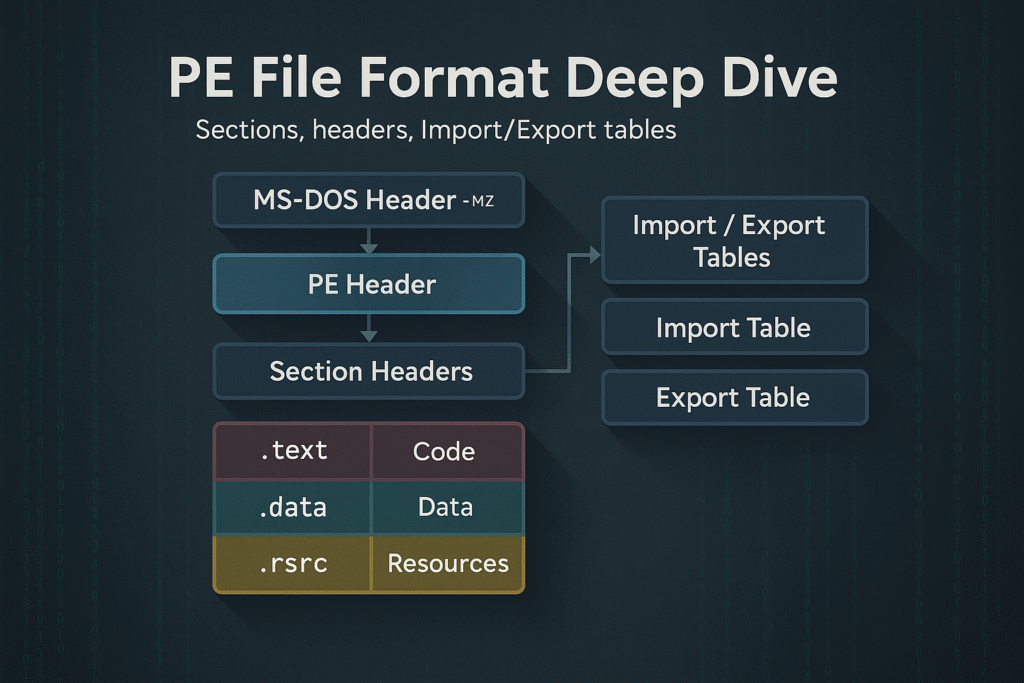
PE File Layout Overview
A PE file is a binary file with multiple headers, sections, and data directories. At a high level, it consists of:
+-----------------------------+
| MS-DOS Header (IMAGE_DOS_HEADER)
| MS-DOS Stub Program
+-----------------------------+
| PE Signature ("PE\0\0")
| COFF File Header (IMAGE_FILE_HEADER)
| Optional Header (IMAGE_OPTIONAL_HEADER)
+-----------------------------+
| Section Headers (IMAGE_SECTION_HEADER[])
+-----------------------------+
| Sections (.text, .data, .rdata, .rsrc, etc.)
+-----------------------------+
Let’s break down each of these components.
1. MS-DOS Header
Struct: IMAGE_DOS_HEADER
Size: 64 bytes
- Legacy compatibility with MS-DOS (displays “This program cannot be run in DOS mode.”)
- Key field:
e_lfanew– offset to the PE Signature
typedef struct _IMAGE_DOS_HEADER {
 WORD e_magic; // "MZ"
 WORD e_cblp;
 ...
 LONG e_lfanew; // Offset to PE header
} IMAGE_DOS_HEADER;
2. PE Signature
- Always located at offset
e_lfanew - 4-byte signature:
"PE\0\0"or0x00004550(little endian) - Followed by the COFF File Header
3. COFF File Header (IMAGE_FILE_HEADER)
Defines characteristics of the executable.
typedef struct _IMAGE_FILE_HEADER {
 WORD Machine; // e.g., 0x8664 for x64
 WORD NumberOfSections;
 DWORD TimeDateStamp;
 DWORD PointerToSymbolTable;
 DWORD NumberOfSymbols;
 WORD SizeOfOptionalHeader;
 WORD Characteristics; // e.g., IMAGE_FILE_EXECUTABLE_IMAGE
} IMAGE_FILE_HEADER;
4. Optional Header (IMAGE_OPTIONAL_HEADER)
Despite the name, this is required for PE files.
Split into 3 parts:
- Standard Fields
- Windows-Specific Fields
- Data Directories (Import Table, Export Table, etc.)
Key Fields:
typedef struct _IMAGE_OPTIONAL_HEADER {
 WORD Magic; // PE32: 0x10B, PE32+: 0x20B
 BYTE MajorLinkerVersion;
 DWORD AddressOfEntryPoint; // RVA of main()
 DWORD ImageBase; // Preferred base address
 DWORD SectionAlignment;
 DWORD FileAlignment;
 DWORD SizeOfImage;
 ...
 IMAGE_DATA_DIRECTORY DataDirectory[16];
} IMAGE_OPTIONAL_HEADER;
5. Section Headers (IMAGE_SECTION_HEADER[])
Each PE section has a 40-byte structure describing its properties.
Common Sections:
| Name | Purpose |
|---|---|
.text | Code (R-X) |
.data | Writable initialized data (RW-) |
.rdata | Read-only data (R-) |
.bss or .idata | Uninitialized globals |
.rsrc | Resources (icons, dialogs, etc.) |
.reloc | Relocation info for ASLR |
Fields:
typedef struct _IMAGE_SECTION_HEADER {
 BYTE Name[8]; // ".text", ".data", etc.
 DWORD VirtualSize;
 DWORD VirtualAddress;
 DWORD SizeOfRawData;
 DWORD PointerToRawData;
 DWORD Characteristics; // Access permissions
} IMAGE_SECTION_HEADER;
6. Data Directories
The PE file includes 16 data directories, pointed to by the DataDirectory[] array inside the optional header.
| Index | Name | Description |
|---|---|---|
| 0 | Export Table | Functions exported by the PE |
| 1 | Import Table | Functions imported from DLLs |
| 2 | Resource Table | Dialogs, icons, strings |
| 5 | Base Relocation | ASLR data |
| 6 | Debug Directory | PDB symbols |
| 10 | TLS Table | Thread-Local Storage |
| 14 | CLR Header | For .NET assemblies |
7. Import Table
This is a critical structure for resolving API dependencies.
- Located in
.idatasection - Uses
IMAGE_IMPORT_DESCRIPTOR
Import Table Structure:
typedef struct _IMAGE_IMPORT_DESCRIPTOR {
 DWORD OriginalFirstThunk; // INT (names or ordinals)
 DWORD TimeDateStamp;
 DWORD ForwarderChain;
 DWORD Name; // DLL name RVA
 DWORD FirstThunk; // IAT (actual addresses)
} IMAGE_IMPORT_DESCRIPTOR;- INT (Import Name Table): RVAs to function names
- IAT (Import Address Table): Populated by the loader with actual addresses of APIs
8. Export Table
Used by DLLs to expose functions to other programs.
typedef struct _IMAGE_EXPORT_DIRECTORY {
 DWORD Characteristics;
 DWORD TimeDateStamp;
 DWORD MajorVersion;
 DWORD MinorVersion;
 DWORD Name;
 DWORD Base;
 DWORD NumberOfFunctions;
 DWORD NumberOfNames;
 DWORD AddressOfFunctions;
 DWORD AddressOfNames;
 DWORD AddressOfNameOrdinals;
} IMAGE_EXPORT_DIRECTORY;
Exports can be:
- By name
- By ordinal
- Forwarded exports (e.g.,
SHLWAPI.DLL!StrStrIWforwarded toNTDLL!StrStrIW)
Virtual Addresses vs File Offsets
- RVA (Relative Virtual Address): Offset from the ImageBase
- VA (Virtual Address): RVA + ImageBase
- Raw Offset: Physical file offset (on-disk)
Use Section Table and alignments (FileAlignment, SectionAlignment) to convert RVA <-> File Offset.
PE Loading (by the OS)
- NTDLL loader maps PE into memory
- Resolves relocations if
ImageBaseis unavailable (ASLR) - Parses Import Table and resolves API addresses
- Initializes TLS callbacks (if present)
- Jumps to
AddressOfEntryPoint
Tools like x64dbg, CFF Explorer, PE-Bear, or PEview can visualize this.
PE Analysis Tips
| Tool | Usage |
|---|---|
PE-Bear | Static analysis of headers, imports, exports |
die.exe | Detects packers, file signatures |
CFF Explorer | GUI editor for PE headers |
x64dbg | Dynamic debugging of the loaded binary |
dumpbin /headers | CLI-based dump of PE structures |
radare2 | CLI reverse engineering with PE support |
Summary
- PE format is the blueprint of how Windows binaries are structured and executed
- Contains multiple headers (
DOS,COFF,Optional) and section tables - Imports, exports, and relocation tables are essential for execution
- Understanding PE layout is essential for malware reverse engineering, binary patching, and loader development
Related Tutorials
- Windows File System Internals (NTFS)
- Access Tokens and Privileges: The Kernel’s Security Context
- SIDs and Security Descriptors: Identity in Windows Security
- Fibers: User-Mode Cooperative Threads
- Jobs and Silos: Process Grouping and Resource Limits
References
- PE Format – Win32 Apps | Microsoft Learn (Official PE/COFF Specification)
- PE Metadata (Control Flow Guard in PE Images) | Microsoft Learn
- MITRE ATT&CK T1055.002 – Process Injection: Portable Executable Injection
- MITRE ATT&CK T1027 – Obfuscated Files or Information (PE Packing & Binary Padding)
- PE/COFF Extended Specification for .NET Debug Directory – dotnet/runtime (GitHub, Microsoft)
- A Tour of the Win32 Portable Executable File Format – Matt Pietrek (Classic MSDN Research Paper)
Get new drops in your inbox
Windows internals, exploit dev, and red-team write-ups - no spam, unsubscribe anytime.