SIDs and Security Descriptors: Identity in Windows Security
A thread opens a handle to a file. Before a single byte is read, the kernel has already answered a question nobody typed: is the caller’s identity allowed to do this? That answer lives at the intersection of two structures – the SID that names who you are, and the security descriptor that says who gets in. Get the relationship between them wrong and you ship a world-writable service. Understand it, and most “weird permission” incidents stop being mysterious.
Objective: Understand how Windows represents identity with Security Identifiers, how Security Descriptors bind owners, DACLs, and SACLs to every securable object, and how attackers abuse – and defenders detect – manipulation of both.
1. Identity Before Access
Windows authenticates security principals – anything the OS can prove an identity for: users, groups, computers, and service accounts. Authentication is the LSA’s job; the SAM (local) or the domain’s NTDS.dit (Active Directory) stores the account records. But authentication only proves who you are. Authorization – what you may touch – is a separate decision made against a different value: the SID.
A SID is the canonical, machine-readable name for a principal. Display names change. SAM account names get reused. SIDs do not. Once the system mints a SID at account-creation time, that value is never reused to identify another principal, even after the account is deleted. Every authorization check in the OS compares SIDs, never names.
2. Anatomy of a SID
A SID is a variable-length binary structure, defined as SID in winnt.h. Three logical parts: a revision, the issuing authority, and a chain of sub-authorities ending in a Relative Identifier (RID).
| Field | Type | Meaning |
|---|---|---|
Revision | BYTE | SID structure version – always 1 |
SubAuthorityCount | BYTE | Number of sub-authority values (max 15) |
IdentifierAuthority | SID_IDENTIFIER_AUTHORITY | 6-byte top-level authority that issued the SID |
SubAuthority[] | DWORD[] | Sub-authority values; the last element is the RID |
The string notation everyone recognizes is just those fields, hyphenated. Take S-1-5-21-<d1>-<d2>-<d3>-513:
S-1– a revision-1 SID.5–SECURITY_NT_AUTHORITY, marking it a Windows NT SID.21–SECURITY_NT_NON_UNIQUE, signaling that a domain identifier follows.<d1>-<d2>-<d3>– three 32-bit values randomly generated to uniquely identify the domain.513– the RID; here, the well-known RID for Domain Users.
You rarely build SIDs by hand. You parse them. Here’s the field-level walk in C – note that the documented accessors (GetSidSubAuthority, GetSidIdentifierAuthority) return pointers into the structure, which trips up everyone the first time:
#include <windows.h>
#include <sddl.h>
#include <stdio.h>

void PrintSid(PSID pSid) {
    if (!IsValidSid(pSid)) return;

    PSID_IDENTIFIER_AUTHORITY pAuth = GetSidIdentifierAuthority(pSid);
    DWORD subCount = *GetSidSubAuthorityCount(pSid);

    printf("Authority: %u\n", (DWORD)pAuth->Value[5]); // NT authority lives in the low byte
    for (DWORD i = 0; i < subCount; i++)
        printf("  SubAuthority[%lu] = %lu\n", i, *GetSidSubAuthority(pSid, i));

    LPSTR str = NULL;
    if (ConvertSidToStringSidA(pSid, &str)) {       // -> "S-1-5-..."
        printf("String SID: %s\n", str);
        LocalFree(str);
    }
}
To go the other direction – constructing a known SID – use AllocateAndInitializeSid, which takes an authority plus up to eight sub-authorities. Building the SYSTEM SID (S-1-5-18) and comparing it with EqualSid is the idiomatic way to check “am I running as LocalSystem?”:
SID_IDENTIFIER_AUTHORITY ntAuth = SECURITY_NT_AUTHORITY; // {0,0,0,0,0,5}
PSID pSystem = NULL;

if (AllocateAndInitializeSid(&ntAuth, 1,
        SECURITY_LOCAL_SYSTEM_RID,   // 18
        0, 0, 0, 0, 0, 0, 0, &pSystem)) {
    // EqualSid(tokenSid, pSystem) -> TRUE means LocalSystem
    FreeSid(pSystem);                // never free this with LocalFree
}
3. Well-Known SIDs and Built-in Principals
Some SIDs are identical on every Windows install. Hard-coding their strings is a bug waiting to happen across locales and versions; use the documented constants where you can. Memorize the ones below anyway – you’ll read them in logs daily.
| SID | Principal |
|---|---|
S-1-0-0 | Null SID (a group with no members) |
S-1-1-0 | Everyone |
S-1-5-18 | Local System |
S-1-5-19 | Local Service |
S-1-5-20 | Network Service |
S-1-5-32-544 | Builtin\Administrators |
S-1-16-12288 | High mandatory integrity level |
Built-in accounts also carry well-known RIDs appended to the domain or machine SID: 500 is Administrator, 501 is Guest, 512 is Domain Admins. An attacker enumerating a domain looks for RID 500 and 512 specifically – the display name can be renamed, the RID cannot. Capability SIDs the OS recognizes are cached under HKEY_LOCAL_MACHINE\SOFTWARE\Microsoft\SecurityManager\CapabilityClasses\AllCachedCapabilities.
4. SIDs at Runtime: The Access Token
When a user signs in, LSA builds an access token for the session. That token is the runtime bag of identity: the user’s SID, the SIDs of every group the user belongs to, the privileges granted, and a mandatory integrity level SID (the S-1-16-* family). Every process started in that logon context inherits a copy. When code makes an access check, the kernel compares the SIDs in the token against the SIDs in the object’s DACL.
One detail that becomes an attack surface later: an account can carry extra SIDs in its Active Directory sIDHistory attribute. That attribute exists for legitimate domain migration – copy the old SID into sIDHistory so a migrated user keeps access to resources permissioned to the old account without re-ACLing everything. The catch is that all values in sIDHistory are injected into the access token at logon, exactly as if they were primary group memberships.

5. The Security Descriptor: Structure and Fields
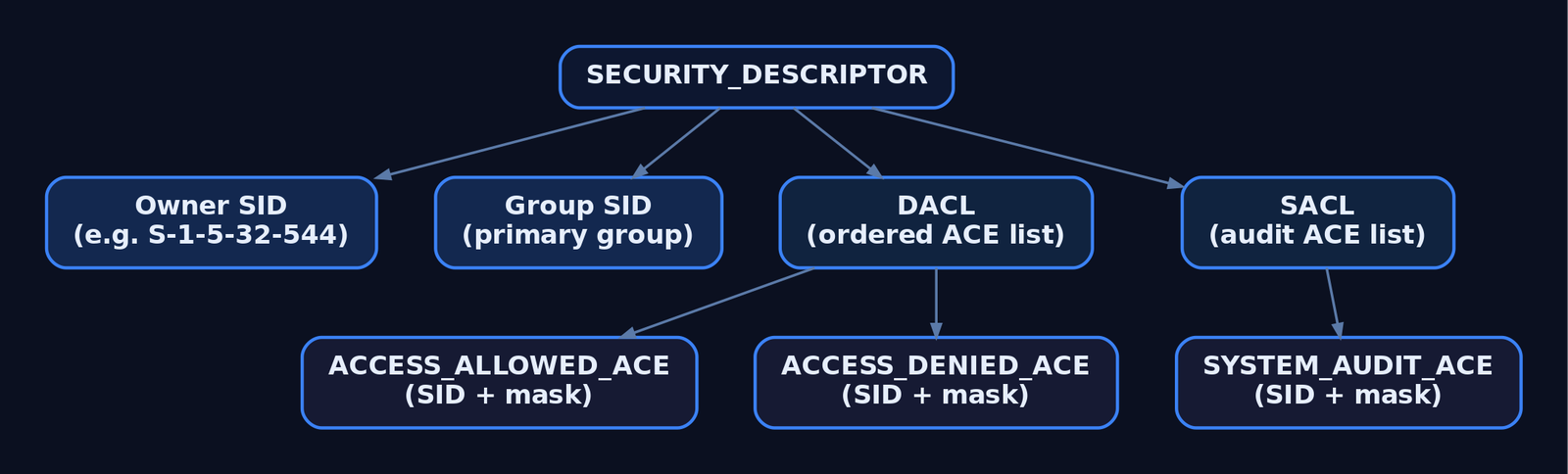
Every object the Object Manager creates has a security descriptor. The structure is SECURITY_DESCRIPTOR, reproduced here verbatim from winnt.h:
typedef struct _SECURITY_DESCRIPTOR {
  BYTE                        Revision;
  BYTE                        Sbz1;
  SECURITY_DESCRIPTOR_CONTROL Control;
  PSID                        Owner;
  PSID                        Group;
  PACL                        Sacl;
  PACL                        Dacl;
} SECURITY_DESCRIPTOR, *PISECURITY_DESCRIPTOR;
Field by field: Revision is always 1; Sbz1 is reserved and must be zero; Control is a flag bitmask; Owner and Group point to SIDs; Dacl and Sacl point to access-control lists. The internal layout differs between absolute form (the struct holds pointers to separately allocated SIDs and ACLs) and self-relative form (everything packed into one contiguous blob with offsets, marked by SE_SELF_RELATIVE). Because that format varies, never poke fields directly – drive it through the API.
The Control field qualifies how the rest of the descriptor is interpreted:
| Flag | Meaning |
|---|---|
SE_DACL_PRESENT | The descriptor has a DACL (the pointer may still be NULL) |
SE_SACL_PRESENT | The descriptor has a SACL |
SE_DACL_PROTECTED | DACL is shielded from inherited ACEs |
SE_SACL_PROTECTED | SACL is shielded from inherited ACEs |
SE_OWNER_DEFAULTED | Owner was assigned by a default mechanism |
SE_SELF_RELATIVE | Descriptor is in packed, self-relative form |
Here is the single most important gotcha in this entire topic, and it has burned production systems repeatedly. There is a difference between no DACL, an empty DACL, and a NULL DACL:
SECURITY_DESCRIPTOR sd;
InitializeSecurityDescriptor(&sd, SECURITY_DESCRIPTOR_REVISION);

// NULL DACL: present == TRUE, pointer == NULL  -> GRANTS EVERYONE FULL ACCESS
SetSecurityDescriptorDacl(&sd, TRUE, NULL, FALSE);

// Empty DACL: present == TRUE, non-NULL ACL with zero ACEs -> DENIES EVERYONE
// (initialize an ACL with InitializeAcl and add no ACEs, then pass it here)
If SE_DACL_PRESENT is not set, or it is set with a NULL DACL pointer, the object allows full access to everyone. Developers reach for SetSecurityDescriptorDacl(&sd, TRUE, NULL, FALSE) thinking “no restrictions, default behavior” and ship a world-writable named pipe or service. An empty DACL – present, non-NULL, zero ACEs – does the opposite and denies everyone. One null pointer is the difference.
6. DACLs and ACEs: How Access Is Decided
A DACL is an ordered list of Access Control Entries. Each ACE has an ACE_HEADER (AceType, AceFlags, AceSize), an ACCESS_MASK of rights, and a trailing SID the entry applies to.
| ACE Type | Used In | Effect |
|---|---|---|
ACCESS_ALLOWED_ACE | DACL | Grants rights in its mask to the SID |
ACCESS_DENIED_ACE | DACL | Denies rights in its mask to the SID |
SYSTEM_AUDIT_ACE | SACL | Logs access matching its mask |
Evaluation order matters: the kernel walks ACEs top to bottom and stops as soon as the requested access is fully granted or any of it is denied. Well-formed (canonical) DACLs place deny ACEs ahead of allow ACEs precisely so a deny is seen first. An ACL has no hard ACE-count limit, but the whole ACL must stay under 64 KB.
Reading a real object’s DACL means pulling the descriptor and iterating ACEs by index with GetAce:
PSECURITY_DESCRIPTOR pSD = NULL;
PSID  pOwner = NULL;
PACL  pDacl  = NULL;

DWORD rc = GetNamedSecurityInfoW(
    L"C:\\Windows\\System32\\config\\SAM", SE_FILE_OBJECT,
    OWNER_SECURITY_INFORMATION | DACL_SECURITY_INFORMATION,
    &pOwner, NULL, &pDacl, NULL, &pSD);

if (rc == ERROR_SUCCESS && pDacl) {
    for (WORD i = 0; i < pDacl->AceCount; i++) {
        PACE_HEADER hdr = NULL;
        if (GetAce(pDacl, i, (LPVOID*)&hdr)) {
            // hdr->AceType  == ACCESS_ALLOWED_ACE_TYPE / ACCESS_DENIED_ACE_TYPE
            // hdr->AceFlags == CONTAINER_INHERIT_ACE | OBJECT_INHERIT_ACE | ...
        }
    }
    LocalFree(pSD);
}
7. SACLs: Auditing Through the System ACL
The SACL uses the same ACL container but holds SYSTEM_AUDIT_ACE entries instead. Its access mask doesn’t grant or deny anything – it defines which access attempts generate audit records in the Windows Security Event Log. Reading or writing any object’s SACL requires the SeSecurityPrivilege right, which only Administrators normally hold. That privilege boundary is exactly why SACL tampering is a high-value detection target: the act of stripping audit ACEs is itself privileged.
8. SDDL: Security Descriptors as Text
A binary descriptor is awful to log, diff, or paste into a config file, so Windows defines the Security Descriptor Definition Language – a string form. The grammar is O: owner, G: group, D: DACL, S: SACL, each followed by flags and parenthesized ACEs:
O:BAG:SYD:(A;;FA;;;SY)(A;;FA;;;BA)(A;;0x1200a9;;;BU)S:(AU;SAFA;FA;;;WD)That single ACE (A;;GRGWGX;;;SY) reads as: Allow, no inherit flags, Generic Read/Write/eXecute, to SY (SYSTEM). Round-trip it with ConvertSecurityDescriptorToStringSecurityDescriptor and ConvertStringSecurityDescriptorToSecurityDescriptor. In practice you’ll read SDDL far more often through PowerShell:
$acl = Get-Acl C:\Windows\System32\config\SAM
$acl.Owner            # owner principal
$acl.Sddl             # full SDDL string
$acl.Access | Format-Table IdentityReference, FileSystemRights, AccessControlType
icacls <path> gives the same data in a terser shorthand; Get-Acl is friendlier when you want the SDDL string itself for a baseline diff.
9. Inheritance and the Kernel Check
Child objects don’t usually carry hand-written ACLs. They inherit them. An ACE’s flags decide propagation: OBJECT_INHERIT_ACE (OI) pushes it onto leaf objects like files, CONTAINER_INHERIT_ACE (CI) onto sub-containers like folders or registry subkeys, and INHERIT_ONLY_ACE (IO) makes an ACE apply only to children and not the object carrying it. SE_DACL_PROTECTED blocks inheritance entirely – that’s what “disable inheritance” does in Explorer.
The decision itself happens in the kernel. Each OBJECT_HEADER carries a SecurityDescriptor field. At handle-creation time the Object Manager hands the token, the requested access, and the descriptor to the Security Reference Monitor (nt!SeAccessCheck), which walks the DACL and returns a granted-access mask. You can see the whole chain live in WinDbg:
kd> !process 0 0 lsass.exe
kd> !object <Object address>
kd> dt nt!_OBJECT_HEADER <header address> SecurityDescriptor
kd> !sd <SecurityDescriptor address & ~0xf>   ; mask low bits, they're flags
kd> !token                                     ; the token the check runs against
Files, registry keys, processes, threads, named pipes, services, jobs – anything named and securable runs through this same path.
10. Common Attacker Techniques
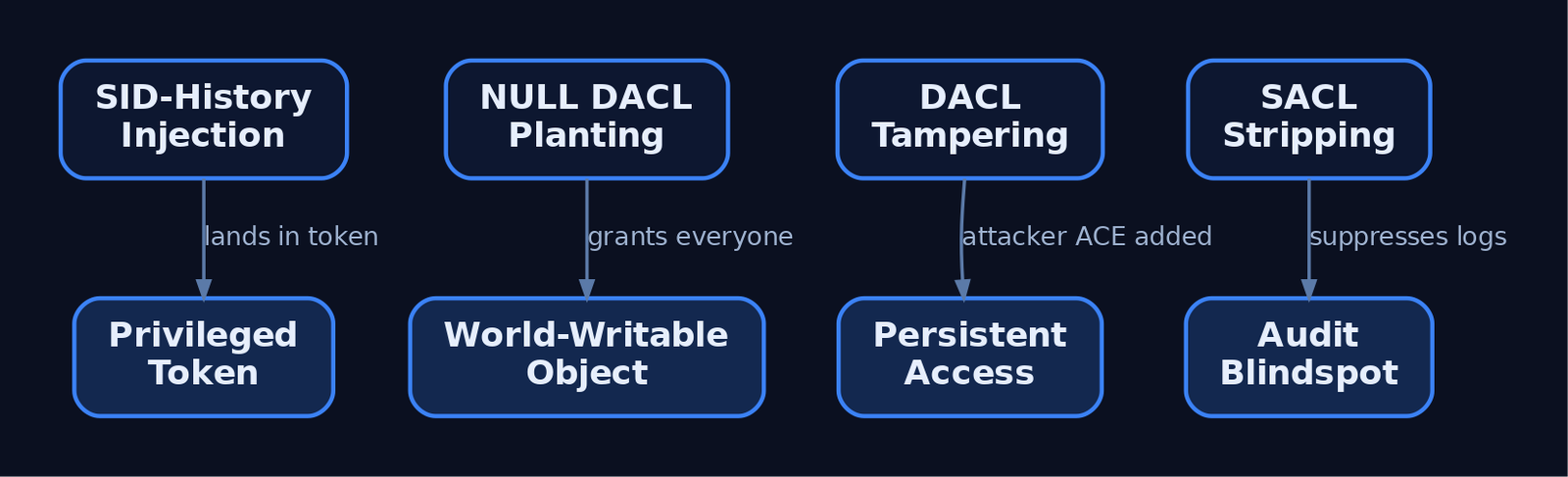
SIDs and SDs aren’t just plumbing – they’re a manipulation target for evasion and escalation. The primitives below all leave traces (covered next), which is the point of teaching them.
| Technique | Description |
|---|---|
| NULL DACL planting | Set a present-but-NULL DACL on a service, registry key, or pipe to make it world-writable |
| DACL tampering for persistence | Add an explicit ACCESS_ALLOWED_ACE granting the attacker’s SID FullControl on a sensitive object |
| Owner abuse | Taking ownership of an object implicitly grants WRITE_DAC, letting an attacker rewrite the DACL afterward |
| SID-History injection | Write a privileged SID (e.g. a Domain Admins RID) into a controlled account’s sIDHistory so it lands in the token |
| SACL stripping | Remove audit ACEs from lsass.exe, SAM, or ntds.dit to suppress access logging before credential theft |
| Permission group discovery | Enumerate group SIDs and ACL members to plan lateral movement |
A populated sIDHistory on a non-migrated account is the canonical hunting signal for the injection case:
Get-ADUser -Filter * -Properties sIDHistory |
    Where-Object { $_.sIDHistory } |
    Select-Object Name, @{ n='sIDHistory'; e={ $_.sIDHistory -join ', ' } }
In a domain with no active migration, any result here deserves investigation – especially a sIDHistory value ending in RID 512 or 519.
11. Detection, Hunting, and Hardening
DACL and SACL changes are logged by Windows itself, not Sysmon – you must enable the right Advanced Audit Policy subcategories first (Object Access → Audit File System / Audit Registry, and Policy Change → Audit Audit Policy Change).
| Event ID | Trigger | Hunt On |
|---|---|---|
4670 | Object permissions changed (DACL/Owner) | ObjectName, OldSd, NewSd, SubjectUserSid |
4907 | Object auditing (SACL) settings changed | Blank NewSd = SACL stripped |
4715 | Audit policy on an object changed | OriginalSecurityDescriptor, NewSecurityDescriptor |
4719 | System audit policy changed | SubjectUserSid, AuditPolicyChanges |
4663 | Object access attempt | Sudden gaps after a 4907 on LSASS = stripping |
4728/4732/4756 | Member added to privileged group | Correlate with SID manipulation |
The highest-fidelity signal is a 4907 that blanks the SACL on lsass.exe, ntds.dit, or the SAM hive – that’s pre-credential-dump preparation. Pair it with Sysmon Event ID 10 (process access to LSASS) and Event ID 1 watching for icacls.exe, cacls.exe, sc.exe sdset, and Set-Acl command lines. A Sigma sketch for DACL tampering on sensitive objects:
title: Suspicious DACL Modification on Sensitive Object
logsource:
  product: windows
  service: security
detection:
  selection:
    EventID: 4670
    ObjectName|contains:
      - '\lsass.exe'
      - '\ntds.dit'
      - '\SAM'
  condition: selection
fields:
  - SubjectUserSid
  - ObjectName
  - OldSd
  - NewSd
level: high
Hardening, in rough priority order:
- Hunt NULL DACLs. Use
AccessChkto enumerate world-writable services, keys, and files; fix them. - Protect the LSASS SACL and alert on any
4907that empties it. - Enable SID Filtering on every trust to neutralize cross-domain
sIDHistoryabuse, and auditsIDHistoryon a schedule. - Restrict
SeSecurityPrivilegeto Administrators and watch for its use. - Prefer explicit DENY over absent ALLOW, and put privileged accounts in Protected Users.
MITRE ATT&CK Mapping
| Technique | MITRE ID | Detection |
|---|---|---|
| Access Token Manipulation | T1134 | Token/SID anomalies in logon events |
| SID-History Injection | T1134.005 | Non-empty sIDHistory on non-migrated accounts |
| File/Directory Permissions Modification | T1222.001 | 4670; icacls/SetNamedSecurityInfo in 4688 |
| Impair Defenses: Disable/Modify Tools | T1562.001 | 4907 blanking a SACL; 4663 gaps |
| Permission Groups Discovery | T1069.001 / .002 | Bulk SID/group enumeration |
12. Tools
| Tool | Description | Link |
|---|---|---|
| AccessChk | Dumps effective permissions and finds NULL/weak DACLs | learn.microsoft.com |
icacls | Built-in ACL viewer/editor with SDDL shorthand | (built-in) |
Get-Acl / Set-Acl | PowerShell SD read/write, exposes .Sddl | (built-in) |
| WinDbg | Kernel-side !sd, !token, OBJECT_HEADER inspection | learn.microsoft.com |
| Process Hacker | GUI view of token SIDs and object security | processhacker.sourceforge.io |
| WinObj | Browse Object Manager namespace and per-object security | learn.microsoft.com |
Summary
- A SID is the immutable, never-reused name Windows checks for every authorization decision – display names are cosmetic, SIDs are ground truth.
- The access token carries the user SID plus all group SIDs (including any from
sIDHistory), and the kernel compares those against an object’s DACL viant!SeAccessCheck. - The
SECURITY_DESCRIPTORbinds owner, group, DACL, and SACL; a present-but-NULL DACL silently grants everyone full access, while an empty DACL denies everyone. - SID-History injection (
T1134.005) and SACL stripping (T1562.001) are the two abuse primitives worth hunting hardest – watch4670,4907, and non-emptysIDHistory. - Enable Object Access and Policy Change auditing, restrict
SeSecurityPrivilege, enable SID Filtering on trusts, and baseline SDDL on sensitive objects so a tampered DACL stands out.
Related Tutorials
- Access Tokens and Privileges: The Kernel’s Security Context
- Fibers: User-Mode Cooperative Threads
- Jobs and Silos: Process Grouping and Resource Limits
- Windows Scheduler Internals: Priority Levels, Quantum, and Thread Selection
- Threat-Informed Defense: Principles, Frameworks, and the Intelligence-Driven Security Cycle
References
- Security Identifiers | Microsoft Learn (Windows Server)
- Security Identifiers – Win32 Apps | Microsoft Learn (Win32 API Reference)
- Security Descriptors – Win32 Apps | Microsoft Learn (Win32 API Reference)
- [MS-DTYP]: SECURITY_DESCRIPTOR | Microsoft Learn (Windows Open Specification)
- [MS-DTYP]: SID | Microsoft Learn (Windows Open Specification)
- Access Token Manipulation: SID-History Injection, Sub-technique T1134.005 | MITRE ATT&CK
Get new drops in your inbox
Windows internals, exploit dev, and red-team write-ups - no spam, unsubscribe anytime.