Working Sets and the Memory Manager’s Trimming Policy
Objective: Understand how the Windows Memory Manager tracks, ages, and trims the resident pages of a process, from the
KeBalanceSetManagerandMmWorkingSetManagercall chain down to the PSAPI structures you can walk from user mode, and learn to detect the specific working-set primitives that malware uses to flush in-memory indicators before a dump.
Working sets are one of those Windows concepts that everyone thinks they understand until someone asks when a page actually leaves memory, and who decides. The answer is not “when the OS is low on RAM.” It is a specific system thread, running at a specific priority, waiting on two specific events, using a per-process list structure the header for which does not appear in any public header file. The details matter, because the same knobs the OS uses to keep the machine responsive are the ones an adversary reaches for when they want to make your live-memory forensics harder.
This post walks the mechanism end to end, then instruments it in a small lab and shows what the defender sees.
1. What a Working Set Actually Is
The working set of a process is the subset of that process’s virtual address space that is currently resident in physical RAM. That is it. It is not the committed memory, it is not the reserved address space, and it is not the private bytes. Two rules cover the edge cases:
- Only pageable memory can appear in the working set. Address Windowing Extensions (AWE) mappings and large-page allocations are not tracked here, because they are never candidates for paging.
- A page can be shared and still count toward multiple working sets. If
ntdll.dllis mapped into 200 processes, its pages appear in the working set of every one of those that has touched them, with the shared bit set and a share count.
The single sentence you should memorize: the working set is what the CPU can touch without taking a page fault. Anything else, valid PTE or not, has to walk a fault path first.
| Concept | Belongs In Working Set? | Notes |
|---|---|---|
| Private committed pages actually touched | Yes | Standard case. |
| Shared image pages (DLLs, EXE code) | Yes, per process that touched them | Shared=1, ShareCount reflects fan-out. |
| Committed but never accessed | No | No PTE ever built until first fault. |
AWE (AllocateUserPhysicalPages) | No | Locked physical, unmanaged by WS. |
Large pages (MEM_LARGE_PAGES) | No | Never trimmed, no aging. |
VirtualLock-ed pages | Yes, and cannot be trimmed | Reflected as Locked=1 in the EX block. |
2. Page Faults and Working Set Growth
Growth is fault-driven. When a thread references a virtual address whose PTE is not marked valid, the CPU raises a page fault and control lands in MmAccessFault in the kernel. The handler classifies the fault:
- Soft (transition) fault: the page is still in physical memory sitting on the Standby or Modified list. The MM just reattaches it to the process, marks the PTE valid, and returns. No I/O.
- Hard fault: the backing store, page file or mapped file, must be read. I/O happens, the page comes in, the PTE is fixed up, and the page is added to the working set.
- Demand-zero: first touch of committed private memory. A zeroed page is pulled from the Free/Zero list and inserted.
Every successful resolution grows the working set by one page (or several, if prefetching is in play). This is the growth half of the story. Everything the rest of this post talks about is the shrink half.
3. Who Trims, When, and Why
Trimming is not a reflex reaction to RtlAllocateHeap. It is a periodic policy decision made by a dedicated system thread.
| Component | Symbol | Priority | Job |
|---|---|---|---|
| Balance Set Manager | KeBalanceSetManager | 16 | Wakes once per second, or when signaled, and calls the working set manager. |
| Working Set Manager | MmWorkingSetManager | (runs in KBSM context) | Decides which processes to trim, how aggressively, and drives aging + modified page writing. |
| Process/Stack Swapper | KeSwapProcessOrStack | 23 | Handles full-process and kernel-stack in/out swapping. |
The Balance Set Manager waits on two event objects. One is fed by a periodic timer (once per second). The other is an internal working-set manager event that other parts of the memory manager signal when things are getting tight: high page-fault rate, free list too small, standby list drying up. Under memory pressure the second event fires long before the timer, and trimming runs on demand.
Aggressiveness is regulated by the working-set manager’s own internal counters. A calm system barely trims at all; a system where Memory\Available MBytes is dropping fast will trim broadly and repeatedly on the same tick.
Page selection is age-based, keyed to per-page metadata in the Page Frame Number database (MMPFN). Least-recently-used-ish pages leave first. Where they go depends on their state:
- Unmodified or shared clean pages go to the Standby List. Still in RAM, effectively a second-chance cache. A future fault on the same VA becomes a cheap soft fault.
- Dirty private pages go to the Modified List. The Modified Page Writer eventually flushes them to the page file, at which point they become standby.
- Once every process that referenced a shared page has dropped it, the page becomes a transition page, still in RAM but owned by no one, until it is reused or refaulted.
The takeaway most people miss: trimming a page does not mean the page is gone. It usually just means it lost its ticket to the front of the queue.

4. Limits, the MMWSL, and What “Minimum” Really Means
Every process carries a minimum and maximum working set size. The defaults on a 4 KB-page system:
- Minimum: 50 pages (204,800 bytes)
- Maximum: 345 pages (1,413,120 bytes)
These are soft targets by default. The kernel tracks per-process working set state in the MMWSL (Working Set List) structure, one per process, hanging off the EPROCESS. Each resident page has a corresponding MMWSLE (Working Set List Entry) encoding its virtual page number and its age bits. Both structures are undocumented and their field layout drifts across builds. If you need offsets, walk them with dt nt!_MMWSL and dt nt!_MMWSLE in a symbol-matched debug session; do not trust anything else.
The nuance that trips people up is that SetProcessWorkingSetSize “minimum” does not mean “guaranteed resident.” Microsoft is explicit here: setting a minimum does not reserve memory. When the process goes idle, or the system needs pages, the OS can and will drop below the requested floor. If you actually need pages to stay in RAM (secret keys, decrypted buffers, security-sensitive scratch space), you use VirtualLock. Everything else is a hint.
5. Observing a Working Set From User Mode
PSAPI gives you a snapshot of every resident page a process owns. QueryWorkingSet fills a PSAPI_WORKING_SET_INFORMATION buffer whose payload is a variable-length array of PSAPI_WORKING_SET_BLOCK unions, one per page:
typedef union _PSAPI_WORKING_SET_BLOCK {
    ULONG_PTR Flags;
    struct {
        ULONG_PTR Protection  : 5;   // page protection
        ULONG_PTR ShareCount  : 3;   // sharers, saturates at 7
        ULONG_PTR Shared      : 1;   // 1 = shareable
        ULONG_PTR Reserved    : 3;
        ULONG_PTR VirtualPage : 52;  // 20 on x86
    };
} PSAPI_WORKING_SET_BLOCK;
The classic gotcha: the buffer size you need is not knowable in advance. You call once, get ERROR_BAD_LENGTH, grow, and retry. Between the two calls the working set can change size, so you loop until the call succeeds. Here is the walker that goes with Exercise 1 of the lab:
#include <windows.h>
#include <psapi.h>
#include <stdio.h>
#pragma comment(lib, "psapi.lib")

int main(int argc, char **argv) {
    DWORD pid = (DWORD)atoi(argv[1]);
    HANDLE hProc = OpenProcess(PROCESS_QUERY_INFORMATION | PROCESS_VM_READ,
                               FALSE, pid);
    if (!hProc) { printf("OpenProcess: %lu\n", GetLastError()); return 1; }

    SIZE_T cb = sizeof(PSAPI_WORKING_SET_INFORMATION) +
                sizeof(PSAPI_WORKING_SET_BLOCK) * 8192;
    PSAPI_WORKING_SET_INFORMATION *wsi = NULL;

    for (;;) {
        wsi = (PSAPI_WORKING_SET_INFORMATION *)HeapAlloc(GetProcessHeap(), 0, cb);
        if (QueryWorkingSet(hProc, wsi, (DWORD)cb)) break;
        HeapFree(GetProcessHeap(), 0, wsi);
        if (GetLastError() != ERROR_BAD_LENGTH) return 2;
        cb *= 2;
    }

    printf("Resident pages: %llu\n", (unsigned long long)wsi->NumberOfEntries);
    for (ULONG_PTR i = 0; i < wsi->NumberOfEntries && i < 16; i++) {
        PSAPI_WORKING_SET_BLOCK b = wsi->WorkingSetInfo[i];
        printf(" VA page 0x%012llx  prot=0x%02llx  shared=%llu  refs=%llu\n",
               (unsigned long long)b.VirtualPage,
               (unsigned long long)b.Protection,
               (unsigned long long)b.Shared,
               (unsigned long long)b.ShareCount);
    }
    CloseHandle(hProc);
    return 0;
}
Point this at the lab target (below) and you get one line per resident page, decoded. Cross-check against the “Working Set” view in VMMap; the page counts should match within a tick.
QueryWorkingSetEx is the more useful cousin. Instead of walking every page, you hand it an array of VAs you care about and get per-VA attributes back, including Valid, Locked (i.e., was this VA VirtualLock-ed), LargePage, Node (NUMA), Win32Protection, and Bad. That is the right tool for asking “is my secrets buffer actually pinned?” as opposed to “walk everything.”
For live monitoring, InitializeProcessForWsWatch starts recording, and GetWsChanges returns a PSAPI_WS_WATCH_INFORMATION[] of every page that has been faulted into the working set since monitoring began, complete with FaultingPc and FaultingVa. Correlate the PC with EnumProcessModules/GetModuleInformation and you have a rolling log of “which code caused which page to come in.” Excellent for debugging startup performance, and quietly excellent for tracking JIT and unpacking behavior on a suspicious binary.
6. Building the Lab Target
Compile this with any recent MSVC or MinGW. It allocates 256 MB, touches every page so the pages actually enter its working set, then loops printing its PID and current WS.
// ws_lab_target.c
#include <windows.h>
#include <psapi.h>
#include <stdio.h>
#pragma comment(lib, "psapi.lib")

#define BUF_MB   256
#define BUF_SIZE ((SIZE_T)BUF_MB * 1024 * 1024)

int main(void) {
    printf("PID: %lu\n", GetCurrentProcessId());
    unsigned int *buf = (unsigned int *)VirtualAlloc(
        NULL, BUF_SIZE, MEM_COMMIT | MEM_RESERVE, PAGE_READWRITE);
    if (!buf) { printf("VirtualAlloc failed\n"); return 1; }

    // Touch every page so it actually enters the working set.
    for (SIZE_T i = 0; i < BUF_SIZE / sizeof(unsigned int); i++)
        buf[i] = 0xDEADBEEF;

    PROCESS_MEMORY_COUNTERS pmc = { .cb = sizeof(pmc) };
    HANDLE self = GetCurrentProcess();
    for (;;) {
        GetProcessMemoryInfo(self, &pmc, sizeof(pmc));
        printf("WS = %8llu KB   PeakWS = %8llu KB   Faults = %lu\n",
               (unsigned long long)(pmc.WorkingSetSize / 1024),
               (unsigned long long)(pmc.PeakWorkingSetSize / 1024),
               pmc.PageFaultCount);
        Sleep(2000);
        // Re-touch a subset so recovery is observable after external trim.
        for (SIZE_T i = 0; i < BUF_SIZE / sizeof(unsigned int); i += 4096)
            buf[i] += 1;
    }
}
Run it in one console. You should see the working set stabilize at roughly 262,000 KB plus the loader footprint. That is your patient.
7. Forcing a Trim From Another Process
This is the primitive we care about. Two lines of API do the whole thing:
// ws_trim.c   -   trim another process to the floor
#include <windows.h>
#include <psapi.h>
#include <stdio.h>
#pragma comment(lib, "psapi.lib")

int main(int argc, char **argv) {
    DWORD pid = (DWORD)atoi(argv[1]);
    HANDLE h = OpenProcess(PROCESS_SET_QUOTA | PROCESS_QUERY_INFORMATION,
                           FALSE, pid);
    if (!h) { printf("OpenProcess: %lu\n", GetLastError()); return 1; }

    PROCESS_MEMORY_COUNTERS pmc = { .cb = sizeof(pmc) };
    GetProcessMemoryInfo(h, &pmc, sizeof(pmc));
    printf("Before: WS = %llu KB\n",
           (unsigned long long)(pmc.WorkingSetSize / 1024));

    // Hard trim: remove as many pages as possible.
    if (!SetProcessWorkingSetSize(h, (SIZE_T)-1, (SIZE_T)-1)) {
        printf("SetProcessWorkingSetSize: %lu\n", GetLastError());
        return 2;
    }

    Sleep(200);
    GetProcessMemoryInfo(h, &pmc, sizeof(pmc));
    printf("After : WS = %llu KB\n",
           (unsigned long long)(pmc.WorkingSetSize / 1024));

    CloseHandle(h);
    return 0;
}
Run ws_lab_target.exe, note the PID, then in a second window ws_trim.exe <pid>. The target’s working set will collapse from ~262 MB to a few hundred KB in a blink. Watch the target’s next iteration: the printed WS will climb again as the re-touch loop soft-faults pages back in from the Standby list, then eventually plateau again. That soft-fault recovery is why “empty working set” is not “wipe memory.” The pages are almost all still in RAM, just re-parked on Standby.
That distinction is the whole reason adversaries do this and the whole reason it is not as clever as it looks.
8. Why an Adversary Cares
There are two real uses of forced trimming in offensive tooling.
The first is anti-dump timing. A process about to be dumped, or one that suspects a dump is imminent, calls SetProcessWorkingSetSize(hSelf, -1, -1) (or EmptyWorkingSet) on itself. Any user-mode dumper that reads memory via ReadProcessMemory on committed-but-not-resident pages will still get the data (the OS just soft-faults it back in), but tools that scrape strictly from resident RAM without traversing the page file, or that race a snapshot before the page-in can happen, will miss content. It is also a way to force the Modified Page Writer to flush dirty pages to the page file, which changes where forensic evidence lives.
The second is against other processes, most often security tooling. Trimming a defender’s working set out from under it degrades its cache warmth. Scan buffers, YARA rule tables, and hooked-DLL data structures get pushed to Standby and refault on next use. On a busy box this can measurably slow real-time scanning during the critical window right after payload execution. It falls under T1562.001 (Impair Defenses).
Neither of these is subtle when you know what to look for. Both are common enough to be worth a Sigma rule.
The gotcha I burned an afternoon on the first time I built this: on Windows 10 and 11 with memory compression enabled, the “trimmed” pages of your own process may end up in the compression store rather than the page file, still owned by MemCompression. Watching Task Manager’s Compressed column tick up while your target’s WS drops to zero is what tipped me off. If you dump MemCompression you can still find your data. Anti-forensics via EmptyWorkingSet is therefore weaker on modern Windows than it used to be, though it still fools naive tools.

9. Detection and Defense
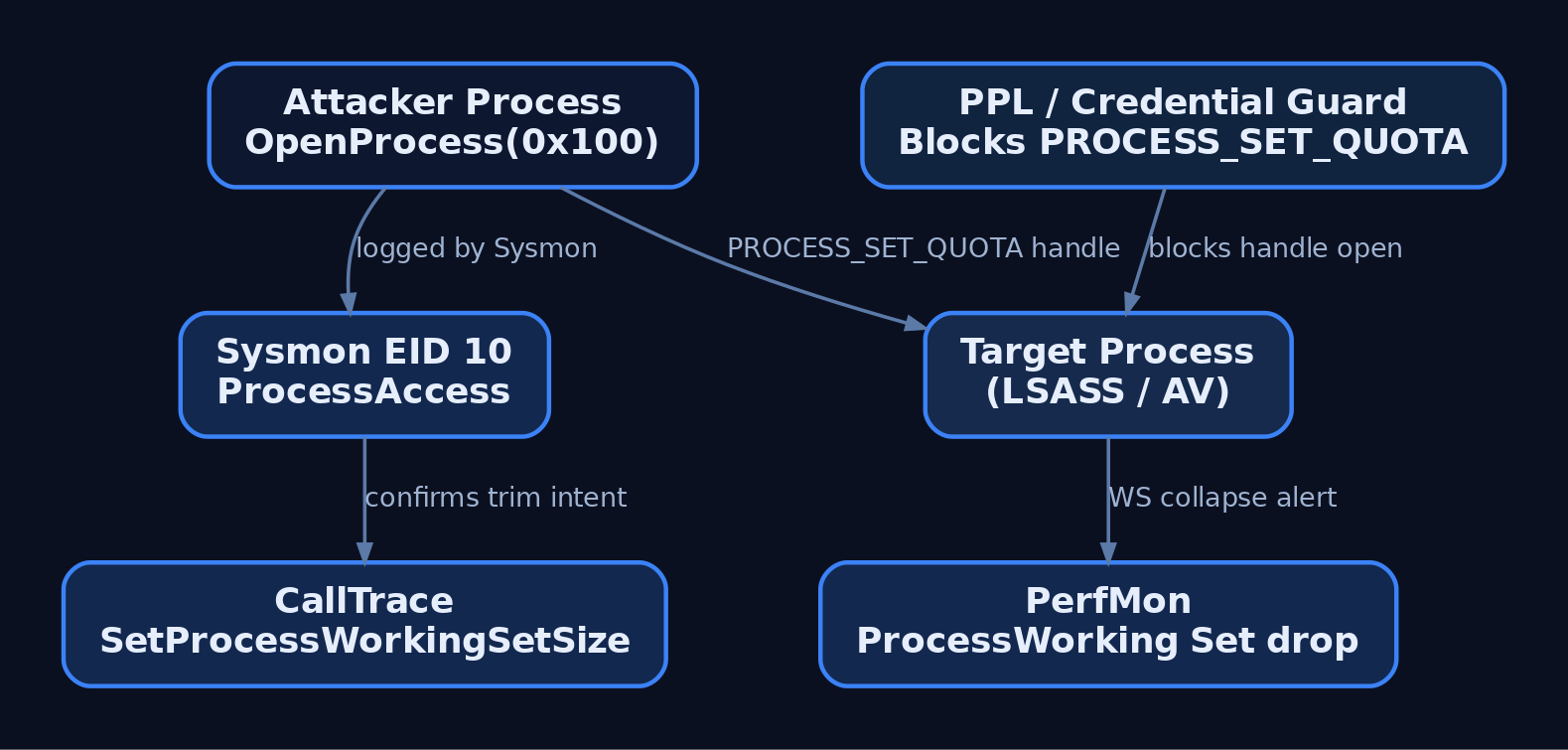
The cheapest, highest-signal detection is a cross-process OpenProcess with PROCESS_SET_QUOTA (0x0100) in the granted access mask coming from an unexpected source. Sysmon Event ID 10 catches it directly.
title: Cross-Process Working Set Manipulation via PROCESS_SET_QUOTA
id: 2f5f4c0b-ws-trim
status: experimental
logsource:
    product: windows
    service: sysmon
detection:
    selection:
        EventID: 10
        GrantedAccess|contains: '0x100'
    filter_sql:
        SourceImage|endswith:
            - '\sqlservr.exe'
            - '\MsMpEng.exe'
    filter_self:
        SourceProcessId: TargetProcessId
    condition: selection and not (filter_sql or filter_self)
fields:
    - SourceImage
    - TargetImage
    - GrantedAccess
    - CallTrace
level: medium
SQL Server is the single most common legitimate issuer of trim calls against other processes; expand the allowlist to fit your environment before shipping this. The CallTrace field is what makes the rule actually useful, because it will typically resolve to KERNELBASE!SetProcessWorkingSetSize or KERNEL32!K32EmptyWorkingSet, either of which is a strong confirmation that the intent was trimming and not something incidental like debugging.
Relevant Sysmon events for the wider chain:
| Event ID | Name | Why it matters here |
|---|---|---|
| 10 | ProcessAccess | Detects the PROCESS_SET_QUOTA handle open that trimming requires. |
| 8 | CreateRemoteThread | Often precedes forced WS manipulation in injection chains. |
| 25 | ProcessTampering | Fires when in-memory image diverges from disk (Sysmon 13+); relevant when trimming is combined with hollowing. |
| 1 | ProcessCreate | Baseline correlation. |
For a deeper telemetry layer, subscribe to Microsoft-Windows-Kernel-Memory for page-fault and working-set-change events, and, if you have an ELAM-signed consumer, Microsoft-Windows-Threat-Intelligence (ETWTI) for the highest-fidelity view of the adjacent injection primitives. Windows Kernel Trace with the PERF_MEMORY group and EVENT_TRACE_FLAG_MEMORY_HARD_FAULTS gives you raw hard-fault streams useful for anomaly baselining.
Performance counters are underrated here. Process\Working Set per process, sampled every 15 seconds, is enough to alert on the specific pattern of a critical service’s WS collapsing to near zero outside of a service restart. Add Memory\Modified Page List Bytes and Memory\Pages/sec for system-wide context.
Hardening the targets that matter:
- Put LSASS and other high-value processes under PPL (Protected Process Light). PPL blocks
PROCESS_SET_QUOTAfrom user-mode callers outright. - Enable Credential Guard where you can. It moves LSASS secrets into a VSM-isolated process whose working set is not reachable via the ordinary trim paths.
- Baseline normal working-set curves for security tooling and alert on unexplained drops.
- For anything security-sensitive in your own code, do not trust
SetProcessWorkingSetSizeminimums to pin memory. UseVirtualLockand audit the call sites. - Consider ETW syscall tracing on
NtSetInformationProcesswithProcessQuotaLimitsfor the(SIZE_T)-1 / (SIZE_T)-1fingerprint.
10. Tools
| Tool | Use | Link |
|---|---|---|
| VMMap | Visualize working set vs. committed vs. reserved per region | learn.microsoft.com/sysinternals |
| Process Explorer | Live per-process WS, private bytes, WS Peak | learn.microsoft.com/sysinternals |
| Process Hacker | Per-thread stack, more granular WS view than PE | processhacker.sourceforge.io |
| RAMMap | System-wide page list breakdown (Standby, Modified, Free, Zeroed) | learn.microsoft.com/sysinternals |
| WinDbg (kernel) | dt nt!_MMWSL, dt nt!_MMWSLE, !pfn, !vm, !memusage | learn.microsoft.com/windows-hardware |
| Sysmon | ProcessAccess (EID 10) telemetry | learn.microsoft.com/sysinternals |
| xperf / WPR | ETW capture of Microsoft-Windows-Kernel-Memory | learn.microsoft.com/windows-hardware |
For the kernel cross-check on the lab target, the sequence I actually use in WinDbg attached to a test VM is:
!process 0 0 ws_lab_target.exe
.process /i /r <EPROCESS>
dt nt!_MMWSL @@masm(nt!MmWorkingSetList)
!vm 1
!memusage 4
!pfn <pfn-from-ws-walker>
Field offsets inside MMWSL and MMWSLE change across Windows builds. Do not memorize them from a blog post; ask the symbols on the box you are actually on.
11. MITRE ATT&CK Mapping
| Technique | MITRE ID | Detection |
|---|---|---|
| Process Injection | T1055 | Sysmon EID 8 (CreateRemoteThread), EID 10 with 0x1F0FFF/0x1FFFFF access. |
| Process Injection: DLL Injection | T1055.001 | EID 10 PROCESS_VM_WRITE + EID 8; correlate CallTrace. |
| Process Injection: Process Hollowing | T1055.012 | Sysmon EID 25 ProcessTampering; image-on-disk vs. in-memory diff. |
| Indicator Removal | T1070 | Sysmon EID 10 with PROCESS_SET_QUOTA (0x0100) to sensitive targets. |
| Impair Defenses: Disable or Modify Tools | T1562.001 | WS-drop anomalies on security tooling via PerfMon Process\Working Set. |
12. Summary
- The working set is the resident, pageable subset of a process’s virtual address space, managed by
MmWorkingSetManagerunder the Balance Set Manager on a 1 Hz timer plus demand triggers. - Trimmed pages go to the Standby or Modified list; they are not gone from RAM, which is why refault recovery is cheap.
SetProcessWorkingSetSize(-1, -1)andEmptyWorkingSetare anti-dump / anti-scan primitives, most useful pre-forensics or against security tooling, and both leave a Sysmon EID 10 fingerprint withPROCESS_SET_QUOTAin the mask.- If you actually need memory pinned,
VirtualLockis the only API that guarantees it; working-set minimums do not. - Detect via Sysmon EID 10 (
0x100) with asqlservr.exe/MsMpEng.exeallowlist, harden LSASS and critical processes under PPL and Credential Guard, and baseline WS curves so a sudden collapse of a defender’s working set is a page you get, not a page you miss.
Related Tutorials
- Handle Tables & Object Manager
- Memory Management Internals
- Access Tokens and Privileges: The Kernel’s Security Context
- SIDs and Security Descriptors: Identity in Windows Security
- Fibers: User-Mode Cooperative Threads
References
- learn.microsoft.com
- learn.microsoft.com
- learn.microsoft.com
- learn.microsoft.com
- learn.microsoft.com
- learn.microsoft.com
- learn.microsoft.com
- learn.microsoft.com
Get new drops in your inbox
Windows internals, exploit dev, and red-team write-ups - no spam, unsubscribe anytime.