Windows OS Architecture
Objective: Build an accurate mental model of the Windows NT stack – privilege rings, the HAL,
ntoskrnl.exe, the Executive, the object model, the syscall path, and the user-mode subsystem layer – so you can place any piece of code, any attack primitive, and any defensive sensor exactly where it lives in the architecture, and understand why the user/kernel boundary is the only trust boundary that really matters.
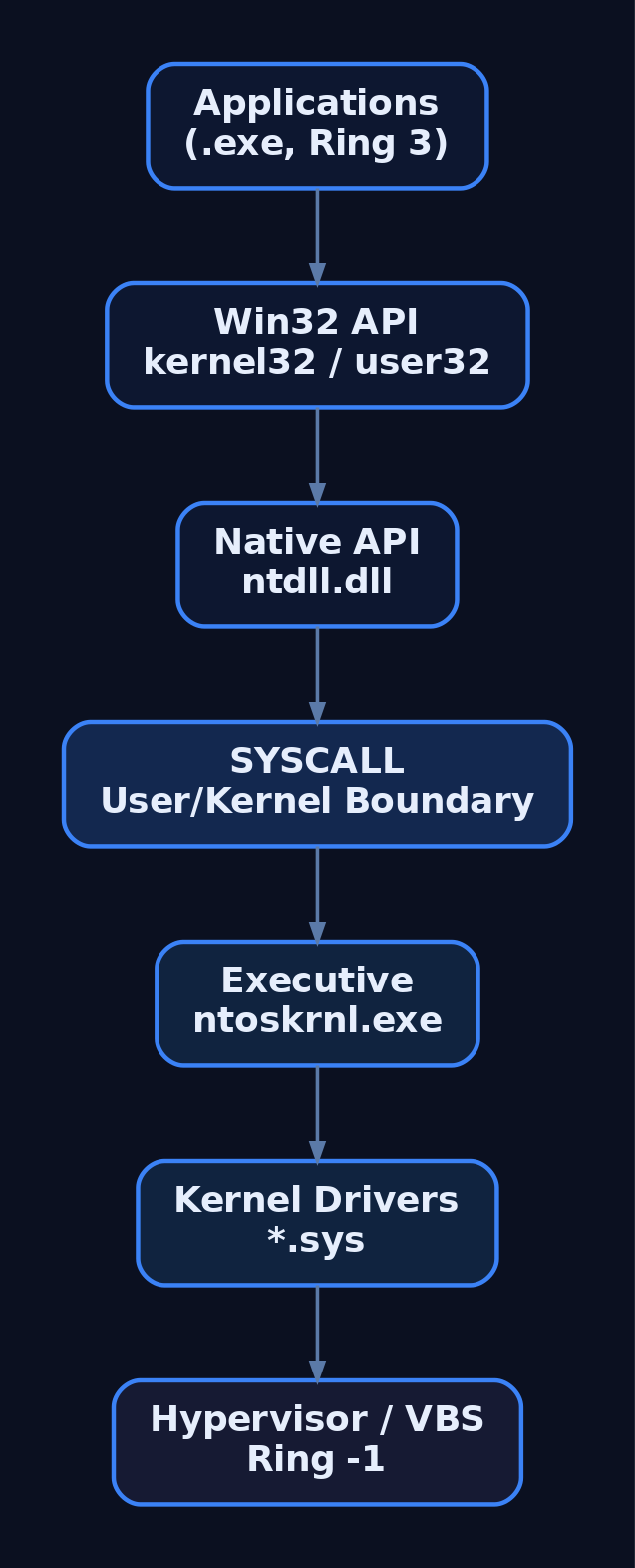
1. The Big Picture: Windows as a Layered System
Everything you will ever attack or defend on a Windows box lives somewhere in a stack of rings, and the entire value of a mental model is that you stop guessing where. Calling the OS a “middleman between you and the hardware” is fine as a one-liner – it manages processes and memory, brokers file I/O, exposes APIs, drives devices – but that framing hides the part that actually pays your rent as an operator or defender: the layering is a security architecture, not just an engineering convenience.
Each layer exists to enforce isolation, enable portability, or mediate trust. User code can’t touch a device register. A web browser can’t read another process’s heap. A driver bug can corrupt the entire machine. Those are all consequences of where a layer sits.
Ring 3 (User Mode)     Applications (.exe)
                       Win32 API     kernel32.dll  user32.dll  advapi32.dll
                       KernelBase    kernelbase.dll
                       Native API    ntdll.dll  /  win32u.dll
─────────────────────  user/kernel boundary  ──  SYSCALL  ──────────────────
Ring 0 (Kernel Mode)   Executive     Obj / Mem / IO / Proc / SRM / Config  (ntoskrnl.exe)
                       Kernel        scheduling · interrupts · synchronization
                       Drivers       *.sys   (WDM / KMDF / UMDF)
                       HAL           hardware abstraction (now linked into ntoskrnl)
─────────────────────  ring −1  ────────────────────────────────────────────
                       Hypervisor    Hyper-V · Secure Kernel  (VBS / HVCI)
─────────────────────  hardware  ───────────────────────────────────────────
                       CPU · RAM · Disk · NIC · GPU
Read this diagram top-down and you have the whole tutorial in miniature. The rest is mechanism.
2. Privilege Rings and the User/Kernel Boundary
x86/x64 hardware exposes four privilege levels, CPL 0 through CPL 3, but Windows ignores rings 1 and 2 entirely. User-mode programs run at CPL 3 (Ring 3); the kernel and everything it loads run at CPL 0 (Ring 0). There is no middle ground.
That split is enforced by the page tables, not by memory segmentation. When a process launches, Windows gives it a private virtual address space and a private handle table, so one application physically cannot read or scribble on another’s memory through normal means. Kernel mode is the opposite: every driver shares one address space with the kernel and with every other driver. A single bad pointer write in a third-party .sys doesn’t crash that driver – it bugchecks the whole box.
| Feature | User Mode | Kernel Mode |
|---|---|---|
| Privilege level | Ring 3 (CPL 3) | Ring 0 (CPL 0) |
| Address space | Per-process private | One shared space |
| x86 split | Low 2 GB (0x00000000–0x7FFFFFFF) | High 2 GB (0x80000000–0xFFFFFFFF) |
| x64 split | 128 TB user range | 128 TB kernel range |
| Memory isolation | Private VAS + private handle table | None – all drivers share memory |
| Crash impact | Process dies | Bugcheck (BSOD), whole system |
| Hardware access | None – must syscall | Direct, via the HAL |
| Examples | explorer.exe, chrome.exe | ntoskrnl.exe, disk.sys |
This is the boundary the entire defensive industry is built around. Get to Ring 0 and you are peer to the security software, not below it. That’s why kernel exploitation and signed-driver abuse are worth so much – and why Microsoft keeps stacking mitigations underneath the kernel (see §10).
3. The HAL and Hardware Portability
Swap a server’s interrupt controller or move from one chipset generation to the next, and Windows still boots with the same kernel binary. That portability has a name: the Hardware Abstraction Layer, historically hal.dll. The HAL translates generic OS requests – “mask this interrupt,” “program this timer,” “talk to the bus” – into platform-specific instructions, so the kernel and drivers never hardcode chipset details.
The rule that matters operationally: drivers do not touch hardware directly. Every kernel-mode driver routes hardware access through HAL routines. That’s a portability win and a chokepoint.
One correction to the old folklore – people still draw hal.dll as its own box. It isn’t, not since Windows 10 version 2004, where the HAL was statically linked into ntoskrnl.exe. The hal.dll you still see on disk is a backwards-compatibility stub. If your mental diagram has a fat separate HAL layer, it’s about a decade out of date.
4. Inside ntoskrnl.exe: Kernel Layer and the Executive
The single most important binary in the OS is ntoskrnl.exe. It contains two distinct layers, and conflating them is a common rookie mistake.
The Executive is the upper layer – the policy and resource-management subsystems. The Kernel (often written “the kernel proper”) is the lower layer, doing the raw CPU-facing work: thread and interrupt scheduling and dispatching, trap handling, exception dispatching, multiprocessor synchronization, and bringing device drivers up at boot. The kernel layer knows nothing about “files” or “security” – it knows threads, DPCs, spinlocks, and trap frames. The Executive builds the meaningful abstractions on top.
| Component | Function |
|---|---|
| Object Manager | Central resource infrastructure – all named/shared resources are objects |
| Memory Manager (VMM) | Implements per-process virtual address spaces; backs the Cache Manager |
| I/O Manager | Builds and routes I/O Request Packets (IRPs) to drivers |
| Security Reference Monitor (SRM) | Validates access tokens against object ACLs |
| Process Manager | Creates/terminates EPROCESS and ETHREAD objects |
| LPC / ALPC Facility | Fast local inter-process communication between subsystems |
| Configuration Manager | The registry implementation |
| Cache Manager | Unified file-system cache |
| PnP / Power Manager | Hardware enumeration and power-state transitions |
When you trace a syscall later in §7, you’re watching the kernel layer dispatch into an Executive routine. Keep the two separate in your head.
 showing the Executive subsystems including Object Manager, Memory Manager, I/O Manager, Security Reference Monitor, and Process Manager above the Kernel layer which contains the statically-linked HAL](https://genxcyber.com/wp-content/uploads/2026/06/windows-os-architecture-2-scaled.png)
5. The Windows Object Model
Here’s the rule that makes the whole system coherent: Windows is object-based. Almost every shareable system resource – processes, threads, files, registry keys, events, mutexes, sections, tokens, devices – is represented as an object managed by the Object Manager. Each object has a type (which defines its attributes and the methods that operate on it), a body of attributes, and a set of methods. This gives one consistent, security-checked path for naming, sharing, protecting, and reference-counting every resource.
The key access distinction maps straight onto the trust boundary from §2:
- Kernel-mode code can hold direct pointers to objects.
- User-mode code can only ever obtain handles – indices into the process’s private handle table that the Object Manager validates on every use.
Not everything is an object. Only data that needs to be shared, protected, named, or made visible to user mode is wrapped in an object; structures used purely internally by a single OS component (and there are many) are plain structures, never registered with the Object Manager.
Each object is fronted by an _OBJECT_HEADER that carries the type index, reference counts (PointerCount/HandleCount), and optional security descriptor. When HandleCount and PointerCount both drop to zero, the object is freed. This reference counting is exactly what attackers and defenders both watch: a leaked or duplicated handle to lsass.exe is a credential-theft tell (see §11-12).
6. Key Kernel Data Structures
If you only memorize one cluster of structures, make it these. Process injection, DKOM rootkits, token theft, and most of EDR’s telemetry all read or write the fields below.
_EPROCESS – Executive process object. The kernel represents every process (including the System Idle and System processes) with an EPROCESS. It holds the handle table, virtual-memory state, security context, debugging, and I/O/timing statistics. Fields worth knowing:
Pcb(_KPROCESS, offset+0x000) – the embedded kernel process control block.UniqueProcessId– the PID.ActiveProcessLinks(_LIST_ENTRY) – the doubly-linked list threading every process together; the list head isnt!PsActiveProcessHead. Unlinking your process here is classic DKOM process hiding.Token(_EX_FAST_REF) – the primary access token; swapping this pointer is token-stealing privilege escalation.VadRoot– root of the Virtual Address Descriptor tree.ObjectTable(_HANDLE_TABLE) – the per-process handle table.
The System process’s EPROCESS pointer lives at nt!PsInitialSystemProcess – the canonical place to grab a SYSTEM token.
_KPROCESS – kernel process control block. Embedded inside EPROCESS at EPROCESS.Pcb. Used by the lower kernel layer for scheduling: thread list, quantum, base priority, and execution times.
_ETHREAD – Executive thread object. The opaque thread object; routines like PsIsSystemThread operate on it. It carries what the I/O Manager, SRM, Memory Manager, and ALPC Manager need to track per thread. Fields: Tcb (_KTHREAD, offset +0x000), ThreadListEntry, IrpList.
_KTHREAD – kernel thread control block. Embedded in ETHREAD at ETHREAD.Tcb. Holds the thread’s stacks, scheduling state, APC queues, system-call info, priority, and execution times.
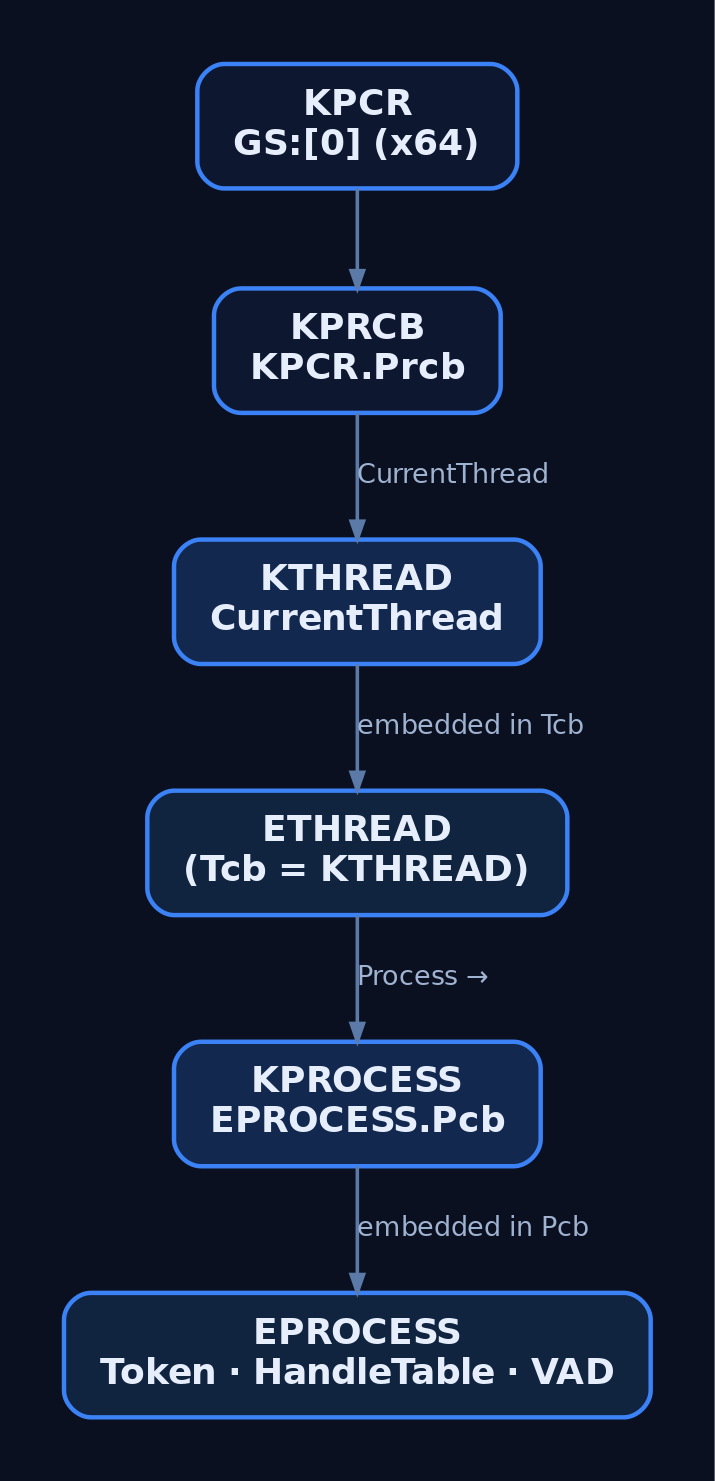
_KPCR – Kernel Processor Control Region. On an SMP box each logical processor gets its own KPCR, carrying per-CPU data shared by kernel and HAL, with an embedded KPRCB (_KPRCB). The current CPU’s KPCR is reachable at FS:[0] in kernel mode on 32-bit Windows and at GS:[0] in kernel mode on x64. KPRCB.CurrentThread points to the KTHREAD currently running on that processor.
The whole chain links together like this:
KPCR.Prcb (KPRCB)
  └─ CurrentThread → KTHREAD
                        └─ embedded in ETHREAD.Tcb
                             └─ Process → KPROCESS
                                            └─ embedded in EPROCESS.Pcb
6.1 WinDbg lab: walking the live structures
Boot a Windows 10/11 VM with bcdedit /debug on plus kdnet (or VirtualKD-Redux) and attach a kernel debugger:
; List all processes via EPROCESS ActiveProcessLinks
!process 0 0

; Dump a full EPROCESS
dt nt!_EPROCESS <address>

; Dump the embedded KPROCESS (Pcb)
dt nt!_KPROCESS <address>

; Dump an ETHREAD
dt nt!_ETHREAD <address>

; Inspect the current processor's KPCR / KPRCB
dt nt!_KPCR @$pcr
dt nt!_KPRCB @$prcb

; Follow CurrentThread → KTHREAD
dt nt!_KPRCB @$prcb CurrentThread
dt nt!_KTHREAD <CurrentThread address>

; Locate the SSDT and inspect a routine
dps nt!KiServiceTable L100
u nt!NtCreateFile
Unlink an EPROCESS from ActiveProcessLinks and !process 0 0 stops showing it while the thread still runs – that is DKOM in one move, and the reason cross-referencing scheduler state against the process list is a rootkit-detection technique.
7. The Syscall Path: From WriteFile to the Kernel
A user-mode API call doesn’t “enter the kernel” magically; it walks a fixed chain and crosses the boundary at exactly one instruction.
kernel32!WriteFile  →  kernelbase!WriteFile  →  ntdll!NtWriteFile (syscall stub)
        →  SYSCALL  →  nt!KiSystemCall64  →  SSDT lookup  →  nt!NtWriteFile
The documented Win32 function in kernel32.dll/kernelbase.dll eventually calls the matching Nt* routine in ntdll.dll. ntdll is the last user-mode stop: it provides over 200 syscall stubs (NtCreateFile, NtSetEvent, …), and each stub just loads the System Service Number and executes the transition instruction.
The x64 stub pattern is tiny and worth recognizing on sight:
mov r10, rcx              ; SYSCALL clobbers RCX, so save arg0 in R10
mov eax, <SSN>            ; System Service Number → EAX
syscall                   ; transition to Ring 0
ret
On the kernel side, nt!KiSystemCall64 is the dispatcher. It uses the SSN in EAX to index the System Service Descriptor Table (SSDT) and calls the corresponding routine. On 64-bit Windows the SSDT stores relative offsets to the kernel routines, not absolute pointers. Two tables exist:
- Native SSDT (
KeServiceDescriptorTable) – core NT operations (process, thread, file, registry, memory). - Shadow SSDT (
KeServiceDescriptorTableShadow) – GUI/Win32k operations, serviced bywin32k.sys; the GUI-path stubs live inwin32u.dll.
SSNs are not stable – they change between Windows builds, which is exactly why “direct syscall” tradecraft has to resolve them dynamically (and why hardcoding them breaks across updates).
7.1 C lab: observing the call chain
// Demonstrates the Win32 → ntdll → kernel call chain
#include <windows.h>
#include <stdio.h>

int main() {
    // Win32 API layer
    HANDLE hFile = CreateFile(
        L"C:\\test.txt",
        GENERIC_READ,
        FILE_SHARE_READ,
        NULL,
        OPEN_EXISTING,
        FILE_ATTRIBUTE_NORMAL,
        NULL
    );
    // Set a breakpoint on ntdll!NtCreateFile in WinDbg to observe
    // the syscall stub and SSN placed in EAX before the SYSCALL instruction
    if (hFile != INVALID_HANDLE_VALUE) CloseHandle(hFile);
    return 0;
}
Break on bp ntdll!NtCreateFile and u ntdll!NtCreateFile to watch the mov r10, rcx / mov eax, <SSN> / syscall sequence. Confirm the SSN against your specific build – it varies.

8. User-Mode Subsystems and the API Stack
The user-mode side is layered just as deliberately as the kernel side:
| Layer | Binary | Role |
|---|---|---|
| Win32 application | .exe | Your code |
| Windows API | kernel32.dll, user32.dll, advapi32.dll | Documented high-level wrappers |
| KernelBase | kernelbase.dll | Refactored Win32 internals (Vista+) |
| Native API | ntdll.dll | Syscall stubs; Nt*/Zw* functions |
| Subsystem DLL | win32u.dll | GUI-path syscall stubs to win32k.sys |
The Windows personality is implemented by the Client/Server Runtime Subsystem, csrss.exe. At boot, once boot and system drivers are loaded, the kernel starts the Session Manager Subsystem (smss.exe), which in turn launches the crucial Win32 user- and kernel-mode services, including csrss.exe. The core system-process tree to memorize:
smss.exe → wininit.exe → lsass.exe, services.exe, csrss.exe
Knowing this tree is what lets you spot anomalies: a csrss.exe not parented by smss.exe, or an lsass.exe with a surprise child, is immediately suspicious.
9. Kernel-Mode Drivers and the I/O Model
Drivers are loadable kernel-mode modules – .sys files – that sit between the I/O Manager and hardware and call HAL routines to actually touch devices. I/O flows as I/O Request Packets (IRPs): the I/O Manager builds an IRP and routes it down the driver stack.
WDM (Windows Driver Model) is the original interface; KMDF (Kernel-Mode Driver Framework) and UMDF (User-Mode Driver Framework) wrap WDM with simpler, less error-prone interfaces. Because every loaded driver shares the kernel address space (§2), each .sys is also raw attack surface – a vulnerable signed driver is a ready-made Ring 0 primitive (BYOVD).
10. Virtualization-Based Security (VBS) and the Hypervisor Layer
Modern Windows adds a layer below the kernel – effectively ring −1. The hypervisor (Hyper-V) is the trust anchor. It carries no external drivers or modules; internally it runs its own memory manager, virtual-processor scheduler, interrupt/timer management, synchronization, and partition/IPC management.
This hypervisor underpins Virtualization-Based Security (VBS) and HVCI (Hypervisor-Protected Code Integrity). With HVCI, kernel code pages can’t be modified at runtime even from Ring 0, and the Secure Kernel isolates secrets (e.g., Credential Guard moves lsass.exe secrets into a VSM enclave). For an attacker this is the point: getting Ring 0 no longer means “game over for the whole machine” – the hypervisor still stands above you, which is what makes DKOM and SSDT/code patching dramatically harder.
11. Security Implications and the Attacker/Defender View per Layer
Each layer is both an attack target and a sensor location:
- User-mode API layer – API hooking, IAT/inline patching; ntdll ETW patching (
EtwEventWrite) to blind telemetry. - Native API / syscall boundary – direct syscalls bypass user-mode hooks; SSNs resolved dynamically.
- Kernel drivers – BYOVD and driver CVEs for Ring 0; HVCI/KMCS raise the bar.
- Kernel data structures – DKOM on
EPROCESS.ActiveProcessLinks(hiding),Tokenswap (privesc).
Detection & Defense pairing
Sysmon event IDs by layer:
| Event ID | Name | Layer monitored |
|---|---|---|
| 1 | Process Creation | User-mode process creation (CreateProcess → NtCreateProcess) |
| 2 | File Creation Time Changed | Object Manager / NTFS |
| 7 | Image Loaded | Module/driver load (flag Signed=false) |
| 10 | Process Access | OpenProcess → NtOpenProcess (cross-process handle) |
| 11 | File Create | I/O Manager path |
| 13 | Registry Value Set | Configuration Manager |
| 25 | Process Tampering | Image hollowing / herpaderping |
Audit policy (auditpol /set /subcategory:"Process Creation" /success:enable /failure:enable):
Process Creation→ 4688 (full command line if enabled)Audit Kernel Object→ 4656/4663 (object handle requests/access)Audit Handle Manipulation→ 4658/4690Audit Security State Change→ 4608 (system start)Audit Sensitive Privilege Use→ 4673 (e.g.SeDebugPrivilege– key for kernel-targeting tools)
ETW providers: Microsoft-Windows-Kernel-Process ({22FB2CD6-...}), Microsoft-Windows-Kernel-File ({EDD08927-...}), Microsoft-Windows-Kernel-Registry ({70EB4F03-...}), Microsoft-Windows-Security-Auditing ({54849625-...}), and the high-fidelity ETWTI Microsoft-Windows-Threat-Intelligence ({F4E1897C-...}) – which surfaces NtAllocateVirtualMemory, NtMapViewOfSection, and remote-thread creation. ETWTI requires a PPL subscriber, which is why it’s the kernel sensor commercial EDRs lean on.
Sigma field patterns:
EventID: 7+Signed: false+ImageLoaded contains \.sys→ unsigned driver loadEventID: 10+TargetImage: lsass.exe+GrantedAccess: 0x1010→ LSASS handle acquisitionEventID: 1+ParentImage: smss.exe→ unexpected child of Session Manager
Hardening:
- KMCS – kernel driver signing enforced by default on x64; pair with UEFI Secure Boot + HVCI (
bcdedit /set hypervisorlaunchtype auto) to block unsigned drivers and stop SSDT/IAT hooks. - HVCI (Memory Integrity) – blocks runtime kernel-code modification; makes DKOM-style attacks far harder.
- ASR rules – stop Office/browser processes from triggering sensitive syscall chains.
- Credential Guard – VBS-isolates
lsass.exesecrets in the Secure Kernel. - LSA Protection (PPL) – runs
lsass.exeas a Protected Process Light, blockingOpenProcesswithPROCESS_VM_READfrom unprivileged callers.
MITRE ATT&CK mapping
| Technique | Name | Architectural link |
|---|---|---|
| T1055 | Process Injection | OpenProcess / NtWriteVirtualMemory / NtCreateThreadEx; user/kernel boundary |
| T1055.001 | DLL Injection | OpenProcess → WriteProcessMemory → CreateRemoteThread |
| T1055.012 | Process Hollowing | CreateProcess(SUSPENDED) → NtUnmapViewOfSection → kernel object manipulation |
| T1014 | Rootkit | DKOM on EPROCESS.ActiveProcessLinks; SSDT hooking |
| T1562.001 | Impair Defenses: Disable/Modify Tools | ETW patching, SSDT hook removal |
| T1562.006 | Impair Defenses: Indicator Blocking | Patching ntdll.dll ETW functions (EtwEventWrite) |
| T1106 | Native API | Direct ntdll.dll Nt* calls, bypassing the Win32 layer |
| T1059 | Command and Scripting Interpreter | Execution flows through the Win32 subsystem and csrss.exe |
12. Recap
Read the stack top to bottom and the model holds:
- Ring 3 vs Ring 0 is the only trust boundary that matters; the CPU enforces it via paging, and crossing it happens at exactly one
SYSCALLinstruction. ntoskrnl.exeholds two layers – the Executive (Object/Memory/IO/Process/SRM/Config managers) on top, the Kernel (scheduling, interrupts, traps, synchronization) below – with the HAL statically linked in since Windows 10 2004.- Everything shareable is an object; user mode gets handles, kernel mode gets pointers.
- The EPROCESS → KPROCESS / ETHREAD → KTHREAD / KPCR → KPRCB chain is where injection, DKOM, and token theft happen – and where WinDbg lets you watch them.
- The syscall path (
kernel32→ntdll→SYSCALL→KiSystemCall64→ SSDT) is fixed, but SSNs drift per build. - VBS/HVCI/Hyper-V sit below the kernel and re-establish a trust anchor even against Ring 0.
Know where a primitive sits, and you know which sensor catches it and which mitigation breaks it. That mapping – layer to telemetry to hardening – is the whole point of carrying this model in your head.
Related Tutorials
- Access Tokens and Privileges: The Kernel’s Security Context
- SIDs and Security Descriptors: Identity in Windows Security
- Fibers: User-Mode Cooperative Threads
- Jobs and Silos: Process Grouping and Resource Limits
- Windows Scheduler Internals: Priority Levels, Quantum, and Thread Selection
References
- en.wikipedia.org
- learn.microsoft.com
- learn.microsoft.com
- learn.microsoft.com
- codemachine.com
- medium.com
- github.com
- n4r1b.com
Get new drops in your inbox
Windows internals, exploit dev, and red-team write-ups - no spam, unsubscribe anytime.