Writing Sigma Rules for ATT&CK Techniques: Field Mapping, Conditions, and Tuning
You just ran Invoke-AtomicTest T1059.001 in your lab and watched a base64 blob fly through powershell.exe. Sysmon dutifully logged it as Event ID 1. Now what? A screenshot in a report is worth nothing to the blue team. A Sigma rule that fires on that exact behavior across Splunk, Elastic, and Sentinel is worth a great deal. This is the loop that closes an adversary emulation exercise: execute the technique, read the raw telemetry, and encode the detection so it survives past the engagement.
Objective: Learn to author, tune, validate, and convert production-quality Sigma rules for Windows ATT&CK techniques – covering rule anatomy, the logsource taxonomy, Sigma-to-SIEM field mapping, condition logic and value modifiers, false-positive filters, and backend conversion with
sigma-cli/pySigma.
1. Where Sigma Fits in an ATT&CK Detection Cycle
Sigma is a vendor-neutral, YAML-based detection format. You write the logic once against a normalized field taxonomy, then a conversion pipeline translates it into whatever query language your SIEM speaks: SPL, KQL, EQL, LogQL. That “write once, detect everywhere” property is what makes it the natural output artifact of an emulation exercise. ATT&CK tells you what to look for. Sigma defines how to look for it in your telemetry.
The workflow is tight and repeatable:
- Red teamer executes a technique in an isolated lab VM (Atomic Red Team is ideal for this).
- You inspect the raw event the sensor produced (usually Sysmon).
- You write a Sigma selection that matches the malicious fields and excludes benign ones.
- You convert and validate against real logs.
- You tag it to ATT&CK and ship it through your rule lifecycle.
One opinion up front, because it saves pain later: do not treat the SigmaHQ public repository as a drop-in detection stack. Many of its rules are deliberately generic and will bury your analysts in noise the day you import them. Use it as reference material, then tune aggressively for your own environment.

2. Rule Anatomy: Every Top-Level Key
A Sigma rule is a YAML document with a fixed set of top-level keys. Learn them once and every rule becomes readable.
| Key | Purpose |
|---|---|
title | Short human-readable name |
id | UUID v4, the unique rule identifier |
status | Lifecycle: experimental to test to stable |
description | What the rule detects |
author | Attribution |
date / modified | ISO-8601 dates |
references | URLs supporting the detection logic |
tags | ATT&CK mapping (for example attack.t1059.001) |
logsource | product / category / service block |
detection | Named selection blocks plus a condition |
falsepositives | Known benign triggers |
level | informational / low / medium / high / critical |
The status field is not decoration – it is a promise about validation:
experimental: any rule not yet validated against real production data. Everything you write during an emulation exercise starts here.test: validated in a test environment or against historical logs, but not run live for at least 30 days.stable: running in production for 30 or more days with an acceptable false-positive rate and confirmed true-positive test data.
Generate the id with a real UUID v4 tool, never by hand. Duplicate IDs break rule collections and merge tooling.
3. The Logsource Block: Taxonomy and Category Reference
The logsource block tells the conversion pipeline which telemetry the rule reads, using three fields: category (the log type), product (the platform), and service (a specific service within the product).
The single most important decision here is category versus service. Reference category: process_creation and you get a generic rule for Windows process creation – it works whether the events come from Sysmon EID 1 or the native Security log EID 4688, because the pipeline injects the correct EventID filter and field mappings for you. Reference service: sysmon and you have hard-coupled the rule to Sysmon. Prefer the generic category unless you truly depend on a Sysmon-only field.
The pipeline configuration handles the plumbing. A config defines that a rule matching the generic Windows process_creation logsource gets an EventID: 1 (or 4688) condition added automatically, so you never hard-code the EventID in the rule body.
category | Sysmon EID | Security EID |
|---|---|---|
process_creation | 1 | 4688 |
network_connection | 3 | – |
image_load | 7 | – |
create_remote_thread | 8 | – |
process_access | 10 | – |
file_event | 11 | – |
registry_add / registry_set / registry_delete | 12 / 13 / 14 | – |
dns_query | 22 | – |
ps_script | – | 4104 |
Cloud logsources follow the same shape: product: aws with service: cloudtrail, or product: azure with service: activitylogs.
4. Field Mapping: Sigma Taxonomy to SIEM Schema
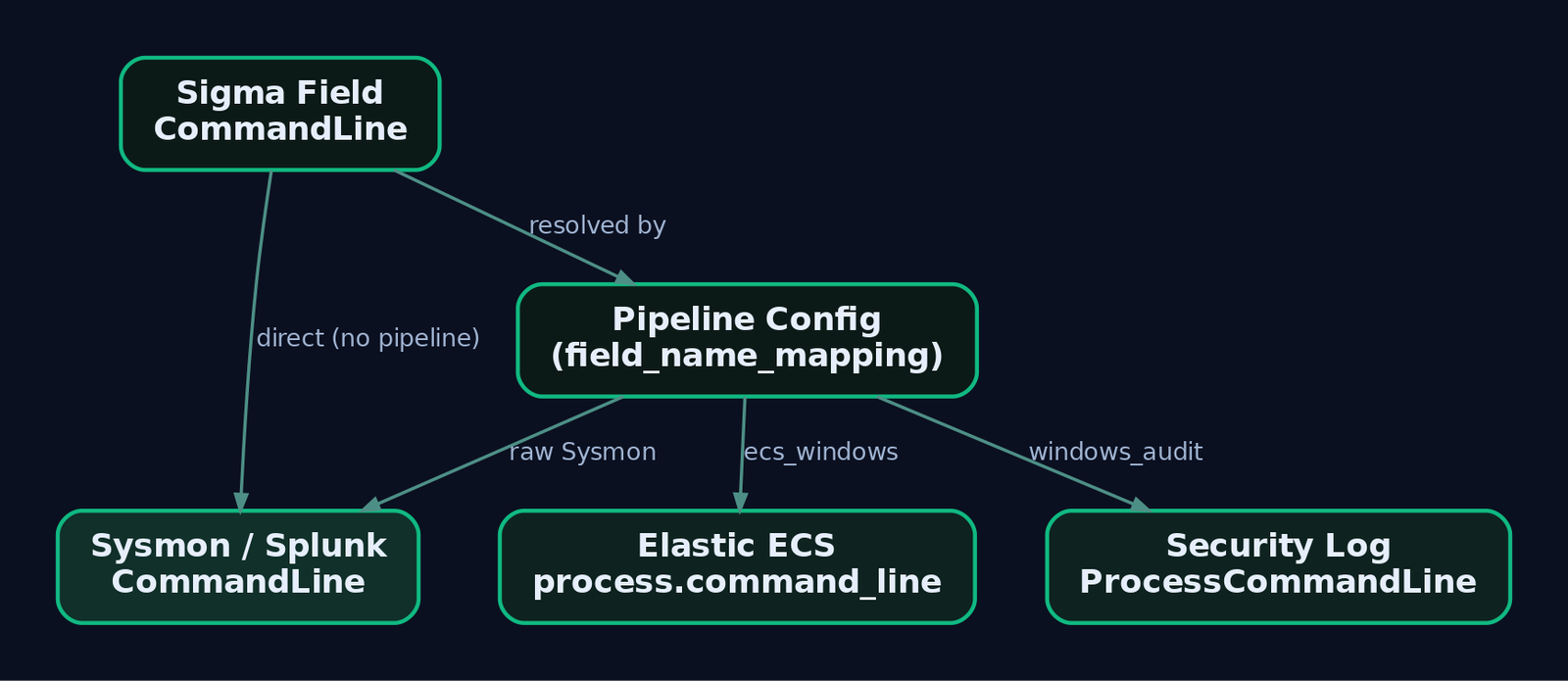
Sigma field names are a normalized taxonomy, not your SIEM’s schema. CommandLine in a rule becomes process.command_line in Elastic ECS, ProcessCommandLine in the native Security log, and stays CommandLine in a raw Sysmon-into-Splunk index. The pipeline does the translation.
| Sigma Field | Maps to (Sysmon) | Maps to (Security Log) |
|---|---|---|
Image | Image (EID 1) | NewProcessName (EID 4688) |
ParentImage | ParentImage | ParentProcessName |
CommandLine | CommandLine | ProcessCommandLine |
ParentCommandLine | ParentCommandLine | ProcessCommandLine |
LogonId | LogonId | SubjectLogonId |
TargetImage | TargetImage (EID 10) | – |
GrantedAccess | GrantedAccess (EID 10) | – |
TargetObject | TargetObject (EID 12/13) | – |
Details | Details (EID 13) | NewValue |
QueryName | QueryName (EID 22) | – |
When mapping fails, nothing errors. The converted query simply references a field that does not exist in your index and returns zero results, forever. That silent-failure mode is the number one reason a “working” rule detects nothing in production. Always validate against a real event you generated yourself.
If your environment uses non-standard field names, write a custom pipeline. The field_name_mapping transformation type does per-field remapping; field_name_prefix_mapping handles whole namespaces.
name: custom_env_mapping
priority: 100
transformations:
  - id: commandline_remap
    type: field_name_mapping
    mapping:
      CommandLine: process.command_line
      Image: process.executable
    rule_conditions:
      - type: logsource
        category: process_creation
        product: windows
SigmaHQ ships maintained pipelines for the common shapes: Sysmon-into-Splunk, Windows-events-into-Elastic (ECS), and more. Reach for a custom pipeline only when your schema diverges.
5. Detection Block: Selections, Modifiers, and Conditions
The detection block holds one or more named selection maps and a final condition expression. Two logic rules govern everything:
- Multiple values in a list are combined with OR.
- Multiple key-value pairs in the same map are combined with AND.
So a selection with Image|endswith and CommandLine|contains requires both to match (AND), while a list of three strings under CommandLine|contains matches if any one appears (OR).
Value modifiers attach to a field name with a pipe and reshape the match:
| Modifier | Effect |
|---|---|
contains | Substring match anywhere in the value |
startswith / endswith | Anchored prefix / suffix match |
all | Flips a list from OR to AND (every value must appear) |
base64 / base64offset | Encodes the search value before matching |
re | Treats the value as a regular expression |
cidr | Matches an IP against a CIDR range |
windash | Matches both - and / command-line switch prefixes |
The windash modifier deserves a mention. Attackers write powershell /enc as readily as powershell -enc, and a naive -enc string misses half of them. windash normalizes that automatically.
Condition atoms then assemble selections into a trigger:
| Expression | Meaning |
|---|---|
selection | Every condition in that block must match |
1 of selection* | Any block whose name starts with selection |
all of selection* | All blocks whose name starts with selection |
selection and not filter | Positive match minus a false-positive block |
selection and not 1 of filter_* | Positive match minus any filter block |
6. ATT&CK Tagging
The tags field maps a rule to MITRE ATT&CK using a lowercase, dot-separated convention. Include both the tactic tag and the technique (or sub-technique) tag.
tags:
  - attack.execution        # tactic
  - attack.t1059.001        # sub-technique
Getting this right pays off later: sigma-cli and companion tooling can roll your rule set into an ATT&CK Navigator coverage layer, turning “which techniques do we actually detect?” into a heatmap. The white space on that map is your detection backlog.
7. Lab Setup and Emulation Workflow
Build an isolated Windows 10/11 VM with no internet route. Install Sysmon v15 or later with a curated baseline – SwiftOnSecurity’s sysmon-config or olafhartong/sysmon-modular. Ship logs to a local stack (Winlogbeat into Elasticsearch/Kibana, or Windows Event Forwarding into a Splunk trial). Then install the toolchain.
pip install sigma-cli
sigma plugin install splunk
sigma plugin install elasticsearch
For safe, repeatable technique execution, use the Atomic Red Team PowerShell module. Every command below runs in the lab VM only.
8. Four Complete Rules (Walkthrough)
Each example follows the same loop: emulate, read the event, write the rule.
8a. T1059.001 – PowerShell Encoded Command
# Lab VM only
Invoke-AtomicTest T1059.001 -TestNumbers 1
# Or manually:
powershell.exe -EncodedCommand <base64-encoded-payload>
This produces Sysmon EID 1 with Image, CommandLine, ParentImage, User, and Hashes. The tell is the encoded-command switch on the command line.
title: PowerShell Encoded Command Execution
id: a28d0f4e-3b7a-4c9d-b1e2-5f84a2d67c90
status: experimental
description: Detects PowerShell invocation with the -EncodedCommand switch,
  commonly used to obfuscate malicious payloads.
author: GenXCyber
date: 2025-09-01
references:
  - https://attack.mitre.org/techniques/T1059/001/
tags:
  - attack.execution
  - attack.t1059.001
logsource:
  category: process_creation
  product: windows
detection:
  selection:
    Image|endswith: '\powershell.exe'
    CommandLine|contains:
      - '-EncodedCommand'
      - '-enc '
      - '-ec '
  filter_legitimate:
    ParentImage|endswith:
      - '\sccm.exe'
      - '\ccmexec.exe'
  condition: selection and not filter_legitimate
falsepositives:
  - SCCM software deployment
  - Legitimate admin automation using encoded commands
level: high
Note the AND between the two keys in selection (must be powershell.exe AND carry an encoded switch), the OR across the switch variants, and the filter_legitimate block carving out software-deployment noise.
8b. T1003.001 – LSASS Memory Access
# Lab VM only, uses procdump against lsass
Invoke-AtomicTest T1003.001 -TestNumbers 1
Credential dumping shows up in Sysmon EID 10 (process_access), where the GrantedAccess mask reveals a handle opened for memory read. The classic values cluster around 0x1010 and 0x1410.
title: LSASS Memory Access Indicative of Credential Dumping
id: 4b7c9e21-6d3f-4a58-9c0a-1e2f3a4b5c6d
status: experimental
description: Detects processes opening a handle to lsass.exe with access masks
  associated with reading process memory.
author: GenXCyber
date: 2025-09-01
references:
  - https://attack.mitre.org/techniques/T1003/001/
tags:
  - attack.credential_access
  - attack.t1003.001
logsource:
  category: process_access
  product: windows
detection:
  selection:
    TargetImage|endswith: '\lsass.exe'
    GrantedAccess|contains:
      - '0x1010'
      - '0x1410'
      - '0x1438'
      - '0x143a'
  filter_legit:
    SourceImage|endswith:
      - '\MsMpEng.exe'
      - '\svchost.exe'
  condition: selection and not filter_legit
falsepositives:
  - Endpoint protection agents reading process memory
  - Legitimate diagnostic tooling
level: high
The filter_legit block excludes Defender (MsMpEng.exe) and service-host processes that legitimately touch LSASS. Tune this list to your actual EDR agent, or you will chase your own security stack every hour.
8c. T1547.001 – Registry Run Key Persistence
Invoke-AtomicTest T1547.001 -TestNumbers 1
# Or manually:
reg add "HKCU\Software\Microsoft\Windows\CurrentVersion\Run" /v MalPersist /t REG_SZ /d "C:\Temp\mal.exe"
This writes a registry value, captured by Sysmon EID 13 (registry_set) with TargetObject, Details, and Image.
title: Autostart Persistence via Registry Run Key
id: 7f1a2b3c-4d5e-6f70-8192-a3b4c5d6e7f8
status: experimental
description: Detects creation of a Run or RunOnce value pointing at an
  executable, batch, or PowerShell script.
author: GenXCyber
date: 2025-09-01
references:
  - https://attack.mitre.org/techniques/T1547/001/
tags:
  - attack.persistence
  - attack.t1547.001
logsource:
  category: registry_set
  product: windows
detection:
  selection:
    TargetObject|contains:
      - '\CurrentVersion\Run\'
      - '\CurrentVersion\RunOnce\'
    Details|endswith:
      - '.exe'
      - '.bat'
      - '.ps1'
  condition: selection
falsepositives:
  - Legitimate software registering autostart entries during install
level: medium
8d. T1218.011 – Rundll32 LOLBin Proxy Execution
rundll32.exe javascript:"\..\mshtml,RunHTMLApplication ";alert('test')
This is a signed-binary proxy-execution abuse, logged as Sysmon EID 1. The command line, not the binary, is the anomaly – rundll32.exe invoking script protocols or remote content.
title: Suspicious Rundll32 Script or Remote Invocation
id: 9c8b7a65-4321-0fed-cba9-876543210fed
status: experimental
description: Detects rundll32.exe launched with script protocol handlers or
  remote URLs, a common LOLBin defense-evasion pattern.
author: GenXCyber
date: 2025-09-01
references:
  - https://attack.mitre.org/techniques/T1218/011/
tags:
  - attack.defense_evasion
  - attack.t1218.011
logsource:
  category: process_creation
  product: windows
detection:
  selection:
    Image|endswith: '\rundll32.exe'
    CommandLine|contains:
      - 'javascript:'
      - 'vbscript:'
      - 'http'
  condition: selection
falsepositives:
  - Rare legitimate applications passing URLs to rundll32
level: high
9. Tuning and False-Positive Reduction
A rule that fires 400 times a day gets muted, and a muted rule detects nothing. Tuning is where detection engineering actually happens.
The oldest pattern is the inline filter: condition: selection and not filter_legitimate, as used in examples 8a and 8b. Multiple filters compose cleanly with selection and not 1 of filter_*. Keep the filter_ naming convention so the wildcard works.
Sigma v2.0 added centralized filter rules so you stop copy-pasting the same “exclude the backup agent” block into fifty rules. A filter rule lives in its own file, references the rules or logsources it applies to, and the exclusion is maintained in one place. This is the correct home for environment-wide noise: your EDR agent, your patch-management tooling, your vulnerability scanner.
Populate falsepositives honestly. It is not filler – it is the note your future self reads at 2 a.m. deciding whether an alert is real. And keep tuning rules at status: experimental until they have proven quiet against production data.

10. Backend Conversion with sigma-cli and pySigma
Validate first, then convert. sigma check catches schema errors before they reach a SIEM.
# Validate rule structure and taxonomy
sigma check psencoded.yml

# Splunk SPL via the Sysmon pipeline
sigma convert -t splunk -p sysmon psencoded.yml

# Elasticsearch via the ECS Windows pipeline
sigma convert -t elasticsearch -p ecs_windows psencoded.yml

# Microsoft Sentinel KQL
sigma convert -t sentinel -p windows_audit psencoded.yml

# Grafana Loki LogQL
sigma convert -t loki psencoded.yml
The -p flag selects the pipeline that supplies field and logsource mappings. Choose the pipeline that matches how the data actually lands in that backend: raw Sysmon into Splunk needs -p sysmon; ECS-normalized data into Elastic needs -p ecs_windows. Get this wrong and you get the silent zero-result failure from section 4.
For repeatable regression testing, drive conversion from Python and assert on the output.
from sigma.collection import SigmaCollection
from sigma.backends.splunk import SplunkBackend
from sigma.pipelines.sysmon import sysmon_pipeline

rule_yaml = open("psencoded.yml").read()
rules = SigmaCollection.from_yaml(rule_yaml)
backend = SplunkBackend(processing_pipeline=sysmon_pipeline())
query = backend.convert(rules)[0]

assert "powershell.exe" in query.lower()
assert "EncodedCommand" in query or "-enc" in query.lower()
print("PASS:", query)
Verify the exact import paths against your installed pySigma version; module names shift between releases.
11. Correlation Rules in Sigma v2.0
Single events miss multi-stage behavior. Sigma v2.0 correlations solve this with three types: event_count (count matching events over a window against a threshold), value_count (count distinct values of a field), and temporal (a group of rules that all fire within the same timespan, grouped by a shared value).
Brute force (T1110) is the canonical event_count case: many failed logons from one source, then a success. A correlation references base rules by name and groups over timespan.
title: Password Brute Force Followed by Success
correlation:
  type: event_count
  rules:
    - failed_logon_4625
  group-by:
    - TargetUserName
  timespan: 5m
  condition:
    gte: 10
The aliases attribute lets a correlation stitch together rules that use different field names for the same concept – for instance, when a source-address field is named one way in a logon event and another way in a network event. Backend support for correlations is still maturing, so confirm your target SIEM plugin handles them before you rely on them in production.
12. Common Attacker Techniques Against the Detection Pipeline
The rules above catch the four running techniques. Attackers also target the detection machinery itself.
| Technique | Description |
|---|---|
| Sensor blinding | Stop or unload Sysmon, clear its config, or filter its channel so events never reach the SIEM |
| Rule repo tampering | Write access to the Sigma repo lets an adversary silently delete or neuter detections |
| Command obfuscation | Switch abbreviations (-ec), case tricks, and /-style flags evade naive string matches (counter with windash and multiple variants) |
| Living-off-the-land | Signed LOLBins like rundll32.exe blend into normal process trees, forcing command-line-level logic |
Treat your rules repository with the same care as production SIEM config. An unmonitored repo is a single point of failure for your entire detection program.

13. Defensive Strategies and Detection
Your rules only fire if the telemetry exists. Confirm the audit configuration underneath them.
| Requirement | Setting |
|---|---|
| Process command line (EID 4688) | Audit Process Creation + “Include command line in process creation events” GPO |
| File/registry object access | Audit Object Access |
| Logon events (4624/4625) | Audit Logon/Logoff |
| Privileged access | Audit Sensitive Privilege Use |
Sysmon supplies the richest fields Sigma consumes:
| EID | Event | Key Fields |
|---|---|---|
| 1 | Process Creation | Image, CommandLine, ParentImage, Hashes, IntegrityLevel |
| 3 | Network Connection | DestinationIp, DestinationPort, Initiated |
| 10 | Process Access | SourceImage, TargetImage, GrantedAccess, CallTrace |
| 13 | Registry Value Set | TargetObject, Details |
| 22 | DNS Query | QueryName, QueryResults |
Protect the sensor and the repo. Detect attempts to blind Sysmon itself, which is a defense-evasion primitive (T1562.001):
title: Sysmon Service Tampering
id: c1d2e3f4-a5b6-4708-91a2-b3c4d5e6f708
status: experimental
description: Detects attempts to stop or reconfigure the Sysmon service, a
  precursor to log evasion.
author: GenXCyber
date: 2025-09-01
tags:
  - attack.defense_evasion
  - attack.t1562.001
logsource:
  category: process_creation
  product: windows
detection:
  selection:
    Image|endswith:
      - '\sc.exe'
      - '\net.exe'
    CommandLine|contains|all:
      - 'stop'
      - 'sysmon'
  condition: selection
falsepositives:
  - Authorized maintenance windows
level: high
Harden the repository: enable branch protection, require signed commits, and alert on direct pushes to main. Run a scheduled CI/CD pipeline that pulls from SigmaHQ, converts against your backends, validates against known test data, and promotes only passing rules through staging into production.
14. Tools for Sigma Rule Development
| Tool | Description | Link |
|---|---|---|
sigma-cli | Validate and convert rules to SIEM queries | github.com/SigmaHQ/sigma-cli |
| pySigma | Python library behind conversion and pipelines | github.com/SigmaHQ/pySigma |
| Atomic Red Team | Safe, isolated ATT&CK technique execution | github.com/redcanaryco/atomic-red-team |
| Sysmon | Rich Windows event telemetry | learn.microsoft.com |
| sysmon-modular | Tunable Sysmon config baseline | github.com/olafhartong/sysmon-modular |
| ATT&CK Navigator | Coverage heatmap from tagged rules | mitre-attack.github.io |
15. MITRE ATT&CK Mapping
| Technique | MITRE ID | Detection |
|---|---|---|
| PowerShell | T1059.001 | Sysmon EID 1, CommandLine encoded-switch match |
| LSASS Memory | T1003.001 | Sysmon EID 10, GrantedAccess mask on lsass.exe |
| Registry Run Keys | T1547.001 | Sysmon EID 13, TargetObject Run/RunOnce |
| Rundll32 | T1218.011 | Sysmon EID 1, rundll32.exe script/URL command line |
| Brute Force | T1110 | Correlation event_count on EID 4625 |
| Impair Defenses | T1562.001 | Sysmon service tamper detection |
| Valid Accounts | T1078 | Security EID 4624/4625 anomalies |
| Kerberoasting | T1558.003 | EID 4769, TicketEncryptionType: '0x17' |
Summary
- Sigma turns a one-off emulation observation into a portable, ATT&CK-tagged detection that runs on any SIEM. Write against the normalized taxonomy, convert per backend.
- The logsource
categoryversusservicechoice controls portability. Generic categories let the pipeline inject the right EventID and field mappings automatically. - Field mapping fails silently. A mismapped field yields a zero-result query, not an error, so always validate against an event you generated yourself.
- List equals OR, map equals AND, and value modifiers like
contains,all, andwindashare how you model real attacker behavior without over-matching. - Tune with filters, not deletion. Keep rules
experimentaluntil they prove quiet, and guard the rule repo like production config, because whoever can edit it can blind you.
Related Tutorials
- Mapping CTI Reports to ATT&CK TTPs: A Step-by-Step Methodology
- Introduction to MITRE ATT&CK: Structure, Tactics, Techniques, and Sub-Techniques
- Navigating ATT&CK Navigator: Building, Annotating, and Exporting Technique Layers
- APT Profiling: How to Build a Comprehensive Adversary Profile from Open-Source Intelligence
- Position-Independent Code: Writing PIC Shellcode Without Hardcoded Addresses
References
- [no internet, domain-joined optional), Sysmon v15+ installed with the SwiftOnSecurity sysmon-config
- [) or olafhartong/sysmon-modular
- [ATT&CK emulation:** Use Atomic Red Team
- references
- sigmahq.io
- sigmahq.io
- sigmahq.io
- sigmahq.io
Get new drops in your inbox
Windows internals, exploit dev, and red-team write-ups - no spam, unsubscribe anytime.