Jobs and Silos: Process Grouping and Resource Limits
Objective: Understand how the Windows kernel uses Job Objects and Silo Objects to group processes, enforce CPU/memory/network limits, and provide the namespace isolation that underpins Windows containers — and how defenders detect and harden against their abuse.
1. What Is a Job Object?
A job object lets a group of processes be managed as a single unit. It is a namable, securable, sharable kernel object that controls attributes of every process associated with it; operations on the job — limits, termination, accounting — apply to all member processes at once.
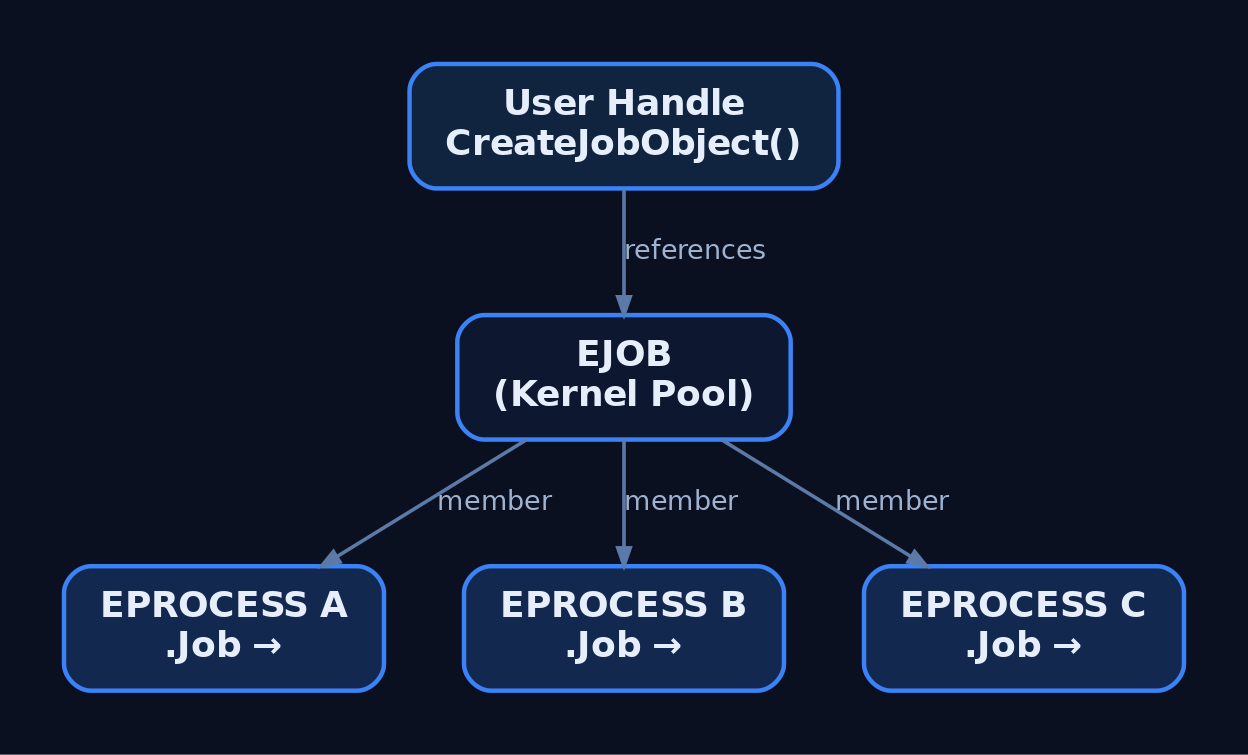
In the kernel the object is the undocumented executive type EJOB, allocated from kernel pool. Each process control block carries an EPROCESS.Job pointer linking it to its owning job. User mode never touches EJOB directly; it operates through a handle returned by CreateJobObject.
Before Windows 8 / Windows Server 2012, a process could belong to one job and jobs could not be nested. Windows 8 introduced nested jobs, allowing a process to participate in a hierarchy where the effective limit is the most restrictive ancestor.
| Object Type | Description |
|---|---|
EJOB | Kernel job object; groups processes, holds limits and accounting |
EPROCESS.Job | Per-process pointer to its owning job |
| Named job | Job published under \Sessions\<N>\BaseNamedObjects\, openable by name |
| Anonymous job | Handle-only job, no namespace entry, shared by duplication/inheritance |
2. Core Job Object APIs
The job lifecycle is driven by a small, stable Win32 surface.
| Function | Purpose |
|---|---|
CreateJobObject | Create, or open if named, a job object |
OpenJobObject | Open an existing named job |
AssignProcessToJobObject | Add a process to a job |
SetInformationJobObject | Apply limits and policy to the job |
QueryInformationJobObject | Read limits, accounting, and peak usage |
TerminateJobObject | Kill every process in the job |
IsProcessInJob | Test whether a process already belongs to a job |
HANDLE CreateJobObject(LPSECURITY_ATTRIBUTES lpJobAttributes, LPCWSTR lpName);
BOOL   AssignProcessToJobObject(HANDLE hJob, HANDLE hProcess);
BOOL   SetInformationJobObject(HANDLE hJob, JOBOBJECTINFOCLASS JobObjectInformationClass,
                               LPVOID lpJobObjectInformation, DWORD cbJobObjectInformationLength);
BOOL   QueryInformationJobObject(HANDLE hJob, JOBOBJECTINFOCLASS JobObjectInformationClass,
                                 LPVOID lpJobObjectInformation, DWORD cbJobObjectInformationLength,
                                 LPDWORD lpReturnLength);
BOOL   TerminateJobObject(HANDLE hJob, UINT uExitCode);
3. Basic Limits: CPU, Memory, and Process Count
JOBOBJECT_BASIC_LIMIT_INFORMATION carries the foundational controls.
typedef struct _JOBOBJECT_BASIC_LIMIT_INFORMATION {
  LARGE_INTEGER PerProcessUserTimeLimit;
  LARGE_INTEGER PerJobUserTimeLimit;
  DWORD         LimitFlags;
  SIZE_T        MinimumWorkingSetSize;
  SIZE_T        MaximumWorkingSetSize;
  DWORD         ActiveProcessLimit;
  ULONG_PTR     Affinity;
  DWORD         PriorityClass;
  DWORD         SchedulingClass;
} JOBOBJECT_BASIC_LIMIT_INFORMATION;
The LimitFlags bitmask selects which fields the kernel enforces.
| Limit Flag | Description |
|---|---|
JOB_OBJECT_LIMIT_PROCESS_TIME | Per-process user-mode CPU cap (100 ns ticks); process killed when exceeded |
JOB_OBJECT_LIMIT_JOB_TIME | Job-wide CPU time cap |
JOB_OBJECT_LIMIT_WORKINGSET | Min/max working set per process |
JOB_OBJECT_LIMIT_ACTIVE_PROCESS | Caps active process count; over-limit assignment terminates the process |
JOB_OBJECT_LIMIT_AFFINITY | Forces a processor affinity mask |
JOB_OBJECT_LIMIT_KILL_ON_JOB_CLOSE | Kills all processes when the last job handle closes |
JOB_OBJECT_LIMIT_KILL_ON_JOB_CLOSE is the cornerstone of any sandbox: if the controlling process dies, the entire tree is reaped, leaving no orphaned children.
#include <windows.h>

int main(void) {
    HANDLE hJob = CreateJobObject(NULL, L"Sandbox_Demo");   // named for observability
    if (!hJob) return GetLastError();

    JOBOBJECT_EXTENDED_LIMIT_INFORMATION eli = { 0 };
    eli.BasicLimitInformation.LimitFlags =
        JOB_OBJECT_LIMIT_KILL_ON_JOB_CLOSE |   // tear down tree on handle loss
        JOB_OBJECT_LIMIT_ACTIVE_PROCESS;       // bound process count
    eli.BasicLimitInformation.ActiveProcessLimit = 4;
    SetInformationJobObject(hJob, JobObjectExtendedLimitInformation, &eli, sizeof(eli));

    STARTUPINFO si = { sizeof(si) };
    PROCESS_INFORMATION pi = { 0 };
    // Create suspended so we can assign before any code runs
    CreateProcess(L"C:\\Windows\\System32\\notepad.exe", NULL, NULL, NULL,
                  FALSE, CREATE_SUSPENDED, NULL, NULL, &si, &pi);

    AssignProcessToJobObject(hJob, pi.hProcess);
    ResumeThread(pi.hThread);

    CloseHandle(pi.hThread);
    CloseHandle(pi.hProcess);
    CloseHandle(hJob);   // KILL_ON_JOB_CLOSE terminates notepad here
    return 0;
}
4. Extended and Rate Limits
JOBOBJECT_EXTENDED_LIMIT_INFORMATION embeds the basic structure as BasicLimitInformation and adds memory governance: ProcessMemoryLimit (per-process commit, needs JOB_OBJECT_LIMIT_PROCESS_MEMORY), JobMemoryLimit (job-wide commit, needs JOB_OBJECT_LIMIT_JOB_MEMORY), and the continuously tracked PeakProcessMemoryUsed / PeakJobMemoryUsed. The two memory limits are independent — a 100 MB job-wide cap can coexist with a 10 MB per-process cap.
JOBOBJECT_EXTENDED_LIMIT_INFORMATION eli = { 0 };
eli.BasicLimitInformation.LimitFlags =
    JOB_OBJECT_LIMIT_PROCESS_MEMORY | JOB_OBJECT_LIMIT_JOB_MEMORY;
eli.ProcessMemoryLimit = 10  * 1024 * 1024;   // 10 MB per process
eli.JobMemoryLimit     = 100 * 1024 * 1024;   // 100 MB job-wide (independent)
SetInformationJobObject(hJob, JobObjectExtendedLimitInformation, &eli, sizeof(eli));

DWORD ret = 0;
QueryInformationJobObject(hJob, JobObjectExtendedLimitInformation, &eli, sizeof(eli), &ret);
printf("PeakJobMemoryUsed: %zu bytes\n", eli.PeakJobMemoryUsed);
CPU throttling uses JOBOBJECT_CPU_RATE_CONTROL_INFORMATION.
typedef struct _JOBOBJECT_CPU_RATE_CONTROL_INFORMATION {
  DWORD ControlFlags;
  union {
    DWORD CpuRate;
    DWORD Weight;
    struct { WORD MinRate; WORD MaxRate; } DUMMYSTRUCTNAME;
  } DUMMYUNIONNAME;
} JOBOBJECT_CPU_RATE_CONTROL_INFORMATION;| Control Flag | Value | Behaviour |
|---|---|---|
JOB_OBJECT_CPU_RATE_CONTROL_ENABLE | 0x1 | Enables CPU rate control |
JOB_OBJECT_CPU_RATE_CONTROL_WEIGHT_BASED | 0x2 | Rate derived from relative weight vs. other jobs |
JOB_OBJECT_CPU_RATE_CONTROL_HARD_CAP | 0x4 | Hard cap; no job threads run after the budget is spent until next interval |
JOB_OBJECT_CPU_RATE_CONTROL_NOTIFY | 0x8 | Notifies when the rate limit is exceeded |
JOBOBJECT_CPU_RATE_CONTROL_INFORMATION cpu = { 0 };
cpu.ControlFlags = JOB_OBJECT_CPU_RATE_CONTROL_ENABLE |
                   JOB_OBJECT_CPU_RATE_CONTROL_HARD_CAP;
cpu.CpuRate = 2000;   // 20.00% of one CPU (units of 1/100 percent)

// Windows containers (non-Hyper-V) use weight-based control instead:
// cpu.ControlFlags = JOB_OBJECT_CPU_RATE_CONTROL_ENABLE |
//                    JOB_OBJECT_CPU_RATE_CONTROL_WEIGHT_BASED;
// cpu.Weight = 5;    // relative scheduling weight

SetInformationJobObject(hJob, JobObjectCpuRateControlInformation, &cpu, sizeof(cpu));
Network bandwidth is bounded with JOBOBJECT_NET_RATE_CONTROL_INFORMATION, which sets MaxBandwidth (outgoing bytes), a DscpTag, and ControlFlags for scheduling policy.
5. Notification Limits and I/O Completion Ports
Not every limit should kill. JOBOBJECT_NOTIFICATION_LIMIT_INFORMATION defines soft limits that alert without termination, covering IoReadBytesLimit, IoWriteBytesLimit, per-job user time, and job memory. To receive these alerts, associate an I/O completion port via JOBOBJECT_ASSOCIATE_COMPLETION_PORT.
| Completion Message | Meaning |
|---|---|
JOB_OBJECT_MSG_NEW_PROCESS | A process was added to the job |
JOB_OBJECT_MSG_EXIT_PROCESS | A member process exited |
JOB_OBJECT_MSG_ACTIVE_PROCESS_ZERO | Job is now empty |
JOB_OBJECT_MSG_JOB_MEMORY_LIMIT | Job-wide commit limit was hit |
HANDLE hPort = CreateIoCompletionPort(INVALID_HANDLE_VALUE, NULL, 0, 1);

JOBOBJECT_ASSOCIATE_COMPLETION_PORT acp = { 0 };
acp.CompletionKey  = hJob;     // echoed back as the key
acp.CompletionPort = hPort;
SetInformationJobObject(hJob, JobObjectAssociateCompletionPortInformation, &acp, sizeof(acp));

DWORD msg; ULONG_PTR key; LPOVERLAPPED ov;
while (GetQueuedCompletionStatus(hPort, &msg, &key, &ov, INFINITE)) {
    switch (msg) {
        case JOB_OBJECT_MSG_NEW_PROCESS:         /* child started   */ break;
        case JOB_OBJECT_MSG_JOB_MEMORY_LIMIT:    /* commit cap hit   */ break;
        case JOB_OBJECT_MSG_ACTIVE_PROCESS_ZERO: return 0;  // job empty
    }
}
6. Nested Jobs
On Windows 8 and later, assigning an already-jobbed process to a second job nests it. The kernel computes the effective limit as the minimum of the chain — a child job can only tighten, never loosen, an ancestor’s constraint.
// Parent job: 200 MB job-wide commit
HANDLE hParent = CreateJobObject(NULL, NULL);
JOBOBJECT_EXTENDED_LIMIT_INFORMATION p = { 0 };
p.BasicLimitInformation.LimitFlags = JOB_OBJECT_LIMIT_JOB_MEMORY;
p.JobMemoryLimit = 200 * 1024 * 1024;
SetInformationJobObject(hParent, JobObjectExtendedLimitInformation, &p, sizeof(p));
AssignProcessToJobObject(hParent, hProc);

// Child job nested under parent: 100 MB
HANDLE hChild = CreateJobObject(NULL, NULL);
JOBOBJECT_EXTENDED_LIMIT_INFORMATION c = { 0 };
c.BasicLimitInformation.LimitFlags = JOB_OBJECT_LIMIT_JOB_MEMORY;
c.JobMemoryLimit = 100 * 1024 * 1024;
SetInformationJobObject(hChild, JobObjectExtendedLimitInformation, &c, sizeof(c));
AssignProcessToJobObject(hChild, hProc);   // Win8+ nests automatically

// Effective limit on hProc = min(200 MB, 100 MB) = 100 MB
For pre-Windows 8 compatibility, test membership first — assigning a jobbed process there is fatal.
BOOL inJob = FALSE;
IsProcessInJob(hProc, NULL, &inJob);   // NULL JobHandle = "any job"
if (inJob) {
    // Windows 7: cannot reassign (no nesting). Windows 8+: assignment nests.
}
AssignProcessToJobObject(hJob, hProc);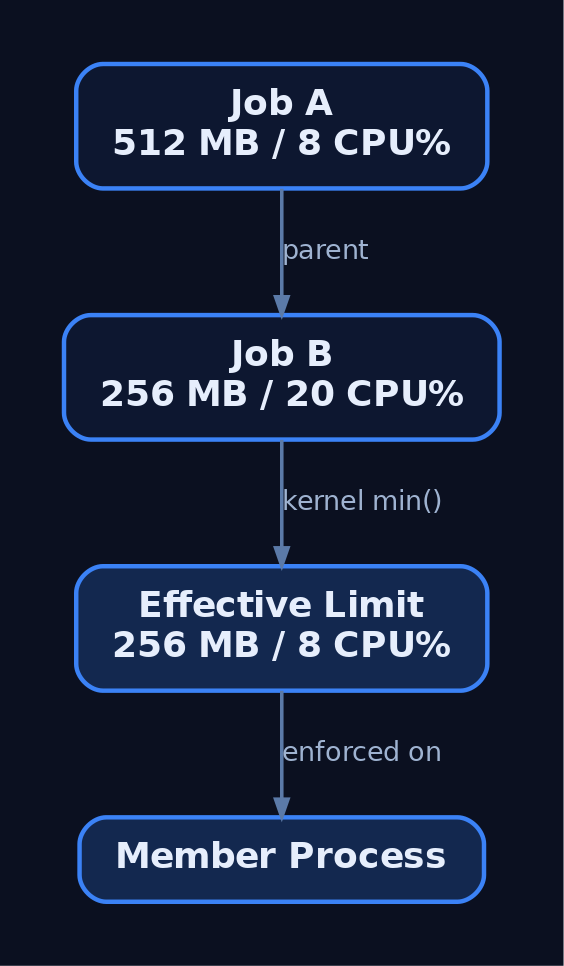
7. Inspecting Jobs at Runtime
Process Explorer and Process Hacker display a process’s job membership and its limits on a dedicated Job tab. WinObj reveals named job objects in the Object Manager namespace. In kernel debugging, walk and dump jobs directly.
0: kd> !process 0 0 notepad.exe          ; find the EPROCESS
0: kd> dt nt!_EPROCESS Job <EPROCESS>    ; read the Job pointer
0: kd> !job <EJOB-address>               ; dump limits and member list
0: kd> dt nt!_EJOB JobFlags              ; locate the silo/flags field
These are observation tools, not attack tooling — they let an analyst confirm exactly which processes share a job and what limits are in force.
8. Silos: From Jobs to Containers
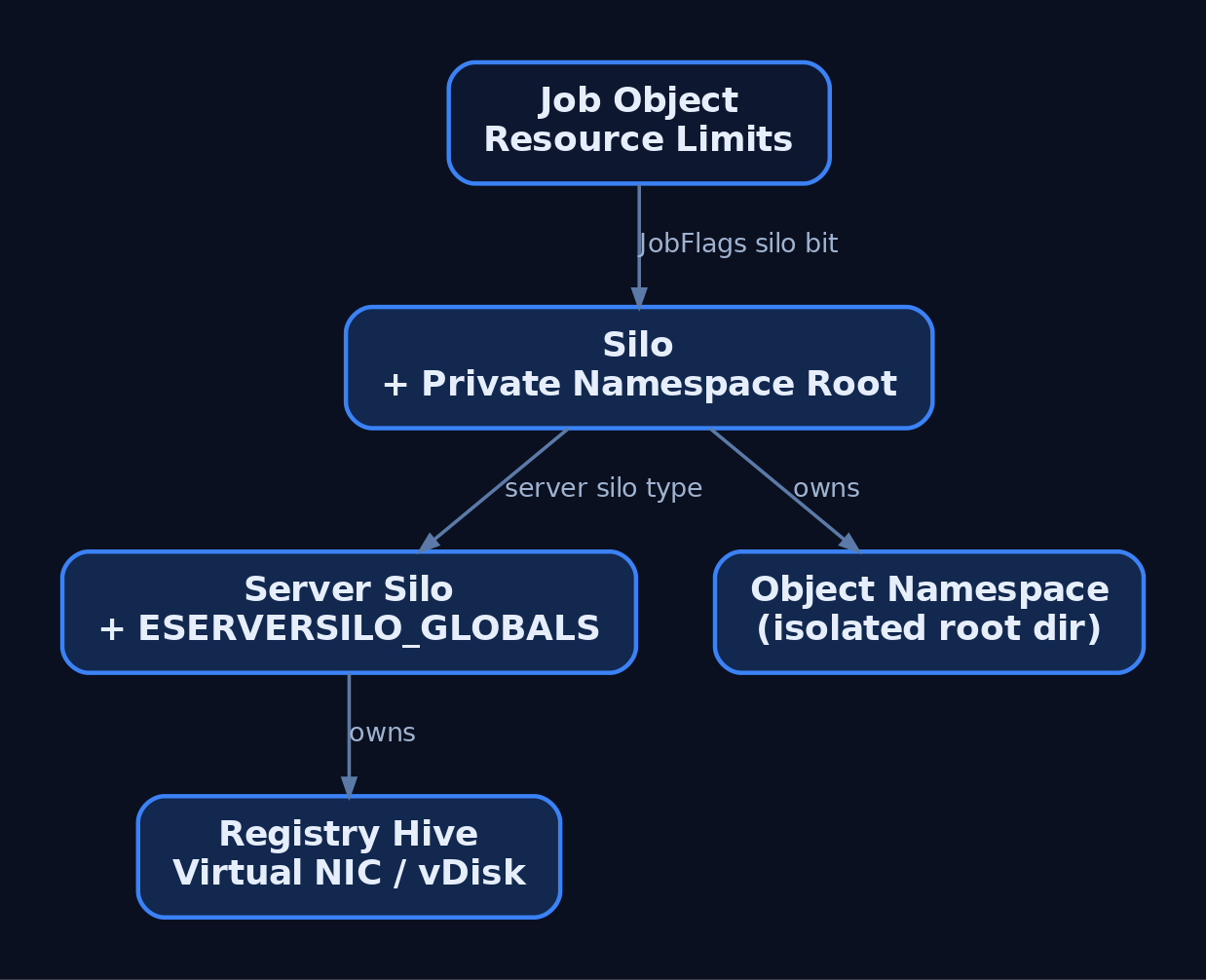
Jobs alone do not isolate the namespace — they constrain resources but not what a process can name or see. Microsoft solved this with silos, effectively “super jobs.” A silo is a job object with the Silo flag set in the EJOB.JobFlags field.
There are two silo types:
| Silo Type | Use | Privilege |
|---|---|---|
| Application silo | Desktop Bridge / MSIX app isolation | Standard |
| Server silo | Windows (Docker) container support | Administrator |
When a silo is created, the kernel builds it its own root directory object, distinct from the host root — giving the silo a private object namespace. A server silo further owns an _ESERVERSILO_GLOBALS structure holding container-specific state, and is backed by a virtual disk, a registry hive, and a virtual network adapter.
| Kernel Function | Purpose |
|---|---|
PsCreateSilo / PsCreateServerSilo | Create silo / server silo objects |
PsAttachSiloToCurrentThread / PsDetachSiloFromCurrentThread | Bind/unbind a thread to a silo context |
PsGetThreadServerSilo | Return the server silo a thread runs in |
PsIsCurrentThreadInServerSilo | Boolean gate used to restrict syscalls inside a container |
; For understanding only — JobFlags layout is build-specific and undocumented.
0: kd> dt nt!_EJOB JobFlags
   +0x0?? JobFlags : Uint4B    ; a bit in this field marks the job as a silo
The
_EJOB,_ESERVERSILO_GLOBALS, andJobFlagsoffsets are undocumented and shift between OS builds. Validate them against your target build with WinDbgdtbefore treating any offset as authoritative.
9. Windows Containers and the Host Compute Service
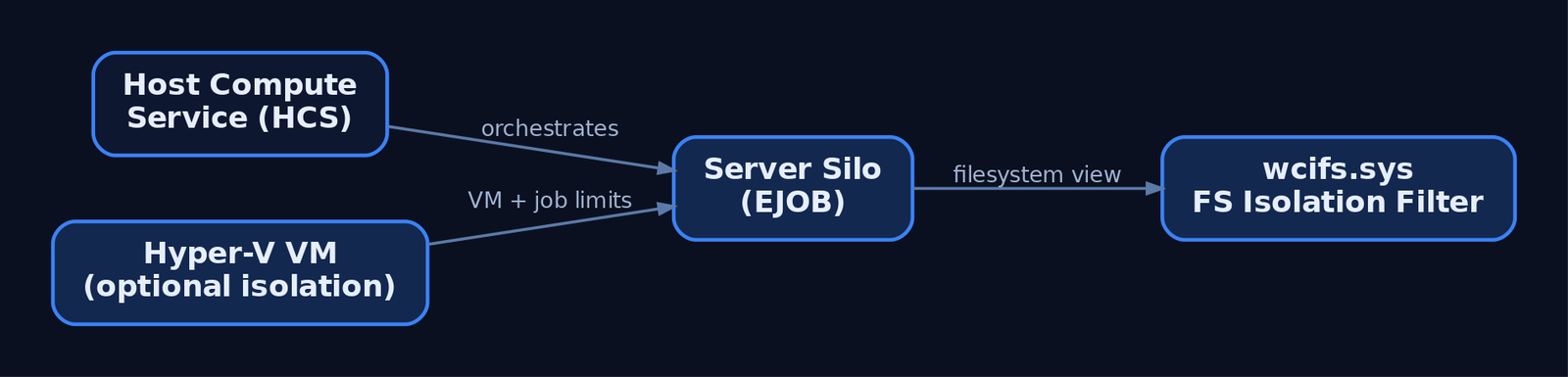
Windows Server containers are built on server silos. The Host Compute Service (HCS) orchestrates their lifecycle, wiring up the silo’s job-object resource controls, registry hive virtualization, and filesystem isolation. The filesystem layer is enforced by wcifs.sys, the Windows Container Isolation Filter Driver, which projects the container’s view over the host volume.
| Mode | Boundary | Notes |
|---|---|---|
--isolation=process | Server silo, shared host kernel | Lighter, but escapes reach the host kernel |
--isolation=hyperv | Utility VM + inner job object | VM enforces limits even if the inner job is escaped |
Process isolation shares the host kernel, which makes server-silo escape research directly relevant to defenders. Hyper-V isolation applies controls at both the VM and the inner container job object — a job escape still cannot exceed VM-level limits.
10. Common Attacker Techniques
| Technique | Description |
|---|---|
| Sandbox-aware keying | Payload detects a constrained job (low ActiveProcessLimit, tight memory cap) and alters behaviour to evade analysis |
| Debugger / UI blocking | Setting JOB_OBJECT_UILIMIT_HANDLES or JOB_OBJECT_UILIMIT_EXITWINDOWS to deny security-tool UI/handle access within the job |
| Breakaway abuse | Using JOB_OBJECT_LIMIT_BREAKAWAY_OK so child processes escape a controlling job’s limits and accounting |
| Child-tree concealment | Wrapping persistent processes in a job to manage and hide their descendant trees |
| Container / silo escape | Breaking out of a server silo’s namespace root to reach the host OS |
Adversaries also use the native API directly — CreateJobObject, AssignProcessToJobObject, SetInformationJobObject — to construct their own sandboxes around tooling, or to apply quotas that frustrate dynamic analysis.
11. Defensive Strategies & Detection
There is no dedicated Sysmon event for CreateJobObject or AssignProcessToJobObject as of Sysmon v15 — job manipulation is caught indirectly via process access, process creation, and ETW.
| Sysmon Event ID | Relevance |
|---|---|
1 (Process Create) | Children spawned under sandboxed jobs; correlate unusual ParentImage / IntegrityLevel |
10 (Process Access) | OpenProcess with PROCESS_SET_QUOTA (0x200) or PROCESS_ALL_ACCESS (0x1fffff) preceding job assignment |
17 / 18 (Pipe Created/Connected) | Named pipes visible across a silo namespace boundary during lateral movement |
| ETW Provider | What It Logs |
|---|---|
Microsoft-Windows-Kernel-Process | Process/thread lifecycle; job assignments surface as ProcessSetJobObjectInformation events |
Microsoft-Windows-Security-Auditing | Process creation (Event 4688 with command-line auditing) |
Microsoft-Windows-Containers-CCG | Container credential guard events in server silos |
Microsoft-Windows-Hyper-V-Compute | HCS / silo creation and teardown |
Enable Audit Process Creation (auditpol /set /subcategory:"Process Creation" /success:enable) to produce Event 4688 with full command line, and Audit Object Access to capture named job-object handle creation as Events 4656 / 4663.
title: Suspicious Process Access Preceding Job Quota Assignment
logsource:
  product: windows
  service: sysmon
detection:
  selection:
    EventID: 10                 # Sysmon ProcessAccess
    GrantedAccess|contains:
      - '0x1fffff'              # PROCESS_ALL_ACCESS
      - '0x200'                 # PROCESS_SET_QUOTA (job assignment)
    TargetImage|contains: '\lsass.exe'
  condition: selection
level: high
Hardening guidance:
- Apply
JOB_OBJECT_LIMIT_KILL_ON_JOB_CLOSEin every sandbox so process trees are reaped on handle loss. - Deny
JOB_OBJECT_LIMIT_BREAKAWAY_OKunless explicitly required — it is a direct escape vector. - Combine job limits with Integrity Levels and AppContainer; jobs do not restrict file or registry access.
- For hostile workloads prefer Hyper-V isolation — controls apply to both the VM and the inner job object.
- Monitor
wcifs.sysactivity in server-silo environments; it enforces filesystem isolation and is a known escape surface. - Audit named job creation under
\Sessions\<N>\BaseNamedObjects\with WinObj and Sysmon object/pipe events as a proxy.
12. MITRE ATT&CK Mapping
| Technique | MITRE ID | Detection |
|---|---|---|
| Native API | T1106 | ETW Kernel-Process job-assignment events; underpins all job/silo API use |
| Process Injection | T1055 | Sysmon Event ID 10; handle access to constrained process groups |
| Impair Defenses: Disable/Modify Tools | T1562.001 | UI-limit flags blocking security tooling; behavioural EDR telemetry |
| Escape to Host | T1611 | wcifs.sys and Hyper-V-Compute ETW; primary silo/container-escape mapping |
| Create or Modify System Process | T1543 | Sysmon Event ID 1; persistent processes wrapped in jobs |
| Execution Guardrails | T1480 | Behavioural analysis of sandbox-aware payloads keyed to job limits |
Verify current technique versions and sub-techniques at https://attack.mitre.org before publication.
13. Tools for Job and Silo Analysis
| Tool | Description | Link |
|---|---|---|
| Process Explorer | View per-process job membership and limits | sysinternals |
| Process Hacker | Inspect job tab, member processes, and quotas | processhacker.sourceforge.io |
| WinObj | Browse named job objects and silo namespace roots | sysinternals |
| WinDbg | !job, dt nt!_EJOB, _ESERVERSILO_GLOBALS inspection | microsoft.com |
| Process Monitor | Observe wcifs.sys and registry-hive container activity | sysinternals |
| ETW (logman / wevtutil) | Capture Kernel-Process and Hyper-V-Compute events | microsoft.com |
Summary
- Job objects group processes into a single managed unit with enforceable CPU, memory, network, and process-count limits, all anchored on the kernel
EJOBobject. - Limits are applied through
SetInformationJobObjectusingJOBOBJECT_BASIC,EXTENDED,CPU_RATE,NET_RATE, andNOTIFICATIONstructures; nesting (Windows 8+) tightens to the most restrictive ancestor. - Silos extend jobs via the
JobFlagssilo bit, adding a private object-namespace root; server silos (_ESERVERSILO_GLOBALS) back Windows containers and share the host kernel. - Abuse spans sandbox-aware keying,
BREAKAWAY_OKescapes, UI-limit tool blocking, and server-silo container escape (T1611). - Detect via Sysmon
Event ID 1/10,Kernel-ProcessandHyper-V-ComputeETW, Event4688auditing, and prefer Hyper-V isolation plusKILL_ON_JOB_CLOSEfor containment.
Related Tutorials
- Windows Process Creation Internals & PEB
- Windows Boot Process
- Access Tokens and Privileges: The Kernel’s Security Context
- SIDs and Security Descriptors: Identity in Windows Security
- Fibers: User-Mode Cooperative Threads
References
- Job Objects – Win32 apps | Microsoft Learn
- JOBOBJECT_BASIC_LIMIT_INFORMATION (winnt.h) – Win32 apps | Microsoft Learn
- Nested Jobs – Win32 apps | Microsoft Learn
- Implementing Resource Controls (Windows Containers) | Microsoft Learn
- Reversing Windows Container, Episode I: Silo – Quarkslab’s Blog
- What I Learned from Reverse Engineering Windows Containers – Palo Alto Networks Unit 42