Windows Boot Process
Objective: Trace the Windows boot chain at the mechanism level – from POST and UEFI firmware through Secure Boot, the Windows Boot Manager, the OS loader’s
_LOADER_PARAMETER_BLOCK, kernel Phase 0/1 initialization, and the handoff tosmss.exe– and learn exactly where bootkits subvert that chain and how a defender catches them.
1. The Boot Chain at a Glance
Most boot diagrams you’ll see online stop at three boxes: bootmgr → winload → kernel. That abstraction is precisely where bootkits live. Everything interesting about boot security – Secure Boot verification, the BCD trust decisions, the firmware-to-kernel handoff, the Start=0 driver load that happens before anti-malware even exists – sits in the gaps those diagrams skip. This post fills the gaps.
Here is the full chain on a modern UEFI machine, with the legacy BIOS path shown for contrast:
[Power On] -> [POST] -> [Firmware: UEFI  /  Legacy BIOS]
                              |
              +---------------+----------------+
        (UEFI: read NVRAM Boot####)      (BIOS: MBR sector 0 -> VBR)
              |                                 |
     \EFI\Microsoft\Boot\bootmgfw.efi      BOOTMGR (active partition)
              +---------------+----------------+
                              v
            Windows Boot Manager  --reads-->  \EFI\Microsoft\Boot\BCD
                              |
            +-----------------+--------------------+
       (cold boot)                          (resume from hibernate)
            |                                       |
   winload.efi / winload.exe            winresume.efi  (reads hiberfil.sys)
            |
   loads ntoskrnl.exe, hal.dll, SYSTEM hive, boot-start drivers, ELAM
            |  ExitBootServices()
            v
   ntoskrnl.exe  ->  KiSystemStartup -> Phase 0 -> Phase 1
            |   (creates PID 0 Idle, PID 4 System)
            v
   smss.exe  (first user-mode process)
            |
      +-----+-------+
   csrss.exe    wininit.exe
                    |
        +-----------+-----------+
   services.exe   lsass.exe   winlogon.exe
     (SCM)         (LSA)         |
                          CreateProcessAsUser
                                 v
                            explorer.exe
| Stage | Component | Execution Context | Key Action |
|---|---|---|---|
| Firmware / POST | UEFI or Legacy BIOS | Real mode (BIOS) / flat 64-bit (UEFI) | Hardware validation, locate boot device |
| Boot Manager | bootmgfw.efi / BOOTMGR | Firmware env (pre-ExitBootServices) | Read BCD, select boot entry |
| OS Loader | winload.efi / winload.exe | Transitions to long mode + paging | Load kernel, HAL, SYSTEM hive, boot drivers |
| Kernel Init | ntoskrnl.exe | Kernel mode | Phase 0/1 executive init, create system processes |
| Session Manager | smss.exe | User mode (SYSTEM) | Sessions, page file, BootExecute, spawn csrss/wininit |
| Logon | wininit/winlogon/lsass/services | User mode (SYSTEM) | SCM, LSA, logon UI |
| Shell | explorer.exe | User mode (user token) | Desktop, taskbar |

2. BIOS vs. UEFI: Firmware Fundamentals
After POST (Power-On Self-Test) validates CPU, RAM, and storage, the firmware hands off to boot code. How it does that is the single biggest fork in the road.
Legacy BIOS has no concept of a file system. It loads the first 512-byte sector of the boot disk verbatim and jumps to it. On a Windows disk that sector is the MBR (Master Boot Record):
| Offset | Size | Contents |
|---|---|---|
0x000 | 446 bytes | Boot code (locates the active partition) |
0x1BE | 64 bytes | Partition table (4 entries × 16 bytes) |
0x1FE | 2 bytes | Boot signature 0x55AA |
The MBR boot code finds the active partition, loads that partition’s VBR (Volume Boot Record), and the VBR locates and executes BOOTMGR. It is a chain of dumb sector reads – and that dumbness is exactly why MBR/VBR bootkits were so effective for so long.
UEFI replaced that scheme with a structured one. The firmware reads its NVRAM boot order (BootOrder plus Boot#### variables), and each Boot#### entry is an EFI_LOAD_OPTION describing a device path to a UEFI image:
// UEFI Boot#### variable payload (simplified; see UEFI Spec 2.10 §3.1.3)
typedef struct {
    UINT32   Attributes;          // LOAD_OPTION_ACTIVE, etc.
    UINT16   FilePathListLength;
    CHAR16   Description[];        // e.g. L"Windows Boot Manager"
    // EFI_DEVICE_PATH_PROTOCOL FilePathList[];  // path to bootmgfw.efi
    // UINT8 OptionalData[];
} EFI_LOAD_OPTION;
These variables are read with GetVariable() and written with SetVariable() (UEFI Runtime Services). A write via SetVariable() persists across reboots – which makes NVRAM a persistence target, not just a config store. UEFI understands FAT, reads named files, and (with Secure Boot) verifies signatures before executing anything. For Windows 10/11 it is the security baseline; the legacy path effectively forfeits Secure Boot, BitLocker-to-TPM measurement integrity, and HVCI guarantees.
Defenders can baseline the legacy MBR directly:
# Read sector 0 of PhysicalDrive0 and hash it (BIOS lab, run as Administrator)
$drive = [IO.File]::OpenRead('\\.\PhysicalDrive0')
$mbr   = New-Object byte[] 512
$drive.Read($mbr, 0, 512) | Out-Null
$drive.Close()
[System.Security.Cryptography.SHA256]::Create().ComputeHash($mbr) |
    ForEach-Object { $_.ToString('x2') } | Join-String
Store that hash. A bootkit that patches the MBR changes it.
3. The EFI System Partition and GPT
UEFI boots from the ESP (EFI System Partition) – a dedicated FAT32 partition that holds bootloaders and firmware applications. On a Windows disk it carries \EFI\Microsoft\Boot\bootmgfw.efi (Microsoft’s boot manager) and the fallback \EFI\Boot\bootx64.efi.
The disk uses a GPT (GUID Partition Table) rather than the old four-entry MBR table. Each GPT partition entry carries a UniquePartitionGuid, and the UEFI boot manager matches device paths against that GUID. The GPT header and the partition-entry array each carry their own CRC-32, so a sloppy edit that corrupts the layout is detectable by the firmware itself.
You can mount and inspect the ESP read-only – this is the baseline every defender should capture:
# Assign a drive letter to the ESP (run as Administrator)
mountvol X: /S

# Enumerate it
dir X:\EFI\ /s

# Baseline the Windows Boot Manager and the fallback loader
Get-FileHash X:\EFI\Microsoft\Boot\bootmgfw.efi -Algorithm SHA256
Get-FileHash X:\EFI\Boot\bootx64.efi            -Algorithm SHA256
A clean ESP is small and boring. New .efi files, an unexpectedly modified bootmgfw.efi, or extra subdirectories under \EFI\ are exactly the signal you want – that is how every UEFI bootkit in the wild plants itself.
4. Secure Boot: The Chain of Trust
Secure Boot’s job is simple to state: only execute code whose signature the firmware trusts. It is enforced from the firmware up – bootmgfw.efi, then winload.efi, then ntoskrnl.exe and boot-start drivers, each link verifying the next.
The firmware maintains two databases:
- DB (Allow database) – trusted signing keys and image hashes that are permitted to load.
- DBX (Disallow database) – revoked or compromised keys and hashes that must be refused even if otherwise valid.
At boot the firmware verifies its own components, then bootmgfw.efi, which in turn verifies winload.efi, which verifies ntoskrnl.exe and the boot-start drivers. A signature that fails verification – or matches a DBX entry – halts the chain. The MOK (Machine Owner Key) mechanism lets an administrator enroll additional trusted keys (commonly used for third-party or Linux loaders) without disabling Secure Boot wholesale. The legacy CSM (Compatibility Support Module), which emulates BIOS for non-UEFI loaders, must be disabled for Secure Boot to be meaningful – leaving CSM on reopens the MBR/VBR attack surface.
This is why DBX maintenance matters: Secure Boot bypasses such as CVE-2022-21894 (“baton drop”, exploited by BlackLotus) and CVE-2023-24932 were remediated by adding the vulnerable boot manager signatures to the DBX revocation list. A system with a stale DBX still trusts the vulnerable loader.
, with DBX revocation feeding back to the firmware](https://genxcyber.com/wp-content/uploads/2026/06/windows-boot-process-2.png)
5. The Windows Boot Manager and the BCD
Once the firmware (or the BIOS VBR) hands off, the Windows Boot Manager takes over: \EFI\Microsoft\Boot\bootmgfw.efi on UEFI systems, or BOOTMGR from the active partition on BIOS systems. Its first job is to read the BCD (Boot Configuration Data) store – a registry-format database that replaced the old boot.ini. On UEFI the store lives at \EFI\Microsoft\Boot\BCD on the ESP; on BIOS at \Boot\BCD on the system partition.
The boot manager parses the BCD entries ({bootmgr}, {default}, {current}, and any others), applies the boot timeout, and decides which loader to launch. On a cold boot it launches winload.efi/winload.exe. If the machine hibernated (or Fast Startup left a snapshot), it instead launches winresume.efi/winresume.exe, which reads hiberfil.sys and restores memory rather than performing a fresh kernel init. If Hyper-V is enabled, the loader loads the hypervisor (hvix64.exe on Intel, hvax64.exe on AMD) before ntoskrnl.exe.
Enumerate and inspect the BCD as a baseline:
# Enumerate all BCD entries (run as Administrator)
bcdedit /enum all

# Show firmware boot entries (UEFI only)
bcdedit /enum firmware

# View the BCD store directly (it loads as a registry hive)
# BCD is mounted under HKLM\BCD00000000 once bcdedit interacts with it
reg query HKLM\BCD00000000 /s
The security-relevant fields are recoveryenabled, bootstatuspolicy, testsigning, and nointegritychecks. The last two are the obvious red flags – testsigning Yes or nointegritychecks Yes means unsigned drivers will load. We will weaponize the first two for the detection demo in Section 10.
6. The Windows OS Loader (winload) and the _LOADER_PARAMETER_BLOCK
The boot manager launches the OS loader: winload.efi on UEFI (located at \windows\system32 or \windows\system32\boot), or winload.exe on BIOS (%SystemRoot%\system32\winload.exe). This is where the machine transitions to a fully paged 64-bit environment and assembles everything the kernel needs.
Winload loads into RAM:
- the NT kernel (
ntoskrnl.exe) and the HAL (hal.dll), - the SYSTEM registry hive from
%SystemRoot%\System32\config\SYSTEM, - all boot-start drivers – those with
Start = 0x0(SERVICE_BOOT_START) underHKLM\SYSTEM\CurrentControlSet\Services\<driver>, which load unconditionally, even in Safe Mode, and - the ELAM (Early Launch Anti-Malware) driver, if configured, ahead of third-party kernel drivers so the kernel can classify each subsequent driver as known-good, known-bad, or unknown.
When the firmware environment is no longer needed, Winload retrieves the final UEFI memory map and calls ExitBootServices(), which terminates EFI Boot Services and frees that memory – the point of no return back to firmware.
Winload then transfers control to the kernel, passing a single structure: the loader parameter block (_LOADER_PARAMETER_BLOCK). It contains the system and boot partition paths, a pointer to the memory descriptor tables, the physical hardware tree used to build the volatile HKLM\HARDWARE hive, the in-memory copy of the SYSTEM hive, and the list of boot drivers that were loaded. The kernel keeps a pointer to it in the global KeLoaderBlock – but discards the block after the first boot phase. The only way to inspect it live is with a kernel debugger attached before boot.
# On the guest VM: enable kernel debugging
bcdedit /debug on
bcdedit /dbgsettings net hostip:<host_ip> port:50001

# On the host (WinDbg Preview), break at the kernel entry point (Phase 0):
bp nt!KiSystemStartup
g

# Dump the loader parameter block before the kernel discards it:
dt poi(nt!KeLoaderBlock) nt!_LOADER_PARAMETER_BLOCK
Watch the SystemRoot, LoadOrderListHead, BootDriverListHead, and RegistryLength fields – this is the exact technique documented in Windows Internals Part 2. Because KeLoaderBlock is only valid during Phase 0, the breakpoint must fire before Phase 1 completes.
List the boot-start drivers Winload loads unconditionally – the same set ELAM gets to vet:
# Drivers loaded as SERVICE_BOOT_START (Start = 0)
Get-ItemProperty "HKLM:\SYSTEM\CurrentControlSet\Services\*" |
    Where-Object { $_.Start -eq 0 } |
    Select-Object PSChildName, ImagePath, Start
A boot-start driver that you do not recognize is a persistence finding (MITRE T1543.003).
, boot driver list, and hardware tree](https://genxcyber.com/wp-content/uploads/2026/06/windows-boot-process-3-scaled.png)
7. Kernel Initialization: Phase 0 and Phase 1
Winload calls ntoskrnl.exe‘s entry point KiSystemStartup, which runs once per CPU. For each processor it calls HalInitializeProcessor to initialize the HAL for that core, then KiInitializeKernel. On the boot CPU, KiInitializeKernel performs system-wide initialization of the internal lists and structures shared by all CPUs, and calls InitBootProcessor, which orchestrates Phase 0 – initializing pool look-aside pointers and honoring the BCD burnmemory option.
Phase 0 runs with interrupts disabled and no real exception handling; it brings up only the minimum needed to make the rest of init possible. Phase 1 then initializes the executive subsystems in order – HAL, Memory Manager, Object Manager, Process/Thread Manager, I/O Manager, Cache Manager, Power Manager, and the PnP Manager – and builds the volatile HKLM\HARDWARE hive from the hardware tree in the loader parameter block.
During this sequence the kernel creates the foundational processes: the System Idle Process (PID 0), which occupies otherwise-idle cores, and the System process (PID 4), which hosts kernel-mode worker threads. Finally the kernel starts smss.exe (the Session Manager Subsystem) as the first user-mode process, running under the SYSTEM context, and hands control to it.
8. Session Manager to Logon
smss.exe is the bridge from kernel-controlled boot into the user-mode world. Before it spawns anything else it runs the programs listed in HKLM\SYSTEM\CurrentControlSet\Control\Session Manager\BootExecute (default autocheck autochk *), sets up paging files, and creates the initial sessions. That BootExecute value runs before any service or security product is online – which is precisely why it is a classic persistence target (MITRE T1547.001).
smss.exe then launches csrss.exe (the Windows subsystem) and wininit.exe. wininit.exe in turn starts services.exe (the Service Control Manager, which loads the rest of the non-boot drivers and services), lsass.exe (the Local Security Authority), and winlogon.exe (the logon UI), which ultimately produces explorer.exe after authentication. Safe Mode behaviour is governed by HKLM\SYSTEM\CurrentControlSet\Control\SafeBoot, which determines which services and drivers are honored when the machine boots minimally.
9. Attack Surface: Bootkits and Boot-Component Tampering
Every layer above is a place to hide:
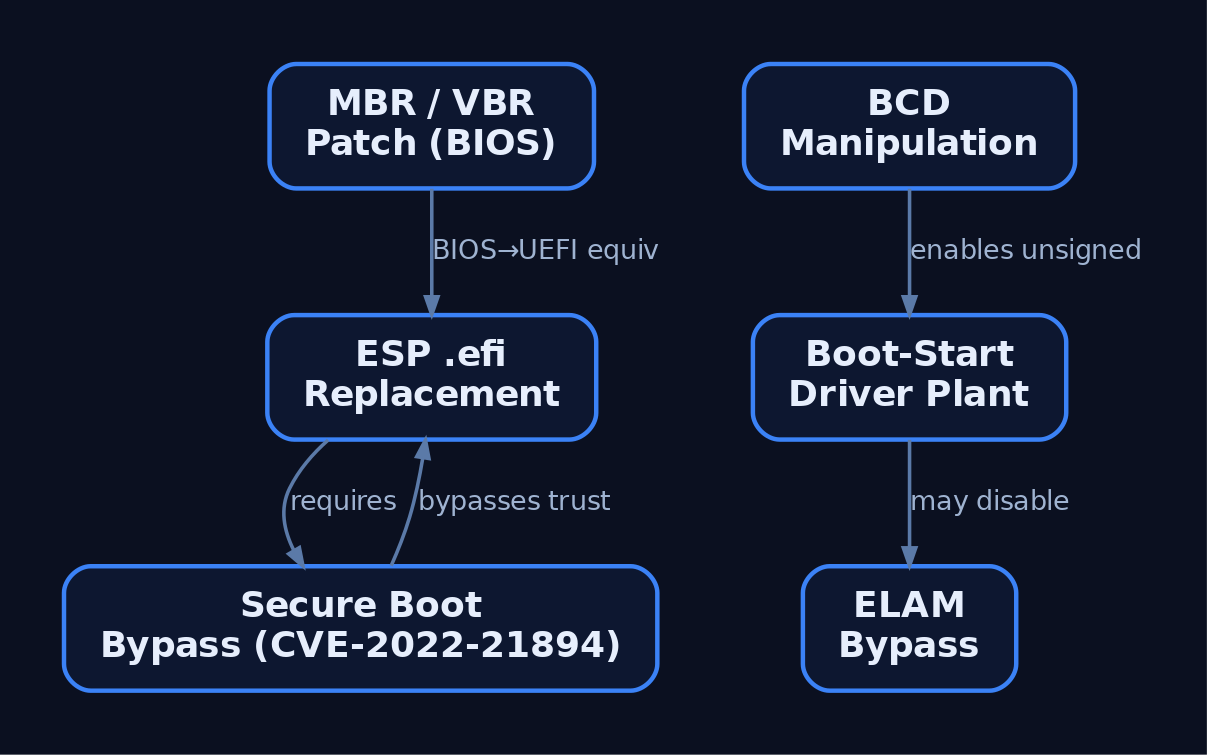
- MBR / VBR bootkits patch the dumb sector-read chain on BIOS systems to gain execution before any OS code.
- ESP
.efireplacement swaps or backdoorsbootmgfw.efi/bootx64.efiso malicious code runs inside the firmware trust boundary. - BCD manipulation disables recovery and integrity checks (
recoveryenabled No,bootstatuspolicy ignoreallfailures,testsigning Yes). - Boot-start driver abuse plants a
Start=0driver that loads before defensive software exists. - ELAM bypass defeats or disables the early anti-malware driver so later malicious drivers are never classified.
The modern case studies all target the Secure Boot trust chain itself. BlackLotus abused CVE-2022-21894 (“baton drop”) to bypass Secure Boot even on patched systems; CVE-2023-24932 was a follow-on Secure Boot bypass remediated only by DBX revocation plus a boot manager update. Academic work such as BOOTKITTY (USENIX WOOT ’25) demonstrates the same principle against modern OSes. We discuss the mechanism here; weaponized code is out of scope.
10. Detection, Defense, and Forensic Verification
10.1 Simulate BCD tampering and detect it
In the lab VM, perform a benign, reversible tamper and then catch it:
REM --- ATTACKER SIMULATION (lab VM only) ---
bcdedit /set {current} recoveryenabled No
bcdedit /set {current} bootstatuspolicy ignoreallfailures

REM --- UNDO immediately after the detection demo ---
bcdedit /set {current} recoveryenabled Yes
bcdedit /deletevalue {current} bootstatuspolicy
10.2 Sysmon event IDs
| Sysmon EID | Name | Boot-process relevance |
|---|---|---|
| 1 | Process Create | Flag bcdedit.exe with /set, recoveryenabled no, or bootstatuspolicy ignoreallfailures. |
| 6 | Driver Loaded | Suspicious kernel drivers at boot; check the ImageSignature field. |
| 9 | RawAccessRead | Reads of boot sectors / PhysicalDrive0 by non-standard processes. |
| 11 | File Create | New .efi files dropped on the ESP – who dropped it and when. |
| 13 | Registry Value Set | Configure Sysmon to capture BootExecute, SetupExecute, Execute, and S0InitialCommand under HKLM\SYSTEM\CurrentControlSet\Control\Session Manager. |
10.3 Windows audit policy
- Event ID 4688 (Process Creation, with command-line logging enabled) – required to detect the
bcdedit.exerecovery-disabling commands from 10.1. - Event ID 4657 (Registry Object Access) – enable Object Access auditing on the registry to produce an independent kernel-level record of Session Manager key modifications, separate from Sysmon.
10.4 Sigma anchor fields
The canonical rule proc_creation_win_bcdedit_boot_conf_tamper.yml (SigmaHQ) targets: process.name == "bcdedit.exe" AND (process.args: "/set" AND process.args: "bootstatuspolicy" AND process.args: "ignoreallfailures") OR (process.args: "no" AND process.args: "recoveryenabled"). See also proc_creation_win_bcdedit_susp_execution.yml.
10.5 TPM / firmware measurements
- Monitor TPM PCR measurements for unexpected changes – PCR 4 and PCR 5 specifically capture boot loader measurements.
- Event ID 1 in the
Microsoft-Windows-TPM-WMIlog can indicate boot integrity measurement failures.
10.6 ESP and BCD integrity monitoring
- Watch the ESP for new or modified EFI binaries; baseline
\EFI\Microsoft\Boot\bootmgfw.efiand\EFI\Boot\bootx64.efi(Section 3). - Audit the BCD with
bcdedit /enum all; flag disabled HVCI/BitLocker and any log indicating Secure Boot was disabled or tampered with.
10.7 Hardening
- Enable Secure Boot wherever feasible – it refuses unsigned boot components even when a registry edit slips past detection before reboot.
- Restrict
bcdedit.exeto documented admin accounts via AppLocker/WDAC; it has no routine use on standard endpoints. - BitLocker with TPM+PIN – binds volume decryption to PCR measurements, so a tampered MBR/bootloader breaks boot.
- VBS + HVCI – prevents unsigned or modified kernel code from executing.
- Keep UEFI firmware and the DBX revocation list current – query the UEFI revocation list to confirm vulnerable boot manager signatures (CVE-2022-21894 / CVE-2023-24932) are present.
- Enable boot logging with
bcdedit /set {current} bootlog yes(ntbtlog.txt) for forensic driver-load auditing.
10.8 MITRE ATT&CK mapping
| Technique | Name | Tactic |
|---|---|---|
| T1542 | Pre-OS Boot | Persistence (TA0003) |
| T1542.001 | Pre-OS Boot: System Firmware | Persistence |
| T1542.002 | Pre-OS Boot: Component Firmware | Persistence |
| T1542.003 | Pre-OS Boot: Bootkit | Persistence |
| T1562.001 | Impair Defenses: Disable or Modify Tools | Defense Evasion (TA0005) |
| T1547.001 | Boot/Logon Autostart: Registry Run Keys | Persistence |
| T1543.003 | Create/Modify System Process: Windows Service | Persistence |
11. Recap
The Windows boot chain is a sequence of trust handoffs: POST validates hardware; UEFI firmware reads NVRAM Boot#### entries and (with Secure Boot) verifies bootmgfw.efi against DB/DBX; the Boot Manager reads the BCD and launches winload.efi; Winload loads ntoskrnl.exe, hal.dll, the SYSTEM hive, boot-start drivers, and ELAM, then calls ExitBootServices() and passes the _LOADER_PARAMETER_BLOCK to the kernel via KeLoaderBlock; KiSystemStartup drives Phase 0/1 init and spawns PID 0, PID 4, and finally smss.exe, which runs BootExecute and brings up the logon stack.
Bootkits live in the gaps between those handoffs – the MBR/VBR, the ESP, the BCD, the boot-start drivers, the ELAM ordering. Defenders close those gaps by baselining the boot components (MBR, ESP, BCD), measuring them into the TPM (PCR 4/5), enforcing Secure Boot + HVCI + BitLocker, keeping DBX current, and instrumenting the chain with Sysmon EIDs 1/6/9/11/13 plus audit events 4688/4657. Know the legitimate sequence cold, and the malicious deviation becomes obvious.
Related Tutorials
- Jobs and Silos: Process Grouping and Resource Limits
- Windows Process Creation Internals & PEB
- Access Tokens and Privileges: The Kernel’s Security Context
- SIDs and Security Descriptors: Identity in Windows Security
- Fibers: User-Mode Cooperative Threads
References
- attack.mitre.org
- attack.mitre.org
- attack.mitre.org
- uefi.org
- www.microsoftpressstore.com
- apprize.best
- joymalya.com
- en.wikipedia.org
Get new drops in your inbox
Windows internals, exploit dev, and red-team write-ups - no spam, unsubscribe anytime.