Active Directory Architecture: Domains, Forests, Trees, OUs, Sites, and GPOs
Objective: Build the mental model that every later Active Directory attack depends on. By the end you will know what a forest, tree, domain, OU, site, and GPO actually are at the protocol and database level, where the real security boundary sits, and how each component shows up as an enumeration target in your lab before you ever throw a single exploit.
Most people learn AD attacks backwards. They run bloodhound-python, see a red line to Domain Admins, and fire the technique without understanding what the graph is built from. That works until it doesn’t. The moment a trust gets in the way, or a GPO link blocks inheritance, or the path crosses a forest boundary, you are stuck because you never learned the terrain. This first article in the series is the terrain. No Kerberoasting yet, no DCSync, no ACL abuse – those each get their own deep dive later. Here we map the country so the rest of the campaign makes sense.
Everything below runs against a self-built lab. If you have not stood one up yet, Section 2 gives you the exact build. Every command in this article is paired with representative output so you know what success looks like on your own DC.
1. What AD DS Actually Is
Active Directory Domain Services (AD DS) is not one program. It is a distributed database fronted by three protocols that interlock so tightly people forget they are separate.
The database is a single file, NTDS.dit, sitting on every domain controller (DC). It is an ESE (Extensible Storage Engine) database, the same engine behind Exchange. Everything AD knows – users, computers, groups, the schema itself – lives in that file as objects with attributes. The file is replicated DC to DC so any DC can answer any question.
Three protocols give you access to that database:
| Protocol | Port | Role in AD |
|---|---|---|
| LDAP | TCP 389, LDAPS 636 | The query and update language for the directory. Reading attributes, searching objects, writing changes. |
| Kerberos | TCP/UDP 88 | Authentication. The KDC (Key Distribution Center) role runs on every DC and issues tickets. |
| DNS | UDP/TCP 53 | Service location. Clients find DCs and the Global Catalog through SRV records. |
A client never “logs into Active Directory” as a single act. It resolves a DC via DNS, authenticates with Kerberos (falling back to NTLM where needed), then reads and writes the directory over LDAP. Understanding this split matters because your detection and your attacks hit different protocols. Kerberoasting is a Kerberos game. SharpHound is an LDAP game. DC location poisoning is a DNS game.
Two pieces of Kerberos vocabulary you must own now, because every later article assumes them:
- A TGT (Ticket Granting Ticket) is your proof of identity, issued by the AS (Authentication Service) during the AS-REQ/AS-REP exchange. It is encrypted with the
krbtgtaccount’s key, so only the KDC can read it. You present it to ask for more tickets. - A service ticket (TGS) is your proof you may talk to one specific service. You request it with TGS-REQ, present your TGT, and the KDC returns a ticket encrypted with that service account’s key. That last detail is the whole basis of Kerberoasting, but we are getting ahead.
Inside both ticket types rides the PAC (Privilege Attribute Certificate), a blob carrying your SID, your group SIDs, and other authorization data. The PAC is why a service can make access decisions without calling back to a DC for every check. When you later see “PAC validation” in a CVE, this is the structure under discussion.
2. Building the Lab
You cannot reproduce any of this without a target. Here is the minimum viable range.
| Host | OS | Role | IP |
|---|---|---|---|
DC01 | Windows Server 2022 Eval | Domain Controller, DNS | 192.168.56.10 |
WS01 | Windows 10/11 | Domain member workstation | 192.168.56.20 |
attacker | Kali / any Linux | Tooling box | 192.168.56.100 |
Grab the free evaluation ISOs, drop them in VirtualBox or VMware on a host-only 192.168.56.0/24 network, promote DC01 to a new forest named lab.local, then seed it with structure:
# Run on DC01 after promotion. Builds OUs, users, a service account, and groups.
Import-Module ActiveDirectory
New-ADOrganizationalUnit -Name "Workstations" -Path "DC=lab,DC=local"
New-ADOrganizationalUnit -Name "Servers"      -Path "DC=lab,DC=local"
New-ADOrganizationalUnit -Name "Staff"        -Path "DC=lab,DC=local"

New-ADUser -Name "John Smith" -SamAccountName jsmith `
  -UserPrincipalName jsmith@lab.local -Path "OU=Staff,DC=lab,DC=local" `
  -AccountPassword (ConvertTo-SecureString 'Password1!' -AsPlainText -Force) -Enabled $true

New-ADUser -Name "SQL Service" -SamAccountName svc_sql `
  -UserPrincipalName svc_sql@lab.local -Path "OU=Servers,DC=lab,DC=local" `
  -ServicePrincipalNames "MSSQLSvc/DC01.lab.local:1433" `
  -AccountPassword (ConvertTo-SecureString 'Summer2024!' -AsPlainText -Force) -Enabled $true

New-ADUser -Name "Lab User" -SamAccountName labuser `
  -UserPrincipalName labuser@lab.local -Path "OU=Staff,DC=lab,DC=local" `
  -AccountPassword (ConvertTo-SecureString 'Password1!' -AsPlainText -Force) -Enabled $true
# No output on success. Verify:
PS C:\> Get-ADUser -Filter * | Select-Object SamAccountName

SamAccountName
--------------
Administrator
Guest
krbtgt
jsmith
svc_sql
labuser
That svc_sql account with an SPN is your future Kerberoasting target. The structure is your future enumeration playground. Now let’s read it the way an attacker does.
3. The Logical Model: Forests, Trees, and Domains
The logical model is the part of AD with no physical meaning. Forests, trees, and domains exist as data, not as cables.
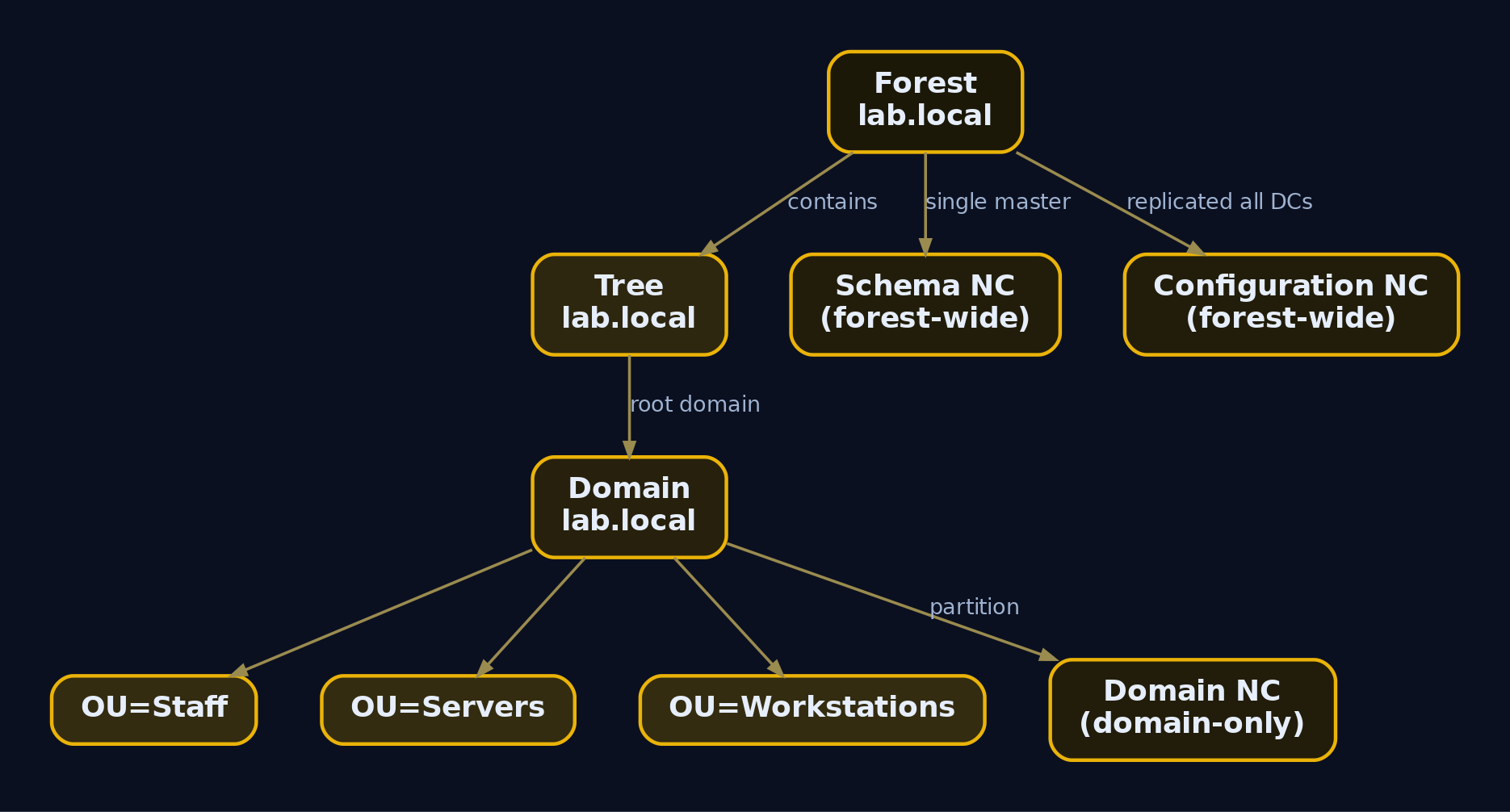
A domain is a partition of the AD database. Partitioning matters because it scopes replication: a domain’s objects replicate fully only to DCs of that domain, which keeps a global enterprise from copying every object everywhere. A domain is also the boundary for account policy and a Kerberos realm. It owns its own krbtgt account.
A tree is one or more domains sharing a contiguous DNS namespace. corp.example.com with a child eu.corp.example.com is one tree. The child’s name is just the parent’s name with a relative label prepended. Parent and child are joined by an automatic two-way transitive trust the instant the child is created.
A forest is the outermost container: one or more trees sharing a single schema, a single configuration partition, and a single Global Catalog. Here is the single most important sentence in this article:
The forest, not the domain, is the security boundary. A domain looks like a wall, but it is not. Every domain in a forest must trust every administrator in that forest, because they share the schema and configuration partitions and the trust topology is automatic and transitive. If you own Domain Admin in any domain, you are one well-known technique away from Enterprise Admin across the whole forest. When defenders draw their trust diagrams at the domain level, they are drawing the wrong picture.
Enumerate the forest and its domains first
Before you can attack anything you need to know how many domains exist and which one you landed in. Start with the .NET classes, which work even without RSAT installed:
[System.DirectoryServices.ActiveDirectory.Forest]::GetCurrentForest()
Name                  : lab.local
Sites                 : {Default-First-Site-Name}
Domains               : {lab.local}
GlobalCatalogs        : {DC01.lab.local}
ApplicationPartitions : {DC=DomainDnsZones,DC=lab,DC=local, DC=ForestDnsZones,DC=lab,DC=local}
ForestMode            : Windows2016Forest
RootDomain            : lab.local
Schema                : CN=Schema,CN=Configuration,DC=lab,DC=local
SchemaRoleOwner       : DC01.lab.local
NamingRoleOwner       : DC01.lab.local
That single output tells you the forest name, every domain (here just one), the GC, the forest functional level, and which DC owns the two forest-wide FSMO roles. Note SchemaRoleOwner and NamingRoleOwner – we return to FSMO in Section 6.
[System.DirectoryServices.ActiveDirectory.Domain]::GetCurrentDomain()
Forest                  : lab.local
DomainControllers       : {DC01.lab.local}
Children                : {}
DomainMode              : Windows2016Domain
Parent                  :
PdcRoleOwner            : DC01.lab.local
RidRoleOwner            : DC01.lab.local
InfrastructureRoleOwner : DC01.lab.local
Name                    : lab.local
Children being empty confirms a single-domain forest. In a real engagement a populated Children list is your map of child domains to pivot into.
The naming contexts are the database partitions
The directory is split into naming contexts (NCs), also called partitions. Query the RootDSE, a special anonymous-readable entry on every DC, to see them:
$rootDSE = [ADSI]"LDAP://RootDSE"
$rootDSE.namingContexts
DC=lab,DC=local
CN=Configuration,DC=lab,DC=local
CN=Schema,CN=Configuration,DC=lab,DC=local
DC=DomainDnsZones,DC=lab,DC=local
DC=ForestDnsZones,DC=lab,DC=local
Three of these matter enormously:
| Naming Context | DN | Holds |
|---|---|---|
| Domain NC | DC=lab,DC=local | Users, computers, groups, OUs, GPCs. The bulk of what you enumerate. |
| Configuration NC | CN=Configuration,DC=lab,DC=local | Forest-wide topology: sites, subnets, site links, services. Replicates to every DC in the forest. |
| Schema NC | CN=Schema,CN=Configuration,DC=lab,DC=local | Definitions of every object class and attribute. Forest-wide, single master. |
The Configuration NC is the reason a single GC server can answer questions about sites across the whole forest, and the reason an attacker who can write to the Schema partition has forest-wide reach. The Global Catalog holds a read-only copy of every object from every domain, but only a partial attribute set (PAS), the attributes flagged for GC replication, to keep traffic down. That is why a GC search returns objects from other domains but sometimes missing the attribute you wanted.
4. Organizational Units and Delegation
An OU is a container inside a domain used to organize objects for two purposes: applying Group Policy and delegating administration. That is it. Repeat after me: an OU is not a security boundary. Placing an object in an OU grants it no permissions and does not protect it from anyone. Control over an OU is decided purely by the ACL on the OU object and on the objects inside it.
This trips people up constantly. A sAMAccountName must be unique across the entire domain, never just within an OU. You cannot have jsmith in OU=Staff and another jsmith in OU=Servers. The OU is cosmetic and administrative, not a namespace.
Enumerate OUs and their delegation
Get-ADOrganizationalUnit -Filter * | Select-Object Name, DistinguishedName
Name          DistinguishedName
----          -----------------
Domain Controllers OU=Domain Controllers,DC=lab,DC=local
Workstations  OU=Workstations,DC=lab,DC=local
Servers       OU=Servers,DC=lab,DC=local
Staff         OU=Staff,DC=lab,DC=local
The structure is interesting only once you read who can write to it. Delegation lives in the OU’s DACL as ACEs (Access Control Entries). The dangerous ones are broad rights like GenericAll, GenericWrite, WriteDacl, and WriteOwner granted to non-admin principals:
(Get-Acl "AD:\OU=Staff,DC=lab,DC=local").Access |
  Where-Object { $_.IdentityReference -notmatch 'BUILTIN|NT AUTHORITY|S-1-5-32' } |
  Select-Object IdentityReference, ActiveDirectoryRights, AccessControlType |
  Format-Table -Auto
IdentityReference     ActiveDirectoryRights                   AccessControlType
-----------------     ---------------------                   -----------------
LAB\Helpdesk          GenericAll                              Allow
LAB\Domain Admins     GenericAll                              Allow
LAB\Authenticated...  ReadProperty, GenericExecute            Allow
That LAB\Helpdesk -> GenericAll over OU=Staff is a textbook delegation gone wrong. Anyone in Helpdesk can reset passwords, write attributes, or modify ACLs on every user in Staff. This is the raw material BloodHound turns into attack paths, and it is why ACL abuse gets its own article. For now, the lesson is that the OU’s value to an attacker is entirely in its ACEs, not its position in the tree.
5. The Physical Model: Sites, Subnets, and Replication
The physical model maps AD to the real network. A site is a grouping of IP subnets, defined in the Configuration NC, that AD treats as well-connected. Sites do two jobs: they control replication scheduling between DCs, and they steer clients to a nearby DC via DNS SRV records. A site cannot span physical locations in any meaningful sense, it is purely an IP construct.
A site link ties sites together with a cost, a replInterval, and a schedule, governing how often and how expensively inter-site replication runs. These objects live under CN=IP,CN=Inter-Site Transports,CN=Sites,CN=Configuration.
Enumerate sites, subnets, and DCs
Get-ADReplicationSite -Filter * | Select-Object Name, Description
Name                    Description
----                    -----------
Default-First-Site-Name
Get-ADReplicationSubnet -Filter * | Select-Object Name, Site
Name              Site
----              ----
192.168.56.0/24   CN=Default-First-Site-Name,CN=Sites,CN=Configuration,DC=lab,DC=local
Get-ADDomainController -Filter * | Select-Object Name, Site, IPv4Address, IsGlobalCatalog
Name  Site                    IPv4Address    IsGlobalCatalog
----  ----                    -----------    ---------------
DC01  Default-First-Site-Name 192.168.56.10  True
Why an attacker cares: sites tell you the network topology AD believes in. In a large environment, the subnet-to-site map is a free network diagram. Knowing which DC a workstation will choose (its site’s DC) tells you where authentication traffic flows and where to position relay or poisoning attacks. Site links and their costs can even hint at branch offices and WAN boundaries you have not yet discovered.
SYSVOL, the share that carries GPO file content, replicates between DCs over DFSR (Distributed File System Replication) on modern domains, or the legacy FRS on very old ones. Finding FRS still in use is itself a finding: it signals a domain that has not been migrated and likely carries other legacy debt.
6. Domain Controllers: Roles and Critical Files
A domain controller stores credentials and answers authentication and authorization requests. Two artifacts on a DC are the crown jewels of the entire domain.
NTDS.dit is the database. It contains every object, and critically, the secrets: the NT hashes of every account and the krbtgt key that signs every TGT. Pulling NTDS.dit (or replicating it via DCSync) is total domain compromise. The file is divided into the domain, configuration, and schema partitions described earlier.
SYSVOL is the file share, present on every DC, holding logon scripts and the file half of every GPO. It is world-readable to authenticated users by design, which makes it an enumeration goldmine, as we will see in Section 7.
FSMO roles: the single-master operations
Most AD operations are multi-master, any DC can service them. A handful must be single-master to avoid conflicts. These are the five FSMO (Flexible Single Master Operations) roles:
| FSMO Role | Scope | Responsibility |
|---|---|---|
Schema Master | Forest | Owns schema modifications |
Domain Naming Master | Forest | Owns adding/removing domains |
PDC Emulator | Domain | Time sync source, password change focus, lockout processing |
RID Master | Domain | Hands out RID pools so SIDs stay unique |
Infrastructure Master | Domain | Maintains cross-domain object references |
Enumerate them so you know which DCs are operationally special:
netdom query fsmo
Schema master               DC01.lab.local
Domain naming master        DC01.lab.local
PDC                         DC01.lab.local
RID pool manager            DC01.lab.local
Infrastructure master       DC01.lab.local
The command completed successfully.
The PDC Emulator is the most interesting target. It is the authoritative time source (Kerberos breaks if clocks drift past five minutes), the DC that processes urgent replication like password changes and lockouts, and the default target for many tools. Compromise it and you sit at the center of the domain’s authentication nervous system.
7. Group Policy Objects: Architecture and Processing
GPOs are how AD pushes configuration to thousands of machines, and because of that reach they are a premier attack surface. A GPO is a virtual object with two physical halves:
- The GPC (Group Policy Container) lives in the Domain NC as an object of class
groupPolicyContainer. It holds metadata: the GUID, the version number, which Client-Side Extensions to run, and a pointer to the file half. - The GPT (Group Policy Template) lives in
SYSVOLas a folder full of files: the actual scripts, security templates, and preference XML.
The two are linked and version-stamped so clients know when to re-read them. The critical GPC attributes:
| LDAP Attribute | Purpose |
|---|---|
cn | The GPO GUID, e.g. {31B2F340-016D-11D2-945F-00C04FB984F9} (Default Domain Policy) |
versionNumber | Combined version used to keep GPC and GPT in sync |
gPCFileSysPath | UNC path to the GPT: \\lab.local\SYSVOL\lab.local\Policies\{GUID} |
gPCMachineExtensionNames / gPCUserExtensionNames | CSE GUIDs that tell the client which extensions process this GPO |
flags | GPO state: enabled, user-side disabled, computer-side disabled |
Enumerate GPOs three ways
The friendly way, via the GroupPolicy module:
Get-GPO -All | Select-Object DisplayName, Id, GpoStatus
DisplayName              Id                                     GpoStatus
-----------              --                                     ---------
Default Domain Policy    {31B2F340-016D-11D2-945F-00C04FB984F9} AllSettingsEnabled
Default Domain Cont...   {6AC1786C-016F-11D2-945F-00C04fB984F9} AllSettingsEnabled
Disable Defender RTP     {a1b2c3d4-1111-2222-3333-444455556666} AllSettingsEnabled
The raw LDAP way, which is how an attacker without RSAT or who wants to avoid the GroupPolicy module sees them:
$searcher = New-Object DirectoryServices.DirectorySearcher
$searcher.Filter = "(objectClass=groupPolicyContainer)"
$searcher.PropertiesToLoad.AddRange(@("cn","displayName","gPCFileSysPath","versionNumber","flags"))
$searcher.FindAll() | ForEach-Object { $_.Properties }
Name                           Value
----                           -----
displayname                    {Default Domain Policy}
cn                             {{31B2F340-016D-11D2-945F-00C04FB984F9}}
gpcfilesyspath                 {\\lab.local\sysvol\lab.local\Policies\{31B2F340-016D-11D2-945F-00C04FB984F9}}
versionnumber                  {3}
flags                          {0}

displayname                    {Disable Defender RTP}
cn                             {{a1b2c3d4-1111-2222-3333-444455556666}}
gpcfilesyspath                 {\\lab.local\sysvol\lab.local\Policies\{a1b2c3d4-1111-2222-3333-444455556666}}
versionnumber                  {2}
flags                          {0}
That gPCFileSysPath is the bridge from the directory to the file system. Follow it.
Read the GPT files straight off SYSVOL
SYSVOL is readable by any authenticated user, so a valid low-priv credential is enough to walk every GPO’s files. From the Linux box:
smbclient //192.168.56.10/SYSVOL -U 'lab.local\labuser%Password1!'
Try "help" to get a list of possible commands.
smb: \> cd lab.local\Policies\{31B2F340-016D-11D2-945F-00C04FB984F9}\
smb: \lab.local\Policies\{31B2F340-016D-11D2-945F-00C04FB984F9}\> ls
  .                                   D        0  Mon Jun 10 09:14:22 2024
  ..                                  D        0  Mon Jun 10 09:14:22 2024
  GPT.INI                             A       23  Mon Jun 10 09:14:22 2024
  MACHINE                             D        0  Mon Jun 10 09:14:22 2024
  USER                                D        0  Mon Jun 10 09:14:22 2024
Inside a GPT you find concrete configuration worth inspecting:
| File | Contents |
|---|---|
GPT.INI | Version number, matched against the GPC versionNumber |
Machine\Microsoft\Windows NT\SecEdit\GptTmpl.inf | Security template: rights assignments, password policy, group membership |
Machine\Preferences\Groups\Groups.xml | Group Policy Preferences local group membership (historically cpassword) |
Machine\Preferences\ScheduledTasks\ScheduledTasks.xml | Scheduled tasks pushed by the GPO |
Machine\Scripts\ and User\Scripts\ | Startup/logon scripts |
The historical jackpot is a cpassword in any GPP XML. Microsoft published the AES key in MS14-025 and patched the ability to create new ones, but stale Groups.xml, Drives.xml, and ScheduledTasks.xml files with embedded credentials linger in countless real domains:
smb: \> get lab.local\Policies\{a1b2c3d4-...}\Machine\Preferences\Groups\Groups.xml
<?xml version="1.0" encoding="utf-8"?>
<Groups clsid="{3125E937-EB16-4b4c-9934-544FC6D24D26}">
  <User clsid="{DF5F1855-51E5-4d24-8B1A-D9BDE98BA1D1}" name="Administrator (built-in)"
    image="2" changed="2023-02-11 19:05:12" uid="{...}">
    <Properties action="U" newName="" fullName="" description=""
      cpassword="j1Uyj3Vx8TY9LtLZil2uAuZkFQA/4latT76ZwgdHdhw"
      changeLogon="0" noChange="1" neverExpires="1" acctDisabled="0"
      userName="Administrator (built-in)"/>
  </User>
</Groups>
That cpassword decrypts to a cleartext local admin password with gpp-decrypt. Enumeration found it; the GPO-abuse article covers weaponizing it.
Processing order and refresh
GPOs apply in a fixed order known as LSDOU: Local, then Site, then Domain, then OU (deepest OU last). Closest to the object wins by default, so an OU-linked GPO overrides a domain-linked one. Two modifiers bend this: Block Inheritance stops higher GPOs from flowing down to an OU, and Enforced (formerly No Override) forces a GPO to win regardless. WMI filters can further scope a GPO to machines matching a query.
Check link and inheritance state per OU:
Get-GPInheritance -Target "OU=Workstations,DC=lab,DC=local"
Name             : Workstations
ContainerType    : OU
Path             : OU=Workstations,DC=lab,DC=local
GpoInheritanceBlocked : No
GpoLinks         : {Disable Defender RTP}
InheritedGpoLinks: {Disable Defender RTP, Default Domain Policy}
Clients re-evaluate policy every 90 minutes with a random 0 to 30 minute offset; DCs refresh every 5 minutes. An admin (or an attacker who has pushed a malicious GPO) can force immediate application:
gpupdate /force
Updating policy...
Computer Policy update has completed successfully.
User Policy update has completed successfully.
The reason GPO abuse is so prized: a single malicious GPO linked at the domain or a busy OU will, within 90 minutes and no further action, execute on every machine in scope. That is mass remote code execution wearing a configuration-management hat.

8. Trust Relationships
A trust lets one domain accept another’s authentication. The trusting domain extends access to principals from the trusted domain. Trusts have a direction (one-way or two-way) and a transitivity (transitive trusts chain, non-transitive ones do not).
| Trust Type | Direction | Transitivity |
|---|---|---|
| Parent-Child | Two-way (implicit) | Transitive |
| Tree-Root | Two-way (implicit) | Transitive |
| Shortcut | One- or two-way | Transitive within forest |
| Forest Trust | One- or two-way | Transitive |
| External | One-way only | Non-transitive |
The intra-forest trusts (parent-child and tree-root) are created automatically and are always two-way transitive. That automatic transitivity is exactly why the forest is the security boundary: a user in any domain can be authenticated across the chain. Forest trusts join two separate forests and are transitive across that bond. External trusts are point-to-point, one-way, and non-transitive, used for legacy or selective access.
Enumerate trusts
Get-ADTrust -Filter * | Select-Object Name, Direction, TrustType, IntraForest
Name          Direction   TrustType   IntraForest
----          ---------   ---------   -----------
partner.local Bidirectional Forest    False
The native, no-RSAT method, which also works from any domain-joined host:
nltest /domain_trusts
List of domain trusts:
    0: LAB lab.local (NT 5) (Forest Tree Root) (Primary Domain) (Native)
    1: PARTNER partner.local (NT 5) (Forest: 2) (Direct Outbound) (Direct Inbound) ( Attr: forest_transitive)
The command completed successfully.
Two attack-relevant attributes ride on trusts. SID filtering strips SIDs from foreign domains out of inbound PACs to prevent forged-SID privilege injection; intra-forest trusts disable it by design (which is part of why the forest is one boundary). SID history (sIDHistory) lets an object carry SIDs from a previous domain during migrations, and a populated sIDHistory referencing a high-privilege group is a classic stealth persistence and escalation primitive. Both topics get full treatment in the trust-attacks article; here, the point is that enumerating trust direction and transitivity tells you which way privilege can flow before you commit to a path.

9. Turning Architecture Into a Recon Map
Every component above is a recon target. The discipline is always the same: enumerate to find the opportunity, understand what it enables, then (in later articles) exploit. Here is the foundational recon sweep, native tools first.
Native account and group discovery, the commands that map to T1087.002 and T1069.002:
net group "Domain Admins" /domain
Group name     Domain Admins
Comment        Designated administrators of the domain

Members
-------------------------------------------------------------------------------
Administrator            svc_backup
The command completed successfully.
net group "Enterprise Admins" /domain
Group name     Enterprise Admins
Comment        Designated administrators of the enterprise

Members
-------------------------------------------------------------------------------
Administrator
The command completed successfully.
Finding svc_backup inside Domain Admins is a finding: a service account with DA rights is a high-value Kerberoast or credential-theft target. Remote system discovery (T1018):
nltest /dclist:lab.local
Get list of DCs in domain 'lab.local' from '\\DC01'.
    DC01.lab.local [PDC]  [DS] Site: Default-First-Site-Name
The command completed successfully.
SharpHound / BloodHound: the architecture as a graph
BloodHound ingests all of the above (objects, ACLs, group membership, sessions, trusts) and renders attack paths. From the Linux box, run the Python collector with the lab credential:
bloodhound-python -u 'labuser' -p 'Password1!' \
  -d lab.local -dc DC01.lab.local -ns 192.168.56.10 --zip -c All
INFO: Found AD domain: lab.local
INFO: Connecting to LDAP server: DC01.lab.local
INFO: Found 1 domains
INFO: Found 1 domains in the forest
INFO: Found 4 computers
INFO: Connecting to GC LDAP server: DC01.lab.local
INFO: Found 12 users
INFO: Found 53 groups
INFO: Found 3 gpos
INFO: Found 4 ous
INFO: Found 1 trusts
INFO: Compressing output into 20240610142233_bloodhound.zip
Load the zip in the BloodHound UI and run the canned queries: “Find Shortest Paths to Domain Admins”, “Find Computers where Domain Users are Local Admin”, and “Map Domain Trusts”. Each line in that graph traces back to a component we just enumerated: an OU ACE, a group membership, a session, a trust. The graph is only as good as your understanding of what its edges mean, which is exactly why we built the model first.
The collector’s LDAP storm is also extremely noisy. That noise is the entire premise of the next section.
10. Common Attacker Techniques
| Technique | Description |
|---|---|
| Forest/domain mapping | Enumerate forest, domains, and trusts to scope the engagement and find pivot targets |
| OU ACL abuse discovery | Locate over-broad delegations (GenericAll, WriteDacl) on OUs and objects |
| GPO enumeration and abuse | Find writable or over-linked GPOs to push code to many hosts at once |
| SYSVOL credential hunting | Sweep GPT files for cpassword and embedded secrets |
| Trust direction analysis | Map which way authentication and privilege can flow across trusts |
| Service account discovery | Find SPN-bearing accounts as Kerberoast targets |
| FSMO/DC location | Identify the PDC Emulator and GC for high-value targeting |
These are the doorways. The exploitation that walks through each one – Kerberoasting the SPN accounts, abusing the OU ACEs, weaponizing a writable GPO, decrypting GPP cpassword, and crossing trusts with SID history – lives in the dedicated articles that follow this one.
11. Defensive Strategies & Detection
Enumeration is loud if you are listening on the right channel. The DC’s Security log is that channel.
| Event ID | Source | Trigger |
|---|---|---|
4662 | Security (DC) | Operation on an AD object. Core signal for LDAP enumeration (SharpHound, ADFind) and DCSync. Requires Audit Directory Service Access plus SACLs. |
5136 | Security (DC) | AD object modified. Catches GPO changes and OU ACL edits. |
4728 | Security (DC) | Member added to a security-enabled global group (e.g. Domain Admins). |
4741 | Security (DC) | Computer account created. |
4768 | Security (DC) | Kerberos TGT requested (AS-REQ). Baseline for AS-REP roasting. |
4769 | Security (DC) | Kerberos service ticket requested (TGS-REQ). Baseline for Kerberoasting. |
4776 | Security (DC) | NTLM authentication validated by the DC. |
7045 | System | New service installed. Relevant to GPO-pushed persistence. |
Most of these are off by default. Turn them on under Computer Config > Windows Settings > Security Settings > Advanced Audit Policy:
DS Access        > Audit Directory Service Access   > Success, Failure   (4662)
DS Access        > Audit Directory Service Changes   > Success            (5136)
Account Mgmt     > Audit Security Group Management    > Success            (4728)
Account Mgmt     > Audit Computer Account Management  > Success            (4741)
Account Logon    > Audit Kerberos Authentication Svc  > Success, Failure   (4768)
Account Logon    > Audit Kerberos Service Ticket Ops  > Success, Failure   (4769)
For raw LDAP visibility, enable Field Engineering diagnostics on the DC:
HKLM\SYSTEM\CurrentControlSet\Services\NTDS\Diagnostics\Field Engineering = 5 (DWORD)
Relevant ETW providers: Microsoft-Windows-Security-Auditing (all the IDs above), Microsoft-Windows-LDAP-Client (client-side query telemetry), and Microsoft-Windows-ActiveDirectory_DomainService (DC-side operations).
Sigma rule: LDAP enumeration via 4662
A SharpHound run produces a statistically abnormal burst of 4662 ReadProperty events from a non-machine account. That is the signal:
title: Potential AD Enumeration via LDAP (SharpHound/ADFind)
logsource:
  product: windows
  service: security
detection:
  selection:
    EventID: 4662
    AccessMask: '0x100'        # ReadProperty
    ObjectServer: 'DS'
  filter_dc_accounts:
    SubjectUserName|endswith: '$'
  condition: selection and not filter_dc_accounts
fields:
  - SubjectUserName
  - ObjectName
  - ObjectType
  - AccessList
level: medium
For DCSync specifically, hunt 4662 where the property GUID is 1131f6ad-9c07-11d1-f79f-00c04fc2dcd2 (DS-Replication-Get-Changes-All) and the SubjectUserName does not end in $ (not a machine account). Verify that GUID against the [MS-ADTS] schema spec before you build production alerts on it; it is sourced from practitioner write-ups here and not yet independently confirmed against Microsoft’s spec.
AD canaries: detection without log floods
Enabling SACLs on every object to feed 4662 is often infeasible due to log volume. The high-signal alternative is a decoy object: create a fake “Tier 0 Admin” user or OU with a deny-all DACL and an audit SACL. No legitimate process touches it, so any 4662 against it is enumeration with a near-zero false-positive rate. SharpHound and ADFind will read decoy objects right alongside real ones.
Hardening checklist
- Enable SMB signing on all DCs to defeat SYSVOL relay.
- Disable LDAP anonymous binds; verify
HKLM\SYSTEM\CurrentControlSet\Services\NTDS\Parameters\LDAPServerIntegrity. - Audit OU ACLs for
GenericAll/GenericWritegranted where attribute-level delegation would do. - Protect GPO security descriptors in both the GPC ACL and the SYSVOL filesystem ACL.
- Adopt a tiered admin model (Tier 0 DC/AD, Tier 1 server, Tier 2 workstation); never reuse credentials across tiers.
- Review delegations established at deployment – most BloodHound escalation paths trace to a few misconfigurations set during initial build and never revisited.
- Set domain password policy at the domain level (14+ chars, 24+ history, lockout 5 to 10); this cannot be scoped per OU.
- Sweep SYSVOL for GPP
cpasswordand delete staleGroups.xml/Drives.xmlfiles even though MS14-025 is patched.

12. Tools for AD Architecture Analysis
| Tool | Description | Link |
|---|---|---|
| RSAT ActiveDirectory module | Get-AD* cmdlets for native enumeration | microsoft.com |
| BloodHound / SharpHound | Graphs objects, ACLs, sessions, and trusts into attack paths | bloodhound.specterops.io |
| bloodhound-python | Cross-platform LDAP collector for BloodHound | github.com |
| ADExplorer (Sysinternals) | Live LDAP browser and offline snapshot of the directory | sysinternals.com |
| ldapsearch | Raw LDAP queries against any naming context | openldap.org |
| smbclient / impacket | SYSVOL browsing, GPP hunting, remote enumeration | impacket.org |
| PingCastle | AD security posture and trust mapping audit | pingcastle.com |
| gpp-decrypt | Decrypts GPP cpassword blobs | kali.org |
13. MITRE ATT&CK Mapping
| Technique | MITRE ID | Detection |
|---|---|---|
| Domain Trust Discovery | T1482 | 4662 on trust objects; nltest /domain_trusts, Get-ADTrust baselining |
| Account Discovery: Domain Account | T1087.002 | 4662 read bursts; command-line logging of net user /domain |
| Permission Groups Discovery: Domain Groups | T1069.002 | 4798/4799 group enumeration; net group /domain command logging |
| Remote System Discovery | T1018 | net view, Get-ADComputer patterns; LDAP read spikes |
| Valid Accounts: Domain Accounts | T1078.002 | Anomalous 4768/4776 auth from new sources |
| Domain Policy Modification: Group Policy | T1484.001 | 5136 on groupPolicyContainer and gPLink; SYSVOL file changes |
Summary
- The forest, not the domain, is the only real security boundary in Active Directory – intra-forest trusts are automatic, two-way, transitive, and run without SID filtering, so a single Domain Admin compromise puts the whole forest in reach.
- AD DS is a partitioned LDAP database (
NTDS.dit) fronted by Kerberos and DNS; reading the three naming contexts (Domain, Configuration, Schema) fromRootDSEis the first move in any recon. - OUs are administrative and GPO scope, never a security boundary – their value to an attacker is entirely in the ACEs on the OU and its objects.
- A GPO is a GPC in the directory plus a GPT in SYSVOL, applied LSDOU and refreshed every 90 minutes, which turns a single writable or over-linked GPO into mass code execution.
- Enumeration is loud on the right channel: turn on
Audit Directory Service Access, watch Event ID4662for SharpHound-style read bursts, deploy decoy Tier 0 objects for high-signal detection, and sweep SYSVOL for stale GPPcpasswordsecrets. - This architecture map is the prerequisite for the rest of the series – Kerberoasting, ACL abuse, GPO abuse, and trust attacks each build directly on the components enumerated here.
Related Tutorials
References
- learn.microsoft.com
- learn.microsoft.com
- learn.microsoft.com
- learn.microsoft.com
- en.wikipedia.org
- attack.mitre.org
- attack.mitre.org
- attack.mitre.org
Get new drops in your inbox
Windows internals, exploit dev, and red-team write-ups - no spam, unsubscribe anytime.