Introduction to Sigma: Rule Syntax, Backends, and Converting Rules to SIEM Queries
Two analysts spot the same suspicious behavior: PowerShell launched with -EncodedCommand. One runs Splunk, the other runs Sentinel. Without a shared format, each rewrites the same logic in a different query language, and neither can hand the detection to the third team on Elastic. That duplication is the exact problem Sigma solves. Write the detection once, in YAML, then compile it down to whatever SIEM the target environment happens to run.
Objective: Learn to read, write, validate, and convert Sigma rules into live SIEM queries (Splunk SPL, KQL, Elastic Lucene) using the modern
sigma-cliandpySigmatoolchain, and map every rule cleanly to MITRE ATT&CK for purple-team work.
1. What Is Sigma and Why It Matters
Sigma is a generic, open signature format that describes log-event detections in plain YAML. The canonical analogy holds up well: Sigma is for log files what Snort is for network traffic and YARA is for files. You author one vendor-agnostic rule, share it, and let a backend translate it into a SIEM-native query.
A quick history helps frame the tooling. Sigma appeared publicly at Hack.lu in 2017, matured through the v1.x line with the old sigmac converter, and then the whole conversion engine was rewritten as pySigma. In August 2024 the specification jumped to v2.0, adding new fields, new modifiers, and a formal correlation capability for multi-event detections.
One opinion up front, because it saves you grief: Sigma’s value is not the YAML, it is the portability. Teams over-invest in perfectly clever rules and under-invest in reading the generated query before they ship it. Always read the compiled output. The rule that looks correct in YAML can compile into something that matches nothing.
2. Anatomy of a Sigma Rule
Every rule is a YAML document with a fixed set of top-level keys. Only title, logsource, and detection are strictly required to convert, but production rules carry the full metadata block so they are searchable, attributable, and mappable to ATT&CK.
| Field | Role |
|---|---|
title | Brief description of what the rule detects (max 256 characters). |
id | Globally unique identifier, a randomly generated UUID version 4. |
status | Lifecycle state: stable, test, experimental, deprecated, unsupported. |
description | Longer explanation of the detection. |
author | Rule author(s). |
date | Creation or last-modified date. |
tags | Categorization, including ATT&CK tags (attack.tXXXX). |
level | Severity: informational, low, medium, high, critical. |
logsource | What log data the rule targets. |
detection | Named selection groups plus a condition. |
falsepositives | Known benign triggers. |
references | External links. |
Generate the id correctly. Do not copy one from another rule.
python -c "import uuid; print(uuid.uuid4())"

3. The logsource Section In Depth
The logsource section tells the backend which slice of log data to search rather than scanning every index. It splits into three fields:
categorydescribes a class of products (process_creation,webserver,firewall,edr).productdescribes a specific product (windows,linux,cisco).servicedescribes a service inside a product (security,sysmon,powershell,kerberos).
The backend and its pipeline turn that abstract logsource into concrete index routing and field names. This is where the vendor-agnostic promise becomes real: category: process_creation + product: windows can compile against Sysmon Event ID 1 on one stack and Security Event ID 4688 on another, with no change to your rule.
| Logsource Combination | Windows Log Source |
|---|---|
category: process_creation + product: windows | Sysmon Event ID 1 / Security Event ID 4688 |
product: windows + service: security | Windows Security log |
product: windows + service: sysmon | Sysmon operational log |
product: windows + service: powershell | PowerShell operational log (4103/4104) |
4. Detection Logic: Selections, Conditions, and Boolean Operators
The detection block holds one or more named selection groups and a condition that combines them. Sigma expresses Boolean logic through YAML structure itself:
- A YAML list (
- value1,- value2) is an OR. - A YAML dictionary (multiple
Field: valuekeys) is an AND.
detection:
  selection_img:
    Image|endswith:
      - '\powershell.exe'   # OR
      - '\pwsh.exe'
  selection_flag:
    CommandLine|contains: '-EncodedCommand'
  condition: selection_img and selection_flag
Inside selection_img, the two list values are ORed. Across selection_img and selection_flag, the condition ANDs them. The condition field supports the operators you need for real detections:
| Condition Expression | Meaning |
|---|---|
selection and not filter | Match selection, exclude filter (tuning). |
1 of selection* | Any selection group whose name starts with selection. |
all of selection* | Every matching selection group must fire. |
1 of them | Any defined selection group. |
all of them | Every defined selection group. |
The not filter idiom is your primary false-positive lever. Build the malicious pattern in selection, then carve out known-good parents and paths in a filter group and subtract it: selection and not filter.

5. Field Modifiers Deep Dive
Modifiers transform how a field’s value is matched. Chain them with the pipe character: FieldName|modifier1|modifier2: value. This is where Sigma gets expressive.
| Modifier | Effect |
|---|---|
contains | Wraps value in * wildcards, matches anywhere in the field. |
startswith | Value must appear at the start of the field. |
endswith | Value must appear at the end of the field. |
all | Changes a value list from OR to AND. |
re | Applies a regular-expression match. |
cased | Case-sensitive match (Sigma defaults to case-insensitive). |
exists | Boolean check that a field is present or absent, ignoring value. |
cidr | Matches an IP against a CIDR range. |
windash | Generates permutations of hyphen, forward slash, and Unicode dash variants for command-line flags. |
base64, base64offset | Base64-encodes the value before matching. |
utf16le, utf16be, wide | Character-encoding transforms. |
lt, lte, gt, gte | Numeric comparisons. |
Two chaining rules matter, and both bit me once:
First, startswith, endswith, and contains must not be followed by base64 or base64offset. The encoder will happily encode the wildcards too, silently destroying their meaning. I once shipped CommandLine|contains|base64 and the rule matched nothing for a week before I diffed the converted query and saw the wildcards baked into the Base64 blob.
Second, a chain must not end on a character-set encoding modifier (utf16, utf16le, utf16be, wide), because the resulting byte sequences contain null characters that most query languages cannot represent cleanly. Encode, then convert, then match.
The windash modifier deserves a callout for command-line detections. Windows treats -enc, /enc, and several Unicode dash characters as the same flag. CommandLine|windash|contains: '-EncodedCommand' expands to catch every variant an attacker might use to dodge a naive -EncodedCommand string match.
6. The sigma-cli Toolchain and pySigma Architecture
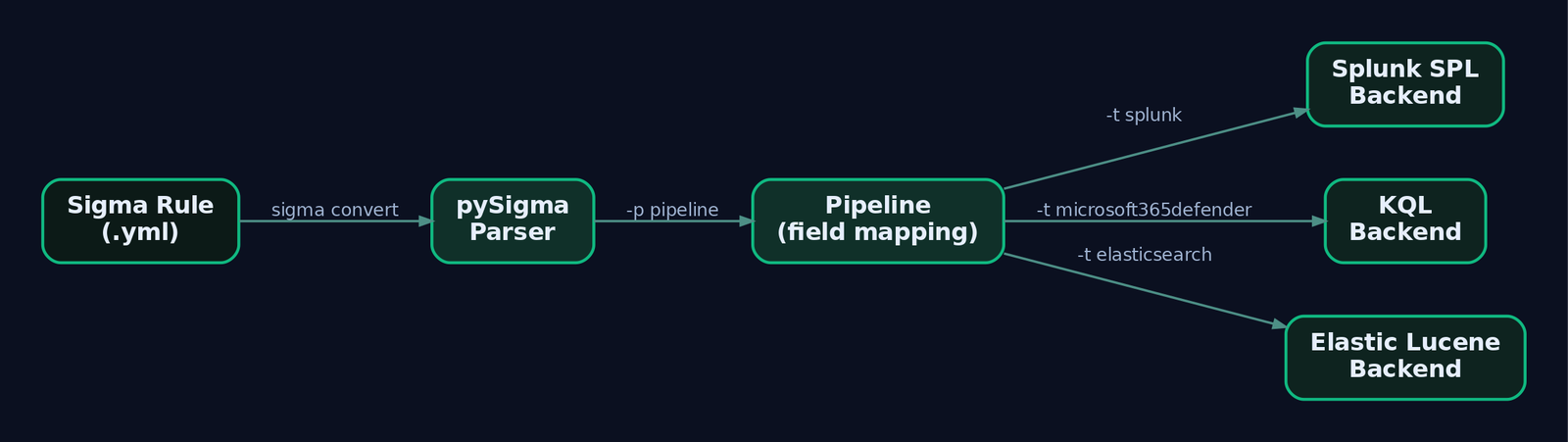
Ignore sigmac. The legacy toolchain is unmaintained and was replaced by pySigma (the library) and sigma-cli (the command-line tool). pySigma parses and converts rules; it stays deliberately slim by pushing SIEM-specific logic into separate backend and pipeline plugins.
- Backends are the drivers that emit a specific query language.
- Pipelines apply environment-specific transforms: field mapping, logsource mapping, index routing.
Python 3.10 or later is required.
pip install sigma-cli
sigma list backends
sigma list pipelines
sigma plugin list
Backends install individually as plugins so you only pull what you need:
| Backend Package | Target Language / SIEM |
|---|---|
pysigma-backend-splunk | Splunk SPL |
pysigma-backend-elasticsearch | Elastic Lucene / EQL |
pysigma-backend-microsoft365defender | KQL (Sentinel / Defender XDR) |
pysigma-backend-qradar-aql | IBM QRadar AQL |
pysigma-backend-opensearch | OpenSearch |
Package names occasionally shift between minor releases, so confirm the exact target name with sigma list backends after install before you script anything around it.
7. Lab: From TTP to Telemetry
The lab target is a controlled Windows endpoint, not a CVE. The TTP is PowerShell encoded-command execution (T1059.001), a universally understood behavior that exercises the full Sigma workflow end to end. Run the offensive step only on your own lab VM.
Lab setup:
- Analyst host: Kali or Windows with Python 3.10+,
sigma-cli, and the backend plugins. - Victim VM: Windows 10/11 with Sysmon v15+ (SwiftOnSecurity or Olaf Hartong config).
- Detection engine: Splunk Free locally, a Sentinel trial, or offline with Zircolite against exported EVTX.
Step 1: Generate telemetry on the lab VM
# Lab VM only - simulate an attacker's encoded PowerShell
$cmd = "Write-Output 'GenXCyber Lab - T1059.001 simulation'"
$encoded = [Convert]::ToBase64String([Text.Encoding]::Unicode.GetBytes($cmd))
powershell.exe -EncodedCommand $encoded
This produces a Sysmon Event ID 1 with CommandLine containing -EncodedCommand and a Base64 blob.
Step 2: Export the EVTX
Export Microsoft-Windows-Sysmon/Operational from Event Viewer (or with wevtutil epl) for offline analysis.
Step 3: Write the rule
title: PowerShell Encoded Command Execution
id: 3b6a2f8e-4c1d-4a7e-b9f0-2e5c3d1a0f8b
status: test
description: Detects PowerShell invoked with the -EncodedCommand switch, a common
  technique used to obfuscate payload delivery.
author: GenXCyber Lab
date: 2024-01-01
tags:
  - attack.execution
  - attack.t1059.001
  - attack.defense_evasion
  - attack.t1027
references:
  - https://attack.mitre.org/techniques/T1059/001/
logsource:
  category: process_creation
  product: windows
detection:
  selection_img:
    Image|endswith:
      - '\powershell.exe'
      - '\pwsh.exe'
  selection_cli:
    CommandLine|windash|contains:
      - '-EncodedCommand'
      - '-EncodedC'
      - '-enc '
  condition: selection_img and selection_cli
falsepositives:
  - Legitimate administrative scripts using encoded commands
  - Software deployment tooling (SCCM, PDQ)
level: medium
Note the deliberate choices: |endswith anchors on the binary name so a parent-process path never triggers it; |windash|contains catches both -enc and /enc families; the two selection groups are ANDed; and the tags carry the correct sub-technique attack.t1059.001.
Step 4: Validate before converting
sigma check rules/powershell_encoded_command.yml
sigma check runs validators including logsource_valid (recognized logsource fields), field_name_condition_valid (condition references defined selections), and regex checks. Fix validation errors here, not after you have deployed a broken query.
8. Converting the Rule to SIEM Queries
The command structure is consistent across every target:
sigma convert -t <backend> -p <pipeline> [-p <pipeline2>] -f <format> <file_or_dir>
Splunk SPL
pip install pysigma-backend-splunk
sigma convert -t splunk -p splunk_windows_sysmon -f default rules/powershell_encoded_command.yml
Approximate output:
(Image IN ("*\\powershell.exe","*\\pwsh.exe") AND (CommandLine IN ("*-EncodedCommand*","*-EncodedC*","*-enc *") OR CommandLine IN ("*/EncodedCommand*","*/EncodedC*","*/enc *")))
The windash expansion is visible: the backend emitted both hyphen and slash variants for you.
KQL for Microsoft Sentinel / Defender XDR
pip install pysigma-backend-microsoft365defender
sigma convert -t microsoft365defender -p microsoft_365_defender rules/powershell_encoded_command.yml
Elastic Lucene
pip install pysigma-backend-elasticsearch
sigma convert -t elasticsearch -p ecs_windows -f lucene rules/powershell_encoded_command.yml
The pipeline is the load-bearing argument. ecs_windows maps Sigma’s abstract Image and CommandLine fields onto Elastic Common Schema (process.executable, process.command_line). Pick the wrong pipeline and the query compiles cleanly against field names your data does not have, matching nothing. Read the output every time.
Step 8b: Confirm offline with Zircolite
pip install zircolite
zircolite --evtx /path/to/Sysmon.evtx --ruleset rules/powershell_encoded_command.yml
Zircolite runs the Sigma rule directly against the EVTX you exported in Step 2, closing the loop: your generated telemetry should light up as a detection. Hayabusa and Chainsaw do the same job with native Sigma support and are worth having in the kit.
9. MITRE ATT&CK Tagging and Coverage Mapping
Tags are namespaced with the dot as separator, and the attack namespace maps rules to the ATT&CK framework. Get the format exactly right or Navigator integration breaks.
- Technique:
attack.t1059(no leading zero padding for the four-digit ID). - Sub-technique:
attack.t1059.001. - Tactic:
attack.execution,attack.defense_evasion,attack.persistence.
Correct tags let you export a coverage layer into the ATT&CK Navigator and see, at a glance, which techniques your rule set actually covers versus the emulation plan you are running. That gap analysis is the whole point of purple teaming: run the adversary’s TTPs, then confirm which ones your Sigma rules caught and which slipped through untagged.
| Technique | MITRE ID | Detection |
|---|---|---|
| Command and Scripting Interpreter: PowerShell | T1059.001 | Sysmon EID 1 CommandLine with -EncodedCommand; PowerShell 4104 |
| Obfuscated Files or Information | T1027 | Base64 blobs in command line; decoded script block content |
| Command Obfuscation | T1027.010 | windash and encoding permutations in CommandLine |
| System Binary Proxy Execution: Rundll32 | T1218.011 | Sysmon EID 1 Image|endswith: \rundll32.exe |
| Impair Defenses: Disable/Modify Tools | T1562.001 | AMSI bypass strings; correlated 4104 events |
| Ingress Tool Transfer | T1105 | Network connection (EID 3) following encoded execution |
Tooling glue is worth knowing: Atomic Threat Coverage automatically links Sigma rules to ATT&CK techniques, Atomic Red Team tests, and response playbooks, which makes an emulation-to-detection workflow far less manual.
10. Sigma Correlation Rules (v2.0)
A single encoded-PowerShell event is medium severity. Five of them from one host in five minutes is an incident. The v2.0 correlation specification links several events into more sophisticated detections. Four types exist:
| Correlation Type | Fires On |
|---|---|
event_count | Number of matching events crosses a threshold. |
value_count | Number of distinct field values crosses a threshold. |
temporal | Multiple different rules match within a timespan. |
temporal_ordered | Multiple rules match in a specified order within a timespan. |
Here is a value_count-style correlation that references the base rule by its name and fires when one host racks up five or more encoded-command executions inside five minutes:
title: Repeated PowerShell Encoded Command Execution
name: ps_encoded_exec
type: correlation
rules:
  powershell_encoded: powershell_encoded_command   # references base rule by 'name'
group-by:
  - ComputerName
timespan: 5m
condition:
  gte: 5
level: high
Correlation support varies by backend. temporal_ordered in particular is not implemented everywhere yet, so verify your target backend handles the correlation type before you promise cross-SIEM coverage. Verify, do not assume.
11. Common Attacker Techniques This Workflow Catches
The encoded-command pattern is one instance of a broad family of command-line abuse that Sigma is unusually good at catching, because process-creation logs are rich and consistent.
| Technique | Description |
|---|---|
| Encoded command execution | powershell -EncodedCommand <base64> to hide the payload string. |
| Download cradles | IEX (New-Object Net.WebClient).DownloadString(...) staged over HTTP. |
| AMSI bypass | In-memory patching of AmsiScanBuffer before running malicious script. |
| LOLBin proxy execution | rundll32.exe, regsvr32.exe, mshta.exe running attacker code. |
| Constrained-mode evasion | Downgrade or bypass of PowerShell Constrained Language Mode. |
Each maps to at least one ATT&CK technique from section 9, and each is expressible as a Sigma selection over Image, CommandLine, and ParentImage.
12. Defensive Strategies & Detection
Sigma only catches what your logging exposes. Get the telemetry right first, then the rules have something to match.
Sysmon Event IDs
| Event ID | Description |
|---|---|
1 | Process Create (Image, CommandLine, ParentImage, Hashes, User). |
3 | Network Connection. |
7 | Image Loaded. |
10 | Process Access. |
11 | File Create. |
13 | Registry value set. |
22 | DNS Query. |
Windows and ETW sources
- Security Event ID 4688 for process creation, but only after enabling command-line capture.
- PowerShell Operational log: Event ID 4104 (Script Block Logging, which records the decoded content) and 4103 (Module Logging).
- ETW provider
Microsoft-Windows-PowerShell(GUID{A0C1853B-5C40-4B15-8766-3CF1C58F985A}) backs the 4103/4104 events;Microsoft-Windows-Sysmonis{5770385F-C22A-43E0-BF4C-06F5698FFBD9}.
Hardening knobs
# Script Block Logging (Event ID 4104) - captures decoded PowerShell
New-ItemProperty -Path "HKLM:\SOFTWARE\Policies\Microsoft\Windows\PowerShell\ScriptBlockLogging" `
  -Name "EnableScriptBlockLogging" -Value 1 -PropertyType DWord -Force

# Command-line auditing for Security 4688
AuditPol /set /subcategory:"Process Creation" /success:enable
Also deploy Sysmon with a curated config and consider Constrained Language Mode in sensitive environments. Script Block Logging is the single highest-value control here because it defeats the encoding entirely: 4104 logs the decoded script, so the Base64 blob stops being a blind spot.
Sigma detection sketch (the deployable form)
title: PowerShell Encoded Command Execution
logsource:
  category: process_creation
  product: windows
detection:
  selection_img:
    Image|endswith:
      - '\powershell.exe'
      - '\pwsh.exe'
  selection_cli:
    CommandLine|windash|contains:
      - '-EncodedCommand'
      - '-enc '
  filter_legit:
    ParentImage|endswith: '\ccmexec.exe'   # SCCM known-good, tune per environment
  condition: selection_img and selection_cli and not filter_legit
level: medium
Start at level: medium and status: test. Promote to high and stable only after the filter_legit group has been tuned against a week of real data. Document every exclusion in the falsepositives field so the next analyst knows why it is there.
13. Tools for Sigma Analysis
| Tool | Description | Link |
|---|---|---|
| sigma-cli | Convert, validate, and list backends/pipelines | github.com/SigmaHQ/sigma-cli |
| pySigma | Conversion library underpinning sigma-cli | github.com/SigmaHQ/pySigma |
| Zircolite | Standalone Sigma engine for EVTX/JSON logs | github.com/wagga40/Zircolite |
| Hayabusa | Fast Windows EVTX Sigma scanner | github.com/Yamato-Security/hayabusa |
| Chainsaw | DFIR EVTX hunting with Sigma support | github.com/WithSecureLabs/chainsaw |
| Sysmon | Rich Windows telemetry source | learn.microsoft.com/sysinternals |
| ATT&CK Navigator | Coverage-layer visualization | mitre-attack.github.io/attack-navigator |
| SigmaHQ rule repo | Community rule baseline | github.com/SigmaHQ/sigma |
14. Summary
- Sigma is the vendor-agnostic detection language: write once in YAML, compile to any SIEM query. It is to logs what Snort is to packets and YARA is to files.
- Rule logic lives in
logsource(what to search) anddetection(named selections plus acondition), where YAML lists are OR and dictionaries are AND. - Modifiers like
contains,endswith, andwindashmake rules precise; respect the chaining rules, especially never followingcontainswithbase64. - Use the modern
sigma-cliandpySigmatoolchain with per-target backends and pipelines. Ignore the unmaintainedsigmac. Always read the compiled query before deploying. - Tag rules correctly (
attack.t1059.001,attack.execution) so coverage maps into ATT&CK Navigator, and lean on v2.0 correlations plus Script Block Logging (Event ID 4104) to turn single events into real detections.
Related Tutorials
- Introduction to MITRE ATT&CK: Structure, Tactics, Techniques, and Sub-Techniques
- APT Profiling: How to Build a Comprehensive Adversary Profile from Open-Source Intelligence
- Mapping CTI Reports to ATT&CK TTPs: A Step-by-Step Methodology
- Cyber Threat Intelligence (CTI) Fundamentals: Sources, Types, and the Intelligence Lifecycle
- Navigating ATT&CK Navigator: Building, Annotating, and Exporting Technique Layers
References
Get new drops in your inbox
Windows internals, exploit dev, and red-team write-ups - no spam, unsubscribe anytime.