Atomic Red Team Deep Dive: Writing Custom Atomics and Contributing to the Library
Your purple-team retro just ended. Someone projected the ATT&CK Navigator layer, pointed at a half-empty column under Persistence, and asked the question that always lands awkwardly: do we actually detect this? Nobody’s sure. The closest thing to a test was a Cobalt Strike run six months ago that nobody bothered to map. That gap is exactly what Atomic Red Team is built to close – a focused, scriptable, ATT&CK-mapped procedure you can fire on demand, watch your sensors react to, and re-run after every rule change. The catch is that the upstream library, large as it is (over 1,070 procedures across 12 of the 14 ATT&CK tactics), will never cover your environment’s exact gap. You have to write atomics.
This walkthrough takes you end to end: schema, lab, a working custom atomic for T1547.001 (Registry Run Keys), the detection rule that catches it, and the pull request that gets it merged upstream.
1. Why Atomics Beat “Run This Tool” Demos
Three rules separate a good atomic from a bad one, and they’re the same three rules the maintainers enforce at review:
- One technique, one self-contained test. No multi-stage chains. If you want a chain, you write three atomics and orchestrate them with
Invoke-AtomicTestcalls. - Fully automated where the technique permits it. A
manualexecutor is allowed (and sometimes the only honest option), but the framework rewards atomics that run, prove themselves, and clean up without a human in the loop. - Cleanup is part of the contract. If your test plants a Run key, it must remove that Run key. The framework explicitly requires that cleanup be idempotent – students who skip this find their first PR review comment is “please pipe
2>nulon thatreg delete.”
The reward for following the rules: every atomic is replayable. Run it Monday to validate a rule; run it Friday after the EDR update; run it during a tabletop. That’s the actual product – not the YAML, the repeatability.
2. Anatomy of the YAML Schema
The schema lives at redcanaryco/atomic-red-team/wiki/YAML-Schema and is validated by atomic_red_team.rb. Memorize these top-level keys; everything else is window dressing.
| YAML Key | Type | Purpose |
|---|---|---|
attack_technique | string | ATT&CK ID, e.g. T1547.001. Top-level, required. |
display_name | string | Human-readable name as defined by ATT&CK. |
atomic_tests | array | Array of individual test objects. |
atomic_tests[n].name | string | Short name of this specific test. |
atomic_tests[n].description | string | What the test does and why. |
atomic_tests[n].auto_generated_guid | string (UUIDv4) | Unique test ID. Do not add it yourself – GitHub Actions injects it on PR. |
atomic_tests[n].supported_platforms | array (enum) | windows, macos, linux, office-365, azure-ad, google-workspace, saas, iaas, containers, iaas:gcp, iaas:azure, iaas:aws |
atomic_tests[n].input_arguments | object | Named parameters; each has description, type, default. |
atomic_tests[n].executor | object | How the test runs. |
atomic_tests[n].dependencies | array | Pre-requisite checks (nullable). |
atomic_tests[n].dependency_executor_name | string | Executor for prereq commands; defaults to the test executor. |
There are exactly five valid executor names. Get them wrong and validation fails immediately:
Executor name | Maps To | Use For |
|---|---|---|
command_prompt | CommandExecutor | cmd.exe one-liners, reg.exe, classic native Windows tools |
powershell | CommandExecutor | PowerShell cmdlets, .NET calls, anything pwsh.exe can run |
bash | CommandExecutor | Linux/macOS shell |
sh | CommandExecutor | POSIX shell |
manual | ManualExecutor | Steps that genuinely cannot be automated; uses a free-form steps: string instead of command: |
For a CommandExecutor, the object also carries command, cleanup_command, and elevation_required (a bool). Arguments interpolate into commands with #{argument_name} – that exact syntax, no Python-style braces, no PowerShell $().
The Markdown file beside every YAML (T1547.001.md) is auto-generated on every commit from the YAML plus ATT&CK CTI metadata. Hand-editing it is a wasted commit; the next CI run overwrites you.
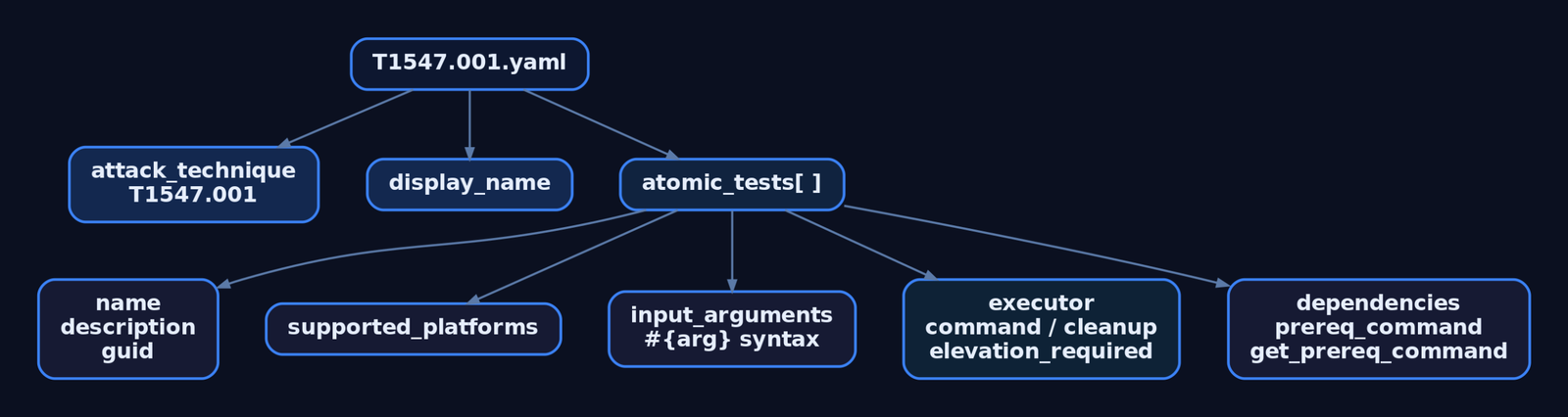
3. Lab Setup
Atomics are designed to behave like malware. The folder gets flagged by AV constantly, and that is by design. Two ground rules before you touch a keyboard:
It is recommended to set up a test machine for atomic test execution that is similar to the build in your environment. Never run atomics on production systems. The atomics folder contains many files likely to trigger AV alerts on the endpoint – the install directory should be allowlisted so files are not quarantined or removed.
My lab for this tutorial: a snapshotted Windows 11 VM on an isolated vSwitch, Sysmon installed with the SwiftOnSecurity config (Olaf Hartong’s sysmon-modular is the other respectable choice), and Wazuh forwarding to a SIEM VM on the same isolated segment. No production AD, no internet routing.
Install the framework from the PowerShell Gallery:
# Run as the user who will execute tests (not necessarily Administrator)
Install-Module -Name invoke-atomicredteam, powershell-yaml -Scope CurrentUser -Force

# Clone the atomics into a known path
git clone https://github.com/redcanaryco/atomic-red-team.git C:\AtomicRedTeam

# Pin a default atomics path so you never have to type -PathToAtomicsFolder again
$PSDefaultParameterValues = @{
  "Invoke-AtomicTest:PathToAtomicsFolder" = "C:\AtomicRedTeam\atomics"
}

# Verify
Import-Module Invoke-AtomicRedTeam
Invoke-AtomicTest T1547.001 -ShowDetails | Select-Object -First 20
Add C:\AtomicRedTeam to Defender exclusions before doing anything else. The first time I skipped that step, Defender quarantined three payloads mid-run and the framework just returned cryptic file-not-found errors. Twenty minutes wasted before I checked the Defender history.
4. Writing the Atomic by Hand (T1547.001 – HKCU Run Key)
The chosen technique is T1547.001 – Boot or Logon Autostart Execution: Registry Run Keys / Startup Folder. It’s commonly exercised, has clear Sysmon coverage, and leaves no destructive side effects in the lab. The existing YAML at atomics/T1547.001/T1547.001.yaml already has tests; we’ll add a new one for an HKCU (per-user) Run key, which is less covered than the HKLM variants.
Open the file. Find the end of the existing atomic_tests: array. Append a new list item:
  - name: Add HKCU Run Key for Persistence (GenXCyber Lab)
    description: |
      Adds a registry value under HKCU\Software\Microsoft\Windows\CurrentVersion\Run
      to simulate adversary persistence via a user-level Run key. The payload is a
      harmless echo command that writes a marker file to disk on next logon.
    supported_platforms:
      - windows
    input_arguments:
      reg_key_name:
        description: Name of the registry value to create
        type: String
        default: GenXCyberPersist
      payload_command:
        description: Command to place in the Run key value
        type: String
        default: 'cmd.exe /c echo GenXCyber-Atomic-Test >> C:\Temp\art_persist.txt'
    executor:
      name: command_prompt
      elevation_required: false
      command: |
        reg add "HKCU\Software\Microsoft\Windows\CurrentVersion\Run" /v "#{reg_key_name}" /t REG_SZ /d "#{payload_command}" /f
      cleanup_command: |
        reg delete "HKCU\Software\Microsoft\Windows\CurrentVersion\Run" /v "#{reg_key_name}" /f 2>nul
A few things that will bite you if you’re new to this:
- No
auto_generated_guid. The maintainers’ GitHub Action injects it on PR. Adding one by hand triggers a validation error. 2>nulon the cleanup. Required. Run cleanup twice in a row – second run should exit cleanly, not error. In PowerShell executors you’d use-ErrorAction Ignoreinstead.- Indentation is two spaces, list items use
-. YAML will accept tabs in some parsers and reject them in others; the Ruby validator is strict. If you see a parse error and your file “looks fine,” paste it into a YAML linter before anything else. I lost an hour once to a single trailing space after a|block scalar marker. elevation_required: falseis honest here – HKCU writes don’t need admin. Lying about elevation means the test fails when launched from a normal shell, and reviewers will catch it.
Validate offline before doing anything else:
# From the atomic-red-team repo root (requires Ruby + bundler)
ruby bin/validate-atomics.rb atomics/T1547.001/T1547.001.yaml
If it prints nothing, you’re good. If it complains, fix and re-run until silent.
5. The PowerShell Alternative: New-Atomic* Functions
If raw YAML annoys you, Invoke-AtomicRedTeam ships builder cmdlets that produce a PowerShell object you pipe straight to ConvertTo-Yaml. The output is schema-correct by construction, which is the real selling point – you cannot misspell supported_platforms because the parameter is -SupportedPlatforms.
# Build the executor
$executor = New-AtomicTestExecutor -ExecutorType command_prompt `
  -Command 'reg add "HKCU\Software\Microsoft\Windows\CurrentVersion\Run" /v "#{reg_key_name}" /t REG_SZ /d "#{payload_command}" /f' `
  -CleanupCommand 'reg delete "HKCU\Software\Microsoft\Windows\CurrentVersion\Run" /v "#{reg_key_name}" /f 2>nul' `
  -ElevationRequired $false

# Build input arguments (hashtable of name -> InputArgument object)
$inputArgs = @{
  reg_key_name    = New-AtomicTestInputArgument -Description 'Registry value name' `
                       -InputType String -Default 'GenXCyberPersist'
  payload_command = New-AtomicTestInputArgument -Description 'Command stored in Run key' `
                       -InputType String -Default 'cmd.exe /c echo GenXCyber-Atomic-Test >> C:\Temp\art_persist.txt'
}

# Build the test
$atomicTest = New-AtomicTest -Name 'Add HKCU Run Key for Persistence (GenXCyber Lab)' `
  -Description 'Simulates HKCU Run key persistence with a harmless payload.' `
  -SupportedPlatforms @('windows') `
  -InputArguments $inputArgs `
  -Executor $executor

# Emit YAML
New-AtomicTechnique -AttackTechnique T1547.001 `
  -DisplayName 'Boot or Logon Autostart Execution: Registry Run Keys / Startup Folder' `
  -AtomicTests @($atomicTest) | ConvertTo-Yaml | Out-File T1547.001.draft.yaml -Encoding utf8
When to use this path: you’re authoring a batch of tests programmatically (e.g., generating one atomic per LOLBAS binary). When to stick with hand-YAML: a single test where you want full control over comments and block-scalar formatting. Both round-trip the same schema, so reviewer-side it makes no difference.
6. Dependencies and the ExternalPayloads Folder
Most lab atomics need nothing. The interesting ones (Mimikatz, BloodHound collectors, custom binaries) need dependencies. The schema gives you three sub-keys per dependency:
| Sub-Key | Purpose |
|---|---|
description | Plain-English statement of the prereq |
prereq_command | Returns exit code 0 if the prereq is satisfied (a check) |
get_prereq_command | Installs / fetches the prereq |
Two contribution rules you cannot skip:
- Do not commit binaries that have their own GitHub repos. Reference them by permanent commit-SHA URLs so the payload can’t shift under you.
- External payloads download into the
ExternalPayloadsfolder, a sibling ofatomics/. Code yourprereq_commandto check for the file there.
A representative dependency block:
    dependency_executor_name: powershell
    dependencies:
      - description: |
          The payload file must exist on disk at #{payload_path}.
        prereq_command: |
          if (Test-Path "#{payload_path}") { exit 0 } else { exit 1 }
        get_prereq_command: |
          New-Item -ItemType Directory -Force -Path (Split-Path "#{payload_path}") | Out-Null
          Invoke-WebRequest -Uri "https://raw.githubusercontent.com/<org>/<repo>/<sha>/payload.ps1" `
                            -OutFile "#{payload_path}" -UseBasicParsing
The workflow on the runner side:
Invoke-AtomicTest T1547.001 -TestNames "Add HKCU Run Key for Persistence (GenXCyber Lab)" -CheckPrereqs
Invoke-AtomicTest T1547.001 -TestNames "Add HKCU Run Key for Persistence (GenXCyber Lab)" -GetPrereqs
For our HKCU test there are no dependencies – reg.exe ships with Windows. Show your maturity by including a dependencies: block when one is actually needed, and leaving it off when it isn’t. Don’t pad atomics with no-op dependency stubs; reviewers strip them.
7. Executing the Test and Capturing Telemetry
Now run it. The framework’s three-step rhythm – show, execute, clean – is muscle memory after a week:
# 1. Dry-run: confirm the framework parsed your YAML and shows the expected command
Invoke-AtomicTest T1547.001 -ShowDetails | Select-String -Pattern "GenXCyber" -Context 0,8

# 2. Identify the test number for the new atomic
Invoke-AtomicTest T1547.001 -ShowDetailsBrief

# 3. Execute (assume your test came out as -TestNumbers 12; adjust to your output)
Invoke-AtomicTest T1547.001 -TestNumbers 12

# 4. Verify the artifact is on disk
Get-ItemProperty "HKCU:\Software\Microsoft\Windows\CurrentVersion\Run" -Name GenXCyberPersist

# 5. Clean up — this must run silently
Invoke-AtomicTest T1547.001 -TestNumbers 12 -Cleanup

# 6. Run cleanup again. It must still exit cleanly. If it errors, your `2>nul` is missing.
Invoke-AtomicTest T1547.001 -TestNumbers 12 -Cleanup
By default the framework drops an Invoke-AtomicTest-ExecutionLog.csv in $env:TEMP containing test name, number, execution time, user, and hostname. That CSV is useful for spreadsheet review but light on detail. For full command input and output capture, switch on the Attire logger; for SIEM-visible execution events, use the Windows Event Log logger:
# Attire logger — captures stdout/stderr per test
$PSDefaultParameterValues["Invoke-AtomicTest:LoggingModule"]   = "Attire-ExecutionLogger"
$PSDefaultParameterValues["Invoke-AtomicTest:ExecutionLogPath"] = "C:\AtomicRedTeam\logs\attire.json"

# Or: write directly to Windows Event Log so your SIEM picks it up
$PSDefaultParameterValues["Invoke-AtomicTest:LoggingModule"] = "WinEvent-ExecutionLogger"

Invoke-AtomicTest T1547.001 -TestNumbers 12
The framework only logs execution runs – -ShowDetails, -CheckPrereqs, -GetPrereqs, and -Cleanup are deliberately not logged. That distinction matters when you’re correlating SIEM alerts with the CSV, and it’s the kind of footnote that bites you during a purple-team debrief if you don’t already know it.

8. The Detection Feedback Loop: Sysmon and Sigma
This is the part most authors skip and where the actual value is. A custom atomic without a paired detection rule is half the deliverable.
Trigger the test, then mine Sysmon. The relevant event is Event ID 13 (Registry value set):
Get-WinEvent -LogName "Microsoft-Windows-Sysmon/Operational" -MaxEvents 200 |
  Where-Object { $_.Id -eq 13 -and $_.Message -match 'CurrentVersion\\Run' } |
  Select-Object TimeCreated, @{n='Target';e={ ($_.Message -split "`n" | Select-String 'TargetObject').Line }},
                              @{n='Details';e={ ($_.Message -split "`n" | Select-String 'Details').Line }} |
  Format-List
You should see TargetObject matching \REGISTRY\USER\<SID>\Software\Microsoft\Windows\CurrentVersion\Run\GenXCyberPersist and Details containing the cmd.exe /c echo ... payload. That telemetry is the ground truth – every detection rule you write is a query against fields you can literally see here.
Pair it with a Sigma rule:
title: Suspicious HKCU Run Key Value Set
id: 1e6c4f7a-9c40-4b29-8c2d-c4f6a51a7c92
status: experimental
description: Detects registry value creation under HKCU Run keys, indicative of user-level persistence
references:
  - https://attack.mitre.org/techniques/T1547/001/
tags:
  - attack.persistence
  - attack.t1547.001
logsource:
  product: windows
  service: sysmon
detection:
  selection:
    EventID: 13
    TargetObject|contains:
      - '\Software\Microsoft\Windows\CurrentVersion\Run\'
      - '\Software\Microsoft\Windows\CurrentVersion\RunOnce\'
  filter_legitimate:
    Image|endswith:
      - '\msiexec.exe'
      - '\setup.exe'
  condition: selection and not filter_legitimate
falsepositives:
  - Software installation
  - Group Policy application
level: medium
Convert it to your SIEM’s query language with pysigma and the appropriate backend (pysigma-backend-splunk, pysigma-backend-elasticsearch, etc.), deploy, then re-run the atomic. If your SIEM doesn’t fire, the rule is wrong, the ingestion is wrong, or the parser is dropping TargetObject. The atomic exists precisely to differentiate those three failure modes – that’s the feedback loop.
A note that experience teaches: the filter_legitimate block above will swallow msiexec.exe writes, which is usually what you want, but adversaries do abuse msiexec for execution. Build your allowlist iteratively against your environment’s actual baseline, not against an assumed one.
9. Contributing Upstream: Fork → PR
Once the atomic runs cleanly and your detection rule fires, you can submit it. The workflow is standard fork-and-PR with a few project-specific rules:
# Fork redcanaryco/atomic-red-team on GitHub, then:
git clone https://github.com/<yourfork>/atomic-red-team.git
cd atomic-red-team
git remote add upstream https://github.com/redcanaryco/atomic-red-team.git
git fetch upstream
git checkout -b feat/T1547.001-hkcu-run-key upstream/master

# Edit atomics/T1547.001/T1547.001.yaml (append your new test block)
# Validate locally one more time
ruby bin/validate-atomics.rb atomics/T1547.001/T1547.001.yaml

git add atomics/T1547.001/T1547.001.yaml
git commit -m "feat(T1547.001): add HKCU Run key persistence atomic"
git push origin feat/T1547.001-hkcu-run-key

# Open the PR against redcanaryco/atomic-red-team:master via GitHub UI
What happens after you hit “Create Pull Request”:
- GitHub Actions validates the YAML against the same schema your local Ruby script ran.
- The Action injects your
auto_generated_guidas a new commit on the PR. Do not preempt it. - The Action regenerates
T1547.001.mdfrom the YAML plus ATT&CK CTI. Do not stage.mdchanges. - The Action updates
atomics/Indexes/with the new test entry. Do not edit indexes by hand.
Common reviewer asks:
- Cleanup runs twice without error (verify with
-Cleanuptwice locally before you push). descriptionactually explains both what and why.- No hard-coded paths under
C:\Users\<yourname>\.... Parametrize viainput_arguments. - Permanent SHA-pinned URLs for any external payloads referenced in
get_prereq_command. - No deletion of dependencies in cleanup commands.
A weekend of patient revision is normal. The maintainers are responsive but exacting; treat the PR conversation as detection-engineering peer review, because that’s what it is.

10. Defensive Strategies & Detection
The atomic itself is the test. The detection stack around it is what you’re actually validating.
| Sysmon Event ID | What to Look For |
|---|---|
| 1 – Process Create | reg.exe spawned by cmd.exe/powershell.exe under a user context; CommandLine contains CurrentVersion\Run |
| 12 – Registry Object Added/Deleted | Key add/delete under Run/RunOnce paths |
| 13 – Registry Value Set | TargetObject matches \Software\Microsoft\Windows\CurrentVersion\Run\*; Details carries the persisted command |
ETW providers that complement Sysmon:
Microsoft-Windows-Registry– kernel-level registry monitoring; useful when Sysmon is tampered with.Microsoft-Windows-Security-Auditing– enable Audit Registry under Object Access for native event log coverage. Modifications surface as Event ID 4657 (A registry value was modified).
Audit policy commands:
AuditPol /set /subcategory:"Registry"         /success:enable /failure:enable
AuditPol /set /subcategory:"Process Creation" /success:enable
Hardening:
- AppLocker or WDAC rules that block unauthorized use of
reg.exefrom interactive user sessions. - EDR continuous monitoring of Run key contents; corroborate with scheduled
Get-ItemPropertyaudits againstHKCU:\...\RunandHKLM:\...\Run. - Allowlist
C:\AtomicRedTeam\in Defender on the test VM and never replicate that exclusion onto production endpoints. Reviewers see exclusion creep in real engagements all the time.
11. Tools for Atomic Authoring and Analysis
| Tool | Use | Link |
|---|---|---|
Invoke-AtomicRedTeam | PowerShell execution framework; New-Atomic* builders | github.com/redcanaryco/invoke-atomicredteam |
atomic-red-team repo | Tests library + bin/validate-atomics.rb schema validator | github.com/redcanaryco/atomic-red-team |
| Sysmon + SwiftOnSecurity config | Endpoint telemetry for validating detections | github.com/SwiftOnSecurity/sysmon-config |
sysmon-modular (Olaf Hartong) | Modular Sysmon configs mapped to ATT&CK | github.com/olafhartong/sysmon-modular |
| ATT&CK Navigator | Gap analysis against existing coverage | mitre-attack.github.io/attack-navigator |
pysigma + backends | Convert Sigma rules to SIEM queries | github.com/SigmaHQ/pySigma |
| Process Monitor | Trace reg.exe calls during atomic development | learn.microsoft.com/sysinternals |
| Wazuh / Splunk / Elastic | SIEM for the validation loop | wazuh.com / splunk.com / elastic.co |
12. MITRE ATT&CK Mapping
| Technique | MITRE ID | Detection |
|---|---|---|
| Boot or Logon Autostart Execution: Registry Run Keys / Startup Folder | T1547.001 | Sysmon EID 13 on Run/RunOnce paths; Windows EID 4657 |
| Command and Scripting Interpreter: Windows Command Shell | T1059.003 | Sysmon EID 1 on cmd.exe with /c; the command_prompt executor in this atomic |
| Command and Scripting Interpreter: PowerShell | T1059.001 | Sysmon EID 1 + Script Block Logging (EID 4104); Invoke-AtomicRedTeam itself uses PowerShell |
| Impair Defenses: Disable or Modify Tools | T1562.001 | AV exclusion of the AtomicRedTeam folder; alert on Defender exclusion policy changes |
| Hide Artifacts: NTFS Alternate Data Streams | T1564.003 | Referenced as an example of atomics that ship payloads under src/ and bin/ |
Summary
- A good atomic is one technique, one self-contained test, fully automated, with idempotent cleanup. That contract is what makes the library replayable, and replayability is the product.
- The YAML schema is small and strict. Learn the five executor names, the
#{arg}interpolation syntax, and theauto_generated_guidrule (never set by hand) and most validation errors disappear. Invoke-AtomicRedTeamand theNew-Atomic*cmdlets let you skip raw YAML entirely. Use them when generating tests programmatically; stick with hand-YAML for one-offs.- An atomic without a paired detection rule is half the deliverable. Sysmon EID 13 plus a Sigma rule for Run-key writes is the minimum viable feedback loop for T1547.001.
- Contributions go upstream via fork → PR. GitHub Actions handles GUID generation, Markdown regeneration, and indexing – your only job is a clean YAML and a clean cleanup.
Related Tutorials
- Building a Red Team Lab: Infrastructure, VMs, and C2 Setup
- PE File Format Deep Dive
- Shellcode Encoders: XOR Encoding, Custom Decoders, and Avoiding Bad Chars
- APT Profiling: How to Build a Comprehensive Adversary Profile from Open-Source Intelligence
- Position-Independent Code: Writing PIC Shellcode Without Hardcoded Addresses
References
Get new drops in your inbox
Windows internals, exploit dev, and red-team write-ups - no spam, unsubscribe anytime.