OSINT for People and Credentials: LinkedIn, Breach Data, and Email Harvesting
Objective: Understand how adversaries assemble a pre-engagement targeting package – employee identities, email addresses, and exposed credentials – from public sources such as LinkedIn, breach databases, and email-discovery APIs, and learn the matching detection and hardening guidance that lets defenders run the same playbook against their own organization.
1. What OSINT Reconnaissance Is (and Isn’t)
Open-Source Intelligence (OSINT) is the collection and correlation of information from publicly available sources. In a red team context it forms the Reconnaissance phase that precedes any packet sent to the target.
The critical distinction is passive versus active:
| Concept | What It Actually Is |
|---|---|
| Passive OSINT | Querying third-party databases, search engines, and public records. No packet ever reaches the target, so the target cannot detect you. |
| Active recon boundary | Direct interaction with target infrastructure – DNS zone transfers, port scans, banner grabbing. The target can log it. |
| Email format inference | Deriving a standard format from confirmed samples, then extrapolating across all discovered names. |
| Credential stuffing pipeline | Cross-referencing leaked credential databases against a domain to find reusable passwords for spraying or stuffing. |
Everything in this tutorial is passive or queries third-party services – never the target. Even so, all activity must sit inside a signed rules of engagement (RoE) and scope document. You only run breach-domain searches and authenticated harvesting against domains you own or are explicitly authorized to test. Storing breach data carries legal weight; handle it like the regulated material it is.
2. The Adversary’s Goal: Building a Targeting Package
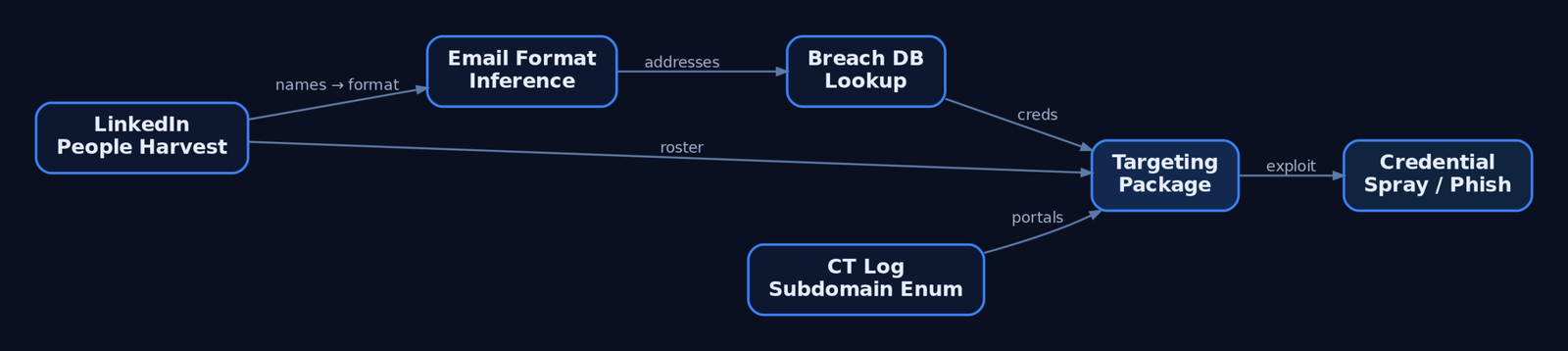
The output of this phase is a structured targeting package. A complete one contains:
- Employee list – names, titles, departments, reporting structure.
- Email addresses – confirmed or inferred from the corporate format.
- Exposed credentials – breach hits tied to those addresses.
- Tech stack – EDR, VPN, and cloud platforms gleaned from job postings.
- Attack surface – subdomains and employee-facing portals.
This maps directly to ATT&CK Reconnaissance (TA0043): gathering identity information (T1589), org information (T1591), and searching open websites (T1593). The package’s value is leverage – it converts anonymous infrastructure into named humans with reusable passwords and a known authentication portal.
3. LinkedIn People Harvesting
LinkedIn is the richest single source of employee identity data. Unauthenticated bulk scraping violates its Terms of Service, so red teams stick to passive search-engine methods.
The primary technique is Google dorking – crafted search queries that pull indexed profiles without touching LinkedIn directly:
# Run only against organizations you have written authorization to assess.
# Illustrative dork strings — patterns, not automated scrapers.

site:linkedin.com/in "Target Corp" "Security Engineer"
site:linkedin.com/in "Target Corp" "Cloud Administrator"
Beyond names and titles, job postings leak the tech stack. A listing requiring “experience with CrowdStrike Falcon” confirms the EDR platform; a VPN product name reveals the remote-access surface. Each discovered name feeds two downstream tasks: email-address derivation and lure crafting for later social engineering.
What an adversary derives from purely public profiles:
| Technique | Description |
|---|---|
| Name and title harvesting | Build the employee roster and org chart. |
| Department structure mapping | Identify privileged roles (IT, finance, HR). |
| Tech-stack inference | Read EDR/VPN/cloud product names from job ads. |
| Movement tracking | Spot new hires (weaker awareness) and recent departures. |
4. Email Harvesting with theHarvester
theHarvester is the canonical recon tool for this phase. It gathers names, emails, IPs, subdomains, and URLs from 40+ public resources, determining a domain’s external threat landscape without contacting the target.
theHarvester invocation:
# Authorized engagements only — run against domains in your signed scope.
theHarvester -d example-corp.com -b bing,linkedin,hunter -l 500 -f results.json
Flag breakdown:
| Flag | Purpose |
|---|---|
-d <domain> | Target domain to enumerate. |
-b <source> | Comma-separated data sources (bing, google, linkedin, hunter, censys, certspotter, shodan). |
-l <limit> | Cap on results retrieved per source. |
-f <file> | Write structured output (JSON/XML) for later correlation. |
Several sources – hunter, censys, shodan – require API keys configured in theHarvester’s api-keys.yaml. The output is a deduplicated set of email addresses, subdomains, and hostnames you carry forward into format inference and breach lookups.
5. Email Format Inference and Verification
A handful of confirmed addresses reveals the corporate email format. Extrapolate that pattern across the LinkedIn roster to generate every employee’s likely address.
The six dominant corporate archetypes:
| Pattern | Example |
|---|---|
firstname.lastname | jane.doe@domain.com |
firstnamelastname | janedoe@domain.com |
flastname | jdoe@domain.com |
firstname | jane@domain.com |
f.lastname | j.doe@domain.com |
firstname_lastname | jane_doe@domain.com |
Hunter.io automates detection: its domain-search endpoint returns a pattern field naming the format explicitly, plus per-address confidence scores.
# Authorized scope only. Requires a Hunter.io API key.
import requests

def hunter_domain_search(domain, api_key):
    url = "https://api.hunter.io/v2/domain-search"
    params = {"domain": domain, "api_key": api_key}
    r = requests.get(url, params=params, timeout=20)
    r.raise_for_status()
    data = r.json()["data"]

    print(f"[+] Detected format: {data.get('pattern')}")
    for e in data.get("emails", []):
        print(f"    {e['value']:35} confidence={e['confidence']}")

# hunter_domain_search("example-corp.com", "<API_KEY>")
Validate an inferred format passively by confirming sample addresses in breach databases (next section) rather than actively probing the target’s SMTP server.
6. Breach Data with Have I Been Pwned
Have I Been Pwned (HIBP) aggregates breach data from thousands of compromised databases. The v3 API is current; per-account and domain endpoints require the hibp-api-key header and a descriptive User-Agent.
Per-account breach lookup:
# Authorized accounts only (e.g., your own domain's mailboxes).
import requests

def hibp_account(account, api_key):
    url = f"https://haveibeenpwned.com/api/v3/breachedaccount/{account}"
    headers = {"hibp-api-key": api_key, "User-Agent": "RedTeam-Recon-Lab"}
    r = requests.get(url, headers=headers, params={"truncateResponse": "false"}, timeout=20)
    if r.status_code == 404:
        return []          # clean — no breaches
    r.raise_for_status()
    for b in r.json():
        severity = "HIGH" if "Passwords" in b["DataClasses"] else "INFO"
        print(f"[{severity}] {b['Name']} ({b['BreachDate']}) -> {b['DataClasses']}")
    return r.json()
Key breach-metadata fields: Name, BreachDate, DataClasses, IsVerified, and IsFabricated. Treat IsFabricated: true entries with caution – they may be unreliable.
The /breacheddomain/ endpoint searches an entire domain at once, but it requires a paid plan and verified domain ownership – by design, you can only run it against a domain you control. That same constraint makes it a legitimate blue-team monitoring tool.
Privacy-preserving password check (k-Anonymity):
The /range/ endpoint requires no API key and never sends the full hash. You SHA-1 the candidate password, send only the first 5 characters of the hash, and match the returned suffix list locally.
import hashlib, requests

def pwned_password(password):
    sha1 = hashlib.sha1(password.encode()).hexdigest().upper()
    prefix, suffix = sha1[:5], sha1[5:]
    r = requests.get(f"https://api.pwnedpasswords.com/range/{prefix}", timeout=20)
    r.raise_for_status()
    for line in r.text.splitlines():
        h, count = line.split(":")
        if h == suffix:
            return int(count)          # times seen in breaches
    return 0
The full password never leaves your machine – this is the model defenders should adopt for any internal password-exposure check.
7. Deeper Breach Intelligence: DeHashed, IntelligenceX, and Paste Sites
HIBP confirms that an account was breached; it does not return passwords. For credential investigation, red teams reach for paid platforms.
| Service | What It Adds |
|---|---|
| DeHashed | Plaintext/hashed passwords, usernames, IPs tied to an email; lets you check whether the same hash recurs across accounts (reuse). |
| IntelligenceX | Indexes paste-site content and leak archives for near-real-time monitoring. |
| BreachDirectory | Ongoing credential-exposure tracking. |
| Pastebin / GitHub Gist | Credentials and internal data frequently surface here before removal. |
If a target email appears in DeHashed with a known password, that password may have been reused on corporate VPNs, mail portals, or cloud consoles – the basis of the credential-stuffing pipeline. Accessing and storing this material carries real legal constraints: retain only what the engagement requires, encrypt it at rest, and destroy it per the RoE.
8. Certificate Transparency for Subdomain Enumeration
Every TLS certificate issued for a domain is logged in public Certificate Transparency (CT) logs. Querying them discovers subdomains that never appear in DNS brute-forcing – and crucially, this is passive: you query a third-party log, not the target.
# crt.sh CT-log query — passive subdomain enumeration.
import requests

def crtsh_subdomains(domain):
    r = requests.get(f"https://crt.sh/?q=%.{domain}&output=json", timeout=30)
    r.raise_for_status()
    subs = {row["name_value"] for row in r.json()}
    for s in sorted(subs):
        print(s)

# crtsh_subdomains("example-corp.com")
Discovered hosts like vpn.example-corp.com or mail.example-corp.com correlate back to the harvested employees – these are the portals where breach credentials get sprayed.
9. Correlating Findings into an Attack Path
Reconnaissance is only useful when chained. The logical flow:
- People (LinkedIn) → roster of names and titles.
- Email format (Hunter.io) → addresses for every name.
- Breach hits (HIBP / DeHashed) → which addresses leaked, and which leaked passwords.
- Portals (crt.sh) → where those credentials authenticate.
- Spray candidates → privileged accounts without MFA, ranked by exploitability.
Two illustrative correlation helpers – dork construction and authorized format validation:
# Dork strings illustrate patterns only — no automated scraping.
linkedin = 'site:linkedin.com/in "TargetCorp" "engineer"'
github   = 'org:targetcorp filename:.env password'

# Authorized lab/own-domain only: generate candidates and check breach exposure.
def generate_and_check(names, domain, hibp_key):
    candidates = [f"{f.lower()}.{l.lower()}@{domain}" for f, l in names]
    for addr in candidates:
        hits = hibp_account(addr, hibp_key)   # from Section 6
        flag = "EXPOSED" if hits else "clean"
        print(f"{addr:35} {flag}")
Deliver the result as a structured artefact, not raw tool dumps:
# OSINT Targeting Report — example-corp.com (AUTHORIZED ENGAGEMENT)

## Employees Found
- Jane Doe — Security Engineer (LinkedIn)
- John Roe — Cloud Administrator (LinkedIn)

## Email Format
- Confirmed pattern: firstname.lastname@example-corp.com (Hunter.io, confidence 95)

## Breach Hits
- jane.doe@... — Breach2021 (Passwords, Emails) — HIGH
- john.roe@...  — no exposure — clean

## Credential Risk Ranking
1. jane.doe@... — admin role + breach password + portal vpn.example-corp.com

## Suggested Next Steps
- Validate MFA status on exposed accounts (authorized phase 2 only)
10. Common Attacker Techniques
| Technique | Description |
|---|---|
| Employee-name harvesting | Build rosters from LinkedIn and search engines to derive emails and lures. |
| Email-format inference | Extrapolate one confirmed format across the entire roster. |
| Breach-credential mining | Cross-reference addresses against HIBP/DeHashed for reusable passwords. |
| Paste-site monitoring | Scrape Pastebin/Gist leaks before takedown. |
| GitHub secret hunting | Search public repos and commit history for .env files, API keys, and DB passwords. |
| CT-log enumeration | Discover forgotten subdomains and shadow IT portals. |
Git history is decisive: a secret deleted last month still lives in the commit log unless the repo was scrubbed with git filter-repo – most never are.
11. Defensive Strategies & Detection
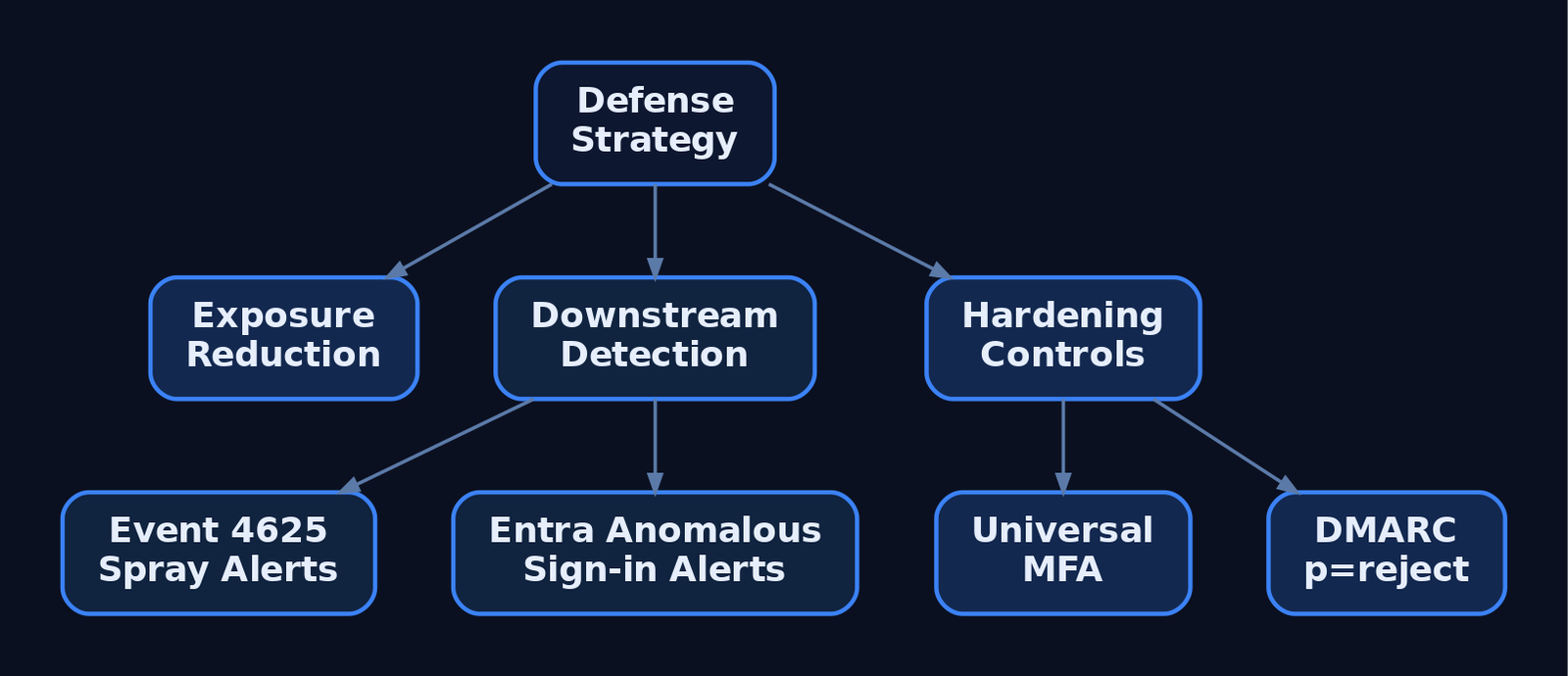
Inbound passive OSINT is largely invisible – there is no packet to log. Defense is therefore exposure reduction plus detecting the downstream use of harvested data and any internal authorized tooling.
What is observable:
- Sysmon Event ID 22 (DNSEvent) – internal hosts resolving OSINT API domains (
hunter.io,haveibeenpwned.com). Field:QueryName. Relevant to authorized red-team logging, not inbound recon. - Sysmon Event ID 3 (NetworkConnect) – outbound connections to Shodan/Censys/harvesting endpoints. Fields:
DestinationIp,DestinationPort,Image. - WAF / CDN logs – high-rate hits on
/staff,/team,/about,/sitemap.xmland scraper user-agents. - Certificate Transparency monitoring – alerts when unexpected certs/subdomains appear (shadow IT or forgotten assets).
- GitHub secret scanning – Advanced Security flags committed credentials before adversaries find them.
Downstream credential abuse is where SIEM earns its keep. Watch domain controllers for Event ID 4625 failures spread across many accounts from one source IP – SubStatus 0xC000006A (wrong password) and 0xC0000064 (bad username) signal password spraying. In Entra ID, alert on a successful sign-in from a new geolocation immediately after a domain appears in a breach.
Sigma rule (internal OSINT tool execution in a lab/red-team environment):
title: Internal OSINT Recon Tool Execution
logsource:
  product: windows
  service: sysmon
detection:
  selection:
    EventID: 1                 # Sysmon ProcessCreate
    Image|endswith:
      - '\theHarvester.py'
      - '\python.exe'
    CommandLine|contains:
      - 'theHarvester'
      - 'hunter.io'
      - 'haveibeenpwned'
  condition: selection
level: medium
This targets authorized internal tooling; it cannot see external recon performed against you.
Hardening priorities:
| Mitigation | Description |
|---|---|
| Employee profile hygiene | Train staff not to list VPN/EDR/tooling names in LinkedIn bios. |
| Corporate email discipline | Forbid work email for personal SaaS – breaches of those services leak corporate credentials. |
DMARC p=reject | Stops harvested addresses being trivially spoofed in follow-on phishing. |
| MFA everywhere | Neutralizes breached passwords; prioritize internet-facing admin panels. |
| GitHub secret scanning + pre-commit hooks | Block secrets at commit; audit history with truffleHog / git-secrets. |
| Periodic HIBP domain search | Verified-owner API run on a schedule; force resets on exposed accounts. |
Blue teams should run this entire playbook against themselves – to find leaked credentials, spot typosquatting, identify unauthorized assets, and measure supplier exposure.
12. Tools for OSINT Reconnaissance
| Tool | Description | Link |
|---|---|---|
| theHarvester | Multi-source email/subdomain/IP harvesting | github.com/laramies/theHarvester |
| Hunter.io | Email discovery + format detection API | hunter.io |
| Have I Been Pwned | Breach and password-exposure API (v3) | haveibeenpwned.com |
| DeHashed | Credential investigation (passwords, usernames) | dehashed.com |
| IntelligenceX | Paste-site and leak indexing | intelx.io |
| crt.sh | Certificate Transparency log search | crt.sh |
| truffleHog | Git history secret scanning | github.com |
13. MITRE ATT&CK Mapping
All techniques sit under Reconnaissance (TA0043) except the downstream abuse rows.
| Technique | MITRE ID | Detection |
|---|---|---|
| Gather Victim Identity Information | T1589 | Largely undetectable inbound; reduce exposure. |
| …Credentials | T1589.001 | HIBP/DeHashed exposure monitoring; force resets. |
| …Email Addresses | T1589.002 | Hunter.io/theHarvester output review; verify ID at attack.mitre.org. |
| …Employee Names | T1589.003 | Profile-hygiene training; LinkedIn monitoring. |
| Search Open Websites/Domains | T1593 | WAF/CDN scraper detection. |
| …Social Media | T1593.001 | Brand/impersonation monitoring. |
| …Search Engines | T1593.002 | Dork-leak audits of own indexed content. |
| …Code Repositories | T1593.003 | GitHub secret scanning. |
| Gather Victim Org Information | T1591 | Public-footprint review. |
| Search Open Technical Databases | T1596 | CT-log monitoring (crt.sh, Censys). |
| Compromise Accounts | T1586 | Anomalous sign-in correlation. |
| Valid Accounts | T1078 | MFA enforcement; 4625 spray detection (shifts to TA0001). |
Summary
- OSINT reconnaissance converts public data – LinkedIn profiles, breach dumps, and CT logs – into a targeting package of named employees with reusable credentials, all without sending a packet to the target.
- Employee names drive email-format inference; Hunter.io’s
patternfield and theHarvester’s multi-source output extrapolate addresses across an entire org. - HIBP confirms exposure (use the keyless k-Anonymity
/range/endpoint for safe password checks); DeHashed and paste sites supply the actual reusable passwords. - The attack path chains people → emails → breach credentials → discovered portals → MFA-less spray candidates – mapped to ATT&CK
T1589,T1593, and downstreamT1586/T1078. - Defenders detect the downstream abuse – Event ID 4625 spray patterns, anomalous Entra sign-ins – and shrink exposure with DMARC
p=reject, universal MFA, GitHub secret scanning, and authorized HIBP domain searches.
Related Tutorials
- Active OSINT: DNS, Certificate Transparency, and Subdomain Enumeration
- Passive OSINT: Mapping the Target Without Touching It
- Phishing Campaign Design: Pretexting, Lures, and Target Profiling
- Building a Red Team Lab: Infrastructure, VMs, and C2 Setup
- OPSEC Principles for Red Teamers: Staying Undetected
References
- Gather Victim Identity Information, Technique T1589 – Enterprise | MITRE ATT&CK®
- Gather Victim Identity Information: Credentials, Sub-technique T1589.001 – Enterprise | MITRE ATT&CK®
- Gather Victim Identity Information: Email Addresses, Sub-technique T1589.002 – Enterprise | MITRE ATT&CK®
- Gather Victim Identity Information: Employee Names, Sub-technique T1589.003 – Enterprise | MITRE ATT&CK®
- Compromise Accounts: Social Media Accounts, Sub-technique T1586.001 – Enterprise | MITRE ATT&CK®
- Acquire OSINT data sets and information (People Information Gathering), Technique T1266 – PRE-ATT&CK | MITRE ATT&CK®
Get new drops in your inbox
Windows internals, exploit dev, and red-team write-ups - no spam, unsubscribe anytime.