Phishing Campaign Design: Pretexting, Lures, and Target Profiling
The most common mistake I see from someone running their first authorized phishing engagement is treating it as an email problem. They obsess over the payload and the landing page, launch on day two, and wonder why the click rate is 4%. The professional sequence is inverted – the message is the last artifact you build. The dossier, the pretext, and the sender domain’s reputation decide whether anyone reads past the subject line. Everything else is decoration.
This walkthrough is written for authorized red teamers and the defenders who have to understand the adversary’s decision chain to break it. Every phase maps to MITRE ATT&CK, and every offensive step is paired with how a blue team sees it.
1. Rules of Engagement and Legal Scope
Phishing simulations touch real people and harvest real PII. None of what follows is legal without explicit, signed authorization. Before a single byte of recon:
- Written authorization naming the target organization, the engagement window, and the specific techniques in scope (attachment vs. link vs. vishing).
- A scoping statement that lists which domains, mailboxes, and employee groups are fair game – and which are explicitly off-limits (legal, HR, executives’ personal accounts).
- Data-handling rules. Harvested credentials, breach-dump matches, and scraped employee data are PII. Encrypt at rest, define a retention window, and destroy on engagement close. You are a custodian, not a collector.
- An abort and de-confliction path so the SOC’s incident response doesn’t burn a weekend chasing your simulation.
If you can’t point to the paragraph in the contract that authorizes a technique, you don’t run it.
2. The Adversary’s Pre-Attack Workflow
Real intrusion sets – APT29, Kimsuky, TA453 – don’t improvise lures. They build a target list first, under the Reconnaissance tactic (TA0043), long before any email leaves an outbox. The workflow is iterative: start with a broad pool of harvested identities, enrich each with org and role context, then narrow to a short list of high-value recipients whose job function makes a specific pretext plausible.
The reason this matters to defenders: most of this generates zero target-side telemetry. Passive identity collection (T1589) reads breach databases and LinkedIn; nothing hits your logs. Your first detectable event is often the inbound message itself – which means the controls that matter most are the ones that limit exposure before the campaign and inspect delivery during it.

3. Target Profiling via OSINT
Passive vs. Active Reconnaissance
Passive recon never touches the target’s infrastructure – breach dumps, social media, cached pages. Active recon (port scans, mail-server probing) does, and it’s noisier. A good profiling phase stays passive as long as possible.
The ATT&CK techniques in play:
| Technique | MITRE ID | What it feeds |
|---|---|---|
| Gather Victim Identity Information | T1589 | Names, emails, exposed credentials |
| Email Addresses | T1589.002 | Format enumeration (first.last@) |
| Employee Names | T1589.003 | Org-chart and LinkedIn scraping |
| Gather Victim Org Information | T1591 | Departments, hierarchy |
| Business Relationships | T1591.002 | Vendor/partner pretext chains |
| Identify Roles | T1591.004 | Who approves wires, who resets passwords |
| Search Open Websites | T1593.001 | Social-media profiling |
| Search Open Technical Databases | T1596 | Cert transparency, Shodan, WHOIS |
Once you know the email format, every name you scrape becomes an address. That’s the whole point of T1589.002:
import itertools

# T1589.002 — derive addresses from a known naming convention.
formats   = ["{first}.{last}", "{f}{last}", "{first}{l}"]
domain    = "example.com"
employees = [("jane", "doe"), ("ahmed", "khan")]

for first, last in employees:
    for fmt in formats:
        addr = fmt.format(first=first, last=last,
                          f=first[0], l=last[0]) + "@" + domain
        print(addr)   # later: validate against MX / catch-all behavior
Scraped profile data turns into a prioritized target map. The goal is T1591.004 – separate the people who can wire money or reset passwords from everyone else:
import json

# T1591.004 — convert scraped profiles into a ranked target list.
with open("profiles.json") as f:
    people = json.load(f)

HIGH_VALUE = {"finance", "accounts payable", "it", "helpdesk", "executive"}

for p in people:
    dept = p.get("department", "").lower()
    priority = "HIGH" if any(k in dept for k in HIGH_VALUE) else "low"
    print(f"{priority:4} | {p['name']:24} | {p['title']}")
Infrastructure and tech-stack intelligence (T1596) tunes the theme. If certificate transparency logs reveal a Citrix or VPN gateway, “your VPN certificate expires in 24 hours” becomes credible:
# T1596 — map the footprint from public technical databases.
whois example.com | grep -Ei 'registrar|creation|name server'
dig +short MX example.com               # mail routing → gateway vendor fingerprint

# Certificate Transparency: enumerate subdomains without touching the target.
curl -s "https://crt.sh/?q=%25.example.com&output=json" \
| jq -r '.[].name_value' | sort -u| Tool | Description | Link |
|---|---|---|
| theHarvester | Email/domain/name harvesting from public sources | github.com |
| Maltego | Graphical link analysis for org mapping | maltego.com |
| Hunter.io | Email format discovery and verification | hunter.io |
| Recon-ng | Modular OSINT framework | github.com |
| Have I Been Pwned | Credential-exposure checking | haveibeenpwned.com |
| OSINT Framework | Curated index of profiling resources | osintframework.com |
4. Pretexting Fundamentals
A pretext is a fabricated backstory that gives the lure context. The believable ones lean on a small set of influence principles:
| Principle | Description |
|---|---|
| Authority | Impersonating IT helpdesk, C-suite, auditors, or law enforcement |
| Urgency / Scarcity | “Account expires in 24 hours,” “final warning before suspension” |
| Social proof | Referencing real colleagues, known vendors, ongoing projects |
| Likability / Familiarity | Hijacking an existing email thread (reply-chain phishing) |
| Pretext narrative | A plausible story matching the target’s job and industry |
The skeleton that turns those principles into a message:
[ROLE the sender claims]        -> "Microsoft 365 Security Team"
+ [AUTHORITY trigger]           -> policy / compliance / mandate
+ [URGENCY hook]                -> "session expires in 24h"
+ [ACTION request]              -> "re-verify at <link>"
+ [PLAUSIBLE sender + branding] -> aged look-alike domain, correct logo
= a lure that survives the recipient's first three seconds of scrutiny
Matching the Pretext to the Role
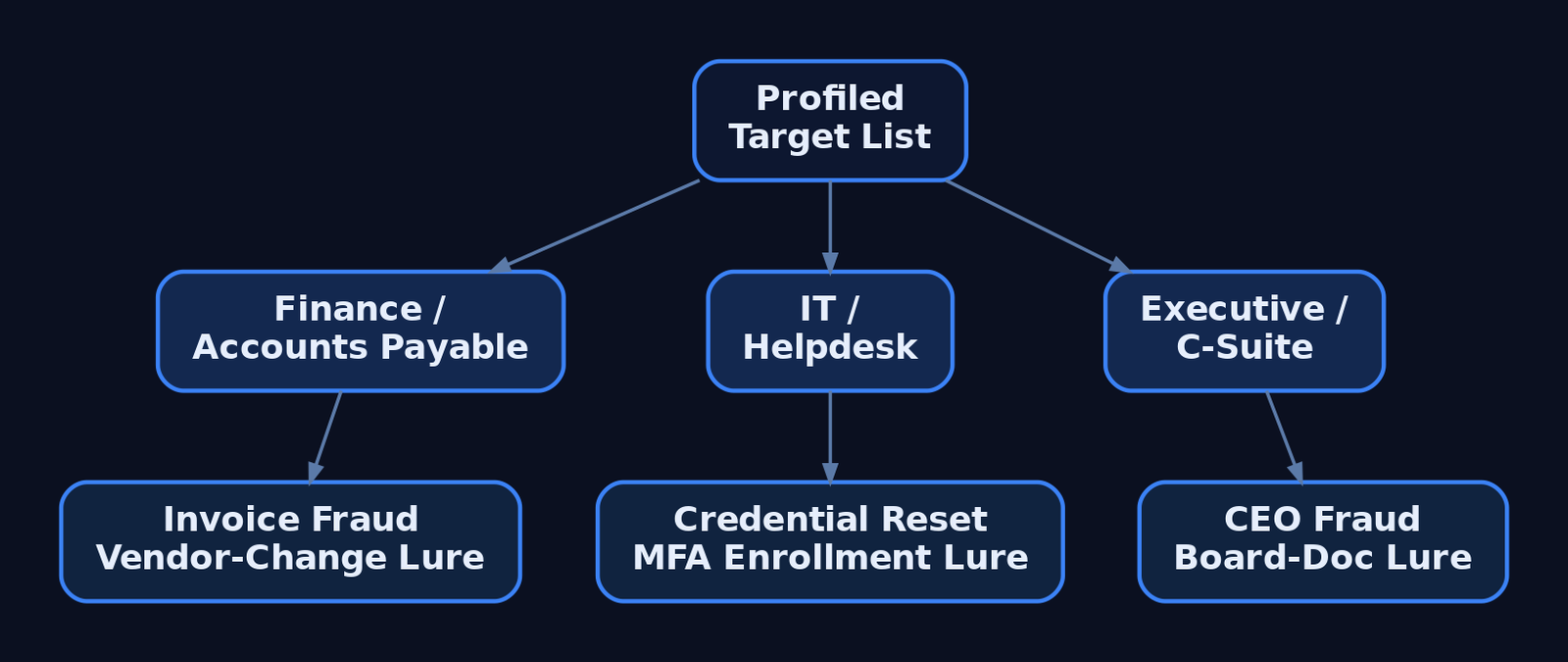
Profiling pays off here. A generic lure addressed to everyone is weaker than three tailored ones. Finance gets invoice-fraud and vendor-payment-change narratives. IT and helpdesk staff get credential-reset and MFA-enrollment pretexts. Executives get CEO-fraud and board-document lures. The pretext has to fit what the recipient already expects to receive on a normal Tuesday.
5. Lure Design and Delivery Vector Selection
The delivery vector is T1566 (Phishing), and the sub-technique you pick is a trade-off between trust, evasion, and what the target’s controls inspect:
| Sub-technique | ID | Delivery mechanism |
|---|---|---|
| Spearphishing Attachment | T1566.001 | Malicious file – Office doc, PDF, ISO, LNK, OneNote |
| Spearphishing Link | T1566.002 | Link to harvesting page or payload host |
| Spearphishing via Service | T1566.003 | Teams, Slack, LinkedIn DM, cloud storage |
| Spearphishing Voice | T1566.004 | Vishing / callback phishing |
Attachment campaigns rely on User Execution (T1204.002) – the victim has to open and trigger the file. Links exist precisely to avoid attachment scanning. If a gateway detonates attachments, you move to a link; if it rewrites links, you move to something the scanner doesn’t understand.
| Lure format | Abuse scenario |
|---|---|
| ISO / VHD in archive | Container strips Mark-of-the-Web from the inner payload |
| LNK file | Shortcut launches a hidden interpreter on double-click |
| OneNote attachment | Embedded “click to view” object spawns a child process |
| Double-extension file | invoice.pdf.exe reads as a PDF in a narrow window |
| QR code (“quishing”) | URL lives in an image – no clickable link for gateways to parse |
| HTML smuggling | Browser assembles the payload locally from inline data |
HTML smuggling is worth understanding because it inverts the perimeter: the file never crosses the network as a file, so attachment and URL scanners see only plain HTML.
<!-- Illustrative ONLY — shows why HTML smuggling evades file/URL scanners.
     The "payload" never traverses the network as a file; the browser builds it
     locally from a string already inside the HTML. The gateway sees inert markup. -->
<script>
  const data = atob("SGVsbG8gZnJvbSB0aGUgYnJvd3Nlcg==");   // benign demo content
  const blob = new Blob([data], { type: "application/octet-stream" });
  const url  = URL.createObjectURL(blob);
  const a    = document.createElement("a");
  a.href = url; a.download = "invoice.txt";                // forces a local "save"
  // a.click();   // auto-trigger left disabled deliberately
</script>
6. Sender Infrastructure and Spoofing
Delivery fails at the envelope if the sender looks wrong. Adversaries register look-alike domains (T1583.001) – corp-helpdesk.example against the real corp.helpdesk.example – and warm up aged sending accounts (T1585.002) so they pass reputation filters. The highest-trust option is hijacking a real conversation from a compromised third-party mailbox (T1586.002), where the reply lands inside an existing thread the victim already trusts.
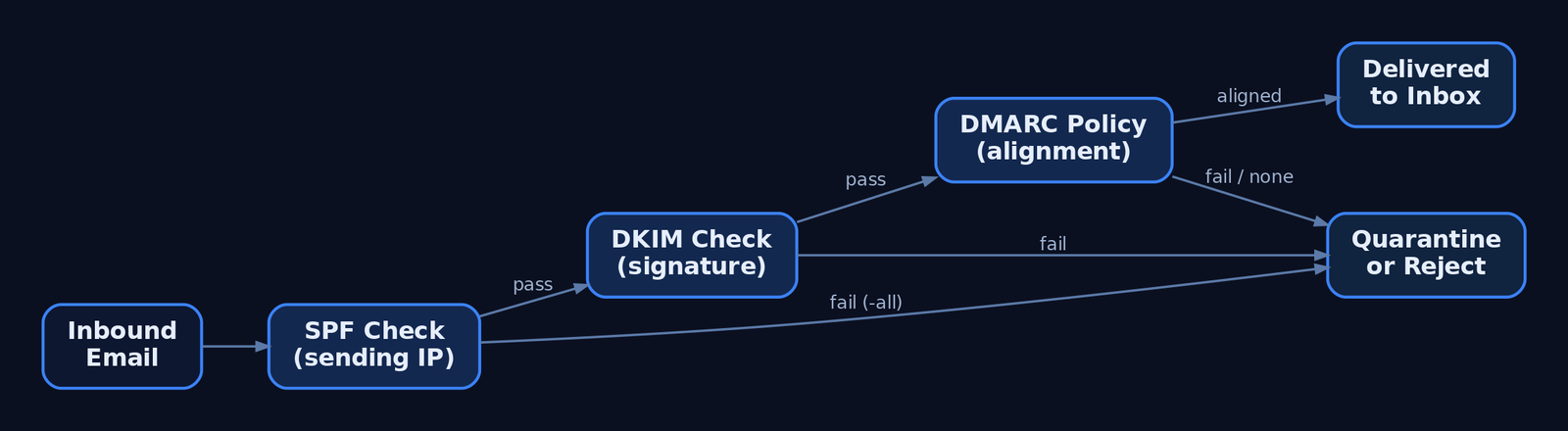
From the attacker’s chair, the three email-authentication records define what’s possible:
| Control | What it does |
|---|---|
| SPF (TXT) | Authorizes sending IPs; ~all softfails, -all hardfails |
| DKIM | Cryptographic signature over headers/body; detects mid-transit tampering |
| DMARC | Enforces policy (p=reject / p=quarantine / p=none) on SPF/DKIM failure and binds both to the From: header via alignment |
Direct domain spoofing dies against a hard -all SPF record plus DMARC p=reject. That’s why attackers pivot to look-alike domains – a domain you control passes its own SPF and DKIM cleanly, and DMARC has nothing to complain about because the From: is genuinely yours.
A war story worth your hour: I once burned a beautifully aged look-alike domain in the first thirty minutes of a campaign because the landing page’s TLS certificate had been issued that morning. A switched-on analyst pulled the cert transparency log, saw a brand-new cert on a brand-new host receiving inbound clicks, and quarantined the whole run. The same crt.sh query you use to profile a target is the one defenders use to catch you. Provision infrastructure days ahead, not minutes.
7. Reconnaissance Phishing vs. Payload Delivery
Not every phishing message delivers malware. T1598 (Phishing for Information) sits under Reconnaissance – it tricks the target into divulging credentials or actionable data with no payload at all. A fake login portal (T1598.003) harvests a password; callback phishing extracts data verbally over the phone. The defining indicator: no malicious attachment, no exploit-laden link. That absence is what distinguishes T1598 from T1566.
Two modern variants defeat MFA and deserve detection-level treatment (no working frameworks here):
- Adversary-in-the-Middle (
T1557). A reverse proxy relays the victim’s real login to the real service and captures the session cookie issued after a successful MFA prompt. The stolen cookie replays the authenticated session – the second factor never protected anything because it already passed. - MFA Request Generation (
T1621). Push-bombing a target with repeated approval prompts until fatigue or confusion yields a tap. - OAuth device-code phishing. Abusing the device-authorization flow to capture tokens without ever touching a password, against M365 and Google Workspace.
The defensive answer to all three is phishing-resistant authentication – FIDO2 / passkeys – which is not susceptible to relay because the credential is bound to the legitimate origin.
8. Campaign Execution and Metrics
For authorized simulations, GoPhish handles sending profiles, landing pages, and tracking. The shape of a scoped, consented campaign:
# Authorized simulation only. Illustrative profile + campaign shape.
sending_profile:
  name: "IT Helpdesk Sim"
  from_address: "helpdesk@corp-helpdesk.example"   # pre-warmed look-alike
  host: "smtp.relay.internal:587"
  username: "sim-sender"
  ignore_cert_errors: false

campaign:
  name: "Q3 Awareness - Password Reset"
  url: "https://corp-helpdesk.example/reset"        # tracked landing page
  launch_date: "2026-07-01T09:00:00Z"
  tracking_pixel: true                              # open-rate beacon
  groups: ["finance-pilot"]                         # scoped, consented list
Read the metrics honestly. Open rate measures subject-line and sender plausibility. Click rate measures pretext strength. Submit rate – credentials actually entered – is the number that matters for risk, and it’s the one you report. Don’t shame individuals; aggregate by department and feed the result back into training. And when the engagement closes, destroy the harvested submissions per your data-handling rules.
9. Detection and Defense – The Defender’s View
Recon is invisible, so defense concentrates at delivery and execution. Email authentication is the first wall: enforce DMARC p=reject with alignment, and teach analysts to read the headers.
# Defender view: read Authentication-Results to spot spoofing.
$headers = Get-Content .\suspicious.eml -Raw
[regex]::Matches($headers, 'Authentication-Results:.*?(?=\r?\n\S)') |
    ForEach-Object { $_.Value }
# Flag: spf=fail, dkim=fail, dmarc=fail (or dmarc=none = no enforcement)
Post-delivery, the payload betrays itself through process lineage. Key Sysmon events:
| Event ID | Name | Relevance to phishing |
|---|---|---|
1 | Process Create | outlook.exe → powershell.exe, winword.exe → cmd.exe |
3 | Network Connection | Unusual outbound from an Office app (C2 callback) |
11 | File Created | Attachment written to %TEMP%\Outlook Temp\ |
15 | FileCreateStreamHash | Zone.Identifier ADS confirms internet origin (MOTW) |
22 | DNS Query | Office or browser DNS right after lure interaction |
The canonical detection – an Office app spawning a script interpreter:
title: Office Application Spawning a Script Interpreter
id: 6c4f1a2e-phishing-office-child
logsource:
  category: process_creation
  product: windows
detection:
  selection:
    ParentImage|endswith:
      - '\winword.exe'
      - '\excel.exe'
      - '\outlook.exe'
      - '\onenote.exe'
    Image|endswith:
      - '\powershell.exe'
      - '\cmd.exe'
      - '\mshta.exe'
      - '\wscript.exe'
      - '\cscript.exe'
  condition: selection
tags:
  - attack.initial_access
  - attack.t1566.001
  - attack.t1204.002
level: high
Catch attachment execution by its working directory:
title: Process Execution From Outlook Attachment Temp Path
id: 9a2b7c10-phishing-outlook-temp
logsource:
  category: process_creation
  product: windows
detection:
  selection:
    CurrentDirectory|contains: '\Content.Outlook\'
  condition: selection
tags:
  - attack.initial_access
  - attack.t1566.001
level: high
Credential-harvest fallout shows up in the Security log – 4625 (failed logon), 4740 (lockout from spray), 4688 (process creation with command-line auditing) – and in M365 / Entra ID sign-in risk events. Hardening that actually moves the needle:
- ASR rules blocking Office apps from spawning child processes.
- Protected View + Trust Center disabling internet-origin macros by default, with MOTW enforced even for archive-extracted files to kill the ISO bypass.
- Safe Links / Safe Attachments for click-time URL rewriting and sandbox detonation.
- FIDO2 / passkeys over push-based MFA – the only control that survives AiTM.
- Limiting public OSINT exposure – shallow public org charts, undisclosed email formats, sanitized job postings.
- Awareness training using current lures (ISO, OneNote, QR), not just decade-old attachment scares.
10. MITRE ATT&CK Mapping
| Technique | MITRE ID | Detection |
|---|---|---|
| Gather Victim Identity Information | T1589 | Largely invisible; monitor breach exposure, 4625/4740 downstream |
| Gather Victim Org Information / Roles | T1591 / T1591.004 | Limit public org-chart depth |
| Search Open Technical Databases | T1596 | Monitor own CT logs for look-alike certs |
| Acquire Infrastructure: Domains | T1583.001 | Newly-registered-domain blocking at gateway |
| Compromise Accounts: Email | T1586.002 | Anomalous reply-chain sender, header mismatch |
| Phishing | T1566 | Email auth, gateway telemetry, Sysmon EID 1 |
| Spearphishing Attachment | T1566.001 | Sysmon EID 1/11/15, Office child-process Sigma |
| Spearphishing Link | T1566.002 | Safe Links, URL detonation |
| Spearphishing Voice | T1566.004 | Helpdesk verification policy, user reporting |
| User Execution: Malicious File | T1204.002 | Parent-child process chain |
| Phishing for Information | T1598 | Link to harvest page with no payload |
| Adversary-in-the-Middle | T1557 | Impossible-travel, session anomalies; FIDO2 |
| MFA Request Generation | T1621 | Repeated push prompts in sign-in logs |
Summary
- A phishing campaign is won during reconnaissance, not in the message – the dossier and pretext decide the outcome before delivery.
- Target profiling chains passive OSINT (
T1589,T1591,T1593,T1596) into a ranked list, generating almost no target-side telemetry. - Pretexts weaponize authority, urgency, and familiarity; the strongest ones match the recipient’s actual job function.
- Delivery vector (
T1566sub-techniques) is a trade-off against the controls in place – attachment, link, service, or voice – with ISO, OneNote, quishing, and HTML smuggling as modern evasion paths. T1598harvests data with no payload, and AiTM (T1557) defeats push-based MFA – both demand phishing-resistant FIDO2.- Defenders win at delivery and execution: enforce
DMARC p=reject, hunt Office child-process chains via Sysmon EID 1, and convert every red-team finding into a concrete blue-team control.
Related Tutorials
- Passive OSINT: Mapping the Target Without Touching It
- APT Profiling: How to Build a Comprehensive Adversary Profile from Open-Source Intelligence
- Building a Red Team Lab: Infrastructure, VMs, and C2 Setup
- OSINT for People and Credentials: LinkedIn, Breach Data, and Email Harvesting
- Active OSINT: DNS, Certificate Transparency, and Subdomain Enumeration
References
- Phishing (T1566) – Enterprise | MITRE ATT&CK®
- Phishing for Information (T1598) – Enterprise | MITRE ATT&CK®
- Gather Victim Identity Information (T1589) – Enterprise | MITRE ATT&CK®
- Gather Victim Org Information (T1591) – Enterprise | MITRE ATT&CK®
- Phishing: Spearphishing Link (T1566.002) – Enterprise | MITRE ATT&CK®
- Phishing for Information: Spearphishing Service (T1598.001) – Enterprise | MITRE ATT&CK®
Get new drops in your inbox
Windows internals, exploit dev, and red-team write-ups - no spam, unsubscribe anytime.