AD PowerShell Module Enumeration: The Microsoft-Signed Get-AD* Equivalents to PowerView
Objective: Walk through a complete, lab-grounded Active Directory reconnaissance workflow using the Microsoft-signed
ActiveDirectoryPowerShell module, understand the ADWS transport layer that makes the traffic invisible to network LDAP sniffers, map every cmdlet to its PowerView analogue, and build detections that actually fire on this tradecraft.
PowerView is still the textbook tool for AD recon, and for good reason. But when you drop PowerSploit\PowerView.ps1 on a modern, EDR-monitored workstation, you are introducing an unsigned PS1 with a long list of well-known function names into a process that almost certainly has AMSI hooks and ScriptBlock logging enabled. Defender flags it instantly. Even when you bypass AMSI, the AV signature on the file itself is decades old.
The Microsoft-signed ActiveDirectory PowerShell module does roughly 80% of what PowerView does, ships with RSAT, loads a Microsoft-signed DLL into powershell.exe, and talks to the DC over an encrypted SOAP channel on a port that most netflow analysts have never heard of. From a blue team’s point of view, it is the same enumeration you have always been worried about, wearing a perfectly legitimate management hat. From the red team’s point of view, it is the path of least resistance.
This article assumes you have a working AD lab. A Windows Server 2022 DC (DC01.lab.local) plus a Windows 10/11 workstation (WS01.lab.local) joined to lab.local is enough. RSAT should be installed on the DC or a separate admin host so you can grab the DLL. The walkthrough deliberately runs from a workstation that does not have RSAT installed, because that is the realistic red-team scenario.
1. Why Use the AD Module Instead of PowerView
PowerView has functions the AD module simply does not match: ACL graph traversal (Find-InterestingDomainAcl), GPO abuse helpers, and session enumeration via NetWkstaUserEnum. If you need those, you need PowerView (or SharpView, or BloodHound’s collectors).
For everything else, ask yourself what an attacker actually loses by switching to Get-AD*:
| Feature | PowerView | AD Module |
|---|---|---|
| Microsoft-signed binary | No | Yes (Microsoft.ActiveDirectory.Management.dll) |
| AV/EDR signature footprint | High (well-known PS1) | Low (LOLBin-class) |
| Transport | LDAP/389 or LDAPS/636 | ADWS/9389 (SOAP over TLS) |
| Visible to network LDAP sniffers | Yes | No |
| Requires admin to install/run | No | No (DLL-only mode) |
| ACL traversal helpers | Strong | Weak (Get-Acl AD:\... only) |
| GPO abuse helpers | Strong | None |
| Session enumeration | Yes | No |
| Kerberoast candidate enumeration | Yes | Yes (-Filter {ServicePrincipalName -ne "$null"}) |
| AS-REP candidate enumeration | Yes | Yes (-Filter {DoesNotRequirePreAuth -eq $true}) |
The trade you are making is “I lose ACL/GPO graph traversal, I gain a Microsoft signature and a transport defenders rarely watch.” For pure account, group, computer, and trust discovery, that trade is heavily in your favor.
A small lived gotcha before we move on: do not assume Get-ADUser respects every PowerView flag verbatim. PowerView’s -AdminCount switch maps to -Filter {AdminCount -eq 1}, but AdminCount is not returned by default. If you forget -Properties AdminCount, you get the filter behavior with no visible attribute and end up second-guessing yourself for ten minutes. Ask me how I know.
2. Module Installation and the DLL-Only Portability Trick
There are three ways to get the module on a host:
# Option A: modern Windows 10/11 client
Add-WindowsCapability -Online -Name "Rsat.ActiveDirectory.DS-LDS.Tools~~~~0.0.1.0"
Path          :
Online        : True
RestartNeeded : False
# Option B: Windows Server (requires local admin)
Install-WindowsFeature RSAT-AD-PowerShell
Success Restart Needed Exit Code      Feature Result
------- -------------- ---------      --------------
True    No             Success        {Active Directory module for Windows Po...
Both A and B require local admin. That is fine on your jump box. On the target workstation you have compromised as a standard domain user, it is not.
The trick that makes this tradecraft viable is that Microsoft.ActiveDirectory.Management.dll is a self-contained .NET assembly. Copy it off any RSAT-equipped host and Import-Module it directly. No installer, no admin, no registry surgery.
On the source machine (the one with RSAT installed) the DLL lives here:
Get-ChildItem 'C:\Windows\Microsoft.NET\assembly\GAC_64\Microsoft.ActiveDirectory.Management' -Recurse -Filter *.dll
    Directory: C:\Windows\Microsoft.NET\assembly\GAC_64\Microsoft.ActiveDirectory.Management\v4.0_10.0.0.0__31bf3856ad364e35

Mode                 LastWriteTime         Length Name
----                 -------------         ------ ----
-a----        4/15/2024  3:21 PM        1043248 Microsoft.ActiveDirectory.Management.dll
Copy that DLL to the target (C:\Users\bob\AppData\Local\Temp\admod.dll, anywhere writable will do) and load it:
# On WS01 (no RSAT, no admin rights, regular domain user bob)
Import-Module C:\Users\bob\AppData\Local\Temp\admod.dll -Verbose
Get-Command -Module Microsoft.ActiveDirectory.Management.dll | Measure-Object
VERBOSE: Loading module from path 'C:\Users\bob\AppData\Local\Temp\admod.dll'.
VERBOSE: Importing cmdlet 'Get-ADComputer'.
VERBOSE: Importing cmdlet 'Get-ADDomain'.
VERBOSE: Importing cmdlet 'Get-ADForest'.
VERBOSE: Importing cmdlet 'Get-ADGroup'.
VERBOSE: Importing cmdlet 'Get-ADGroupMember'.
VERBOSE: Importing cmdlet 'Get-ADTrust'.
VERBOSE: Importing cmdlet 'Get-ADUser'.
...

Count    : 147
147 cmdlets registered, the module is live, and you have not installed anything. From the OS’s point of view, powershell.exe loaded a Microsoft-signed assembly. From the user’s point of view, you have a fully functional AD recon platform.
One subtlety: this DLL-only mode does not bring along the AD: PSDrive provider. Get-Acl "AD:\CN=Users,DC=lab,DC=local" will fail unless you also load Microsoft.ActiveDirectory.Management.Resources.dll and register the provider. For pure read-only object enumeration you do not need it. For DACL inspection you do, which is one more reason ACL hunting stays in PowerView’s lane.
3. How the AD Module Actually Works: ADWS and Port 9389
This is the part defenders consistently miss, so it is the part worth understanding properly.
Active Directory Web Services (ADWS) was introduced in Windows Server 2008 R2 and runs by default on every modern domain controller. It listens on TCP/9389, speaks SOAP over TLS, and uses a stack of .NET framing protocols (NNS, NMF, NBFSE) for authentication and message encoding. Both the AD PowerShell module and the Active Directory Administrative Center (ADAC) GUI are SOAP clients of this service.
When you run Get-ADUser -Filter * from WS01, this happens:
- The AD module on WS01 opens a TLS-encrypted SOAP session to
DC01:9389. - The SOAP request describes the LDAP query in XML.
- ADWS, running as a service on DC01, parses the SOAP request and issues the actual LDAP search against its own local LDAP interface.
- Because ADWS is local on the DC, the LDAP query’s client IP is
127.0.0.1(or[::1]). - Results come back to ADWS, are serialized into SOAP/XML, returned over the TLS tunnel, deserialized into
Microsoft.ActiveDirectory.Management.ADUserobjects on WS01.
The detection consequences:
- A network sensor watching port 389/636 for high-volume LDAP queries sees nothing.
- DC LDAP diagnostic logging (Event 1644 in the Directory Service log, the standard “expensive LDAP search” event) records the query, but the
Clientfield shows[::1]for every single one. To the log it looks like the DC is querying itself. - The real client IP only appears in the ADWS-specific events: 1138 (ADWS connection opened) and 1139 (ADWS connection closed) in
Microsoft-Windows-ActiveDirectory_DomainService.
If your SIEM is correlating high-volume Event 1644 by source IP, every PowerShell enumeration on the network looks like it came from the DC itself. You need to join 1138 to 1644 by timestamp and Operation ID, or you will miss this entirely. Most environments do not do this.
You can confirm the transport in your lab with a single line:
# Run on WS01 while a Get-ADUser query is executing in another window
Get-NetTCPConnection -RemotePort 9389
LocalAddress    LocalPort RemoteAddress  RemotePort State       OwningProcess
------------    --------- -------------  ---------- -----       -------------
10.10.10.50     49831     10.10.10.10    9389       Established 5328
PID 5328 is powershell.exe, the remote address is the DC, the port is 9389. Not a single byte goes to 389 or 636.

4. Domain and Forest Reconnaissance
Start with the cheap, low-volume queries that establish the lay of the land. Domain SID, forest functional level, FSMO holders, all DCs. This is roughly a dozen LDAP attribute reads and produces almost no detectable noise on a normal busy DC.
Get-ADDomain | Select-Object DNSRoot, NetBIOSName, DomainSID, PDCEmulator, RIDMaster, InfrastructureMaster, DomainMode, ParentDomain
DNSRoot              : lab.local
NetBIOSName          : LAB
DomainSID            : S-1-5-21-1004336348-1177238915-682003330
PDCEmulator          : DC01.lab.local
RIDMaster            : DC01.lab.local
InfrastructureMaster : DC01.lab.local
DomainMode           : Windows2016Domain
ParentDomain         :
The DomainSID is the prefix you will see on every user RID, the FSMO list tells you which DC to target for time-sensitive abuse (PDC for Kerberos delta), and DomainMode tells you whether features like AES-only Kerberos or PAM trusts are available.
Get-ADForest | Select-Object Name, ForestMode, RootDomain, Domains, GlobalCatalogs, SchemaMaster, DomainNamingMaster
Name               : lab.local
ForestMode         : Windows2016Forest
RootDomain         : lab.local
Domains            : {lab.local}
GlobalCatalogs     : {DC01.lab.local}
SchemaMaster       : DC01.lab.local
DomainNamingMaster : DC01.lab.local
A single-domain forest in this lab. In a real environment Domains is your first map of where lateral pivots can happen, and GlobalCatalogs tells you which DCs you can query for cross-domain object info on port 3268 (which is itself worth knowing if you ever need to fall back from ADWS).
Get-ADDomainController -Filter * | Select-Object HostName, IPv4Address, OperatingSystem, IsGlobalCatalog, IsReadOnly, Site
HostName        IPv4Address OperatingSystem               IsGlobalCatalog IsReadOnly Site
--------        ----------- ---------------               --------------- ---------- ----
DC01.lab.local  10.10.10.10 Windows Server 2022 Standard            True       False Default-First-Site-Name
Why this matters: read-only DCs are a legitimate target for credential staging abuse, sites tell you replication boundaries (and therefore where DCSync-style traffic is normal), and the OS version dictates which Kerberos primitives apply (RC4 vs AES, FAST availability, sIDHistory filtering quirks).
5. User Enumeration: Targets, SPNs, and AdminCount
The user object is where most kill chains start, because users carry the attributes you need for Kerberoasting, AS-REP roasting, password spraying, and privilege mapping.
A quick refresher on what is sitting on that object. userAccountControl (UAC) is a bitmask with flags like DONT_REQ_PREAUTH (0x400000), TRUSTED_FOR_DELEGATION (0x80000), and DONT_EXPIRE_PASSWORD (0x10000). servicePrincipalName is the multi-valued attribute that ties a user account to a Kerberos service identity, and any user with one is a Kerberoast candidate because the TGS reply for that SPN will be encrypted with that user’s password-derived key. adminCount=1 is set by SDProp when an account is, or has historically been, a member of one of the protected groups (Domain Admins, Enterprise Admins, Schema Admins, etc.) and is a high-fidelity “this is or was privileged” indicator.
First, basic discovery of enabled users:
Get-ADUser -Filter {Enabled -eq $true} -Properties SamAccountName, Description, PasswordNeverExpires, LastLogonDate |
    Select-Object SamAccountName, Description, PasswordNeverExpires, LastLogonDate |
    Format-Table -AutoSize
SamAccountName  Description                            PasswordNeverExpires LastLogonDate
--------------  -----------                            -------------------- -------------
Administrator   Built-in account for administering...                 True 11/12/2024 09:14:22
krbtgt          Key Distribution Center Service Acc...                True
alice           IT helpdesk                                          False 11/14/2024 17:02:08
bob             Sales                                                False 11/14/2024 08:51:11
helpdesk        Tier 1 support shared account                         True 11/13/2024 22:10:55
svc-sql         SQL Server service - do NOT touch                     True 11/14/2024 06:00:01
svc-backup      Backup service. Pw: Backup!Winter24                   True 11/13/2024 03:00:02
guest           Built-in account for guest access                    False
There are three high-value findings in that table and the article should not pretend otherwise. svc-backup has a credential in its Description field, which is the kind of misconfiguration that ends engagements in twenty minutes. svc-sql is a service account with PasswordNeverExpires set. And both service accounts have never logged on interactively, consistent with them being used purely for Kerberos service auth.
Now go after the privileged accounts via AdminCount:
Get-ADUser -Filter {AdminCount -eq 1} -Properties AdminCount, memberOf |
    Select-Object SamAccountName, @{n='Groups';e={($_.memberOf | ForEach-Object {($_ -split ',')[0] -replace 'CN='}) -join ','}}
SamAccountName Groups
-------------- ------
Administrator  Domain Admins,Enterprise Admins,Schema Admins
helpdesk       IT-Admins
krbtgt         Denied RODC Password Replication Group
helpdesk is interesting. It carries adminCount=1 because of nested membership in something that touches Domain Admins. Notice Administrator carries the full set, expected. krbtgt always shows up here, which is a known SDProp artifact, not a finding.
Kerberoast candidate enumeration. This is the query you actually run on every engagement.
Get-ADUser -Filter {ServicePrincipalName -like "*"} -Properties ServicePrincipalName, PasswordLastSet, msDS-SupportedEncryptionTypes |
    Select-Object SamAccountName, ServicePrincipalName, PasswordLastSet, msDS-SupportedEncryptionTypes |
    Format-Table -AutoSize
SamAccountName ServicePrincipalName             PasswordLastSet         msDS-SupportedEncryptionTypes
-------------- --------------------             ---------------         -----------------------------
svc-sql        {MSSQLSvc/sql01.lab.local:1433}  3/12/2022 14:22:48                                  0
svc-web        {HTTP/web01.lab.local}           7/04/2023 09:11:30                                 28
Two roastable service accounts. svc-sql is the prize: msDS-SupportedEncryptionTypes = 0 means the account falls back to RC4-HMAC for Kerberos, which produces a hash that cracks orders of magnitude faster than AES-256. The PasswordLastSet of 2022 says it has been sitting on the same password for years, which generally means a short, human-chosen string. That ticket is going to crack on a laptop.
svc-web shows msDS-SupportedEncryptionTypes = 28 (0x1C = AES128 + AES256 + RC4). The TGS reply will be AES-encrypted, hashcat mode 19700, and unless the password is genuinely weak you are not getting in.
AS-REP roast candidates (accounts with Kerberos pre-authentication disabled):
Get-ADUser -Filter {DoesNotRequirePreAuth -eq $true} -Properties DoesNotRequirePreAuth, ServicePrincipalName |
    Select-Object SamAccountName, DoesNotRequirePreAuth
SamAccountName       DoesNotRequirePreAuth
--------------       ---------------------
legacy-app                            True
legacy-app has UAC bit DONT_REQ_PREAUTH set, meaning the KDC will hand you an AS-REP encrypted with that user’s key without any client-side proof of password. That is hashcat mode 18200, crack offline at will.
Finally, the password-in-description sweep:
Get-ADUser -Filter * -Properties Description |
    Where-Object { $_.Description -match '(?i)pass|pwd|cred|temp' } |
    Select-Object SamAccountName, Description
SamAccountName Description
-------------- -----------
svc-backup     Backup service. Pw: Backup!Winter24
contractor1    Temp account, password reset to Welcome2024!
You will see this on roughly one in three engagements. Sysadmins write things down. The regex is intentionally permissive because they will write pwd, creds, temp pw, anything.
6. Group and Membership Enumeration
Groups are where the trust model lives. Nested membership is also where blue teams stop looking, so this is where attackers find the “wait, why is this account in Domain Admins” mistakes.
Direct enumeration of security groups:
Get-ADGroup -Filter {GroupCategory -eq 'Security'} | Select-Object SamAccountName, GroupScope, SID | Sort-Object SamAccountName
SamAccountName            GroupScope SID
--------------            ---------- ---
Account Operators         DomainLocal S-1-5-32-548
Administrators            DomainLocal S-1-5-32-544
Backup Operators          DomainLocal S-1-5-32-551
DnsAdmins                 DomainLocal S-1-5-21-1004336348-1177238915-682003330-1101
Domain Admins             Global      S-1-5-21-1004336348-1177238915-682003330-512
Domain Computers          Global      S-1-5-21-1004336348-1177238915-682003330-515
Domain Controllers        Global      S-1-5-21-1004336348-1177238915-682003330-516
Domain Users              Global      S-1-5-21-1004336348-1177238915-682003330-513
Enterprise Admins         Universal   S-1-5-21-1004336348-1177238915-682003330-519
IT-Admins                 Global      S-1-5-21-1004336348-1177238915-682003330-1144
Remote Desktop Users      DomainLocal S-1-5-32-555
Schema Admins             Universal   S-1-5-21-1004336348-1177238915-682003330-518
Now do the recursive expansion of the groups you actually care about:
$targets = 'Domain Admins','Enterprise Admins','Schema Admins','Administrators','DnsAdmins','Backup Operators','Account Operators'
foreach ($g in $targets) {
    "`n[*] $g (recursive)"
    Get-ADGroupMember -Identity $g -Recursive -ErrorAction SilentlyContinue |
        Select-Object @{n='Name';e={$_.SamAccountName}}, objectClass |
        Format-Table -AutoSize
}
[*] Domain Admins (recursive)
Name          objectClass
----          -----------
Administrator user
helpdesk      user

[*] Enterprise Admins (recursive)
Name          objectClass
----          -----------
Administrator user

[*] Schema Admins (recursive)
Name          objectClass
----          -----------
Administrator user

[*] Administrators (recursive)
Name          objectClass
----          -----------
Administrator user
helpdesk      user

[*] DnsAdmins (recursive)
Name      objectClass
----      -----------
svc-dns   user

[*] Backup Operators (recursive)
Name          objectClass
----          -----------
svc-backup    user

[*] Account Operators (recursive)
Name objectClass
---- -----------
Get-ADGroupMember -Recursive does the nested expansion server-side via the member;range= ranged retrieval, so you get the flattened user list directly. Notice helpdesk ends up in Domain Admins not as a direct member but transitively through IT-Admins. That is the kind of finding that only shows up if you remember to pass -Recursive.
Two operationally relevant gotchas. First, Get-ADGroupMember silently fails on groups with foreign-security-principal members from across a trust, throwing an error that the FSP cannot be resolved. Catch it with -ErrorAction SilentlyContinue or fall back to reading the member attribute directly with Get-ADGroup -Identity X -Properties member. Second, Get-ADGroupMember has historically choked on groups with more than 5000 members because of the default LDAP page size; for Domain Users you typically want Get-ADUser -Filter * instead.
DnsAdmins is worth specifically calling out because membership in that group has historically meant SYSTEM on the DC via the ServerLevelPluginDll registry primitive. Microsoft has patched the reliable variants but the group is still a strong privilege indicator.
7. Computer Enumeration: OS Mapping and Attack Surface
Computer objects are how you map the network without scanning it. Get-ADComputer -Filter * returns every domain-joined host, its OS string, last logon, and any SPNs registered against the machine account.
Get-ADComputer -Filter * -Properties OperatingSystem, OperatingSystemVersion, LastLogonDate, ServicePrincipalName, TrustedForDelegation, 'msDS-AllowedToDelegateTo' |
    Select-Object Name, OperatingSystem, LastLogonDate, TrustedForDelegation |
    Sort-Object OperatingSystem |
    Format-Table -AutoSize
Name        OperatingSystem                LastLogonDate         TrustedForDelegation
----        ---------------                -------------         --------------------
LEGACY01    Windows Server 2008 R2 Standard 8/02/2024 12:14:08                  False
SQL01       Windows Server 2019 Standard   11/14/2024 08:00:14                   True
DC01        Windows Server 2022 Standard   11/14/2024 17:33:09                   True
WEB01       Windows Server 2022 Standard   11/14/2024 11:08:45                  False
WS01        Windows 10 Enterprise          11/14/2024 17:01:55                  False
WS02        Windows 11 Enterprise          11/14/2024 16:45:21                  False
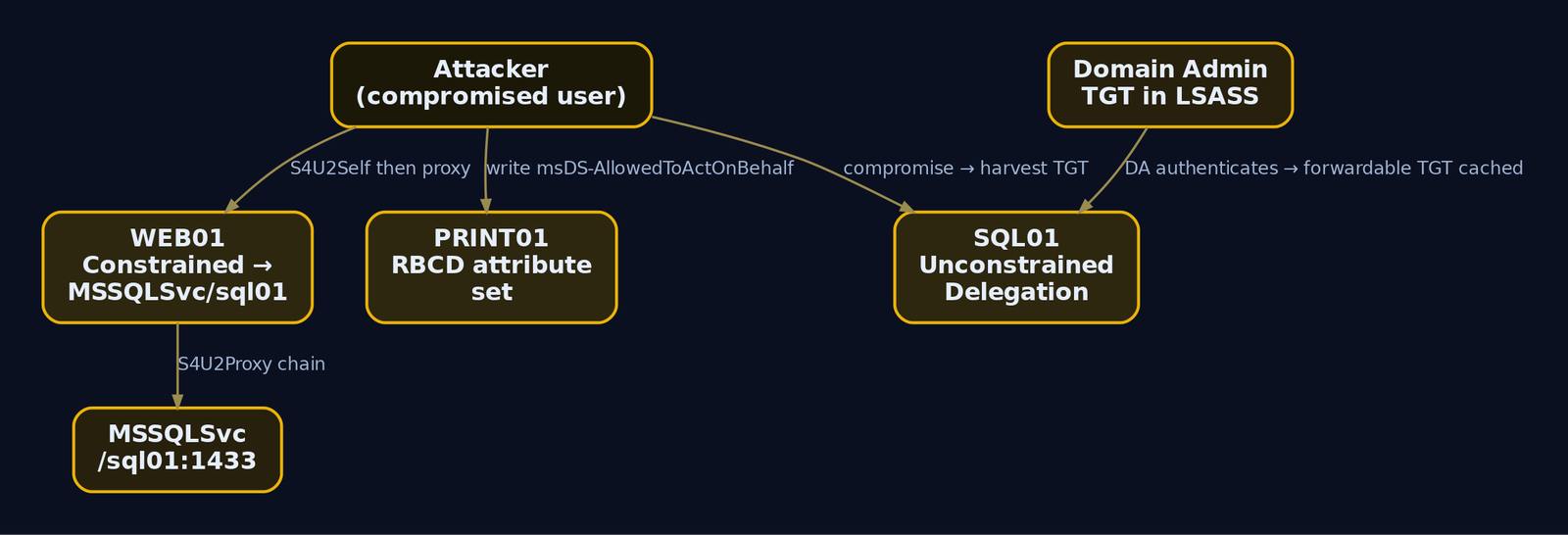
LEGACY01 is the obvious sore thumb: 2008 R2 in 2024 is end-of-support, almost certainly missing post-2020 patches, and a candidate for everything from MS17-010 to PrintNightmare. SQL01 is more interesting in a quieter way: TrustedForDelegation = True means the computer account is configured for unconstrained delegation, which means any user authenticating to a service on that box hands SQL01 a forwardable TGT. Compromise SQL01, wait for a Domain Admin to touch it for any reason, and you have their TGT in LSASS ready to extract with mimikatz or Rubeus. That single attribute is one of the highest-value findings in the entire enumeration.
Pull the delegation picture explicitly:
# Unconstrained delegation
Get-ADComputer -Filter {TrustedForDelegation -eq $true -and PrimaryGroupID -eq 515} -Properties TrustedForDelegation |
    Select-Object Name, DNSHostName

# Constrained delegation (computers with msDS-AllowedToDelegateTo populated)
Get-ADComputer -Filter * -Properties 'msDS-AllowedToDelegateTo' |
    Where-Object { $_.'msDS-AllowedToDelegateTo' } |
    Select-Object Name, 'msDS-AllowedToDelegateTo'

# RBCD (msDS-AllowedToActOnBehalfOfOtherIdentity populated)
Get-ADComputer -Filter * -Properties 'msDS-AllowedToActOnBehalfOfOtherIdentity' |
    Where-Object { $_.'msDS-AllowedToActOnBehalfOfOtherIdentity' } |
    Select-Object Name
Name  DNSHostName
----  -----------
SQL01 SQL01.lab.local

Name  msDS-AllowedToDelegateTo
----  ------------------------
WEB01 {MSSQLSvc/sql01.lab.local:1433, MSSQLSvc/sql01.lab.local}

Name
----
PRINT01
Three distinct primitives, three distinct attack paths. Unconstrained on SQL01 is the easy one. Constrained from WEB01 to MSSQLSvc/sql01 is the S4U2Proxy chain. RBCD on PRINT01 (msDS-AllowedToActOnBehalfOfOtherIdentity populated) means somebody has write access to that attribute somewhere and is using it as a delegation primitive, which itself is worth investigating with Get-Acl.
PrimaryGroupID -eq 515 filters out the DCs from the unconstrained query, because DCs always have TrustedForDelegation and you do not want them cluttering the output.
8. Trust and Cross-Domain Enumeration
Trusts are how domain compromise becomes forest compromise.
Get-ADTrust -Filter * |
    Select-Object Name, Source, Target, Direction, TrustType, SIDFilteringQuarantined, SelectiveAuthentication, TGTDelegation, IntraForest
Name           : child.lab.local
Source         : DC=lab,DC=local
Target         : DC=child,DC=lab,DC=local
Direction      : BiDirectional
TrustType      : Uplevel
SIDFilteringQuarantined : False
SelectiveAuthentication : False
TGTDelegation           : False
IntraForest             : True

Name           : partner.com
Source         : DC=lab,DC=local
Target         : DC=partner,DC=com
Direction      : Inbound
TrustType      : External
SIDFilteringQuarantined : True
SelectiveAuthentication : False
TGTDelegation           : False
IntraForest             : False
What you are reading: the child.lab.local trust is an intra-forest parent-child, bi-directional, SID filtering off (which is normal and expected within a forest). The partner.com trust is an external trust, inbound only, with SID filtering quarantine on, which means SID history injection from lab.local into partner.com is going to be filtered at the trust boundary. If SIDFilteringQuarantined were False on that external trust, that would be a high-value abuse primitive (the Golden Trust ticket primitive against the forest).
Cross-domain queries via the -Server parameter, which targets a specific DC in another domain:
Get-ADDomain -Server child.lab.local | Select-Object DNSRoot, DomainSID, PDCEmulator
Get-ADUser -Filter * -Server child.lab.local -Properties SamAccountName | Select-Object -First 5 SamAccountName
DNSRoot          DomainSID                                       PDCEmulator
-------          ---------                                       -----------
child.lab.local  S-1-5-21-2884128459-1077384402-3661728014       CHILDDC01.child.lab.local

SamAccountName
--------------
Administrator
krbtgt
Guest
childuser1
childuser2
The ADWS session opens against CHILDDC01:9389 and the same enumeration techniques port over wholesale.
9. GPO and OU Enumeration with the AD Module
The AD module does not have GPMC cmdlets, but every GPO is a groupPolicyContainer object in AD, and the AD module can read it generically.
Get-ADObject -LDAPFilter "(objectClass=groupPolicyContainer)" -Properties DisplayName, gPCFileSysPath, whenCreated, whenChanged |
    Select-Object DisplayName, gPCFileSysPath, whenCreated
DisplayName            gPCFileSysPath                                                          whenCreated
-----------            --------------                                                          -----------
Default Domain Policy  \\lab.local\SysVol\lab.local\Policies\{31B2F340-016D-11D2-945F-00C04F... 4/10/2022 18:00:13
Default Domain Cont... \\lab.local\SysVol\lab.local\Policies\{6AC1786C-016F-11D2-945F-00C04F... 4/10/2022 18:00:13
Workstation Lockdown   \\lab.local\SysVol\lab.local\Policies\{A8F1C2B1-9D44-4C5F-9C8F-66E1B... 6/15/2023 09:42:18
SQL Admin Restrictions \\lab.local\SysVol\lab.local\Policies\{D44A1E2F-9211-4F7C-8A1E-C2C9F... 8/22/2023 14:11:55
The gPCFileSysPath is the SYSVOL location of the GPO’s actual files. As a domain user you have read access. That is where groups.xml cpassword-style misconfigurations have historically lived, and where Restricted Groups / GPP Files / scheduled tasks reveal what the GPO actually does.
# Find OUs and the GPOs linked to them
Get-ADOrganizationalUnit -Filter * -Properties LinkedGroupPolicyObjects |
    Where-Object { $_.LinkedGroupPolicyObjects.Count -gt 0 } |
    Select-Object DistinguishedName, @{n='LinkedGPOs';e={$_.LinkedGroupPolicyObjects -join "`n"}}
DistinguishedName                     LinkedGPOs
-----------------                     ----------
OU=Workstations,DC=lab,DC=local       cn={A8F1C2B1-9D44-4C5F-9C8F-66E1B...},cn=policies,cn=system,DC=lab,DC=local
OU=SQL Servers,DC=lab,DC=local        cn={D44A1E2F-9211-4F7C-8A1E-C2C9F...},cn=policies,cn=system,DC=lab,DC=local
Cross-reference the GUIDs from LinkedGroupPolicyObjects against the DisplayName listing above and you know which GPO applies where without ever touching Get-GPO.
10. Full Enumeration Script: Chaining a Complete Recon Workflow
What you actually want on a real engagement is a single script that produces structured output you can grep, diff, and feed to BloodHound or graph tools. Here is the workflow as one block:
$out = "C:\Users\bob\AppData\Local\Temp\recon"
New-Item -ItemType Directory -Force -Path $out | Out-Null

Get-ADDomain               | Export-Clixml "$out\domain.xml"
Get-ADForest               | Export-Clixml "$out\forest.xml"
Get-ADDomainController -Filter * | Export-Clixml "$out\dcs.xml"

# Users (full attribute set, written once)
Get-ADUser -Filter * -Properties * | Export-Clixml "$out\users_full.xml"

# Computers
Get-ADComputer -Filter * -Properties * | Export-Clixml "$out\computers_full.xml"

# Groups + recursive membership of high-value groups
Get-ADGroup -Filter * -Properties * | Export-Clixml "$out\groups_full.xml"
$hvt = 'Domain Admins','Enterprise Admins','Schema Admins','Administrators',
       'DnsAdmins','Backup Operators','Account Operators','Server Operators',
       'Print Operators','Remote Desktop Users'
$hvt | ForEach-Object {
    $g = $_
    try {
        Get-ADGroupMember -Identity $g -Recursive -ErrorAction Stop |
            Select-Object @{n='Group';e={$g}}, SamAccountName, objectClass, SID
    } catch { }
} | Export-Clixml "$out\hvt_members.xml"

Get-ADTrust -Filter * | Export-Clixml "$out\trusts.xml"
Get-ADObject -LDAPFilter "(objectClass=groupPolicyContainer)" -Properties * | Export-Clixml "$out\gpo.xml"
Get-ADOrganizationalUnit -Filter * -Properties * | Export-Clixml "$out\ous.xml"

"[+] Enumeration complete: $out"
Get-ChildItem $out | Select-Object Name, Length
[+] Enumeration complete: C:\Users\bob\AppData\Local\Temp\recon

Name              Length
----              ------
computers_full.xml 124882
dcs.xml             14820
domain.xml          22155
forest.xml          18044
gpo.xml             68203
groups_full.xml     91744
hvt_members.xml     12108
ous.xml             24390
trusts.xml          11240
users_full.xml     281522
Eight XML files, every CLI XML re-hydratable with Import-Clixml, full attribute set. You can pull this archive off the box, walk it offline, and never touch the DC again. That alone is an OPSEC win, every additional query is another row in Event 1644.
A small but important thing: doing Get-ADUser -Filter * -Properties * once is loud (one big query) but every subsequent question about users is then answered from the CLI XML on disk. Doing Get-ADUser -Filter * followed by twenty Get-ADUser <name> -Properties X for different attributes is twenty-one queries. One loud query beats twenty-one moderately loud ones for both OPSEC and runtime.
11. OPSEC Considerations: When the Module Works Against You
Three things will get you caught even with the AD module’s stealth advantages.
-Properties * is a flare. When the AD module asks ADWS for all attributes, ADWS issues an LDAP search with no specific attribute list, and the resulting Event 1644 on the DC has a distinctive [all_with_list] marker in its filter description. Defenders looking for the bulk-enumeration pattern key on exactly that string. Ask only for the properties you actually need.
Query velocity matters. A normal admin running ADAC might trigger ten to twenty ADWS queries in a minute. A recon script tearing through users, computers, groups, and trusts in sequence triggers hundreds. If your SIEM is doing rate analysis on Event 1138 by user, you stand out. Add Start-Sleep jitter between query phases and live with the slower runtime.
Case mangling helps against bad rules but not against good ones. PowerShell cmdlet names are case-insensitive, so gEt-aDcompUTER -Filter {eNaBLed -eq $TruE} -PROPErTieS * runs identically to the normal form. This evades naive Sigma rules that key on exact-case Get-ADComputer substrings in CommandLine fields. It does not evade the ScriptBlock log (Event 4104) if the rule does case-insensitive matching, which the SigmaHQ rules do by default with the |contains modifier. Treat this as an evasion against lazy detections, not a stealth technique.
gEt-aDcompUTER -fIlTeR { ENableD -eq $TrUE } -pRoPErTiEs OperatingSystem | sElEcT-oBJecT NaMe, OpERaTiNgsYsTeM | sElect-OBJect -fIRsT 3
Name     OperatingSystem
----     ---------------
DC01     Windows Server 2022 Standard
WS01     Windows 10 Enterprise
SQL01    Windows Server 2019 Standard
It runs. It still hits the DC. Event 4104 captures it exactly as typed.
Set $ErrorActionPreference carefully. Default behavior of the module is to throw on unresolvable objects (FSPs, deleted refs, scope errors), and those errors are noisy in transcripts and useful to defenders. SilentlyContinue quiets them but also hides legitimate problems. Stop with a try/catch around each phase is the OPSEC-correct answer.

12. Detection and Defense
The honest version: if PowerShell logging is not on, you will see almost none of this. The first half of every detection conversation about the AD module is “did we turn on the things that make detection possible.”
Prerequisites. All of the following must be enabled via Group Policy under Computer Configuration > Policies > Administrative Templates > Windows Components > Windows PowerShell:
- Module Logging with
ModuleNames = *(writes Event 4103 toMicrosoft-Windows-PowerShell/Operational) - Script Block Logging (writes Event 4104, the single most important detection signal for this tradecraft)
- Transcription (writes session transcripts to disk)
On domain controllers:
- Audit Directory Service Access (Success + Failure) for Events 4661/4662
- Field Engineering LDAP logging for Event 1644: set
HKLM:\SYSTEM\CurrentControlSet\Services\NTDS\Diagnostics\15 Field Engineeringto5
Without those, the AD module looks like nothing on the DC and nothing on the workstation. With them on, the picture changes considerably.
Key Windows Event IDs
| Event ID | Log / Source | What it shows |
|---|---|---|
4104 | Microsoft-Windows-PowerShell/Operational | ScriptBlock logged. Captures the cmdlet text including filters and parameters. Primary detection for Get-AD*. |
4103 | Microsoft-Windows-PowerShell/Operational | Module log pipeline execution event. |
4688 | Security | Process creation. With command-line auditing enabled, catches powershell.exe invocations. |
1138 | Microsoft-Windows-ActiveDirectory_DomainService | ADWS session opened. Logs the real client IP. |
1139 | Same | ADWS session closed. |
1644 | Directory Service (DC) | LDAP search statistics. Client field always [::1] for ADWS-routed queries. [all_with_list] marker indicates -Properties *. |
1166 | Directory Service | LDAP search operation started. |
1167 | Directory Service | LDAP search operation ended. |
4661 | Security | SAM/AD object handle requested. Requires DS Access auditing. |
4662 | Security | Operation performed on AD object. Useful for hunting access to specific objects like Domain Admins. |
The high-fidelity detection is to correlate Event 1138 (real client IP from ADWS) with the burst of Event 1644 (LDAP queries from localhost) and Event 4104 on the source workstation. Any one of these alone is noisy. Joined by timestamp and Operation ID, they are surgical.
Sysmon
| Sysmon Event ID | What it adds |
|---|---|
1 (ProcessCreate) | Catches powershell.exe / pwsh.exe with AD-related command line. Less reliable than 4104 because parameters can be passed via stdin or -EncodedCommand. |
7 (ImageLoad) | Catches Microsoft.ActiveDirectory.Management.dll loading into any process, including non-PowerShell hosts. This is often the cleanest signal because the DLL is the artifact. |
3 (NetworkConnect) | Workstation-side outbound to DC:9389. Correlate the source process and user with DC-side Event 1138. |
Sigma Rules
The following rules exist in SigmaHQ and should be in your ruleset. Verify file paths against the current repo before deploying:
posh_ps_active_directory_module_dll_import(PowerShell Script, EventID 4104)proc_creation_win_powershell_active_directory_module_dll_import(Process Creation)posh_pm_active_directory_module_dll_import(PowerShell Module log)posh_ps_get_adcomputer(EventID 4104, matchesGet-AdComputerinvocations)
A custom Sigma rule that covers the broader Get-AD* pattern on Event 4104:
title: AD Module Enumeration via Get-AD* Cmdlets
id: 9f8b3e7a-2d44-4c6a-9c1d-3e7a91b54c01
status: experimental
description: Detects broad Active Directory enumeration using the Microsoft-signed AD PowerShell module.
logsource:
  product: windows
  category: ps_script
detection:
  selection_cmdlets:
    ScriptBlockText|contains|all:
      - 'Get-AD'
    ScriptBlockText|contains:
      - 'Get-ADUser'
      - 'Get-ADComputer'
      - 'Get-ADGroup'
      - 'Get-ADGroupMember'
      - 'Get-ADTrust'
      - 'Get-ADDomain'
      - 'Get-ADForest'
      - 'Microsoft.ActiveDirectory.Management'
  selection_bulk:
    ScriptBlockText|contains:
      - '-Filter *'
      - '-Properties *'
      - '-LDAPFilter'
  condition: selection_cmdlets or selection_bulk
falsepositives:
  - Administrative scripts on management workstations
  - Active Directory Administrative Center usage
level: medium
The |contains modifier in Sigma is case-insensitive by default in modern backends, so gEt-aDcompUTER matches. Verify your specific SIEM’s Sigma converter respects that, because older converters did not.
MITRE Defender for Identity
MDI sits on the DC and watches the local LDAP layer below ADWS, so the localhost problem does not apply. If you have it deployed, the “Reconnaissance using directory services queries” and “Account enumeration” detections fire on this tradecraft regardless of which transport the client used.
Hardening
- Restrict ingress to TCP/9389 on DCs to a small set of management subnets via host firewall.
- Detect
Microsoft.ActiveDirectory.Management.dllloading from any non-standard path (Sysmon EID 7). - Audit access to high-value group objects (
Domain Admins, etc.) with SACLs that fire Event 4662 on read. - Enroll privileged accounts in the Protected Users group (they reject NTLM, refuse DES/RC4, get a 4-hour TGT lifetime).
- Centralize PowerShell logs via WEF to a SIEM. Local logs are easily cleared.

13. Tools
| Tool | Use | Link |
|---|---|---|
Microsoft.ActiveDirectory.Management.dll | The AD module itself, loadable standalone | bundled with RSAT |
| ADAC | GUI client of ADWS, useful for confirming what queries look like | builtin |
| PowerView / SharpView | When you need ACL graph traversal or session enumeration | github.com/PowerShellMafia |
| BloodHound + SharpHound | Graph-based AD relationship analysis | bloodhound.specterops.io |
| SoaPy | Stealth ADWS client, direct SOAP without the AD module DLL | github.com/logangoins/SoaPy |
| ADExplorer | Sysinternals offline AD snapshot viewer | learn.microsoft.com/sysinternals |
| Microsoft Defender for Identity | DC-side detection that sees through the ADWS proxy | microsoft.com/security/business/microsoft-defender-for-identity |
| SigmaHQ rules | Detection content for ScriptBlock and process creation | github.com/SigmaHQ/sigma |
14. MITRE ATT&CK Mapping
| Technique | MITRE ID | Detection |
|---|---|---|
| Account Discovery: Domain Account | T1087.002 | Event 4104 on Get-ADUser, Event 1644 with user/group filter strings |
| Permission Groups Discovery: Domain Groups | T1069.002 | Event 4104 on Get-ADGroup/Get-ADGroupMember, Event 4662 on protected groups |
| Domain Trust Discovery | T1482 | Event 4104 on Get-ADTrust, Event 4662 on CN=System trust objects |
| Remote System Discovery | T1018 | Event 4104 on Get-ADComputer -Filter *, Event 1644 bulk computer enumeration |
| System Network Configuration Discovery | T1016 | Event 4104 on Get-ADDomainController/Get-ADSite |
| Command and Scripting Interpreter: PowerShell | T1059.001 | Event 4103/4104, Sysmon EID 1, Defender ASR rules |
Summary
- The AD module is a Microsoft-signed PowerView for read-only recon. It does not match PowerView on ACL/GPO graph traversal, but for account, group, computer, and trust enumeration it is functionally equivalent and far quieter.
- DLL portability is the OPSEC unlock.
Microsoft.ActiveDirectory.Management.dllcopied from any RSAT host andImport-Module‘d on a target gives a standard domain user full enumeration capability with no install and no admin rights. - ADWS over TCP/9389 makes the traffic invisible to network LDAP detection. Every query hits the DC as
localhostin Event 1644. Detection must correlate ADWS Event 1138/1139 (real client IP) with the LDAP search events and with Event 4104 on the workstation. -Properties *is the loudest knob you can turn. It paints[all_with_list]into the LDAP filter description on the DC and is exactly what bulk-enumeration detections look for. Ask only for what you need.- Without ScriptBlock logging (4104) and Field Engineering 1644, you cannot detect this. Get those on first, then deploy the SigmaHQ rules for module DLL imports and the broader
Get-AD*pattern, then hunt for the workstation-to-DC 9389 sessions that do not come from your admin tier.
Related Tutorials
References
- [Suggested build tool: AutomatedLab
- attack.mitre.org
- attack.mitre.org
- attack.mitre.org
- learn.microsoft.com
- learn.microsoft.com
- www.ired.team
- adsecurity.org
Get new drops in your inbox
Windows internals, exploit dev, and red-team write-ups - no spam, unsubscribe anytime.