Phishing Campaign Design: Pretexting, Lures, and Target Profiling
The most common mistake I see from someone running their first authorized phishing engagement is treating it as an email problem. They obsess over the payload and the landing page, launch on day two, and wonder why the click rate is 4%. The professional sequence is inverted — the message is the last artifact you build. The dossier, the pretext, and the sender domain’s reputation decide whether anyone reads past the subject line. Everything else is decoration.
This walkthrough is written for authorized red teamers and the defenders who have to understand the adversary’s decision chain to break it. Every phase maps to MITRE ATT&CK, and every offensive step is paired with how a blue team sees it.
1. Rules of Engagement and Legal Scope
Phishing simulations touch real people and harvest real PII. None of what follows is legal without explicit, signed authorization. Before a single byte of recon:
- Written authorization naming the target organization, the engagement window, and the specific techniques in scope (attachment vs. link vs. vishing).
- A scoping statement that lists which domains, mailboxes, and employee groups are fair game — and which are explicitly off-limits (legal, HR, executives’ personal accounts).
- Data-handling rules. Harvested credentials, breach-dump matches, and scraped employee data are PII. Encrypt at rest, define a retention window, and destroy on engagement close. You are a custodian, not a collector.
- An abort and de-confliction path so the SOC’s incident response doesn’t burn a weekend chasing your simulation.
If you can’t point to the paragraph in the contract that authorizes a technique, you don’t run it.
2. The Adversary’s Pre-Attack Workflow
Real intrusion sets — APT29, Kimsuky, TA453 — don’t improvise lures. They build a target list first, under the Reconnaissance tactic (TA0043), long before any email leaves an outbox. The workflow is iterative: start with a broad pool of harvested identities, enrich each with org and role context, then narrow to a short list of high-value recipients whose job function makes a specific pretext plausible.
The reason this matters to defenders: most of this generates zero target-side telemetry. Passive identity collection (T1589) reads breach databases and LinkedIn; nothing hits your logs. Your first detectable event is often the inbound message itself — which means the controls that matter most are the ones that limit exposure before the campaign and inspect delivery during it.

3. Target Profiling via OSINT
Passive vs. Active Reconnaissance
Passive recon never touches the target’s infrastructure — breach dumps, social media, cached pages. Active recon (port scans, mail-server probing) does, and it’s noisier. A good profiling phase stays passive as long as possible.
The ATT&CK techniques in play:
| Technique | MITRE ID | What it feeds |
|---|---|---|
| Gather Victim Identity Information | T1589 | Names, emails, exposed credentials |
| Email Addresses | T1589.002 | Format enumeration (first.last@) |
| Employee Names | T1589.003 | Org-chart and LinkedIn scraping |
| Gather Victim Org Information | T1591 | Departments, hierarchy |
| Business Relationships | T1591.002 | Vendor/partner pretext chains |
| Identify Roles | T1591.004 | Who approves wires, who resets passwords |
| Search Open Websites | T1593.001 | Social-media profiling |
| Search Open Technical Databases | T1596 | Cert transparency, Shodan, WHOIS |
Once you know the email format, every name you scrape becomes an address. That’s the whole point of T1589.002:
import itertools

# T1589.002 — derive addresses from a known naming convention.
formats   = ["{first}.{last}", "{f}{last}", "{first}{l}"]
domain    = "example.com"
employees = [("jane", "doe"), ("ahmed", "khan")]

for first, last in employees:
    for fmt in formats:
        addr = fmt.format(first=first, last=last,
                          f=first[0], l=last[0]) + "@" + domain
        print(addr)   # later: validate against MX / catch-all behavior
Scraped profile data turns into a prioritized target map. The goal is T1591.004 — separate the people who can wire money or reset passwords from everyone else:
import json

# T1591.004 — convert scraped profiles into a ranked target list.
with open("profiles.json") as f:
    people = json.load(f)

HIGH_VALUE = {"finance", "accounts payable", "it", "helpdesk", "executive"}

for p in people:
    dept = p.get("department", "").lower()
    priority = "HIGH" if any(k in dept for k in HIGH_VALUE) else "low"
    print(f"{priority:4} | {p['name']:24} | {p['title']}")
Infrastructure and tech-stack intelligence (T1596) tunes the theme. If certificate transparency logs reveal a Citrix or VPN gateway, “your VPN certificate expires in 24 hours” becomes credible:
# T1596 — map the footprint from public technical databases.
whois example.com | grep -Ei 'registrar|creation|name server'
dig +short MX example.com               # mail routing → gateway vendor fingerprint

# Certificate Transparency: enumerate subdomains without touching the target.
curl -s "https://crt.sh/?q=%25.example.com&output=json" \
| jq -r '.[].name_value' | sort -u| Tool | Description | Link |
|---|---|---|
| theHarvester | Email/domain/name harvesting from public sources | github.com |
| Maltego | Graphical link analysis for org mapping | maltego.com |
| Hunter.io | Email format discovery and verification | hunter.io |
| Recon-ng | Modular OSINT framework | github.com |
| Have I Been Pwned | Credential-exposure checking | haveibeenpwned.com |
| OSINT Framework | Curated index of profiling resources | osintframework.com |
4. Pretexting Fundamentals
A pretext is a fabricated backstory that gives the lure context. The believable ones lean on a small set of influence principles:
| Principle | Description |
|---|---|
| Authority | Impersonating IT helpdesk, C-suite, auditors, or law enforcement |
| Urgency / Scarcity | “Account expires in 24 hours,” “final warning before suspension” |
| Social proof | Referencing real colleagues, known vendors, ongoing projects |
| Likability / Familiarity | Hijacking an existing email thread (reply-chain phishing) |
| Pretext narrative | A plausible story matching the target’s job and industry |
The skeleton that turns those principles into a message:
[ROLE the sender claims]        -> "Microsoft 365 Security Team"
+ [AUTHORITY trigger]           -> policy / compliance / mandate
+ [URGENCY hook]                -> "session expires in 24h"
+ [ACTION request]              -> "re-verify at <link>"
+ [PLAUSIBLE sender + branding] -> aged look-alike domain, correct logo
= a lure that survives the recipient's first three seconds of scrutiny
Matching the Pretext to the Role
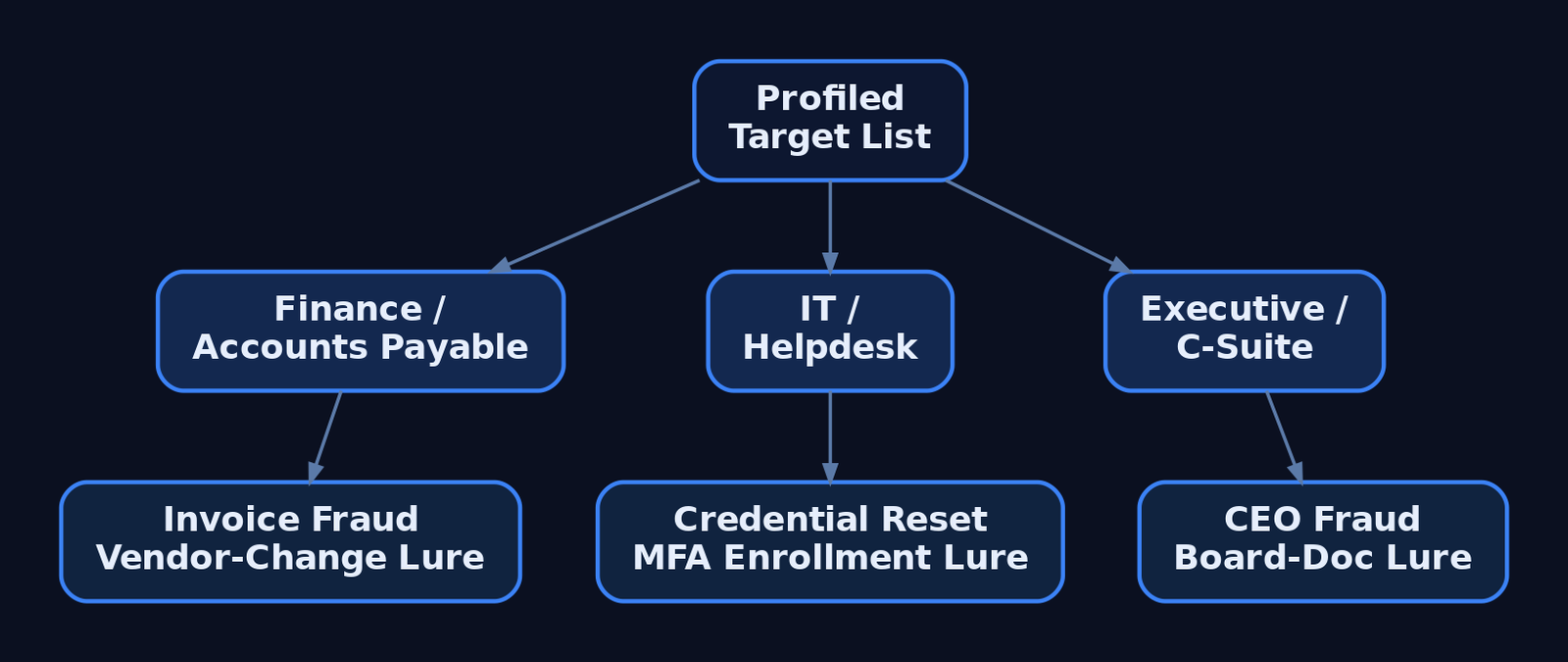
Profiling pays off here. A generic lure addressed to everyone is weaker than three tailored ones. Finance gets invoice-fraud and vendor-payment-change narratives. IT and helpdesk staff get credential-reset and MFA-enrollment pretexts. Executives get CEO-fraud and board-document lures. The pretext has to fit what the recipient already expects to receive on a normal Tuesday.
5. Lure Design and Delivery Vector Selection
The delivery vector is T1566 (Phishing), and the sub-technique you pick is a trade-off between trust, evasion, and what the target’s controls inspect:
| Sub-technique | ID | Delivery mechanism |
|---|---|---|
| Spearphishing Attachment | T1566.001 | Malicious file — Office doc, PDF, ISO, LNK, OneNote |
| Spearphishing Link | T1566.002 | Link to harvesting page or payload host |
| Spearphishing via Service | T1566.003 | Teams, Slack, LinkedIn DM, cloud storage |
| Spearphishing Voice | T1566.004 | Vishing / callback phishing |
Attachment campaigns rely on User Execution (T1204.002) — the victim has to open and trigger the file. Links exist precisely to avoid attachment scanning. If a gateway detonates attachments, you move to a link; if it rewrites links, you move to something the scanner doesn’t understand.
| Lure format | Abuse scenario |
|---|---|
| ISO / VHD in archive | Container strips Mark-of-the-Web from the inner payload |
| LNK file | Shortcut launches a hidden interpreter on double-click |
| OneNote attachment | Embedded “click to view” object spawns a child process |
| Double-extension file | invoice.pdf.exe reads as a PDF in a narrow window |
| QR code (“quishing”) | URL lives in an image — no clickable link for gateways to parse |
| HTML smuggling | Browser assembles the payload locally from inline data |
HTML smuggling is worth understanding because it inverts the perimeter: the file never crosses the network as a file, so attachment and URL scanners see only plain HTML.
<!-- Illustrative ONLY — shows why HTML smuggling evades file/URL scanners.
     The "payload" never traverses the network as a file; the browser builds it
     locally from a string already inside the HTML. The gateway sees inert markup. -->
<script>
  const data = atob("SGVsbG8gZnJvbSB0aGUgYnJvd3Nlcg==");   // benign demo content
  const blob = new Blob([data], { type: "application/octet-stream" });
  const url  = URL.createObjectURL(blob);
  const a    = document.createElement("a");
  a.href = url; a.download = "invoice.txt";                // forces a local "save"
  // a.click();   // auto-trigger left disabled deliberately
</script>
6. Sender Infrastructure and Spoofing
Delivery fails at the envelope if the sender looks wrong. Adversaries register look-alike domains (T1583.001) — corp-helpdesk.example against the real corp.helpdesk.example — and warm up aged sending accounts (T1585.002) so they pass reputation filters. The highest-trust option is hijacking a real conversation from a compromised third-party mailbox (T1586.002), where the reply lands inside an existing thread the victim already trusts.
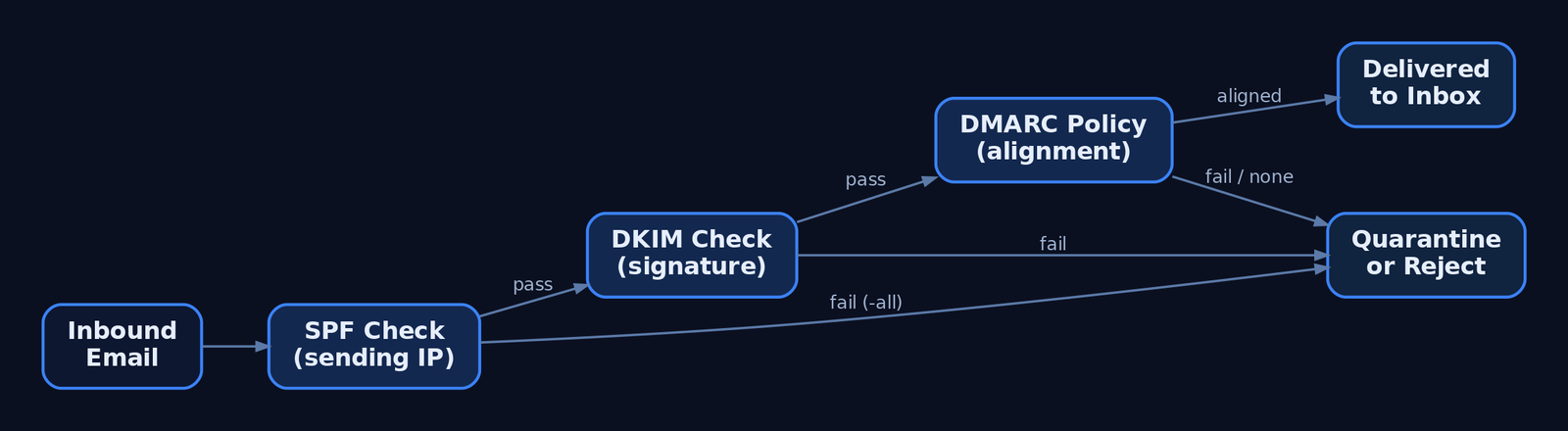
From the attacker’s chair, the three email-authentication records define what’s possible:
| Control | What it does |
|---|---|
| SPF (TXT) | Authorizes sending IPs; ~all softfails, -all hardfails |
| DKIM | Cryptographic signature over headers/body; detects mid-transit tampering |
| DMARC | Enforces policy (p=reject / p=quarantine / p=none) on SPF/DKIM failure and binds both to the From: header via alignment |
Direct domain spoofing dies against a hard -all SPF record plus DMARC p=reject. That’s why attackers pivot to look-alike domains — a domain you control passes its own SPF and DKIM cleanly, and DMARC has nothing to complain about because the From: is genuinely yours.
A war story worth your hour: I once burned a beautifully aged look-alike domain in the first thirty minutes of a campaign because the landing page’s TLS certificate had been issued that morning. A switched-on analyst pulled the cert transparency log, saw a brand-new cert on a brand-new host receiving inbound clicks, and quarantined the whole run. The same crt.sh query you use to profile a target is the one defenders use to catch you. Provision infrastructure days ahead, not minutes.
7. Reconnaissance Phishing vs. Payload Delivery
Not every phishing message delivers malware. T1598 (Phishing for Information) sits under Reconnaissance — it tricks the target into divulging credentials or actionable data with no payload at all. A fake login portal (T1598.003) harvests a password; callback phishing extracts data verbally over the phone. The defining indicator: no malicious attachment, no exploit-laden link. That absence is what distinguishes T1598 from T1566.
Two modern variants defeat MFA and deserve detection-level treatment (no working frameworks here):
- Adversary-in-the-Middle (
T1557). A reverse proxy relays the victim’s real login to the real service and captures the session cookie issued after a successful MFA prompt. The stolen cookie replays the authenticated session — the second factor never protected anything because it already passed. - MFA Request Generation (
T1621). Push-bombing a target with repeated approval prompts until fatigue or confusion yields a tap. - OAuth device-code phishing. Abusing the device-authorization flow to capture tokens without ever touching a password, against M365 and Google Workspace.
The defensive answer to all three is phishing-resistant authentication — FIDO2 / passkeys — which is not susceptible to relay because the credential is bound to the legitimate origin.
8. Campaign Execution and Metrics
For authorized simulations, GoPhish handles sending profiles, landing pages, and tracking. The shape of a scoped, consented campaign:
# Authorized simulation only. Illustrative profile + campaign shape.
sending_profile:
  name: "IT Helpdesk Sim"
  from_address: "helpdesk@corp-helpdesk.example"   # pre-warmed look-alike
  host: "smtp.relay.internal:587"
  username: "sim-sender"
  ignore_cert_errors: false

campaign:
  name: "Q3 Awareness - Password Reset"
  url: "https://corp-helpdesk.example/reset"        # tracked landing page
  launch_date: "2026-07-01T09:00:00Z"
  tracking_pixel: true                              # open-rate beacon
  groups: ["finance-pilot"]                         # scoped, consented list
Read the metrics honestly. Open rate measures subject-line and sender plausibility. Click rate measures pretext strength. Submit rate — credentials actually entered — is the number that matters for risk, and it’s the one you report. Don’t shame individuals; aggregate by department and feed the result back into training. And when the engagement closes, destroy the harvested submissions per your data-handling rules.
9. Detection and Defense — The Defender’s View
Recon is invisible, so defense concentrates at delivery and execution. Email authentication is the first wall: enforce DMARC p=reject with alignment, and teach analysts to read the headers.
# Defender view: read Authentication-Results to spot spoofing.
$headers = Get-Content .\suspicious.eml -Raw
[regex]::Matches($headers, 'Authentication-Results:.*?(?=\r?\n\S)') |
    ForEach-Object { $_.Value }
# Flag: spf=fail, dkim=fail, dmarc=fail (or dmarc=none = no enforcement)
Post-delivery, the payload betrays itself through process lineage. Key Sysmon events:
| Event ID | Name | Relevance to phishing |
|---|---|---|
1 | Process Create | outlook.exe → powershell.exe, winword.exe → cmd.exe |
3 | Network Connection | Unusual outbound from an Office app (C2 callback) |
11 | File Created | Attachment written to %TEMP%\Outlook Temp\ |
15 | FileCreateStreamHash | Zone.Identifier ADS confirms internet origin (MOTW) |
22 | DNS Query | Office or browser DNS right after lure interaction |
The canonical detection — an Office app spawning a script interpreter:
title: Office Application Spawning a Script Interpreter
id: 6c4f1a2e-phishing-office-child
logsource:
  category: process_creation
  product: windows
detection:
  selection:
    ParentImage|endswith:
      - '\winword.exe'
      - '\excel.exe'
      - '\outlook.exe'
      - '\onenote.exe'
    Image|endswith:
      - '\powershell.exe'
      - '\cmd.exe'
      - '\mshta.exe'
      - '\wscript.exe'
      - '\cscript.exe'
  condition: selection
tags:
  - attack.initial_access
  - attack.t1566.001
  - attack.t1204.002
level: high
Catch attachment execution by its working directory:
title: Process Execution From Outlook Attachment Temp Path
id: 9a2b7c10-phishing-outlook-temp
logsource:
  category: process_creation
  product: windows
detection:
  selection:
    CurrentDirectory|contains: '\Content.Outlook\'
  condition: selection
tags:
  - attack.initial_access
  - attack.t1566.001
level: high
Credential-harvest fallout shows up in the Security log — 4625 (failed logon), 4740 (lockout from spray), 4688 (process creation with command-line auditing) — and in M365 / Entra ID sign-in risk events. Hardening that actually moves the needle:
- ASR rules blocking Office apps from spawning child processes.
- Protected View + Trust Center disabling internet-origin macros by default, with MOTW enforced even for archive-extracted files to kill the ISO bypass.
- Safe Links / Safe Attachments for click-time URL rewriting and sandbox detonation.
- FIDO2 / passkeys over push-based MFA — the only control that survives AiTM.
- Limiting public OSINT exposure — shallow public org charts, undisclosed email formats, sanitized job postings.
- Awareness training using current lures (ISO, OneNote, QR), not just decade-old attachment scares.
10. MITRE ATT&CK Mapping
| Technique | MITRE ID | Detection |
|---|---|---|
| Gather Victim Identity Information | T1589 | Largely invisible; monitor breach exposure, 4625/4740 downstream |
| Gather Victim Org Information / Roles | T1591 / T1591.004 | Limit public org-chart depth |
| Search Open Technical Databases | T1596 | Monitor own CT logs for look-alike certs |
| Acquire Infrastructure: Domains | T1583.001 | Newly-registered-domain blocking at gateway |
| Compromise Accounts: Email | T1586.002 | Anomalous reply-chain sender, header mismatch |
| Phishing | T1566 | Email auth, gateway telemetry, Sysmon EID 1 |
| Spearphishing Attachment | T1566.001 | Sysmon EID 1/11/15, Office child-process Sigma |
| Spearphishing Link | T1566.002 | Safe Links, URL detonation |
| Spearphishing Voice | T1566.004 | Helpdesk verification policy, user reporting |
| User Execution: Malicious File | T1204.002 | Parent-child process chain |
| Phishing for Information | T1598 | Link to harvest page with no payload |
| Adversary-in-the-Middle | T1557 | Impossible-travel, session anomalies; FIDO2 |
| MFA Request Generation | T1621 | Repeated push prompts in sign-in logs |
Summary
- A phishing campaign is won during reconnaissance, not in the message — the dossier and pretext decide the outcome before delivery.
- Target profiling chains passive OSINT (
T1589,T1591,T1593,T1596) into a ranked list, generating almost no target-side telemetry. - Pretexts weaponize authority, urgency, and familiarity; the strongest ones match the recipient’s actual job function.
- Delivery vector (
T1566sub-techniques) is a trade-off against the controls in place — attachment, link, service, or voice — with ISO, OneNote, quishing, and HTML smuggling as modern evasion paths. T1598harvests data with no payload, and AiTM (T1557) defeats push-based MFA — both demand phishing-resistant FIDO2.- Defenders win at delivery and execution: enforce
DMARC p=reject, hunt Office child-process chains via Sysmon EID 1, and convert every red-team finding into a concrete blue-team control.
Related Tutorials
- Passive OSINT: Mapping the Target Without Touching It
- APT Profiling: How to Build a Comprehensive Adversary Profile from Open-Source Intelligence
- Building a Red Team Lab: Infrastructure, VMs, and C2 Setup
- OSINT for People and Credentials: LinkedIn, Breach Data, and Email Harvesting
- Active OSINT: DNS, Certificate Transparency, and Subdomain Enumeration
References
- Phishing (T1566) – Enterprise | MITRE ATT&CK®
- Phishing for Information (T1598) – Enterprise | MITRE ATT&CK®
- Gather Victim Identity Information (T1589) – Enterprise | MITRE ATT&CK®
- Gather Victim Org Information (T1591) – Enterprise | MITRE ATT&CK®
- Phishing: Spearphishing Link (T1566.002) – Enterprise | MITRE ATT&CK®
- Phishing for Information: Spearphishing Service (T1598.001) – Enterprise | MITRE ATT&CK®
APT Profiling: How to Build a Comprehensive Adversary Profile from Open-Source Intelligence
Objective: Learn how to systematically collect, structure, and operationalize open-source intelligence into a complete, ATT&CK-mapped adversary profile — a defensible dossier that drives realistic adversary emulation, detection-gap analysis, and threat-informed defense.
1. What Is an Adversary Profile and Why Build One
An adversary profile is a structured dossier describing who a threat actor is, what they target, how they operate, and which tools and infrastructure they favor — all normalized to a shared taxonomy. It is the durable opposite of an IOC-only feed.
An IOC feed gives you hashes and IP addresses that expire in days. A profile captures the actor’s tactics, techniques, and procedures (TTPs), which change slowly and cost the adversary real effort to alter. A finished profile is the source artifact for three downstream activities:
- Adversary emulation — sequencing a real group’s TTPs into a test plan.
- Detection engineering — overlaying the profile against your sensor coverage to find gaps.
- Risk communication — translating actor capability and intent for leadership.
Threat intelligence comes in four flavors, and a good profile feeds all of them: strategic (executive risk), tactical (SOC TTPs), operational (incident-response context), and technical (machine-readable indicators).
2. The Intelligence Lifecycle Applied to APT Profiling
Cyber threat intelligence is produced through a six-phase lifecycle. Profiling is just this lifecycle scoped to a single actor.
| Phase | Profiling Activity |
|---|---|
| Planning / Direction | Define the intelligence requirement: “Which APT threatens our sector, and can we detect its TTPs?” |
| Collection | Gather vendor reports, advisories, passive DNS, malware samples |
| Processing | Normalize raw reports; extract candidate TTPs and IOCs |
| Analysis | Map to ATT&CK, assess confidence, resolve naming conflicts |
| Dissemination | Publish as STIX bundle, Navigator layer, and emulation plan |
| Feedback | Refine the profile as new reporting and red-team results arrive |
Start with an explicit Priority Intelligence Requirement (PIR) or Request for Information (RFI). Without a scoped question, collection sprawls and the profile never converges.
3. Analytical Frameworks: Diamond Model, Kill Chain, and ATT&CK
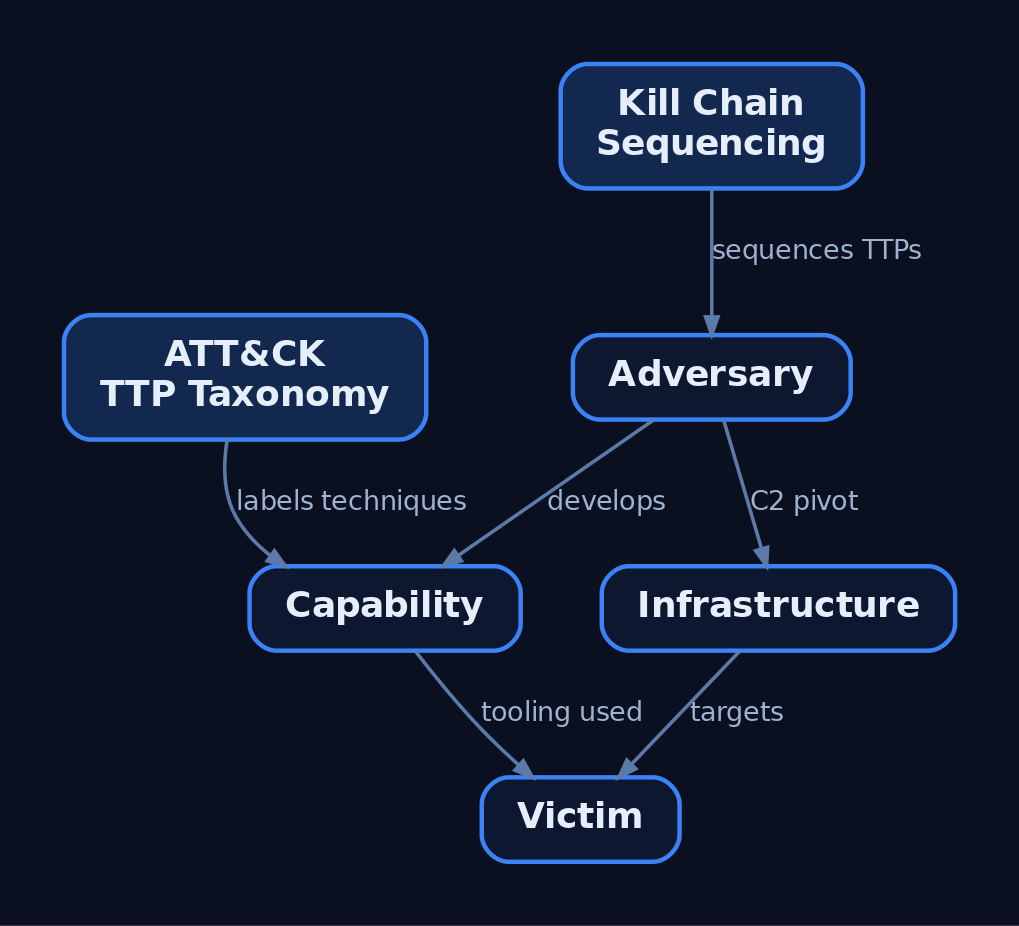
Three frameworks provide complementary lenses. Use all three — they are not interchangeable.
| Framework | Role in APT Profiling |
|---|---|
| MITRE ATT&CK | Maps observed TTPs to a standardized taxonomy for comparison and emulation |
| Cyber Kill Chain (Lockheed Martin) | Sequences behaviors across reconnaissance, weaponization, delivery, exploitation, installation, command and control, and actions on objectives |
| Diamond Model | Relates the four core intrusion elements: Adversary, Infrastructure, Capability, Victim |
The Diamond Model is the pivoting engine. Each intrusion event has four interconnected vertices, and the relationships between them drive investigation. The adversary–infrastructure edge reveals how operators stand up C2; the victim–capability edge exposes which tooling is used against which target. Unlike the sequential Kill Chain, the Diamond Model excels at attribution and visualizing relationships — pivot from a known malware sample to the infrastructure that served it, then to other victims of the same infrastructure.
ATT&CK then supplies the granular vocabulary that makes those pivots comparable across reports and across teams.
4. OSINT Collection: Primary Source Taxonomy
OSINT spans news media, social media, public records, government publications, academic research, commercial data, and the deep/dark web. For APT profiling, prioritize these primary source classes and score each for reliability.
| Source Type | Description |
|---|---|
| Vendor threat reports | Mandiant, CrowdStrike Intelligence, Microsoft MSTIC, Secureworks CTU, Elastic Security Labs, SpecterOps |
| Government advisories | CISA advisories (often with embedded ATT&CK mappings), NSA/CISA joint advisories, FBI Flash |
| MITRE ATT&CK Groups | Curated, attributed group profiles at attack.mitre.org/groups/ |
| Malware repositories | VirusTotal, MalwareBazaar, Hybrid Analysis for tooling attribution |
| Infrastructure / passive DNS | Shodan, Censys, DomainTools, WHOIS/RDAP, certificate transparency logs |
| Code repositories | GitHub/GitLab for leaked tooling and infrastructure-as-code patterns |
Infrastructure pivoting is largely passive. The example below queries Shodan for hosts matching a documented C2 fingerprint — a benign illustration of the adversary–infrastructure edge.
import shodan

API_KEY = "YOUR_API_KEY"      # placeholder — never commit real keys
api = shodan.Shodan(API_KEY)

# Pivot on a publicly documented C2 framework fingerprint
query = 'product:"Cobalt Strike Beacon" ssl.cert.subject.CN:"example-c2.test"'
results = api.search(query)

for host in results["matches"]:
    print(host["ip_str"], host.get("port"), host.get("org"))
Rate every source with the Admiralty Code: source reliability (A–F) and information credibility (1–6). A single vendor blog is B2 at best; corroboration across two independent vendors plus a government advisory raises confidence.
5. Building the Adversary Dossier
Capture the profile in a fixed schema so that every actor is described the same way and TTP heatmaps are comparable. Use this template as your reference document.
| Field | Content |
|---|---|
Actor ID | Canonical tracker (e.g., ATT&CK G0016) |
Aliases | Associated group names and vendor designations |
Nexus | Suspected country of origin / state sponsorship |
Motivation | Espionage, financial, ideological, destructive |
Active Since | First reported activity date |
Targeting | Sectors, geographies, victim profile |
Tooling | Malware families and offensive tools |
Infrastructure Patterns | Registrar habits, ASN clusters, cert reuse, C2 conventions |
ATT&CK Techniques | Normalized technique-ID list with frequency |
IOCs | Hashes, domains, IPs (with confidence and decay date) |
Confidence | Admiralty rating per claim |
Sources | Cited reports with retrieval dates |
ATT&CK’s Group object aligns directly with several of these fields, so anchor your dossier to it.
| Field | Description |
|---|---|
Group ID | Unique identifier (e.g., G0016 for APT29) |
Associated Groups | Publicly reported overlapping names (formerly “Aliases”) |
Description | Activity dates, suspected attribution, targeted industries |
Techniques Used | Techniques with a note on how the group used each |
Software | Malware and tool families attributed to the group |
Campaigns | Named, time-bounded intrusion clusters |
ATT&CK currently tracks 176 groups, each with attribution, targeted geographies, and targeted sectors.

6. ATT&CK Mapping: Extracting and Normalizing Techniques
Follow CISA’s Best Practices for MITRE ATT&CK Mapping: read the report, find the behavior, then map to the most specific technique the evidence supports. The cardinal sin is over-mapping — claiming a sub-technique when the text only justifies a tactic.
A conceptual keyword-to-technique pass illustrates semi-automated extraction. This is not a production NLP classifier; treat it as a triage aid that an analyst validates.
import json

# Local ATT&CK Enterprise snapshot (STIX bundle) loaded for ID validation
with open("enterprise-attack.json") as f:
    bundle = json.load(f)

# Illustrative keyword -> technique lookup, manually curated
keyword_map = {
    "spearphishing attachment": "T1566.001",
    "powershell":               "T1059.001",
    "wmi":                      "T1047",
    "scheduled task":          "T1053.005",
    "lsass":                   "T1003.001",
}

report = """The actor sent a spearphishing attachment, used PowerShell to
run a loader, registered a scheduled task for persistence, and dumped
credentials from LSASS."""

report_l = report.lower()
hits = sorted({tid for kw, tid in keyword_map.items() if kw in report_l})
print(hits)   # ['T1003.001', 'T1053.005', 'T1059.001', 'T1566.001']
Every machine-suggested ID gets human confirmation against the report sentence before it enters the profile.
7. Querying ATT&CK Group Data Programmatically
MITRE publishes ATT&CK as STIX. Pull a group’s techniques directly with mitreattack-python rather than scraping the website.
from mitreattack.stix20 import MitreAttackData

mitre = MitreAttackData("enterprise-attack.json")

# Resolve the documented group by alias (use real, attributed groups only)
group = mitre.get_groups_by_alias("APT29")[0]   # G0016

techniques = mitre.get_techniques_used_by_group(group.id)
for entry in techniques:
    tech = entry["object"]
    attack_id = mitre.get_attack_id(tech.id)
    print(attack_id, tech.name)
You can also reach the live TAXII 2.1 server and walk the relationship graph yourself — pivoting intrusion-set → uses → attack-pattern.
from taxii2client.v21 import Server
from stix2 import TAXIICollectionSource, Filter

server = Server("https://attack-taxii.mitre.org/api/v21/")
collection = server.api_roots[0].collections[0]   # Enterprise ATT&CK
src = TAXIICollectionSource(collection)

group = src.query([Filter("type", "=", "intrusion-set"),
                   Filter("name", "=", "APT29")])[0]

for rel in src.relationships(group.id, "uses", source_only=True):
    if rel.target_ref.startswith("attack-pattern"):
        print(src.get(rel.target_ref).name)
8. ATT&CK Navigator Layers and Coverage Gap Analysis
The ATT&CK Navigator renders technique sets as a heatmap. Export a group’s techniques as a layer JSON, score each by observed frequency, and drag the file into the Navigator web app. Below is a v4 layer for a documented group.
{
  "name": "G0016 APT29 - Observed TTPs",
  "versions": { "attack": "14", "navigator": "4.9.1", "layer": "4.5" },
  "domain": "enterprise-attack",
  "techniques": [
    { "techniqueID": "T1566.001", "score": 5, "color": "#fc3b3b",
      "comment": "Spearphishing attachment - multiple campaigns" },
    { "techniqueID": "T1059.001", "score": 4, "color": "#fc6b3b",
      "comment": "PowerShell loaders" },
    { "techniqueID": "T1003.001", "score": 3, "color": "#fc9d3b",
      "comment": "LSASS credential access" }
  ],
  "gradient": {
    "colors": ["#ffffff", "#fc3b3b"], "minValue": 0, "maxValue": 5
  }
}
The power move is layer arithmetic: load the actor layer and your team’s detection coverage layer, then compute their difference. Techniques the actor uses that your sensors do not cover are your prioritized hardening backlog. Overlaying two actor layers instead reveals shared TTPs worth emulating once to cover multiple threats.
9. Structuring the Profile in STIX 2.1
To make the profile machine-readable and shareable over TAXII, serialize it as STIX. Platforms such as MISP, OpenCTI, ThreatConnect, and Anomali ThreatStream ingest this directly.
| STIX SDO | Maps To |
|---|---|
threat-actor | Actor identity, aliases, motivation, sophistication |
intrusion-set | Named activity cluster (e.g., “APT29”) |
attack-pattern | An ATT&CK technique via external_references |
malware | Family with malware_types, is_family |
tool | Legitimate software used offensively |
campaign | A time-bounded activity cluster |
indicator | A STIX pattern, e.g. [file:hashes.'SHA-256' = '...'] |
relationship | Links SDOs (uses, attributed-to) |
{
  "type": "bundle", "id": "bundle--6f3a...",
  "objects": [
    { "type": "intrusion-set", "spec_version": "2.1",
      "id": "intrusion-set--1a2b...", "name": "APT29",
      "aliases": ["Cozy Bear"] },
    { "type": "attack-pattern", "spec_version": "2.1",
      "id": "attack-pattern--3c4d...", "name": "Spearphishing Attachment",
      "external_references": [
        { "source_name": "mitre-attack", "external_id": "T1566.001" } ] },
    { "type": "malware", "spec_version": "2.1",
      "id": "malware--5e6f...", "name": "WELLMESS",
      "is_family": true, "malware_types": ["backdoor"] },
    { "type": "relationship", "spec_version": "2.1",
      "id": "relationship--7a8b...", "relationship_type": "uses",
      "source_ref": "intrusion-set--1a2b...",
      "target_ref": "attack-pattern--3c4d..." }
  ]
}
10. The Pyramid of Pain and Attribution Confidence
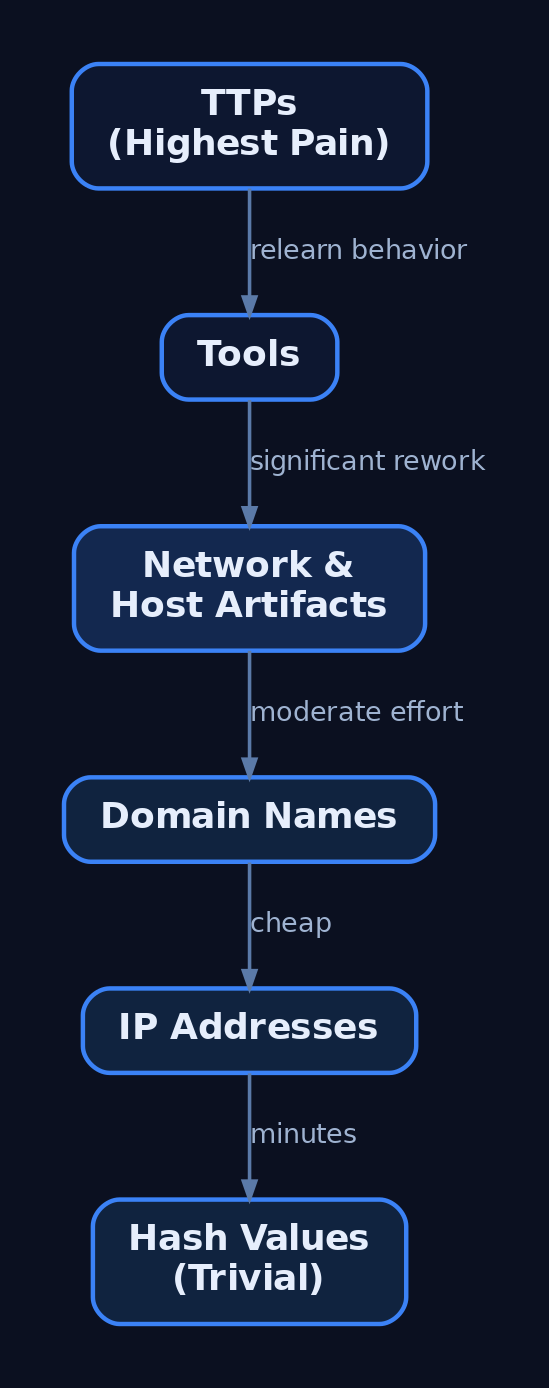
David Bianco’s Pyramid of Pain (2013) explains why TTP-based profiling outlasts IOC-based profiling. From the bottom (trivial for the adversary to change) to the top (expensive and painful):
- Hash values → trivially recompiled
- IP addresses → rotated in minutes
- Domain names → re-registered cheaply
- Network/host artifacts → moderate effort
- Tools → significant rework
- TTPs → the adversary must relearn how they operate
Profiling for the top of the pyramid forces the adversary to change behavior, not just infrastructure. That is the entire defensive case for TTP-centric profiles.
Treat attribution skeptically. Multiple vendors track overlapping activity under different names, and their group boundaries may disagree. Record an explicit confidence rating (Admiralty Code or an Assessed/Confirmed scale) per claim, and never collapse two vendor clusters into “the same actor” without corroboration.
11. From Profile to Emulation Plan
The finished profile drives an emulation plan in the style of the CTID Adversary Emulation Library. Translate the TTP heatmap into a prioritized, sequenced scenario:
- Sequence techniques along the Kill Chain — initial access, execution, persistence, credential access, exfiltration.
- Prioritize by impact, current detection coverage (from the Navigator gap analysis), and business relevance.
- Constrain the plan to documented behaviors; emulate procedures, not improvised tradecraft.
The output is a runnable, scoped test that exercises exactly the techniques your real adversary uses — and validates the detections you built from the same profile.

12. Common Attacker Techniques
A profile must capture what the adversary does during its own reconnaissance and resource development — the pre-attack behaviors you study and emulate.
| Technique | Description |
|---|---|
| Gather identity information | Harvest credentials, emails, employee names (T1589) |
| Gather network information | Enumerate DNS, IP ranges, topology (T1590) |
| Gather org information | Identify roles, business tempo, relationships (T1591) |
| Gather host information | Fingerprint software, hardware, configs (T1592) |
| Search open websites | Social media, search engines, code repos (T1593) |
| Active scanning | Port, vulnerability, wordlist scanning (T1595) |
| Acquire / develop capabilities | Register infra, build or buy tooling (T1583, T1587, T1588) |
13. Defensive Strategies & Detection
Profiling cuts both ways: detect adversaries profiling you, and validate coverage against a finished profile. Correlate weak recon signals across categories — perimeter scanning (T1595), web fingerprinting (T1592), and email harvesting (T1589) together indicate targeted pre-attack planning.
| Detection Area | Specifics |
|---|---|
| Web server logs | Scanner user-agents (Masscan, ZGrab); sequential 404 bursts (T1595.003) |
| DNS monitoring | AXFR zone-transfer attempts; unusual PTR sweeps (T1590.002) |
| Honeytokens | Planted career-page emails that fire on first contact (T1589.002) |
| Cert Transparency | Alerts on lookalike-domain issuance (T1583/T1584) |
| Identity logs | Event ID 4624 correlated with 4662 for LDAP/AD enumeration |
Host-based recon once inside is visible to Sysmon: Event ID 1 (Process Create) catches nslookup, nltest, net view; Event ID 3 (Network Connection) surfaces internal scanning; Event ID 22 (DNS Query) enumerates lookups. Enable Audit Directory Service Access and command-line auditing (4688).
title: Domain Trust and Group Reconnaissance via Built-in Tools
logsource:
  product: windows
  service: sysmon
detection:
  selection:
    EventID: 1
    CommandLine|contains:
      - 'nltest /domain_trusts'
      - 'net group "domain admins"'
      - 'net view /domain'
  condition: selection
level: medium
Centralize network, endpoint, identity, and threat-intel telemetry into one analytics platform, and ingest the profile’s STIX into a TIP (MISP/OpenCTI) so IOCs correlate against live data automatically. Reduce your OSINT attack surface: prune public DNS records, enable WHOIS privacy, and strip version banners.
14. Tools for Adversary Profiling
| Tool | Description | Link |
|---|---|---|
| MITRE ATT&CK Navigator | Technique heatmaps and layer arithmetic | mitre-attack.github.io |
mitreattack-python | Programmatic ATT&CK STIX queries | github.com |
| MISP | Threat-intel platform, STIX/TAXII ingestion | misp-project.org |
| OpenCTI | Knowledge graph for actors and TTPs | opencti.io |
| Shodan / Censys | Passive internet asset discovery | shodan.io |
| DomainTools / RDAP | WHOIS and passive DNS pivoting | domaintools.com |
| VirusTotal / MalwareBazaar | Tooling attribution from samples | virustotal.com |
15. MITRE ATT&CK Mapping
| Technique | MITRE ID | Detection |
|---|---|---|
| Gather Victim Identity Information | T1589 | Honeytoken email triggers; phishing telemetry |
| Email Addresses | T1589.002 | Planted-address alerting |
| Gather Victim Network Information | T1590 | AXFR / PTR sweep monitoring |
| DNS | T1590.002 | Microsoft-Windows-DNS-Client ETW |
| Gather Victim Org Information | T1591 | LinkedIn exposure review |
| Gather Victim Host Information | T1592 | Web fingerprinting in server logs |
| Search Open Websites/Domains | T1593 | Code-repo secret scanning |
| Search Victim-Owned Websites | T1594 | Anomalous crawl patterns |
| Active Scanning | T1595 | Perimeter scan / 404 burst detection |
| Acquire Infrastructure | T1583 | Cert Transparency lookalike alerts |
| Compromise Infrastructure | T1584 | Passive DNS pivoting |
| Develop / Obtain Capabilities | T1587 / T1588 | Malware-repo attribution |
Summary
- An adversary profile is a structured, ATT&CK-mapped dossier of actor identity, targeting, tooling, and TTPs — the durable artifact IOC feeds cannot replace.
- Run the six-phase intelligence lifecycle and fuse three frameworks: the Diamond Model for pivoting, the Kill Chain for sequencing, and ATT&CK for the TTP taxonomy.
- Collect from vendor reports, government advisories, passive DNS, and malware repositories — and score every source with the Admiralty Code.
- Serialize the result as STIX 2.1 and a Navigator layer so it feeds TIPs, gap analysis, and CTID-style emulation plans.
- Detect adversaries profiling you with correlated recon signals — Sysmon Event IDs
1/3/22, honeytokens, and Cert Transparency monitoring — and profile for the top of the Pyramid of Pain, where changing TTPs costs the adversary the most.
Related Tutorials
- Cyber Threat Intelligence (CTI) Fundamentals: Sources, Types, and the Intelligence Lifecycle
- Threat-Informed Defense: Principles, Frameworks, and the Intelligence-Driven Security Cycle
- Adversary Emulation vs. Adversary Simulation: Definitions, Differences, and Why It Matters
- Phishing Campaign Design: Pretexting, Lures, and Target Profiling
- Mapping CTI Reports to ATT&CK TTPs: A Step-by-Step Methodology
References
OSINT for People and Credentials: LinkedIn, Breach Data, and Email Harvesting
Objective: Understand how adversaries assemble a pre-engagement targeting package — employee identities, email addresses, and exposed credentials — from public sources such as LinkedIn, breach databases, and email-discovery APIs, and learn the matching detection and hardening guidance that lets defenders run the same playbook against their own organization.
1. What OSINT Reconnaissance Is (and Isn’t)
Open-Source Intelligence (OSINT) is the collection and correlation of information from publicly available sources. In a red team context it forms the Reconnaissance phase that precedes any packet sent to the target.
The critical distinction is passive versus active:
| Concept | What It Actually Is |
|---|---|
| Passive OSINT | Querying third-party databases, search engines, and public records. No packet ever reaches the target, so the target cannot detect you. |
| Active recon boundary | Direct interaction with target infrastructure — DNS zone transfers, port scans, banner grabbing. The target can log it. |
| Email format inference | Deriving a standard format from confirmed samples, then extrapolating across all discovered names. |
| Credential stuffing pipeline | Cross-referencing leaked credential databases against a domain to find reusable passwords for spraying or stuffing. |
Everything in this tutorial is passive or queries third-party services — never the target. Even so, all activity must sit inside a signed rules of engagement (RoE) and scope document. You only run breach-domain searches and authenticated harvesting against domains you own or are explicitly authorized to test. Storing breach data carries legal weight; handle it like the regulated material it is.
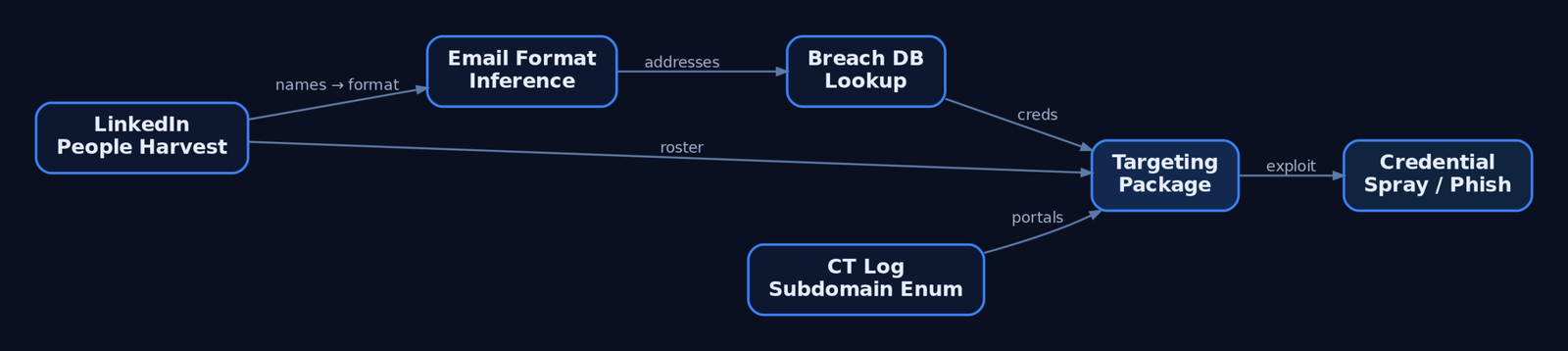
2. The Adversary’s Goal: Building a Targeting Package
The output of this phase is a structured targeting package. A complete one contains:
- Employee list — names, titles, departments, reporting structure.
- Email addresses — confirmed or inferred from the corporate format.
- Exposed credentials — breach hits tied to those addresses.
- Tech stack — EDR, VPN, and cloud platforms gleaned from job postings.
- Attack surface — subdomains and employee-facing portals.
This maps directly to ATT&CK Reconnaissance (TA0043): gathering identity information (T1589), org information (T1591), and searching open websites (T1593). The package’s value is leverage — it converts anonymous infrastructure into named humans with reusable passwords and a known authentication portal.
3. LinkedIn People Harvesting
LinkedIn is the richest single source of employee identity data. Unauthenticated bulk scraping violates its Terms of Service, so red teams stick to passive search-engine methods.
The primary technique is Google dorking — crafted search queries that pull indexed profiles without touching LinkedIn directly:
# Run only against organizations you have written authorization to assess.
# Illustrative dork strings — patterns, not automated scrapers.

site:linkedin.com/in "Target Corp" "Security Engineer"
site:linkedin.com/in "Target Corp" "Cloud Administrator"
Beyond names and titles, job postings leak the tech stack. A listing requiring “experience with CrowdStrike Falcon” confirms the EDR platform; a VPN product name reveals the remote-access surface. Each discovered name feeds two downstream tasks: email-address derivation and lure crafting for later social engineering.
What an adversary derives from purely public profiles:
| Technique | Description |
|---|---|
| Name and title harvesting | Build the employee roster and org chart. |
| Department structure mapping | Identify privileged roles (IT, finance, HR). |
| Tech-stack inference | Read EDR/VPN/cloud product names from job ads. |
| Movement tracking | Spot new hires (weaker awareness) and recent departures. |
4. Email Harvesting with theHarvester
theHarvester is the canonical recon tool for this phase. It gathers names, emails, IPs, subdomains, and URLs from 40+ public resources, determining a domain’s external threat landscape without contacting the target.
theHarvester invocation:
# Authorized engagements only — run against domains in your signed scope.
theHarvester -d example-corp.com -b bing,linkedin,hunter -l 500 -f results.json
Flag breakdown:
| Flag | Purpose |
|---|---|
-d <domain> | Target domain to enumerate. |
-b <source> | Comma-separated data sources (bing, google, linkedin, hunter, censys, certspotter, shodan). |
-l <limit> | Cap on results retrieved per source. |
-f <file> | Write structured output (JSON/XML) for later correlation. |
Several sources — hunter, censys, shodan — require API keys configured in theHarvester’s api-keys.yaml. The output is a deduplicated set of email addresses, subdomains, and hostnames you carry forward into format inference and breach lookups.
5. Email Format Inference and Verification
A handful of confirmed addresses reveals the corporate email format. Extrapolate that pattern across the LinkedIn roster to generate every employee’s likely address.
The six dominant corporate archetypes:
| Pattern | Example |
|---|---|
firstname.lastname | jane.doe@domain.com |
firstnamelastname | janedoe@domain.com |
flastname | jdoe@domain.com |
firstname | jane@domain.com |
f.lastname | j.doe@domain.com |
firstname_lastname | jane_doe@domain.com |
Hunter.io automates detection: its domain-search endpoint returns a pattern field naming the format explicitly, plus per-address confidence scores.
# Authorized scope only. Requires a Hunter.io API key.
import requests

def hunter_domain_search(domain, api_key):
    url = "https://api.hunter.io/v2/domain-search"
    params = {"domain": domain, "api_key": api_key}
    r = requests.get(url, params=params, timeout=20)
    r.raise_for_status()
    data = r.json()["data"]

    print(f"[+] Detected format: {data.get('pattern')}")
    for e in data.get("emails", []):
        print(f"    {e['value']:35} confidence={e['confidence']}")

# hunter_domain_search("example-corp.com", "<API_KEY>")
Validate an inferred format passively by confirming sample addresses in breach databases (next section) rather than actively probing the target’s SMTP server.
6. Breach Data with Have I Been Pwned
Have I Been Pwned (HIBP) aggregates breach data from thousands of compromised databases. The v3 API is current; per-account and domain endpoints require the hibp-api-key header and a descriptive User-Agent.
Per-account breach lookup:
# Authorized accounts only (e.g., your own domain's mailboxes).
import requests

def hibp_account(account, api_key):
    url = f"https://haveibeenpwned.com/api/v3/breachedaccount/{account}"
    headers = {"hibp-api-key": api_key, "User-Agent": "RedTeam-Recon-Lab"}
    r = requests.get(url, headers=headers, params={"truncateResponse": "false"}, timeout=20)
    if r.status_code == 404:
        return []          # clean — no breaches
    r.raise_for_status()
    for b in r.json():
        severity = "HIGH" if "Passwords" in b["DataClasses"] else "INFO"
        print(f"[{severity}] {b['Name']} ({b['BreachDate']}) -> {b['DataClasses']}")
    return r.json()
Key breach-metadata fields: Name, BreachDate, DataClasses, IsVerified, and IsFabricated. Treat IsFabricated: true entries with caution — they may be unreliable.
The /breacheddomain/ endpoint searches an entire domain at once, but it requires a paid plan and verified domain ownership — by design, you can only run it against a domain you control. That same constraint makes it a legitimate blue-team monitoring tool.
Privacy-preserving password check (k-Anonymity):
The /range/ endpoint requires no API key and never sends the full hash. You SHA-1 the candidate password, send only the first 5 characters of the hash, and match the returned suffix list locally.
import hashlib, requests

def pwned_password(password):
    sha1 = hashlib.sha1(password.encode()).hexdigest().upper()
    prefix, suffix = sha1[:5], sha1[5:]
    r = requests.get(f"https://api.pwnedpasswords.com/range/{prefix}", timeout=20)
    r.raise_for_status()
    for line in r.text.splitlines():
        h, count = line.split(":")
        if h == suffix:
            return int(count)          # times seen in breaches
    return 0
The full password never leaves your machine — this is the model defenders should adopt for any internal password-exposure check.
7. Deeper Breach Intelligence: DeHashed, IntelligenceX, and Paste Sites
HIBP confirms that an account was breached; it does not return passwords. For credential investigation, red teams reach for paid platforms.
| Service | What It Adds |
|---|---|
| DeHashed | Plaintext/hashed passwords, usernames, IPs tied to an email; lets you check whether the same hash recurs across accounts (reuse). |
| IntelligenceX | Indexes paste-site content and leak archives for near-real-time monitoring. |
| BreachDirectory | Ongoing credential-exposure tracking. |
| Pastebin / GitHub Gist | Credentials and internal data frequently surface here before removal. |
If a target email appears in DeHashed with a known password, that password may have been reused on corporate VPNs, mail portals, or cloud consoles — the basis of the credential-stuffing pipeline. Accessing and storing this material carries real legal constraints: retain only what the engagement requires, encrypt it at rest, and destroy it per the RoE.
8. Certificate Transparency for Subdomain Enumeration
Every TLS certificate issued for a domain is logged in public Certificate Transparency (CT) logs. Querying them discovers subdomains that never appear in DNS brute-forcing — and crucially, this is passive: you query a third-party log, not the target.
# crt.sh CT-log query — passive subdomain enumeration.
import requests

def crtsh_subdomains(domain):
    r = requests.get(f"https://crt.sh/?q=%.{domain}&output=json", timeout=30)
    r.raise_for_status()
    subs = {row["name_value"] for row in r.json()}
    for s in sorted(subs):
        print(s)

# crtsh_subdomains("example-corp.com")
Discovered hosts like vpn.example-corp.com or mail.example-corp.com correlate back to the harvested employees — these are the portals where breach credentials get sprayed.
9. Correlating Findings into an Attack Path
Reconnaissance is only useful when chained. The logical flow:
- People (LinkedIn) → roster of names and titles.
- Email format (Hunter.io) → addresses for every name.
- Breach hits (HIBP / DeHashed) → which addresses leaked, and which leaked passwords.
- Portals (crt.sh) → where those credentials authenticate.
- Spray candidates → privileged accounts without MFA, ranked by exploitability.
Two illustrative correlation helpers — dork construction and authorized format validation:
# Dork strings illustrate patterns only — no automated scraping.
linkedin = 'site:linkedin.com/in "TargetCorp" "engineer"'
github   = 'org:targetcorp filename:.env password'

# Authorized lab/own-domain only: generate candidates and check breach exposure.
def generate_and_check(names, domain, hibp_key):
    candidates = [f"{f.lower()}.{l.lower()}@{domain}" for f, l in names]
    for addr in candidates:
        hits = hibp_account(addr, hibp_key)   # from Section 6
        flag = "EXPOSED" if hits else "clean"
        print(f"{addr:35} {flag}")
Deliver the result as a structured artefact, not raw tool dumps:
# OSINT Targeting Report — example-corp.com (AUTHORIZED ENGAGEMENT)

## Employees Found
- Jane Doe — Security Engineer (LinkedIn)
- John Roe — Cloud Administrator (LinkedIn)

## Email Format
- Confirmed pattern: firstname.lastname@example-corp.com (Hunter.io, confidence 95)

## Breach Hits
- jane.doe@... — Breach2021 (Passwords, Emails) — HIGH
- john.roe@...  — no exposure — clean

## Credential Risk Ranking
1. jane.doe@... — admin role + breach password + portal vpn.example-corp.com

## Suggested Next Steps
- Validate MFA status on exposed accounts (authorized phase 2 only)
10. Common Attacker Techniques
| Technique | Description |
|---|---|
| Employee-name harvesting | Build rosters from LinkedIn and search engines to derive emails and lures. |
| Email-format inference | Extrapolate one confirmed format across the entire roster. |
| Breach-credential mining | Cross-reference addresses against HIBP/DeHashed for reusable passwords. |
| Paste-site monitoring | Scrape Pastebin/Gist leaks before takedown. |
| GitHub secret hunting | Search public repos and commit history for .env files, API keys, and DB passwords. |
| CT-log enumeration | Discover forgotten subdomains and shadow IT portals. |
Git history is decisive: a secret deleted last month still lives in the commit log unless the repo was scrubbed with git filter-repo — most never are.
11. Defensive Strategies & Detection
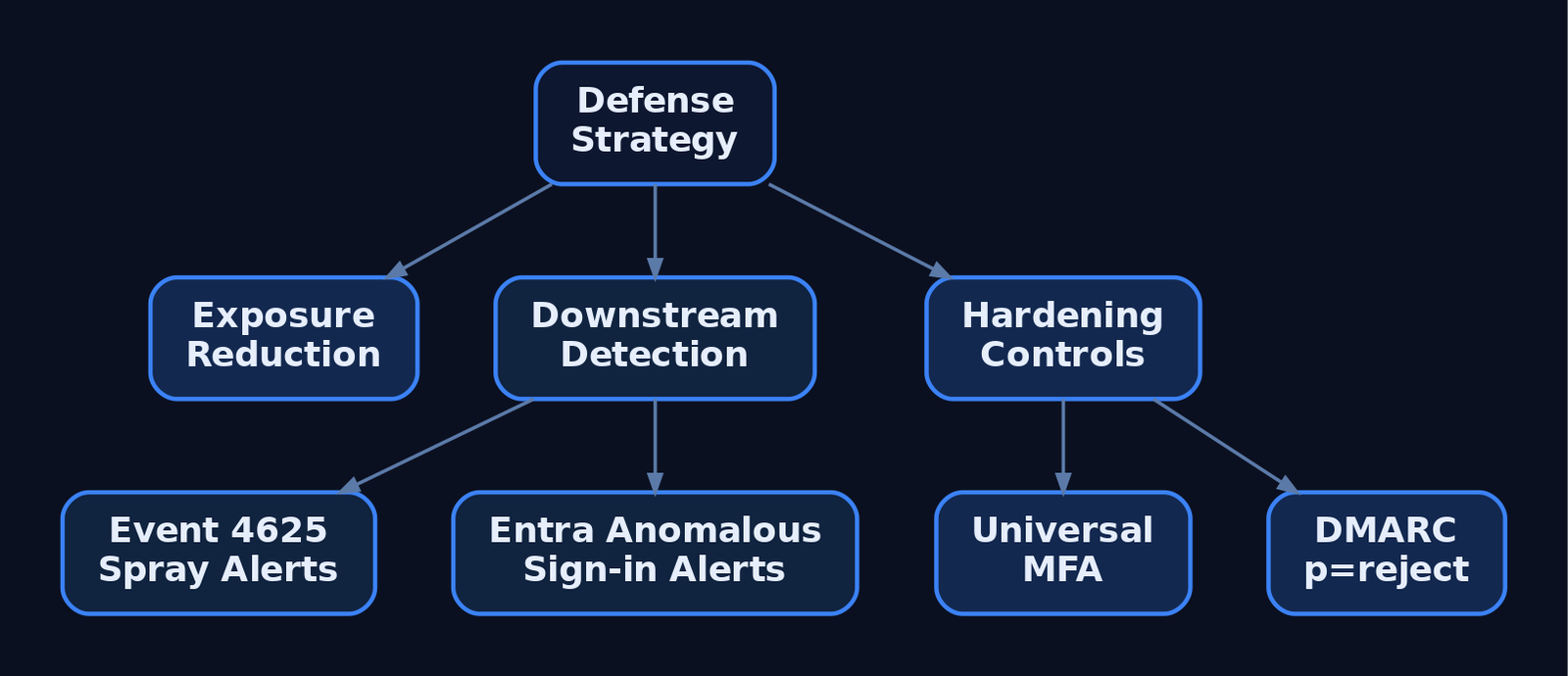
Inbound passive OSINT is largely invisible — there is no packet to log. Defense is therefore exposure reduction plus detecting the downstream use of harvested data and any internal authorized tooling.
What is observable:
- Sysmon Event ID 22 (DNSEvent) — internal hosts resolving OSINT API domains (
hunter.io,haveibeenpwned.com). Field:QueryName. Relevant to authorized red-team logging, not inbound recon. - Sysmon Event ID 3 (NetworkConnect) — outbound connections to Shodan/Censys/harvesting endpoints. Fields:
DestinationIp,DestinationPort,Image. - WAF / CDN logs — high-rate hits on
/staff,/team,/about,/sitemap.xmland scraper user-agents. - Certificate Transparency monitoring — alerts when unexpected certs/subdomains appear (shadow IT or forgotten assets).
- GitHub secret scanning — Advanced Security flags committed credentials before adversaries find them.
Downstream credential abuse is where SIEM earns its keep. Watch domain controllers for Event ID 4625 failures spread across many accounts from one source IP — SubStatus 0xC000006A (wrong password) and 0xC0000064 (bad username) signal password spraying. In Entra ID, alert on a successful sign-in from a new geolocation immediately after a domain appears in a breach.
Sigma rule (internal OSINT tool execution in a lab/red-team environment):
title: Internal OSINT Recon Tool Execution
logsource:
  product: windows
  service: sysmon
detection:
  selection:
    EventID: 1                 # Sysmon ProcessCreate
    Image|endswith:
      - '\theHarvester.py'
      - '\python.exe'
    CommandLine|contains:
      - 'theHarvester'
      - 'hunter.io'
      - 'haveibeenpwned'
  condition: selection
level: medium
This targets authorized internal tooling; it cannot see external recon performed against you.
Hardening priorities:
| Mitigation | Description |
|---|---|
| Employee profile hygiene | Train staff not to list VPN/EDR/tooling names in LinkedIn bios. |
| Corporate email discipline | Forbid work email for personal SaaS — breaches of those services leak corporate credentials. |
DMARC p=reject | Stops harvested addresses being trivially spoofed in follow-on phishing. |
| MFA everywhere | Neutralizes breached passwords; prioritize internet-facing admin panels. |
| GitHub secret scanning + pre-commit hooks | Block secrets at commit; audit history with truffleHog / git-secrets. |
| Periodic HIBP domain search | Verified-owner API run on a schedule; force resets on exposed accounts. |
Blue teams should run this entire playbook against themselves — to find leaked credentials, spot typosquatting, identify unauthorized assets, and measure supplier exposure.
12. Tools for OSINT Reconnaissance
| Tool | Description | Link |
|---|---|---|
| theHarvester | Multi-source email/subdomain/IP harvesting | github.com/laramies/theHarvester |
| Hunter.io | Email discovery + format detection API | hunter.io |
| Have I Been Pwned | Breach and password-exposure API (v3) | haveibeenpwned.com |
| DeHashed | Credential investigation (passwords, usernames) | dehashed.com |
| IntelligenceX | Paste-site and leak indexing | intelx.io |
| crt.sh | Certificate Transparency log search | crt.sh |
| truffleHog | Git history secret scanning | github.com |
13. MITRE ATT&CK Mapping
All techniques sit under Reconnaissance (TA0043) except the downstream abuse rows.
| Technique | MITRE ID | Detection |
|---|---|---|
| Gather Victim Identity Information | T1589 | Largely undetectable inbound; reduce exposure. |
| …Credentials | T1589.001 | HIBP/DeHashed exposure monitoring; force resets. |
| …Email Addresses | T1589.002 | Hunter.io/theHarvester output review; verify ID at attack.mitre.org. |
| …Employee Names | T1589.003 | Profile-hygiene training; LinkedIn monitoring. |
| Search Open Websites/Domains | T1593 | WAF/CDN scraper detection. |
| …Social Media | T1593.001 | Brand/impersonation monitoring. |
| …Search Engines | T1593.002 | Dork-leak audits of own indexed content. |
| …Code Repositories | T1593.003 | GitHub secret scanning. |
| Gather Victim Org Information | T1591 | Public-footprint review. |
| Search Open Technical Databases | T1596 | CT-log monitoring (crt.sh, Censys). |
| Compromise Accounts | T1586 | Anomalous sign-in correlation. |
| Valid Accounts | T1078 | MFA enforcement; 4625 spray detection (shifts to TA0001). |
Summary
- OSINT reconnaissance converts public data — LinkedIn profiles, breach dumps, and CT logs — into a targeting package of named employees with reusable credentials, all without sending a packet to the target.
- Employee names drive email-format inference; Hunter.io’s
patternfield and theHarvester’s multi-source output extrapolate addresses across an entire org. - HIBP confirms exposure (use the keyless k-Anonymity
/range/endpoint for safe password checks); DeHashed and paste sites supply the actual reusable passwords. - The attack path chains people → emails → breach credentials → discovered portals → MFA-less spray candidates — mapped to ATT&CK
T1589,T1593, and downstreamT1586/T1078. - Defenders detect the downstream abuse — Event ID 4625 spray patterns, anomalous Entra sign-ins — and shrink exposure with DMARC
p=reject, universal MFA, GitHub secret scanning, and authorized HIBP domain searches.
Related Tutorials
- Active OSINT: DNS, Certificate Transparency, and Subdomain Enumeration
- Passive OSINT: Mapping the Target Without Touching It
- Phishing Campaign Design: Pretexting, Lures, and Target Profiling
- Building a Red Team Lab: Infrastructure, VMs, and C2 Setup
- OPSEC Principles for Red Teamers: Staying Undetected
References
- Gather Victim Identity Information, Technique T1589 – Enterprise | MITRE ATT&CK®
- Gather Victim Identity Information: Credentials, Sub-technique T1589.001 – Enterprise | MITRE ATT&CK®
- Gather Victim Identity Information: Email Addresses, Sub-technique T1589.002 – Enterprise | MITRE ATT&CK®
- Gather Victim Identity Information: Employee Names, Sub-technique T1589.003 – Enterprise | MITRE ATT&CK®
- Compromise Accounts: Social Media Accounts, Sub-technique T1586.001 – Enterprise | MITRE ATT&CK®
- Acquire OSINT data sets and information (People Information Gathering), Technique T1266 – PRE-ATT&CK | MITRE ATT&CK®