Access Tokens and Privileges: The Kernel’s Security Context
Run whoami /priv on an admin shell. You’ll see a column labeled State, and most of the entries — including SeDebugPrivilege and SeImpersonatePrivilege — read Disabled. They aren’t missing. They’re sitting in the token, dormant, waiting for a BOOL flip. That single column is the entire story of most Windows post-exploitation tradecraft in one place: not forging anything, just enabling what was already issued.
Objective: Understand how Windows builds and enforces a per-process security context through the access token, how the Security Reference Monitor uses that token on every object access, and which token operations defenders need to see to catch impersonation, theft, and privilege enablement.
1. Why Tokens Exist
When you authenticate, LSASS (lsass.exe) creates a logon session, derives a primary access token from that session, and hands it to whatever process is being started for you — userinit.exe, then explorer.exe. From that point forward, every kernel object you touch — files, registry keys, named pipes, processes, threads — is evaluated against that token by the Security Reference Monitor (SRM).
The SRM lives in the kernel and does one job: when a thread asks for access to an object, compare the thread’s effective token to the object’s security descriptor and return a yes/no. That comparison happens in SeAccessCheck (kernel) and is surfaced to user mode as AccessCheck. The order matters — Integrity Level check → DACL check → Privilege check.
Without a token, the kernel has no answer to “who is this thread, and what is it allowed to do?” Tokens aren’t a wrapper around credentials. They are the runtime identity.

2. Inside nt!_TOKEN
The kernel object is nt!_TOKEN. It’s undocumented — Microsoft exposes Win32 wrappers, not field layouts — but you can inspect it on your own build:
0: kd> dt nt!_TOKENThe layout shifts between Windows versions, so never hardcode offsets. The fields that matter conceptually are stable:
| Field | Purpose |
|---|---|
TokenId | LUID uniquely identifying this token instance |
AuthenticationId | LUID of the originating logon session |
TokenType | TokenPrimary (1) or TokenImpersonation (2) |
ImpersonationLevel | Only meaningful for impersonation tokens |
UserAndGroups | Array of SID_AND_ATTRIBUTES — user SID plus group SIDs |
Privileges | SEP_TOKEN_PRIVILEGES — three 64-bit privilege bitmasks |
IntegrityLevelIndex | Index into UserAndGroups pointing at the mandatory label |
LogonSession | Pointer to SEP_LOGON_SESSION_REFERENCES |
DefaultDacl | DACL applied to objects this token creates |
SessionId | RDP / Terminal Services session ID |
The Privileges member is worth dwelling on. SEP_TOKEN_PRIVILEGES carries three 64-bit bitmasks — Present, Enabled, and EnabledByDefault — and that three-state design is the entire reason “privilege escalation” can be a one-API-call affair (covered in §6). This layout is community-observed via WinDbg and ReactOS source; treat it as undocumented and verify on your target build.

3. Primary vs. Impersonation Tokens
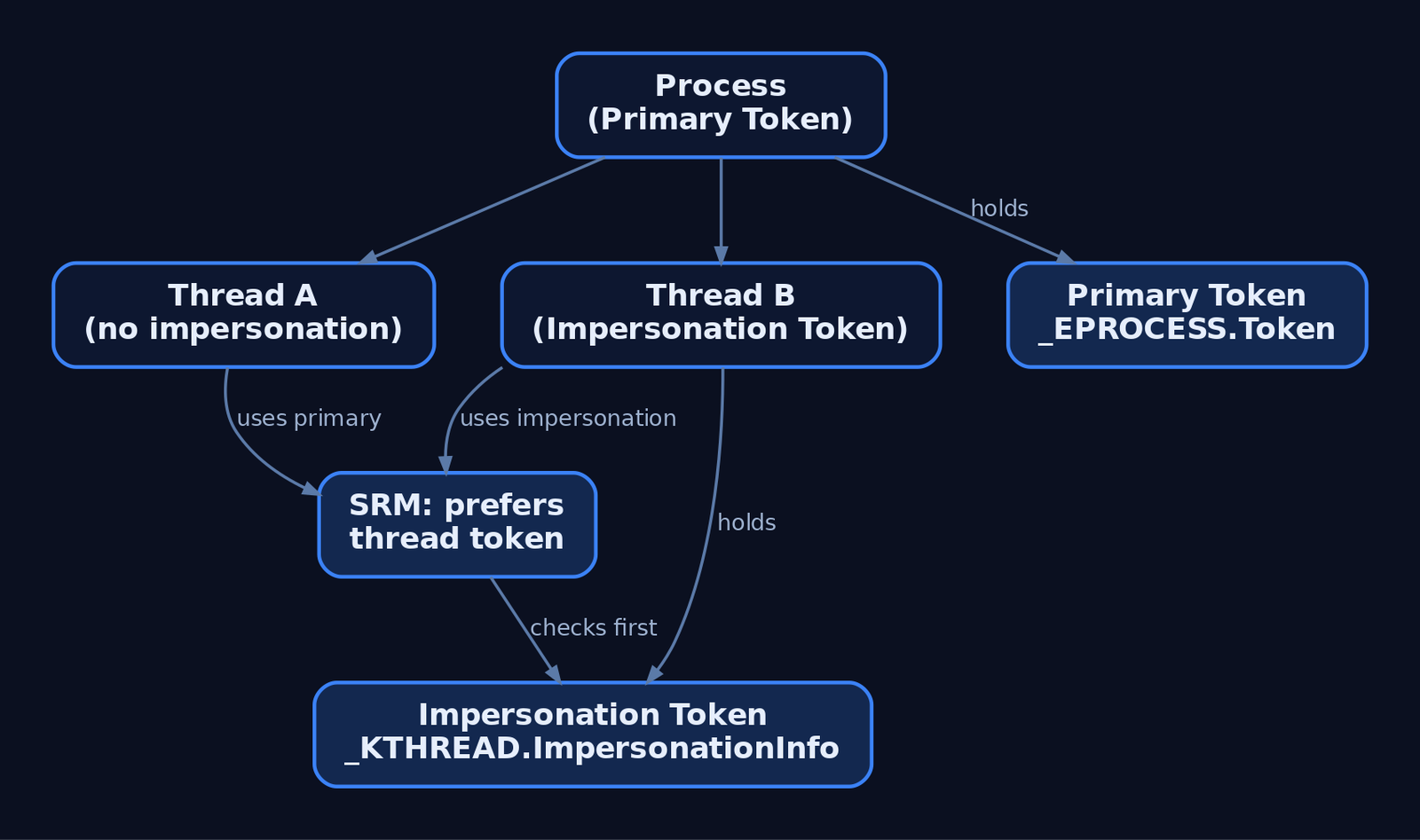
Every process has exactly one primary token, set at CreateProcess time and fixed for the lifetime of the process. You don’t swap it. To run code under a different identity, you start a new process with a different token (CreateProcessAsUser, CreateProcessWithTokenW).
Threads are different. A thread can carry an impersonation token that temporarily overrides the process’s primary token for that thread only. This is how RPC servers, named-pipe servers, and IIS worker threads handle requests on behalf of multiple callers without spawning a process each time. The kernel keeps it in _KTHREAD.ImpersonationInfo; SeAccessCheck prefers the thread token over the process token if one is present.
The distinction matters at detection time too. OpenProcessToken returns the primary token; OpenThreadToken returns the impersonation token, if any. A thread calling OpenThreadToken and getting ERROR_NO_TOKEN is normal — most threads aren’t impersonating. A thread calling it and getting SYSTEM is not.
4. Integrity Levels and Mandatory Integrity Control
Mandatory Integrity Control (MIC) added a sideband label to the token and a corresponding mandatory label ACE in object SACLs. Five well-known integrity SIDs cover the practical range:
| SID | Level | Typical Use |
|---|---|---|
S-1-16-0 | Untrusted | Heavily sandboxed code |
S-1-16-4096 | Low | Browser renderers, AppContainer |
S-1-16-8192 | Medium | Default for interactive user processes |
S-1-16-12288 | High | Elevated (post-UAC) admin processes |
S-1-16-16384 | System | SYSTEM-account services and kernel components |
The label sits in UserAndGroups at index IntegrityLevelIndex, retrievable from user mode via GetTokenInformation(..., TokenIntegrityLevel, ...) into a TOKEN_MANDATORY_LABEL. MIC’s enforcement rule is simple: a process at a lower integrity level cannot write to or modify a higher-integrity object belonging to the same user — no DLL injection, no token impersonation up the chain. That single rule is what stops a Medium-IL Word process from injecting into a High-IL elevated PowerShell.
5. Reading a Token from User Mode
The minimum useful query: open the token, ask for the user SID, print it.
HANDLE hToken = NULL;
if (!OpenProcessToken(GetCurrentProcess(), TOKEN_QUERY, &hToken)) {
    return GetLastError();
}

DWORD cbUser = 0;
GetTokenInformation(hToken, TokenUser, NULL, 0, &cbUser);
PTOKEN_USER pUser = (PTOKEN_USER)LocalAlloc(LPTR, cbUser);

if (GetTokenInformation(hToken, TokenUser, pUser, cbUser, &cbUser)) {
    LPWSTR sidStr = NULL;
    ConvertSidToStringSidW(pUser->User.Sid, &sidStr);
    wprintf(L"User SID: %s\n", sidStr);
    LocalFree(sidStr);
}

LocalFree(pUser);
CloseHandle(hToken);
The same GetTokenInformation call with TokenGroups returns a TOKEN_GROUPS you can walk to see which groups are SE_GROUP_ENABLED, SE_GROUP_MANDATORY, or SE_GROUP_INTEGRITY (that last flag is how you find the IL label without parsing the index). TokenPrivileges returns a TOKEN_PRIVILEGES and feeds the next section.
For integrity level specifically:
DWORD cb = 0;
GetTokenInformation(hToken, TokenIntegrityLevel, NULL, 0, &cb);
PTOKEN_MANDATORY_LABEL pLabel = (PTOKEN_MANDATORY_LABEL)LocalAlloc(LPTR, cb);
GetTokenInformation(hToken, TokenIntegrityLevel, pLabel, cb, &cb);

DWORD rid = *GetSidSubAuthority(
    pLabel->Label.Sid,
    (DWORD)(UCHAR)(*GetSidSubAuthorityCount(pLabel->Label.Sid) - 1));

// rid == 0x2000 (8192)  -> Medium
// rid == 0x3000 (12288) -> High
// rid == 0x4000 (16384) -> System
6. Privileges: Present, Enabled, Removed
A privilege has three independent states inside the token:
- Present — the privilege exists in the token. Cannot be added at runtime by user mode.
- Enabled — the privilege is currently active for access checks.
- Removed — once a privilege is removed via
SE_PRIVILEGE_REMOVED, it’s gone for the life of the token.
AdjustTokenPrivileges only moves a privilege between “present and disabled” and “present and enabled.” It cannot grant a privilege the token never had. So when a tool “enables SeDebugPrivilege,” it isn’t gaining authority — that authority was issued at logon and waiting in the Present bitmask. The enable is purely a flag flip.
HANDLE hToken;
LUID  luid;
TOKEN_PRIVILEGES tp = {0};

OpenProcessToken(GetCurrentProcess(),
                 TOKEN_ADJUST_PRIVILEGES | TOKEN_QUERY,
                 &hToken);

LookupPrivilegeValueW(NULL, SE_DEBUG_NAME, &luid);

tp.PrivilegeCount           = 1;
tp.Privileges[0].Luid       = luid;
tp.Privileges[0].Attributes = SE_PRIVILEGE_ENABLED;

AdjustTokenPrivileges(hToken, FALSE, &tp, sizeof(tp), NULL, NULL);

if (GetLastError() == ERROR_NOT_ALL_ASSIGNED) {
    // Privilege wasn't Present in the token -> not actually enabled.
}
That ERROR_NOT_ALL_ASSIGNED check is the gotcha most first-timers miss: AdjustTokenPrivileges returns TRUE even when the privilege isn’t in Present. The real outcome is only visible through GetLastError. I’ve burned a solid afternoon staring at a “successful” call that did nothing because the calling process was unelevated and SeDebugPrivilege was never issued in the first place.
The privileges worth keeping at the top of a defender’s list:
| Privilege | Why It Matters |
|---|---|
SeDebugPrivilege | Open any process, including LSASS, for read/write |
SeImpersonatePrivilege | Precondition for the Potato family of escalations |
SeAssignPrimaryTokenPrivilege | Replace a process’s primary token |
SeTcbPrivilege | “Act as part of the OS” — essentially unrestricted |
SeLoadDriverPrivilege | Load arbitrary kernel drivers → BYOVD |
SeBackupPrivilege / SeRestorePrivilege | Read/write any file regardless of DACL |
SeTakeOwnershipPrivilege | Seize ownership of any object |
SeCreateTokenPrivilege | Forge tokens directly — held only by SYSTEM |
7. Impersonation in Depth
SECURITY_IMPERSONATION_LEVEL defines how far the impersonating thread can act on behalf of the original principal:
| Level | Meaning |
|---|---|
SecurityAnonymous | Server cannot identify or impersonate the client |
SecurityIdentification | Server can identify but not act as the client |
SecurityImpersonation | Server can act as the client on the local machine |
SecurityDelegation | Server can act as the client on local and remote systems |
The canonical sequence for a service impersonating a caller:
HANDLE hClient;
DuplicateTokenEx(hSourceToken,
                 TOKEN_ALL_ACCESS,
                 NULL,
                 SecurityImpersonation,
                 TokenImpersonation,
                 &hClient);

SetThreadToken(NULL, hClient);   // current thread now runs as the client
// ... perform the work that requires the client's identity ...
RevertToSelf();                  // back to the process's primary token
CloseHandle(hClient);
SECURITY_QUALITY_OF_SERVICE controls whether impersonation tracks the source statically or dynamically, and whether only the enabled privileges follow (EffectiveOnly). That last flag is one of the more interesting defensive levers — a service calling impersonation with EffectiveOnly = TRUE strips dormant privileges out of the impersonation context entirely.
8. Duplication, LogonUser, and Process Creation Under a Token
Three primitives cover most of the “run something as someone else” surface:
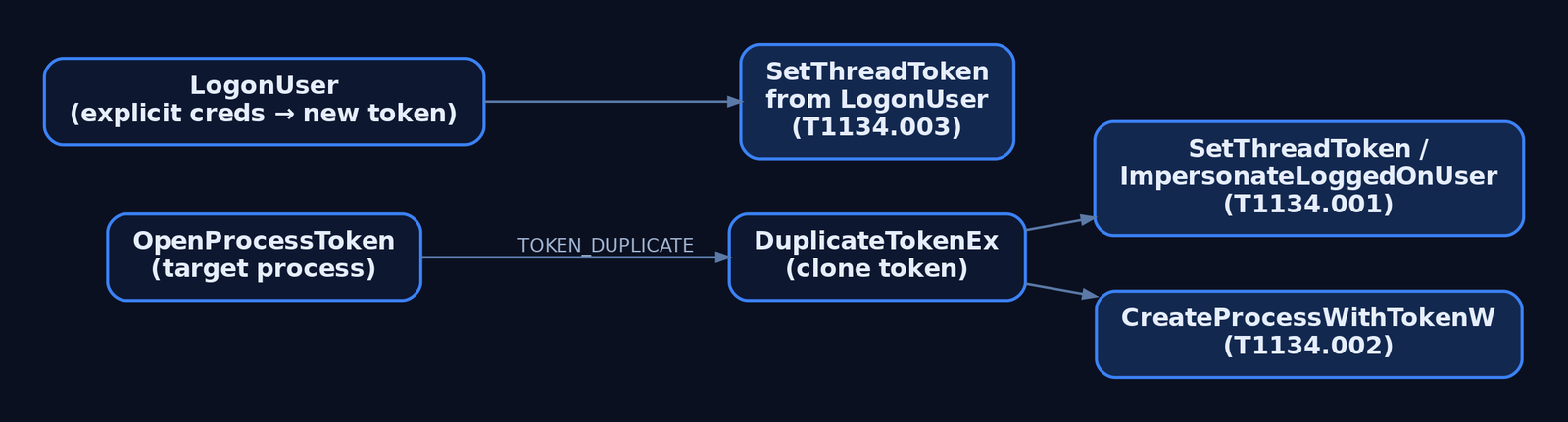
DuplicateTokenEx— clone an existing token, optionally upgrading from impersonation to primary type. RequiresTOKEN_DUPLICATEon the source.LogonUser— authenticate a username/password and receive a fresh primary token tied to a new logon session.CreateProcessWithTokenW— start a new process whose primary token is the one you pass in. RequiresSeImpersonatePrivilegeon the caller.
The MITRE taxonomy splits the abuse cleanly along these primitives:
- T1134.001 — Token Impersonation/Theft.
OpenProcessTokenagainst a higher-privileged process,DuplicateTokenEx, thenImpersonateLoggedOnUserorSetThreadToken. No credentials needed; you steal what’s already running. - T1134.002 — Create Process with Token. Same theft, but you go straight to
CreateProcessWithTokenWto start a new process under the stolen identity rather than impersonating on a thread. - T1134.003 — Make and Impersonate Token.
LogonUserwith credentials in hand, thenSetThreadToken. Quieter than theft because the resulting logon looks legitimate — but it generates a 4624 you can see.
9. _EPROCESS.Token and Kernel-Mode Abuse
The kernel’s view of a process’s primary token is the Token field in _EPROCESS, an EX_FAST_REF — a pointer with reference-count bits packed into the low bits. A kernel exploit with arbitrary write can overwrite that field with a pointer to the SYSTEM process’s token, instantly upgrading the attacker’s process to SYSTEM without touching any user-mode API.
Walking it in WinDbg looks like this:
0: kd> !process 0 0 explorer.exe
PROCESS ffffba0c1a5f6080 ...
0: kd> dt nt!_EPROCESS ffffba0c1a5f6080 Token
   +0x4b8 Token : _EX_FAST_REF
0: kd> dt nt!_TOKEN (poi(ffffba0c1a5f6080+0x4b8) & ~0xf)
The offset will not be 0x4b8 on your build. Use dt to find it on the system you’re analyzing.
For defenders, the operational takeaway is that kernel-mode token swapping leaves no user-mode footprint — no AdjustTokenPrivileges, no OpenProcessToken, no 4703. The detection has to shift earlier: catch the driver load (SeLoadDriverPrivilege use, signed-driver loader events) or the exploit’s user-mode loader, because by the time the swap happens your audit pipeline is blind to it.
10. Detection and Defense
Token abuse leaves observable traces across the Security log, Sysmon, and ETW. Pick the events that match the primitive you’re hunting.
Windows Security Audit Events
| Event ID | Name | What It Tells You |
|---|---|---|
4624 | Successful logon | New logon session and primary token; check LogonType |
4648 | Logon with explicit credentials | runas, CreateProcessWithLogonW, lateral movement |
4672 | Special privileges assigned to new logon | Sensitive privileges granted at session start |
4673 | Privileged service called | Use of sensitive privilege |
4688 | New process created | Includes TokenElevationType (1/2/3) |
4703 | User right adjusted | AdjustTokenPrivileges calls — the core privilege-enable signal |
4672 is high-value: it fires once per privileged logon and lists the sensitive privileges assigned. Filter out the well-known principals (LOCAL SYSTEM, NETWORK SERVICE, LOCAL SERVICE) and expected admins. What’s left is worth a look — that’s where Mimikatz-style pass-the-hash and elevation activity surfaces.
Sysmon
- EID 1 (Process Create) —
IntegrityLevelandUserfields directly show the process’s effective token. A child of a Medium-IL process suddenly running at System integrity is a hard signal. - EID 10 (ProcessAccess) —
OpenProcessagainst LSASS or other high-value targets. WatchGrantedAccessmasks like0x1400(PROCESS_QUERY_INFORMATION | PROCESS_QUERY_LIMITED_INFORMATION) and0x40(PROCESS_DUP_HANDLE). - EID 8 (CreateRemoteThread) — cross-process injection that frequently follows token theft.
Sigma Sketch: Privilege Enable on a Sensitive Right
title: Sensitive Privilege Adjusted via AdjustTokenPrivileges
logsource:
  product: windows
  service: security
detection:
  selection:
    EventID: 4703
    EnabledPrivilegeList|contains:
      - 'SeDebugPrivilege'
      - 'SeImpersonatePrivilege'
      - 'SeTcbPrivilege'
      - 'SeLoadDriverPrivilege'
  filter_known:
    SubjectUserSid:
      - 'S-1-5-18'   # LOCAL SYSTEM
      - 'S-1-5-19'   # LOCAL SERVICE
      - 'S-1-5-20'   # NETWORK SERVICE
  condition: selection and not filter_known
level: high
To produce 4703, the Audit Token Right Adjusted subcategory has to be enabled — it isn’t by default on most builds. Same goes for Audit Sensitive Privilege Use for 4673/4674, and command-line logging in 4688 (Group Policy: System → Audit Process Creation → Include command line).
ETW Providers
| Provider | What It Carries |
|---|---|
Microsoft-Windows-Security-Auditing | All audit events above |
Microsoft-Windows-Kernel-Process | Process/thread lifecycle including token assignment |
Microsoft-Windows-Threat-Intelligence | High-fidelity process-access telemetry; PPL consumer only (Defender/EDR) |
Hardening
SeCreateTokenPrivilege→ SYSTEM only. Nothing else needs it.SeAssignPrimaryTokenPrivilege→ local/network service accounts only. Audit anything else holding it.- Strip
SeImpersonatePrivilegefrom service accounts that don’t host RPC or named-pipe endpoints. Its presence is the precondition for the Potato family. - PPL for critical services — blocks
OpenProcesswith token-access rights from unprotected callers. - Credential Guard — isolates logon-session secrets in VSM,
Related Tutorials
- SIDs and Security Descriptors: Identity in Windows Security
- System Calls and SSDT: How User Mode Reaches the Kernel
- HAL and Ntoskrnl: The Kernel Core Components
- User Mode vs Kernel Mode: Privilege Rings and the Boundary
- Fibers: User-Mode Cooperative Threads
References
- Access Tokens – Win32 apps | Microsoft Learn
- Privilege Constants (Winnt.h) – Win32 apps | Microsoft Learn
- Windows Kernel-Mode Security Reference Monitor | Microsoft Learn
- Access Token Manipulation, Technique T1134 – Enterprise | MITRE ATT&CK®
- Introduction to Windows Tokens for Security Practitioners | Elastic