Payload Delivery via Email: Attachments, Links, and Bypassing Filters
Objective: Trace the full email delivery chain an authorized red team emulates – attachment, link, and filter-bypass tradecraft mapped to MITRE ATT&CK T1566 – and learn the Sysmon, ETW, and header-forensics signals that let a blue team catch each stage.
The gateway scanned the message. SPF passed, DKIM passed, the attachment was a clean .iso, and the body link pointed at a Google Docs URL nobody had ever flagged. Forty seconds after the user double-clicked, a powershell.exe process with OUTLOOK.EXE somewhere up its parent chain reached out to a freshly-aged domain. Everything technically worked as designed. That gap – between “the mail filter saw nothing wrong” and “the endpoint is now executing attacker code” – is the entire subject of this post.
Email is still the number-one initial access vector, and the reason is structural: the security boundary lives at the gateway, but execution happens on the endpoint, and a lot of clever tradecraft exists purely to widen the distance between those two points. We’ll walk the chain a red teamer assembles, then pair every step with how a defender sees it.
This is engagement material. Phishing simulations require written authorization, a defined scope, and rules of engagement – credential-harvesting pages and payload staging against real users are not something you improvise. Treat everything below as “how it works so you can detect it or test with permission.”
1. How Mail Actually Gets Inspected
Before you can bypass a filter you have to know what it reads. A message traverses SMTP relays, gets routed by the recipient’s MX record into a Secure Email Gateway (SEG) or a cloud-native filter – Microsoft Defender for Office 365, Google Workspace – and only then lands in a mailbox. Three authentication checks dominate that inspection:
| Protocol | DNS Record | What It Proves |
|---|---|---|
| SPF | TXT | The sending IP is authorized for the envelope domain |
| DKIM | TXT (selector) | Headers/body were signed by the domain’s private key (DKIM-Signature: d= domain, s= selector, bh=, b=) |
| DMARC | _dmarc. TXT | Alignment policy (p=none/quarantine/reject) plus rua= aggregate reporting |
Here’s a point worth committing to: DMARC p=reject is sold as the cure, and it does kill naive spoofing. The phish it does nothing against is the one sent from a real, compromised business account. That mail passes SPF and DKIM because it genuinely is the sender. No protocol bypass required – the trust is authentic. Keep that asymmetry in mind; it shapes the rest of the tradecraft.
A defender’s first move on a suspicious message is to parse the headers. Python’s email module does it in a few lines:
from email import policy
from email.parser import BytesParser

with open("sample.eml", "rb") as fh:
    msg = BytesParser(policy=policy.default).parse(fh)

# spf= / dkim= / dmarc= verdicts the receiving MTA stamped on the mail
for line in msg.get_all("Authentication-Results", []):
    print(line)

print("From:        ", msg["From"])
print("Return-Path: ", msg["Return-Path"])           # envelope vs. display mismatch?
for rec in msg.get_all("Received", []):
    print("Received:", rec.strip()[:120])            # walk the relay chain bottom-up
Watch for a From: display name that disagrees with Return-Path, a Received chain that originates somewhere implausible, and X-MS-Exchange-Organization-SCL spam-confidence values. Cross-reference embedded URLs and the originating domain against WHOIS for recent registration.

2. Spearphishing Attachments (T1566.001)
Attachment delivery relies on User Execution (T1204.002) – the file is inert until someone opens it. For years the workhorse was a macro-laden Word or Excel document. Then Microsoft began blocking VBA macros in files marked with the Mark of the Web by default in 2022, and the entire ecosystem pivoted.
What replaced macros:
| Technique | Description |
|---|---|
Container files (.iso, .img, .vhd, .vhdx) | Mount on double-click, present a .lnk disguised as a document; inner files often escape MotW |
| LNK chains | Shortcut launches a hidden powershell.exe, wscript.exe, or mshta.exe command line |
| OneNote embeds | An embedded “View Document” button runs an attached VBScript when clicked |
| Extension masquerade | invoice.pdf.lnk, double extensions, RLO Unicode tricks in the display name |
| Remote template injection (T1221) | A benign .docx pulls a weaponized .dotm from an attacker URL after open |
The observed kill chain is consistent across families: the lure file launches a LOLBin, and the LOLBin does the real work. winword.exe spawning rundll32.exe to load a dropped ier.dll. mshta.exe fetching a remote HTA. powershell.exe staging a second-stage implant. The parent-child relationship is the tell, and it’s also the detection seam we’ll exploit in §6.
A war story to make this concrete: on one engagement our .iso lure cleared the gateway perfectly, the user mounted it, clicked the LNK – and nothing happened. We’d spent a day perfecting the MotW evasion and forgotten the host had the ASR rule Block Office applications from creating child processes enabled. The payload was fine. The execution primitive was dead. MotW is not the only wall.

3. Mark of the Web – the Control Everything Fights
When a file arrives from the Internet, Windows tags it with a hidden NTFS Alternate Data Stream named Zone.Identifier carrying a ZoneId. ZoneId=3 is the Internet zone. That tag is the MotW, and it’s the linchpin for downstream protections: Office files with MotW open in Protected View, and tagged executables get routed through Windows Defender SmartScreen, which checks them against an allowlist of known-good binaries and warns on anything unrecognized.
The propagation machinery lives in a few documented APIs:
| API / Interface | Purpose |
|---|---|
IAttachmentExecute | Interface browsers and mail clients use to apply MotW to downloads automatically |
AssocIsDangerous | Returns true for high-risk extensions, triggering the SmartScreen prompt |
AssocGetUrlAction | The wrapper AssocIsDangerous calls; holds the hardcoded high-risk extension list |
Defenders should be able to confirm whether a file carries the tag. PowerShell reads the stream directly:
# A downloaded container DOES carry the tag:
Get-Content -Path .\invoice.iso -Stream Zone.Identifier
# [ZoneTransfer]
# ZoneId=3

# But a file extracted FROM that container frequently does NOT — list its streams:
Get-Item -Path D:\document.lnk -Stream * | Select-Object Stream, Length
The Container Bypass (T1553.005)
Here’s the design flaw. MotW is an NTFS feature. Many container formats don’t support NTFS alternate data streams, so while the downloaded .iso or .vhd itself gets tagged, the files inside it don’t inherit the tag once extracted or mounted. They’re treated as local files – no Protected View, no SmartScreen. This is precisely why .iso/.img/.vhd/.vhdx became the post-macro delivery vehicle of choice. The Kaspersky-documented BlueNoroff intrusions leaned on exactly this.
CVE-2025-0411 extends the same idea to 7-Zip: versions before 24.09 fail to propagate MotW to double-compressed files, letting an inner payload execute without a warning.
LNK Stomping (CVE-2024-38217)
LNK stomping abuses how the shell canonicalizes shortcut files. Craft a .lnk with a non-standard target path or malformed internal structure, and Windows “fixes” it on access – rewriting the file and discarding the MotW metadata in the process. No tag, no SmartScreen prompt. Microsoft patched it on September 10, 2024, and CISA added it to the Known Exploited Vulnerabilities catalog, confirming in-the-wild use.
The component under attack is the LinkTarget IDList – the series of Shell Item IDs describing where the target lives in the shell namespace. Elastic Security Labs and ASEC documented three variants:
| Variant | Manipulation |
|---|---|
| PathSegment | Entire file path stuffed into a single IDList array element |
| Dot | Trailing periods or spaces appended to the target path |
| Relative | Bare filename with no complete path specification |
This is the structural layout an analyst should recognize – not a stomped artefact:
import struct
# ShellLinkHeader (partial) per MS-SHLLINK — EDUCATIONAL layout only.
header = struct.pack(
    "<I16sI",
    0x0000004C,                                                 # HeaderSize (fixed)
    bytes.fromhex("0114020000000000c000000000000046"),          # LinkCLSID
    0x00000001 | 0x00000004,                                    # HasLinkTargetIDList | HasName
)
# Immediately after the header: the LinkTarget IDList (a sequence of ItemIDs).
# Stomping mutates these ItemIDs so the shell re-canonicalizes — and drops MotW.
4. Spearphishing Links (T1566.002) and AiTM
Linking instead of attaching is a deliberate evasion: the gateway inspects a URL, not a file, so there’s nothing binary to detonate at delivery time. The execution still needs the user – User Execution: Malicious Link (T1204.001).
The craft is all about legitimacy laundering. Point the in-body link at a trusted SaaS surface – a Google Docs share, a OneDrive link, an open redirect on a reputable domain – so the SEG scans a benign destination and the malicious hop happens later. URL redirector abuse defeats time-of-delivery reputation entirely.
The high-end variant is Adversary-in-the-Middle (T1557) phishing. Instead of a static fake login page, a reverse-proxy kit relays the victim’s session to the real identity provider in real time, harvesting credentials and the post-MFA session cookie. It maps to Phishing for Information: Spearphishing Link (T1598.003) when the goal is credential collection. Tooling like Evilginx2 implements the concept; the defensive takeaway is that stolen session tokens make MFA-enforced accounts vulnerable, so conditional-access and token-binding controls matter more than the password prompt.
5. HTML Smuggling (T1027.006)
HTML smuggling moves payload assembly off the wire and into the browser. The email or its attached HTML carries no recognizable binary; instead, JavaScript reconstructs the file client-side and hands it to the browser’s download mechanism. The gateway scans markup and sees nothing actionable.
The conceptual pattern – Blob → URL.createObjectURL() → anchor .click() – looks like this. It is annotated pseudocode to show defenders the seam, not a working payload:
// CONCEPTUAL ONLY — not production code, no real payload.
const bytes = decodeEmbeddedData();              // assembled in-browser from inline data
const blob  = new Blob([bytes],                  // (1) file built entirely client-side
                       { type: "application/octet-stream" });
const url   = URL.createObjectURL(blob);         // (2) local blob: URL — no network fetch
const a     = document.createElement("a");
a.href = url; a.download = "report.iso";         // (3) browser writes to Downloads
a.click();                                       //     file gets MotW; the gateway saw markup
Legacy Edge/IE used msSaveOrOpenBlob for the same end. The crucial point for detection: the gateway never observes a suspicious file, but the endpoint does – the assembled file lands in Downloads and receives a Zone.Identifier tag. Your visibility shifts entirely to the host. QakBot and related loaders made this a commodity technique.
6. QR Phishing, Infrastructure, and the Simulated Campaign
Quishing embeds the malicious URL in a QR code, pushing the victim onto a mobile device where corporate EDR and URL rewriting rarely reach. An image-embedded QR also defeats text-based URL scanning outright – there’s no clickable string in the body to inspect.
On the infrastructure side, a credible operation invests before a single mail goes out:
| Technique | Abuse Scenario |
|---|---|
| Domain aging | Sit on a registered domain so reputation engines stop flagging it as newly created |
| Homoglyph / typosquatting | Unicode lookalikes in the From: display name |
| Attacker-controlled DKIM | Sign mail from owned domains so it passes authentication checks |
| Compromised legitimate accounts | Send from a real mailbox – passes SPF/DKIM by definition, the hardest case to catch |
A sanctioned phishing simulation ties these together conceptually with GoPhish: profile targets, build a lure and a tracked landing page, stage the payload, and measure click/submit rates – all against consenting users inside scope, with no weaponized artefacts left behind. The value to the org is the same data a real campaign would yield, captured safely.
7. Defensive Strategies and Detection
Delivery is hard to block at the gateway by design, so detection concentrates on the endpoint after the lure fires. Sysmon gives you the chain:
| Event ID | Name | Phishing Relevance |
|---|---|---|
1 | Process Create | Email-client children – watch ParentImage, CommandLine, User |
3 | Network Connection | Outbound from attachment-spawned processes – DestinationIp, Image |
11 | File Create | Dropped lure/next-stage files in mail temp paths – TargetFilename |
15 | FileCreateStreamHash | ADS creation, including Zone.Identifier – your MotW-presence signal |
22 | DNS Query | Lookups from post-phish processes – QueryName, Image |
Layer ETW on top: Microsoft-Windows-PowerShell/Operational Event ID 4104 (Script Block Logging) captures deobfuscated PowerShell; the AMSI provider scans script content pre-execution; Microsoft-Office-Alerts records macro-blocked events. Enable command-line process auditing (Event ID 4688 with IncludeCmdLine) and object-access auditing on the Outlook temp folder under Content.Outlook\.
The highest-value rule keys on the parent-child seam – an Office app or Outlook spawning an interpreter:
title: Office or Outlook Spawning Script Interpreter
status: experimental
logsource:
  product: windows
  service: sysmon
detection:
  selection:
    EventID: 1
    ParentImage|endswith:
      - '\OUTLOOK.EXE'
      - '\WINWORD.EXE'
      - '\EXCEL.EXE'
    Image|endswith:
      - '\powershell.exe'
      - '\wscript.exe'
      - '\cscript.exe'
      - '\mshta.exe'
      - '\cmd.exe'
      - '\rundll32.exe'
  condition: selection
level: high
Watch for the absence of a Zone.Identifier on files that should have one – that’s the container-bypass signature. A focused Sysmon config surfaces both the stream and the mail temp path:
<Sysmon schemaversion="4.90">
  <EventFiltering>
    <RuleGroup name="MotW-staging" groupRelation="or">
      <!-- Event 15 captures ADS creation, including Zone.Identifier -->
      <FileCreateStreamHash onmatch="include">
        <TargetFilename condition="end with">:Zone.Identifier</TargetFilename>
      </FileCreateStreamHash>
      <!-- Event 11 watches files dropped into the Outlook cache -->
      <FileCreate onmatch="include">
        <TargetFilename condition="contains">\Content.Outlook\</TargetFilename>
      </FileCreate>
    </RuleGroup>
  </EventFiltering>
</Sysmon>
Correlation closes the loop – process spawn followed by an outbound connection inside a tight window:
DeviceProcessEvents
| where InitiatingProcessFileName =~ "outlook.exe"
| project ProcTime = TimeGenerated, DeviceId, ChildProc = FileName, CommandLine
| join kind=inner (
    DeviceNetworkEvents
    | project NetTime = TimeGenerated, DeviceId, RemoteIP, RemoteUrl
  ) on DeviceId
| where NetTime between (ProcTime .. ProcTime + 60s)
| project ProcTime, NetTime, DeviceId, ChildProc, CommandLine, RemoteUrl, RemoteIP
Hardening
Defenders should verify the macro policy is actually enforced, not assumed:
$base = "HKCU:\SOFTWARE\Policies\Microsoft\Office\16.0"
foreach ($app in "Word","Excel","PowerPoint","Outlook") {
    $key = Join-Path $base "$app\Security"
    $val = (Get-ItemProperty -Path $key -Name VBAWarnings -ErrorAction SilentlyContinue).VBAWarnings
    "{0,-11} VBAWarnings = {1}" -f $app, ($val ?? "NOT SET")   # 4 = disable all macros
}
| Mitigation | Description |
|---|---|
Macro policy VBAWarnings = 4 | Disable all macros without notification across Office apps via GPO |
| ASR child-process block | GUID d4f940ab-401b-4efc-aadc-ad5f3c50688a stops Office spawning interpreters |
| ASR obfuscated-script block | GUID 5beb7efe-fd9a-4556-801d-275e5ffc04cc |
| Disable image auto-mount | Remove the shell mount handler for .iso/.img/.vhd; restrict .lnk from temp/Downloads via AppLocker/WDAC |
| Safe Links / Safe Attachments | Time-of-click URL detonation and attachment sandboxing in Defender for O365 |
DMARC p=reject | Reject unauthenticated mail claiming your domain |
| Patch 7-Zip ≥ 24.09 | Closes CVE-2025-0411 double-compression MotW bypass |
Tools
| Tool | Description | Link |
|---|---|---|
| GoPhish | Authorized open-source phishing-simulation framework | getgophish.com |
| oletools | Macro/VBA extraction and analysis from Office docs | github.com |
| pylnk3 | Parse and inspect .lnk structure (LinkTarget IDList) | github.com |
| Sysmon | Process, network, file-stream telemetry | learn.microsoft.com |
| ANY.RUN | Interactive sandbox for attachment detonation | any.run |
| Joe Sandbox | Automated behavioral attachment analysis | joesandbox.com |
MITRE ATT&CK Mapping
| Technique | MITRE ID | Detection |
|---|---|---|
| Phishing | T1566 | Header forensics; SEG/cloud filter telemetry |
| Spearphishing Attachment | T1566.001 | Sysmon 1 parent-child; 15 MotW stream |
| Spearphishing Link | T1566.002 | Sysmon 22 DNS; Safe Links click logs |
| Spearphishing via Service | T1566.003 | Non-email channel monitoring |
| Mark-of-the-Web Bypass | T1553.005 | Missing Zone.Identifier on extracted files |
| User Execution: File / Link | T1204.002 / .001 | Process create from mail client |
| HTML Smuggling | T1027.006 | Endpoint Downloads + MotW; blob anomalies |
| Template Injection | T1221 | Outbound fetch from WINWORD.EXE |
| Phishing for Information | T1598.003 | Credential-page referrers |
| Adversary-in-the-Middle | T1557 | Anomalous session-token use, impossible travel |
Summary
- Email payload delivery (T1566) wins because the inspection boundary is the gateway, but execution is on the endpoint – every advanced technique just widens that gap.
- Attachments pivoted from macros to containers and LNKs after Microsoft’s 2022 macro block; the consistent kill chain is a lure spawning a LOLBin (
powershell.exe,mshta.exe,rundll32.exe). - The Mark of the Web is the control everything fights – container formats strip it from inner files (
T1553.005), andCVE-2024-38217LNK stomping plusCVE-2025-04117-Zip remove it outright. - HTML smuggling and quishing move payload assembly off the wire, so detection shifts almost entirely to host telemetry.
- Catch it with the parent-child seam – Sysmon Event ID
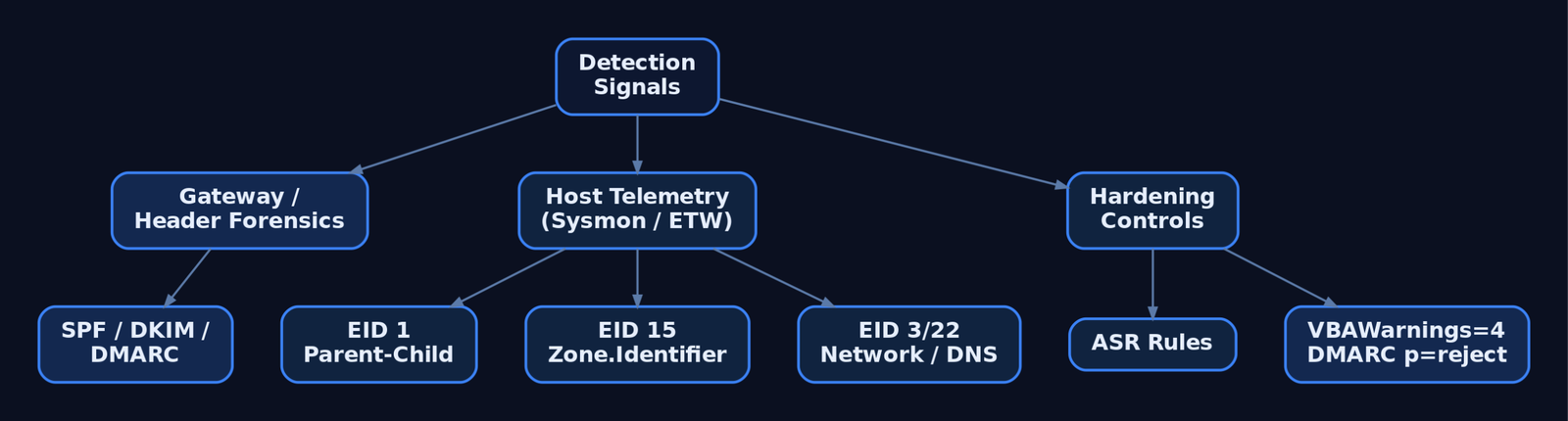
1(Office/Outlook → interpreter),15forZone.Identifierpresence,3/22for callbacks – and harden with ASR rules,VBAWarnings = 4, disabled image auto-mount, and DMARCp=reject.
Related Tutorials
- Egghunters: Staged Payload Delivery When Buffer Space Is Tight
- OSINT for People and Credentials: LinkedIn, Breach Data, and Email Harvesting
- Phishing Campaign Design: Pretexting, Lures, and Target Profiling
- Building a Red Team Lab: Infrastructure, VMs, and C2 Setup
- Active OSINT: DNS, Certificate Transparency, and Subdomain Enumeration
References
- attack.mitre.org
- attack.mitre.org
- attack.mitre.org
- attack.mitre.org
- attack.mitre.org
- redcanary.com
- www.helpnetsecurity.com
- cybersecuritynews.com
Get new drops in your inbox
Windows internals, exploit dev, and red-team write-ups - no spam, unsubscribe anytime.