AV and EDR Concepts: How Detections Work Against Offensive Tools
Objective: Take apart how modern AV and EDR products actually detect offensive tooling, from PE signatures on disk to inline NTDLL hooks, kernel callbacks, ETW-TI, AMSI, and WFP. You’ll build a small lab, watch every layer fire against a self-written injector, and then write the Sigma rule that catches it. By the end you should be able to reason about where a technique gets caught and why, not just guess.
1. AV vs EDR: What’s Actually Different
Traditional AV was a scanner glued to a file-system minifilter. It read bytes off disk, compared them to a signature database, and quarantined matches. That model still exists inside every EDR (nobody throws away a working checker), but it’s now the smallest part of the pipeline. An EDR is a sensor fabric: multiple components collecting different signal types and shipping them to a correlation engine.
The practical implication for a red teamer: obfuscating your binary defeats the AV scanner and does approximately nothing to the EDR. The EDR still sees WriteProcessMemory land followed by CreateRemoteThread starting in an RWX region with no backing module, and that behavioral chain is what actually kills the operation. Signature evasion is table stakes. Behavior is the game.
A modern EDR agent typically has these moving parts:
| Component | Role |
|---|---|
| User-mode service | Config, telemetry buffering, cloud upload |
| Injected DLL | Inline hooks in ntdll.dll inside every process |
| Kernel driver(s) | Registers callbacks in ntoskrnl, WFP callouts, self-protection |
| File-system minifilter | Registered via FltRegisterFilter, sees IRPs, blocks known-bad on write |
| ETW consumer | Subscribes to providers including Microsoft-Windows-Threat-Intelligence |
| Transport thread | Uploads events to the back-end for correlation |
Detection capability equals which signals it subscribes to multiplied by how well it correlates them. Not architecture. Two products with identical block diagrams can have wildly different detection rates because one wrote better sequence rules.

2. Static Detection: Why Just Repacking Doesn’t Help
The static engine still runs the moment a file touches disk (or memory, via AmsiScanBuffer and the on-access minifilter). It checks:
- Byte signatures. Classic YARA-style pattern matches against known offsets, often anchored on shellcode decoders, string constants, or Sleep-mask stubs.
- IMPHASH. MD5 of the ordered PE import table. IMPHASH survives repacking, string obfuscation, and section renaming because you can’t change what the file imports without changing what it does. Two Cobalt Strike beacon loaders written a year apart still share an IMPHASH if the import layout matches.
- Fuzzy hashing (ssdeep, TLSH). Detects near-duplicate binaries. Flip a handful of bytes and the fuzzy score barely moves.
- Entropy. Shannon entropy over 7.0 on a
.textsection screams “packed.” Not malicious by itself, but a strong prior. - Authenticode. Unsigned or revoked-cert binaries get harsher heuristics and often reduced execution allow-lists.
The takeaway: if you renamed strings and packed the payload but the imports still contain VirtualAllocEx, WriteProcessMemory, CreateRemoteThread, and OpenProcess, the IMPHASH is going to look familiar to the vendor’s clustering pipeline. Resolve APIs dynamically (T1027.007) if you care.
3. Userland Hooks: Inside Your Own Process
When a new process is created, the EDR’s kernel driver, having registered via PsSetCreateProcessNotifyRoutineEx and PsSetLoadImageNotifyRoutine, gets notified early enough to arrange for the userland DLL to be mapped into the address space of the new process. Once that DLL is in, it walks the export table of ntdll.dll and patches the first 5 to 15 bytes of each function of interest with a trampoline into itself.
Here’s the anatomy of a typical patched prologue on x64:
; NtOpenProcess, unhooked (Windows 11 22H2, illustrative)
4C 8B D1              mov  r10, rcx           ; syscall trampoline
B8 26 00 00 00        mov  eax, 26h           ; syscall number
F6 04 25 08 03 FE 7F  test byte [7FFE0308h], 1
75 03                 jne  short +3
0F 05                 syscall
C3                    ret

; NtOpenProcess, hooked
E9 xx xx xx xx        jmp  <edr.dll+offset>   ; 5-byte JMP rel32
90 90 90 90 90        (padding / preserved bytes stashed elsewhere)
The EDR’s DLL receives the redirected call, reads the arguments off the stack and registers, applies whatever policy it wants (block, allow, tag), then either returns an error or lets the call through to the real syscall stub. The functions consistently hooked across vendors are the ones that gate the interesting behaviors:
| Function | What it exposes |
|---|---|
NtOpenProcess | Handle acquisition (credential dump prep, injection prep) |
NtAllocateVirtualMemory | Shellcode staging, especially PAGE_EXECUTE_READWRITE |
NtWriteVirtualMemory | Cross-process writes (injection) |
NtCreateThreadEx | Remote thread creation |
NtProtectVirtualMemory | RW to RX flips (shellcode activation) |
NtMapViewOfSection | Section-based injection, hollowing |
NtQueueApcThread | APC injection |
Exercise A: See the JMP with Your Own Eyes
Compile and run this from an unprivileged shell inside a VM that has any EDR (or Defender with ATP telemetry) installed. Compare the first 16 bytes of the in-memory ntdll copy against a fresh disk mapping.
// lab_hook_inspector.c
// Build: cl /W4 lab_hook_inspector.c
#include <windows.h>
#include <stdio.h>

static void check_hook(const char *func_name) {
    HMODULE hNtdll = GetModuleHandleA("ntdll.dll");
    FARPROC  fn_mem  = GetProcAddress(hNtdll, func_name);

    HMODULE hDisk = LoadLibraryExA("C:\\Windows\\System32\\ntdll.dll",
                                    NULL, DONT_RESOLVE_DLL_REFERENCES);
    FARPROC fn_disk = GetProcAddress(hDisk, func_name);

    printf("[%s]\n  in-memory : ", func_name);
    for (int i = 0; i < 16; i++) printf("%02X ", ((BYTE*)fn_mem)[i]);
    printf("\n  from disk : ");
    for (int i = 0; i < 16; i++) printf("%02X ", ((BYTE*)fn_disk)[i]);
    printf("\n  hooked?   : %s\n\n",
           memcmp(fn_mem, fn_disk, 5) ? "YES (first 5 bytes differ)" : "NO");
    FreeLibrary(hDisk);
}

int main(void) {
    const char *targets[] = {
        "NtOpenProcess", "NtAllocateVirtualMemory",
        "NtWriteVirtualMemory", "NtCreateThreadEx",
        "NtProtectVirtualMemory", NULL
    };
    for (int i = 0; targets[i]; i++) check_hook(targets[i]);
    return 0;
}
On a hooked box you’ll see the in-memory prologue start with E9 (relative JMP) or FF 25 (indirect JMP). On a stock Windows install with no third-party EDR you’ll usually see identical bytes, which is itself useful: it means Defender’s user-mode component doesn’t do inline hooks the way CrowdStrike, SentinelOne, or Elastic do. Different vendors, different surface area.
Pair this with Sysmon Event ID 7 (Image Load) captured while lab_hook_inspector.exe starts. You’ll see the EDR DLL loaded and amsi.dll mapped in early. That EDR DLL mapping is the hook installer.

4. Kernel Callbacks: The EDR’s Eyes in Ring 0
Above Ring 3 the EDR loses the ability to inline-patch code, PatchGuard prohibits it, but Microsoft provides a set of documented callback registration APIs so the driver can be notified of security-relevant events. This is the layer where userland-only bypasses die.
// Process creation/termination
NTSTATUS PsSetCreateProcessNotifyRoutine(
    PCREATE_PROCESS_NOTIFY_ROUTINE NotifyRoutine,
    BOOLEAN Remove);

// Extended: allows *blocking* process creation via CreationStatus
NTSTATUS PsSetCreateProcessNotifyRoutineEx(
    PCREATE_PROCESS_NOTIFY_ROUTINE_EX NotifyRoutine,
    BOOLEAN Remove);

NTSTATUS PsSetLoadImageNotifyRoutine(
    PLOAD_IMAGE_NOTIFY_ROUTINE NotifyRoutine);

NTSTATUS PsSetCreateThreadNotifyRoutine(
    PCREATE_THREAD_NOTIFY_ROUTINE NotifyRoutine);

// Filter/mediate handle operations (block OpenProcess on lsass, etc.)
NTSTATUS ObRegisterCallbacks(
    POB_CALLBACK_REGISTRATION CallbackRegistration,
    PVOID *RegistrationHandle);

NTSTATUS CmRegisterCallback(
    PEX_CALLBACK_FUNCTION Function,
    PVOID Context,
    PLARGE_INTEGER Cookie);

NTSTATUS FltRegisterFilter(
    PDRIVER_OBJECT Driver,
    const FLT_REGISTRATION *Registration,
    PFLT_FILTER *RetFilter);
Internally, the kernel stores each set of process/thread/image callbacks in a fixed-size array. Process notifications live in nt!PspCreateProcessNotifyRoutine. When a process is created, nt!PspCallProcessNotifyRoutines iterates over the array and invokes each registered function. The pointers stored there are EX_FAST_REF values, so the low bits are reference-count flags and you have to mask them off before you can resolve a symbol.
Exercise B: Enumerate Registered Callbacks in WinDbg
Boot the lab VM with bcdedit /debug on and attach WinDbg over network (kdnet). In the kernel-mode session:
kd> dq nt!PspCreateProcessNotifyRoutine L10
fffff800`1234a010  ffffb001`23456780 ffffb001`87654322
fffff800`1234a020  ffffb001`aabbcc03 0000000000000000
...

kd> ? ffffb001`23456780 & 0xFFFFFFFFFFFFFFF8
Evaluate expression: -87... = ffffb001`23456780

kd> ln ffffb001`23456780
(fffff801`04a1e120)  WdFilter!MpCreateProcessNotifyRoutineEx
Repeat for the sibling arrays:
kd> dq nt!PspCreateThreadNotifyRoutine L8
kd> dq nt!PspLoadImageNotifyRoutine L8
On a fresh Windows 11 with only Defender + Sysmon installed you should see entries resolving to WdFilter!Mp* (Defender’s minifilter/driver) and SysmonDrv!*. Install a third-party EDR and one or more slots will resolve into its driver, for example CSAgent!* or SentinelMonitor!*. This is how you know, from a defender’s chair or a research chair, exactly which sensors are live.
The important detail: PsSetCreateProcessNotifyRoutineEx gives the driver an out-parameter CreationStatus. Setting it to a failure code aborts the process launch entirely. That’s not passive telemetry, that’s a policy chokepoint.
5. ETW and the Threat-Intelligence Provider
ETW is a pub/sub tracing framework baked into the kernel. Providers publish events, sessions filter and buffer them, and consumers read the buffered events. Every interesting subsystem in Windows exposes one or more providers.
For offensive-tool detection, these are the ones you care about:
| Provider | GUID | Coverage |
|---|---|---|
Microsoft-Windows-Threat-Intelligence | {F4E1897C-BB5D-5668-F1D8-040F4D8DD344} | Kernel-side memory ops, thread manipulation, APCs, LSASS reads |
Microsoft-Windows-PowerShell | {A0C1853B-5C40-4B15-8766-3CF1C58F985A} | Script block and module logging |
Microsoft-Antimalware-Scan-Interface | {2A576B87-09A7-520E-C21A-4942F0271D67} | AMSI scan results |
Microsoft-Windows-DotNETRuntime | {E13C0D23-CCBC-4E12-931B-D9CC2EEE27E4} | Assembly loads, JIT |
Microsoft-Windows-DNS-Client | {1C95126E-7EEA-49A9-A3FE-A378B03DDB4D} | DNS resolutions |
Microsoft-Windows-Kernel-Process | {22FB2CD6-0E7B-422B-A0C7-2FAD1FD0E716} | Process/thread/image |
ETW-TI (Threat-Intelligence) is the one worth understanding in depth. Because PatchGuard prevents hooking the SSDT, vendors can’t cleanly intercept syscall arguments in the kernel through classic patching. Microsoft’s answer was to instrument the relevant kernel paths themselves and emit structured events on this provider. The events come from the kernel, so a userland direct-syscall bypass, which fools the inline ntdll hook, still fires ETW-TI. Bypassing it generally means executing in Ring 0.
ETW-TI is a Secure ETW channel. Consumers must run as Protected Process Light (anti-malware light PPL) or use SeSystemProfilePrivilege in a driver-backed context. In your lab you can either sign a small consumer driver with a test cert (bcdedit /set testsigning on) or use SilkETW / krabsetw as PPL-hosted consumers.
Exercise C: Watch ETW-TI Fire on Remote Allocation
Stand up the lab injector. Keep it minimal so the reader can point at each line and say “that’s the ntdll call the EDR hooks.”
// injector_lab.c
// Build: cl /W4 injector_lab.c
#include <windows.h>
#include <stdio.h>

int main(int argc, char** argv) {
    if (argc < 2) { printf("usage: injector_lab <pid>\n"); return 1; }
    DWORD pid = (DWORD)atoi(argv[1]);

    // Benign 6-byte payload: int3; ret; padding. Detonation is not the point.
    BYTE payload[] = { 0xCC, 0xC3, 0x90, 0x90, 0x90, 0x90 };

    HANDLE hProc = OpenProcess(PROCESS_ALL_ACCESS, FALSE, pid);
    if (!hProc) { printf("OpenProcess failed: %lu\n", GetLastError()); return 1; }

    LPVOID remote = VirtualAllocEx(hProc, NULL, sizeof(payload),
                                    MEM_COMMIT | MEM_RESERVE,
                                    PAGE_EXECUTE_READWRITE);
    if (!remote) { printf("VirtualAllocEx failed: %lu\n", GetLastError()); return 1; }

    SIZE_T written = 0;
    WriteProcessMemory(hProc, remote, payload, sizeof(payload), &written);

    HANDLE hThr = CreateRemoteThread(hProc, NULL, 0,
                                     (LPTHREAD_START_ROUTINE)remote,
                                     NULL, 0, NULL);
    printf("Injected. Remote thread handle: %p\n", hThr);
    return 0;
}
Start a SilkETW capture on the TI provider, then run the injector against a Notepad instance:
# Elevated. SilkETW handles the PPL/consumer plumbing.
SilkETW.exe -t kernel -pn Microsoft-Windows-Threat-Intelligence `
            -ot file -p C:\lab\etwti_output.json

# In another window:
Start-Process notepad ; Start-Sleep 1
$pid_target = (Get-Process notepad | Select -First 1).Id
.\injector_lab.exe $pid_target
Grep the JSON for the interesting task names:
| Task name | Fires on |
|---|---|
KERNEL_THREATINT_TASK_ALLOCVM_REMOTE | NtAllocateVirtualMemory targeting remote PID |
KERNEL_THREATINT_TASK_WRITEVM_REMOTE | NtWriteVirtualMemory targeting remote PID |
KERNEL_THREATINT_TASK_MAPVIEW_REMOTE | NtMapViewOfSection targeting remote PID |
KERNEL_THREATINT_TASK_QUEUEUSERAPC_REMOTE | NtQueueApcThread targeting remote thread |
KERNEL_THREATINT_TASK_SETTHREADCONTEXT | NtSetContextThread (thread hijacking) |
Each event carries CallingProcessId, TargetProcessId, BaseAddress, RegionSize, and Protect. Notice that Protect = 0x40 (PAGE_EXECUTE_READWRITE) is a huge tell. Even switching to allocate RW and then flipping to RX will just move the tell to KERNEL_THREATINT_TASK_PROTECTVM_REMOTE in a subsequent event: the sequence is what gets you.
A quick lived-in gotcha: the first time I set this up, the JSON was empty and I burned an hour thinking my provider GUID was wrong. It wasn’t. SilkETW was running non-elevated and silently failed the PPL requirements. Always start ETW-TI consumers from an elevated shell and verify with logman query -ets.

6. AMSI: The Scanner Inside Script Hosts
AMSI is a COM interface baked into PowerShell, VBScript, JScript, the .NET CLR, and Office VBA. Every time one of those hosts is about to execute a chunk of content, it calls into amsi.dll which relays the buffer to whatever AV/EDR has registered as an AMSI provider under HKLM\SOFTWARE\Microsoft\AMSI\Providers\{GUID}.
Call chain:
powershell.exe
  -> amsi.dll (mapped at startup)
  -> AmsiInitialize / AmsiOpenSession
  -> AmsiScanBuffer(ctx, buffer, len, "PowerShell", session, &result)
  -> COM RPC to registered provider (e.g. MpOav.dll for Defender)
  -> result = AMSI_RESULT_DETECTED (0x8000) means malicious
Key exports:
| Function | Purpose |
|---|---|
AmsiInitialize | Get a scan context tied to the host name |
AmsiOpenSession | Start a session so related buffers can be correlated |
AmsiScanBuffer | Scan raw bytes with an optional content name |
AmsiScanString | Wide-string variant |
AmsiResultIsMalware | Macro: true if result >= AMSI_RESULT_DETECTED |
Exercise D: Watch AmsiScanBuffer Fire
Attach API Monitor (rohitab.com/apimonitor) to powershell.exe, filter modules to amsi.dll, and turn on tracing for AmsiScanBuffer. Then in the PowerShell window paste a string known to trigger the Defender AMSI signature, the classic AMSI test string works well because it’s not actually malicious:
'AMSI Test Sample: 7e72c3ce-861b-4339-8740-0ac1484c1386'
API Monitor should show a call to AmsiScanBuffer with the string in the buffer, the length, contentName = "PowerShell", and a return AMSI_RESULT of 32768 (0x8000, AMSI_RESULT_DETECTED). PowerShell will render its “This script contains malicious content” red block.
That’s the whole “AMSI catches PowerShell payloads” story. It’s a synchronous scan call that returns a verdict before the buffer executes. The typical bypass chain patches or unhooks the client side (patching AmsiScanBuffer to return S_OK and AMSI_RESULT_CLEAN), which is exactly why the corresponding ETW event (Microsoft-Antimalware-Scan-Interface provider) is so useful to defenders: it fires even when the client tries to lie.
7. WFP: Network Visibility in the Kernel
The Windows Filtering Platform is the framework that sits under everything network-adjacent, including the built-in firewall. EDRs register callout drivers with FwpsCalloutRegister and hang filters off layers like FWPM_LAYER_ALE_FLOW_ESTABLISHED_V4 to inspect connect / accept events and beacon flows. That’s how the EDR observes C2 without depending on the target application’s user-mode stack.
Two implications for red-team tooling:
- Encrypted C2 doesn’t hide the flow metadata. WFP still sees destination, timing, JA3/JA4 fingerprints (via other hooks), and cadence. Beacon jitter isn’t optional if you’re serious.
- WFP is also used offensively by tools like “EDR Silencer” (
T1562.006) to block outbound traffic from the EDR’s own processes, so telemetry piles up locally and never reaches the cloud. Defenders should watch WFP filter additions targeting security processes withEventID 5157(Filtering Platform Connection blocked) and events under providerMicrosoft-Windows-WFP.
8. Behavioral Correlation: The Sequence Is the Signal
None of the individual signals above catch a modern operator on their own. The correlation engine does. Vendors ship rules that look like state machines:
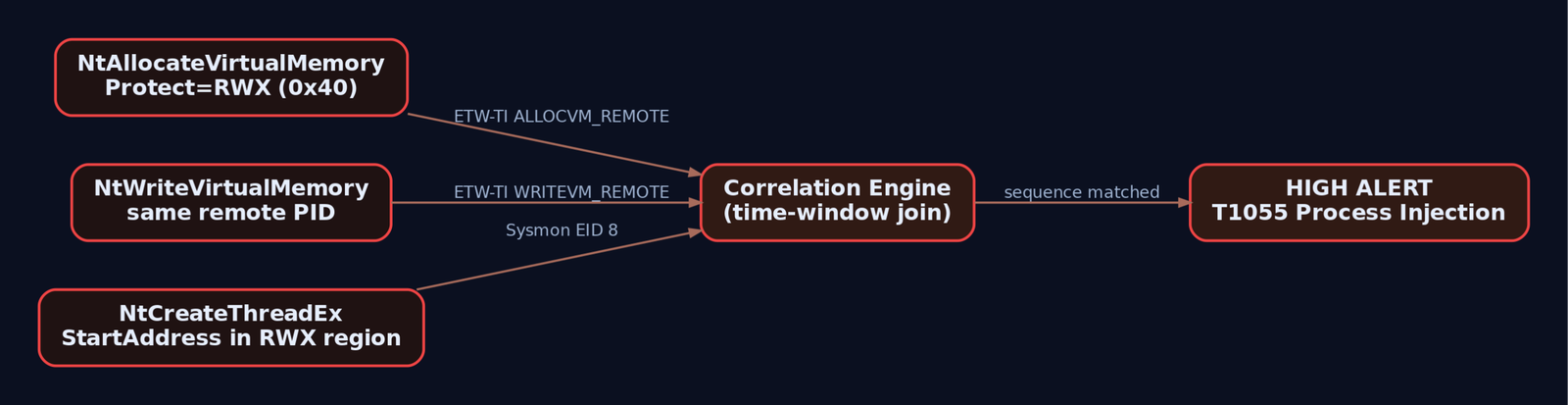
winword.exe->cmd.exe->powershell.exewithin 5s: macro-borne dropper.NtAllocateVirtualMemory(RWX)followed byNtWriteVirtualMemoryon the same target followed byNtCreateThreadExon that target within a short window: classic remote-thread injection.OpenProcess(lsass.exe, PROCESS_VM_READ | PROCESS_QUERY_LIMITED_INFORMATION)from a non-whitelisted image: credential dump attempt.- A signed LOLBin (
rundll32,regsvr32,mshta) making outbound TCP to a rare destination shortly after being spawned by a non-office parent: LOLBin C2.
You can bypass one hook. You can even bypass three. Getting the entire chain to look benign across static, userland, kernel, ETW, and network signals is the actual work.
9. Detection Engineering: Catching Your Own Injector
Now flip chairs. The injector from Exercise C should be trivial for a competent defender to catch, and the exercise is worth doing because it forces you to reason about which signal you rely on. Sysmon Event ID 8 is the direct hit; here’s a Sigma rule targeted at it.
title: Remote Thread Injection From Non-System Path
id: 8f6a2b3c-2b2f-4a2f-92a1-2f0e58e2b19a
status: experimental
description: >
  Detects CreateRemoteThread originating from a binary outside standard
  Windows/Program Files locations, into a process other than itself.
  Classic shellcode-injection pattern used by injector_lab and countless
  real-world loaders.
logsource:
  category: create_remote_thread
  product: windows
detection:
  selection:
    EventID: 8
  filter_system_paths:
    SourceImage|startswith:
      - 'C:\Windows\'
      - 'C:\Program Files\'
      - 'C:\Program Files (x86)\'
  filter_self:
    SourceProcessId: TargetProcessId
  condition: selection and not filter_system_paths and not filter_self
falsepositives:
  - Legitimate cross-process instrumentation (debuggers, profilers)
  - Some AV/EDR components performing remote threads (whitelist by SourceImage)
level: high
tags:
  - attack.defense_evasion
  - attack.t1055
  - attack.t1055.003
A Sigma rule is three moving parts: selection (what you want to match), one or more filter blocks (what you want to exclude), and the condition combining them. Keep filters as separate keyed maps so the rule stays readable when the whitelist grows.
Pair the rule with these fields on Event ID 8 during hunt: StartAddress outside any loaded module (walk Modules for the target PID and check the range) and StartModule = null are hard signals. Injection into a freshly allocated RWX region always leaves that fingerprint.
For LSASS-touching payloads, layer a rule on Event ID 10:
title: LSASS Access With Read/Query From Non-Standard Image
id: 8e2a1234-1a1a-4b4b-9c9c-2f0e58e2b19b
logsource:
  category: process_access
  product: windows
detection:
  selection:
    EventID: 10
    TargetImage|endswith: '\lsass.exe'
    GrantedAccess|contains:
      - '0x1010'
      - '0x1410'
      - '0x1F3FFF'
  filter_signed_sec_products:
    SourceImage|startswith:
      - 'C:\Program Files\Windows Defender\'
      - 'C:\Program Files (x86)\Microsoft\EDR\'
  condition: selection and not filter_signed_sec_products
level: critical
tags:
  - attack.credential_access
  - attack.t1003.001
10. Hardening Playbook
If the machine you’re defending has these switched on, half the tradecraft in this post gets a lot harder to land.
RunAsPPL = 1underHKLM\SYSTEM\CurrentControlSet\Control\Lsa. LSASS becomes PPL, raising the required protection level to open it for read.- HVCI (Hypervisor-Protected Code Integrity) via
HKLM\SYSTEM\CurrentControlSet\Control\DeviceGuard:EnableVirtualizationBasedSecurity = 1,HypervisorEnforcedCodeIntegrity = 1. Unsigned kernel drivers stop loading. BYOVD dies. - Microsoft Vulnerable Driver Blocklist:
HKLM\SYSTEM\CurrentControlSet\Control\CI\Config->VulnerableDriverBlocklistEnable = 1. - ASR rules: block Office child processes, credential stealing from LSASS, unsigned executables off removable media.
- PowerShell Constrained Language Mode where the workload allows.
- Script Block Logging and Module Logging on:
–HKLM\SOFTWARE\Policies\Microsoft\Windows\PowerShell\ScriptBlockLogging->EnableScriptBlockLogging = 1
–HKLM\SOFTWARE\Policies\Microsoft\Windows\PowerShell\ModuleLogging->EnableModuleLogging = 1,ModuleNames = * - Deploy a real Sysmon config. SwiftOnSecurity’s
sysmon-configand Olaf Hartong’ssysmon-modular(with ATT&CK-tagged rules) are the two community baselines worth starting from. - Baseline audit policy:
auditpol /set /subcategory:"Process Creation" /success:enable /failure:enable
auditpol /set /subcategory:"Credential Validation" /success:enable /failure:enable
auditpol /set /subcategory:"Security System Extension" /success:enable
auditpol /set /subcategory:"Audit Policy Change" /success:enable /failure:enable
auditpol /set /subcategory:"Kernel Object" /success:enable
11. Tools
| Tool | Use | Link |
|---|---|---|
| Sysmon | Rich process/thread/image/registry/network telemetry | learn.microsoft.com/sysinternals |
| WinDbg | Kernel debugging, callback enumeration | learn.microsoft.com |
| x64dbg | User-mode debugger for inline-hook inspection | x64dbg.com |
| Process Monitor | File/registry/process traces from an EDR-agnostic angle | learn.microsoft.com/sysinternals |
| API Monitor | Attach and trace amsi.dll and other APIs | rohitab.com/apimonitor |
| SilkETW / krabsetw | ETW consumer front-ends including ETW-TI | github.com/mandiant/SilkETW |
| Sigma | Vendor-neutral detection rule format | github.com/SigmaHQ/sigma |
| Sysmon configs | Community baselines | github.com/SwiftOnSecurity, github.com/olafhartong |
12. MITRE ATT&CK Mapping
| Technique | MITRE ID | Detection |
|---|---|---|
| Process Injection | T1055 | Sysmon EID 8, ETW-TI ALLOCVM_REMOTE / WRITEVM_REMOTE |
| DLL Injection | T1055.001 | EID 8 with StartModule = LoadLibrary in target |
| PE Injection | T1055.002 | EID 8 + RWX region + no backing image |
| Thread Execution Hijacking | T1055.003 | ETW-TI SETTHREADCONTEXT, EID 10 with thread-context access |
| Process Hollowing | T1055.012 | Sysmon EID 25 (ProcessTampering), ETW-TI MAPVIEW_REMOTE |
| Impair Defenses: Disable/Modify Tools | T1562.001 | AMSI ETW provider events, patch of amsi.dll in memory |
| Impair Defenses: Disable Event Logging | T1562.002 | Sudden ETW provider disable, gaps in EID sequence |
| Impair Defenses: Indicator Blocking | T1562.006 | WFP filter add against security-product processes, EID 5157 |
| Obfuscated Files or Information | T1027 | IMPHASH clustering, entropy > 7.0 on .text |
| Dynamic API Resolution | T1027.007 | Sparse IAT + calls resolved via GetProcAddress at runtime |
| System Binary Proxy Execution | T1218 | EID 1 with rundll32/regsvr32/mshta and unusual cmdline |
| DLL Side-Loading | T1574.002 | EID 7 loading unsigned DLL next to a signed EXE |
| Access Token Manipulation | T1134 | Token duplication API traces, sudden SID change |
| OS Credential Dumping: LSASS Memory | T1003.001 | Sysmon EID 10 on lsass.exe from non-whitelisted image |
Summary
- Modern EDR beats offensive tooling through a stack of signals, not one big signature. Static, userland hooks, kernel callbacks, ETW-TI, AMSI, and WFP each cover a different slice of the attack surface.
- Inline hooks in
ntdll.dllare visible with a 30-line C program. If you can see the JMP, so can a bypass, and so can a hardened detection rule for missing/patched hooks. - Kernel callbacks registered through
PsSetCreateProcessNotifyRoutineEx,PsSetCreateThreadNotifyRoutine,PsSetLoadImageNotifyRoutine,ObRegisterCallbacks, andCmRegisterCallbackare the layer userland tricks cannot reach. - ETW-TI turns the kernel itself into the telemetry source, which is why direct-syscall bypasses of user hooks still get caught. Bypassing it means Ring 0.
- Detection engineering wins by correlating: allocation, write, and thread-create against the same remote PID inside a small time window is the signal, and Sysmon EID 8 plus ETW-TI plus a tuned Sigma rule catches the injector every time.
Related Tutorials
- Phishing Campaign Design: Pretexting, Lures, and Target Profiling
- Building a Red Team Lab: Infrastructure, VMs, and C2 Setup
- OSINT for People and Credentials: LinkedIn, Breach Data, and Email Harvesting
- Active OSINT: DNS, Certificate Transparency, and Subdomain Enumeration
- Passive OSINT: Mapping the Target Without Touching It
References
Get new drops in your inbox
Windows internals, exploit dev, and red-team write-ups - no spam, unsubscribe anytime.