Windows File System Internals (NTFS)
Every file you touch on a modern Windows box – every executable, every registry hive backing file, every prefetch artifact – lives inside a relational database masquerading as a file system. NTFS doesn’t just store bytes in clusters; it wraps every object in a rich metadata record, supports multiple data streams per file, journals its own mutations, and enforces ACLs at the driver level. If you’ve ever wondered why forensic timelines have four timestamps per file, or how malware hides a full PE inside a text file with no visible size change, the answer is always the same: MFT attributes.
Objective: Understand the on-disk architecture of NTFS – volume layout, MFT record format, attribute types (resident vs. non-resident), data runs, Alternate Data Streams, journals, and reparse points – and learn how these features are abused for defence evasion and how to detect that abuse.
1. NTFS Architecture Overview
NTFS (New Technology File System) has shipped as the default Windows file system since Windows NT 3.1. The current on-disk version is NTFS 3.1, unchanged since Windows XP – what changed between OS releases is the driver, not the format.
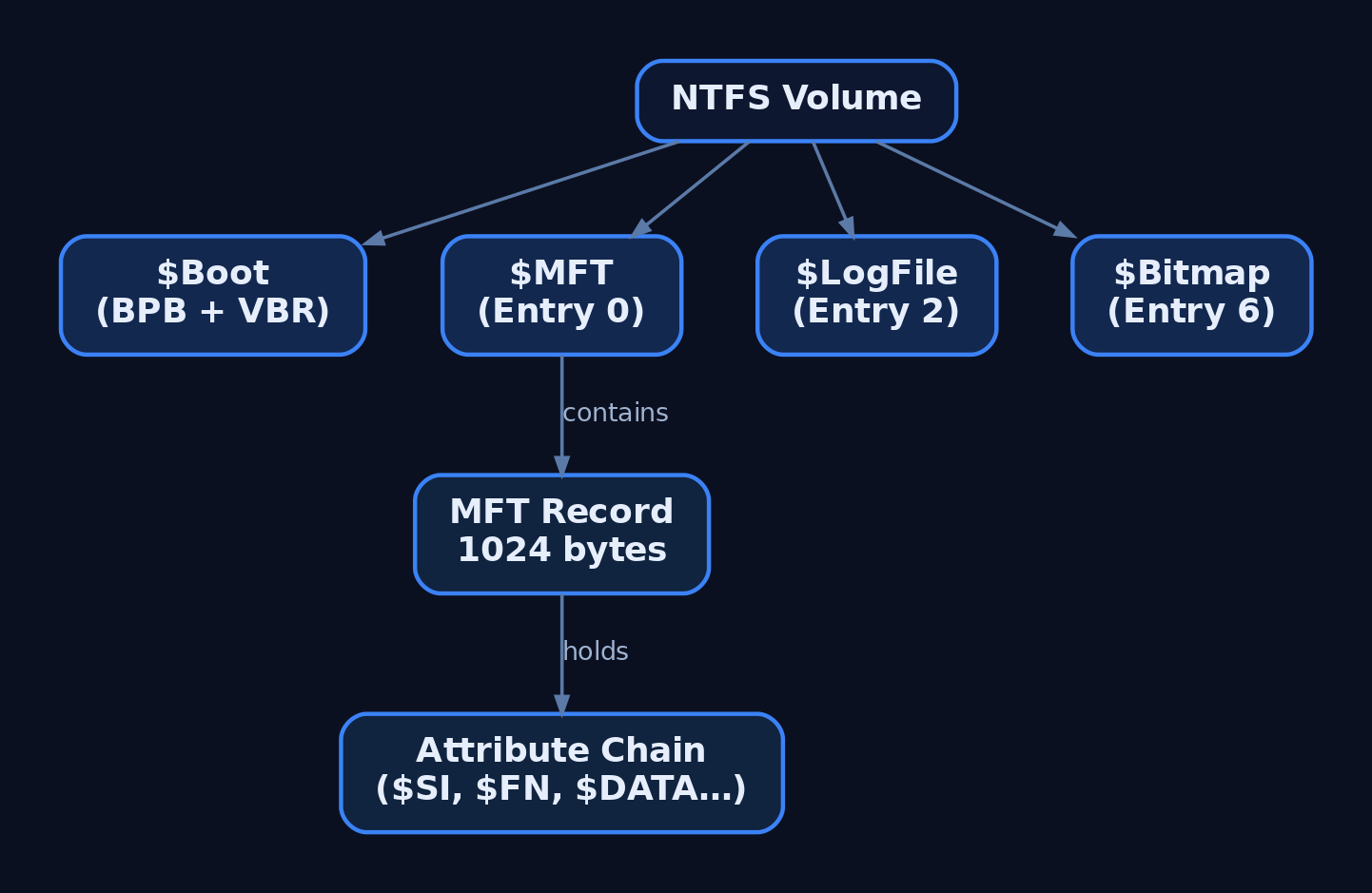
An NTFS volume is divided into fixed-size clusters (typically 4 KB on volumes ≤ 16 TB). The first sector contains the BIOS Parameter Block inside $Boot, storing bytes-per-sector, sectors-per-cluster, total sectors, and the LCN (Logical Cluster Number) of the MFT start. Everything else – every file, directory, and piece of internal bookkeeping – is a record in the Master File Table.
| Feature | NTFS | FAT32 | exFAT |
|---|---|---|---|
| Max file size | 16 TB (practical) | 4 GB | 16 EB (theoretical) |
| Journaling | Yes ($LogFile) | No | No |
| ACL support | Full DACL/SACL | No | Partial (via EA) |
| Alternate Data Streams | Yes | No | No |
| Hard links / Reparse | Yes | No | No |
| Compression / EFS | Per-file | No | No |
2. The Master File Table
The MFT is the heart of NTFS. Every file, directory, and internal metadata structure occupies at least one MFT record (also called a file record segment). The MFT itself is a file – entry 0, named $MFT – so it describes itself recursively.
Each MFT record is 1,024 bytes. The first 42 bytes are a fixed header; the remaining space holds a variable-length chain of attributes. When a file’s attributes outgrow a single 1 KB record, NTFS allocates extension records and links them via an $ATTRIBUTE_LIST (type 0x20).
MFT Addressing
Each entry gets a 48-bit file number (sequential index starting at 0) and a 16-bit sequence number that increments every time the entry is reallocated. Together they form the 64-bit MFT_SEGMENT_REFERENCE – the stable “file reference number” that directory indexes, $LogFile entries, and USN records all use to point at files. The sequence number is the reason a stale handle can’t accidentally reference a reused MFT slot.
3. MFT Record Header Dissection
Every record begins with the FILE_RECORD_SEGMENT_HEADER. I spent an unreasonable amount of time the first time I parsed these by hand because I forgot the update-sequence fixups – the raw bytes on disk don’t match what the NTFS driver sees until you undo the fixup array. Here’s the layout:
| Offset | Size | Field | Notes |
|---|---|---|---|
| 0x00 | 4 | Signature | Magic bytes FILE (0x46494C45) |
| 0x04 | 2 | UpdateSequenceArrayOffset | Offset to fixup array |
| 0x06 | 2 | UpdateSequenceArraySize | Size in words (USN + array) |
| 0x08 | 8 | LogFileSequenceNumber | LSN – ties record to $LogFile |
| 0x10 | 2 | SequenceNumber | Incremented on reallocation |
| 0x12 | 2 | ReferenceCount | Hard link count |
| 0x14 | 2 | FirstAttributeOffset | Byte offset to first attribute |
| 0x16 | 2 | Flags | 0x01 = in use, 0x02 = directory |
| 0x18 | 4 | BytesInUse | Actual used bytes |
| 0x1C | 4 | BytesAllocated | Allocated size (usually 1024) |
| 0x20 | 8 | BaseFileRecordSegment | MFT_SEGMENT_REFERENCE of base record (0 if this is the base) |
| 0x28 | 2 | NextAttributeId | Next instance number to assign |
Update sequences exist to detect torn writes. The NTFS driver replaces the last two bytes of each 512-byte sector within the record with a sequence value, storing the originals in the fixup array. On read, it verifies the sentinel matches and restores the original bytes. If the check fails, the record is corrupt.
You can dump a raw MFT record with FSCTL_GET_NTFS_FILE_RECORD:
#include <windows.h>
#include <stdio.h>

int main(void) {
    HANDLE hVol = CreateFileW(L"\\\\.\\C:", GENERIC_READ,
        FILE_SHARE_READ | FILE_SHARE_WRITE, NULL, OPEN_EXISTING, 0, NULL);
    if (hVol == INVALID_HANDLE_VALUE) return 1;

    /* Request MFT record for file number 0 ($MFT itself) */
    NTFS_FILE_RECORD_INPUT_BUFFER in = { .FileReferenceNumber.QuadPart = 0 };
    BYTE outBuf[sizeof(NTFS_FILE_RECORD_OUTPUT_BUFFER) + 1024];
    DWORD ret;

    BOOL ok = DeviceIoControl(hVol, FSCTL_GET_NTFS_FILE_RECORD,
        &in, sizeof(in), outBuf, sizeof(outBuf), &ret, NULL);

    if (ok) {
        NTFS_FILE_RECORD_OUTPUT_BUFFER *out = (void*)outBuf;
        BYTE *rec = out->FileRecordBuffer;
        printf("Signature: %.4s\n", rec);                    /* "FILE" */
        printf("Flags:     0x%04X\n", *(WORD*)(rec + 0x16)); /* in-use + dir */
        printf("FirstAttr: 0x%04X\n", *(WORD*)(rec + 0x14));
    }
    CloseHandle(hVol);
    return 0;
}
Run this elevated – \\.\C: requires admin rights for direct volume access.
4. NTFS Attribute Architecture
Attributes are the building blocks of every MFT record. Each attribute has a header (always resident inside the record) and a body that is either resident or non-resident.
Resident: the body sits immediately after the header inside the 1 KB record. Small files (roughly < 700 bytes of content) store their entire $DATA right in the MFT – zero extra cluster allocations, one disk read for metadata and content.
Non-resident: the body lives in external clusters. The header contains a run list (VCN-to-LCN mapping) describing where those clusters are.
Attribute Header Fields
| Field | Resident | Non-Resident |
|---|---|---|
TypeCode (4 bytes) | ||
RecordLength (4 bytes) | ||
FormCode (1 byte) | 0x00 | 0x01 |
NameLength / NameOffset | ||
Flags / Instance | ||
ValueLength / ValueOffset | – | |
LowestVcn / HighestVcn | – | |
MappingPairsOffset | – | |
AllocatedLength / FileSize / ValidDataLength | – |
Standard Attribute Types
The complete set is defined in $AttrDef (MFT entry 4):
| Type Code | Name | Typical Residence | Purpose |
|---|---|---|---|
0x10 | $STANDARD_INFORMATION | Resident | Timestamps (MACB), DOS flags, owner, USN |
0x20 | $ATTRIBUTE_LIST | Resident | Overflow pointer to extension records |
0x30 | $FILE_NAME | Resident | Unicode name, parent ref, duplicate timestamps |
0x40 | $OBJECT_ID | Resident | GUID for distributed link tracking |
0x50 | $SECURITY_DESCRIPTOR | Resident | Legacy; NTFS 3.0+ stores ACLs in $Secure:$SDS |
0x60 | $VOLUME_NAME | Resident | Volume label (on $Volume only) |
0x70 | $VOLUME_INFORMATION | Resident | NTFS version, dirty flag |
0x80 | $DATA | Either | File content; unnamed = default stream, named = ADS |
0x90 | $INDEX_ROOT | Resident | B-tree root for directory index |
0xA0 | $INDEX_ALLOCATION | Non-resident | External B-tree nodes |
0xB0 | $BITMAP | Either | Allocation bitmap (index or MFT) |
0xC0 | $REPARSE_POINT | Resident | Symlinks, mount points, OneDrive stubs |
0xD0 | $EA_INFORMATION | Resident | Extended Attribute metadata |
0xE0 | $EA | Either | Extended Attribute data |
A forensic detail that trips people up: $STANDARD_INFORMATION timestamps are trivially settable from user mode (SetFileTime), but $FILE_NAME timestamps are only updated by the NTFS driver during renames or hard-link operations. When an attacker timestomps a file, $STANDARD_INFORMATION changes but $FILE_NAME doesn’t – that delta is the classic timestomp detection signal.

5. Data Runs and Non-Resident Layout
When a $DATA attribute is non-resident, its header contains a run list that maps Virtual Cluster Numbers (VCNs, zero-based offsets within the attribute) to Logical Cluster Numbers (LCNs, physical offsets on the volume).
Each entry in the run list is encoded compactly. The first byte is split into two nibbles: the low nibble gives the byte-width of the run-length field, and the high nibble gives the byte-width of the LCN offset field (which is signed / delta-encoded from the previous run’s starting LCN). The list is terminated by a 0x00 byte.
For sparse files, a run entry with a zero-length LCN field means “no clusters allocated here – return zeroes.” NTFS 3.0+ uses this for sparse attributes, avoiding disk allocation for regions that are entirely null.
Compressed attributes use a 16-cluster compression unit. Each unit is either stored compressed (fewer than 16 clusters on disk) or uncompressed. The run list interleaves real and sparse runs to encode this.
6. NTFS Metadata Files
MFT entries 0-15 are reserved for internal metadata. These aren’t hidden through any special mechanism – they’re just files with the Hidden and System DOS flags set.
| Entry | Name | What It Holds |
|---|---|---|
| 0 | $MFT | The MFT itself (self-referential) |
| 1 | $MFTMirr | Mirror of first 4 MFT records – recovery fallback |
| 2 | $LogFile | Redo/undo transaction journal |
| 3 | $Volume | Volume name, NTFS version, dirty flag |
| 4 | $AttrDef | Attribute type definitions |
| 5 | . | Root directory (\) |
| 6 | $Bitmap | Cluster allocation bitmap (unnamed $DATA attribute) |
| 7 | $Boot | VBR + BPB; also the boot sector |
| 8 | $BadClus | Bad-cluster list; the named stream $Bad contains the entries |
| 9 | $Secure | Centralized security descriptors ($SDS stream) |
| 10 | $UpCase | Unicode uppercase mapping table |
| 11 | $Extend | Directory containing $UsnJrnl, $Quota, $Reparse, $ObjId |
You can query volume-level MFT stats programmatically:
HANDLE hVol = CreateFileW(L"\\\\.\\C:", GENERIC_READ,
    FILE_SHARE_READ | FILE_SHARE_WRITE, NULL, OPEN_EXISTING, 0, NULL);
NTFS_VOLUME_DATA_BUFFER vd;
DWORD ret;
DeviceIoControl(hVol, FSCTL_GET_NTFS_VOLUME_DATA, NULL, 0,
    &vd, sizeof(vd), &ret, NULL);
printf("MFT Start LCN : %lld\n", vd.MftStartLcn.QuadPart);
printf("Bytes/Cluster  : %u\n",  vd.BytesPerCluster);
printf("Bytes/MFT Rec  : %u\n",  vd.BytesPerFileRecordSegment);
printf("Total Clusters : %lld\n", vd.TotalClusters.QuadPart);
CloseHandle(hVol);
7. Alternate Data Streams In Depth
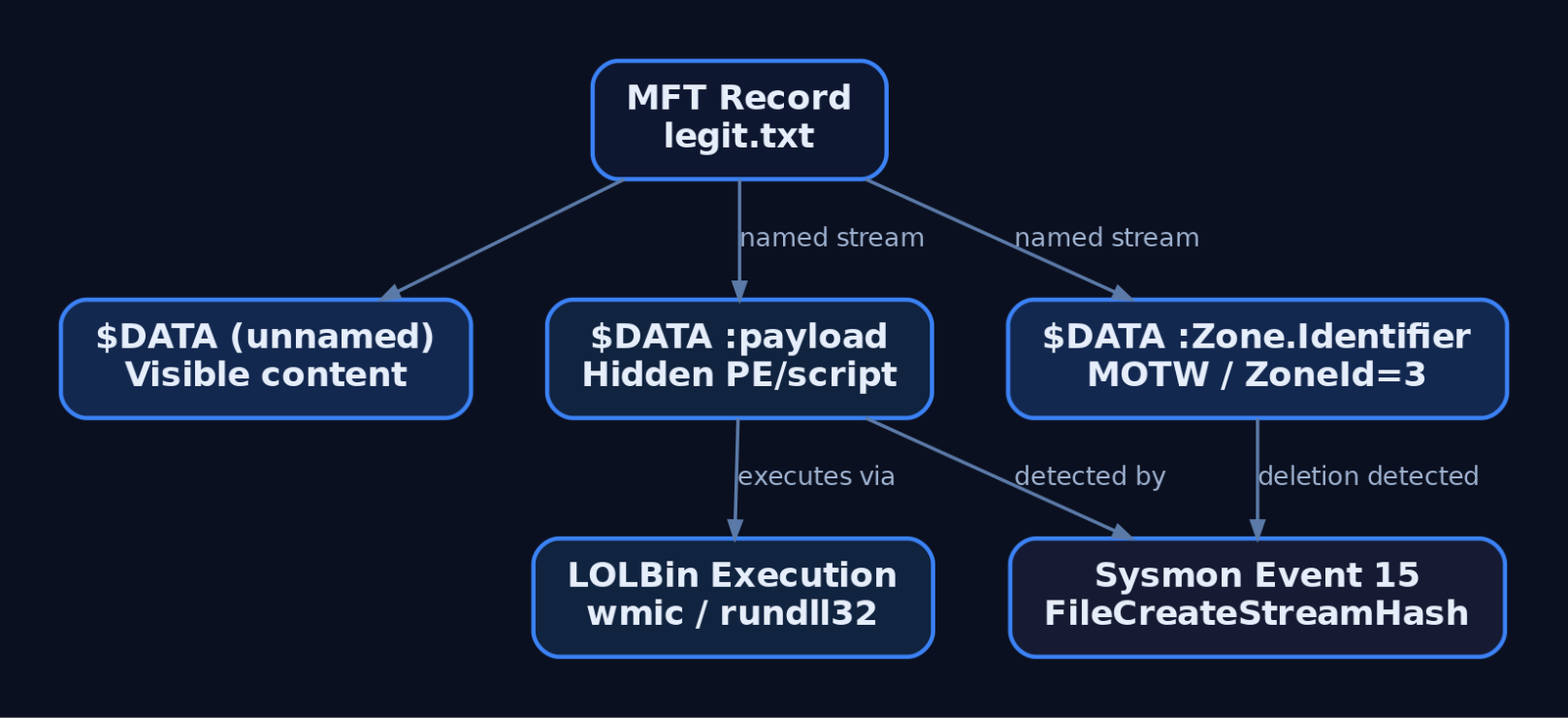
Every NTFS file has at least one $DATA attribute – the unnamed default stream (what type file.txt reads). Additional named $DATA attributes are Alternate Data Streams. They’re stored as extra attributes in the same MFT record (or in extension records if the record fills up), making them invisible to dir, Explorer’s size column, and most legacy tooling.
Creating and Reading ADS
Win32 uses colon-separated path syntax:
/* Write to a named stream */
HANDLE h = CreateFileA("C:\\temp\\legit.txt:payload",
    GENERIC_WRITE, 0, NULL, CREATE_ALWAYS, 0, NULL);
const char *data = "hidden content";
WriteFile(h, data, (DWORD)strlen(data), NULL, NULL);
CloseHandle(h);
Enumerating Streams
WIN32_FIND_STREAM_DATA fsd;
HANDLE hFind = FindFirstStreamW(L"C:\\temp\\legit.txt", FindStreamInfoStandard, &fsd, 0);
if (hFind != INVALID_HANDLE_VALUE) {
    do {
        wprintf(L"  Stream: %-30s  Size: %lld\n",
            fsd.cStreamName, fsd.StreamSize.QuadPart);
    } while (FindNextStreamW(hFind, &fsd));
    FindClose(hFind);
}
From PowerShell:
Get-Item -Path C:\temp\legit.txt -Stream * |
    Select-Object Stream, Length
Zone.Identifier and MOTW
When a browser or download manager saves a file, it writes a Zone.Identifier ADS containing the Mark-of-the-Web:
[ZoneTransfer]
ZoneId=3
ReferenceUrl=https://example.com
HostUrl=https://example.com/file.exe
SmartScreen, Office Protected View, and PowerShell’s execution policy all key off this stream. Stripping it (Remove-Item -Path file.exe -Stream Zone.Identifier) bypasses those trust checks – mapped to T1553.005.
8. NTFS Journals
$LogFile (Transaction Journal)
MFT entry 2. Records redo and undo operations for every metadata change before the change is committed. If the system crashes, the NTFS driver replays the redo log (and backs out incomplete transactions with undo) on the next mount. This protects structural integrity, not file content.
$UsnJrnl (Change Journal)
Located at $Extend\$UsnJrnl, with two named streams: $J (the journal data, append-only) and $Max (configuration – max size and allocation delta). Each entry is a USN_RECORD_V2:
| Field | Type | Purpose |
|---|---|---|
RecordLength | DWORD | Total record size |
MajorVersion | WORD | 2 for V2 records |
FileReferenceNumber | DWORDLONG | MFT_SEGMENT_REFERENCE of the file |
ParentFileReferenceNumber | DWORDLONG | Parent directory reference |
Usn | USN (LONGLONG) | Byte offset in $J |
TimeStamp | LARGE_INTEGER | When the change occurred |
Reason | DWORD | Bitmask – USN_REASON_FILE_CREATE, _DATA_EXTEND, _RENAME_NEW_NAME, etc. |
FileName | WCHAR[] | Variable-length filename |
Query it from the command line:
fsutil usn queryjournal C:
fsutil usn readjournal C: csv > usn_dump.csv
Or programmatically with DeviceIoControl + FSCTL_READ_USN_JOURNAL – pass a READ_USN_JOURNAL_DATA_V0 struct and iterate USN_RECORD_V2 entries from the output buffer.
9. Reparse Points
The $REPARSE_POINT attribute (type 0xC0) causes the I/O Manager to hand the open request to a registered filter driver identified by the reparse tag. The data buffer follows the REPARSE_DATA_BUFFER / REPARSE_GUID_DATA_BUFFER layout.
| Tag | Value | Use |
|---|---|---|
IO_REPARSE_TAG_MOUNT_POINT | 0xA0000003 | Volume mount points (junctions) |
IO_REPARSE_TAG_SYMLINK | 0xA000000C | Symbolic links (mklink) |
IO_REPARSE_TAG_CLOUD | 0x9000001A | OneDrive placeholders |
IO_REPARSE_TAG_APPEXECLINK | 0x8000001B | UWP app execution aliases |
Abuse scenario: an attacker creates a junction (mklink /J) pointing a trusted directory to an attacker-controlled path, redirecting DLL search-order loads. This is a well-known privilege-escalation primitive in installer-based races.
10. Common Attacker Techniques
| Technique | Description |
|---|---|
| ADS payload hiding | Store a full PE or script in a named stream; host file shows no size change. Valak, WastedLocker, and BitPaymer all use this in the wild. |
| ADS execution via LOLBins | wmic process call create "host.txt:evil.exe", wscript host.txt:evil.vbs, rundll32 advpack.dll,RegisterOCX host.txt:evil.dll |
| MOTW stripping | Delete Zone.Identifier to bypass SmartScreen / Protected View |
| Timestomping | Modify $STANDARD_INFORMATION timestamps via SetFileTime; $FILE_NAME timestamps stay original |
| USN journal deletion | fsutil usn deletejournal /D C: wipes the change journal, destroying forensic timeline |
| Symbolic link / junction hijack | Redirect trusted paths to attacker-controlled locations for DLL hijacking or privilege escalation |
| EA-based data hiding | Store payloads in Extended Attributes ($EA); rarely used by legitimate apps, so often overlooked by tooling |

11. Defensive Strategies & Detection
Sysmon Events
| Event ID | Name | What It Catches |
|---|---|---|
| 15 | FileCreateStreamHash | Primary ADS detection – fires on named stream creation with SHA256 of content |
| 11 | FileCreate | Baseline file creation; correlate with Event 15 for ADS attachment |
| 1 | ProcessCreate | LOLBin execution with filename:stream in CommandLine |
| 2 | FileCreationTimeChanged | Timestomp detection ($STANDARD_INFORMATION modified) |
The Sysmon driver registers as a minifilter attached to volumes, intercepting file operations before the file system processes them – this is why it sees ADS creation that dir misses.
Sigma Rules
title: Alternate Data Stream Creation (Non-MOTW)
logsource:
  product: windows
  service: sysmon
detection:
  selection:
    EventID: 15
  filter_legitimate:
    TargetFilename|endswith:
      - ':Zone.Identifier'
      - ':AFP_AfpInfo'
      - ':encryptable'
  condition: selection and not filter_legitimate
fields:
  - TargetFilename
  - Contents
  - Image
level: medium
title: LOLBin Executing from Alternate Data Stream
logsource:
  product: windows
  service: sysmon
detection:
  selection:
    EventID: 1
    Image|endswith:
      - '\wmic.exe'
      - '\rundll32.exe'
      - '\wscript.exe'
      - '\cscript.exe'
    CommandLine|re: '\\w+\\.\\w+:\\w+'
  condition: selection
level: high
Windows Audit Policy
Enable object-access auditing to catch ADS reads and writes:
auditpol /set /subcategory:"File System" /success:enable /failure:enable
This generates Event 4663 (object accessed) when SACLs are configured on target directories. Event 4656 fires on handle request, 4660 on deletion.
ETW Providers
| Provider | GUID | Use |
|---|---|---|
Microsoft-Windows-Kernel-File | {EDD08927-9CC4-4E65-B970-C2560FB5C289} | Kernel-level file I/O tracing |
Microsoft-Windows-Ntfs | {3FF37A1C-A68D-4D6E-8C9B-F79E8B16C482} | NTFS driver internal events |
Hardening
- Application control: AppLocker / WDAC rules blocking execution from paths containing
:in the command line. - Restrict LOLBins: Block
wmic.exe,rundll32.exe,mshta.exefor non-admin users where business need doesn’t exist. - Monitor EA writes:
fsutil file queryEA <path>– Extended Attributes are rarely used by legitimate modern applications; any EA write in a sensitive directory warrants investigation. - Preserve journals: Alert on
fsutil usn deletejournalexecution (Sysmon Event 1 withCommandLinematch).
12. MITRE ATT&CK Mapping
| Technique | MITRE ID | Tactic | Detection |
|---|---|---|---|
| ADS payload hiding / EA abuse | T1564.004 | Defence Evasion | Sysmon Event 15, streams.exe, Get-Item -Stream * |
| MOTW stripping | T1553.005 | Defence Evasion | Sysmon Event 15 (deletion of Zone.Identifier) |
| Timestomping | T1070.006 | Defence Evasion | $SI vs. $FN timestamp delta; Sysmon Event 2 |
| USN journal deletion | T1070 | Defence Evasion | Sysmon Event 1 – fsutil usn deletejournal |
| Directory / file enumeration | T1083 | Discovery | Baseline process → file-access patterns |
| Data from local system (ADS read) | T1005 | Collection | Object-access audit (Event 4663) |
13. Tools for NTFS Analysis
| Tool | Purpose | Link |
|---|---|---|
NtfsInfo (Sysinternals) | Volume stats, cluster size, MFT layout | learn.microsoft.com |
streams.exe (Sysinternals) | Recursive ADS enumeration | learn.microsoft.com |
MFTECmd (Eric Zimmerman) | Parse raw $MFT, $UsnJrnl, $LogFile into CSV/JSON | ericzimmerman.github.io |
analyzeMFT.py | Python MFT parser for cross-platform forensics | github.com/dkovar |
| FTK Imager | Browse NTFS structures, extract ADS, image volumes | exterro.com |
| WinHex / 010 Editor | Raw sector viewing, binary templates for MFT records | x-ways.net / sweetscape.com |
fsutil | Built-in – query volumes, USN journal, reparse, streams, EA | (ships with Windows) |
Volatility 3 windows.filescan | Memory-forensics recovery of FILE_OBJECT and MFT artefacts | volatilityfoundation.org |
| WinDbg | Kernel debugging – !ntfs, dt nt!_FILE_RECORD_SEGMENT_HEADER | learn.microsoft.com |
Summary
- NTFS is a metadata-driven file system where every object – files, directories, even the MFT itself – is a database record built from typed attributes. Understanding the 1 KB MFT record layout and its attribute chain is foundational to both forensics and offence.
- The resident vs. non-resident split, data-run encoding, and update-sequence fixups are the mechanical details that matter when you’re parsing raw disk or writing detection logic.
- Alternate Data Streams are the single most abused NTFS feature for defence evasion – real-world malware families (Valak, WastedLocker, BitPaymer) store and execute payloads from named streams. Detect with Sysmon Event 15 and recursive stream enumeration.
$UsnJrnland$LogFileare goldmines for forensic timelines – and deletion targets for adversaries. Protect and monitor them.- Timestomping exploits the gap between easily-settable
$STANDARD_INFORMATIONand kernel-controlled$FILE_NAMEtimestamps. That delta is your detection signal.
Related Tutorials
- System Calls and SSDT: How User Mode Reaches the Kernel
- PE File Format Deep Dive
- Access Tokens and Privileges: The Kernel’s Security Context
- SIDs and Security Descriptors: Identity in Windows Security
- Fibers: User-Mode Cooperative Threads
References
Get new drops in your inbox
Windows internals, exploit dev, and red-team write-ups - no spam, unsubscribe anytime.